Copyright © 2015 Pearson Education, Inc.
Accounting Information
Systems: An Overview
Chapter 1
1-1
Copyright © 2015 Pearson Education, Inc.
Learning Objectives
• Distinguish between data and information:
▫ Understand the characteristics of useful information.
▫ Explain how to determine the value of information.
• Explain fundamental decisions an organization makes:
▫ Understand basic information needed to make them.
• Identify the transactional information that passes between internal and external
parties and an AIS.
• Describe the major business processes present in most companies.
• Explain what an accounting information system (AIS) is and describe its basic
functions.
• Discuss how an AIS can add value to an organization.
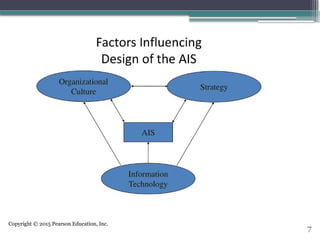
• Explain how an AIS and corporate strategy affect each other.
• Explain the role an AIS plays in a company’s value chain. 1-2
Copyright © 2015 Pearson Education, Inc.
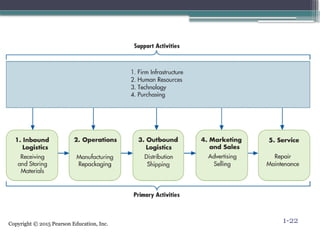
3
Copyright © 2015 Pearson Education, Inc.
4
Copyright © 2015 Pearson Education, Inc.
5
Copyright © 2015 Pearson Education, Inc.
6
Copyright © 2015 Pearson Education, Inc.
7
Copyright © 2015 Pearson Education, Inc.
Data vs. Information
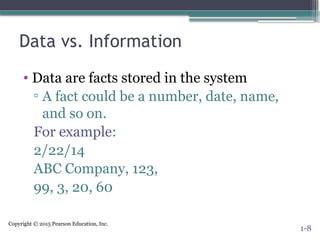
• Data are facts stored in the system
▫ A fact could be a number, date, name,
and so on.
For example:
2/22/14
ABC Company, 123,
99, 3, 20, 60
1-8
Copyright © 2015 Pearson Education, Inc.
Data vs. Information
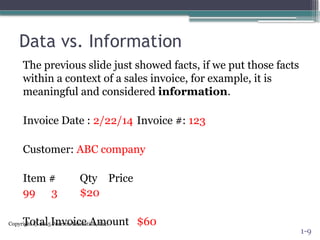
The previous slide just showed facts, if we put those facts
within a context of a sales invoice, for example, it is
meaningful and considered information.
Invoice Date : 2/22/14 Invoice #: 123
Customer: ABC company
Item # Qty Price
99 3 $20
Total Invoice Amount $60
1-9
Copyright © 2015 Pearson Education, Inc.
What is information?
• The term data refers to any and all of the
facts that are collected, stored, and processed
by an information system. Information is data
that has been organized and processed so
that it is meaningful
10
Copyright © 2015 Pearson Education, Inc.
Value of Information
• Information is valuable when the benefits exceed
the costs of gathering, maintaining, and storing
the data.
Benefit (i.e., improved decision making)
> Cost (i.e., time and resources used to get
the information)
1-11
Copyright © 2015 Pearson Education, Inc.
What Makes Information Useful?
There are seven general characteristics that make
information useful:
1. Relevant: information needed to make a decision
(e.g., the decision to extend customer credit would
need relevant information on customer balance from
an A/R aging report)
2. Reliable: information free from bias
3. Complete: does not omit important aspects of
events or activities
4. Timely: information needs to be provided in time to
make the decision
1-12
Copyright © 2015 Pearson Education, Inc.
What Makes Information Useful?
5. Understandable: information must be
presented in a meaningful manner
6. Verifiable: two independent people can
produce the same conclusion
7. Accessible: available when needed
1-13
Copyright © 2015 Pearson Education, Inc.
Organizational Decisions and Information
Needed
• Business organizations use business processes to
get things done. These processes are a set of
structured activities that are performed by
people, machines, or both to achieve a specific
goal.
• Key decisions and information needed often
come from these business processes.
1-14
Copyright © 2015 Pearson Education, Inc.
Transactional Information Between Internal
and External Parties in an AIS
• Business organizations conduct business
transactions between internal and external
stakeholders.
• Internal stakeholders are employees in the
organization (e.g., employees and managers).
• External stakeholders are trading partners such as
customers and vendors as well as other external
organizations such as Banks and Government.
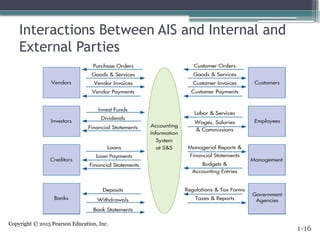
• The AIS captures the flow of information between
these users for the various business transactions.
1-15
Copyright © 2015 Pearson Education, Inc.
Interactions Between AIS and Internal and
External Parties
1-16
Copyright © 2015 Pearson Education, Inc.
Basic Business Processes
• Transactions between the business organization
and external parties fundamentally involve a
“give–get” exchange. These basic business
processes are:
▫ Revenue: give goods / give service—get cash
▫ Expenditure: get goods / get service—give cash
▫ Production: give labor and give raw materials—get
finished goods
▫ Payroll: give cash—get labor
▫ Financing: give cash—get cash
1-17
Copyright © 2015 Pearson Education, Inc.
What Is an Accounting Information System?
• It can be manual or computerized
• Consists of
▫ People who use the system
▫ Processes
▫ Technology (data, software, and information
technology)
▫ Controls to safeguard information
• Thus, transactional data is collected and stored into
meaningful information from which business
decisions are made and provides adequate controls
to protect and secure the organizational data assets.
1-18
Copyright © 2015 Pearson Education, Inc.
How Does an AIS Add Value?
• A well thought out AIS can add value through
effective and efficient decisions.
▫ Having effective decisions means quality decisions
▫ Having efficient decisions means reducing costs of
decision making
1-19
Copyright © 2015 Pearson Education, Inc.
AIS and Strategy
• An AIS is influenced by an organization’s
strategy.
• A strategy is the overall goal the organization
hopes to achieve (e.g., increase profitability).
• Once an overall goal is determined, an
organization can determine actions needed to
reach their goal and identify the informational
requirements necessary to measure how well
they are doing in obtaining that goal.
1-20
Copyright © 2015 Pearson Education, Inc.
AIS in the Value Chain
• The value chain shows how the different
activities within an organization provide value to
the customer.
• These activities are primary and support
activities.
▫ Primary activities provide direct value to the
customer.
▫ Support activities enable primary activities to be
efficient and effective.
1-21
Copyright © 2015 Pearson Education, Inc. 1-22
Copyright © 2015 Pearson Education, Inc.
23
Copyright © 2015 Pearson Education, Inc.
Key Terms
• System
• Goal conflict
• Goal congruence
• Data
• Information
• Information technology (IT)
• Information overload
• Value of information
• Business process
• Transaction
• Transaction processing
• Give-get exchange
• Revenue cycle
• Expenditure cycle
• Production (conversion) cycle
• Human resource/payroll cycle
• Financing cycle
• General ledger and reporting
system
• Accounting information system
(AIS)
• Predictive analytics
• Value chain
• Primary activities
• Support activities
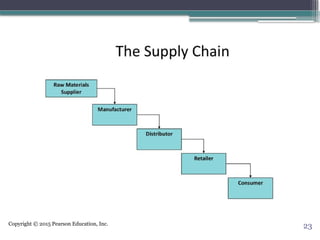
• Supply chain
1-24
Copyright © 2015 Pearson Education, Inc.
Overview of Transaction Processing and
Enterprise Resource Planning Systems
Chapter 2
2-1
Copyright © 2015 Pearson Education, Inc.
Learning Objectives
• Describe the four parts of the data processing cycle and the major
activities in each.
• Describe documents and procedures used to collect and process
transaction data.
• Describe the ways information is stored in computer-based
information systems.
• Discuss the types of information that an AIS can provide.
• Discuss how organizations use enterprise resource planning (ERP)
systems to process transactions and provide information.
2-26
Copyright © 2015 Pearson Education, Inc.
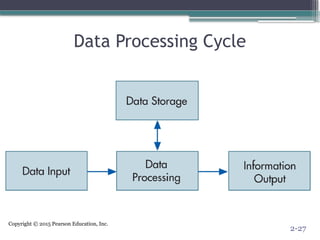
Data Processing Cycle
2-27
Copyright © 2015 Pearson Education, Inc.
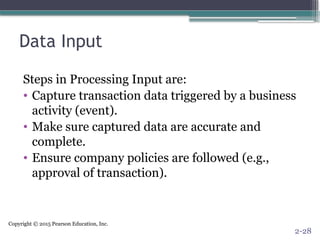
Data Input
Steps in Processing Input are:
• Capture transaction data triggered by a business
activity (event).
• Make sure captured data are accurate and
complete.
• Ensure company policies are followed (e.g.,
approval of transaction).
2-28
Copyright © 2015 Pearson Education, Inc.
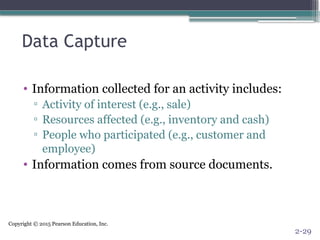
Data Capture
• Information collected for an activity includes:
▫ Activity of interest (e.g., sale)
▫ Resources affected (e.g., inventory and cash)
▫ People who participated (e.g., customer and
employee)
• Information comes from source documents.
2-29
Copyright © 2015 Pearson Education, Inc.
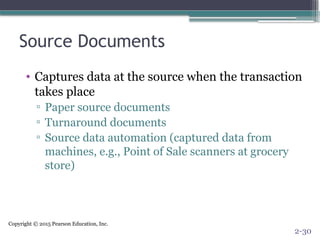
Source Documents
• Captures data at the source when the transaction
takes place
▫ Paper source documents
▫ Turnaround documents
▫ Source data automation (captured data from
machines, e.g., Point of Sale scanners at grocery
store)
2-30
Copyright © 2015 Pearson Education, Inc.
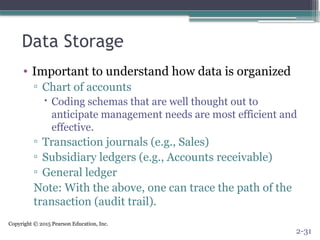
Data Storage
• Important to understand how data is organized
▫ Chart of accounts
 Coding schemas that are well thought out to
anticipate management needs are most efficient and
effective.
▫ Transaction journals (e.g., Sales)
▫ Subsidiary ledgers (e.g., Accounts receivable)
▫ General ledger
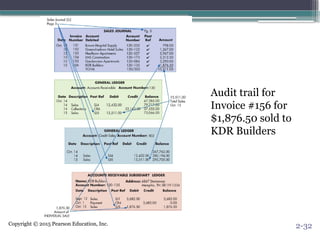
Note: With the above, one can trace the path of the
transaction (audit trail).
2-31
Copyright © 2015 Pearson Education, Inc.
Audit trail for
Invoice #156 for
$1,876.50 sold to
KDR Builders
2-32
Copyright © 2015 Pearson Education, Inc.
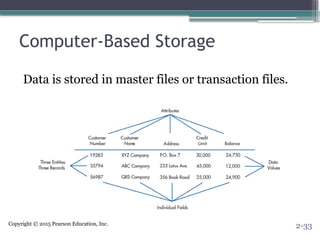
Computer-Based Storage
Data is stored in master files or transaction files.
2-33
Copyright © 2015 Pearson Education, Inc.
Data Processing
Four types of processing (CRUD):
• Creating new records (e.g., adding a customer)
• Reading existing data
• Updating previous record or data
• Deleting data
Data processing can be batch processed (e.g., post
records at the end of the business day) or in real-
time (process as it occurs).
2-34
Copyright © 2015 Pearson Education, Inc.
Information Output
The data stored in the database files can be viewed
• Online (soft copy)
• Printed out (hard copy)
▫ Document (e.g., sales invoice)
▫ Report (e.g., monthly sales report)
▫ Query (question for specific information in a
database, e.g., What division had the most sales
for the month?)
2-35
Copyright © 2015 Pearson Education, Inc.
Enterprise Resource Planning
• Perencanaan sumber daya perusahaan ( ERP )
adalah sistem informasi yang diperuntukkan
bagi perusahaan manufaktur maupun jasa
yang berperan mengintegrasikan dan
mengotomasikan proses bisnis yang
berhubungan dengan aspek operasi,
produksi maupun distribusi di perusahaan
bersangkutan
36
Copyright © 2015 Pearson Education, Inc.
Enterprise Resource Planning (ERP) Systems
• Integrates activities from the entire organization
▫ Production
▫ Payroll
▫ Sales
▫ Purchasing
▫ Financial Reporting
Sistem ERP secara modular biasanya menangani proses manufaktur,
logistik, distribusi, persediaan (inventory), shipping, invoice, dan
akuntansi perusahaan. Sistem membantu mengontrol aktivitas bisnis
seperti penjualan, pengiriman, produksi, manajemen persediaan,
manajemen kualitas, dan sumber daya manusia. ERP merupakan Back
Office System yang mengindikasikan bahwa pelanggan dan publik
secara umum tidak dilibatkan dalam sistem ini
2-37
Copyright © 2015 Pearson Education, Inc.
Advantages of ERP System
• Integrated enterprise-wide allowing for better flow of the
information as it’s stored in a centralized database and can be
accessed by various departments which also improves
customer service.
• Data captured once (i.e., no longer need sales to enter data
about a customer and then accounting to enter same customer
data for invoicing)
• Improve access of control of the data through security settings
• Standardization of procedures and reports (Menstandarkan
data dan informasi melalui keseragaman pelaporan, terutama
untuk perusahaan besar yang biasanya terdiri dari banyak unit
business dengan jumlah dan jenis bisnis yg berbeda-beda).
2-38
Copyright © 2015 Pearson Education, Inc.
Disadvantages of ERP System
• Costly
• Significant amount of time to implement
• Complex
• User resistance (learning new things is
sometimes hard for employees)
2-39
Copyright © 2015 Pearson Education, Inc.
Key Terms
• Data processing cycle
• Source documents
• Turnaround documents
• Source data automation
• General ledger
• Control account
• Coding
• Sequence code
• Block code
• Group code
• Mnemonic code
• Chart of accounts
• General ledger
• Specialized journal
• Audit trail
• Entity
• Attributes
• Field
• Record
• Data value
• File
• Master file
• Transaction file
• Database
• Batch processing
• Online, real-time processing
• Document
• Report
• Query
• Enterprise resource planning
(ERP) system 2-40

Romney accounting information system ch 01

  • 1.
    Copyright © 2015Pearson Education, Inc. Accounting Information Systems: An Overview Chapter 1 1-1
  • 2.
    Copyright © 2015Pearson Education, Inc. Learning Objectives • Distinguish between data and information: ▫ Understand the characteristics of useful information. ▫ Explain how to determine the value of information. • Explain fundamental decisions an organization makes: ▫ Understand basic information needed to make them. • Identify the transactional information that passes between internal and external parties and an AIS. • Describe the major business processes present in most companies. • Explain what an accounting information system (AIS) is and describe its basic functions. • Discuss how an AIS can add value to an organization. • Explain how an AIS and corporate strategy affect each other. • Explain the role an AIS plays in a company’s value chain. 1-2
  • 3.
    Copyright © 2015Pearson Education, Inc. 3
  • 4.
    Copyright © 2015Pearson Education, Inc. 4
  • 5.
    Copyright © 2015Pearson Education, Inc. 5
  • 6.
    Copyright © 2015Pearson Education, Inc. 6
  • 7.
    Copyright © 2015Pearson Education, Inc. 7
  • 8.
    Copyright © 2015Pearson Education, Inc. Data vs. Information • Data are facts stored in the system ▫ A fact could be a number, date, name, and so on. For example: 2/22/14 ABC Company, 123, 99, 3, 20, 60 1-8
  • 9.
    Copyright © 2015Pearson Education, Inc. Data vs. Information The previous slide just showed facts, if we put those facts within a context of a sales invoice, for example, it is meaningful and considered information. Invoice Date : 2/22/14 Invoice #: 123 Customer: ABC company Item # Qty Price 99 3 $20 Total Invoice Amount $60 1-9
  • 10.
    Copyright © 2015Pearson Education, Inc. What is information? • The term data refers to any and all of the facts that are collected, stored, and processed by an information system. Information is data that has been organized and processed so that it is meaningful 10
  • 11.
    Copyright © 2015Pearson Education, Inc. Value of Information • Information is valuable when the benefits exceed the costs of gathering, maintaining, and storing the data. Benefit (i.e., improved decision making) > Cost (i.e., time and resources used to get the information) 1-11
  • 12.
    Copyright © 2015Pearson Education, Inc. What Makes Information Useful? There are seven general characteristics that make information useful: 1. Relevant: information needed to make a decision (e.g., the decision to extend customer credit would need relevant information on customer balance from an A/R aging report) 2. Reliable: information free from bias 3. Complete: does not omit important aspects of events or activities 4. Timely: information needs to be provided in time to make the decision 1-12
  • 13.
    Copyright © 2015Pearson Education, Inc. What Makes Information Useful? 5. Understandable: information must be presented in a meaningful manner 6. Verifiable: two independent people can produce the same conclusion 7. Accessible: available when needed 1-13
  • 14.
    Copyright © 2015Pearson Education, Inc. Organizational Decisions and Information Needed • Business organizations use business processes to get things done. These processes are a set of structured activities that are performed by people, machines, or both to achieve a specific goal. • Key decisions and information needed often come from these business processes. 1-14
  • 15.
    Copyright © 2015Pearson Education, Inc. Transactional Information Between Internal and External Parties in an AIS • Business organizations conduct business transactions between internal and external stakeholders. • Internal stakeholders are employees in the organization (e.g., employees and managers). • External stakeholders are trading partners such as customers and vendors as well as other external organizations such as Banks and Government. • The AIS captures the flow of information between these users for the various business transactions. 1-15
  • 16.
    Copyright © 2015Pearson Education, Inc. Interactions Between AIS and Internal and External Parties 1-16
  • 17.
    Copyright © 2015Pearson Education, Inc. Basic Business Processes • Transactions between the business organization and external parties fundamentally involve a “give–get” exchange. These basic business processes are: ▫ Revenue: give goods / give service—get cash ▫ Expenditure: get goods / get service—give cash ▫ Production: give labor and give raw materials—get finished goods ▫ Payroll: give cash—get labor ▫ Financing: give cash—get cash 1-17
  • 18.
    Copyright © 2015Pearson Education, Inc. What Is an Accounting Information System? • It can be manual or computerized • Consists of ▫ People who use the system ▫ Processes ▫ Technology (data, software, and information technology) ▫ Controls to safeguard information • Thus, transactional data is collected and stored into meaningful information from which business decisions are made and provides adequate controls to protect and secure the organizational data assets. 1-18
  • 19.
    Copyright © 2015Pearson Education, Inc. How Does an AIS Add Value? • A well thought out AIS can add value through effective and efficient decisions. ▫ Having effective decisions means quality decisions ▫ Having efficient decisions means reducing costs of decision making 1-19
  • 20.
    Copyright © 2015Pearson Education, Inc. AIS and Strategy • An AIS is influenced by an organization’s strategy. • A strategy is the overall goal the organization hopes to achieve (e.g., increase profitability). • Once an overall goal is determined, an organization can determine actions needed to reach their goal and identify the informational requirements necessary to measure how well they are doing in obtaining that goal. 1-20
  • 21.
    Copyright © 2015Pearson Education, Inc. AIS in the Value Chain • The value chain shows how the different activities within an organization provide value to the customer. • These activities are primary and support activities. ▫ Primary activities provide direct value to the customer. ▫ Support activities enable primary activities to be efficient and effective. 1-21
  • 22.
    Copyright © 2015Pearson Education, Inc. 1-22
  • 23.
    Copyright © 2015Pearson Education, Inc. 23
  • 24.
    Copyright © 2015Pearson Education, Inc. Key Terms • System • Goal conflict • Goal congruence • Data • Information • Information technology (IT) • Information overload • Value of information • Business process • Transaction • Transaction processing • Give-get exchange • Revenue cycle • Expenditure cycle • Production (conversion) cycle • Human resource/payroll cycle • Financing cycle • General ledger and reporting system • Accounting information system (AIS) • Predictive analytics • Value chain • Primary activities • Support activities • Supply chain 1-24
  • 25.
    Copyright © 2015Pearson Education, Inc. Overview of Transaction Processing and Enterprise Resource Planning Systems Chapter 2 2-1
  • 26.
    Copyright © 2015Pearson Education, Inc. Learning Objectives • Describe the four parts of the data processing cycle and the major activities in each. • Describe documents and procedures used to collect and process transaction data. • Describe the ways information is stored in computer-based information systems. • Discuss the types of information that an AIS can provide. • Discuss how organizations use enterprise resource planning (ERP) systems to process transactions and provide information. 2-26
  • 27.
    Copyright © 2015Pearson Education, Inc. Data Processing Cycle 2-27
  • 28.
    Copyright © 2015Pearson Education, Inc. Data Input Steps in Processing Input are: • Capture transaction data triggered by a business activity (event). • Make sure captured data are accurate and complete. • Ensure company policies are followed (e.g., approval of transaction). 2-28
  • 29.
    Copyright © 2015Pearson Education, Inc. Data Capture • Information collected for an activity includes: ▫ Activity of interest (e.g., sale) ▫ Resources affected (e.g., inventory and cash) ▫ People who participated (e.g., customer and employee) • Information comes from source documents. 2-29
  • 30.
    Copyright © 2015Pearson Education, Inc. Source Documents • Captures data at the source when the transaction takes place ▫ Paper source documents ▫ Turnaround documents ▫ Source data automation (captured data from machines, e.g., Point of Sale scanners at grocery store) 2-30
  • 31.
    Copyright © 2015Pearson Education, Inc. Data Storage • Important to understand how data is organized ▫ Chart of accounts  Coding schemas that are well thought out to anticipate management needs are most efficient and effective. ▫ Transaction journals (e.g., Sales) ▫ Subsidiary ledgers (e.g., Accounts receivable) ▫ General ledger Note: With the above, one can trace the path of the transaction (audit trail). 2-31
  • 32.
    Copyright © 2015Pearson Education, Inc. Audit trail for Invoice #156 for $1,876.50 sold to KDR Builders 2-32
  • 33.
    Copyright © 2015Pearson Education, Inc. Computer-Based Storage Data is stored in master files or transaction files. 2-33
  • 34.
    Copyright © 2015Pearson Education, Inc. Data Processing Four types of processing (CRUD): • Creating new records (e.g., adding a customer) • Reading existing data • Updating previous record or data • Deleting data Data processing can be batch processed (e.g., post records at the end of the business day) or in real- time (process as it occurs). 2-34
  • 35.
    Copyright © 2015Pearson Education, Inc. Information Output The data stored in the database files can be viewed • Online (soft copy) • Printed out (hard copy) ▫ Document (e.g., sales invoice) ▫ Report (e.g., monthly sales report) ▫ Query (question for specific information in a database, e.g., What division had the most sales for the month?) 2-35
  • 36.
    Copyright © 2015Pearson Education, Inc. Enterprise Resource Planning • Perencanaan sumber daya perusahaan ( ERP ) adalah sistem informasi yang diperuntukkan bagi perusahaan manufaktur maupun jasa yang berperan mengintegrasikan dan mengotomasikan proses bisnis yang berhubungan dengan aspek operasi, produksi maupun distribusi di perusahaan bersangkutan 36
  • 37.
    Copyright © 2015Pearson Education, Inc. Enterprise Resource Planning (ERP) Systems • Integrates activities from the entire organization ▫ Production ▫ Payroll ▫ Sales ▫ Purchasing ▫ Financial Reporting Sistem ERP secara modular biasanya menangani proses manufaktur, logistik, distribusi, persediaan (inventory), shipping, invoice, dan akuntansi perusahaan. Sistem membantu mengontrol aktivitas bisnis seperti penjualan, pengiriman, produksi, manajemen persediaan, manajemen kualitas, dan sumber daya manusia. ERP merupakan Back Office System yang mengindikasikan bahwa pelanggan dan publik secara umum tidak dilibatkan dalam sistem ini 2-37
  • 38.
    Copyright © 2015Pearson Education, Inc. Advantages of ERP System • Integrated enterprise-wide allowing for better flow of the information as it’s stored in a centralized database and can be accessed by various departments which also improves customer service. • Data captured once (i.e., no longer need sales to enter data about a customer and then accounting to enter same customer data for invoicing) • Improve access of control of the data through security settings • Standardization of procedures and reports (Menstandarkan data dan informasi melalui keseragaman pelaporan, terutama untuk perusahaan besar yang biasanya terdiri dari banyak unit business dengan jumlah dan jenis bisnis yg berbeda-beda). 2-38
  • 39.
    Copyright © 2015Pearson Education, Inc. Disadvantages of ERP System • Costly • Significant amount of time to implement • Complex • User resistance (learning new things is sometimes hard for employees) 2-39
  • 40.
    Copyright © 2015Pearson Education, Inc. Key Terms • Data processing cycle • Source documents • Turnaround documents • Source data automation • General ledger • Control account • Coding • Sequence code • Block code • Group code • Mnemonic code • Chart of accounts • General ledger • Specialized journal • Audit trail • Entity • Attributes • Field • Record • Data value • File • Master file • Transaction file • Database • Batch processing • Online, real-time processing • Document • Report • Query • Enterprise resource planning (ERP) system 2-40