Introduction to Computers
Objectives Overview
2
Objectives Overview
3
A World of Computers
Computers are everywhere
4
What Is a Computer?
A computer is an electronic device,
operating under the control of
instructions stored in its own memory
5
Information Processing Cycle
What Is a Computer?
6
The Components of a Computer
A computer contains many electric, electronic,
and mechanical components known as
hardware
7
The Components of a Computer
8
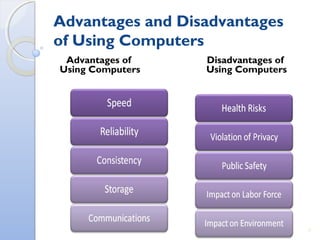
Advantages and Disadvantages
of Using Computers
Advantages of
Using Computers
Disadvantages of
Using Computers
9
Advantages and Disadvantages
of Using Computers
Green computing involves reducing the
electricity consumed and environmental waste
generated when using a computer
Strategies include:
◦ Recycling
◦ Regulating manufacturing processes
◦ Extending the life of computers
◦ Immediately donating or properly disposing of replaced
computers
10
Networks and the Internet
A network is a
collection of
computers and
devices connected
together, often
wirelessly, via
communications
devices and
transmission media
11
Networks and the Internet
The Internet is a worldwide collection of
networks that connects millions of businesses,
government agencies, educational institutions,
and individuals
12
Networks and the Internet
People use the Internet for a variety of
reasons:
13
Networks and the Internet
A social networking Web site
encourages members to share their
interests, ideas, stories, photos, music,
and videos with other registered users
14
Computer Software
Software, also called a program, tells
the computer what tasks to perform and
how to perform them
15
Computer Software
Installing is the process of setting up
software to work with the computer,
printer, and other hardware
16
Computer Software
A programmer
develops software
or writes the
instructions that
direct the
computer to
process data into
information
17
Categories of Computers
18
Personal Computers
A personal computer can perform all
of its input, processing, output, and
storage activities by itself
Two popular architectures are the PC
and the Apple
◦ Desktop computer
19
Mobile Computers and Mobile
Devices
20
Mobile Computers and Mobile
Devices
21
Mobile Computers and Mobile
Devices
22
Game Consoles
A game console
is a mobile
computing device
designed for single-
player or
multiplayer video
games
23
Servers
A server controls
access to the
hardware,
software, and other
resources on a
network
◦ Provides a
centralized storage
area for programs,
data, and
information
24
Mainframes
A mainframe is a
large, expensive,
powerful computer
that can handle
hundreds or
thousands of
connected users
simultaneously
25
Supercomputers
A supercomputer is the fastest, most
powerful computer
◦ Fastest supercomputers are capable of
processing more than one quadrillion
instructions in a single second
26
Embedded Computers
An embedded computer is a special-
purpose computer that functions as a
component in a larger product
27
Embedded Computers
28
Elements of an Information
System
29
Elements of an Information
System
30
Examples of Computer Usage
31
Examples of Computer Usage
32
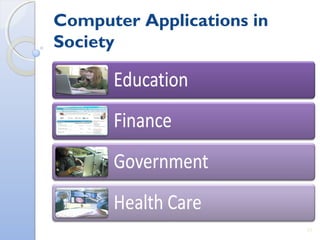
Computer Applications in
Society
33
Computer Applications in
Society
34
Summary
35
36
May I help you with any
clarifications?
Thank You, Friends

ISM