Computer
Science
Introduction
In this bite sized module
•What is Computer Science?
•What is Computer System?
•What is Computation?
•Types of Computing
•Computer Organization
•Hardware and Software
•Operating System
What is Computer Science?
•Computer Science is the
study of the foundations
of information and
computation.
•It is the scientific and
practical approach to
computation and its
applications.
What is a Computer System?
•It is capable of performing computations and
making logical decisions. (2 + 2 = 4)
•It is a machine that can transform data into
useful information.
What is Computation?
•Computation is a type of
calculation that follows a
well defined model
•Example: An Algorithm
•A + B = C
•2 + 2 = 4
Types of Computing
•3 popular types of computing:
•Personal Computing
•Client/Server Computing
•Cloud Computing
•Personal Computing: General-purpose computer.
•Client/Server Computing: Responds to request
across a computer network to provide a network
service. Example: Loading cnn.com on a web page.
•Cloud Computing: A shared pool of computing
resources accessible over a network. Pay as you go
model.
Advantages of Computer Science
•It is the fastest medium of communication.
•Arithmetic problems can be easily solved.
•Computers make it possible to receive, supply
and process large volumes of data at very high
speeds.
How Computer Works?
•A Computer is an electronic machine that:
•Accepts information and stores it until the
information is needed.
•Processes the information according to the
instructions provided by the user.
•Finally returns the result to the user.
Types of Computer
•Personal computer
•Smartphone
•Mainframe computer
•Super computer
•Cloud computer (Amazon Web Services AWS,
Microsoft Azure, Google Cloud GC)
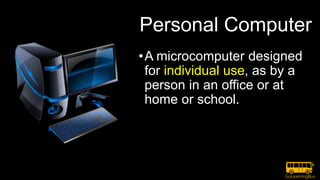
Personal Computer
•A microcomputer designed
for individual use, as by a
person in an office or at
home or school.
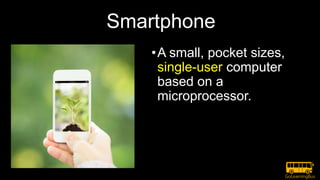
Smartphone
•A small, pocket sizes,
single-user computer
based on a
microprocessor.
Mainframe
•A powerful multi-user
computer capable of
supporting many
hundreds or thousands
of users simultaneously.
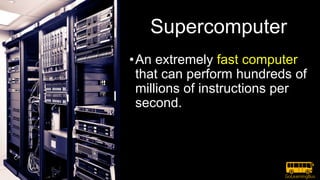
Supercomputer
•An extremely fast computer
that can perform hundreds of
millions of instructions per
second.
Cloud Computing
• AWS: Amazon Web Services provides on-demand delivery of
IT resources via the Internet with pay-as-you-go pricing.
• Microsoft Azure: Microsoft Azure is an open, flexible,
enterprise-grade cloud computing platform
• Google Cloud: Google Cloud Platform is a cloud computing
platform by Google that offers hosting on the same
supporting infrastructure that Google uses internally for end-
user products like Google Search and YouTube. Cloud
Platform provides developer products to build a range of
programs from simple websites to complex applications
Cloud Computing: IaaS, SaaS and PaaS
• SaaS: Software as a service is a software licensing and delivery model
in which software is licensed on a subscription basis and is centrally
hosted. Also referred to as "on-demand software". SaaS is typically
accessed by users using a thin client via a web browser.
• IaaS: Infrastructure as a Service (IaaS) is a form of cloud computing
that provides virtualized computing resources over the Internet. IaaS
is one of three main categories of cloud computing services,
alongside Software as a Service (SaaS) and Platform as a Service
(PaaS).
• PaaS: Platform as a Service, often simply referred to as PaaS, is a
category of cloud computing that provides a platform and
environment to allow developers to build applications and services
over the internet. PaaS services are hosted in the cloud and accessed
by users simply via their web browser.
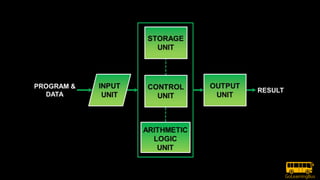
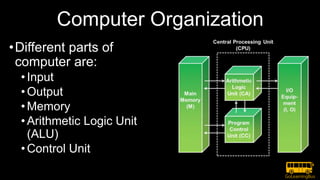
Computer Organization
•Different parts of
computer are:
•Input
•Output
•Memory
•Arithmetic Logic Unit
(ALU)
•Control Unit
Hardware and Software
•Hardware includes physical parts of computer.
•Example: CPU, Keyboard, Mouse, etc.
•Software includes an interface between the user
and the computer.
•Example: Windows, Linux, Mac OS, etc.
Operating System
•A Software that manages computer hardware.
•Provides the user interface to the computer.
•Controls all machine activities and manage
resources.
Thank you
• For questions please email Team@WAGmob.com

Introduction to Computer Science by GoLearningBus

  • 1.
  • 2.
    In this bitesized module •What is Computer Science? •What is Computer System? •What is Computation? •Types of Computing •Computer Organization •Hardware and Software •Operating System
  • 3.
    What is ComputerScience? •Computer Science is the study of the foundations of information and computation. •It is the scientific and practical approach to computation and its applications.
  • 4.
    What is aComputer System? •It is capable of performing computations and making logical decisions. (2 + 2 = 4) •It is a machine that can transform data into useful information.
  • 5.
    What is Computation? •Computationis a type of calculation that follows a well defined model •Example: An Algorithm •A + B = C •2 + 2 = 4
  • 6.
    Types of Computing •3popular types of computing: •Personal Computing •Client/Server Computing •Cloud Computing
  • 7.
    •Personal Computing: General-purposecomputer. •Client/Server Computing: Responds to request across a computer network to provide a network service. Example: Loading cnn.com on a web page. •Cloud Computing: A shared pool of computing resources accessible over a network. Pay as you go model.
  • 8.
    Advantages of ComputerScience •It is the fastest medium of communication. •Arithmetic problems can be easily solved. •Computers make it possible to receive, supply and process large volumes of data at very high speeds.
  • 9.
    How Computer Works? •AComputer is an electronic machine that: •Accepts information and stores it until the information is needed. •Processes the information according to the instructions provided by the user. •Finally returns the result to the user.
  • 11.
    Types of Computer •Personalcomputer •Smartphone •Mainframe computer •Super computer •Cloud computer (Amazon Web Services AWS, Microsoft Azure, Google Cloud GC)
  • 12.
    Personal Computer •A microcomputerdesigned for individual use, as by a person in an office or at home or school.
  • 13.
    Smartphone •A small, pocketsizes, single-user computer based on a microprocessor.
  • 14.
    Mainframe •A powerful multi-user computercapable of supporting many hundreds or thousands of users simultaneously.
  • 15.
    Supercomputer •An extremely fastcomputer that can perform hundreds of millions of instructions per second.
  • 16.
    Cloud Computing • AWS:Amazon Web Services provides on-demand delivery of IT resources via the Internet with pay-as-you-go pricing. • Microsoft Azure: Microsoft Azure is an open, flexible, enterprise-grade cloud computing platform • Google Cloud: Google Cloud Platform is a cloud computing platform by Google that offers hosting on the same supporting infrastructure that Google uses internally for end- user products like Google Search and YouTube. Cloud Platform provides developer products to build a range of programs from simple websites to complex applications
  • 17.
    Cloud Computing: IaaS,SaaS and PaaS • SaaS: Software as a service is a software licensing and delivery model in which software is licensed on a subscription basis and is centrally hosted. Also referred to as "on-demand software". SaaS is typically accessed by users using a thin client via a web browser. • IaaS: Infrastructure as a Service (IaaS) is a form of cloud computing that provides virtualized computing resources over the Internet. IaaS is one of three main categories of cloud computing services, alongside Software as a Service (SaaS) and Platform as a Service (PaaS). • PaaS: Platform as a Service, often simply referred to as PaaS, is a category of cloud computing that provides a platform and environment to allow developers to build applications and services over the internet. PaaS services are hosted in the cloud and accessed by users simply via their web browser.
  • 18.
    Computer Organization •Different partsof computer are: •Input •Output •Memory •Arithmetic Logic Unit (ALU) •Control Unit
  • 19.
    Hardware and Software •Hardwareincludes physical parts of computer. •Example: CPU, Keyboard, Mouse, etc. •Software includes an interface between the user and the computer. •Example: Windows, Linux, Mac OS, etc.
  • 20.
    Operating System •A Softwarethat manages computer hardware. •Provides the user interface to the computer. •Controls all machine activities and manage resources.
  • 21.
    Thank you • Forquestions please email Team@WAGmob.com