Information Security
CS 3002
Dr. Haroon Mahmood
Assistant Professor
NUCES Lahore
2
Information Security
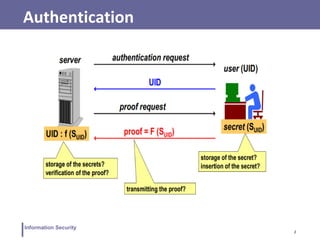
Authentication
3
Information Security
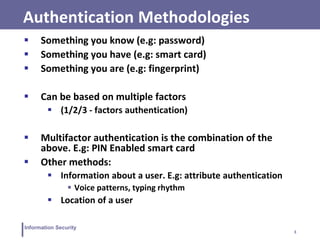
Authentication Methodologies
 Something you know (e.g: password)
 Something you have (e.g: smart card)
 Something you are (e.g: fingerprint)
 Can be based on multiple factors
 (1/2/3 - factors authentication)
 Multifactor authentication is the combination of the
above. E.g: PIN Enabled smart card
 Other methods:
 Information about a user. E.g: attribute authentication
 Voice patterns, typing rhythm
 Location of a user
4
Information Security
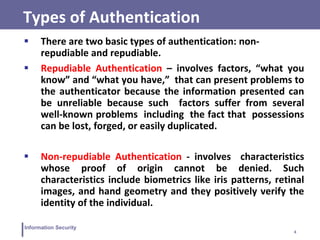
Types of Authentication
 There are two basic types of authentication: non-
repudiable and repudiable.
 Repudiable Authentication – involves factors, “what you
know” and “what you have,” that can present problems to
the authenticator because the information presented can
be unreliable because such factors suffer from several
well-known problems including the fact that possessions
can be lost, forged, or easily duplicated.
 Non-repudiable Authentication - involves characteristics
whose proof of origin cannot be denied. Such
characteristics include biometrics like iris patterns, retinal
images, and hand geometry and they positively verify the
identity of the individual.
5
Information Security
Authentication mechanisms
 In general authentication takes one of the following three
forms:
 Basic authentication involving a server: The server
maintains a user file of either passwords and user names or
some other useful piece of authenticating information. This
information is always examined before authorization is
granted.
 Challenge-response: in which the server or any other
authenticating system generates a challenge to the host
requesting for authentication and expects a response.
 Centralized authentication, in which a central server
authenticates users on the network and in addition also
authorizes and audits them.
6
Information Security
Password-based authentication
 secret = the user password
 (client) create and transmit proof
 F = I (the identity function)
 i.e. proof = password (cleartext!)
 (server) verify the proof:
 case #1: F = I (the identity function)
 server knows all passwords in cleartext (!)
 access control: proof = password ?
 case #2: F = one-way hash (that is a digest)
 server knows the passwords' digests, HUID
 access control: f(proof) = HUID ?
7
Information Security
Passwords
 Authentication based on alphanumeric characters or
numbers
 PROS
 Easy to remember (if only for one system)
 CONS
 User-side password storage:
 Post-it!
 Client-side password manager or wallet
 password guessable (my son’s name!)
 password readable during transmission
 server-side password storage issues (hashing is must)
 35% passwords identified using dictionary attack
 Use “salt”
 Shoulder surfing
 Using same password in multiple places
8
Information Security
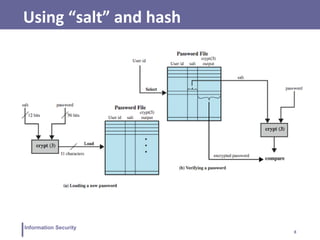
Using “salt” and hash
9
Information Security
Using “salt” and hash
 for each user UID:
 create / ask the password
 generate a random salt (should contain rarely used or
control characters)
 compute HP = hash ( password | salt )
 store the triples { UID, HP, saltUID }
 Advantages:
 Prevents duplicate passwords from being visible in the
password file (different HP for users having the same
password)
 Increases the difficulty of offline dictionary attacks
 Nearly impossible to tell if a person used the same
password on multiple systems
10
Information Security
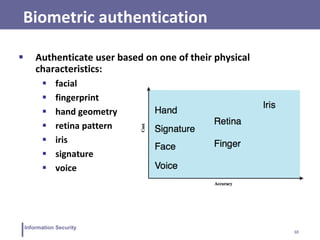
 Authenticate user based on one of their physical
characteristics:
 facial
 fingerprint
 hand geometry
 retina pattern
 iris
 signature
 voice
Biometric authentication
11
Information Security
Operation of a biometric system
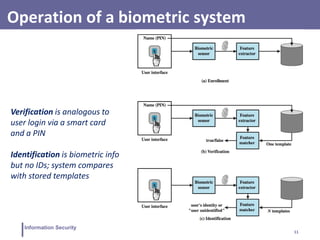
Verification is analogous to
user login via a smart card
and a PIN
Identification is biometric info
but no IDs; system compares
with stored templates
12
Information Security
Problems of biometric systems
 FAR = False Acceptance Rate
 FRR = False Rejection Rate
 FAR and FRR may be partly tuned but they heavily depend
on the cost of the device
 variable biological characteristics:
 finger wound
 voice altered due to emotion or injury
(https://www.youtube.com/watch?v=iYhpbph4sLc)
 retinal blood pattern altered due to alcohol or drug
13
Information Security
Symmetric challenge-response authentication
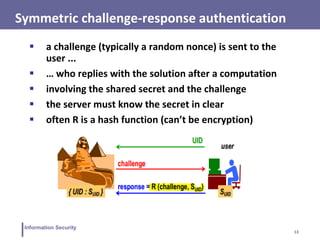
 a challenge (typically a random nonce) is sent to the
user ...
 … who replies with the solution after a computation
 involving the shared secret and the challenge
 the server must know the secret in clear
 often R is a hash function (can’t be encryption)
14
Information Security
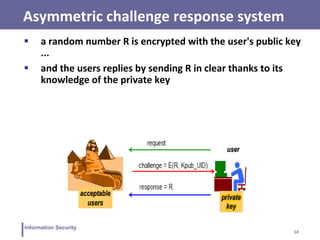
Asymmetric challenge response system
 a random number R is encrypted with the user's public key
...
 and the users replies by sending R in clear thanks to its
knowledge of the private key
15
Information Security
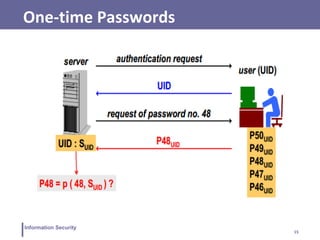
One-time Passwords
16
Information Security
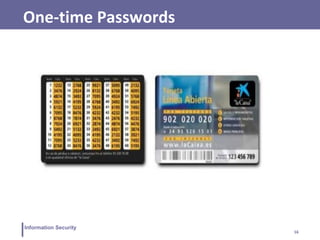
One-time Passwords
17
Information Security
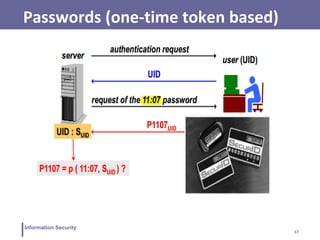
Passwords (one-time token based)
18
Information Security
SecurID: architecture
 invented and patented by Security Dynamics
 time-based synchronous OTP technique:
 PUID ( t ) = h ( SUID, t )
 the client sends:
 user , PIN , token-code (seed, time)
 based on user name and PIN the server verifies against
three possible token-codes:
 TC-1, TC-0, TC+1
 More than once if there is a drift of more than one minute
 wrong authentication attempts limited
19
Information Security
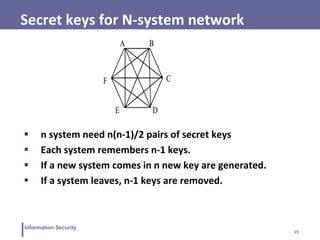
Secret keys for N-system network
 n system need n(n-1)/2 pairs of secret keys
 Each system remembers n-1 keys.
 If a new system comes in n new key are generated.
 If a system leaves, n-1 keys are removed.
20
Information Security
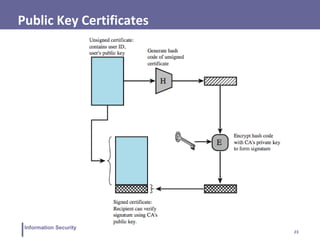
PKI and Certificate Authorities
 Certificate consists of:
 A public key plus a User ID of the key owner
 Signed by a third party trusted by community
 Often govt/bank certificate authority (CA)
 Users obtain certificates from CA
 Create keys & unsigned cert, gives to CA, CA signs cert &
attaches sig, returns to user
 Other users can verify cert
 Checking sig on cert using CA’s public key
21
Information Security
Common Key Steps
1. User software creates a pair of keys: private and public
2. Clients prepares unsigned certificate that includes user ID
and public key
3. User provides unsigned certificate to a CA
4. CA creates a signature:
i. Creates a hash code of the unsigned certificate
ii. Encrypts the hash code with the CA’s private key
5. CA attaches the signature to unsigned certificate to make
signed certificate
22
Information Security
Key Steps (continued)
6. CA returns the signed certificate to the client
7. Client may provide signed signature to other users
8. Any user may verify the certificate
I. Calculate the hash code of certificate (exclude signature)
II. Decrypt signature using CA’s public key
III. Compare the two
23
Information Security
Public Key Certificates
24
Information Security
Public Key Authentication
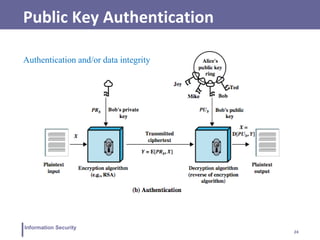
Authentication and/or data integrity
25
Information Security
Key Distribution Center (KDC)
 Each node is configured with KDC's key.
 KDC has all the keys.
 A ↔ B communication? KDC sends a key KAB encrypted
with A's key to A and B's key to B.
 Issues:
 If KDC is compromised, all systems are compromised.
 KDC is single point of failure or performance bottleneck.
 KDC has to be on-line all the time. Replication!
26
Information Security
Kerberos
 Network authentication protocol
 Based on Trusted Third Party (TTP) - KDC
 invented by MIT for project Athena
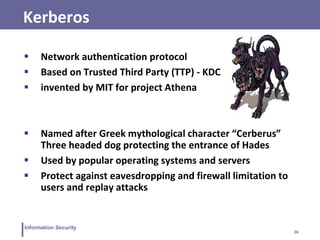
 Named after Greek mythological character “Cerberus”
Three headed dog protecting the entrance of Hades
 Used by popular operating systems and servers
 Protect against eavesdropping and firewall limitation to
users and replay attacks
27
Information Security
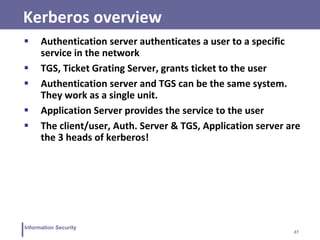
Kerberos overview
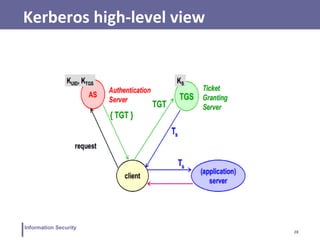
 Authentication server authenticates a user to a specific
service in the network
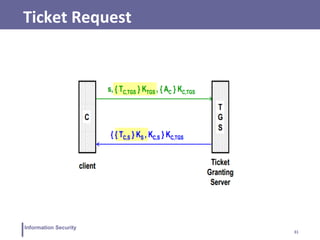
 TGS, Ticket Grating Server, grants ticket to the user
 Authentication server and TGS can be the same system.
They work as a single unit.
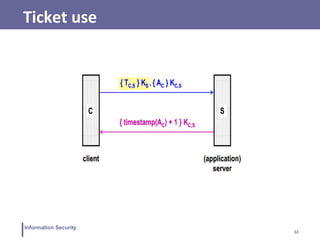
 Application Server provides the service to the user
 The client/user, Auth. Server & TGS, Application server are
the 3 heads of kerberos!
28
Information Security
Kerberos high-level view
29
Information Security
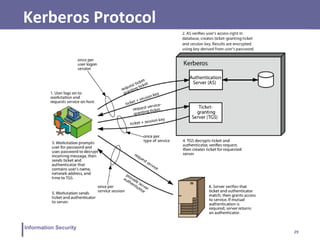
Kerberos Protocol
30
Information Security
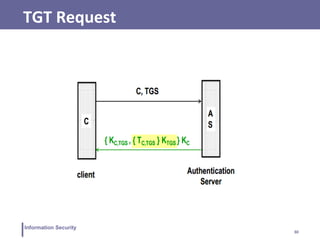
TGT Request
31
Information Security
Ticket Request
32
Information Security
Ticket use
33
Information Security
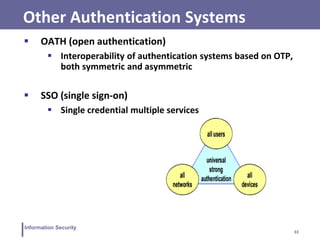
Other Authentication Systems
 OATH (open authentication)
 Interoperability of authentication systems based on OTP,
both symmetric and asymmetric
 SSO (single sign-on)
 Single credential multiple services

IS - User Authentication

  • 1.
    Information Security CS 3002 Dr.Haroon Mahmood Assistant Professor NUCES Lahore
  • 2.
  • 3.
    3 Information Security Authentication Methodologies Something you know (e.g: password)  Something you have (e.g: smart card)  Something you are (e.g: fingerprint)  Can be based on multiple factors  (1/2/3 - factors authentication)  Multifactor authentication is the combination of the above. E.g: PIN Enabled smart card  Other methods:  Information about a user. E.g: attribute authentication  Voice patterns, typing rhythm  Location of a user
  • 4.
    4 Information Security Types ofAuthentication  There are two basic types of authentication: non- repudiable and repudiable.  Repudiable Authentication – involves factors, “what you know” and “what you have,” that can present problems to the authenticator because the information presented can be unreliable because such factors suffer from several well-known problems including the fact that possessions can be lost, forged, or easily duplicated.  Non-repudiable Authentication - involves characteristics whose proof of origin cannot be denied. Such characteristics include biometrics like iris patterns, retinal images, and hand geometry and they positively verify the identity of the individual.
  • 5.
    5 Information Security Authentication mechanisms In general authentication takes one of the following three forms:  Basic authentication involving a server: The server maintains a user file of either passwords and user names or some other useful piece of authenticating information. This information is always examined before authorization is granted.  Challenge-response: in which the server or any other authenticating system generates a challenge to the host requesting for authentication and expects a response.  Centralized authentication, in which a central server authenticates users on the network and in addition also authorizes and audits them.
  • 6.
    6 Information Security Password-based authentication secret = the user password  (client) create and transmit proof  F = I (the identity function)  i.e. proof = password (cleartext!)  (server) verify the proof:  case #1: F = I (the identity function)  server knows all passwords in cleartext (!)  access control: proof = password ?  case #2: F = one-way hash (that is a digest)  server knows the passwords' digests, HUID  access control: f(proof) = HUID ?
  • 7.
    7 Information Security Passwords  Authenticationbased on alphanumeric characters or numbers  PROS  Easy to remember (if only for one system)  CONS  User-side password storage:  Post-it!  Client-side password manager or wallet  password guessable (my son’s name!)  password readable during transmission  server-side password storage issues (hashing is must)  35% passwords identified using dictionary attack  Use “salt”  Shoulder surfing  Using same password in multiple places
  • 8.
  • 9.
    9 Information Security Using “salt”and hash  for each user UID:  create / ask the password  generate a random salt (should contain rarely used or control characters)  compute HP = hash ( password | salt )  store the triples { UID, HP, saltUID }  Advantages:  Prevents duplicate passwords from being visible in the password file (different HP for users having the same password)  Increases the difficulty of offline dictionary attacks  Nearly impossible to tell if a person used the same password on multiple systems
  • 10.
    10 Information Security  Authenticateuser based on one of their physical characteristics:  facial  fingerprint  hand geometry  retina pattern  iris  signature  voice Biometric authentication
  • 11.
    11 Information Security Operation ofa biometric system Verification is analogous to user login via a smart card and a PIN Identification is biometric info but no IDs; system compares with stored templates
  • 12.
    12 Information Security Problems ofbiometric systems  FAR = False Acceptance Rate  FRR = False Rejection Rate  FAR and FRR may be partly tuned but they heavily depend on the cost of the device  variable biological characteristics:  finger wound  voice altered due to emotion or injury (https://www.youtube.com/watch?v=iYhpbph4sLc)  retinal blood pattern altered due to alcohol or drug
  • 13.
    13 Information Security Symmetric challenge-responseauthentication  a challenge (typically a random nonce) is sent to the user ...  … who replies with the solution after a computation  involving the shared secret and the challenge  the server must know the secret in clear  often R is a hash function (can’t be encryption)
  • 14.
    14 Information Security Asymmetric challengeresponse system  a random number R is encrypted with the user's public key ...  and the users replies by sending R in clear thanks to its knowledge of the private key
  • 15.
  • 16.
  • 17.
  • 18.
    18 Information Security SecurID: architecture invented and patented by Security Dynamics  time-based synchronous OTP technique:  PUID ( t ) = h ( SUID, t )  the client sends:  user , PIN , token-code (seed, time)  based on user name and PIN the server verifies against three possible token-codes:  TC-1, TC-0, TC+1  More than once if there is a drift of more than one minute  wrong authentication attempts limited
  • 19.
    19 Information Security Secret keysfor N-system network  n system need n(n-1)/2 pairs of secret keys  Each system remembers n-1 keys.  If a new system comes in n new key are generated.  If a system leaves, n-1 keys are removed.
  • 20.
    20 Information Security PKI andCertificate Authorities  Certificate consists of:  A public key plus a User ID of the key owner  Signed by a third party trusted by community  Often govt/bank certificate authority (CA)  Users obtain certificates from CA  Create keys & unsigned cert, gives to CA, CA signs cert & attaches sig, returns to user  Other users can verify cert  Checking sig on cert using CA’s public key
  • 21.
    21 Information Security Common KeySteps 1. User software creates a pair of keys: private and public 2. Clients prepares unsigned certificate that includes user ID and public key 3. User provides unsigned certificate to a CA 4. CA creates a signature: i. Creates a hash code of the unsigned certificate ii. Encrypts the hash code with the CA’s private key 5. CA attaches the signature to unsigned certificate to make signed certificate
  • 22.
    22 Information Security Key Steps(continued) 6. CA returns the signed certificate to the client 7. Client may provide signed signature to other users 8. Any user may verify the certificate I. Calculate the hash code of certificate (exclude signature) II. Decrypt signature using CA’s public key III. Compare the two
  • 23.
  • 24.
    24 Information Security Public KeyAuthentication Authentication and/or data integrity
  • 25.
    25 Information Security Key DistributionCenter (KDC)  Each node is configured with KDC's key.  KDC has all the keys.  A ↔ B communication? KDC sends a key KAB encrypted with A's key to A and B's key to B.  Issues:  If KDC is compromised, all systems are compromised.  KDC is single point of failure or performance bottleneck.  KDC has to be on-line all the time. Replication!
  • 26.
    26 Information Security Kerberos  Networkauthentication protocol  Based on Trusted Third Party (TTP) - KDC  invented by MIT for project Athena  Named after Greek mythological character “Cerberus” Three headed dog protecting the entrance of Hades  Used by popular operating systems and servers  Protect against eavesdropping and firewall limitation to users and replay attacks
  • 27.
    27 Information Security Kerberos overview Authentication server authenticates a user to a specific service in the network  TGS, Ticket Grating Server, grants ticket to the user  Authentication server and TGS can be the same system. They work as a single unit.  Application Server provides the service to the user  The client/user, Auth. Server & TGS, Application server are the 3 heads of kerberos!
  • 28.
  • 29.
  • 30.
  • 31.
  • 32.
  • 33.
    33 Information Security Other AuthenticationSystems  OATH (open authentication)  Interoperability of authentication systems based on OTP, both symmetric and asymmetric  SSO (single sign-on)  Single credential multiple services