CNIT 125:
Information Security
Professional
(CISSP
Preparation)
Ch 5. Identity and Access
Management
Authentication Methods
• Type 1: Something you know
•
•
•
• Easiest and weakest method
Type 2: Something you have
Type 3: Something you are
A fourth type is where you are
Passwords: Four Types
•
•
•
•
Static passwords
Passphrases
One-time passwords
Dynamic passwords
Static Passwords
•
•
•
Reusable passwords that may or may not
expire
Typically user-generated
Work best when combined with another
authentication type, such as a smart card
or biometric control
Passphrases
•
•
Long static passwords comprised of
words in a phrase or sentence
• "I will pass the CISSP in 6 months!"
Stronger if you use nonsense words, mix
case, and use numbers and symbols
One-Time Passwords
•
•
Very secure but difficult to manage
Impossible to reuse, valid only for one
use
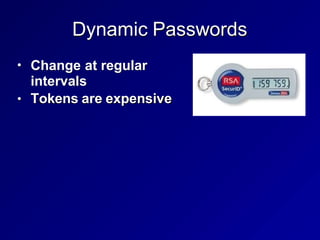
Dynamic Passwords
•
•
Change at regular
intervals
Tokens are expensive
Strong Authentication
•
•
Also called Multifactor Authentication
More than one authentication factor
• Ex: ATM card and PIN
Password Guessing
•
•
May be detected from system logs
Clipping levels distinguish malicious
attacks from normal users
•
• Ex: more than five failed logins per
hour
Account lockout after a number of failed
login attempts
Password Hashes and
Password Cracking
•
•
•
Plaintext passwords are not usually
stored on a system anymore
Password hash is stored instead
Password cracking
• Calculating hash for a long list of
passwords, trying to match the hash
value
Password Hashes
•
•
Stored in /etc/shadow on Unix systems
In SAM (Security Accounts Manager) file
(part of the Registry) on Windows
•
•
• Local account hashes stored on local
system drive
Domain account hashes stored on
domain controller
Hashes also cached on the local
system after a domain login
Capturing Hashes
•
•
•
May be sniffed from network traffic
Or read from RAM with fgdump or
Metasploit's hashdump
SAM file is locked while the operating
system is running
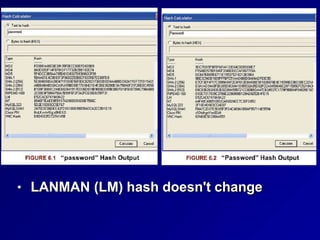
• LANMAN (LM) hash doesn't change
Dictionary Attack
•
•
•
Use a list of possible passwords
Fast and efficient technique
Countermeasure: password complexity
and length rules
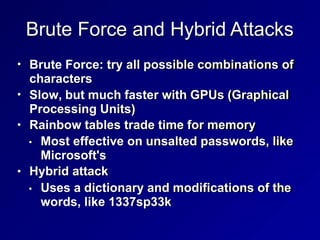
Brute Force and Hybrid Attacks
•
•
•
Brute Force: try all possible combinations of
characters
Slow, but much faster with GPUs (Graphical
Processing Units)
Rainbow tables trade time for memory
•
• Most effective on unsalted passwords, like
Microsoft's
Hybrid attack
• Uses a dictionary and modifications of the
words, like 1337sp33k
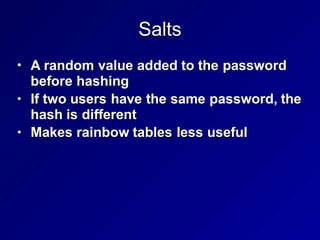
Salts
•
•
•
A random value added to the password
before hashing
If two users have the same password, the
hash is different
Makes rainbow tables less useful
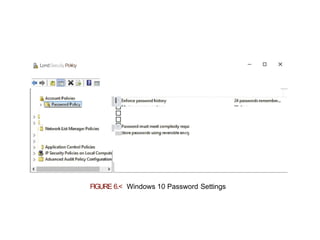
Lo<dSeru‹šyPo¥cy
FIGURE 6.< Windows 10 Password Settings
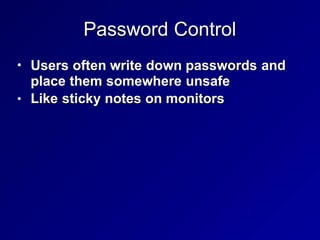
Password Control
•
•
Users often write down passwords and
place them somewhere unsafe
Like sticky notes on monitors
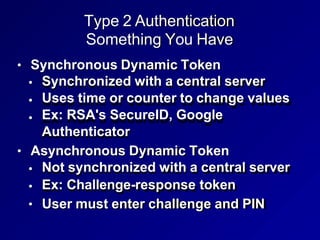
Type 2 Authentication
Something You Have
• Synchronous Dynamic Token
•
•
•
Synchronized with a central server
Uses time or counter to change values
Ex: RSA's SecureID, Google
Authenticator
• Asynchronous Dynamic Token
•
•
•
Not synchronized with a central server
Ex: Challenge-response token
User must enter challenge and PIN
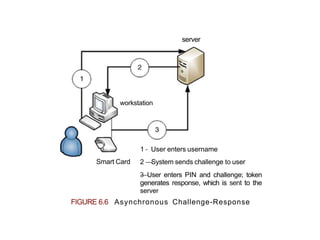
workstation
server
1 - User enters username
2 —System sends challenge to user
3
—User enters PIN and challenge; token
generates response, which is sent to the
server
Smart Card
FIGURE 6.6 Asynchronous Challenge-Response
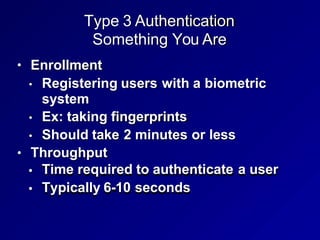
Type 3 Authentication
Something You Are
• Enrollment
• Registering users with a biometric
system
• Ex: taking fingerprints
• Should take 2 minutes or less
• Throughput
•
•
Time required to authenticate a user
Typically 6-10 seconds
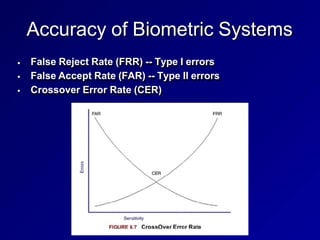
Accuracy of Biometric Systems
•
•
•
False Reject Rate (FRR) -- Type I errors
False Accept Rate (FAR) -- Type II errors
Crossover Error Rate (CER)
Types of Biometric Controls
• Fingerprints are most common
• Data is mathematical representation of
minutiae -- details of fingerprint whorls,
ridges, bifurcation, etc.
FIGMRE 6.8 Fingerprint IVIInuflae {7]
Retina Scan
•
•
•
Laser scan of the capillaries that feed the
retina in the back of the eye
Rarely used because of health risks and
invasion-of-privacy issues
Exchange of bodily fluids should be
avoided
Iris Scan
• Passive biometric control
•
•
•
•
• Can be done without subject's
knowledge
Camera photographs the iris (colored
portion of the eye)
Compares photo to database
Works through contact lenses and glasses
High accuracy, no exchange of bodily
fluids
Hand Geometry
•
•
Measure length, width, thickness, and
surface area of hand
Simple, can require as little as 9 bytes of
data
Keyboard Dynamics
•
•
•
How hard a person presses each key
Rhythm of keypresses
Cheap to implement and effective
Dynamic Signature
•
•
Process of signing with a pen
Similar to keyboard dynamics
Voiceprint
•
•
•
Vulnerable to replay attack
So other access controls must be
combined with it
Voices may change due to illness,
leading to a false rejection
Facial Scan
•
•
•
•
•
Also called facial recognition
Passive but expensive
Not commonly used for authentication
Law enforcement and security agencies
use facial recognition at high-value,
publicly accessible targets
Superbowl XXXV was the first major
sporting event to use facial recognition
to look for terrorists in 2001 (link Ch 6a)
Someplace You Are
•
•
•
•
Location found from GPS or IP address
Can deny access if the subject is in the
incorrect location
Credit card companies use this
technique to detect fraud
Transactions from abroad are rejected,
unless the user notifies the credit card
company of the trip
34
1
Access Control Technologies
Centralized Access Control
•
•
One logical point for access control
Can provide Single Sign-On (SSO)
•
• One authentication allows access to
multiple systems
Can centrally provide AAA services
•
•
•
Authentication
Authorization
Accountability
Decentralized Access Control
•
•
•
•
•
Local sites maintain independent
systems
Provides more local power over data
Risks: adherence to policies may vary
Attackers may find the weakest link
Note: DAC is Discretionary Access
Control; not Decentralized Access
Control
Single Sign-On (SSO)
•
•
•
One central system for authentication
More convenient for users and
administrators
Risks: single point of attack, and
increased damage from a compromise or
unattended desktop
Session Management of Single Sign On
•
•
•
•
SSO should always be combined with
dual-factor authentication
But an attacker might hijack an
authenticated session
Session timeouts and locking
screensavers should be used
Users should be trained to lock their
workstations when they leave their desks
Access Provisioning Lifecycle
•
•
•
•
•
Password policy compliance checking
Notify users when passwords are about to
expire
Identify life cycle changes, such as accounts
inactive for 30 days or new accounts that are
unused for 10 days
Revoke access rights when contracts expire
Coordinate account revocation with human
resources; include termination, horizontal,
and vertical moves
User Entitlement, Access Review,
and Audit
•
•
•
•
Access aggregation occurs when a user
gains more access to more systems
Authorization creep --users gain more
entitlement without shedding the old
ones
Can defeat least privilege and separation
of duties
Entitlements must be regularly reviewed
and audited
Federated Identity Management
•
•
•
Applies Single Sign-On across
organizations
A trusted authority provides a digital
identity above the enterprise level
In practice, Facebook seems to be the
world's identity authority
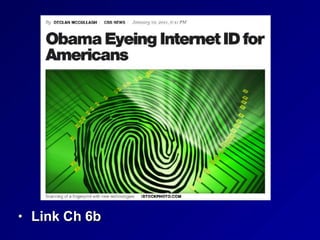
• Link Ch 6b
SAML
•
•
•
•
Security Assertion Markup Language
XML-based framework for exchanging
security information
Including authentication data
Enables SSO at Internet scale
Identity as a Service (IDaaS)
•
•
•
•
•
•
Also called "Cloud Identity"
Integrates easily with cloud hosted
applications and third party services
Easier deployment of two-factor auth.
Compounds challenges with internal
identity management and account/
access revocation
Larger attack services
Ex: Microsoft Accounts (formerly Live ID)
Credential Management Systems
•
•
•
•
•
•
Password managers, may offer:
Secure password generation
Secure password storage
Reduction in the number of passwords
users must remember
Multifactor authentication to unlock
credentials
Audit logging of all interactions
Integrating Third-party Identity Services
•
•
Hosting a third-party ID service locally,
within an enterprise
Allows internal applications to integrate
with a cloud identity
LDAP
•
•
•
•
•
•
Lightweight Directory Access Protocol
Used by most internal identity services
Including Active Directory
LDAP uses TCP or UDP 389
Can use plaintext transmission
Supports authenticated connection and
secure transmissions with TLS
Kerberos
•
•
•
•
Third-party authentication service
developed at MIT
Prevents eavesdropping and replay
attacks
Provides integrity and secrecy
Uses symmetric encryption and mutual
authentication
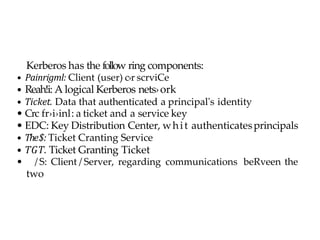
Kerberos has the follow ring components:
• Painrigml: Client (user) c›r scrviCe
• Reah!i: A logical Kerberos nets›ork
• Ticket. Data that authenticated a principal's identity
• Crc fr›i›inl: a ticket and a service key
• EDC: Key Distribution Center, whit authenticatesprincipals
• The$: Ticket Cranting Service
• TGT. Ticket Granting Ticket
• / S: Client / Server, regarding communications beRveen the
two
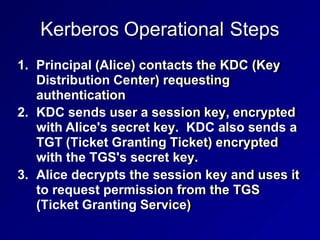
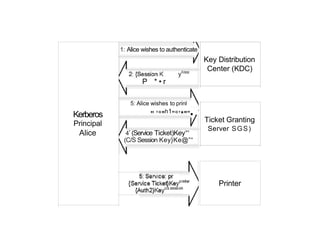
Kerberos Operational Steps
1. Principal (Alice) contacts the KDC (Key
Distribution Center) requesting
authentication
2. KDC sends user a session key, encrypted
with Alice's secret key. KDC also sends a
TGT (Ticket Granting Ticket) encrypted
with the TGS's secret key.
3. Alice decrypts the session key and uses it
to request permission from the TGS
(Ticket Granting Service)
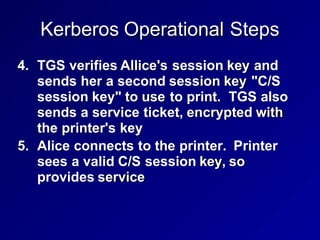
Kerberos Operational Steps
4. TGS verifies Allice's session key and
sends her a second session key "C/S
session key" to use to print. TGS also
sends a service ticket, encrypted with
the printer's key
5. Alice connects to the printer. Printer
sees a valid C/S session key, so
provides service
1: Alice wishes to authenticate
Key Distribution
Center (KDC)
P * • r
5: Alice wishes to prinl
'' ’°"h1
”°’*"”•
Kerberos
Principal
Alice 4’ (Service Ticket)Key
„,
Ticket Granting
Server SGS)
(C/S Session Key}Ke@”“
Printer
Time in Kerberos
•
•
•
•
TGT lifetime is typically 10 hours
Authenticators contain a timestamp
Will be rejected if more than 5 minutes ol
Clocks must be synchronized on all
systems
Kerberos Weaknesses
• KDC stores all keys
•
•
•
•
• Compromise of KDC exposes them all
KDC and TGS are single points of failure
Replay attacks possible for lifetime of
authenticator
Kerberos 4 allowed one user to request a
session key for another user, which could be
used to guess a password
• A weakness closed in Kerberos 5
Plaintext keys can be stolen from a client's RAM
SESAME
•
•
Secure European System for
Applications in a Multi-vendor
Environment
Has new features not present in
Kerberos
•
•
Most important: public-key encryption
This avoids Kerberos' plaintext storage
of symmetric keys
RADIUS and Diameter
•
•
•
•
•
Remote Authentication Dial In User
Service
Uses UDP ports 1812 and 1813
An AAA server
Diameter is RADIUS' successor
Uses TCP and can manage policies for
many services from a single server
TACACS and TACACS+
• Terminal Access Controller Access
Control System
•
• Uses UDP port 49 and may use TCP port
49
TACACS+ is newer
•
•
•
Allows two-factor authentication
Encrypts all data (RADIUS only encrypts
the password)
Not backwards-compatible with TACACS
PAP and CHAP
• Password Authentication Protocol
•
•
Plaintext transmission
Vulnerable to sniffing
• Challenge Handshake Authentication
Protocol
•
•
•
Server sends client a challenge
Client adds challenge to secret and
hashes it, and transmits that
Resists sniffing attacks
Microsoft Active Directory Domains
•
•
• Groups users and network access into
domains
Uses Kerberos
Domains can have trust relationships
•
•
One-way or two-way
Nontransitive or transitive
•
• A transitive trust extends to any other
domain either partner trusts
"Friend of a friend"
Access Control Models
Three Models
•
•
•
Discretionary Access Control (DAC)
Mandatory Access Control (MAC)
Non-Discretionary Access Control
Discretionary Access Control (DAC)
•
•
•
•
Owners have full control over assets
Can share them as they wish
Unix and Windows file systems use DAC
User errors can expose confidential data
Mandatory Access Control (MAC)
•
•
•
•
Subjects have clearance
Objects have labels
Typically Confidential, Secret, and Top
Secret
MAC is expensive and difficult to
implement
Non-Discretionary Access Control
•
•
• Users don't have discretion when
accessing objects
Cannot transfer objects to other subjects
Two types:
•
•
Role-Based Access Control (RBAC)
Task-based access control
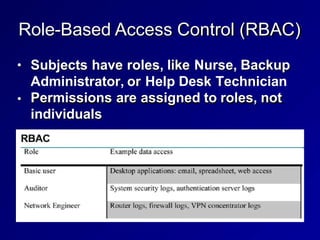
Role-Based Access Control (RBAC)
•
•
Subjects have roles, like Nurse, Backup
Administrator, or Help Desk Technician
Permissions are assigned to roles, not
individuals
Task-Based Access Control
•
•
Works like RBAC, but focuses on the
tasks each subject must perform
Such as writing prescriptions, restoring
data from a backup tap,or opening a help
desk ticket
Rule-Based Access Control
•
•
Uses a set of rules, in "it/then" format
Ex: firewall rules
Content- and Context-Dependent
Access Controls
•
•
May be added to other systems for defense-
in-depth
Content-dependent access control
•
• Additional criteria beyond identification and
authorization
Employees may be allowed to see their own
HR data, but not the CIO's data
• Context-dependent access controls
• Applies additional context, such as time of
day
70
2

Authentication Methods authauthauthauthauthautha

  • 1.
  • 2.
  • 3.
    Authentication Methods • Type1: Something you know • • • • Easiest and weakest method Type 2: Something you have Type 3: Something you are A fourth type is where you are
  • 4.
    Passwords: Four Types • • • • Staticpasswords Passphrases One-time passwords Dynamic passwords
  • 5.
    Static Passwords • • • Reusable passwordsthat may or may not expire Typically user-generated Work best when combined with another authentication type, such as a smart card or biometric control
  • 6.
    Passphrases • • Long static passwordscomprised of words in a phrase or sentence • "I will pass the CISSP in 6 months!" Stronger if you use nonsense words, mix case, and use numbers and symbols
  • 7.
    One-Time Passwords • • Very securebut difficult to manage Impossible to reuse, valid only for one use
  • 8.
    Dynamic Passwords • • Change atregular intervals Tokens are expensive
  • 9.
    Strong Authentication • • Also calledMultifactor Authentication More than one authentication factor • Ex: ATM card and PIN
  • 10.
    Password Guessing • • May bedetected from system logs Clipping levels distinguish malicious attacks from normal users • • Ex: more than five failed logins per hour Account lockout after a number of failed login attempts
  • 11.
    Password Hashes and PasswordCracking • • • Plaintext passwords are not usually stored on a system anymore Password hash is stored instead Password cracking • Calculating hash for a long list of passwords, trying to match the hash value
  • 12.
    Password Hashes • • Stored in/etc/shadow on Unix systems In SAM (Security Accounts Manager) file (part of the Registry) on Windows • • • Local account hashes stored on local system drive Domain account hashes stored on domain controller Hashes also cached on the local system after a domain login
  • 13.
    Capturing Hashes • • • May besniffed from network traffic Or read from RAM with fgdump or Metasploit's hashdump SAM file is locked while the operating system is running
  • 14.
    • LANMAN (LM)hash doesn't change
  • 15.
    Dictionary Attack • • • Use alist of possible passwords Fast and efficient technique Countermeasure: password complexity and length rules
  • 16.
    Brute Force andHybrid Attacks • • • Brute Force: try all possible combinations of characters Slow, but much faster with GPUs (Graphical Processing Units) Rainbow tables trade time for memory • • Most effective on unsalted passwords, like Microsoft's Hybrid attack • Uses a dictionary and modifications of the words, like 1337sp33k
  • 17.
    Salts • • • A random valueadded to the password before hashing If two users have the same password, the hash is different Makes rainbow tables less useful
  • 18.
  • 19.
    Password Control • • Users oftenwrite down passwords and place them somewhere unsafe Like sticky notes on monitors
  • 20.
    Type 2 Authentication SomethingYou Have • Synchronous Dynamic Token • • • Synchronized with a central server Uses time or counter to change values Ex: RSA's SecureID, Google Authenticator • Asynchronous Dynamic Token • • • Not synchronized with a central server Ex: Challenge-response token User must enter challenge and PIN
  • 21.
    workstation server 1 - Userenters username 2 —System sends challenge to user 3 —User enters PIN and challenge; token generates response, which is sent to the server Smart Card FIGURE 6.6 Asynchronous Challenge-Response
  • 22.
    Type 3 Authentication SomethingYou Are • Enrollment • Registering users with a biometric system • Ex: taking fingerprints • Should take 2 minutes or less • Throughput • • Time required to authenticate a user Typically 6-10 seconds
  • 23.
    Accuracy of BiometricSystems • • • False Reject Rate (FRR) -- Type I errors False Accept Rate (FAR) -- Type II errors Crossover Error Rate (CER)
  • 24.
    Types of BiometricControls • Fingerprints are most common • Data is mathematical representation of minutiae -- details of fingerprint whorls, ridges, bifurcation, etc.
  • 25.
    FIGMRE 6.8 FingerprintIVIInuflae {7]
  • 26.
    Retina Scan • • • Laser scanof the capillaries that feed the retina in the back of the eye Rarely used because of health risks and invasion-of-privacy issues Exchange of bodily fluids should be avoided
  • 27.
    Iris Scan • Passivebiometric control • • • • • Can be done without subject's knowledge Camera photographs the iris (colored portion of the eye) Compares photo to database Works through contact lenses and glasses High accuracy, no exchange of bodily fluids
  • 28.
    Hand Geometry • • Measure length,width, thickness, and surface area of hand Simple, can require as little as 9 bytes of data
  • 29.
    Keyboard Dynamics • • • How harda person presses each key Rhythm of keypresses Cheap to implement and effective
  • 30.
    Dynamic Signature • • Process ofsigning with a pen Similar to keyboard dynamics
  • 31.
    Voiceprint • • • Vulnerable to replayattack So other access controls must be combined with it Voices may change due to illness, leading to a false rejection
  • 32.
    Facial Scan • • • • • Also calledfacial recognition Passive but expensive Not commonly used for authentication Law enforcement and security agencies use facial recognition at high-value, publicly accessible targets Superbowl XXXV was the first major sporting event to use facial recognition to look for terrorists in 2001 (link Ch 6a)
  • 33.
    Someplace You Are • • • • Locationfound from GPS or IP address Can deny access if the subject is in the incorrect location Credit card companies use this technique to detect fraud Transactions from abroad are rejected, unless the user notifies the credit card company of the trip
  • 34.
  • 35.
  • 36.
    Centralized Access Control • • Onelogical point for access control Can provide Single Sign-On (SSO) • • One authentication allows access to multiple systems Can centrally provide AAA services • • • Authentication Authorization Accountability
  • 37.
    Decentralized Access Control • • • • • Localsites maintain independent systems Provides more local power over data Risks: adherence to policies may vary Attackers may find the weakest link Note: DAC is Discretionary Access Control; not Decentralized Access Control
  • 38.
    Single Sign-On (SSO) • • • Onecentral system for authentication More convenient for users and administrators Risks: single point of attack, and increased damage from a compromise or unattended desktop
  • 39.
    Session Management ofSingle Sign On • • • • SSO should always be combined with dual-factor authentication But an attacker might hijack an authenticated session Session timeouts and locking screensavers should be used Users should be trained to lock their workstations when they leave their desks
  • 40.
    Access Provisioning Lifecycle • • • • • Passwordpolicy compliance checking Notify users when passwords are about to expire Identify life cycle changes, such as accounts inactive for 30 days or new accounts that are unused for 10 days Revoke access rights when contracts expire Coordinate account revocation with human resources; include termination, horizontal, and vertical moves
  • 41.
    User Entitlement, AccessReview, and Audit • • • • Access aggregation occurs when a user gains more access to more systems Authorization creep --users gain more entitlement without shedding the old ones Can defeat least privilege and separation of duties Entitlements must be regularly reviewed and audited
  • 42.
    Federated Identity Management • • • AppliesSingle Sign-On across organizations A trusted authority provides a digital identity above the enterprise level In practice, Facebook seems to be the world's identity authority
  • 43.
  • 44.
    SAML • • • • Security Assertion MarkupLanguage XML-based framework for exchanging security information Including authentication data Enables SSO at Internet scale
  • 45.
    Identity as aService (IDaaS) • • • • • • Also called "Cloud Identity" Integrates easily with cloud hosted applications and third party services Easier deployment of two-factor auth. Compounds challenges with internal identity management and account/ access revocation Larger attack services Ex: Microsoft Accounts (formerly Live ID)
  • 46.
    Credential Management Systems • • • • • • Passwordmanagers, may offer: Secure password generation Secure password storage Reduction in the number of passwords users must remember Multifactor authentication to unlock credentials Audit logging of all interactions
  • 47.
    Integrating Third-party IdentityServices • • Hosting a third-party ID service locally, within an enterprise Allows internal applications to integrate with a cloud identity
  • 48.
    LDAP • • • • • • Lightweight Directory AccessProtocol Used by most internal identity services Including Active Directory LDAP uses TCP or UDP 389 Can use plaintext transmission Supports authenticated connection and secure transmissions with TLS
  • 49.
    Kerberos • • • • Third-party authentication service developedat MIT Prevents eavesdropping and replay attacks Provides integrity and secrecy Uses symmetric encryption and mutual authentication
  • 50.
    Kerberos has thefollow ring components: • Painrigml: Client (user) c›r scrviCe • Reah!i: A logical Kerberos nets›ork • Ticket. Data that authenticated a principal's identity • Crc fr›i›inl: a ticket and a service key • EDC: Key Distribution Center, whit authenticatesprincipals • The$: Ticket Cranting Service • TGT. Ticket Granting Ticket • / S: Client / Server, regarding communications beRveen the two
  • 51.
    Kerberos Operational Steps 1.Principal (Alice) contacts the KDC (Key Distribution Center) requesting authentication 2. KDC sends user a session key, encrypted with Alice's secret key. KDC also sends a TGT (Ticket Granting Ticket) encrypted with the TGS's secret key. 3. Alice decrypts the session key and uses it to request permission from the TGS (Ticket Granting Service)
  • 52.
    Kerberos Operational Steps 4.TGS verifies Allice's session key and sends her a second session key "C/S session key" to use to print. TGS also sends a service ticket, encrypted with the printer's key 5. Alice connects to the printer. Printer sees a valid C/S session key, so provides service
  • 53.
    1: Alice wishesto authenticate Key Distribution Center (KDC) P * • r 5: Alice wishes to prinl '' ’°"h1 ”°’*"”• Kerberos Principal Alice 4’ (Service Ticket)Key „, Ticket Granting Server SGS) (C/S Session Key}Ke@”“ Printer
  • 54.
    Time in Kerberos • • • • TGTlifetime is typically 10 hours Authenticators contain a timestamp Will be rejected if more than 5 minutes ol Clocks must be synchronized on all systems
  • 55.
    Kerberos Weaknesses • KDCstores all keys • • • • • Compromise of KDC exposes them all KDC and TGS are single points of failure Replay attacks possible for lifetime of authenticator Kerberos 4 allowed one user to request a session key for another user, which could be used to guess a password • A weakness closed in Kerberos 5 Plaintext keys can be stolen from a client's RAM
  • 56.
    SESAME • • Secure European Systemfor Applications in a Multi-vendor Environment Has new features not present in Kerberos • • Most important: public-key encryption This avoids Kerberos' plaintext storage of symmetric keys
  • 57.
    RADIUS and Diameter • • • • • RemoteAuthentication Dial In User Service Uses UDP ports 1812 and 1813 An AAA server Diameter is RADIUS' successor Uses TCP and can manage policies for many services from a single server
  • 58.
    TACACS and TACACS+ •Terminal Access Controller Access Control System • • Uses UDP port 49 and may use TCP port 49 TACACS+ is newer • • • Allows two-factor authentication Encrypts all data (RADIUS only encrypts the password) Not backwards-compatible with TACACS
  • 59.
    PAP and CHAP •Password Authentication Protocol • • Plaintext transmission Vulnerable to sniffing • Challenge Handshake Authentication Protocol • • • Server sends client a challenge Client adds challenge to secret and hashes it, and transmits that Resists sniffing attacks
  • 60.
    Microsoft Active DirectoryDomains • • • Groups users and network access into domains Uses Kerberos Domains can have trust relationships • • One-way or two-way Nontransitive or transitive • • A transitive trust extends to any other domain either partner trusts "Friend of a friend"
  • 61.
  • 62.
    Three Models • • • Discretionary AccessControl (DAC) Mandatory Access Control (MAC) Non-Discretionary Access Control
  • 63.
    Discretionary Access Control(DAC) • • • • Owners have full control over assets Can share them as they wish Unix and Windows file systems use DAC User errors can expose confidential data
  • 64.
    Mandatory Access Control(MAC) • • • • Subjects have clearance Objects have labels Typically Confidential, Secret, and Top Secret MAC is expensive and difficult to implement
  • 65.
    Non-Discretionary Access Control • • •Users don't have discretion when accessing objects Cannot transfer objects to other subjects Two types: • • Role-Based Access Control (RBAC) Task-based access control
  • 66.
    Role-Based Access Control(RBAC) • • Subjects have roles, like Nurse, Backup Administrator, or Help Desk Technician Permissions are assigned to roles, not individuals
  • 67.
    Task-Based Access Control • • Workslike RBAC, but focuses on the tasks each subject must perform Such as writing prescriptions, restoring data from a backup tap,or opening a help desk ticket
  • 68.
    Rule-Based Access Control • • Usesa set of rules, in "it/then" format Ex: firewall rules
  • 69.
    Content- and Context-Dependent AccessControls • • May be added to other systems for defense- in-depth Content-dependent access control • • Additional criteria beyond identification and authorization Employees may be allowed to see their own HR data, but not the CIO's data • Context-dependent access controls • Applies additional context, such as time of day
  • 70.