INFORMATION
SECURITY
LECTURE 2
1
SECURITY IN COMPUTERS
 Two main types; External and Internal Security
 External security: Securing computer against external factors such as fires, floods,
earthquakes, stolen disks/tapes, etc. by maintaining adequate backup, using security
guards, allowing access to sensitive information to only trusted employees/users, etc.
 Internal security: User authentication, access control, and cryptography mechanisms
INFORMATION SECURITY
 Security in Computers
 Authentication: Verifying the identity of a user (person or program) before
permitting access to the requested resource
 Access Control: Once authenticated, access control mechanisms prohibit a
user/process from accessing those resources/information that he/she/it is not
authorized to access
 Cryptography: Means of encrypting private information so that unauthorized
access cannot use information
AUTHENTICATION
 Computer-to-computer authentication
 computers can remember high-quality cryptographic keys and perform
cryptographic operations
 Human-to-computer authentication
 humans cannot store large keys
 humans cannot accurately or efficiently perform cryptographic operations
 That’s why we need special methods for authenticating humans
AUTHENTICATION
 There are three main ways of authenticating a human:
 Something you know
 A password,
 cryptographic key, or
 the correct answer to a challenge-response test
 Something you own
 A physical key,
 security card, or
 a one-time password generator
 Something you are
 Some biometric measurement (facial features, fingerprint, retina scan, or voice print etc.)
INFORMATION SECURITY
 Attacks in Computer Security:
 Virus: a potentially damaging computer program, can spread (by replicating) and
damage files
 Trojan horse: a script that hides within or looks like a legitimate file (data) until
triggered, but it does not replicate itself on other computers
 Spyware: a program placed on computer without user knowledge, tracks and sends
user activity to the other (spying) computer
 Adware: a program that, without user’s consent, displays online advertisements
 Spam: an unsolicited e-mail message (usually commercial) sent to many recipients
 Phishing: a scam in which a perpetrator sends an official looking e-mail that
attempts to obtain your personal information
INFORMATION SECURITY
 Attacks in Computer Security:
 Malicious Code:
 The malicious code attack includes the execution of viruses, worms, Trojan horses,
and active Web scripts with the intent to destroy or steal information.
 Other forms of malware include covert software applications—bots, spyware, and
adware.
 A bot (an abbreviation of robot) is “an automated software program that executes
certain commands when it receives a specific input”.
 Bots are often the technology used to implement Trojan horses, logic bombs, back
doors, and spyware.
INFORMATION SECURITY
 Attacks in Computer Security:
Hoaxes:
 A more devious attack on computer systems is the transmission of a virus hoax with a real
virus attached.
 When the attack is masked in a seemingly legitimate message, unsuspecting users more
readily distribute it.
Back Doors:
 Using a known or previously unknown and newly discovered access mechanism, an attacker
can gain access to a system or network resource through a back door.
Password Crack:
 Attempting to reverse-calculate a password is often called cracking.
 It is used when a copy of the Security Account Manager (SAM) data file, which contains
hashed representation of the user’s password, can be obtained.
INFORMATION SECURITY
 Attacks in Computer Security:
Brute Force:
 The application of computing and network resources which try every possible password
combination is called a brute force attack.
 Often used to obtain passwords to commonly used accounts, it is sometimes called a password
attack.
 Dictionary:
 The dictionary attack is a variation of the brute force attack which narrows the field by selecting
specific target accounts and using a list of commonly used passwords (the dictionary) instead of
random combinations.
 Organizations can use similar dictionaries to disallow passwords during the reset process and thus
guard against easy-to-guess passwords.
 Remedy: Rules requiring numbers and/or special characters in passwords make the dictionary
attack less effective.
INFORMATION SECURITY
 Attacks in Computer Security:
Denial-of- Service Attack (DoS) & Distributed Denial-of- Service Attack (DDoS)
• In a Denial-of-Service (DoS) attack, the attacker sends a large number of connection or
information requests to a target.
• The target system becomes overloaded and cannot respond to legitimate requests for service.
• A distributed denial-of-service (DDoS) is an attack in which a coordinated stream of requests is
launched against a target from many locations at the same time.
• DDoS attacks are preceded by a preparation phase in which many systems, perhaps thousands,
are compromised.
• The compromised machines are turned into zombies.
• Machines that are directed remotely by the attacker to participate in the attack.
INFORMATION SECURITY
 Attacks in Computer Security:
Spoofing
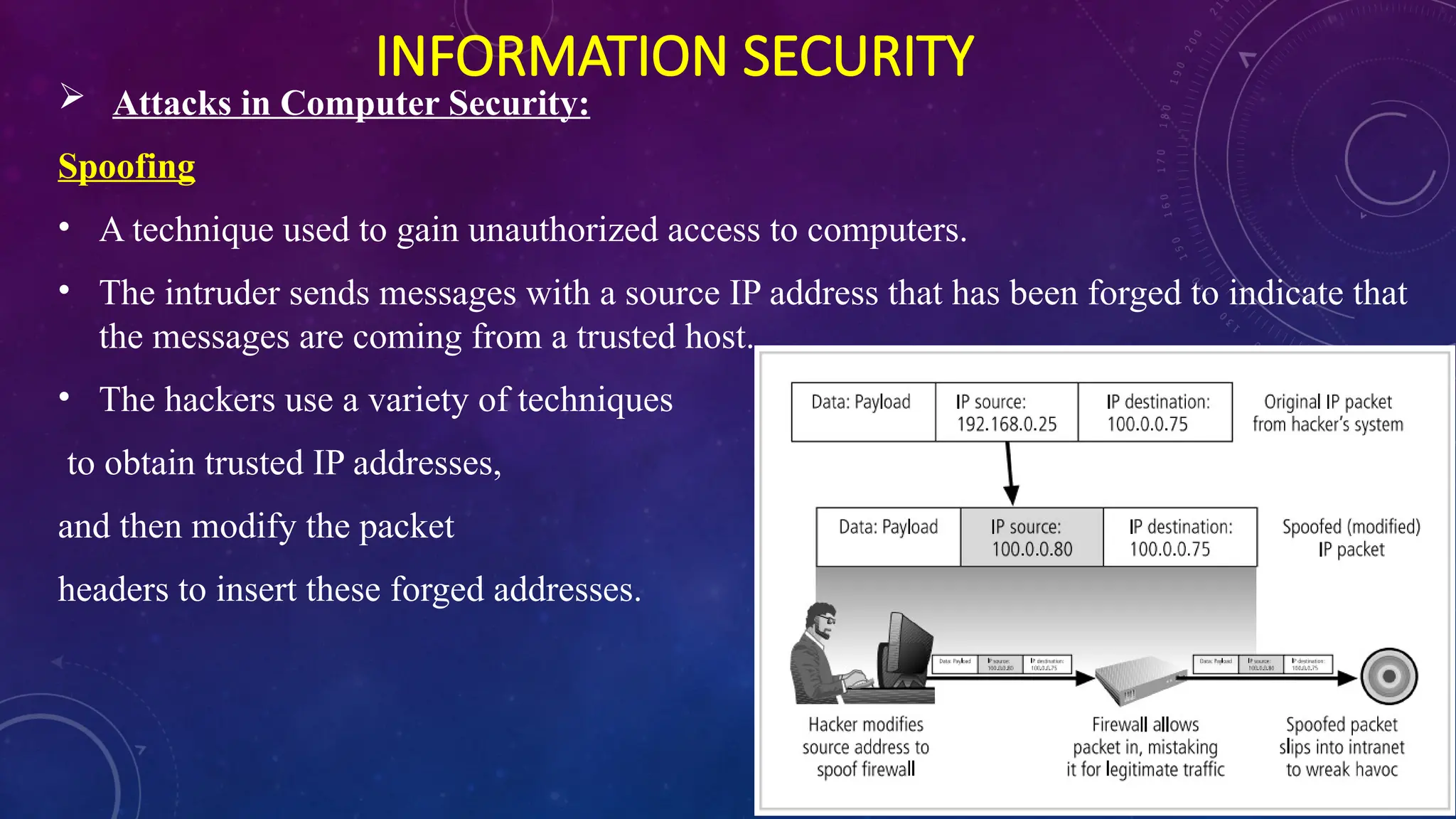
• A technique used to gain unauthorized access to computers.
• The intruder sends messages with a source IP address that has been forged to indicate that
the messages are coming from a trusted host.
• The hackers use a variety of techniques
to obtain trusted IP addresses,
and then modify the packet
headers to insert these forged addresses.
INFORMATION SECURITY
 Attacks in Computer Security:
Man-in-the –Middle:
Also called TCP Hijacking.
An attacker monitors (or sniffs) packets from the network, modifies them, and inserts them
back into the network.
This type of attack uses IP spoofing to enable an attacker to impersonate another entity on the
network.
It allows the attacker to eavesdrop as well as to change, delete, reroute, add, forge, or divert
data.
INFORMATION SECURITY
 Attacks in Computer Security:
Mail Bomber:
Another form of e-mail attack.
Also a DoS is called a mail bomb.
An attacker routes large quantities of e-mail to the target.
SECURITY PRINCIPLES TO FOLLOW
 Turn off file sharing
 Disable Wi-Fi and Bluetooth if not needed
 Turn off automatic connections
 Install an antivirus program on all your computers
 Think twice before posting your personal information online
 Never open an e-mail attachment unless you are expecting it and it is from a trusted source
 Install a personal firewall program
 Disable file and printer sharing on Internet connection
 Always have strong passwords
 Limit the amount of information you provide to websites; fill in only required information
 Clear your history file when you are finished browsing
INFORMATION SECURITY
CNSS Security Model:
 CNSS - Committee on National Security Systems
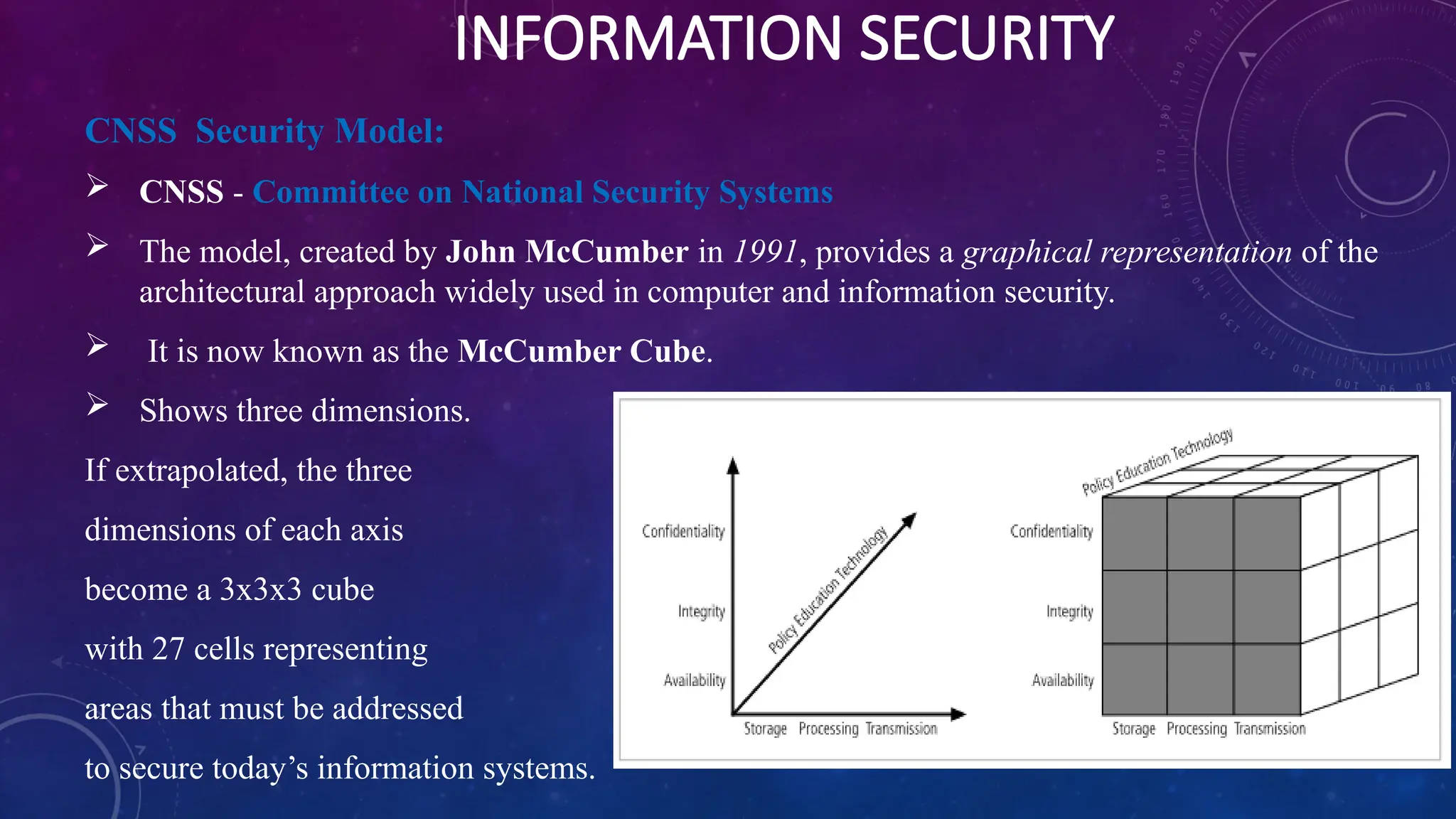
 The model, created by John McCumber in 1991, provides a graphical representation of the
architectural approach widely used in computer and information security.
 It is now known as the McCumber Cube.
 Shows three dimensions.
If extrapolated, the three
dimensions of each axis
become a 3x3x3 cube
with 27 cells representing
areas that must be addressed
to secure today’s information systems.
INFORMATION SECURITY
CNSS Security Model:
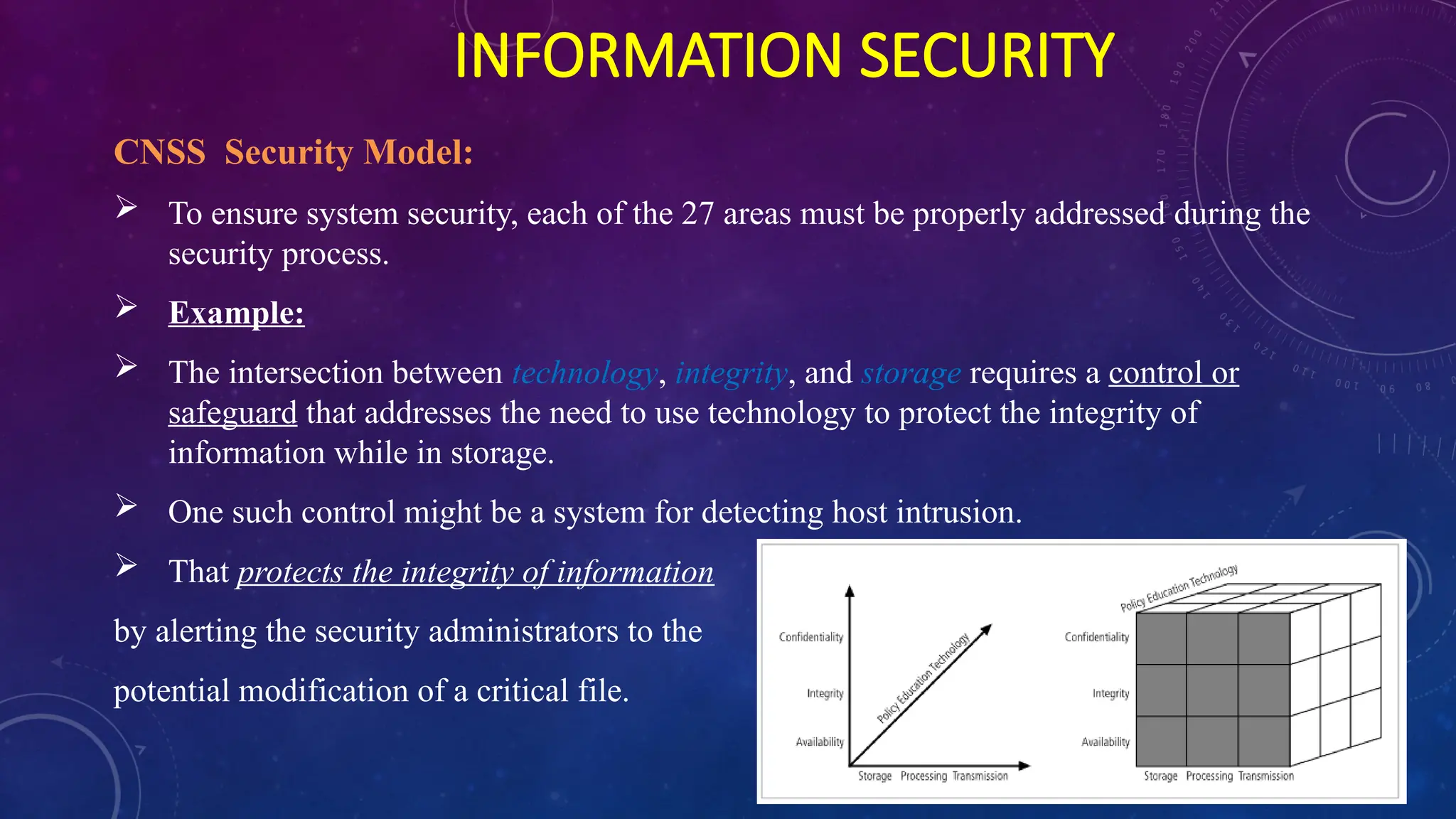
 To ensure system security, each of the 27 areas must be properly addressed during the
security process.
 Example:
 The intersection between technology, integrity, and storage requires a control or
safeguard that addresses the need to use technology to protect the integrity of
information while in storage.
 One such control might be a system for detecting host intrusion.
 That protects the integrity of information
by alerting the security administrators to the
potential modification of a critical file.
INFORMATION SECURITY
 Security Mechanisms:
 Encipherment:
 The use of mechanical algorithms to transform data into a form that is not readily
understandable.
 Digital Signatures:
 Data appended to or a cryptographic transformation of a data unit that allows a recipient
of the data unit to prove the source and integrity of the data unit and protect against
forgery (e.g. by the recipient)
 Access Control:
 A variety of mechanisms that enforce access rights to resources.
 Data Integrity:
 A variety of mechanisms use to assure the integrity of the data unit or stream of data
units.
INFORMATION SECURITY
 Security Mechanisms:
 Authentication Exchange:
 A mechanism intended to ensure the identity of an entity by means of information
exchange.
 Traffic Padding:
 The insertion of bits into gaps in a data stream to frustrate traffic analysis attempts.
 Routing Control:
 Enables selection of particular secure routes for certain data and allows routing changes,
especially when a breach of security is suspected.
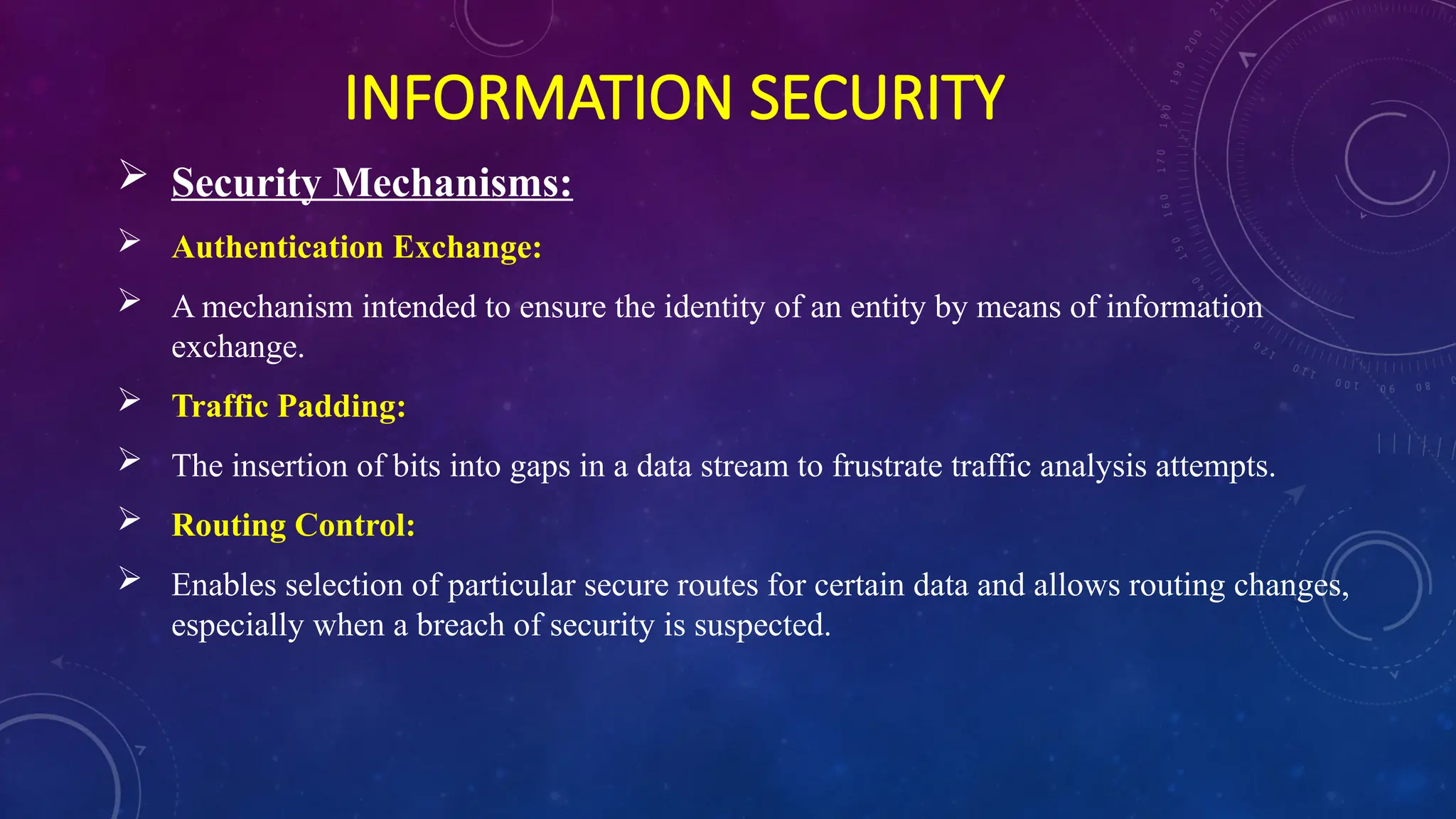
THREATS TO INFORMATION SECURITY
INFORMATION SECURITY

Lecture2-InforSec-Computer and Internet security.pptx

  • 1.
  • 2.
    SECURITY IN COMPUTERS Two main types; External and Internal Security  External security: Securing computer against external factors such as fires, floods, earthquakes, stolen disks/tapes, etc. by maintaining adequate backup, using security guards, allowing access to sensitive information to only trusted employees/users, etc.  Internal security: User authentication, access control, and cryptography mechanisms
  • 3.
    INFORMATION SECURITY  Securityin Computers  Authentication: Verifying the identity of a user (person or program) before permitting access to the requested resource  Access Control: Once authenticated, access control mechanisms prohibit a user/process from accessing those resources/information that he/she/it is not authorized to access  Cryptography: Means of encrypting private information so that unauthorized access cannot use information
  • 4.
    AUTHENTICATION  Computer-to-computer authentication computers can remember high-quality cryptographic keys and perform cryptographic operations  Human-to-computer authentication  humans cannot store large keys  humans cannot accurately or efficiently perform cryptographic operations  That’s why we need special methods for authenticating humans
  • 5.
    AUTHENTICATION  There arethree main ways of authenticating a human:  Something you know  A password,  cryptographic key, or  the correct answer to a challenge-response test  Something you own  A physical key,  security card, or  a one-time password generator  Something you are  Some biometric measurement (facial features, fingerprint, retina scan, or voice print etc.)
  • 6.
    INFORMATION SECURITY  Attacksin Computer Security:  Virus: a potentially damaging computer program, can spread (by replicating) and damage files  Trojan horse: a script that hides within or looks like a legitimate file (data) until triggered, but it does not replicate itself on other computers  Spyware: a program placed on computer without user knowledge, tracks and sends user activity to the other (spying) computer  Adware: a program that, without user’s consent, displays online advertisements  Spam: an unsolicited e-mail message (usually commercial) sent to many recipients  Phishing: a scam in which a perpetrator sends an official looking e-mail that attempts to obtain your personal information
  • 7.
    INFORMATION SECURITY  Attacksin Computer Security:  Malicious Code:  The malicious code attack includes the execution of viruses, worms, Trojan horses, and active Web scripts with the intent to destroy or steal information.  Other forms of malware include covert software applications—bots, spyware, and adware.  A bot (an abbreviation of robot) is “an automated software program that executes certain commands when it receives a specific input”.  Bots are often the technology used to implement Trojan horses, logic bombs, back doors, and spyware.
  • 8.
    INFORMATION SECURITY  Attacksin Computer Security: Hoaxes:  A more devious attack on computer systems is the transmission of a virus hoax with a real virus attached.  When the attack is masked in a seemingly legitimate message, unsuspecting users more readily distribute it. Back Doors:  Using a known or previously unknown and newly discovered access mechanism, an attacker can gain access to a system or network resource through a back door. Password Crack:  Attempting to reverse-calculate a password is often called cracking.  It is used when a copy of the Security Account Manager (SAM) data file, which contains hashed representation of the user’s password, can be obtained.
  • 9.
    INFORMATION SECURITY  Attacksin Computer Security: Brute Force:  The application of computing and network resources which try every possible password combination is called a brute force attack.  Often used to obtain passwords to commonly used accounts, it is sometimes called a password attack.  Dictionary:  The dictionary attack is a variation of the brute force attack which narrows the field by selecting specific target accounts and using a list of commonly used passwords (the dictionary) instead of random combinations.  Organizations can use similar dictionaries to disallow passwords during the reset process and thus guard against easy-to-guess passwords.  Remedy: Rules requiring numbers and/or special characters in passwords make the dictionary attack less effective.
  • 10.
    INFORMATION SECURITY  Attacksin Computer Security: Denial-of- Service Attack (DoS) & Distributed Denial-of- Service Attack (DDoS) • In a Denial-of-Service (DoS) attack, the attacker sends a large number of connection or information requests to a target. • The target system becomes overloaded and cannot respond to legitimate requests for service. • A distributed denial-of-service (DDoS) is an attack in which a coordinated stream of requests is launched against a target from many locations at the same time. • DDoS attacks are preceded by a preparation phase in which many systems, perhaps thousands, are compromised. • The compromised machines are turned into zombies. • Machines that are directed remotely by the attacker to participate in the attack.
  • 11.
    INFORMATION SECURITY  Attacksin Computer Security: Spoofing • A technique used to gain unauthorized access to computers. • The intruder sends messages with a source IP address that has been forged to indicate that the messages are coming from a trusted host. • The hackers use a variety of techniques to obtain trusted IP addresses, and then modify the packet headers to insert these forged addresses.
  • 12.
    INFORMATION SECURITY  Attacksin Computer Security: Man-in-the –Middle: Also called TCP Hijacking. An attacker monitors (or sniffs) packets from the network, modifies them, and inserts them back into the network. This type of attack uses IP spoofing to enable an attacker to impersonate another entity on the network. It allows the attacker to eavesdrop as well as to change, delete, reroute, add, forge, or divert data.
  • 13.
    INFORMATION SECURITY  Attacksin Computer Security: Mail Bomber: Another form of e-mail attack. Also a DoS is called a mail bomb. An attacker routes large quantities of e-mail to the target.
  • 14.
    SECURITY PRINCIPLES TOFOLLOW  Turn off file sharing  Disable Wi-Fi and Bluetooth if not needed  Turn off automatic connections  Install an antivirus program on all your computers  Think twice before posting your personal information online  Never open an e-mail attachment unless you are expecting it and it is from a trusted source  Install a personal firewall program  Disable file and printer sharing on Internet connection  Always have strong passwords  Limit the amount of information you provide to websites; fill in only required information  Clear your history file when you are finished browsing
  • 15.
    INFORMATION SECURITY CNSS SecurityModel:  CNSS - Committee on National Security Systems  The model, created by John McCumber in 1991, provides a graphical representation of the architectural approach widely used in computer and information security.  It is now known as the McCumber Cube.  Shows three dimensions. If extrapolated, the three dimensions of each axis become a 3x3x3 cube with 27 cells representing areas that must be addressed to secure today’s information systems.
  • 16.
    INFORMATION SECURITY CNSS SecurityModel:  To ensure system security, each of the 27 areas must be properly addressed during the security process.  Example:  The intersection between technology, integrity, and storage requires a control or safeguard that addresses the need to use technology to protect the integrity of information while in storage.  One such control might be a system for detecting host intrusion.  That protects the integrity of information by alerting the security administrators to the potential modification of a critical file.
  • 17.
    INFORMATION SECURITY  SecurityMechanisms:  Encipherment:  The use of mechanical algorithms to transform data into a form that is not readily understandable.  Digital Signatures:  Data appended to or a cryptographic transformation of a data unit that allows a recipient of the data unit to prove the source and integrity of the data unit and protect against forgery (e.g. by the recipient)  Access Control:  A variety of mechanisms that enforce access rights to resources.  Data Integrity:  A variety of mechanisms use to assure the integrity of the data unit or stream of data units.
  • 18.
    INFORMATION SECURITY  SecurityMechanisms:  Authentication Exchange:  A mechanism intended to ensure the identity of an entity by means of information exchange.  Traffic Padding:  The insertion of bits into gaps in a data stream to frustrate traffic analysis attempts.  Routing Control:  Enables selection of particular secure routes for certain data and allows routing changes, especially when a breach of security is suspected.
  • 19.
  • 20.