Web Programming
Lecture 1
World Wide Web
What Is the World Wide Web?
The internet is a network
of computer networks
worldwide
The web is a tool used to
retrieve information
published on the internet
To navigate the web we
use a browser i.E.
Netscape or internet
explorer
Brief History of the www
1968 - DARPA (Defense Advanced Research Projects
Agency) contracts with BBN (Bolt, Beranek & Newman)
to create ARPAnet
1970 - First five nodes:
UCLA
Stanford
UC Santa Barbara
U of Utah, and
BBN
1974 - TCP specification by Vint Cerf
1984 – On January 1, the Internet with its
1000 hosts converts en masse to using
TCP/IP for its messaging
Internet Protocols
HTTP
Original web communication protocol
Request-Response type
Client (browser) will open a connection to a server and
then send a request using a very specific format
Server will respond and close the connection
Stateless
Does not maintain any connection information between
transaction information
Feature
Negotiation of data representation, allowing systems to
build indepently of the data being transferred
TCP/IP
Transmission Control Protocol over Internet Protocol
IP ensures that data packets reach the destination from the
source of communication
Not necessarily data packets follow the same path
TCP keeps track of these packets, and manages the
assembling of these packets to form the original message
Thus, both TCP and IP work together to ensure that
effective transmission of data over the internet
WebSite (Web Brouchers)
vs
Web Application
Web Brochures vs. Web Applications
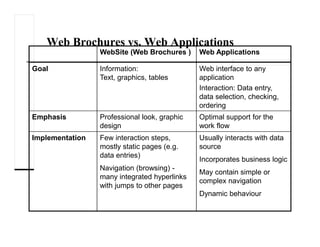
WebSite (Web Brochures ) Web Applications
Goal Information:
Text, graphics, tables
Web interface to any
application
Interaction: Data entry,
data selection, checking,
ordering
Emphasis Professional look, graphic
design
Optimal support for the
work flow
Implementation Few interaction steps,
mostly static pages (e.g.
data entries)
Navigation (browsing) -
many integrated hyperlinks
with jumps to other pages
Usually interacts with data
source
Incorporates business logic
May contain simple or
complex navigation
Dynamic behaviour
Web Brochures vs. Web Applications
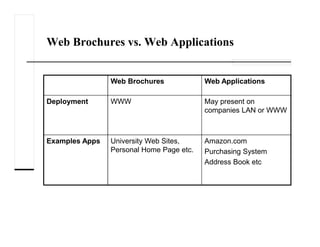
Web Brochures Web Applications
Deployment WWW May present on
companies LAN or WWW
Examples Apps University Web Sites,
Personal Home Page etc.
Amazon.com
Purchasing System
Address Book etc
c
Advantages of Using
Web Applications
Allows you to browse a wide
variety of internet sources
Instantaneous connections to
internet sites world wide
Disadvantages of Using
Web Applications
Connections can be slow or
busy
No standard methods of
organization
Out-of -date materials may not
be removed
Contents can be (maliciously)
altered
Sites can simply be
moved/removed
Web Application
Architecture
Layers
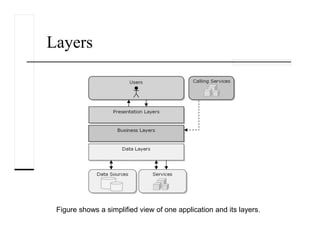
Figure shows a simplified view of one application and its layers.
Layers
It is important to note that the layers are merely logical groupings of the
software components that make up the application or service.
They help to differentiate between the different kinds of tasks
performed by the components.
The make it easier to design reusability into the solution.
Each logical layer contains a number of discrete component types
grouped into sublayers, with each sublayer performing a specific kind of
task.
By identifying the generic kinds of components that exist in most
solutions, you can construct a meaningful map of an application or
service, and then use this map as a blueprint for your design.
Evolution of Enterprise
Application Framework for C/S Arc
Single tier
Two tier
Three tier
RPC based
Remote object based
Three tier (HTML browser and Web server)
N-Tier
Client-server architectures
1-tier Architecture
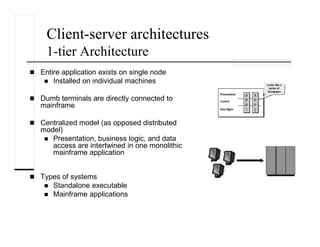
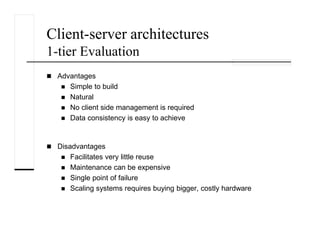
Entire application exists on single node
Installed on individual machines
Dumb terminals are directly connected to
mainframe
Centralized model (as opposed distributed
model)
Presentation, business logic, and data
access are intertwined in one monolithic
mainframe application
Types of systems
Standalone executable
Mainframe applications
Client-server architectures
1-tier Evaluation
Advantages
Simple to build
Natural
No client side management is required
Data consistency is easy to achieve
Disadvantages
Facilitates very little reuse
Maintenance can be expensive
Single point of failure
Scaling systems requires buying bigger, costly hardware
Client-server architectures
2-tier Architecture
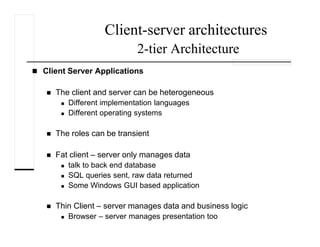
Client Server Applications
The client and server can be heterogeneous
Different implementation languages
Different operating systems
The roles can be transient
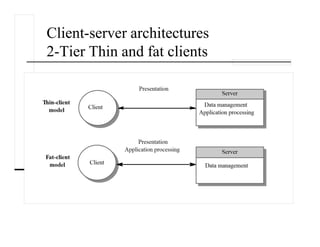
Fat client – server only manages data
talk to back end database
SQL queries sent, raw data returned
Some Windows GUI based application
Thin Client – server manages data and business logic
Browser – server manages presentation too
Client-server architectures
2-Tier Thin and fat clients
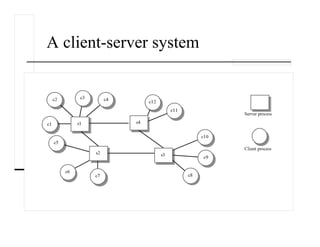
A client-server system
Client-server architectures
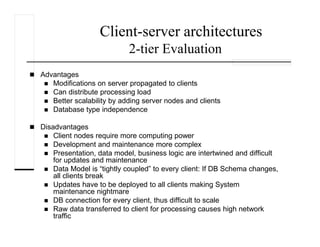
2-tier Evaluation
Advantages
Modifications on server propagated to clients
Can distribute processing load
Better scalability by adding server nodes and clients
Database type independence
Disadvantages
Client nodes require more computing power
Development and maintenance more complex
Presentation, data model, business logic are intertwined and difficult
for updates and maintenance
Data Model is “tightly coupled” to every client: If DB Schema changes,
all clients break
Updates have to be deployed to all clients making System
maintenance nightmare
DB connection for every client, thus difficult to scale
Raw data transferred to client for processing causes high network
traffic
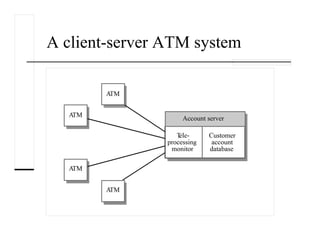
A client-server ATM system
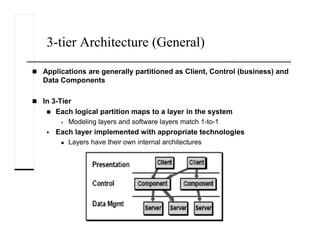
3-tier Architecture (General)
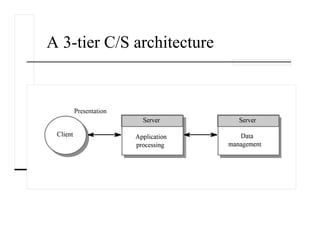
Applications are generally partitioned as Client, Control (business) and
Data Components
In 3-Tier
Each logical partition maps to a layer in the system
Modeling layers and software layers match 1-to-1
Each layer implemented with appropriate technologies
Layers have their own internal architectures
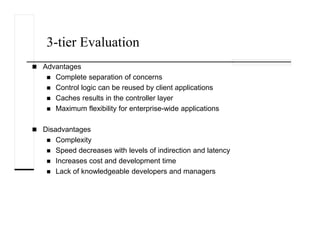
3-tier Evaluation
Advantages
Complete separation of concerns
Control logic can be reused by client applications
Caches results in the controller layer
Maximum flexibility for enterprise-wide applications
Disadvantages
Complexity
Speed decreases with levels of indirection and latency
Increases cost and development time
Lack of knowledgeable developers and managers
A 3-tier C/S architecture
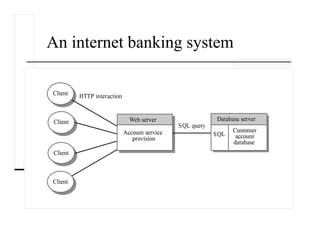
An internet banking system
N-tier (multi-tier & multi-layered) Architecture
Layers added for better separation of concerns
• Every layer does a specified task, which improves cohesion and
lowers coupling
• Application can be divided among developers with well defined
roles.
• Layers and Tiers need not have 1-1 mapping. 3-tier is popular as
its maps to typical IT problems
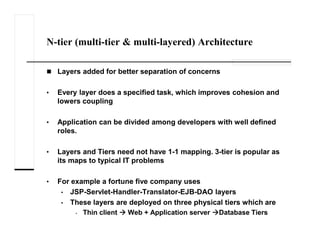
• For example a fortune five company uses
• JSP-Servlet-Handler-Translator-EJB-DAO layers
• These layers are deployed on three physical tiers which are
• Thin client Web + Application server Database Tiers

lec-01-WP.pdf

  • 1.
  • 2.
  • 3.
    What Is theWorld Wide Web? The internet is a network of computer networks worldwide The web is a tool used to retrieve information published on the internet To navigate the web we use a browser i.E. Netscape or internet explorer
  • 4.
    Brief History ofthe www 1968 - DARPA (Defense Advanced Research Projects Agency) contracts with BBN (Bolt, Beranek & Newman) to create ARPAnet 1970 - First five nodes: UCLA Stanford UC Santa Barbara U of Utah, and BBN 1974 - TCP specification by Vint Cerf 1984 – On January 1, the Internet with its 1000 hosts converts en masse to using TCP/IP for its messaging
  • 5.
  • 6.
    HTTP Original web communicationprotocol Request-Response type Client (browser) will open a connection to a server and then send a request using a very specific format Server will respond and close the connection Stateless Does not maintain any connection information between transaction information Feature Negotiation of data representation, allowing systems to build indepently of the data being transferred
  • 7.
    TCP/IP Transmission Control Protocolover Internet Protocol IP ensures that data packets reach the destination from the source of communication Not necessarily data packets follow the same path TCP keeps track of these packets, and manages the assembling of these packets to form the original message Thus, both TCP and IP work together to ensure that effective transmission of data over the internet
  • 8.
  • 9.
    Web Brochures vs.Web Applications WebSite (Web Brochures ) Web Applications Goal Information: Text, graphics, tables Web interface to any application Interaction: Data entry, data selection, checking, ordering Emphasis Professional look, graphic design Optimal support for the work flow Implementation Few interaction steps, mostly static pages (e.g. data entries) Navigation (browsing) - many integrated hyperlinks with jumps to other pages Usually interacts with data source Incorporates business logic May contain simple or complex navigation Dynamic behaviour
  • 10.
    Web Brochures vs.Web Applications Web Brochures Web Applications Deployment WWW May present on companies LAN or WWW Examples Apps University Web Sites, Personal Home Page etc. Amazon.com Purchasing System Address Book etc
  • 11.
  • 13.
    Advantages of Using WebApplications Allows you to browse a wide variety of internet sources Instantaneous connections to internet sites world wide
  • 14.
    Disadvantages of Using WebApplications Connections can be slow or busy No standard methods of organization Out-of -date materials may not be removed Contents can be (maliciously) altered Sites can simply be moved/removed
  • 15.
  • 16.
    Layers Figure shows asimplified view of one application and its layers.
  • 17.
    Layers It is importantto note that the layers are merely logical groupings of the software components that make up the application or service. They help to differentiate between the different kinds of tasks performed by the components. The make it easier to design reusability into the solution. Each logical layer contains a number of discrete component types grouped into sublayers, with each sublayer performing a specific kind of task. By identifying the generic kinds of components that exist in most solutions, you can construct a meaningful map of an application or service, and then use this map as a blueprint for your design.
  • 18.
    Evolution of Enterprise ApplicationFramework for C/S Arc Single tier Two tier Three tier RPC based Remote object based Three tier (HTML browser and Web server) N-Tier
  • 19.
    Client-server architectures 1-tier Architecture Entireapplication exists on single node Installed on individual machines Dumb terminals are directly connected to mainframe Centralized model (as opposed distributed model) Presentation, business logic, and data access are intertwined in one monolithic mainframe application Types of systems Standalone executable Mainframe applications
  • 20.
    Client-server architectures 1-tier Evaluation Advantages Simpleto build Natural No client side management is required Data consistency is easy to achieve Disadvantages Facilitates very little reuse Maintenance can be expensive Single point of failure Scaling systems requires buying bigger, costly hardware
  • 21.
    Client-server architectures 2-tier Architecture ClientServer Applications The client and server can be heterogeneous Different implementation languages Different operating systems The roles can be transient Fat client – server only manages data talk to back end database SQL queries sent, raw data returned Some Windows GUI based application Thin Client – server manages data and business logic Browser – server manages presentation too
  • 22.
  • 23.
  • 24.
    Client-server architectures 2-tier Evaluation Advantages Modificationson server propagated to clients Can distribute processing load Better scalability by adding server nodes and clients Database type independence Disadvantages Client nodes require more computing power Development and maintenance more complex Presentation, data model, business logic are intertwined and difficult for updates and maintenance Data Model is “tightly coupled” to every client: If DB Schema changes, all clients break Updates have to be deployed to all clients making System maintenance nightmare DB connection for every client, thus difficult to scale Raw data transferred to client for processing causes high network traffic
  • 25.
  • 26.
    3-tier Architecture (General) Applicationsare generally partitioned as Client, Control (business) and Data Components In 3-Tier Each logical partition maps to a layer in the system Modeling layers and software layers match 1-to-1 Each layer implemented with appropriate technologies Layers have their own internal architectures
  • 27.
    3-tier Evaluation Advantages Complete separationof concerns Control logic can be reused by client applications Caches results in the controller layer Maximum flexibility for enterprise-wide applications Disadvantages Complexity Speed decreases with levels of indirection and latency Increases cost and development time Lack of knowledgeable developers and managers
  • 28.
    A 3-tier C/Sarchitecture
  • 29.
  • 30.
    N-tier (multi-tier &multi-layered) Architecture Layers added for better separation of concerns • Every layer does a specified task, which improves cohesion and lowers coupling • Application can be divided among developers with well defined roles. • Layers and Tiers need not have 1-1 mapping. 3-tier is popular as its maps to typical IT problems • For example a fortune five company uses • JSP-Servlet-Handler-Translator-EJB-DAO layers • These layers are deployed on three physical tiers which are • Thin client Web + Application server Database Tiers