IOT for Smart Agriculture
Knowledge Centric Co., Ltd.
Internet of Things
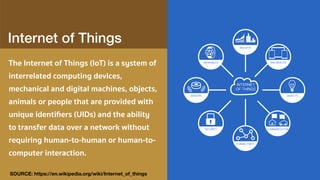
The Internet of Things (IoT) is a system of
interrelated computing devices,
mechanical and digital machines, objects,
animals or people that are provided with
unique identifiers (UIDs) and the ability
to transfer data over a network without
requiring human-to-human or human-to-
computer interaction.
SOURCE: https://en.wikipedia.org/wiki/Internet_of_things
Microprocessor
WHAT IS MICROCONTROLLER?
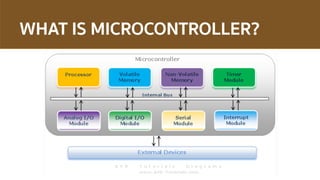
• A micro-controller is basically a small-scale computer with
generalised (and programable) input and output
• The input and outputs can be manipulated by and can manipulate the
physical world.
• Programmers work in the virtual world.
• Machinery work in the physical world.
WHAT IS MICROCONTROLLER?
Massimo Banzi,Tinker.it & Arduino Co-Founder
``Physical Computing is about prototyping with electronics, turning
sensors, actuators and microcontrollers into materials for designers
and artists.’’
``It involves the design of interactive objects that can communicate
with humans using sensors and actuators controlled by a behaviour
implemented as software running inside a microcontroller.’’
Arduino

A Prototype Platform
Single-board microcontroller, intended
to make the application of interactive
objects or environments more accessible
Designed to make the process of using
electronics multidisciplinary projects
more accessible
Circuitry which executes instructions in
programmable Integrated Circuit
Arduino Can …
• Sense the environment by receiving input from variety of sensors.
• Affect it surroundings by controlling lights, motors, and other
actuators.
• Support Standalone Applications
• Integrate with Computer / other process
Arduino / Microcontrollers a.k.a. Physical Computing
• “Arduino is a tool for making computers that can sense and control
more of the physical world than your desktop computer.”
• A micro-controller is essentially a brain – or, think of a bunch of
programmable “elves…”
• It is the guts of something like Vernier, Pasco, or Fourier
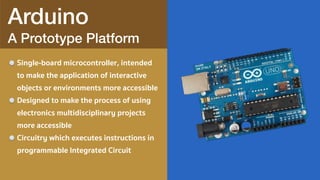
Arduino

A Prototype Platform
Single-board microcontroller, intended
to make the application of interactive
objects or environments more accessible
Designed to make the process of using
electronics multidisciplinary projects
more accessible
Circuitry which executes instructions in
programmable Integrated Circuit
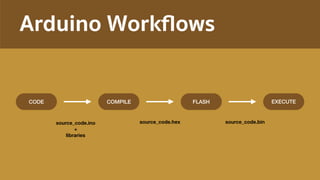
Arduino Workflows
CODE COMPILE FLASH EXECUTE
source_code.ino

+

libraries
source_code.hex source_code.bin
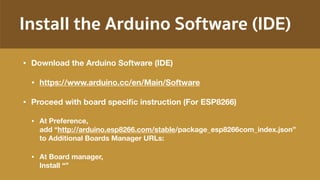
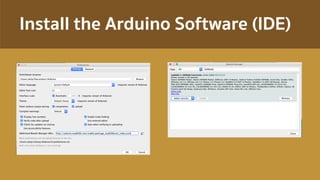
Install the Arduino Software (IDE)
• Download the Arduino Software (IDE)
• https://www.arduino.cc/en/Main/Software
• Proceed with board specific instruction (For ESP8266)
• At Preference, 

add “http://arduino.esp8266.com/stable/package_esp8266com_index.json” 

to Additional Boards Manager URLs:
• At Board manager,

Install “”
Install the Arduino Software (IDE)
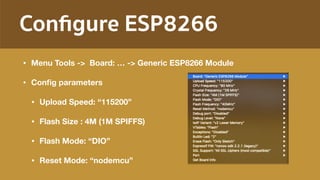
Configure ESP8266
• Menu Tools -> Board: … -> Generic ESP8266 Module
• Config parameters
• Upload Speed: “115200”
• Flash Size : 4M (1M SPIFFS)
• Flash Mode: “DIO”
• Reset Mode: “nodemcu”

Arduino

Minimum Code
setup : It is called only when the
Arduino is powered on or reset. It is
used to initialize variables and pin
modes
loop : The loop functions runs
continuously till the device is
powered off. The main logic of the
code goes here. Similar to while (1)
for micro-controller programming.
void setup() {
}
void loop() {
}
01:
02:
03:
04:
05:
06:
07:
08:
09:
10:
11:
12:
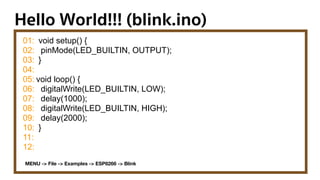
Hello World!!! (blink.ino)
01:
02:
03:
04:
05:
06:
07:
08:
09:
10:
11:
12:
void setup() {
pinMode(LED_BUILTIN, OUTPUT);
}
void loop() {
digitalWrite(LED_BUILTIN, LOW);
delay(1000);
digitalWrite(LED_BUILTIN, HIGH);
delay(2000);
}
MENU -> File -> Examples -> ESP8266 -> Blink
OFFEETIM
VARIABLE, TYPE AND VALUE
VARIABLE
VALUE
TYPE
VARIABLE
VALUE
TYPE
TYPE_NAME VARIABLE_NAME = VALUE;
int counter = 0;
String label =“mySensor”;
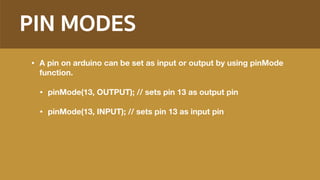
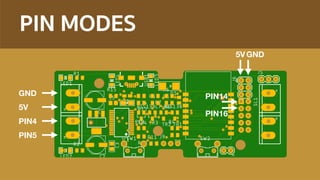
PIN MODES
• A pin on arduino can be set as input or output by using pinMode
function.
• pinMode(13, OUTPUT); // sets pin 13 as output pin
• pinMode(13, INPUT); // sets pin 13 as input pin
PIN MODES
PIN5
PIN4
5V
GND
GND5V
PIN16
PIN14
SERIAL

Communication
setup : It is called only when the
Arduino is powered on or reset. It is
used to initialize variables and pin
modes
loop : The loop functions runs
continuously till the device is
powered off. The main logic of the
code goes here. Similar to while (1)
for micro-controller programming.
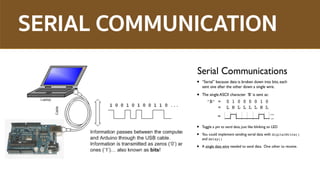
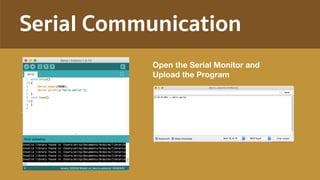
SERIAL COMMUNICATION
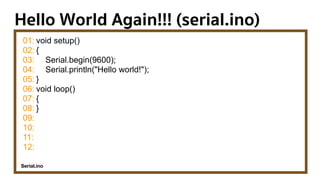
Hello World Again!!! (serial.ino)
01:
02:
03:
04:
05:
06:
07:
08:
09:
10:
11:
12:
void setup()
{
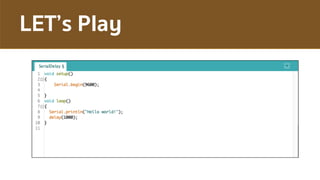
Serial.begin(9600);
Serial.println("Hello world!");
}
void loop()
{
}
Serial.ino
Serial Communication
Open the Serial Monitor and 

Upload the Program
DELAY
• Delays are essential in
embedded systems, unlike
high-performance systems
where we want the program
to execute as fast as possible
• Delays are used to
synchronize events, or read
inputs with a specific
sampling freqency (more on
Bus/Wait I/O)
• Arduino example:
delay(int milliseconds)
//creates a delay in ms
delayMicroseconds(int microseconds)
//creates a delay in µs
delay(1000); //one second delay
delayMicroseconds(10); //10 µs delay
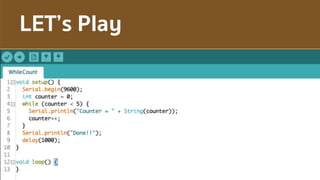
LET’s Play
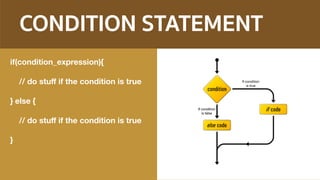
CONDITION STATEMENT
if(condition_expression){
// do stuff if the condition is true
} else {
// do stuff if the condition is true
}
LET’s Play
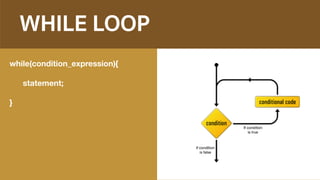
WHILE LOOP
while(condition_expression){
statement;
}
LET’s Play
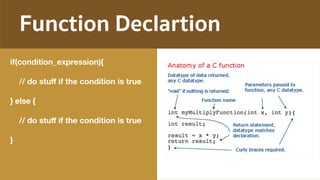
Function Declartion
if(condition_expression){
// do stuff if the condition is true
} else {
// do stuff if the condition is true
}
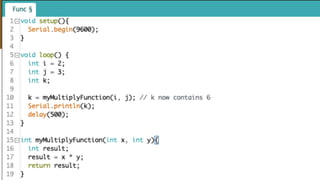
LET’s Play
OFFEETIM
INPUT vs. OUTPUT
Inputs is a signal / information going
into the board.

Examples: Buttons Switches, Light
Sensors, Flex Sensors, Humidity
Sensors, Temperature Sensors…
Output is any signal exiting the board.

Examples: LEDs, DC motor, servo
motor, a piezo buzzer, relay, an RGB
LED
Input and Output
A Sensor is a converter that measures
a physical quantity and converts it into
a signal which can be read by an
observer or by an (today mostly
electronic) instrument.

An Actuator is a type of motor for
moving or controlling a mechanism or
system. It is operated by a source of
energy, typically electric current,
hydraulic fluid pressure, or pneumatic
pressure, and converts that energy
into motion. An actuator is the
mechanism by which a control system
acts upon an environment.
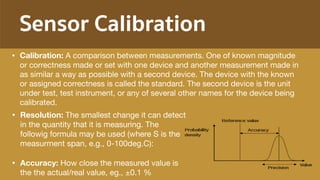
Sensor Calibration
• Resolution: The smallest change it can detect
in the quantity that it is measuring. The
followig formula may be used (where S is the
measurment span, e.g., 0-100deg.C):

• Accuracy: How close the measured value is
the the actual/real value, eg., ±0.1 %
• Calibration: A comparison between measurements. One of known magnitude
or correctness made or set with one device and another measurement made in
as similar a way as possible with a second device. The device with the known
or assigned correctness is called the standard. The second device is the unit
under test, test instrument, or any of several other names for the device being
calibrated.
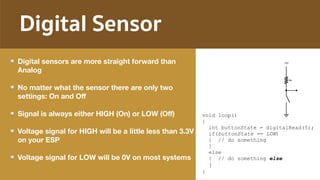
Digital Sensor
Digital sensors are more straight forward than
Analog
No matter what the sensor there are only two
settings: On and Off
Signal is always either HIGH (On) or LOW (Off)
Voltage signal for HIGH will be a little less than 3.3V
on your ESP
Voltage signal for LOW will be 0V on most systems
void loop()
{
int buttonState = digitalRead(5);
if(buttonState == LOW)
{ // do something
}
else
{ // do something else
}
}
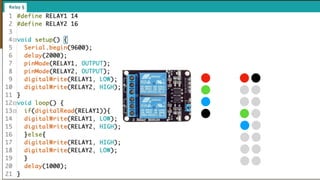
Relay Control
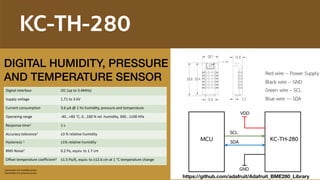
KC-TH-280
Digital interface I2C (up to 3.4MHz)
Supply voltage 1.71 to 3.6V
Current consumption 3.6 μA @ 1 Hz humidity, pressure and temperature
Operating range -40...+85 °C, 0...100 % rel. humidity, 300...1100 hPa
Response time1 1 s
Accuracy tolerance1 ±3 % relative humidity
Hysteresis 1 ±1% relative humidity
RMS Noise2 0.2 Pa, equiv. to 1.7 cm
Offset temperature coefficient2 ±1.5 Pa/K, equiv. to ±12.6 cm at 1 °C temperature change
1 parameters for humidity sensor
2 parameters for pressure sensor
Red wire -- Power Supply
Black wire -- GND
Green wire – SCL
Blue wire --- SDA
GND
VDD
SCL
SDA KC-TH-280MCU
DIGITAL HUMIDITY, PRESSURE

AND TEMPERATURE SENSOR
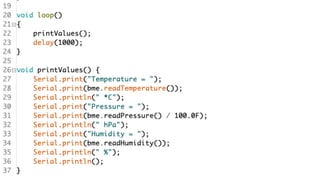
https://github.com/adafruit/Adafruit_BME280_Library
I2C Scanner
OFFEETIM

Iot for smart agriculture

  • 1.
    IOT for SmartAgriculture Knowledge Centric Co., Ltd.
  • 3.
    Internet of Things TheInternet of Things (IoT) is a system of interrelated computing devices, mechanical and digital machines, objects, animals or people that are provided with unique identifiers (UIDs) and the ability to transfer data over a network without requiring human-to-human or human-to- computer interaction. SOURCE: https://en.wikipedia.org/wiki/Internet_of_things
  • 4.
  • 5.
    WHAT IS MICROCONTROLLER? •A micro-controller is basically a small-scale computer with generalised (and programable) input and output • The input and outputs can be manipulated by and can manipulate the physical world. • Programmers work in the virtual world. • Machinery work in the physical world.
  • 6.
  • 7.
    Massimo Banzi,Tinker.it &Arduino Co-Founder ``Physical Computing is about prototyping with electronics, turning sensors, actuators and microcontrollers into materials for designers and artists.’’ ``It involves the design of interactive objects that can communicate with humans using sensors and actuators controlled by a behaviour implemented as software running inside a microcontroller.’’
  • 8.
    Arduino
 A Prototype Platform Single-boardmicrocontroller, intended to make the application of interactive objects or environments more accessible Designed to make the process of using electronics multidisciplinary projects more accessible Circuitry which executes instructions in programmable Integrated Circuit
  • 9.
    Arduino Can … •Sense the environment by receiving input from variety of sensors. • Affect it surroundings by controlling lights, motors, and other actuators. • Support Standalone Applications • Integrate with Computer / other process
  • 10.
    Arduino / Microcontrollersa.k.a. Physical Computing • “Arduino is a tool for making computers that can sense and control more of the physical world than your desktop computer.” • A micro-controller is essentially a brain – or, think of a bunch of programmable “elves…” • It is the guts of something like Vernier, Pasco, or Fourier
  • 11.
    Arduino
 A Prototype Platform Single-boardmicrocontroller, intended to make the application of interactive objects or environments more accessible Designed to make the process of using electronics multidisciplinary projects more accessible Circuitry which executes instructions in programmable Integrated Circuit
  • 12.
    Arduino Workflows CODE COMPILEFLASH EXECUTE source_code.ino
 +
 libraries source_code.hex source_code.bin
  • 13.
    Install the ArduinoSoftware (IDE) • Download the Arduino Software (IDE) • https://www.arduino.cc/en/Main/Software • Proceed with board specific instruction (For ESP8266) • At Preference, 
 add “http://arduino.esp8266.com/stable/package_esp8266com_index.json” 
 to Additional Boards Manager URLs: • At Board manager,
 Install “”
  • 14.
    Install the ArduinoSoftware (IDE)
  • 15.
    Configure ESP8266 • MenuTools -> Board: … -> Generic ESP8266 Module • Config parameters • Upload Speed: “115200” • Flash Size : 4M (1M SPIFFS) • Flash Mode: “DIO” • Reset Mode: “nodemcu”

  • 16.
    Arduino
 Minimum Code setup :It is called only when the Arduino is powered on or reset. It is used to initialize variables and pin modes loop : The loop functions runs continuously till the device is powered off. The main logic of the code goes here. Similar to while (1) for micro-controller programming. void setup() { } void loop() { } 01: 02: 03: 04: 05: 06: 07: 08: 09: 10: 11: 12:
  • 17.
    Hello World!!! (blink.ino) 01: 02: 03: 04: 05: 06: 07: 08: 09: 10: 11: 12: voidsetup() { pinMode(LED_BUILTIN, OUTPUT); } void loop() { digitalWrite(LED_BUILTIN, LOW); delay(1000); digitalWrite(LED_BUILTIN, HIGH); delay(2000); } MENU -> File -> Examples -> ESP8266 -> Blink
  • 18.
  • 19.
    VARIABLE, TYPE ANDVALUE VARIABLE VALUE TYPE VARIABLE VALUE TYPE TYPE_NAME VARIABLE_NAME = VALUE; int counter = 0; String label =“mySensor”;
  • 20.
    PIN MODES • Apin on arduino can be set as input or output by using pinMode function. • pinMode(13, OUTPUT); // sets pin 13 as output pin • pinMode(13, INPUT); // sets pin 13 as input pin
  • 21.
  • 22.
    SERIAL
 Communication setup : Itis called only when the Arduino is powered on or reset. It is used to initialize variables and pin modes loop : The loop functions runs continuously till the device is powered off. The main logic of the code goes here. Similar to while (1) for micro-controller programming.
  • 23.
  • 24.
    Hello World Again!!!(serial.ino) 01: 02: 03: 04: 05: 06: 07: 08: 09: 10: 11: 12: void setup() { Serial.begin(9600); Serial.println("Hello world!"); } void loop() { } Serial.ino
  • 25.
    Serial Communication Open theSerial Monitor and 
 Upload the Program
  • 26.
    DELAY • Delays areessential in embedded systems, unlike high-performance systems where we want the program to execute as fast as possible • Delays are used to synchronize events, or read inputs with a specific sampling freqency (more on Bus/Wait I/O) • Arduino example: delay(int milliseconds) //creates a delay in ms delayMicroseconds(int microseconds) //creates a delay in µs delay(1000); //one second delay delayMicroseconds(10); //10 µs delay
  • 27.
  • 28.
    CONDITION STATEMENT if(condition_expression){ // dostuff if the condition is true } else { // do stuff if the condition is true }
  • 29.
  • 30.
  • 31.
  • 32.
    Function Declartion if(condition_expression){ // dostuff if the condition is true } else { // do stuff if the condition is true }
  • 33.
  • 34.
  • 35.
    INPUT vs. OUTPUT Inputsis a signal / information going into the board. Examples: Buttons Switches, Light Sensors, Flex Sensors, Humidity Sensors, Temperature Sensors… Output is any signal exiting the board. Examples: LEDs, DC motor, servo motor, a piezo buzzer, relay, an RGB LED
  • 36.
    Input and Output ASensor is a converter that measures a physical quantity and converts it into a signal which can be read by an observer or by an (today mostly electronic) instrument. An Actuator is a type of motor for moving or controlling a mechanism or system. It is operated by a source of energy, typically electric current, hydraulic fluid pressure, or pneumatic pressure, and converts that energy into motion. An actuator is the mechanism by which a control system acts upon an environment.
  • 37.
    Sensor Calibration • Resolution:The smallest change it can detect in the quantity that it is measuring. The followig formula may be used (where S is the measurment span, e.g., 0-100deg.C): • Accuracy: How close the measured value is the the actual/real value, eg., ±0.1 % • Calibration: A comparison between measurements. One of known magnitude or correctness made or set with one device and another measurement made in as similar a way as possible with a second device. The device with the known or assigned correctness is called the standard. The second device is the unit under test, test instrument, or any of several other names for the device being calibrated.
  • 38.
    Digital Sensor Digital sensorsare more straight forward than Analog No matter what the sensor there are only two settings: On and Off Signal is always either HIGH (On) or LOW (Off) Voltage signal for HIGH will be a little less than 3.3V on your ESP Voltage signal for LOW will be 0V on most systems void loop() { int buttonState = digitalRead(5); if(buttonState == LOW) { // do something } else { // do something else } }
  • 39.
  • 40.
    KC-TH-280 Digital interface I2C(up to 3.4MHz) Supply voltage 1.71 to 3.6V Current consumption 3.6 μA @ 1 Hz humidity, pressure and temperature Operating range -40...+85 °C, 0...100 % rel. humidity, 300...1100 hPa Response time1 1 s Accuracy tolerance1 ±3 % relative humidity Hysteresis 1 ±1% relative humidity RMS Noise2 0.2 Pa, equiv. to 1.7 cm Offset temperature coefficient2 ±1.5 Pa/K, equiv. to ±12.6 cm at 1 °C temperature change 1 parameters for humidity sensor 2 parameters for pressure sensor Red wire -- Power Supply Black wire -- GND Green wire – SCL Blue wire --- SDA GND VDD SCL SDA KC-TH-280MCU DIGITAL HUMIDITY, PRESSURE
 AND TEMPERATURE SENSOR https://github.com/adafruit/Adafruit_BME280_Library
  • 41.
  • 44.