IOS UI Guide
QA Madness
IOS Multi-Touch Gestures
1. Tap 3. Scroll2. Double Tap
4. Flick 5. Pan 6. Long Press
IOS Multi-Touch Gestures
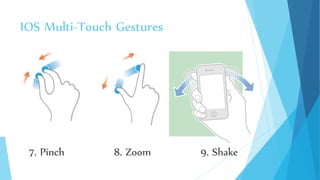
7. Pinch 8. Zoom 9. Shake
IOS Multi-Touch Gestures
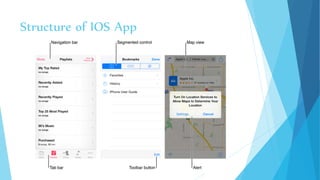
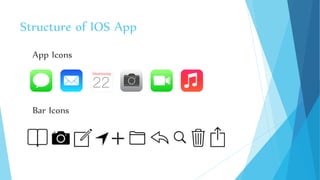
Structure of IOS App
App Icons
Bar Icons
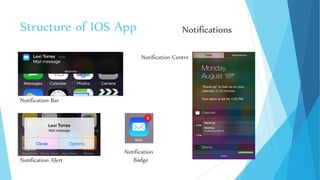
Notification Bar
Notification Alert
Notification Centre
Notification
Badge
Structure of IOS App Notifications
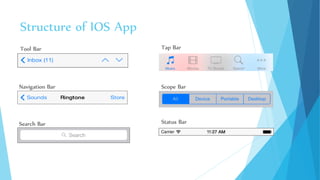
Tool Bar Tap Bar
Scope Bar
Search Bar
Navigation Bar
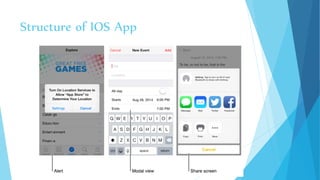
Structure of IOS App
Status Bar
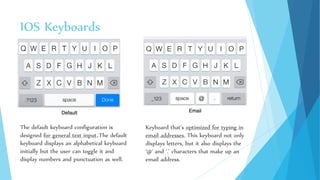
IOS Keyboards
The default keyboard configuration is
designed for general text input.The default
keyboard displays an alphabetical keyboard
initially but the user can toggle it and
display numbers and punctuation as well.
Keyboard that’s optimized for typing in
email addresses. This keyboard not only
displays letters, but it also displays the
‘@’ and ‘.’ characters that make up an
email address.
IOS Keyboards
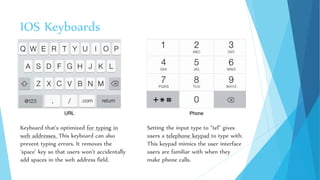
Keyboard that’s optimized for typing in
web addresses. This keyboard can also
prevent typing errors. It removes the
‘space’ key so that users won’t accidentally
add spaces in the web address field.
Setting the input type to “tel” gives
users a telephone keypad to type with.
This keypad mimics the user interface
users are familiar with when they
make phone calls.
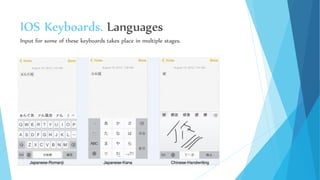
IOS Keyboards. Languages
IOS also supports different input methods and keyboard layouts for different languages.
IOS Keyboards. Languages
Input for some of these keyboards takes place in multiple stages.

iOS UI Guide

  • 1.
  • 2.
    IOS Multi-Touch Gestures 1.Tap 3. Scroll2. Double Tap
  • 3.
    4. Flick 5.Pan 6. Long Press IOS Multi-Touch Gestures
  • 4.
    7. Pinch 8.Zoom 9. Shake IOS Multi-Touch Gestures
  • 5.
  • 6.
  • 7.
    Structure of IOSApp App Icons Bar Icons
  • 8.
    Notification Bar Notification Alert NotificationCentre Notification Badge Structure of IOS App Notifications
  • 9.
    Tool Bar TapBar Scope Bar Search Bar Navigation Bar Structure of IOS App Status Bar
  • 10.
    IOS Keyboards The defaultkeyboard configuration is designed for general text input.The default keyboard displays an alphabetical keyboard initially but the user can toggle it and display numbers and punctuation as well. Keyboard that’s optimized for typing in email addresses. This keyboard not only displays letters, but it also displays the ‘@’ and ‘.’ characters that make up an email address.
  • 11.
    IOS Keyboards Keyboard that’soptimized for typing in web addresses. This keyboard can also prevent typing errors. It removes the ‘space’ key so that users won’t accidentally add spaces in the web address field. Setting the input type to “tel” gives users a telephone keypad to type with. This keypad mimics the user interface users are familiar with when they make phone calls.
  • 12.
    IOS Keyboards. Languages IOSalso supports different input methods and keyboard layouts for different languages.
  • 13.
    IOS Keyboards. Languages Inputfor some of these keyboards takes place in multiple stages.