INVENTARY MANAGEMNET SYSTEM
INTERNSHIP PROJECT
PROJECT DONEBY:MD. AL MAHMUD
INDEPENDENTUNIVERSITY, BANGLADESH
In this slides I will showonly my project screenshot, if anyone wants toget my
full internshipreport withproject contact:mdalmahmud0183@gmail.com
Technology Used:
1. HTML, CSS, JavaScript, jquery, Bootstrap for font-end design
2. Raw PHP for backend
3. MySQL for database
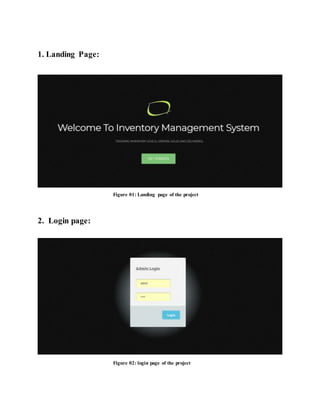
1. Landing Page:
Figure 01: Landing page of the project
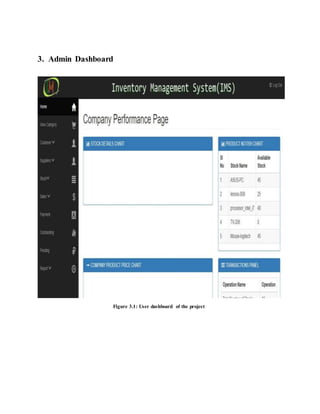
2. Login page:
Figure 02: login page of the project
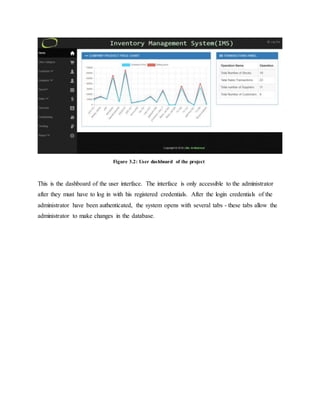
3. Admin Dashboard
Figure 3.1: User dashboard of the project
Figure 3.2: User dashboard of the project
This is the dashboard of the user interface. The interface is only accessible to the administrator
after they must have to log in with his registered credentials. After the login credentials of the
administrator have been authenticated, the system opens with several tabs - these tabs allow the
administrator to make changes in the database.
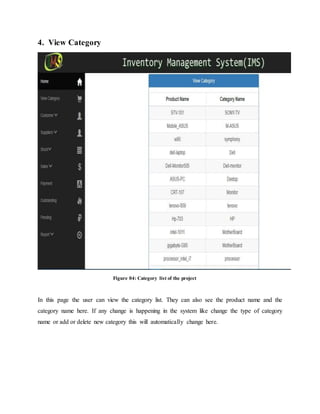
4. View Category
Figure 04: Category list of the project
In this page the user can view the category list. They can also see the product name and the
category name here. If any change is happening in the system like change the type of category
name or add or delete new category this will automatically change here.
5. Add Supplier
Figure 05: Add supplier form of the project
Here user can add their supplier details in this page. They can add new supplier name, address,
contact information here. By adding here, the system adds new supplier to the system. Depends
on their needs they can add new supplier information here.
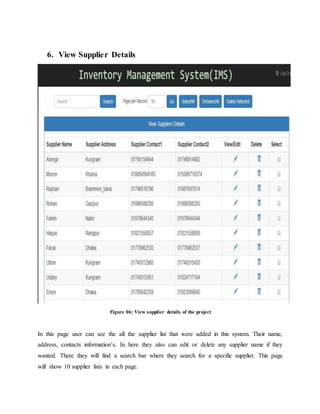
6. View Supplier Details
Figure 06: View supplier details of the project
In this page user can see the all the supplier list that were added in this system. Their name,
address, contacts information’s. In here they also can edit or delete any supplier name if they
wanted. There they will find a search bar where they search for a specific supplier. This page
will show 10 supplier lists in each page.
7. Pending Payment
Figure 07: View pending payment of the project
Pending payment section, they find for which category or product the company don’t pay the bill
means the payment is still due. They can see how much payment is still due and how much
money they already paid. This section also shows 10 products per page.
8. Report
Figure 08: View report of the project
In the report section they put an input like start date and end date then they find a total purchase
report depends on their date they input. They also can generate a report and print it if they
wanted.
Some code (for example)
# index.php
<html>
<head>
<meta charset="utf-8">
<meta name="viewport"content="width=device-width,maximum-scale=1">
<title>IMSLoginPage</title>
<linkrel="icon"href="Knight/favicon.png"type="image/png">
<linkhref='http://fonts.googleapis.com/css?family=Montserrat:400,700' rel='stylesheet'type='text/css'>
<link
href='http://fonts.googleapis.com/css?family=Open+Sans:400,300,800italic,700italic,600italic,400italic,
300italic,800,700,600' rel='stylesheet'type='text/css'>
<linkhref="Knight/css/bootstrap.css"rel="stylesheet"type="text/css">
<linkhref="Knight/css/style.css"rel="stylesheet"type="text/css">
<linkhref="Knight/css/font-awesome.css"rel="stylesheet"type="text/css">
<linkhref="Knight/css/responsive.css"rel="stylesheet"type="text/css">
<linkhref="Knight/css/animate.css" rel="stylesheet"type="text/css">
<style type="text/css">.pie {
behavior:url(Knight/PIE.htc);
}</style>
<script type="text/javascript"src="Knight/js/jquery.1.8.3.min.js"></script>
<script type="text/javascript"src="Knight/js/bootstrap.js"></script>
<script type="text/javascript"src="Knight/js/jquery-scrolltofixed.js"></script>
<script type="text/javascript"src="Knight/js/jquery.easing.1.3.js"></script>
<script type="text/javascript"src="Knight/js/jquery.isotope.js"></script>
<script type="text/javascript"src="Knight/js/wow.js"></script>
<script type="text/javascript"src="Knight/js/classie.js"></script>
<script src="Knight/js/respond-1.1.0.min.js"></script>
<script src="Knight/js/html5shiv.js"></script>
<script src="Knight/js/html5element.js"></script>
</head>
<body>
<divstyle="overflow:hidden;">
<headerclass="header"id="header">
<divclass="container">
<figure class="logoanimatedfadeInDowndelay-07s">
<!--<a href="#"><imgsrc="images/SSS.gif"alt=""></a>-->
<a href="#"><imgsrc="images/s.gif"alt=""></a>
</figure>
<h1 class="animatedfadeInDowndelay-07s">WelcomeToInventoryManagementSystem</h1>
<ul class="we-create animatedfadeInUpdelay-1s">
<li>TrackingInventorylevels,Orders,SalesandDeliveries.</li>
</ul>
<a class="linkanimatedfadeInUpdelay-1s"href="indexx.php">GetStarted</a>
</div>
</div>
</header>
<footerclass="footer">
<div class="container">
<divclass="footer-logo"><ahref="#"><imgsrc=""alt=""></a></div>
<spanclass="copyright">Copyright©2018 | <a href="#">Md. Al-Mahmud</a></span>
</div>
</footer>
<script type="text/javascript">
$(document).ready(function(e) {
$('#test').scrollToFixed();
$('.res-nav_click').click(function(){
$('.main-nav').slideToggle();
returnfalse
});
});
</script>
<script>
wow= newWOW(
{
animateClass:'animated',
offset: 100
}
);
wow.init();
</script>
<script type="text/javascript">
$(window).load(function(){
$('.main-navli a').bind('click',function(event){
var $anchor = $(this);
$('html,body').stop().animate({
scrollTop:$($anchor.attr('href')).offset().top - 102
}, 1500,'easeInOutExpo');
event.preventDefault();
});
})
</script>
<script type="text/javascript">
$(window).load(function(){
var $container= $('.portfolioContainer'),
$body= $('body'),
colW = 375,
columns= null;
$container.isotope({
resizable:true,
masonry:{
columnWidth:colW
}
});
$(window).smartresize(function(){
// checkif columnshas changed
var currentColumns=Math.floor( ( $body.width()-30) / colW );
if ( currentColumns!==columns) {
// setnewcolumncount
columns= currentColumns;
// applywidthtocontainermanually,thentriggerrelayout
$container.width( columns*colW)
.isotope('reLayout');
}
}).smartresize();//triggerresize tosetcontainerwidth
$('.portfolioFiltera').click(function(){
$('.portfolioFilter.current').removeClass('current');
$(this).addClass('current');
var selector=$(this).attr('data-filter');
$container.isotope({
filter:selector,
});
returnfalse;
});
});
</script>
</body>
</html>
# addstock.php
<?php
session_start();//Use session variableonthispage.Thisfunctionmustputonthe topof page.
if(!isset($_SESSION['username'])||$_SESSION['usertype'] !='admin'){ //if sessionvariable"username"
doesnotexist.
header("location:indexx.php?msg=Please%20login%20to%20access%20admin%20area%20!");//Re-
directto indexx.php
}
else
{
include_once "db.php";
?><!DOCTYPE HTML PUBLIC "-//W3C//DTDHTML 4.01 Transitional//EN"
"http://www.w3.org/TR/html4/loose.dtd">
<html>
<head>
<title>InventoryManagementSystem!</title>
<linkrel="icon"href="Knight/favicon.png"type="image/png">
<meta http-equiv="Content-Type"content="text/html;charset=iso-8859-1">
<linkrel="stylesheet"href="css/validationEngine.jquery.css"type="text/css"media="screen"title="no
title"charset="utf-8"/>
<linkrel="stylesheet"href="css/template.css"type="text/css"media="screen"title="no
title"charset="utf-8"/>
<script src="js/jquery.min.js"type="text/javascript"></script>
<script type='text/javascript'src='lib/jquery.bgiframe.min.js'></script>
<script type='text/javascript'src='lib/jquery.ajaxQueue.js'></script>
<script type='text/javascript'src='lib/thickbox-compressed.js'></script>
<script type='text/javascript'src='js/jquery.autocomplete.js'></script>
<script type='text/javascript'src='js/localdata.js'></script>
<linkrel="stylesheet"type="text/css"href="css/jquery.autocomplete.css"/>
<linkrel="stylesheet"type="text/css"href="lib/thickbox.css"/>
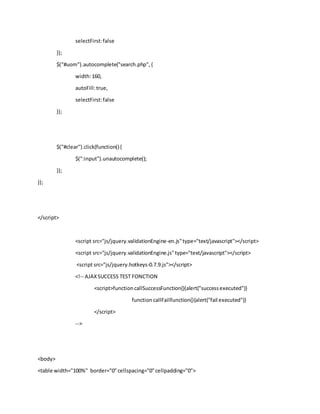
<script type="text/javascript">
$().ready(function(){
functionlog(event,data,formatted) {
$("<li>").html( !data?"Nomatch!" : "Selected:"+ formatted).appendTo("#result");
}
functionformatItem(row){
returnrow[0] + " (<strong>id:" + row[1] + "</strong>)";
}
functionformatResult(row) {
returnrow[0].replace(/(<.+?>)/gi,'');
}
$("#singleBirdRemote").autocomplete("search.php",{
width:160,
autoFill:true,
selectFirst:false
});
$("#suplier").autocomplete("search.php",{
width:160,
autoFill:true,
selectFirst:false
});
$("#uom").autocomplete("search.php",{
width:160,
autoFill:true,
selectFirst:false
});
$("#clear").click(function(){
$(":input").unautocomplete();
});
});
</script>
<script src="js/jquery.validationEngine-en.js"type="text/javascript"></script>
<script src="js/jquery.validationEngine.js"type="text/javascript"></script>
<script src="js/jquery.hotkeys-0.7.9.js"></script>
<!-- AJAXSUCCESS TEST FONCTION
<script>functioncallSuccessFunction(){alert("successexecuted")}
function callFailFunction(){alert("fail executed")}
</script>
-->
<body>
<table width="100%" border="0"cellspacing="0"cellpadding="0">
<tr>
<td align="center"valign="top"><table width="100%"border="0"cellspacing="0"cellpadding="0">
<tr>
<td><table width="100%"border="0"cellpadding="0"cellspacing="0"bgcolor="#ECECEC">
<tr>
<?php
include "banner.php";
?>
</tr>
<tr>
<td height="500" align="center"valign="top"><table width="96%"border="0"
cellpadding="0"cellspacing="0"bgcolor="#ECECEC">
<tr>
<td width="130" align="left"valign="top">
<br>
<br>
<br>
<table width="100%" border="0"cellspacing="0"cellpadding="0">
<?php
include "link.php";
?>
<tr>
<td align="center">&nbsp;</td>
</tr>
<tr>
<td align="center">&nbsp;</td>
</tr>
<tr>
<td align="center">&nbsp;</td>
</tr>
</table>
<divid="vertmenu">
<h1>Options</h1>
<ul>
<li><a href="admin.php"tabindex="1">AdminHome</a></li>
<li><a href="add_purchase.php"tabindex="2">AddStockEntry</a></li>
<li><a href="add_stock_sales.php"tabindex="3">AddStockSales</a></li>
<li><a href="add_stock_details.php"tabindex="4">AddStockDetails</a></li>
<li><a href="add_category.php"tabindex="5">AddCatetogry</a></li>
<li><a href="add_supplier_details.php"tabindex="6">AddSupplierDetails</a></li>
<li><a href="add_customers_details.php"tabindex="7">AddCustomerDetails</a></li>
<li><a href="view_stock_entries.php"tabindex="8">V<iew StockEntries/a></li>
<li><a href="view_stock_sales.php"tabindex="9">ViewStockSales</a></li>
<li><a href="view_stock_details.php"tabindex="10">View StockDetails</a></li>
<li><a href="view_supplier_details.php"tabindex="11">View SupplierDetails</a></li>
<li><a href="view_customer_details.php"tabindex="12">View CustomerDetails</a></li>
<li><a href="report.php"tabindex="13">Report</a></li>
<li><a href="logout.php"tabindex="14">Signout</a></li>
</ul>
</div>
</td> <td height="500" align="center"valign="top">
<?php
include "llink.php";
?>
<?php
if(isset($_POST['name']))
{
$id=mysql_real_escape_string($_POST['id']);
$name=mysql_real_escape_string($_POST['name']);
$category=mysql_real_escape_string($_POST['category']);
$buyingrate=mysql_real_escape_string($_POST['buyingrate']);
$sellingrate=mysql_real_escape_string($_POST['sellingrate']);
$suplier=mysql_real_escape_string($_POST['suplier']);
$uom=mysql_real_escape_string($_POST['uom']);
$expiry=mysql_real_escape_string($_POST['expiry']);
$count = $db->countOf("stock_details","stock_id='$id'");
if($count==1)
{
echo"<font color=red>DublicatEntry.Please Verify</font>";
}
else
{
if($db->query("insertinto
stock_details(stock_id,stock_name,stock_quatity,supplier_id,company_price,selling_price,category,expi
re_date,uom) values('$id','$name',0,'$suplier',$buyingrate,$sellingrate,'$category','$expiry','$uom')"))
echo"<br><font color=greensize=+1>Stock DetailsAdded!</font>";
else
echo"<br><font color=redsize=+1 >ProbleminAdding!</font>";
}
}
?>
<br>
<br>
<form name="form1"method="post"id="form1"action="">
<h2> <p align="center"><strong>AddNew StockDetails</strong></p></h2>
<table width="300" border="0"cellspacing="0"cellpadding="0">
<tr>
<td width="150">&nbsp;</td>
</tr>
<tr>
<td width="150">&nbsp;</td>
</tr>
<tr>
<td width="150">ID</td>
<td width="150"><inputname="id"type="text"id="id"></td>
</tr>
<tr>
<td width="150">&nbsp;</td>
</tr>
<tr>
<td width="150">Name</td>
<td width="150"><inputname="name"type="text"id="name"
class="validate[required,length[0,100]] text-input"></td>
</tr>
<tr>
<td width="150">&nbsp;</td>
</tr>
<tr>
<td width="150">Category</td>
<td width="150"><inputname="category"type="text"id="singleBirdRemote"></td>
</tr>
<tr>
<td>&nbsp;</td>
<td>&nbsp;</td>
</tr>
<tr>
<td>BuyingRate</td>
<td><inputname="buyingrate"type="text"id="buyingrate"
class="validate[required,custom[onlyNumber],lengthCheck[6]] text-input"></td>
</tr>
<tr>
<td>&nbsp;</td>
<td>&nbsp;</td>
</tr>
<tr>
<td>SellingRate </td>
<td><inputname="sellingrate"type="text"id="sellingrate"
class="validate[required,custom[onlyNumber],lengthCheck[6]] text-input"></td>
</tr>
<tr>
<td>&nbsp;</td>
<td>&nbsp;</td>
</tr>
<tr>
<td>SuplierName</td>
<td><inputname="suplier"type="text"id="suplier"class="validate[optional,length[0,100]]
text-input"></td>
</tr>
<tr>
<td>&nbsp;</td>
<td>&nbsp;</td>
</tr>
<tr>
<td>UOM</td>
<td><inputname="uom"type="text"id="uom"class="validate[optional,length[0,100]] text-
input"></td>
</tr>
<tr>
<td>&nbsp;</td>
<td>&nbsp;</td>
</tr>
<tr>
<td>ExpiryDate </td>
<td><inputname="expiry"type="text"id="expiry"class="validate[optional,length[0,100]]
text-input"></td>
</tr>
<tr>
<td>&nbsp;</td>
<td>&nbsp;</td>
</tr>
<tr>
<td align="right"><inputtype="reset"name="Reset"value="Reset">
&nbsp;&nbsp;&nbsp;</td>
<td> &nbsp;&nbsp;&nbsp;
<inputtype="submit"name="Submit" value="Save"></td>
</tr>
<tr>
<td
align="center">&nbsp;&nbsp;&nbsp;&nbsp;&nbsp;&nbsp;&nbsp;&nbsp;&nbsp;&nbsp;&nbsp;&nbsp;&
nbsp;&nbsp;&nbsp;</td>
<td align="left">&nbsp;&nbsp;</td>
</tr>
</table>
</form></td>
</tr>
</table>
<?php
include "footer.php";
?>
</td>
</tr>
</table></td>
</tr>
</table></td>
</tr>
</table>
</body>
</html>
<?php
}
?>

Inventory management system