By Mohd Anas & Mohd Shahzad
WEATHER APP
OVERVIEW OF THE PRESENTATION
• Introduction
• Working of the Project
• Technology Used
• Data Source
• Benefits
• Architecture Diagram
INTRODUCTION
• The Proposed System provides the weather of
different cities around the World.
• In this system the user can view Weather for which
they search for.
• The system can track Local and National Weather.
• The Proposed system uses Rapid API for searching
the Weather.
WORKING OF THE PROJECT
• The User is asked to enter the name of the city.
• User then clicks on Search which further calls the Rapid API.
• Weather conditions of place which include Temperature,
Humidity, Wind Speed, Wind Degree, Cloud PCT are
displayed.
• If user wishes to search weather for other cities he can re-
enter the city name in search bar and press enter.
• If user wishes to exit, he can simply close the application.
• In this system don’t need to setup weather station in each city
on each country to get weather information. We can get
those information incuding Temperature, Humidity etc. by
using Weather API.
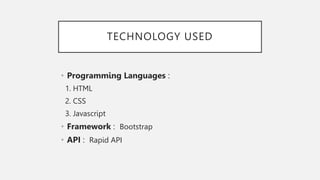
TECHNOLOGY USED
• Programming Languages :
1. HTML
2. CSS
3. Javascript
• Framework : Bootstrap
• API : Rapid API
• Our system uses RapidAPI to get the weather
information.
• RapidAPI, the World’s largest API hub, is used by
millions of developers to find, test, and connect to
thousand of APIs.
• The back-end of the application uses API from
RapidAPI, which is an open source and enables
anyone to download APIs for various purposes.
• We are using “Weather by API-Ninjas” from RapidAPI
Hub.
DATA SOURCE
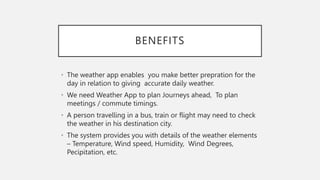
BENEFITS
• The weather app enables you make better prepration for the
day in relation to giving accurate daily weather.
• We need Weather App to plan Journeys ahead, To plan
meetings / commute timings.
• A person travelling in a bus, train or flight may need to check
the weather in his destination city.
• The system provides you with details of the weather elements
– Temperature, Wind speed, Humidity, Wind Degrees,
Pecipitation, etc.
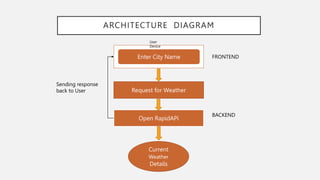
ARCHITECTURE DIAGRAM
Enter City Name
User
Device
Request for Weather
Open RapidAPi
Current
Weather
Details
FRONTEND
BACKEND
Sending response
back to User

Weather App PPT.pptx

  • 1.
    By Mohd Anas& Mohd Shahzad WEATHER APP
  • 2.
    OVERVIEW OF THEPRESENTATION • Introduction • Working of the Project • Technology Used • Data Source • Benefits • Architecture Diagram
  • 3.
    INTRODUCTION • The ProposedSystem provides the weather of different cities around the World. • In this system the user can view Weather for which they search for. • The system can track Local and National Weather. • The Proposed system uses Rapid API for searching the Weather.
  • 4.
    WORKING OF THEPROJECT • The User is asked to enter the name of the city. • User then clicks on Search which further calls the Rapid API. • Weather conditions of place which include Temperature, Humidity, Wind Speed, Wind Degree, Cloud PCT are displayed. • If user wishes to search weather for other cities he can re- enter the city name in search bar and press enter. • If user wishes to exit, he can simply close the application. • In this system don’t need to setup weather station in each city on each country to get weather information. We can get those information incuding Temperature, Humidity etc. by using Weather API.
  • 5.
    TECHNOLOGY USED • ProgrammingLanguages : 1. HTML 2. CSS 3. Javascript • Framework : Bootstrap • API : Rapid API
  • 6.
    • Our systemuses RapidAPI to get the weather information. • RapidAPI, the World’s largest API hub, is used by millions of developers to find, test, and connect to thousand of APIs. • The back-end of the application uses API from RapidAPI, which is an open source and enables anyone to download APIs for various purposes. • We are using “Weather by API-Ninjas” from RapidAPI Hub. DATA SOURCE
  • 7.
    BENEFITS • The weatherapp enables you make better prepration for the day in relation to giving accurate daily weather. • We need Weather App to plan Journeys ahead, To plan meetings / commute timings. • A person travelling in a bus, train or flight may need to check the weather in his destination city. • The system provides you with details of the weather elements – Temperature, Wind speed, Humidity, Wind Degrees, Pecipitation, etc.
  • 8.
    ARCHITECTURE DIAGRAM Enter CityName User Device Request for Weather Open RapidAPi Current Weather Details FRONTEND BACKEND Sending response back to User