University	College	of	Southeast	Norway	
http://home.hit.no/~hansha	


Introduction	to	Vision	
Systems	in	LabVIEW	
Hans-Petter	Halvorsen,	2016.10.31
Preface	
In	this	tutorial	we	will	introduce	the	concepts	of	Machine	Vision	and	how	we	can	implement	such	
applications	in	LabVIEW.	
For	more	information	and	additional	resources:	
http://home.hit.no/~hansha/?tutorial=vision	 	
	
For	more	information	about	LabVIEW,	visit	my	Blog:	http://home.hit.no/~hansha/.	
	
You	need	the	following	software:	
• LabVIEW	
• NI	Vision	Acquisition	Software	
• NI	Vision	Development	Module	
• (NI	Vision	Builder	for	Automated	Inspection)	
These	software	packages	will	be	explained	in	detailed	later.	 	
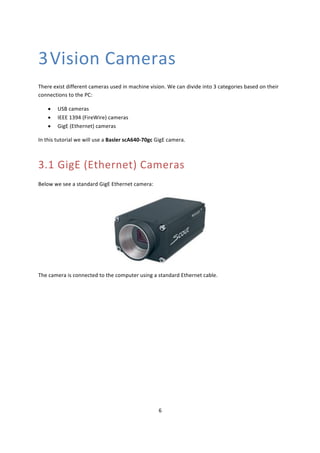
In	the	examples	we	will	use	a	GigE	Vision	camera	(Basler	scA640-70gc),	i.e.	the	camera	is	connected	
to	the	computer	using	a	standard	Ethernet	cable.	
	
	
[Figure:	www.ni.com]	
Figure	on	title	page:	www.ni.com.
iii	
	
Table	of	Contents	
Preface	....................................................................................................................................................	2	
Table	of	Contents	...................................................................................................................................	iii	
1	 Introduction	to	LabVIEW	..................................................................................................................	1	
1.1	 Dataflow	Programming	.............................................................................................................	1	
1.2	 Graphical	Programming	.............................................................................................................	1	
2	 Introduction	to	Machine	Vision	........................................................................................................	3	
2.1	 Introduction	...............................................................................................................................	3	
2.2	 Image	Processing	and	Analysis	..................................................................................................	3	
2.2.1	 Thresholding	......................................................................................................................	3	
2.2.2	 Pattern	recognition	and	matching	......................................	Error!	Bookmark	not	defined.	
2.2.3	 Texture	recognition	.............................................................	Error!	Bookmark	not	defined.	
2.2.4	 Barcode	reading	.................................................................................................................	3	
2.2.5	 OCR	....................................................................................................................................	4	
2.2.6	 Gauging	..............................................................................................................................	4	
2.2.7	 Position	...............................................................................	Error!	Bookmark	not	defined.	
2.2.8	 Edge	Detection	....................................................................	Error!	Bookmark	not	defined.	
2.2.9	 Color	analysis	......................................................................	Error!	Bookmark	not	defined.	
2.2.10	 Filtering	.............................................................................	Error!	Bookmark	not	defined.	
2.2.11	 Counting	and	Classification	..............................................................................................	4	
3	 Vision	Cameras	.................................................................................................................................	6	
3.1	 GigE	(Ethernet)	Cameras	...........................................................................................................	6	
4	 Introduction	to	Vision	Systems	in	LabVIEW	......................................................................................	7	
4.1	 Software	....................................................................................................................................	7
iv	 	 Table	of	Contents	
Tutorial: Introduction to Vision Systems in LabVIEW
4.1.1	 NI	Vision	Acquisition	Software	...........................................................................................	7	
4.1.2	 Vision	Development	Module	.............................................................................................	7	
4.1.3	 Vision	Builder	for	Automated	Inspections	.........................................................................	9	
4.2	 Configuration	.............................................................................................................................	9	
4.3	 Building	Vision	Systems	in	LabVIEW	........................................................................................	11	
4.3.1	 Using	the	Vision	Acquisition	Express	VI	...........................................................................	11	
4.3.2	 Using	the	IMAQdx	VIs	......................................................................................................	13	
4.3.3	 Open	Images	from	a	File	..................................................................................................	15	
5	 Vision	functionality	in	LabVIEW	......................................................................................................	17	
5.1.1	 Thresholding	....................................................................................................................	18	
5.1.2	 Pattern	recognition	and	matching	...................................................................................	18	
5.1.3	 Texture	recognition	..........................................................................................................	19	
5.1.4	 Barcode	reading	...............................................................................................................	19	
5.1.5	 OCR	..................................................................................................................................	19	
5.1.6	 Gauging	............................................................................................................................	20	
5.1.7	 Position	...............................................................................	Error!	Bookmark	not	defined.	
5.1.8	 Edge	Detection	.................................................................................................................	20	
5.1.9	 Color	analysis	......................................................................	Error!	Bookmark	not	defined.	
5.1.10	 Filtering	..........................................................................................................................	21	
5.1.11	 Counting	and	Classification	............................................................................................	21
1	
	
1Introduction	to	LabVIEW	
LabVIEW	(short	for	Laboratory	Virtual	Instrumentation	Engineering	Workbench)	is	a	platform	and	
development	environment	for	a	visual	programming	language	from	National	Instruments.	The	
graphical	language	is	named	"G".	Originally	released	for	the	Apple	Macintosh	in	1986,	LabVIEW	is	
commonly	used	for	data	acquisition,	instrument	control,	and	industrial	automation	on	a	variety	of	
platforms	including	Microsoft	Windows,	various	flavors	of	Linux,	and	Mac	OS	X.	Visit	National	
Instruments	at	www.ni.com.	
The	code	files	have	the	extension	“.vi”,	which	is	an	abbreviation	for	“Virtual	Instrument”.	LabVIEW	
offers	lots	of	additional	Add-Ons	and	Toolkits.	
1.1 Dataflow	Programming	
The	programming	language	used	in	LabVIEW,	also	referred	to	as	G,	is	a	dataflow	programming	
language.	Execution	is	determined	by	the	structure	of	a	graphical	block	diagram	(the	LV-source	code)	
on	which	the	programmer	connects	different	function-nodes	by	drawing	wires.	These	wires	
propagate	variables	and	any	node	can	execute	as	soon	as	all	its	input	data	become	available.	Since	
this	might	be	the	case	for	multiple	nodes	simultaneously,	G	is	inherently	capable	of	parallel	
execution.	Multi-processing	and	multi-threading	hardware	is	automatically	exploited	by	the	built-in	
scheduler,	which	multiplexes	multiple	OS	threads	over	the	nodes	ready	for	execution.	
1.2 	 Graphical	Programming	
LabVIEW	ties	the	creation	of	user	interfaces	(called	front	panels)	into	the	development	cycle.	
LabVIEW	programs/subroutines	are	called	virtual	instruments	(VIs).	Each	VI	has	three	components:	a	
block	diagram,	a	front	panel,	and	a	connector	panel.	The	last	is	used	to	represent	the	VI	in	the	block	
diagrams	of	other,	calling	VIs.	Controls	and	indicators	on	the	front	panel	allow	an	operator	to	input	
data	into	or	extract	data	from	a	running	virtual	instrument.	However,	the	front	panel	can	also	serve	
as	a	programmatic	interface.	Thus	a	virtual	instrument	can	either	be	run	as	a	program,	with	the	front	
panel	serving	as	a	user	interface,	or,	when	dropped	as	a	node	onto	the	block	diagram,	the	front	panel	
defines	the	inputs	and	outputs	for	the	given	node	through	the	connector	pane.	This	implies	each	VI	
can	be	easily	tested	before	being	embedded	as	a	subroutine	into	a	larger	program.	
The	graphical	approach	also	allows	non-programmers	to	build	programs	simply	by	dragging	and	
dropping	virtual	representations	of	lab	equipment	with	which	they	are	already	familiar.	The	LabVIEW	
programming	environment,	with	the	included	examples	and	the	documentation,	makes	it	simple	to	
create	small	applications.	This	is	a	benefit	on	one	side,	but	there	is	also	a	certain	danger	of
2	 	 Introduction	to	LabVIEW	
Tutorial: Introduction to Vision Systems in LabVIEW
underestimating	the	expertise	needed	for	good	quality	“G”	programming.	For	complex	algorithms	or	
large-scale	code,	it	is	important	that	the	programmer	possess	an	extensive	knowledge	of	the	special	
LabVIEW	syntax	and	the	topology	of	its	memory	management.	The	most	advanced	LabVIEW	
development	systems	offer	the	possibility	of	building	stand-alone	applications.	Furthermore,	it	is	
possible	to	create	distributed	applications,	which	communicate	by	a	client/server	scheme,	and	are	
therefore	easier	to	implement	due	to	the	inherently	parallel	nature	of	G-code.
3	
	
2Introduction	to	Machine	
Vision	
2.1 Introduction	
Wikipedia:	
Machine	vision	(MV)	is	the	process	of	applying	a	range	of	technologies	to	provide	imaging-based	
automatic	inspection,	process	control	and	robot	guidance	in	industrial	applications.	
A	generally	accepted	definition	of	machine	vision	is	“the	analysis	of	images	to	extract	data	for	
controlling	a	process	or	activity”.	
The	primary	uses	for	machine	vision	are	automatic	inspection	and	robot	guidance.	The	main	
categories	into	which	MV	applications	fall	are	quality	assurance,	sorting,	material	handling,	robot	
guidance,	and	calibration,	etc.	
2.2 Image	Processing	and	Analysis	
After	the	image	is	taken	we	need	to	do	some	image	processing	and	analysis.	Below	we	list	some	of	
the	most	used	functions:	
2.2.1 Thresholding	 	
Converting	a	grayscale	image	too	black	and	white.	
2.2.2 Barcode	reading	
We	have	different	kind	of	barcodes	and	we	see	barcodes	everywhere	today.	We	have	1D	barcodes,	
2D	barcodes,	QR	codes,	etc.	Today	barcodes	have	a	lot	of	applications.	
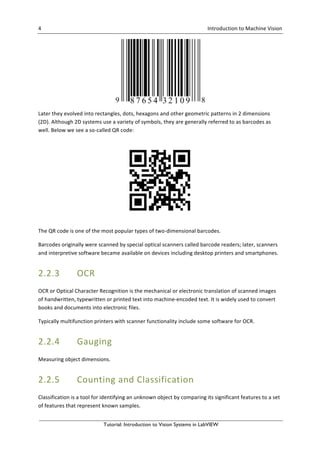
A	barcode	is	an	optical	machine-readable	representation	of	data,	which	shows	data	about	the	object	
by	varying	the	widths	and	spacing’s	of	parallel	lines,	and	may	be	referred	to	as	linear	or	1-
dimensional	(1D)	barcode.	Below	we	see	a	standard	barcode:
4	 	 Introduction	to	Machine	Vision	 	
Tutorial: Introduction to Vision Systems in LabVIEW
	
Later	they	evolved	into	rectangles,	dots,	hexagons	and	other	geometric	patterns	in	2	dimensions	
(2D).	Although	2D	systems	use	a	variety	of	symbols,	they	are	generally	referred	to	as	barcodes	as	
well.	Below	we	see	a	so-called	QR	code:	
	
The	QR	code	is	one	of	the	most	popular	types	of	two-dimensional	barcodes.	
Barcodes	originally	were	scanned	by	special	optical	scanners	called	barcode	readers;	later,	scanners	
and	interpretive	software	became	available	on	devices	including	desktop	printers	and	smartphones.	
2.2.3 OCR	 	
OCR	or	Optical	Character	Recognition	is	the	mechanical	or	electronic	translation	of	scanned	images	
of	handwritten,	typewritten	or	printed	text	into	machine-encoded	text.	It	is	widely	used	to	convert	
books	and	documents	into	electronic	files.	
Typically	multifunction	printers	with	scanner	functionality	include	some	software	for	OCR.	
2.2.4 Gauging	
Measuring	object	dimensions.	
2.2.5 Counting	and	Classification	
Classification	is	a	tool	for	identifying	an	unknown	object	by	comparing	its	significant	features	to	a	set	
of	features	that	represent	known	samples.
5	 	 Introduction	to	Machine	Vision	 	
Tutorial: Introduction to Vision Systems in LabVIEW
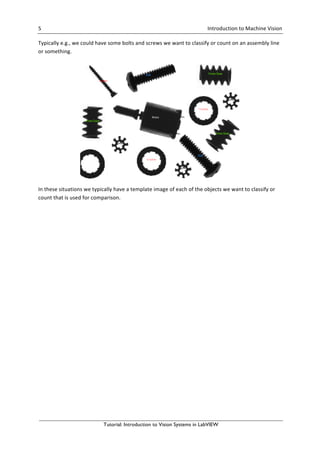
Typically	e.g.,	we	could	have	some	bolts	and	screws	we	want	to	classify	or	count	on	an	assembly	line	
or	something.	
	
In	these	situations	we	typically	have	a	template	image	of	each	of	the	objects	we	want	to	classify	or	
count	that	is	used	for	comparison.
6	
	
3Vision	Cameras	
There	exist	different	cameras	used	in	machine	vision.	We	can	divide	into	3	categories	based	on	their	
connections	to	the	PC:	
• USB	cameras	
• IEEE	1394	(FireWire)	cameras	
• GigE	(Ethernet)	cameras	
In	this	tutorial	we	will	use	a	Basler	scA640-70gc	GigE	camera.	
3.1 GigE	(Ethernet)	Cameras	
Below	we	see	a	standard	GigE	Ethernet	camera:	
	
The	camera	is	connected	to	the	computer	using	a	standard	Ethernet	cable.
7	
	
4Introduction	to	Vision	
Systems	in	LabVIEW	
4.1 Software	
National	Instruments	offers	different	kind	Vision	software	depending	on	your	application	and	your	
needs:	
• NI	Vision	Acquisition	Software	
• NI	Vision	Development	Module	
• NI	Vision	Builder	for	Automated	Inspections	
We	will	discuss	the	different	packages	more	in	detail	below.	
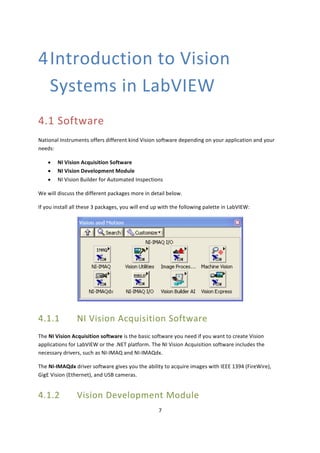
If	you	install	all	these	3	packages,	you	will	end	up	with	the	following	palette	in	LabVIEW:	
	
4.1.1 NI	Vision	Acquisition	Software	
The	NI	Vision	Acquisition	software	is	the	basic	software	you	need	if	you	want	to	create	Vision	
applications	for	LabVIEW	or	the	.NET	platform.	The	NI	Vision	Acquisition	software	includes	the	
necessary	drivers,	such	as	NI-IMAQ	and	NI-IMAQdx.	
The	NI-IMAQdx	driver	software	gives	you	the	ability	to	acquire	images	with	IEEE	1394	(FireWire),	
GigE	Vision	(Ethernet),	and	USB	cameras.	
4.1.2 Vision	Development	Module
8	 	 Introduction	to	Vision	Systems	in	LabVIEW	 	
Tutorial: Introduction to Vision Systems in LabVIEW
For	more	advanced	machine	vision	and	image	processing	you	will	need	the	Vision	Development	
Module.	The	Vision	Development	Module	contains	hundreds	of	image	processing	and	machine	vision	
functions,	both	for	LabVIEW	and	the	.NET	platform.	
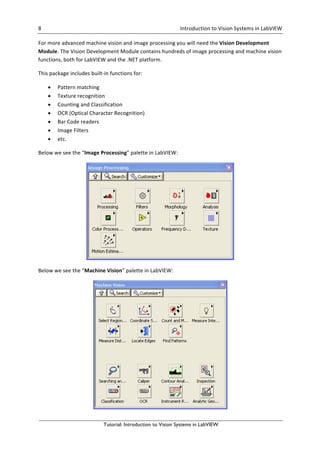
This	package	includes	built-in	functions	for:	
• Pattern	matching	
• Texture	recognition	 	
• Counting	and	Classification	
• OCR	(Optical	Character	Recognition)	
• Bar	Code	readers	
• Image	Filters	
• etc.	
Below	we	see	the	“Image	Processing”	palette	in	LabVIEW:	
	
Below	we	see	the	“Machine	Vision”	palette	in	LabVIEW:
9	 	 Introduction	to	Vision	Systems	in	LabVIEW	 	
Tutorial: Introduction to Vision Systems in LabVIEW
We	will	learn	more	about	these	later.	
4.1.3 Vision	Builder	for	Automated	Inspections	
NI	Vision	Builder	for	Automated	Inspection	(AI)	is	an	external	and	independent	application	for	
building	and	machine	vision	applications	without	the	need	for	programming.	 	
4.2 Configuration	
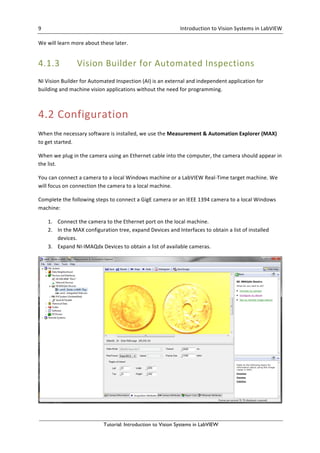
When	the	necessary	software	is	installed,	we	use	the	Measurement	&	Automation	Explorer	(MAX)	
to	get	started.	
When	we	plug	in	the	camera	using	an	Ethernet	cable	into	the	computer,	the	camera	should	appear	in	
the	list.	
You	can	connect	a	camera	to	a	local	Windows	machine	or	a	LabVIEW	Real-Time	target	machine.	We	
will	focus	on	connection	the	camera	to	a	local	machine.	
Complete	the	following	steps	to	connect	a	GigE	camera	or	an	IEEE	1394	camera	to	a	local	Windows	
machine:	
1. Connect	the	camera	to	the	Ethernet	port	on	the	local	machine.	 	
2. In	the	MAX	configuration	tree,	expand	Devices	and	Interfaces	to	obtain	a	list	of	installed	
devices.	 	
3. Expand	NI-IMAQdx	Devices	to	obtain	a	list	of	available	cameras.
10	 	 Introduction	to	Vision	Systems	in	LabVIEW	 	
Tutorial: Introduction to Vision Systems in LabVIEW
When	the	camera	is	successfully	connected,	you	can	configure	and	test	the	camera	in	MAX.	
Click	the	camera	name	to	select	the	appropriate	camera	(in	this	tutorial	we	use	a	“Basler	scA640-
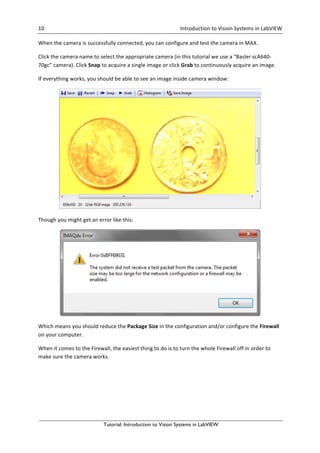
70gc”	camera).	Click	Snap	to	acquire	a	single	image	or	click	Grab	to	continuously	acquire	an	image.	
If	everything	works,	you	should	be	able	to	see	an	image	inside	camera	window:	
	
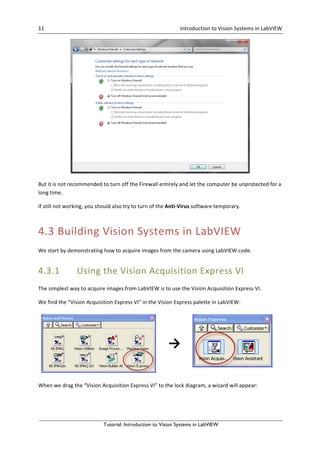
Though	you	might	get	an	error	like	this:	
	
Which	means	you	should	reduce	the	Package	Size	in	the	configuration	and/or	configure	the	Firewall	
on	your	computer.	
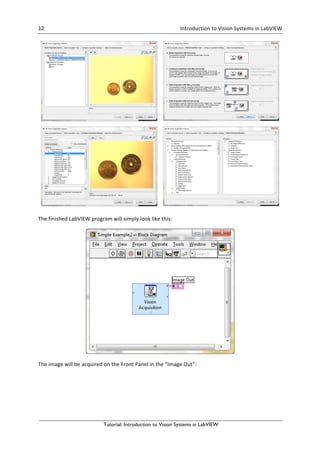
When	it	comes	to	the	Firewall,	the	easiest	thing	to	do	is	to	turn	the	whole	Firewall	off	in	order	to	
make	sure	the	camera	works.
11	 	 Introduction	to	Vision	Systems	in	LabVIEW	 	
Tutorial: Introduction to Vision Systems in LabVIEW
	
But	it	is	not	recommended	to	turn	off	the	Firewall	entirely	and	let	the	computer	be	unprotected	for	a	
long	time.	 	
If	still	not	working,	you	should	also	try	to	turn	of	the	Anti-Virus	software	temporary.	
4.3 Building	Vision	Systems	in	LabVIEW	
We	start	by	demonstrating	how	to	acquire	images	from	the	camera	using	LabVIEW	code.	
4.3.1 Using	the	Vision	Acquisition	Express	VI	
The	simplest	way	to	acquire	images	from	LabVIEW	is	to	use	the	Vision	Acquisition	Express	VI.	
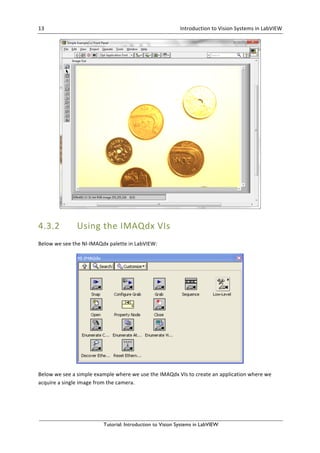
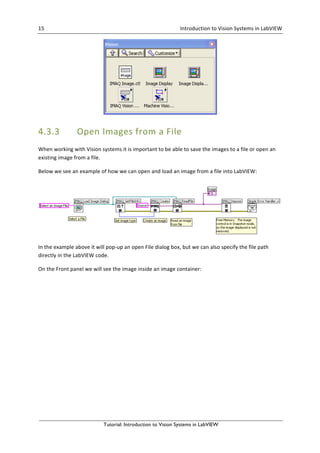
We	find	the	“Vision	Acquisition	Express	VI”	in	the	Vision	Express	palette	in	LabVIEW:	
	
→	
	
When	we	drag	the	“Vision	Acquisition	Express	VI”	to	the	lock	diagram,	a	wizard	will	appear:
12	 	 Introduction	to	Vision	Systems	in	LabVIEW	 	
Tutorial: Introduction to Vision Systems in LabVIEW
	 	
	 	
The	finished	LabVIEW	program	will	simply	look	like	this:	
	
The	image	will	be	acquired	on	the	Front	Panel	in	the	“Image	Out”:
13	 	 Introduction	to	Vision	Systems	in	LabVIEW	 	
Tutorial: Introduction to Vision Systems in LabVIEW
	
4.3.2 Using	the	IMAQdx	VIs	
Below	we	see	the	NI-IMAQdx	palette	in	LabVIEW:	
	
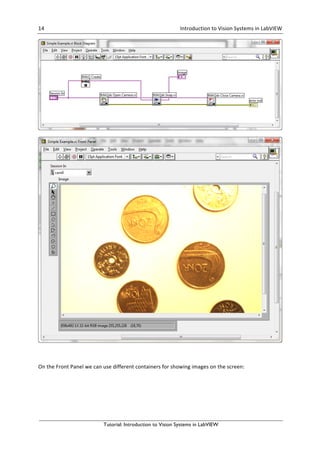
Below	we	see	a	simple	example	where	we	use	the	IMAQdx	VIs	to	create	an	application	where	we	
acquire	a	single	image	from	the	camera.
14	 	 Introduction	to	Vision	Systems	in	LabVIEW	 	
Tutorial: Introduction to Vision Systems in LabVIEW


On	the	Front	Panel	we	can	use	different	containers	for	showing	images	on	the	screen:
15	 	 Introduction	to	Vision	Systems	in	LabVIEW	 	
Tutorial: Introduction to Vision Systems in LabVIEW
	
4.3.3 Open	Images	from	a	File	
When	working	with	Vision	systems	it	is	important	to	be	able	to	save	the	images	to	a	file	or	open	an	
existing	image	from	a	file.	
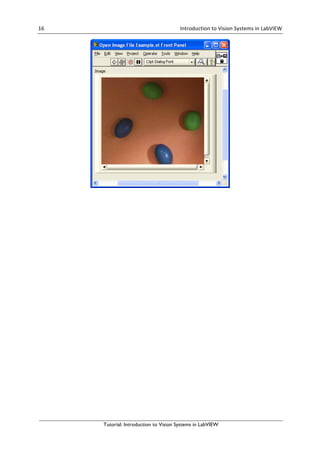
Below	we	see	an	example	of	how	we	can	open	and	load	an	image	from	a	file	into	LabVIEW:	
	
In	the	example	above	it	will	pop-up	an	open	File	dialog	box,	but	we	can	also	specify	the	file	path	
directly	in	the	LabVIEW	code.	 	
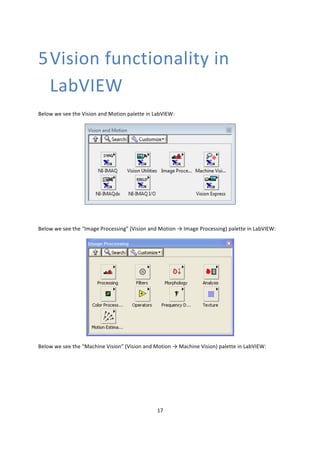
On	the	Front	panel	we	will	see	the	image	inside	an	image	container:
16	 	 Introduction	to	Vision	Systems	in	LabVIEW	 	
Tutorial: Introduction to Vision Systems in LabVIEW
17	
	
5Vision	functionality	in	
LabVIEW	
Below	we	see	the	Vision	and	Motion	palette	in	LabVIEW:	
	
	
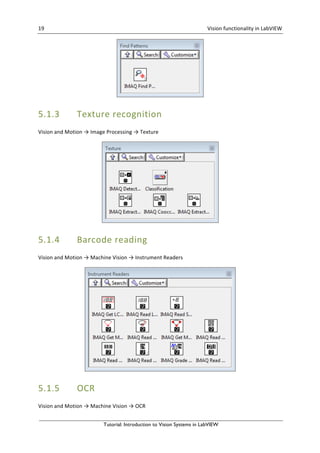
Below	we	see	the	“Image	Processing”	(Vision	and	Motion	→	Image	Processing)	palette	in	LabVIEW:	
	
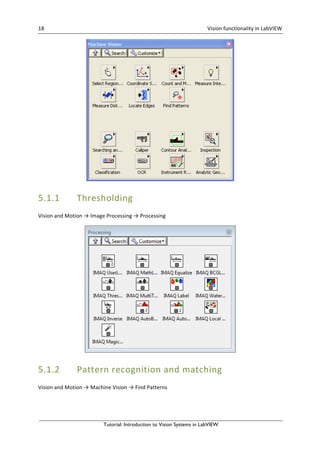
Below	we	see	the	“Machine	Vision”	(Vision	and	Motion	→	Machine	Vision)	palette	in	LabVIEW:
18	 	 Vision	functionality	in	LabVIEW	 	
Tutorial: Introduction to Vision Systems in LabVIEW
	
5.1.1 Thresholding	
Vision	and	Motion	→	Image	Processing	→	Processing	
	
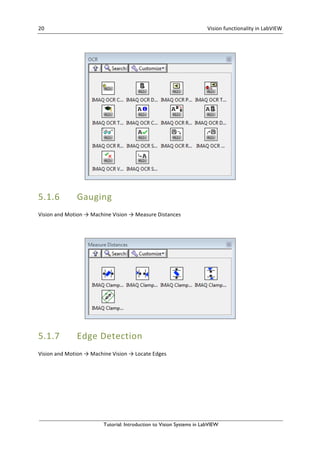
5.1.2 Pattern	recognition	and	matching	
Vision	and	Motion	→	Machine	Vision	→	Find	Patterns
19	 	 Vision	functionality	in	LabVIEW	 	
Tutorial: Introduction to Vision Systems in LabVIEW
	
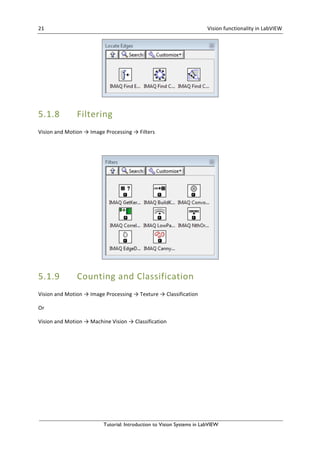
5.1.3 Texture	recognition	
Vision	and	Motion	→	Image	Processing	→	Texture	
	
5.1.4 Barcode	reading	
Vision	and	Motion	→	Machine	Vision	→	Instrument	Readers	
	
5.1.5 OCR	
Vision	and	Motion	→	Machine	Vision	→	OCR
20	 	 Vision	functionality	in	LabVIEW	 	
Tutorial: Introduction to Vision Systems in LabVIEW
	
	
5.1.6 Gauging	
Vision	and	Motion	→	Machine	Vision	→	Measure	Distances	
	
	
5.1.7 Edge	Detection	
Vision	and	Motion	→	Machine	Vision	→	Locate	Edges
21	 	 Vision	functionality	in	LabVIEW	 	
Tutorial: Introduction to Vision Systems in LabVIEW
	
5.1.8 Filtering	
Vision	and	Motion	→	Image	Processing	→	Filters	
	
	
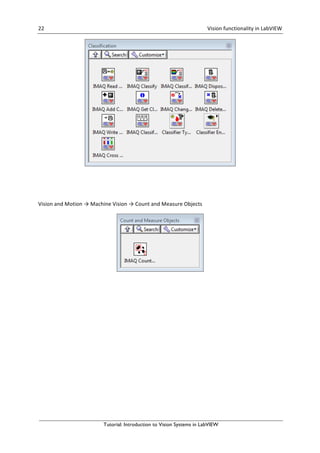
5.1.9 Counting	and	Classification	
Vision	and	Motion	→	Image	Processing	→	Texture	→	Classification	
Or	
Vision	and	Motion	→	Machine	Vision	→	Classification
22	 	 Vision	functionality	in	LabVIEW	 	
Tutorial: Introduction to Vision Systems in LabVIEW


Vision	and	Motion	→	Machine	Vision	→	Count	and	Measure	Objects
Hans-Petter	Halvorsen,	M.Sc.	
	
E-mail:	hans.p.halvorsen@hit.no	
Blog:	http://home.hit.no/~hansha/	
	
	
University	College	of	Southeast	Norway	
www.usn.no

Introduction to vision systems in lab view