Professional Training
- 1
NAME : SARISH WADKAR
REG NUMBER : 38180007
Internship name :
Virtual Automation
Based Online Summer Internship Program
Intern at :
National Instruments Innovation Centre
Duration : 6 weeks
Introduction to
National Instruments :
 NI, formerly National Instruments Corporation,
is an American multinational company with
international operation. Headquartered in Austin,
Texas, it is a producer of automated test
equipment and virtual instrumentation software.
Common applications include data
acquisition, instrument control and machine
vision.
LabVIEW overview :
 What is LabVIEW:
LabVIEW (Laboratory Virtual Instrument Engineering Workbench),
created by National Instruments (www.ni.com) is a graphical programming
language that uses icons instead of lines of text to create applications.
 LabVIEW programs/codes are called Virtual Instruments, or VIs for
short.
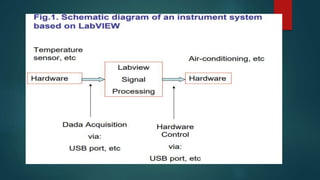
 LabVIEW is used for Data acquisition, signal Processing (Analysis),
and hardware control – a typical instrument configuration based on
Labview.
LabVIEW environment
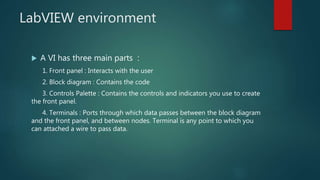
 A VI has three main parts :
1. Front panel : Interacts with the user
2. Block diagram : Contains the code
3. Controls Palette : Contains the controls and indicators you use to create
the front panel.
4. Terminals : Ports through which data passes between the block diagram
and the front panel, and between nodes. Terminal is any point to which you
can attached a wire to pass data.
Front Panel :
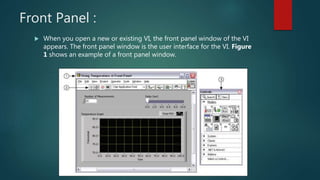
 When you open a new or existing VI, the front panel window of the VI
appears. The front panel window is the user interface for the VI. Figure
1 shows an example of a front panel window.
Block Diagram :
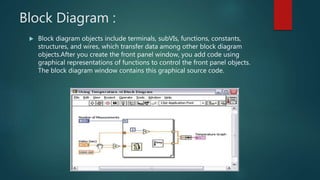
 Block diagram objects include terminals, subVIs, functions, constants,
structures, and wires, which transfer data among other block diagram
objects.After you create the front panel window, you add code using
graphical representations of functions to control the front panel objects.
The block diagram window contains this graphical source code.
Control palette :
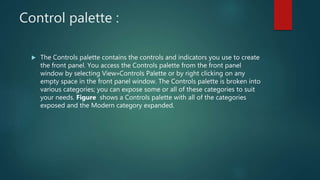
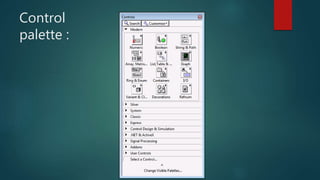
 The Controls palette contains the controls and indicators you use to create
the front panel. You access the Controls palette from the front panel
window by selecting View»Controls Palette or by right clicking on any
empty space in the front panel window. The Controls palette is broken into
various categories; you can expose some or all of these categories to suit
your needs. Figure shows a Controls palette with all of the categories
exposed and the Modern category expanded.
Control
palette :
Terminals :
 There are different terminals:
• Control and indicator terminals
• Node terminals
• Constant terminals.
• Specialized terminals on various structures.
 Terminals are entry and exit ports that exchange information between the front
panel and block diagram. They are analogous to parameters and constants in
text-based programming languages. Types of terminals include control or
indicator terminals and node terminals. Control and indicator terminals belong
to front panel controls and indicators. Data points you enter into the front
panel controls (a and b in the previous front panel) enter the block diagram
through the control terminals.
LabVIEW Programming Concept :
 LabVIEW follows Data-Flow programming .
 The process to determine the execution of program is called Arbitrary-
Interleaving .
 During compilation the VI compiler constructs a wired table .
 LabVIEW functions are polymorphic.
 LabVIEW is not an interpreted language it is compiled behind the scenes by
LabVIEW’s execution engine.
 LabVIEW constructs a wire table for the VI .
 This wire table identifies elements in the block diagram that have inputs
needed for that element to run .
 A LabVIEW program is executed by pressing the arrow or the Run button
located in the palette along the top of the window
Applications of LabVIEW :
 Machine monitoring and control :LabVIEW Real-Time module helps in
preparing powerful machine monitoring and control applications.
 Research and Analysis : Scientist and Researchers use it biomedical
,aerospace energy industries etc .
 Control Design : Real world data can be compared with theoretical data .
Benefits :
 Extensive Interface - Even people with limited coding experience can write
programs and deploy solutions in reduced time interval.It also includes An
interface to .NET framework assembly .
 Code Reuse and Platform independent -The G-code is independent of the
operating system .
 Parallel Processing- Easy to code programs with multiple tasksperformed
in parallel by multithreading .
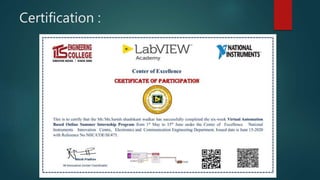
Certification :
ONLINE COURSES
 Introduction to IOT and Embedded systems :
University of California – Coursera
 Renewable Energy and Green Building Entrepreneurship :
Duke University – Coursera
 Geospatial application for Disaster management :
Center for Space Science and Technology Education for Asia and Pacific
(CSSTEAP) & ISRO
Events :
 Young Leader Summit 2020 – IIM Bangalore
Competition :
 STRATUP Business Simulation – 3rd rank in 84 teams
THANK YOU

38180007 Sarish Wadkar.pptx

  • 1.
    Professional Training - 1 NAME: SARISH WADKAR REG NUMBER : 38180007
  • 2.
    Internship name : VirtualAutomation Based Online Summer Internship Program Intern at : National Instruments Innovation Centre Duration : 6 weeks
  • 3.
    Introduction to National Instruments:  NI, formerly National Instruments Corporation, is an American multinational company with international operation. Headquartered in Austin, Texas, it is a producer of automated test equipment and virtual instrumentation software. Common applications include data acquisition, instrument control and machine vision.
  • 4.
    LabVIEW overview : What is LabVIEW: LabVIEW (Laboratory Virtual Instrument Engineering Workbench), created by National Instruments (www.ni.com) is a graphical programming language that uses icons instead of lines of text to create applications.  LabVIEW programs/codes are called Virtual Instruments, or VIs for short.  LabVIEW is used for Data acquisition, signal Processing (Analysis), and hardware control – a typical instrument configuration based on Labview.
  • 6.
    LabVIEW environment  AVI has three main parts : 1. Front panel : Interacts with the user 2. Block diagram : Contains the code 3. Controls Palette : Contains the controls and indicators you use to create the front panel. 4. Terminals : Ports through which data passes between the block diagram and the front panel, and between nodes. Terminal is any point to which you can attached a wire to pass data.
  • 7.
    Front Panel : When you open a new or existing VI, the front panel window of the VI appears. The front panel window is the user interface for the VI. Figure 1 shows an example of a front panel window.
  • 8.
    Block Diagram : Block diagram objects include terminals, subVIs, functions, constants, structures, and wires, which transfer data among other block diagram objects.After you create the front panel window, you add code using graphical representations of functions to control the front panel objects. The block diagram window contains this graphical source code.
  • 9.
    Control palette : The Controls palette contains the controls and indicators you use to create the front panel. You access the Controls palette from the front panel window by selecting View»Controls Palette or by right clicking on any empty space in the front panel window. The Controls palette is broken into various categories; you can expose some or all of these categories to suit your needs. Figure shows a Controls palette with all of the categories exposed and the Modern category expanded.
  • 10.
  • 11.
    Terminals :  Thereare different terminals: • Control and indicator terminals • Node terminals • Constant terminals. • Specialized terminals on various structures.  Terminals are entry and exit ports that exchange information between the front panel and block diagram. They are analogous to parameters and constants in text-based programming languages. Types of terminals include control or indicator terminals and node terminals. Control and indicator terminals belong to front panel controls and indicators. Data points you enter into the front panel controls (a and b in the previous front panel) enter the block diagram through the control terminals.
  • 12.
    LabVIEW Programming Concept:  LabVIEW follows Data-Flow programming .  The process to determine the execution of program is called Arbitrary- Interleaving .  During compilation the VI compiler constructs a wired table .  LabVIEW functions are polymorphic.  LabVIEW is not an interpreted language it is compiled behind the scenes by LabVIEW’s execution engine.  LabVIEW constructs a wire table for the VI .  This wire table identifies elements in the block diagram that have inputs needed for that element to run .  A LabVIEW program is executed by pressing the arrow or the Run button located in the palette along the top of the window
  • 13.
    Applications of LabVIEW:  Machine monitoring and control :LabVIEW Real-Time module helps in preparing powerful machine monitoring and control applications.  Research and Analysis : Scientist and Researchers use it biomedical ,aerospace energy industries etc .  Control Design : Real world data can be compared with theoretical data .
  • 14.
    Benefits :  ExtensiveInterface - Even people with limited coding experience can write programs and deploy solutions in reduced time interval.It also includes An interface to .NET framework assembly .  Code Reuse and Platform independent -The G-code is independent of the operating system .  Parallel Processing- Easy to code programs with multiple tasksperformed in parallel by multithreading .
  • 15.
  • 16.
    ONLINE COURSES  Introductionto IOT and Embedded systems : University of California – Coursera  Renewable Energy and Green Building Entrepreneurship : Duke University – Coursera  Geospatial application for Disaster management : Center for Space Science and Technology Education for Asia and Pacific (CSSTEAP) & ISRO
  • 17.
    Events :  YoungLeader Summit 2020 – IIM Bangalore Competition :  STRATUP Business Simulation – 3rd rank in 84 teams
  • 18.