Android Architecture
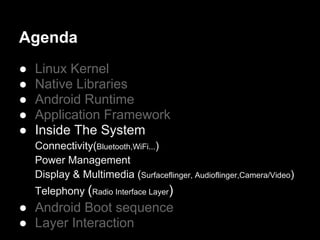
Agenda
●   Linux Kernel
●   Native Libraries
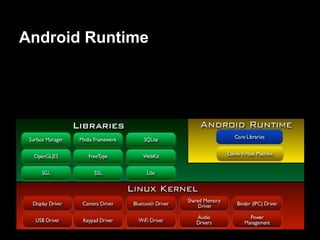
●   Android Runtime
●   Application Framework
●   Inside The System
    Connectivity(Bluetooth,WiFi...)
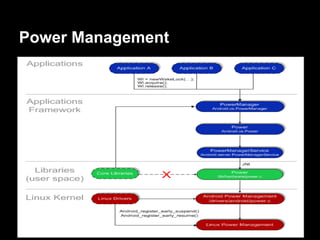
    Power Management
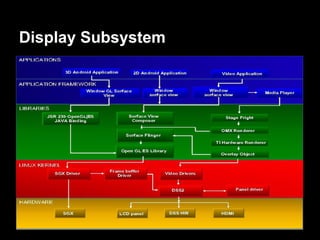
    Display & Multimedia (Surfaceflinger, Audioflinger,Camera/Video)
    Telephony (Radio Interface Layer)
● Android Boot sequence
● Layer Interaction
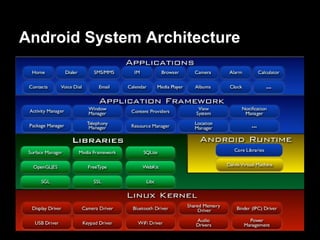
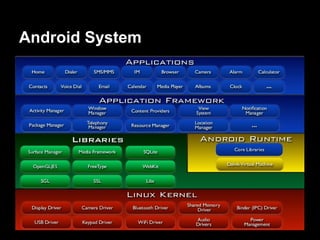
Android System Architecture
Agenda
●   Linux Kernel
●   Native Libraries
●   Android Runtime
●   Application Framework
●   Inside The System
    Connectivity(Bluetooth,WiFi...)
    Power Management
    Display & Multimedia (Surfaceflinger, Audioflinger,Camera/Video)
    Telephony (Radio Interface Layer)
● Android Boot sequence
● Layer Interaction
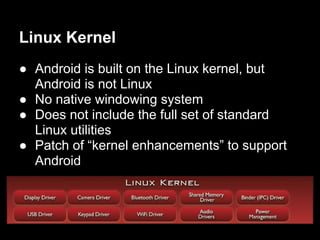
Linux Kernel
● Android is built on the Linux kernel, but
  Android is not Linux
● No native windowing system
● Does not include the full set of standard
  Linux utilities
● Patch of “kernel enhancements” to support
  Android
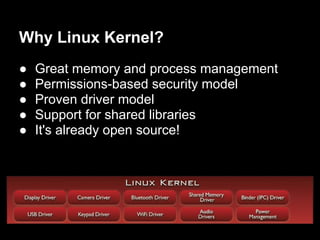
Why Linux Kernel?
●   Great memory and process management
●   Permissions-based security model
●   Proven driver model
●   Support for shared libraries
●   It's already open source!
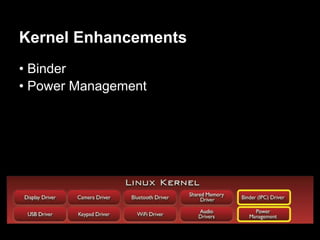
Kernel Enhancements
• Binder
• Power Management
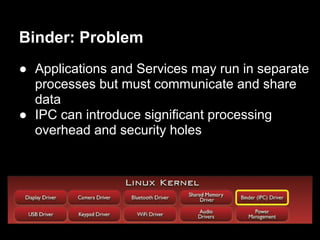
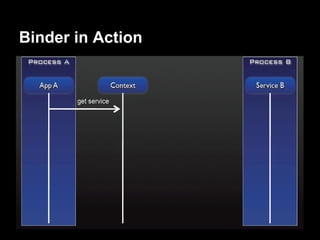
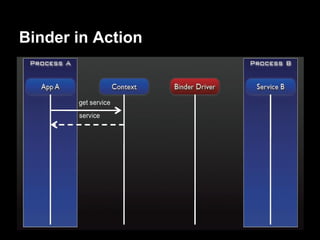
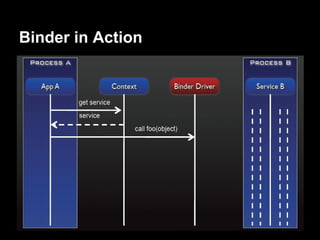
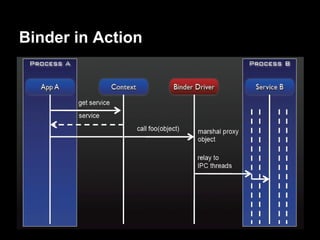
Binder: Problem
● Applications and Services may run in separate
  processes but must communicate and share
  data
● IPC can introduce significant processing
  overhead and security holes
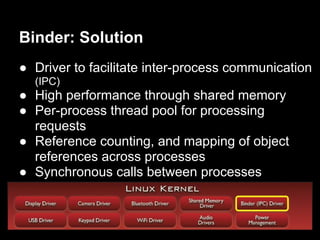
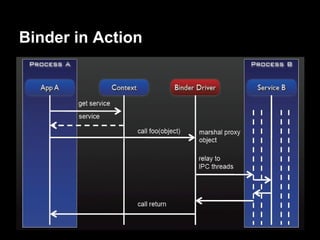
Binder: Solution
● Driver to facilitate inter-process communication
  (IPC)
● High performance through shared memory
● Per-process thread pool for processing
  requests
● Reference counting, and mapping of object
  references across processes
● Synchronous calls between processes
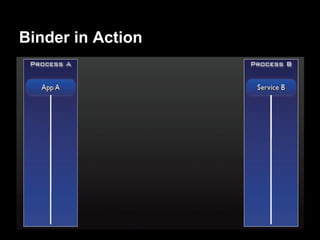
Binder in Action
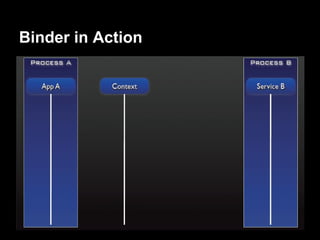
Binder in Action
Binder in Action
Binder in Action
Binder in Action
Binder in Action
Binder in Action
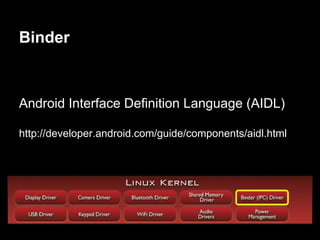
Binder


Android Interface Definition Language (AIDL)

http://developer.android.com/guide/components/aidl.html
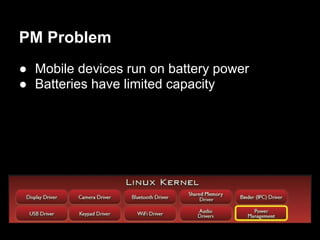
PM Problem
● Mobile devices run on battery power
● Batteries have limited capacity
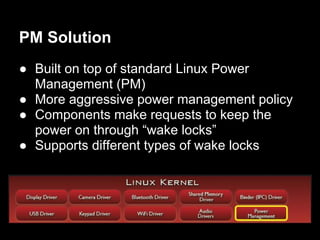
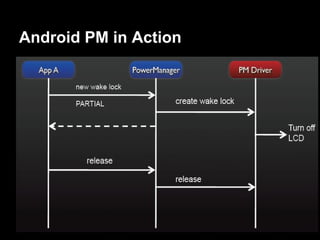
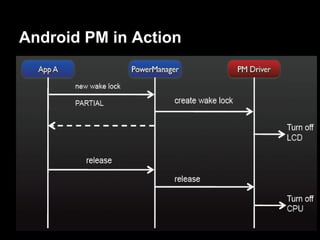
PM Solution
● Built on top of standard Linux Power
  Management (PM)
● More aggressive power management policy
● Components make requests to keep the
  power on through “wake locks”
● Supports different types of wake locks
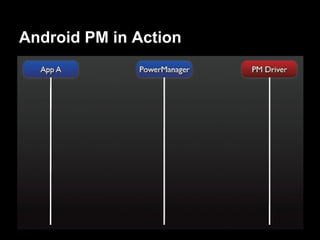
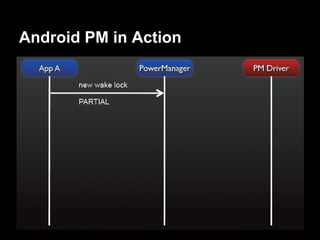
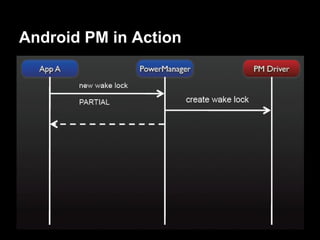
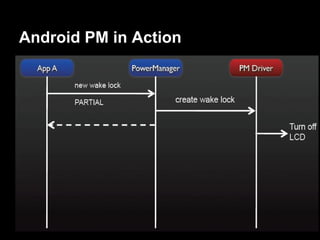
Android PM in Action
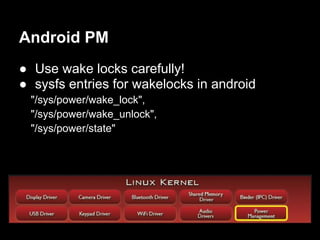
Android PM
● Use wake locks carefully!
● sysfs entries for wakelocks in android
  "/sys/power/wake_lock",
  "/sys/power/wake_unlock",
  "/sys/power/state"
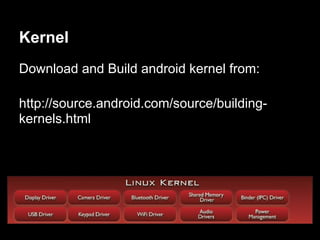
Kernel
Download and Build android kernel from:

http://source.android.com/source/building-
kernels.html
Agenda
●   Linux Kernel
●   Native Libraries
●   Android Runtime
●   Application Framework
●   Inside The System
    Connectivity(Bluetooth,WiFi...)
    Power Management
    Display & Multimedia (Surfaceflinger, Audioflinger,Camera/Video)
    Telephony (Radio Interface Layer)
● Android Boot sequence
● Layer Interaction
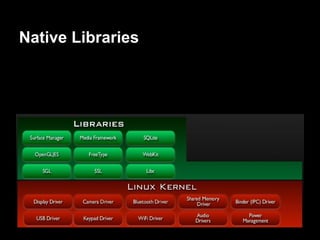
Native Libraries
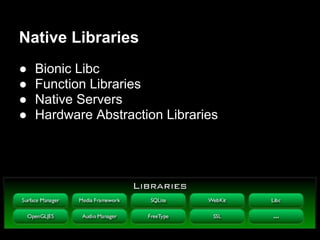
Native Libraries
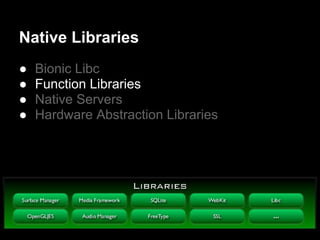
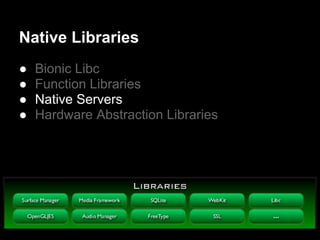
●   Bionic Libc
●   Function Libraries
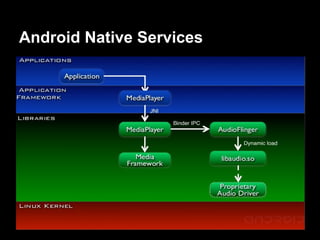
●   Native Servers
●   Hardware Abstraction Libraries
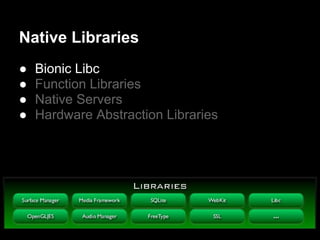
Native Libraries
●   Bionic Libc
●   Function Libraries
●   Native Servers
●   Hardware Abstraction Libraries
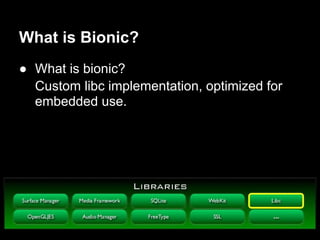
What is Bionic?
● What is bionic?
  Custom libc implementation, optimized for
  embedded use.
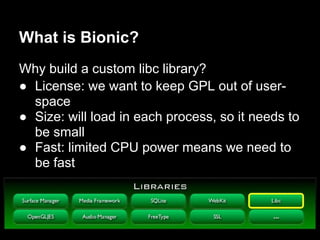
What is Bionic?
Why build a custom libc library?
● License: we want to keep GPL out of user-
  space
● Size: will load in each process, so it needs to
  be small
● Fast: limited CPU power means we need to
  be fast
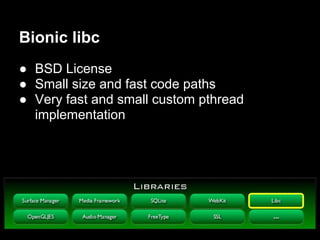
Bionic libc
● BSD License
● Small size and fast code paths
● Very fast and small custom pthread
  implementation
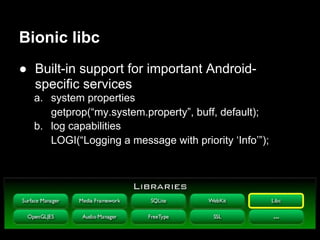
Bionic libc
● Built-in support for important Android-
  specific services
  a. system properties
     getprop(“my.system.property”, buff, default);
  b. log capabilities
     LOGI(“Logging a message with priority ‘Info’”);
Native Libraries
●   Bionic Libc
●   Function Libraries
●   Native Servers
●   Hardware Abstraction Libraries
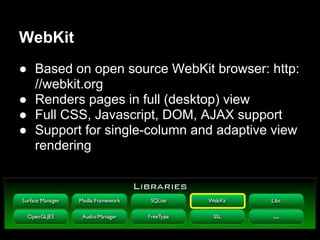
WebKit
● Based on open source WebKit browser: http:
  //webkit.org
● Renders pages in full (desktop) view
● Full CSS, Javascript, DOM, AJAX support
● Support for single-column and adaptive view
  rendering
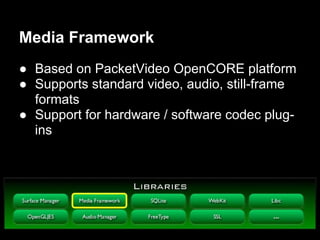
Media Framework
● Based on PacketVideo OpenCORE platform
● Supports standard video, audio, still-frame
  formats
● Support for hardware / software codec plug-
  ins
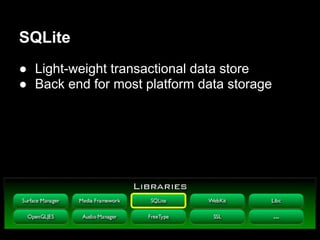
SQLite
● Light-weight transactional data store
● Back end for most platform data storage
Native Libraries
●   Bionic Libc
●   Function Libraries
●   Native Servers
●   Hardware Abstraction Libraries
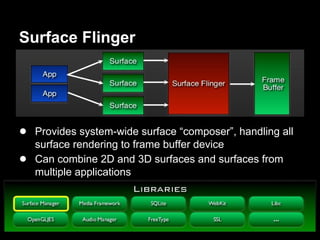
Surface Flinger


● Provides system-wide surface “composer”, handling all
    surface rendering to frame buffer device
●   Can combine 2D and 3D surfaces and surfaces from
    multiple applications
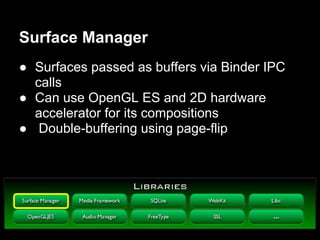
Surface Manager
● Surfaces passed as buffers via Binder IPC
  calls
● Can use OpenGL ES and 2D hardware
  accelerator for its compositions
● Double-buffering using page-flip
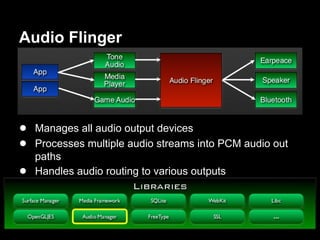
Audio Flinger


● Manages all audio output devices
● Processes multiple audio streams into PCM audio out
    paths
●   Handles audio routing to various outputs
Native Libraries
●   Bionic Libc
●   Function Libraries
●   Native Servers
●   Hardware Abstraction Libraries
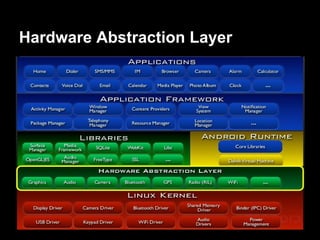
Hardware Abstraction Layer
Hardware Abstraction Libraries
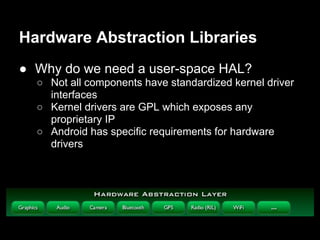
● Why do we need a user-space HAL?
  ○ Not all components have standardized kernel driver
    interfaces
  ○ Kernel drivers are GPL which exposes any
    proprietary IP
  ○ Android has specific requirements for hardware
    drivers
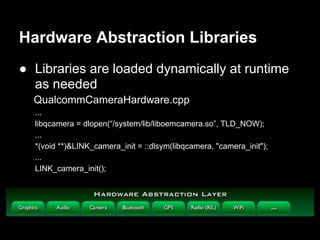
Hardware Abstraction Libraries
● Libraries are loaded dynamically at runtime
  as needed
  QualcommCameraHardware.cpp
  ...
  libqcamera = dlopen(“/system/lib/liboemcamera.so”, TLD_NOW);
  ...
  *(void **)&LINK_camera_init = ::dlsym(libqcamera, "camera_init");
  ...
  LINK_camera_init();
Agenda
●   Linux Kernel
●   Native Libraries
●   Android Runtime
●   Application Framework
●   Inside The System
    Connectivity(Bluetooth,WiFi...)
    Power Management
    Display & Multimedia (Surfaceflinger, Audioflinger,Camera/Video)
    Telephony (Radio Interface Layer)
● Android Boot sequence
● Layer Interaction
Android Runtime
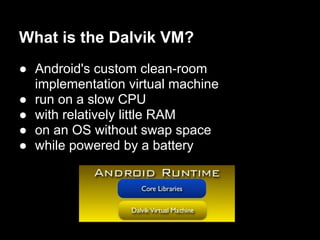
What is the Dalvik VM?
● Android's custom clean-room
  implementation virtual machine
● run on a slow CPU
● with relatively little RAM
● on an OS without swap space
● while powered by a battery
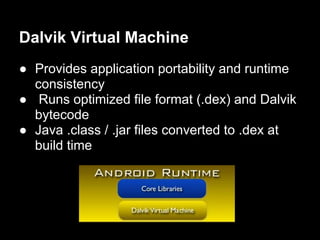
Dalvik Virtual Machine
● Provides application portability and runtime
  consistency
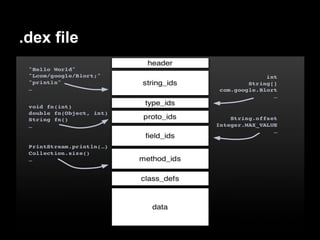
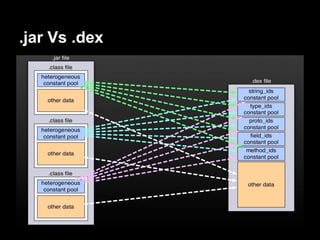
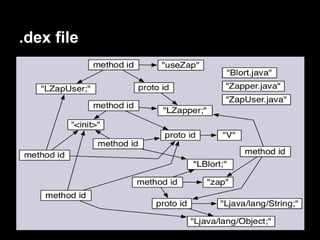
● Runs optimized file format (.dex) and Dalvik
  bytecode
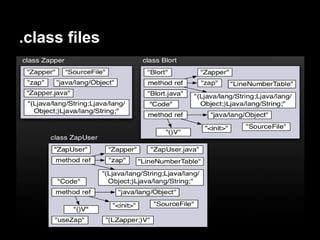
● Java .class / .jar files converted to .dex at
  build time
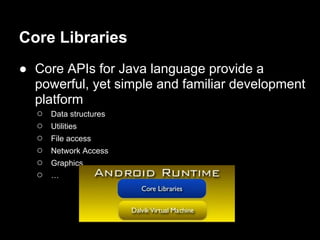
Core Libraries
● Core APIs for Java language provide a
  powerful, yet simple and familiar development
  platform
  ○   Data structures
  ○   Utilities
  ○   File access
  ○   Network Access
  ○   Graphics
  ○   …
.dex file
.jar Vs .dex
.class files
.dex file
Agenda
●   Linux Kernel
●   Native Libraries
●   Android Runtime
●   Application Framework
●   Inside The System
    Connectivity(Bluetooth,WiFi...)
    Power Management
    Display & Multimedia (Surfaceflinger, Audioflinger,Camera/Video)
    Telephony (Radio Interface Layer)
● Android Boot sequence
● Layer Interaction
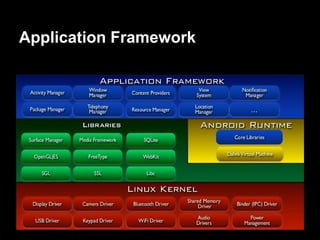
Application Framework
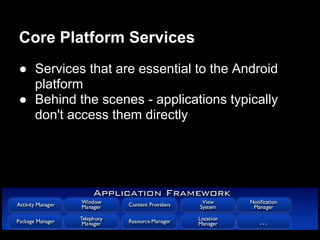
Core Platform Services
● Services that are essential to the Android
  platform
● Behind the scenes - applications typically
  don't access them directly
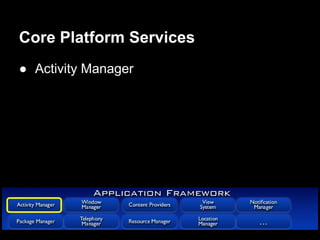
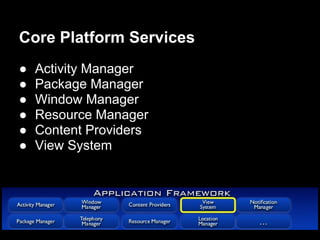
Core Platform Services
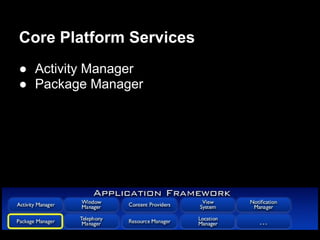
● Activity Manager
Core Platform Services
● Activity Manager
● Package Manager
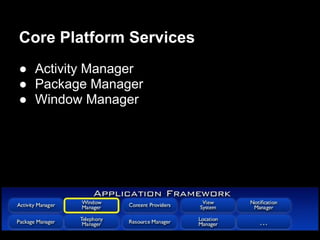
Core Platform Services
● Activity Manager
● Package Manager
● Window Manager
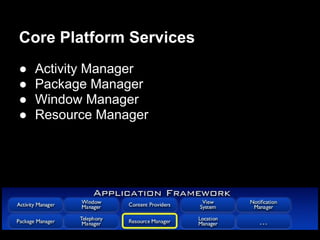
Core Platform Services
●   Activity Manager
●   Package Manager
●   Window Manager
●   Resource Manager
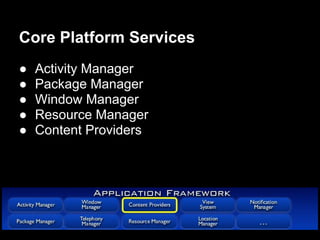
Core Platform Services
●   Activity Manager
●   Package Manager
●   Window Manager
●   Resource Manager
●   Content Providers
Core Platform Services
●   Activity Manager
●   Package Manager
●   Window Manager
●   Resource Manager
●   Content Providers
●   View System
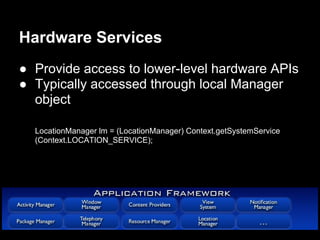
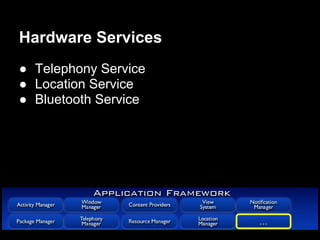
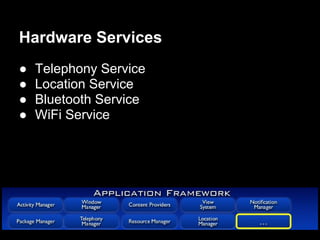
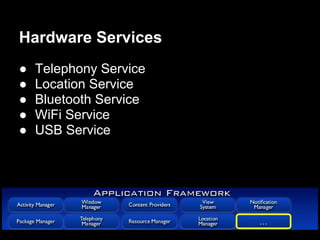
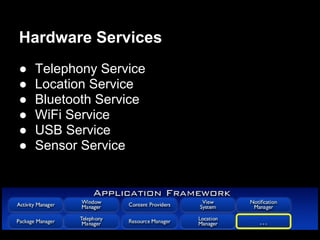
Hardware Services
● Provide access to lower-level hardware APIs
● Typically accessed through local Manager
  object

  LocationManager lm = (LocationManager) Context.getSystemService
  (Context.LOCATION_SERVICE);
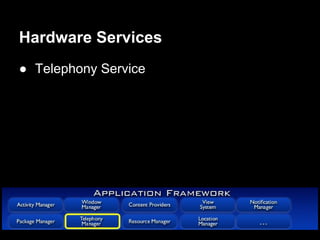
Hardware Services
● Telephony Service
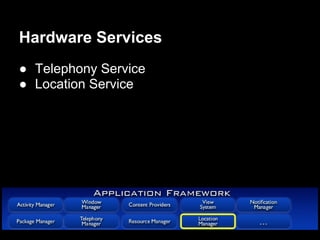
Hardware Services
● Telephony Service
● Location Service
Hardware Services
● Telephony Service
● Location Service
● Bluetooth Service
Hardware Services
●   Telephony Service
●   Location Service
●   Bluetooth Service
●   WiFi Service
Hardware Services
●   Telephony Service
●   Location Service
●   Bluetooth Service
●   WiFi Service
●   USB Service
Hardware Services
●   Telephony Service
●   Location Service
●   Bluetooth Service
●   WiFi Service
●   USB Service
●   Sensor Service
Android System
Agenda
●   Linux Kernel
●   Native Libraries
●   Android Runtime
●   Application Framework
●   Inside The System
    Connectivity(Bluetooth,WiFi...)
    Power Management
    Display & Multimedia (Surfaceflinger, Audioflinger,Camera/Video)
    Telephony (Radio Interface Layer)
● Android Boot sequence
● Layer Interaction
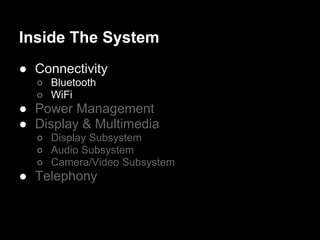
Inside The System
● Connectivity
  ○ Bluetooth
  ○ WiFi
● Power Management
● Display & Multimedia
  ○ Display Subsystem
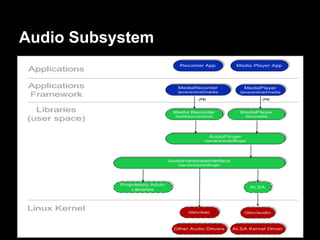
  ○ Audio Subsystem
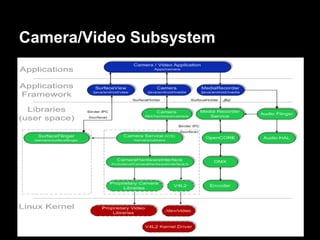
  ○ Camera/Video Subsystem
● Telephony
Connectivity
● Bluetooth
● Wi-Fi
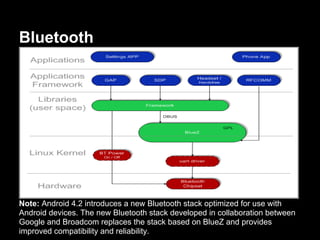
Bluetooth


Note: Android 4.2 introduces a new Bluetooth stack optimized for use with
Android devices. The new Bluetooth stack developed in collaboration between
Google and Broadcom replaces the stack based on BlueZ and provides
improved compatibility and reliability.
Wi-Fi
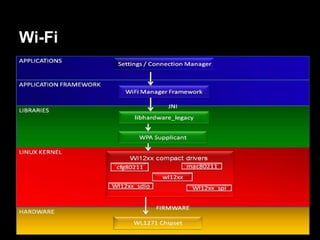
● Android uses wpa_supplicant as the platform
  interface to the Wi-Fi device.
● Your Wi-Fi driver must be compatible with
  the standard wpa_supplicant
Wi-Fi
Inside The System
● Connectivity
  ○ Bluetooth
  ○ WiFi
● Power Management
● Display & Multimedia
  ○ Display Subsystem
  ○ Audio Subsystem
  ○ Camera/Video Subsystem
● Telephony
Power Management
Inside The System
● Connectivity
  ○ Bluetooth
  ○ WiFi
● Power Management
● Display & Multimedia
  ○ Display Subsystem
  ○ Audio Subsystem
  ○ Camera/Video Subsystem
● Telephony
Display & Multimedia
● Display Subsystem
● Audio Subsystem
● Camera/Video Subsystem
Display Subsystem
Audio Subsystem
Camera/Video Subsystem
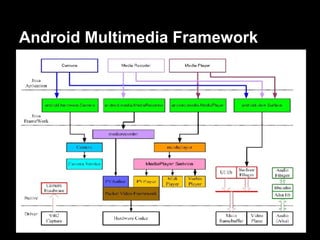
Android Multimedia Framework
Inside The System
● Connectivity
  ○ Bluetooth
  ○ WiFi
● Power Management
● Display & Multimedia
  ○ Display Subsystem
  ○ Audio Subsystem
  ○ Camera/Video Subsystem
● Telephony
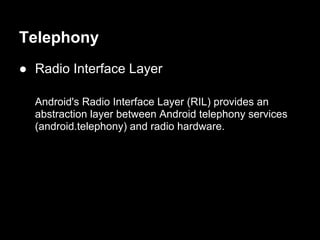
Telephony
● Radio Interface Layer

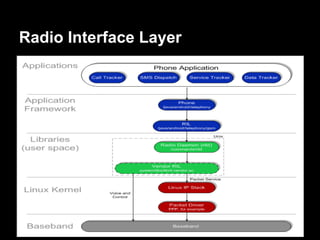
  Android's Radio Interface Layer (RIL) provides an
  abstraction layer between Android telephony services
  (android.telephony) and radio hardware.
Radio Interface Layer
Agenda
●   Linux Kernel
●   Native Libraries
●   Android Runtime
●   Application Framework
●   Inside The System
    Connectivity(Bluetooth,WiFi...)
    Power Management
    Display & Multimedia (Surfaceflinger, Audioflinger,Camera/Video)
    Telephony (Radio Interface Layer)
● Android Boot sequence
● Layer Interaction
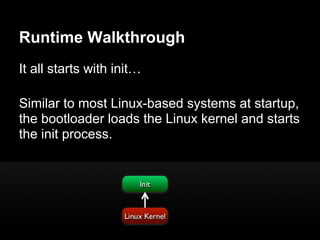
Runtime Walkthrough
It all starts with init…

Similar to most Linux-based systems at startup,
the bootloader loads the Linux kernel and starts
the init process.
Runtime Walkthrough
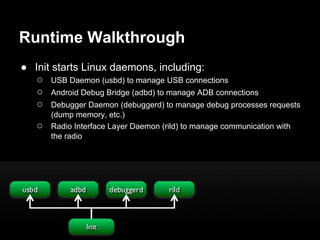
● Init starts Linux daemons, including:
   ○ USB Daemon (usbd) to manage USB connections
   ○ Android Debug Bridge (adbd) to manage ADB connections
   ○ Debugger Daemon (debuggerd) to manage debug processes requests
       (dump memory, etc.)
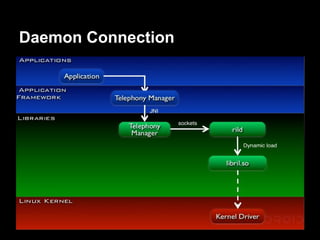
   ○   Radio Interface Layer Daemon (rild) to manage communication with
       the radio
Runtime Walkthrough
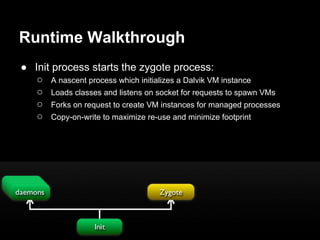
● Init process starts the zygote process:
   ○ A nascent process which initializes a Dalvik VM instance
   ○ Loads classes and listens on socket for requests to spawn VMs
   ○ Forks on request to create VM instances for managed processes
   ○ Copy-on-write to maximize re-use and minimize footprint
Runtime Walkthrough
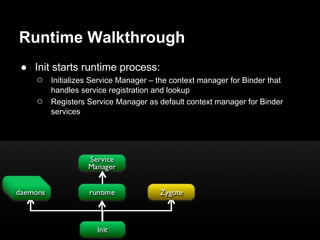
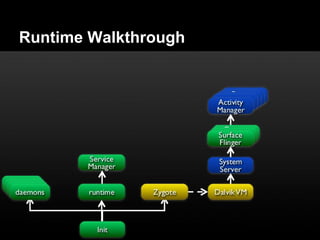
● Init starts runtime process:
   ○ Initializes Service Manager – the context manager for Binder that
        handles service registration and lookup
    ○   Registers Service Manager as default context manager for Binder
        services
Runtime Walkthrough
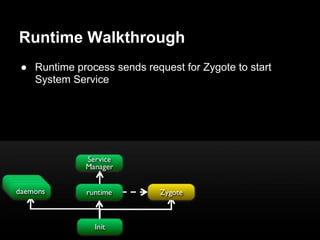
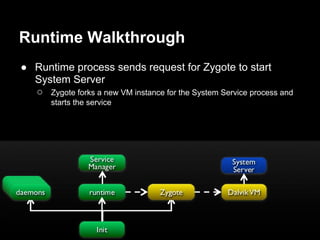
● Runtime process sends request for Zygote to start
  System Service
Runtime Walkthrough
● Runtime process sends request for Zygote to start
  System Server
  ○ Zygote forks a new VM instance for the System Service process and
       starts the service
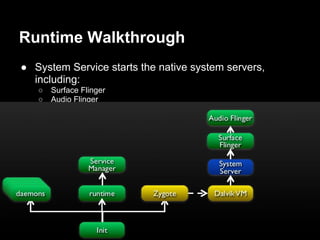
Runtime Walkthrough
● System Service starts the native system servers,
  including:
   ○   Surface Flinger
   ○   Audio Flinger
Runtime Walkthrough
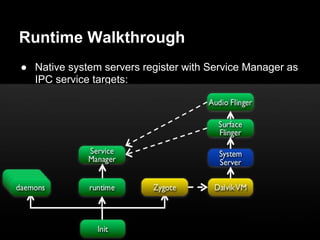
● Native system servers register with Service Manager as
  IPC service targets:
Runtime Walkthrough
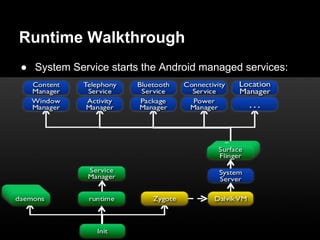
● System Service starts the Android managed services:
Runtime Walkthrough
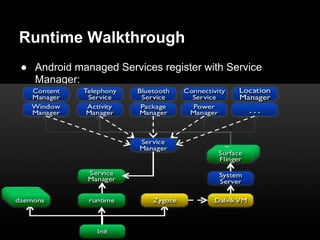
● Android managed Services register with Service
  Manager:
Runtime Walkthrough
Runtime Walkthrough
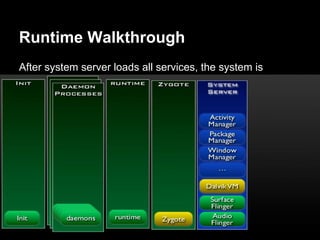
After system server loads all services, the system is
ready…
Runtime Walkthrough
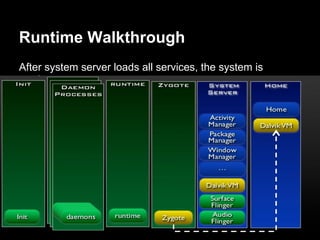
After system server loads all services, the system is
ready…
Runtime Walkthrough
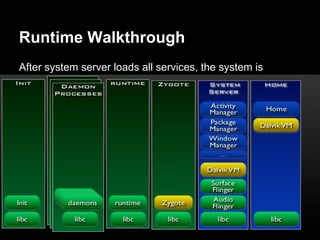
After system server loads all services, the system is
ready…
Runtime Walkthrough
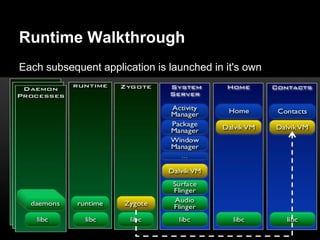
Each subsequent application is launched in it's own
process
Agenda
●   Linux Kernel
●   Native Libraries
●   Android Runtime
●   Application Framework
●   Inside The System
    Connectivity(Bluetooth,WiFi...)
    Power Management
    Display & Multimedia (Surfaceflinger, Audioflinger,Camera/Video)
    Telephony (Radio Interface Layer)
● Android Boot sequence
● Layer Interaction
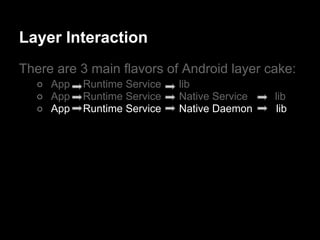
Layer Interaction
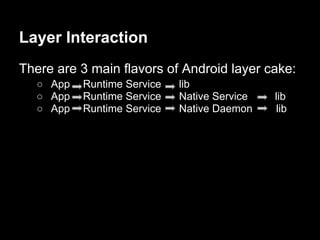
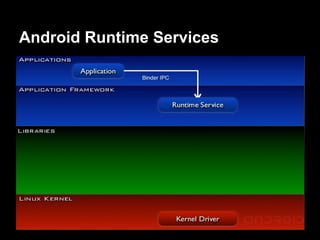
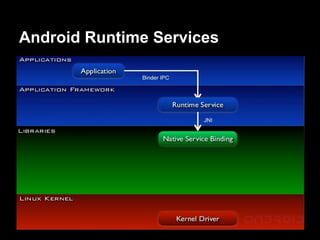
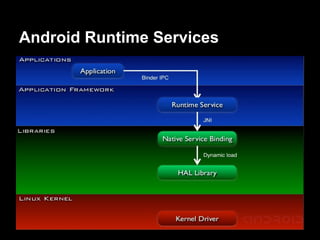
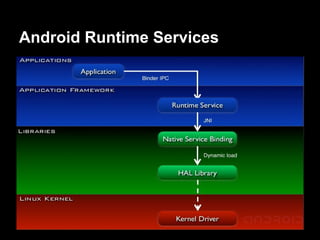
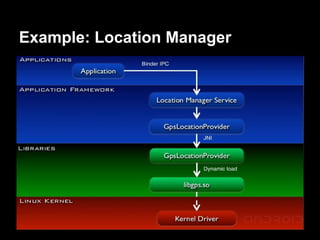
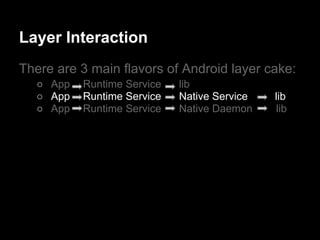
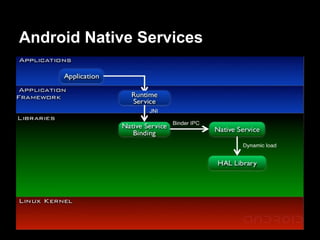
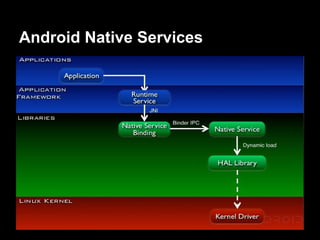
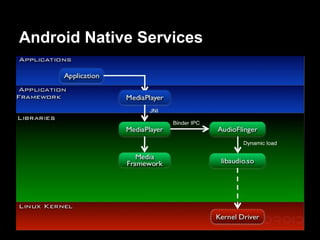
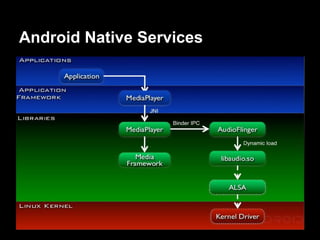
There are 3 main flavors of Android layer cake:
  ○ App   Runtime Service   lib
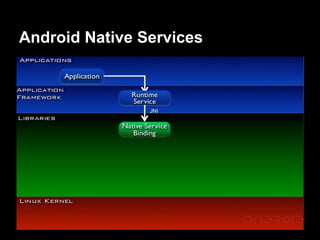
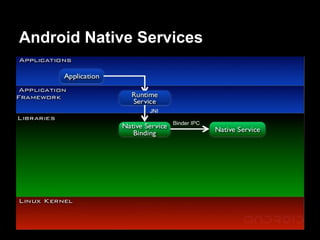
  ○ App   Runtime Service   Native Service   lib
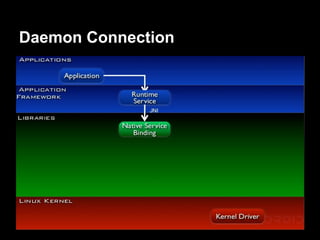
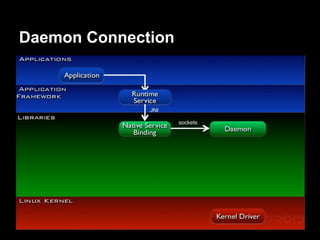
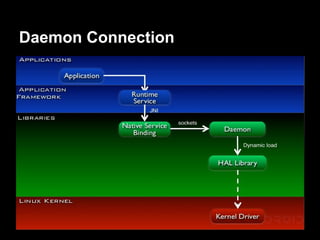
  ○ App   Runtime Service   Native Daemon    lib
Layer Interaction
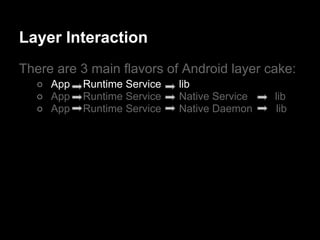
There are 3 main flavors of Android layer cake:
  ○ App   Runtime Service   lib
  ○ App   Runtime Service   Native Service   lib
  ○ App   Runtime Service   Native Daemon    lib
Android Runtime Services
Example: Location Manager
Layer Interaction
There are 3 main flavors of Android layer cake:
  ○ App   Runtime Service   lib
  ○ App   Runtime Service   Native Service   lib
  ○ App   Runtime Service   Native Daemon    lib
Android Native Services
Layer Interaction
There are 3 main flavors of Android layer cake:
  ○ App   Runtime Service   lib
  ○ App   Runtime Service   Native Service   lib
  ○ App   Runtime Service   Native Daemon    lib
Daemon Connection
Daemon Connection
Daemon Connection
Daemon Connection
Questions

Android presentation

  • 1.
  • 2.
    Agenda ● Linux Kernel ● Native Libraries ● Android Runtime ● Application Framework ● Inside The System Connectivity(Bluetooth,WiFi...) Power Management Display & Multimedia (Surfaceflinger, Audioflinger,Camera/Video) Telephony (Radio Interface Layer) ● Android Boot sequence ● Layer Interaction
  • 3.
  • 4.
    Agenda ● Linux Kernel ● Native Libraries ● Android Runtime ● Application Framework ● Inside The System Connectivity(Bluetooth,WiFi...) Power Management Display & Multimedia (Surfaceflinger, Audioflinger,Camera/Video) Telephony (Radio Interface Layer) ● Android Boot sequence ● Layer Interaction
  • 5.
    Linux Kernel ● Androidis built on the Linux kernel, but Android is not Linux ● No native windowing system ● Does not include the full set of standard Linux utilities ● Patch of “kernel enhancements” to support Android
  • 6.
    Why Linux Kernel? ● Great memory and process management ● Permissions-based security model ● Proven driver model ● Support for shared libraries ● It's already open source!
  • 7.
  • 8.
    Binder: Problem ● Applicationsand Services may run in separate processes but must communicate and share data ● IPC can introduce significant processing overhead and security holes
  • 9.
    Binder: Solution ● Driverto facilitate inter-process communication (IPC) ● High performance through shared memory ● Per-process thread pool for processing requests ● Reference counting, and mapping of object references across processes ● Synchronous calls between processes
  • 10.
  • 11.
  • 12.
  • 13.
  • 14.
  • 15.
  • 16.
  • 17.
    Binder Android Interface DefinitionLanguage (AIDL) http://developer.android.com/guide/components/aidl.html
  • 18.
    PM Problem ● Mobiledevices run on battery power ● Batteries have limited capacity
  • 19.
    PM Solution ● Builton top of standard Linux Power Management (PM) ● More aggressive power management policy ● Components make requests to keep the power on through “wake locks” ● Supports different types of wake locks
  • 20.
  • 21.
  • 22.
  • 23.
  • 24.
  • 25.
  • 26.
    Android PM ● Usewake locks carefully! ● sysfs entries for wakelocks in android "/sys/power/wake_lock", "/sys/power/wake_unlock", "/sys/power/state"
  • 27.
    Kernel Download and Buildandroid kernel from: http://source.android.com/source/building- kernels.html
  • 28.
    Agenda ● Linux Kernel ● Native Libraries ● Android Runtime ● Application Framework ● Inside The System Connectivity(Bluetooth,WiFi...) Power Management Display & Multimedia (Surfaceflinger, Audioflinger,Camera/Video) Telephony (Radio Interface Layer) ● Android Boot sequence ● Layer Interaction
  • 29.
  • 30.
    Native Libraries ● Bionic Libc ● Function Libraries ● Native Servers ● Hardware Abstraction Libraries
  • 31.
    Native Libraries ● Bionic Libc ● Function Libraries ● Native Servers ● Hardware Abstraction Libraries
  • 32.
    What is Bionic? ●What is bionic? Custom libc implementation, optimized for embedded use.
  • 33.
    What is Bionic? Whybuild a custom libc library? ● License: we want to keep GPL out of user- space ● Size: will load in each process, so it needs to be small ● Fast: limited CPU power means we need to be fast
  • 34.
    Bionic libc ● BSDLicense ● Small size and fast code paths ● Very fast and small custom pthread implementation
  • 35.
    Bionic libc ● Built-insupport for important Android- specific services a. system properties getprop(“my.system.property”, buff, default); b. log capabilities LOGI(“Logging a message with priority ‘Info’”);
  • 36.
    Native Libraries ● Bionic Libc ● Function Libraries ● Native Servers ● Hardware Abstraction Libraries
  • 37.
    WebKit ● Based onopen source WebKit browser: http: //webkit.org ● Renders pages in full (desktop) view ● Full CSS, Javascript, DOM, AJAX support ● Support for single-column and adaptive view rendering
  • 38.
    Media Framework ● Basedon PacketVideo OpenCORE platform ● Supports standard video, audio, still-frame formats ● Support for hardware / software codec plug- ins
  • 39.
    SQLite ● Light-weight transactionaldata store ● Back end for most platform data storage
  • 40.
    Native Libraries ● Bionic Libc ● Function Libraries ● Native Servers ● Hardware Abstraction Libraries
  • 41.
    Surface Flinger ● Providessystem-wide surface “composer”, handling all surface rendering to frame buffer device ● Can combine 2D and 3D surfaces and surfaces from multiple applications
  • 42.
    Surface Manager ● Surfacespassed as buffers via Binder IPC calls ● Can use OpenGL ES and 2D hardware accelerator for its compositions ● Double-buffering using page-flip
  • 43.
    Audio Flinger ● Managesall audio output devices ● Processes multiple audio streams into PCM audio out paths ● Handles audio routing to various outputs
  • 44.
    Native Libraries ● Bionic Libc ● Function Libraries ● Native Servers ● Hardware Abstraction Libraries
  • 45.
  • 46.
    Hardware Abstraction Libraries ●Why do we need a user-space HAL? ○ Not all components have standardized kernel driver interfaces ○ Kernel drivers are GPL which exposes any proprietary IP ○ Android has specific requirements for hardware drivers
  • 47.
    Hardware Abstraction Libraries ●Libraries are loaded dynamically at runtime as needed QualcommCameraHardware.cpp ... libqcamera = dlopen(“/system/lib/liboemcamera.so”, TLD_NOW); ... *(void **)&LINK_camera_init = ::dlsym(libqcamera, "camera_init"); ... LINK_camera_init();
  • 48.
    Agenda ● Linux Kernel ● Native Libraries ● Android Runtime ● Application Framework ● Inside The System Connectivity(Bluetooth,WiFi...) Power Management Display & Multimedia (Surfaceflinger, Audioflinger,Camera/Video) Telephony (Radio Interface Layer) ● Android Boot sequence ● Layer Interaction
  • 49.
  • 50.
    What is theDalvik VM? ● Android's custom clean-room implementation virtual machine ● run on a slow CPU ● with relatively little RAM ● on an OS without swap space ● while powered by a battery
  • 51.
    Dalvik Virtual Machine ●Provides application portability and runtime consistency ● Runs optimized file format (.dex) and Dalvik bytecode ● Java .class / .jar files converted to .dex at build time
  • 52.
    Core Libraries ● CoreAPIs for Java language provide a powerful, yet simple and familiar development platform ○ Data structures ○ Utilities ○ File access ○ Network Access ○ Graphics ○ …
  • 53.
  • 54.
  • 55.
  • 56.
  • 57.
    Agenda ● Linux Kernel ● Native Libraries ● Android Runtime ● Application Framework ● Inside The System Connectivity(Bluetooth,WiFi...) Power Management Display & Multimedia (Surfaceflinger, Audioflinger,Camera/Video) Telephony (Radio Interface Layer) ● Android Boot sequence ● Layer Interaction
  • 58.
  • 59.
    Core Platform Services ●Services that are essential to the Android platform ● Behind the scenes - applications typically don't access them directly
  • 60.
  • 61.
    Core Platform Services ●Activity Manager ● Package Manager
  • 62.
    Core Platform Services ●Activity Manager ● Package Manager ● Window Manager
  • 63.
    Core Platform Services ● Activity Manager ● Package Manager ● Window Manager ● Resource Manager
  • 64.
    Core Platform Services ● Activity Manager ● Package Manager ● Window Manager ● Resource Manager ● Content Providers
  • 65.
    Core Platform Services ● Activity Manager ● Package Manager ● Window Manager ● Resource Manager ● Content Providers ● View System
  • 66.
    Hardware Services ● Provideaccess to lower-level hardware APIs ● Typically accessed through local Manager object LocationManager lm = (LocationManager) Context.getSystemService (Context.LOCATION_SERVICE);
  • 67.
  • 68.
    Hardware Services ● TelephonyService ● Location Service
  • 69.
    Hardware Services ● TelephonyService ● Location Service ● Bluetooth Service
  • 70.
    Hardware Services ● Telephony Service ● Location Service ● Bluetooth Service ● WiFi Service
  • 71.
    Hardware Services ● Telephony Service ● Location Service ● Bluetooth Service ● WiFi Service ● USB Service
  • 72.
    Hardware Services ● Telephony Service ● Location Service ● Bluetooth Service ● WiFi Service ● USB Service ● Sensor Service
  • 73.
  • 74.
    Agenda ● Linux Kernel ● Native Libraries ● Android Runtime ● Application Framework ● Inside The System Connectivity(Bluetooth,WiFi...) Power Management Display & Multimedia (Surfaceflinger, Audioflinger,Camera/Video) Telephony (Radio Interface Layer) ● Android Boot sequence ● Layer Interaction
  • 75.
    Inside The System ●Connectivity ○ Bluetooth ○ WiFi ● Power Management ● Display & Multimedia ○ Display Subsystem ○ Audio Subsystem ○ Camera/Video Subsystem ● Telephony
  • 76.
  • 77.
    Bluetooth Note: Android 4.2introduces a new Bluetooth stack optimized for use with Android devices. The new Bluetooth stack developed in collaboration between Google and Broadcom replaces the stack based on BlueZ and provides improved compatibility and reliability.
  • 78.
    Wi-Fi ● Android useswpa_supplicant as the platform interface to the Wi-Fi device. ● Your Wi-Fi driver must be compatible with the standard wpa_supplicant
  • 79.
  • 80.
    Inside The System ●Connectivity ○ Bluetooth ○ WiFi ● Power Management ● Display & Multimedia ○ Display Subsystem ○ Audio Subsystem ○ Camera/Video Subsystem ● Telephony
  • 81.
  • 82.
    Inside The System ●Connectivity ○ Bluetooth ○ WiFi ● Power Management ● Display & Multimedia ○ Display Subsystem ○ Audio Subsystem ○ Camera/Video Subsystem ● Telephony
  • 83.
    Display & Multimedia ●Display Subsystem ● Audio Subsystem ● Camera/Video Subsystem
  • 84.
  • 85.
  • 86.
  • 87.
  • 88.
    Inside The System ●Connectivity ○ Bluetooth ○ WiFi ● Power Management ● Display & Multimedia ○ Display Subsystem ○ Audio Subsystem ○ Camera/Video Subsystem ● Telephony
  • 89.
    Telephony ● Radio InterfaceLayer Android's Radio Interface Layer (RIL) provides an abstraction layer between Android telephony services (android.telephony) and radio hardware.
  • 90.
  • 91.
    Agenda ● Linux Kernel ● Native Libraries ● Android Runtime ● Application Framework ● Inside The System Connectivity(Bluetooth,WiFi...) Power Management Display & Multimedia (Surfaceflinger, Audioflinger,Camera/Video) Telephony (Radio Interface Layer) ● Android Boot sequence ● Layer Interaction
  • 92.
    Runtime Walkthrough It allstarts with init… Similar to most Linux-based systems at startup, the bootloader loads the Linux kernel and starts the init process.
  • 93.
    Runtime Walkthrough ● Initstarts Linux daemons, including: ○ USB Daemon (usbd) to manage USB connections ○ Android Debug Bridge (adbd) to manage ADB connections ○ Debugger Daemon (debuggerd) to manage debug processes requests (dump memory, etc.) ○ Radio Interface Layer Daemon (rild) to manage communication with the radio
  • 94.
    Runtime Walkthrough ● Initprocess starts the zygote process: ○ A nascent process which initializes a Dalvik VM instance ○ Loads classes and listens on socket for requests to spawn VMs ○ Forks on request to create VM instances for managed processes ○ Copy-on-write to maximize re-use and minimize footprint
  • 95.
    Runtime Walkthrough ● Initstarts runtime process: ○ Initializes Service Manager – the context manager for Binder that handles service registration and lookup ○ Registers Service Manager as default context manager for Binder services
  • 96.
    Runtime Walkthrough ● Runtimeprocess sends request for Zygote to start System Service
  • 97.
    Runtime Walkthrough ● Runtimeprocess sends request for Zygote to start System Server ○ Zygote forks a new VM instance for the System Service process and starts the service
  • 98.
    Runtime Walkthrough ● SystemService starts the native system servers, including: ○ Surface Flinger ○ Audio Flinger
  • 99.
    Runtime Walkthrough ● Nativesystem servers register with Service Manager as IPC service targets:
  • 100.
    Runtime Walkthrough ● SystemService starts the Android managed services:
  • 101.
    Runtime Walkthrough ● Androidmanaged Services register with Service Manager:
  • 102.
  • 103.
    Runtime Walkthrough After systemserver loads all services, the system is ready…
  • 104.
    Runtime Walkthrough After systemserver loads all services, the system is ready…
  • 105.
    Runtime Walkthrough After systemserver loads all services, the system is ready…
  • 106.
    Runtime Walkthrough Each subsequentapplication is launched in it's own process
  • 107.
    Agenda ● Linux Kernel ● Native Libraries ● Android Runtime ● Application Framework ● Inside The System Connectivity(Bluetooth,WiFi...) Power Management Display & Multimedia (Surfaceflinger, Audioflinger,Camera/Video) Telephony (Radio Interface Layer) ● Android Boot sequence ● Layer Interaction
  • 108.
    Layer Interaction There are3 main flavors of Android layer cake: ○ App Runtime Service lib ○ App Runtime Service Native Service lib ○ App Runtime Service Native Daemon lib
  • 109.
    Layer Interaction There are3 main flavors of Android layer cake: ○ App Runtime Service lib ○ App Runtime Service Native Service lib ○ App Runtime Service Native Daemon lib
  • 110.
  • 111.
  • 112.
  • 113.
  • 114.
  • 115.
    Layer Interaction There are3 main flavors of Android layer cake: ○ App Runtime Service lib ○ App Runtime Service Native Service lib ○ App Runtime Service Native Daemon lib
  • 116.
  • 117.
  • 118.
  • 119.
  • 120.
  • 121.
  • 122.
  • 123.
    Layer Interaction There are3 main flavors of Android layer cake: ○ App Runtime Service lib ○ App Runtime Service Native Service lib ○ App Runtime Service Native Daemon lib
  • 124.
  • 125.
  • 126.
  • 127.
  • 128.