
开放原码手机操作系统 Ubuntu Phone 
架构、移植与刷机 
2014-09-20 Rex Tsai <rex.tsai@canonical.com> 
Software Freedom Day @ Chinese Academy Of Sciences, Beijing 
© 2014 Canonical Ltd. Ubuntu and Canonical are registered trademarks of Canonical Ltd.
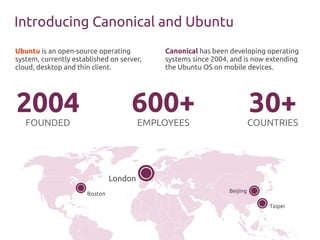
Introducing Canonical and Ubuntu 
600+ 
London 
EMPLOYEES 
Boston Beijing 
30+ 
COUNTRIES 
2004 
FOUNDED 
Canonical has been developing operating 
systems since 2004, and is now extending 
the Ubuntu OS on mobile devices. 
Ubuntu is an open-source operating 
system, currently established on server, 
cloud, desktop and thin client. 
Taipei
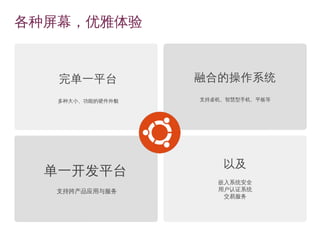
各种屏幕,优雅体验 
融合的操作系统 
支持桌机、智慧型手机、平板等 
单一开发平台 
支持跨产品应用与服务 
以及 
嵌入系统安全 
用户认证系统 
交易服务 
完单一平台 
多种大小、功能的硬件外貌
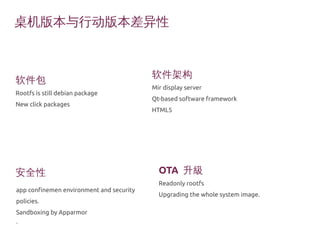
桌机版本与行动版本差异性 
软件包 
Rootfs is still debian package 
New click packages 
安全性OTA 升級 
Readonly rootfs 
Upgrading the whole system image. 
app confinemen environment and security 
policies. 
Sandboxing by Apparmor 
• 
软件架构 
Mir display server 
Qt-based software framework 
HTML5
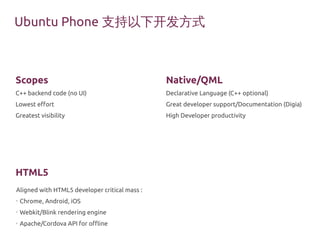
Ubuntu Phone支持以下开发方式 
Scopes 
C++ backend code (no UI) 
Lowest effort 
Greatest visibility 
HTML5 
Native/QML 
Declarative Language (C++ optional) 
Great developer support/Documentation (Digia) 
High Developer productivity 
Aligned with HTML5 developer critical mass : 
• Chrome, Android, iOS 
• Webkit/Blink rendering engine 
• Apache/Cordova API for offline
Scope
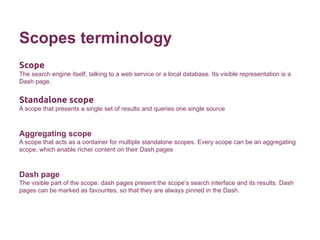
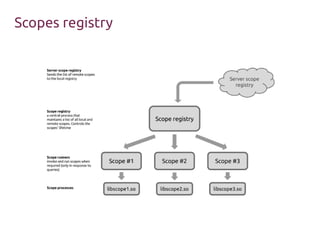
Scopes terminology 
Scope 
The search engine itself, talking to a web service or a local database. Its visible representation is a 
Dash page. 
Standalone scope 
A scope that presents a single set of results and queries one single source 
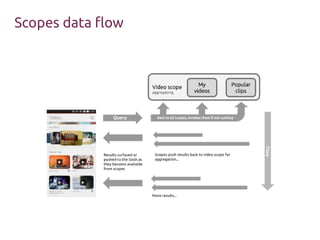
Aggregating scope 
A scope that acts as a container for multiple standalone scopes. Every scope can be an aggregating 
scope, which enable richer content on their Dash pages 
Dash page 
The visible part of the scope: dash pages present the scope’s search interface and its results. Dash 
pages can be marked as favourites, so that they are always pinned in the Dash.
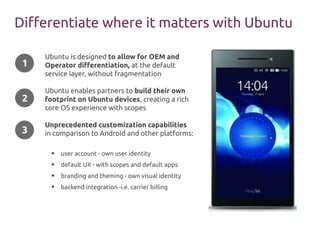
Differentiate where it matters with Ubuntu 
Ubuntu is designed to allow for OEM and 
Operator differentiation, at the default 
service layer, without fragmentation 
Ubuntu enables partners to build their own 
footprint on Ubuntu devices, creating a rich 
core OS experience with scopes 
Unprecedented customization capabilities 
in comparison to Android and other platforms: 
● user account - own user identity 
● default UX - with scopes and default apps 
● branding and theming - own visual identity 
● backend integration -i.e. carrier billing 
1 
2 
3
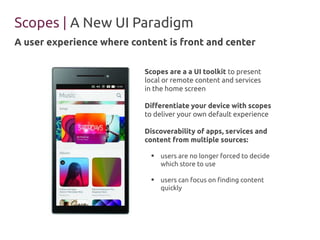
Scopes | A New UI Paradigm 
A user experience where content is front and center 
Scopes are a a UI toolkit to present 
local or remote content and services 
in the home screen 
Differentiate your device with scopes 
to deliver your own default experience 
Discoverability of apps, services and 
content from multiple sources: 
● users are no longer forced to decide 
which store to use 
● users can focus on finding content 
quickly
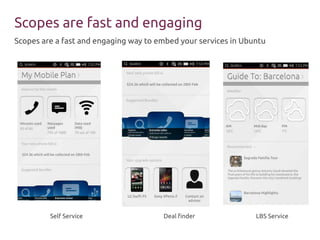
Scopes are fast and engaging 
Scopes are a fast and engaging way to embed your services in Ubuntu 
Self Service Deal finder LBS Service
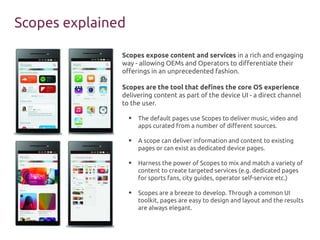
Scopes expose content and services in a rich and engaging 
way - allowing OEMs and Operators to differentiate their 
offerings in an unprecedented fashion. 
Scopes are the tool that defines the core OS experience 
delivering content as part of the device UI - a direct channel 
to the user. 
● The default pages use Scopes to deliver music, video and 
apps curated from a number of different sources. 
● A scope can deliver information and content to existing 
pages or can exist as dedicated device pages. 
● Harness the power of Scopes to mix and match a variety of 
content to create targeted services (e.g. dedicated pages 
for sports fans, city guides, operator self-service etc.) 
● Scopes are a breeze to develop. Through a common UI 
toolkit, pages are easy to design and layout and the results 
are always elegant. 
Scopes explained
Scopes registry
Scopes data flow
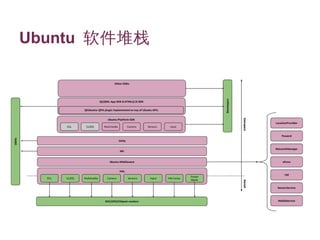
架构概览
Ubuntu 软件堆栈
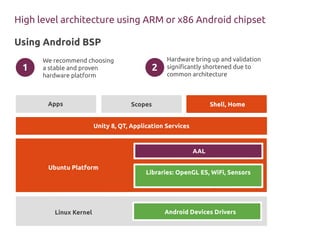
High level architecture using ARM or x86 Android chipset 
Using Android BSP 
We recommend choosing 
a stable and proven 
hardware platform 
Hardware bring up and validation 
significantly shortened due to 
common architecture 
1 2 
Apps Scopes Shell, Home 
Unity 8, QT, Application Services 
Ubuntu Platform 
Linux Kernel 
AAL 
Libraries: OpenGL ES, WiFi, Sensors 
Android Devices Drivers
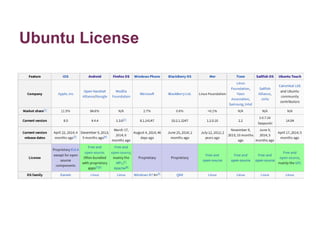
Ubuntu License
List of ports by community 
● Acer Iconia A700 
● AT&T S3 
● Dell Streak 7 
● Desire HD 
● Droid 3 
● Droid bionic 
● Galaxy Nexus 4/7/10 
● Galaxy Note N700 port 
● Galaxy R 
● Galaxy S 
● Galaxy s2 
● Galaxy s2 skyrocket [AT&T] 
● Galaxy s3[sprint] 
● Galaxy s3 [Verizon] 
● Galaxy tab 2 
● HP Touchpad 
● HTC Desire 
● HTC Desire S 
● HTC EVO 4G LTE 
● HTC one X+ AT&T 
● HTC Sensation 
● HTC Vision Desire Z/G2 
● Huawei mediapad 
● Iconia A500 
● Infinity tf700 
● Kindle fire 
● Kindle fire 2 
● Kindle fire HD 8.9 
● LGE Optimus Black 
● LG optimus 2x 
● LG Optimus L9 
● LG P930 NITRO HD 
● Micromax Canvas HD 
● Motorola Defy/ DEfy+ 
● Motorola droid razr 
● Motorola zoom 
● My touch 4g 
● Nexus One 
● Nexus S 
● Note 10.1 N8000 
● Note 2 
● One X 
● RK2918 Tablets 
● S3 International i9300 
● Samsung Galaxy Tab 7 inch (original) 
● TF101 Eee Pad Transformer 
● T-Mobile s3 
● Verizon Galaxy Nexus 
● Wave and wave 2 (yes bada) 
● Xperia Neo V 
● Xperia S 
http://forum.xda-developers.com/showthread.php?t=2182442 
https://wiki.ubuntu.com/Touch/Devices
Hardware enablement
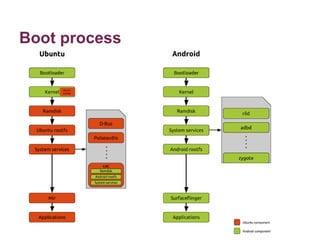
Boot process
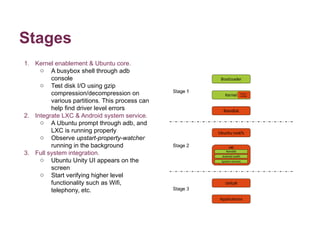
Stages 
1. Kernel enablement & Ubuntu core. 
o A busybox shell through adb 
console 
o Test disk I/O using gzip 
compression/decompression on 
various partitions. This process can 
help find driver level errors 
2. Integrate LXC & Android system service. 
o A Ubuntu prompt through adb, and 
LXC is running properly 
o Observe upstart-property-watcher 
running in the background 
3. Full system integration. 
o Ubuntu Unity UI appears on the 
screen 
o Start verifying higher level 
functionality such as Wifi, 
telephony, etc.
Image Components 
Device tarball 
The Device tarball contains the Ubuntu equivalent of an Android BSP. Each individual mobile device 
will have its own specific device tarball. 
Ubuntu tarball 
The Ubuntu tarball is considered the “standard” Ubuntu Touch image. As much as possible, it is 
common across all Ubuntu Touch devices. This design helps to prevent fragmentation of deployed 
devices. 
Custom tarball 
The Custom tarball is the officially supported method for all Ubuntu Touch downstream consumers, 
ranging from commercial OEMs to community remixes, to modify the look, feel, and behavior of 
Ubuntu Touch.
Deployment
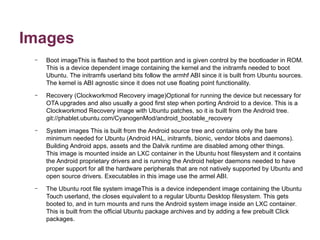
Images 
– Boot imageThis is flashed to the boot partition and is given control by the bootloader in ROM. 
This is a device dependent image containing the kernel and the initramfs needed to boot 
Ubuntu. The initramfs userland bits follow the armhf ABI since it is built from Ubuntu sources. 
The kernel is ABI agnostic since it does not use floating point functionality. 
– Recovery (Clockworkmod Recovery image)Optional for running the device but necessary for 
OTA upgrades and also usually a good first step when porting Android to a device. This is a 
Clockworkmod Recovery image with Ubuntu patches, so it is built from the Android tree. 
git://phablet.ubuntu.com/CyanogenMod/android_bootable_recovery 
– System images This is built from the Android source tree and contains only the bare 
minimum needed for Ubuntu (Android HAL, initramfs, bionic, vendor blobs and daemons). 
Building Android apps, assets and the Dalvik runtime are disabled among other things. 
This image is mounted inside an LXC container in the Ubuntu host filesystem and it contains 
the Android proprietary drivers and is running the Android helper daemons needed to have 
proper support for all the hardware peripherals that are not natively supported by Ubuntu and 
open source drivers. Executables in this image use the armel ABI. 
– The Ubuntu root file system imageThis is a device independent image containing the Ubuntu 
Touch userland, the closes equivalent to a regular Ubuntu Desktop filesystem. This gets 
booted to, and in turn mounts and runs the Android system image inside an LXC container. 
This is built from the official Ubuntu package archives and by adding a few prebuilt Click 
packages.
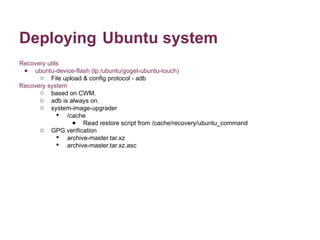
Deploying Ubuntu system 
Recovery utils 
● ubuntu-device-flash (lp:/ubuntu/goget-ubuntu-touch) 
o File upload & config protocol - adb 
Recovery system 
o based on CWM. 
o adb is always on. 
o system-image-upgrader 
 /cache 
● Read restore script from /cache/recovery/ubuntu_command 
o GPG verification 
 archive-master.tar.xz 
 archive-master.tar.xz.asc
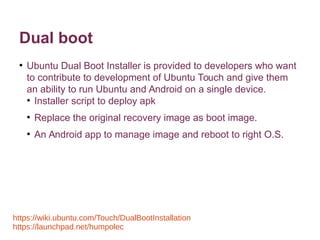
Dual boot 
● Ubuntu Dual Boot Installer is provided to developers who want 
to contribute to development of Ubuntu Touch and give them 
an ability to run Ubuntu and Android on a single device. 
● Installer script to deploy apk 
● Replace the original recovery image as boot image. 
● An Android app to manage image and reboot to right O.S. 
https://wiki.ubuntu.com/Touch/DualBootInstallation 
https://launchpad.net/humpolec
Easy customization of look, feel, and 
behavior
Image Components 
Device tarball 
The Device tarball contains the Ubuntu equivalent of an Android BSP. Each individual mobile device 
will have its own specific device tarball. 
Ubuntu tarball 
The Ubuntu tarball is considered the “standard” Ubuntu Touch image. As much as possible, it is 
common across all Ubuntu Touch devices. This design helps to prevent fragmentation of deployed 
devices. 
Custom tarball 
The Custom tarball is the officially supported method for all Ubuntu Touch downstream consumers, 
ranging from commercial OEMs to community remixes, to modify the look, feel, and behavior of 
Ubuntu Touch.
Customization 
● Backgrounds 
Normal Unity Shell background and the Welcome Screen background. 
o Shell background 
o Welcome Screen background 
● Color Schemes 
o Customized themes 
o Infographic color scheme 
the series of circles on the Welcome Screen that displays user’s data 
● Audio 
● Default Browser settings 
o Bookmarks 
o home page 
● Preinstalling Content 
o click packages 
o sample content.
References 
● Ubuntu Developer http://developer.ubuntu.com/ 
o Scope http://developer.ubuntu.com/scopes/overview/ 
● Mir: Welcome to Mir http://unity.ubuntu.com/mir/ 
● Touch - Ubuntu Wiki https://wiki.ubuntu.com/Touch 
o Touch/Porting https://wiki.ubuntu.com/Touch/Porting 
o Touch/Deploying https://wiki.ubuntu.com/Touch/Deploying 
● OEM Customization http://developer.ubuntu.com/resources/oem/ 
o Ubuntu Image Architecture http://developer.ubuntu.com/resources/oem/architecture/ 
● Ubuntu Touch Ports http://forum.xda-developers.com/ubuntu-touch/android-ports 
● Ubuntu Phone - https://lists.launchpad.net/ubuntu-phone/
开放原码手机操作系统 Ubuntu Phone 架构、移植与刷机

开放原码手机操作系统 Ubuntu Phone 架构、移植与刷机

  • 1.
    开放原码手机操作系统 Ubuntu Phone 架构、移植与刷机 2014-09-20 Rex Tsai <rex.tsai@canonical.com> Software Freedom Day @ Chinese Academy Of Sciences, Beijing © 2014 Canonical Ltd. Ubuntu and Canonical are registered trademarks of Canonical Ltd.
  • 2.
    Introducing Canonical andUbuntu 600+ London EMPLOYEES Boston Beijing 30+ COUNTRIES 2004 FOUNDED Canonical has been developing operating systems since 2004, and is now extending the Ubuntu OS on mobile devices. Ubuntu is an open-source operating system, currently established on server, cloud, desktop and thin client. Taipei
  • 3.
    各种屏幕,优雅体验 融合的操作系统 支持桌机、智慧型手机、平板等 单一开发平台 支持跨产品应用与服务 以及 嵌入系统安全 用户认证系统 交易服务 完单一平台 多种大小、功能的硬件外貌
  • 4.
    桌机版本与行动版本差异性 软件包 Rootfsis still debian package New click packages 安全性OTA 升級 Readonly rootfs Upgrading the whole system image. app confinemen environment and security policies. Sandboxing by Apparmor • 软件架构 Mir display server Qt-based software framework HTML5
  • 5.
    Ubuntu Phone支持以下开发方式 Scopes C++ backend code (no UI) Lowest effort Greatest visibility HTML5 Native/QML Declarative Language (C++ optional) Great developer support/Documentation (Digia) High Developer productivity Aligned with HTML5 developer critical mass : • Chrome, Android, iOS • Webkit/Blink rendering engine • Apache/Cordova API for offline
  • 6.
  • 7.
    Scopes terminology Scope The search engine itself, talking to a web service or a local database. Its visible representation is a Dash page. Standalone scope A scope that presents a single set of results and queries one single source Aggregating scope A scope that acts as a container for multiple standalone scopes. Every scope can be an aggregating scope, which enable richer content on their Dash pages Dash page The visible part of the scope: dash pages present the scope’s search interface and its results. Dash pages can be marked as favourites, so that they are always pinned in the Dash.
  • 8.
    Differentiate where itmatters with Ubuntu Ubuntu is designed to allow for OEM and Operator differentiation, at the default service layer, without fragmentation Ubuntu enables partners to build their own footprint on Ubuntu devices, creating a rich core OS experience with scopes Unprecedented customization capabilities in comparison to Android and other platforms: ● user account - own user identity ● default UX - with scopes and default apps ● branding and theming - own visual identity ● backend integration -i.e. carrier billing 1 2 3
  • 9.
    Scopes | ANew UI Paradigm A user experience where content is front and center Scopes are a a UI toolkit to present local or remote content and services in the home screen Differentiate your device with scopes to deliver your own default experience Discoverability of apps, services and content from multiple sources: ● users are no longer forced to decide which store to use ● users can focus on finding content quickly
  • 10.
    Scopes are fastand engaging Scopes are a fast and engaging way to embed your services in Ubuntu Self Service Deal finder LBS Service
  • 11.
    Scopes expose contentand services in a rich and engaging way - allowing OEMs and Operators to differentiate their offerings in an unprecedented fashion. Scopes are the tool that defines the core OS experience delivering content as part of the device UI - a direct channel to the user. ● The default pages use Scopes to deliver music, video and apps curated from a number of different sources. ● A scope can deliver information and content to existing pages or can exist as dedicated device pages. ● Harness the power of Scopes to mix and match a variety of content to create targeted services (e.g. dedicated pages for sports fans, city guides, operator self-service etc.) ● Scopes are a breeze to develop. Through a common UI toolkit, pages are easy to design and layout and the results are always elegant. Scopes explained
  • 12.
  • 13.
  • 14.
  • 15.
  • 16.
    High level architectureusing ARM or x86 Android chipset Using Android BSP We recommend choosing a stable and proven hardware platform Hardware bring up and validation significantly shortened due to common architecture 1 2 Apps Scopes Shell, Home Unity 8, QT, Application Services Ubuntu Platform Linux Kernel AAL Libraries: OpenGL ES, WiFi, Sensors Android Devices Drivers
  • 17.
  • 18.
    List of portsby community ● Acer Iconia A700 ● AT&T S3 ● Dell Streak 7 ● Desire HD ● Droid 3 ● Droid bionic ● Galaxy Nexus 4/7/10 ● Galaxy Note N700 port ● Galaxy R ● Galaxy S ● Galaxy s2 ● Galaxy s2 skyrocket [AT&T] ● Galaxy s3[sprint] ● Galaxy s3 [Verizon] ● Galaxy tab 2 ● HP Touchpad ● HTC Desire ● HTC Desire S ● HTC EVO 4G LTE ● HTC one X+ AT&T ● HTC Sensation ● HTC Vision Desire Z/G2 ● Huawei mediapad ● Iconia A500 ● Infinity tf700 ● Kindle fire ● Kindle fire 2 ● Kindle fire HD 8.9 ● LGE Optimus Black ● LG optimus 2x ● LG Optimus L9 ● LG P930 NITRO HD ● Micromax Canvas HD ● Motorola Defy/ DEfy+ ● Motorola droid razr ● Motorola zoom ● My touch 4g ● Nexus One ● Nexus S ● Note 10.1 N8000 ● Note 2 ● One X ● RK2918 Tablets ● S3 International i9300 ● Samsung Galaxy Tab 7 inch (original) ● TF101 Eee Pad Transformer ● T-Mobile s3 ● Verizon Galaxy Nexus ● Wave and wave 2 (yes bada) ● Xperia Neo V ● Xperia S http://forum.xda-developers.com/showthread.php?t=2182442 https://wiki.ubuntu.com/Touch/Devices
  • 19.
  • 20.
  • 21.
    Stages 1. Kernelenablement & Ubuntu core. o A busybox shell through adb console o Test disk I/O using gzip compression/decompression on various partitions. This process can help find driver level errors 2. Integrate LXC & Android system service. o A Ubuntu prompt through adb, and LXC is running properly o Observe upstart-property-watcher running in the background 3. Full system integration. o Ubuntu Unity UI appears on the screen o Start verifying higher level functionality such as Wifi, telephony, etc.
  • 22.
    Image Components Devicetarball The Device tarball contains the Ubuntu equivalent of an Android BSP. Each individual mobile device will have its own specific device tarball. Ubuntu tarball The Ubuntu tarball is considered the “standard” Ubuntu Touch image. As much as possible, it is common across all Ubuntu Touch devices. This design helps to prevent fragmentation of deployed devices. Custom tarball The Custom tarball is the officially supported method for all Ubuntu Touch downstream consumers, ranging from commercial OEMs to community remixes, to modify the look, feel, and behavior of Ubuntu Touch.
  • 23.
  • 24.
    Images – BootimageThis is flashed to the boot partition and is given control by the bootloader in ROM. This is a device dependent image containing the kernel and the initramfs needed to boot Ubuntu. The initramfs userland bits follow the armhf ABI since it is built from Ubuntu sources. The kernel is ABI agnostic since it does not use floating point functionality. – Recovery (Clockworkmod Recovery image)Optional for running the device but necessary for OTA upgrades and also usually a good first step when porting Android to a device. This is a Clockworkmod Recovery image with Ubuntu patches, so it is built from the Android tree. git://phablet.ubuntu.com/CyanogenMod/android_bootable_recovery – System images This is built from the Android source tree and contains only the bare minimum needed for Ubuntu (Android HAL, initramfs, bionic, vendor blobs and daemons). Building Android apps, assets and the Dalvik runtime are disabled among other things. This image is mounted inside an LXC container in the Ubuntu host filesystem and it contains the Android proprietary drivers and is running the Android helper daemons needed to have proper support for all the hardware peripherals that are not natively supported by Ubuntu and open source drivers. Executables in this image use the armel ABI. – The Ubuntu root file system imageThis is a device independent image containing the Ubuntu Touch userland, the closes equivalent to a regular Ubuntu Desktop filesystem. This gets booted to, and in turn mounts and runs the Android system image inside an LXC container. This is built from the official Ubuntu package archives and by adding a few prebuilt Click packages.
  • 25.
    Deploying Ubuntu system Recovery utils ● ubuntu-device-flash (lp:/ubuntu/goget-ubuntu-touch) o File upload & config protocol - adb Recovery system o based on CWM. o adb is always on. o system-image-upgrader  /cache ● Read restore script from /cache/recovery/ubuntu_command o GPG verification  archive-master.tar.xz  archive-master.tar.xz.asc
  • 26.
    Dual boot ●Ubuntu Dual Boot Installer is provided to developers who want to contribute to development of Ubuntu Touch and give them an ability to run Ubuntu and Android on a single device. ● Installer script to deploy apk ● Replace the original recovery image as boot image. ● An Android app to manage image and reboot to right O.S. https://wiki.ubuntu.com/Touch/DualBootInstallation https://launchpad.net/humpolec
  • 27.
    Easy customization oflook, feel, and behavior
  • 28.
    Image Components Devicetarball The Device tarball contains the Ubuntu equivalent of an Android BSP. Each individual mobile device will have its own specific device tarball. Ubuntu tarball The Ubuntu tarball is considered the “standard” Ubuntu Touch image. As much as possible, it is common across all Ubuntu Touch devices. This design helps to prevent fragmentation of deployed devices. Custom tarball The Custom tarball is the officially supported method for all Ubuntu Touch downstream consumers, ranging from commercial OEMs to community remixes, to modify the look, feel, and behavior of Ubuntu Touch.
  • 29.
    Customization ● Backgrounds Normal Unity Shell background and the Welcome Screen background. o Shell background o Welcome Screen background ● Color Schemes o Customized themes o Infographic color scheme the series of circles on the Welcome Screen that displays user’s data ● Audio ● Default Browser settings o Bookmarks o home page ● Preinstalling Content o click packages o sample content.
  • 30.
    References ● UbuntuDeveloper http://developer.ubuntu.com/ o Scope http://developer.ubuntu.com/scopes/overview/ ● Mir: Welcome to Mir http://unity.ubuntu.com/mir/ ● Touch - Ubuntu Wiki https://wiki.ubuntu.com/Touch o Touch/Porting https://wiki.ubuntu.com/Touch/Porting o Touch/Deploying https://wiki.ubuntu.com/Touch/Deploying ● OEM Customization http://developer.ubuntu.com/resources/oem/ o Ubuntu Image Architecture http://developer.ubuntu.com/resources/oem/architecture/ ● Ubuntu Touch Ports http://forum.xda-developers.com/ubuntu-touch/android-ports ● Ubuntu Phone - https://lists.launchpad.net/ubuntu-phone/