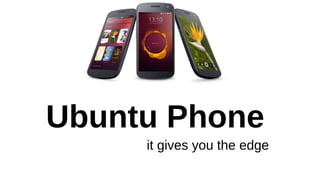
Ubuntu Phone
it gives you the edge
Personal Desktop PC = Cloud Computing=Mobile
Computing
Confused????
One device one OS for all your needs
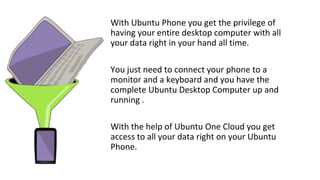
With Ubuntu Phone you get the privilege of
having your entire desktop computer with all
your data right in your hand all time.
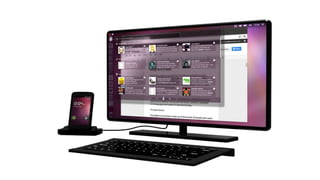
You just need to connect your phone to a
monitor and a keyboard and you have the
complete Ubuntu Desktop Computer up and
running .
With the help of Ubuntu One Cloud you get
access to all your data right on your Ubuntu
Phone.
Edge Based Control
Yes, its all on the edge
With current smart phones, they are either making you rely on the
hard keys or they are taking off a part of your screen for providing the
basic navigation or menu control soft keys.
But things are much better at Ubuntu
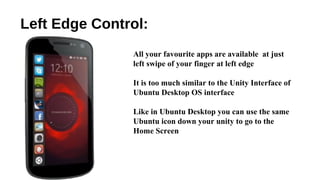
Left Edge Control:
All your favourite apps are available at just
left swipe of your finger at left edge
It is too much similar to the Unity Interface of
Ubuntu Desktop OS interface
Like in Ubuntu Desktop you can use the same
Ubuntu icon down your unity to go to the
Home Screen
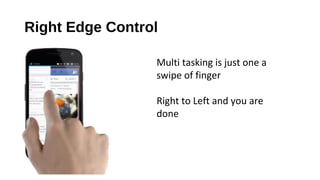
Right Edge Control
Multi tasking is just one a
swipe of finger
Right to Left and you are
done
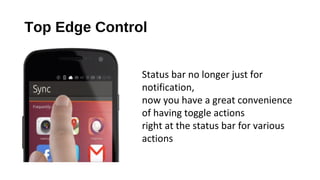
Top Edge Control
Status bar no longer just for
notification,
now you have a great convenience
of having toggle actions
right at the status bar for various
actions
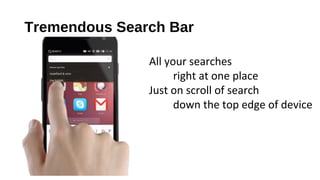
Tremendous Search Bar
All your searches
right at one place
Just on scroll of search
down the top edge of device
Features:
• Open Source Operating System
• LINUX based kernel
• Huge pool of apps
• Support of HTML5 for great light weight apps.
• Great support for native apps.
• No Synchronizing overhead when working on PC out of Ubuntu
Phone
Buy a new phone???
Again???
NO
Cost effective
Cost Effective
All the android running devices
with multi-core processor
will be completely
supported
for Ubuntu Phone OS

Ubuntu phone - future of smart phones

  • 1.
  • 2.
    Personal Desktop PC= Cloud Computing=Mobile Computing Confused???? One device one OS for all your needs
  • 3.
    With Ubuntu Phoneyou get the privilege of having your entire desktop computer with all your data right in your hand all time. You just need to connect your phone to a monitor and a keyboard and you have the complete Ubuntu Desktop Computer up and running . With the help of Ubuntu One Cloud you get access to all your data right on your Ubuntu Phone.
  • 4.
    Edge Based Control Yes,its all on the edge With current smart phones, they are either making you rely on the hard keys or they are taking off a part of your screen for providing the basic navigation or menu control soft keys. But things are much better at Ubuntu
  • 5.
    Left Edge Control: Allyour favourite apps are available at just left swipe of your finger at left edge It is too much similar to the Unity Interface of Ubuntu Desktop OS interface Like in Ubuntu Desktop you can use the same Ubuntu icon down your unity to go to the Home Screen
  • 6.
    Right Edge Control Multitasking is just one a swipe of finger Right to Left and you are done
  • 7.
    Top Edge Control Statusbar no longer just for notification, now you have a great convenience of having toggle actions right at the status bar for various actions
  • 8.
    Tremendous Search Bar Allyour searches right at one place Just on scroll of search down the top edge of device
  • 9.
    Features: • Open SourceOperating System • LINUX based kernel • Huge pool of apps • Support of HTML5 for great light weight apps. • Great support for native apps. • No Synchronizing overhead when working on PC out of Ubuntu Phone
  • 11.
    Buy a newphone??? Again??? NO
  • 12.
    Cost effective Cost Effective Allthe android running devices with multi-core processor will be completely supported for Ubuntu Phone OS