Sass – Sassy-CSS
CSS Sample
p {
color: #336699;
font-size: 2em;
}
➔ P = selector.
➔ What follows (the bit inside the curly braces) = declaration block.
➔ The two lines—one defining the color and one defining the font size—are
known as declarations.
➔ Each declaration has a property and a value.
➔ The property in this case is the color or the font size.
➔ The value is the color itself—for example, #336699, blue—or the size of the
font—for example, 20px.
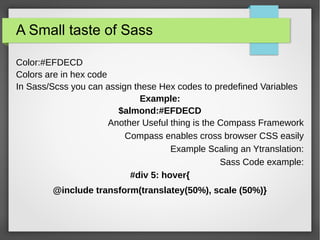
A Small taste of Sass
Color:#EFDECD
Colors are in hex code
In Sass/Scss you can assign these Hex codes to predefined Variables
Example:
$almond:#EFDECD
Another Useful thing is the Compass Framework
Compass enables cross browser CSS easily
Example Scaling an Ytranslation:
Sass Code example:
#div 5: hover{
@include transform(translatey(50%), scale (50%)}
But First
●2 types
●SCSS
●Original Sass
No Browser Directly reads Sass
●So Sass -> CSS -> Browser
●Works with Ruby
Original Sass? What?
Original Sass: A Stripped-down Way to Write Sass
Before SCSS, there was Original Sass, which strips out some
of the unnecessary elements of CSS and SCSS. Original Sass
can be compiled just the same as SCSS, via the Sass engine.
A great example of unnecessary elements are curly braces.
Look at this:
.fab_text {
color: #336699;
font-size: 2em; }
>
We know by the use of . or # that something is a selector.
Using whitespace (two spaces or a soft tab that indents the
properties) helps us. In the example above, the indentation
lets us know that color and font-size refer only to the fab_text
class. The curly braces aren’t needed. Why not just strip them
out?
.fab_text
color: #336699;
font-size: 2em;
>>
While we’re at it, we might as well take away the semicolons
at the end of the values. They don’t add much, do they?
.fab_text
color: #336699
font-size: 2em
Commenting
/* Hey look at this multiline comment
* that we want to show up in our CSS
* output. */
#page {
color: black; }
// These comments are single lines
// and we do not want them to appear
// in our CSS
#sidebar {
color: #336699; }
This compiles to:
/* Hey look at this multiline comment
* that we want to show up in our CSS
* output. */
#page {
color: black; }
#sidebar {
Color: #336699; }
/*! Loud comments */
Compass? Does it actually help>
● Yes! Scss is built on Rails! (ruby on rails anyone?)
● Compass Watch -> automatically updates CSS when
changes made to Sass files
● Partials : resources available easily on the web to help
Normalize Scss across browsers
● @extend can be used to copy styles of an earler style
block
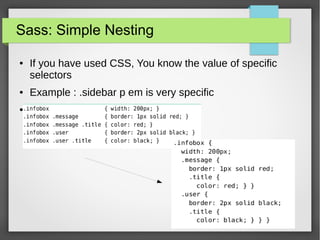
Sass: Simple Nesting
● If you have used CSS, You know the value of specific
selectors
● Example : .sidebar p em is very specific
●
Based on config.rb
Parent > Child
Variables
Font Libraries
Colors!
Easy coloring
@extend
Mixins
● A mixin is a fragment of Sass that can easily be applied to
another selector.
● Let’s say we require a distinct style: blue text with small
caps.
● We need to apply this style to many selectors in our
document.
● We don’t want to have to repeat color: #369; over and over
again.
Mixing In mixins
CSS can be
repetitive
Define use, Use anywhere
How to include a mixin
How to define a mixin
@content
● What if we could easily keep our responsive media style
rules grouped with the content it defines rules for, but not
clutter our file with @media rules?
● It makes much more sense to keep our media rules inline
like this
● For small sites it's not too big of a deal, but when you're
dealing with stylesheets for larger sites, it's a pain to locate
the associated @media rules and make changes in
potentially 4 different locations (default, tablet, mobile,
wide mobile).
@content
@content
Thats it for now
● The End. Thank You for your time.

Sass presentation

  • 1.
  • 2.
    CSS Sample p { color:#336699; font-size: 2em; } ➔ P = selector. ➔ What follows (the bit inside the curly braces) = declaration block. ➔ The two lines—one defining the color and one defining the font size—are known as declarations. ➔ Each declaration has a property and a value. ➔ The property in this case is the color or the font size. ➔ The value is the color itself—for example, #336699, blue—or the size of the font—for example, 20px.
  • 3.
    A Small tasteof Sass Color:#EFDECD Colors are in hex code In Sass/Scss you can assign these Hex codes to predefined Variables Example: $almond:#EFDECD Another Useful thing is the Compass Framework Compass enables cross browser CSS easily Example Scaling an Ytranslation: Sass Code example: #div 5: hover{ @include transform(translatey(50%), scale (50%)}
  • 4.
    But First ●2 types ●SCSS ●OriginalSass No Browser Directly reads Sass ●So Sass -> CSS -> Browser ●Works with Ruby
  • 5.
    Original Sass? What? OriginalSass: A Stripped-down Way to Write Sass Before SCSS, there was Original Sass, which strips out some of the unnecessary elements of CSS and SCSS. Original Sass can be compiled just the same as SCSS, via the Sass engine. A great example of unnecessary elements are curly braces. Look at this: .fab_text { color: #336699; font-size: 2em; }
  • 6.
    > We know bythe use of . or # that something is a selector. Using whitespace (two spaces or a soft tab that indents the properties) helps us. In the example above, the indentation lets us know that color and font-size refer only to the fab_text class. The curly braces aren’t needed. Why not just strip them out? .fab_text color: #336699; font-size: 2em;
  • 7.
    >> While we’re atit, we might as well take away the semicolons at the end of the values. They don’t add much, do they? .fab_text color: #336699 font-size: 2em
  • 8.
    Commenting /* Hey lookat this multiline comment * that we want to show up in our CSS * output. */ #page { color: black; } // These comments are single lines // and we do not want them to appear // in our CSS #sidebar { color: #336699; } This compiles to: /* Hey look at this multiline comment * that we want to show up in our CSS * output. */ #page { color: black; } #sidebar { Color: #336699; } /*! Loud comments */
  • 9.
    Compass? Does itactually help> ● Yes! Scss is built on Rails! (ruby on rails anyone?) ● Compass Watch -> automatically updates CSS when changes made to Sass files ● Partials : resources available easily on the web to help Normalize Scss across browsers ● @extend can be used to copy styles of an earler style block
  • 10.
    Sass: Simple Nesting ●If you have used CSS, You know the value of specific selectors ● Example : .sidebar p em is very specific ●
  • 12.
  • 13.
  • 14.
  • 15.
  • 16.
  • 17.
  • 18.
  • 19.
    Mixins ● A mixinis a fragment of Sass that can easily be applied to another selector. ● Let’s say we require a distinct style: blue text with small caps. ● We need to apply this style to many selectors in our document. ● We don’t want to have to repeat color: #369; over and over again.
  • 20.
    Mixing In mixins CSScan be repetitive Define use, Use anywhere
  • 21.
    How to includea mixin How to define a mixin
  • 22.
    @content ● What ifwe could easily keep our responsive media style rules grouped with the content it defines rules for, but not clutter our file with @media rules? ● It makes much more sense to keep our media rules inline like this ● For small sites it's not too big of a deal, but when you're dealing with stylesheets for larger sites, it's a pain to locate the associated @media rules and make changes in potentially 4 different locations (default, tablet, mobile, wide mobile).
  • 23.
  • 24.
  • 25.
    Thats it fornow ● The End. Thank You for your time.