Introduction to Operating Systems


                   Introduction and
                          Overview

Questions answered in this lecture:
  What is an operating system?
  How have operating systems evolved?
  Why study operating systems?
What is an Operating System?
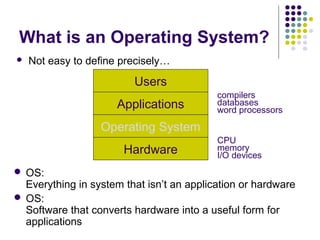
   Not easy to define precisely…
                         Users
                                           compilers
                      Applications         databases
                                           word processors

                  Operating System
                                           CPU
                       Hardware            memory
                                           I/O devices
 OS:
  Everything in system that isn’t an application or hardware
 OS:
  Software that converts hardware into a useful form for
  applications
What is the role of the OS?
    Role #1: Provide standard Library (I.e., abstract
     resources)
    What is a resource?
       Anything valuable (e.g., CPU, memory, disk)
    Advantages of standard library
       Allow applications to reuse common facilities
       Make different devices look the same
       Provide higher-level abstractions
    Challenges
       What are the correct abstractions?
       How much of hardware should be exposed?
What is the role of the OS?
   Role #2: Resource coordinator (I.e., manager)

   Advantages of resource coordinator
     Virtualize resources so multiple users or applications
      can share
     Protect applications from one another
     Provide efficient and fair access to resources
   Challenges
     What are the correct mechanisms?
     What are the correct policies?
What Functionality belongs in
OS?
   No single right answer
     Desired functionality depends on outside factors

     OS must adapt to both user expectations and
      technology changes
       Change abstractions provided to users

       Change algorithms to implement those abstractions

       Change low-level implementation to deal with
        hardware

   Current operating systems driven by evolution
History of the OS
   Two distinct phases of history
     Phase 1: Computers are expensive

       Goal: Use computer’s time efficiently

       Maximize throughput (I.e., jobs per second)

       Maximize utilization (I.e., percentage busy)

     Phase 2: Computers are inexpensive

       Goal: Use people’s time efficiently

       Minimize response time
First commercial systems
     1950s Hardware
       Enormous, expensive, and slow
       Input/Output: Punch cards and line printers
     Goal of OS
       Get the hardware working
       Single operator/programmer/user runs and debugs
         interactively
     OS Functionality
       Standard library only (no sharing or coordination of
         resources)
       Monitor that is always resident; transfer control to programs
     Advantages
       Worked and allowed interactive debugging
     Problems
       Inefficient use of hardware (throughput and utilization)
Batch Processing
   Goal of OS: Better throughput and utilization
   Batch: Group of jobs submitted together
       Operator collects jobs; orders efficiently; runs one at a
        time
   Advantages
       Amortize setup costs over many jobs
       Operator more skilled at loading tapes
       Keep machine busy while programmer thinks
       Improves throughput and utilization
   Problems
       User must wait until batch is done for results
       Machine idle when job is reading from cards and writing to
        printers
Spooling
    Hardware
       Mechanical I/O devices much slower than CPU
       Read 17 cards/sec vs. execute 1000s instructions/sec
    Goal of OS
       Improve performance by overlapping I/O with CPU execution
    Spooling: Simultaneous Peripheral Operations On-Line
    1.  Read card punches to disk
    2.  Compute (while reading and writing to disk)
    3.  Write output from disk to printer
    OS Functionality
       Buffering and interrupt handling
    Problem
       Machine idle when job waits for I/O to/from disk
Multiprogrammed Batch
Systems
   Observation: Spooling provides pool of ready jobs
   Goal of OS
     Improve performance by always running a job

     Keep multiple jobs resident in memory

     When job waits for disk I/O, OS switches to another job

   OS Functionality
     Job scheduling policies

     Memory management and protection

   Advantage: Improves throughput and utilization
   Disadvantage: Machine not interactive
Inexpensive Peripherals
   1960s Hardware
     Expensive mainframes, but inexpensive keyboards and monitors
     Enables text editors and interactive debuggers
   Goal of OS
     Improve user’s response time
   OS Functionality
     Time-sharing: switch between jobs to give appearance of
      dedicated machine
     More complex job scheduling
     Concurrency control and synchronization
   Advantage
     Users easily submit jobs and get immediate feedback
Inexpensive Personal
Computers
   1980s Hardware
     Entire machine is inexpensive
     One dedicated machine per user
   Goal of OS
     Give user control over machine
   OS Functionality
     Remove time-sharing of jobs, protection, and virtual memory
   Advantages
     Simplicity
     Works with little main memory
     Machine is all your own (performance is predictable)
   Disadvantages
     No time-sharing or protection between jobs
Inexpensive, Powerful
Computers
   1990s+ Hardware
     PCs with increasing computation and storage

     Users connected to the web

   Goal of OS
     Allow single user to run several applications simultaneously

     Provide security from malicious attacks

     Efficiently support web servers


   OS Functionality
     Add back time-sharing, protection, and virtual memory
Current Systems
   Conclusion: OS changes due to both hardware and users
   Current trends
     Multiprocessors
     Networked systems
     Virtual machines
   OS code base is large
     Millions of lines of code
     1000 person-years of work
   Code is complex and poorly understood
     System outlives any of its builders
     System will always contain bugs
     Behavior is hard to predict, tuning is done by guessing
OS Components
   Kernel: Core components of the OS

   Process scheduler
    Determines when and for long each process executes
   Memory manager
    Determines when and how memory is allocated to processes
    Decides what to do when main memory is full
   File system
    Organizes named collections of data in persistent storage
   Networking
    Enables processes to communicate with one another

Why study Operating
Systems?
   Build, modify, or administer an operating system

   Understand system performance
     Behavior of OS impacts entire machine

     Challenge to understand large, complex system

     Tune workload performance

     Apply knowledge across many areas

       Computer architecture, programming languages, data
        structures and algorithms, and performance modeling

Introduction to Operating Systems

  • 1.
    Introduction to OperatingSystems Introduction and Overview Questions answered in this lecture: What is an operating system? How have operating systems evolved? Why study operating systems?
  • 2.
    What is anOperating System?  Not easy to define precisely… Users compilers Applications databases word processors Operating System CPU Hardware memory I/O devices  OS: Everything in system that isn’t an application or hardware  OS: Software that converts hardware into a useful form for applications
  • 3.
    What is therole of the OS?  Role #1: Provide standard Library (I.e., abstract resources)  What is a resource?  Anything valuable (e.g., CPU, memory, disk)  Advantages of standard library  Allow applications to reuse common facilities  Make different devices look the same  Provide higher-level abstractions  Challenges  What are the correct abstractions?  How much of hardware should be exposed?
  • 4.
    What is therole of the OS?  Role #2: Resource coordinator (I.e., manager)  Advantages of resource coordinator  Virtualize resources so multiple users or applications can share  Protect applications from one another  Provide efficient and fair access to resources  Challenges  What are the correct mechanisms?  What are the correct policies?
  • 5.
    What Functionality belongsin OS?  No single right answer  Desired functionality depends on outside factors  OS must adapt to both user expectations and technology changes  Change abstractions provided to users  Change algorithms to implement those abstractions  Change low-level implementation to deal with hardware  Current operating systems driven by evolution
  • 6.
    History of theOS  Two distinct phases of history  Phase 1: Computers are expensive  Goal: Use computer’s time efficiently  Maximize throughput (I.e., jobs per second)  Maximize utilization (I.e., percentage busy)  Phase 2: Computers are inexpensive  Goal: Use people’s time efficiently  Minimize response time
  • 7.
    First commercial systems  1950s Hardware  Enormous, expensive, and slow  Input/Output: Punch cards and line printers  Goal of OS  Get the hardware working  Single operator/programmer/user runs and debugs interactively  OS Functionality  Standard library only (no sharing or coordination of resources)  Monitor that is always resident; transfer control to programs  Advantages  Worked and allowed interactive debugging  Problems  Inefficient use of hardware (throughput and utilization)
  • 8.
    Batch Processing  Goal of OS: Better throughput and utilization  Batch: Group of jobs submitted together  Operator collects jobs; orders efficiently; runs one at a time  Advantages  Amortize setup costs over many jobs  Operator more skilled at loading tapes  Keep machine busy while programmer thinks  Improves throughput and utilization  Problems  User must wait until batch is done for results  Machine idle when job is reading from cards and writing to printers
  • 9.
    Spooling  Hardware  Mechanical I/O devices much slower than CPU  Read 17 cards/sec vs. execute 1000s instructions/sec  Goal of OS  Improve performance by overlapping I/O with CPU execution  Spooling: Simultaneous Peripheral Operations On-Line 1. Read card punches to disk 2. Compute (while reading and writing to disk) 3. Write output from disk to printer  OS Functionality  Buffering and interrupt handling  Problem  Machine idle when job waits for I/O to/from disk
  • 10.
    Multiprogrammed Batch Systems  Observation: Spooling provides pool of ready jobs  Goal of OS  Improve performance by always running a job  Keep multiple jobs resident in memory  When job waits for disk I/O, OS switches to another job  OS Functionality  Job scheduling policies  Memory management and protection  Advantage: Improves throughput and utilization  Disadvantage: Machine not interactive
  • 11.
    Inexpensive Peripherals  1960s Hardware  Expensive mainframes, but inexpensive keyboards and monitors  Enables text editors and interactive debuggers  Goal of OS  Improve user’s response time  OS Functionality  Time-sharing: switch between jobs to give appearance of dedicated machine  More complex job scheduling  Concurrency control and synchronization  Advantage  Users easily submit jobs and get immediate feedback
  • 12.
    Inexpensive Personal Computers  1980s Hardware  Entire machine is inexpensive  One dedicated machine per user  Goal of OS  Give user control over machine  OS Functionality  Remove time-sharing of jobs, protection, and virtual memory  Advantages  Simplicity  Works with little main memory  Machine is all your own (performance is predictable)  Disadvantages  No time-sharing or protection between jobs
  • 13.
    Inexpensive, Powerful Computers  1990s+ Hardware  PCs with increasing computation and storage  Users connected to the web  Goal of OS  Allow single user to run several applications simultaneously  Provide security from malicious attacks  Efficiently support web servers  OS Functionality  Add back time-sharing, protection, and virtual memory
  • 14.
    Current Systems  Conclusion: OS changes due to both hardware and users  Current trends  Multiprocessors  Networked systems  Virtual machines  OS code base is large  Millions of lines of code  1000 person-years of work  Code is complex and poorly understood  System outlives any of its builders  System will always contain bugs  Behavior is hard to predict, tuning is done by guessing
  • 15.
    OS Components  Kernel: Core components of the OS  Process scheduler Determines when and for long each process executes  Memory manager Determines when and how memory is allocated to processes Decides what to do when main memory is full  File system Organizes named collections of data in persistent storage  Networking Enables processes to communicate with one another 
  • 16.
    Why study Operating Systems?  Build, modify, or administer an operating system  Understand system performance  Behavior of OS impacts entire machine  Challenge to understand large, complex system  Tune workload performance  Apply knowledge across many areas  Computer architecture, programming languages, data structures and algorithms, and performance modeling