Ray Cheng
Introduction to NFC
Outline
• Introduction to NFC
• Use Cases
• Technical Overview
• NFC on Android
Introduction to NFC
• Near Field Communication
• A short-range radio technology that enables communication
between devices that either touch or are momentarily held
close together
– NFC is an open-platform technology that is being standardized in the
NFC Forum
– NFC is based on and extends on RFID. It operates on 13.56 MHz
frequency
– The NFC communication range is up to 10 cm
– The NFC standard supports different data transmission rates such as
106 kBps, 212 kBps, and 424 kBps
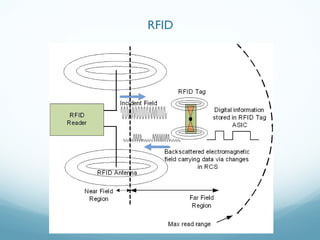
RFID
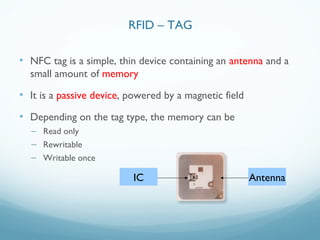
• NFC tag is a simple, thin device containing an antenna and a
small amount of memory
• It is a passive device, powered by a magnetic field
• Depending on the tag type, the memory can be
– Read only
– Rewritable
– Writable once
IC Antenna
RFID – TAG
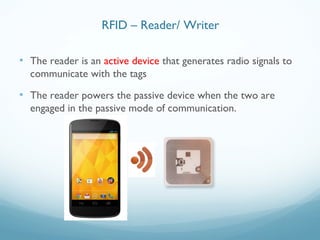
• The reader is an active device that generates radio signals to
communicate with the tags
• The reader powers the passive device when the two are
engaged in the passive mode of communication.
RFID – Reader/ Writer
• NFC devices can operate in three different modes
– Read / Write
– Peer to Peer
– Card emulation
• Based on the ISO/IEC 18092, NFC IP-1, and ISO/IEC 14443
contactless smart card standards
Operation Modes
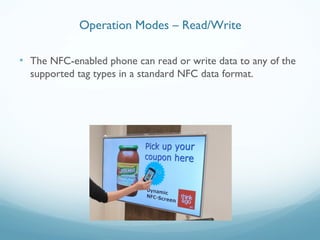
• The NFC-enabled phone can read or write data to any of the
supported tag types in a standard NFC data format.
Operation Modes – Read/Write
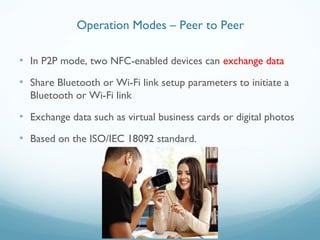
• In P2P mode, two NFC-enabled devices can exchange data
• Share Bluetooth or Wi-Fi link setup parameters to initiate a
Bluetooth or Wi-Fi link
• Exchange data such as virtual business cards or digital photos
• Based on the ISO/IEC 18092 standard.
Operation Modes – Peer to Peer
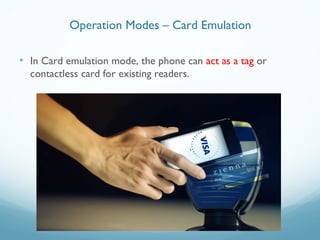
• In Card emulation mode, the phone can act as a tag or
contactless card for existing readers.
Operation Modes – Card Emulation
• Introduction to NFC
• Use Cases
• Technical Overview
• NFC on Android
Outline
Use Cases
Use Cases
Use Cases
Use Cases
Use Cases
• Introduction to NFC
• Use Cases
• Technical Overview
• NFC on Android
Outline
• NFC Tag Types
• Transition Specs
• NFC Data Exchange Format (NDEF)
Technological Overview
• NFC Forum tag types
– Type 1 tag
– Type 2 tag
– Type 3 tag
– Type 4 tag
• NXP-specific tag type
– Type MIFARE Classic Tag
Tag Types
• Type 1 Tags are cost effective and ideal for many NFC
applications
– Based on ISO-14443A standard
– Read and rewrite capable; also users can configure the tag to be read-
only
– 96 bytes of memory, expandable up to 2 kB
– Communication speed 106 kbits/s
– No data collision protection
Type 1 Tag
• Type 2 Tags are similar to Type 1 Tags and are derived from
the NXP/Philips MIFARE Ultralight tag
– Based on ISO-14443A standard
– Read and rewrite capable; also users can configure the tag to be read-
only
– 96 bytes of memory, expandable up to 2 kB
– Communication speed 106 kbits/s
– Anti-collision support
Type 2 Tag
• Type 3 Tags are derived from the nonsecure parts of Sony
FeliCa tags. These tags are more expensive than Types 1 and
2
– Based on the Japanese Industrial Standard (JIS) X 6319-4
– Preconfigured at manufacture to be either read and rewritable, or
read-only
– Variable memory, up to 1 MB per service
– Supports two communication speeds: 212 or 424 kbits/s
– Anti-collision support
Type 3 Tag
• Type 4 Tags are similar to Type 1 Tags and are derived from
the NXP DESFire tag
– Based on ISO-14443A standard
– Preconfigured at manufacture to be either read and rewritable, or
read-only
– Variable memory, up to 32 kB per service
– Supports three different communication speeds: 106, 212, or 424
kbits/s
– Anti-collision support
Type 4 Tag
• This is a proprietary tag type defined by NXP Semiconductors
– Based on ISO-14443A standard
– Read and rewrite capable; also users can configure the tag to be read-
only
– Variable memory 192/768/3584 bytes
– Communication speed 106 kbits/s
– Anti-collision support
Type MIFARE Classic Tag
• ISO-14443
• NFCIP-1
• MIFARE
• FeliCa
NFC Relative Specifications
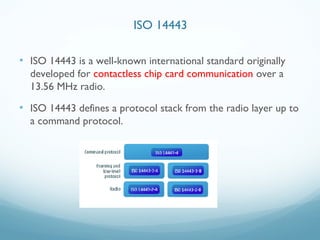
• ISO 14443 is a well-known international standard originally
developed for contactless chip card communication over a
13.56 MHz radio.
• ISO 14443 defines a protocol stack from the radio layer up to
a command protocol.
ISO 14443
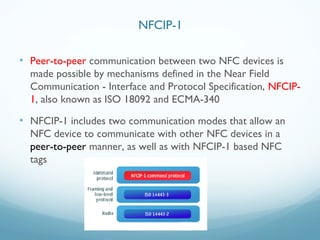
• Peer-to-peer communication between two NFC devices is
made possible by mechanisms defined in the Near Field
Communication - Interface and Protocol Specification, NFCIP-
1, also known as ISO 18092 and ECMA-340
• NFCIP-1 includes two communication modes that allow an
NFC device to communicate with other NFC devices in a
peer-to-peer manner, as well as with NFCIP-1 based NFC
tags
NFCIP-1
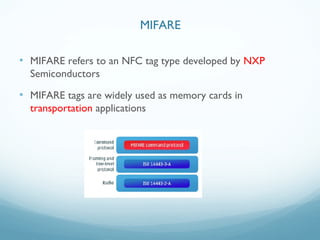
• MIFARE refers to an NFC tag type developed by NXP
Semiconductors
• MIFARE tags are widely used as memory cards in
transportation applications
MIFARE
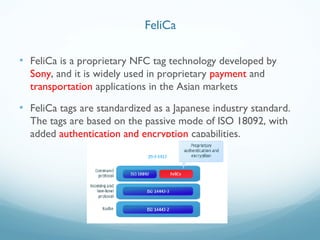
• FeliCa is a proprietary NFC tag technology developed by
Sony, and it is widely used in proprietary payment and
transportation applications in the Asian markets
• FeliCa tags are standardized as a Japanese industry standard.
The tags are based on the passive mode of ISO 18092, with
added authentication and encryption capabilities.
FeliCa
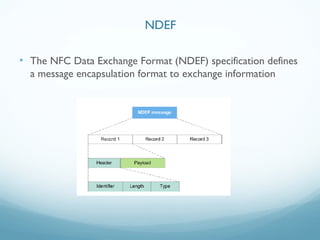
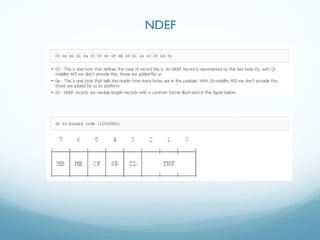
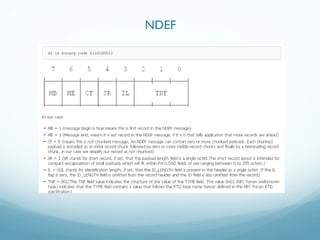
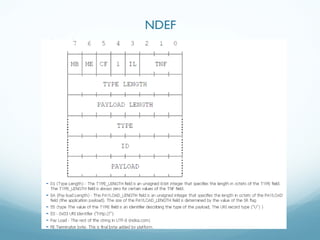
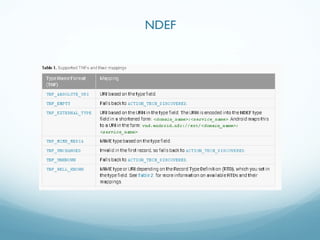
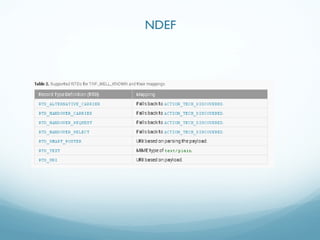
• The NFC Data Exchange Format (NDEF) specification defines
a message encapsulation format to exchange information
NDEF
NDEF
NDEF
NDEF
NDEF
NDEF
• Introduction to NFC
• Use Cases
• Technical Overview
• NFC on Android
Outline
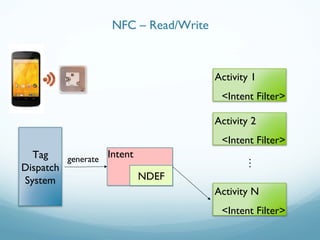
• When a Android Device being engaged with another NFC
device, the tag dispatch system start to work
• Tag dispatch system retrieve data from another NFC device
and decide what to do according to the data
• Work closely with Android Intent and Intent Filter
NFC on Android
Tag
Dispatch
System
Intent
NDEFNDEF
Activity 1
<Intent Filter>
Activity 2
<Intent Filter>
Activity N
<Intent Filter>
…
generate
NFC – Read/Write
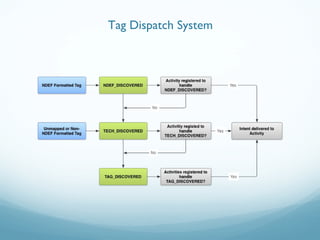
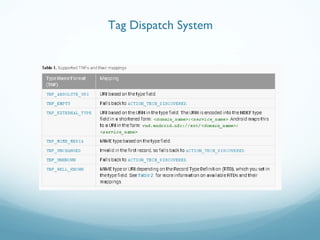
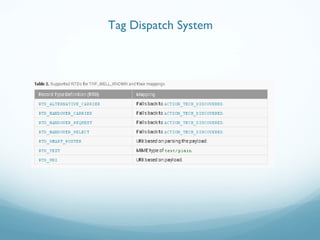
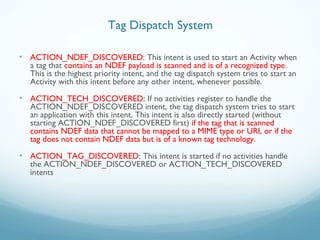
• ACTION_NDEF_DISCOVERED: This intent is used to start an Activity when
a tag that contains an NDEF payload is scanned and is of a recognized type.
This is the highest priority intent, and the tag dispatch system tries to start an
Activity with this intent before any other intent, whenever possible.
• ACTION_TECH_DISCOVERED: If no activities register to handle the
ACTION_NDEF_DISCOVERED intent, the tag dispatch system tries to start
an application with this intent. This intent is also directly started (without
starting ACTION_NDEF_DISCOVERED first) if the tag that is scanned
contains NDEF data that cannot be mapped to a MIME type or URI, or if the
tag does not contain NDEF data but is of a known tag technology.
• ACTION_TAG_DISCOVERED: This intent is started if no activities handle
the ACTION_NDEF_DISCOVERED or ACTION_TECH_DISCOVERED
intents
Tag Dispatch System
Tag Dispatch System
Tag Dispatch System
Tag Dispatch System
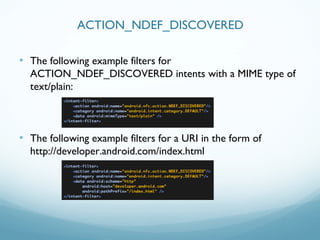
• The following example filters for
ACTION_NDEF_DISCOVERED intents with a MIME type of
text/plain:
• The following example filters for a URI in the form of
http://developer.android.com/index.html
ACTION_NDEF_DISCOVERED
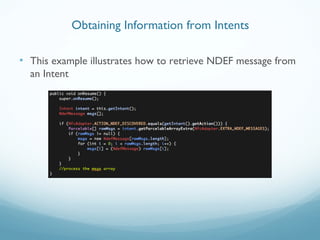
• This example illustrates how to retrieve NDEF message from
an Intent
Obtaining Information from Intents
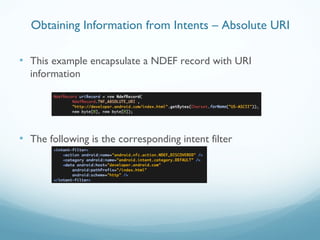
• This example encapsulate a NDEF record with URI
information
• The following is the corresponding intent filter
Obtaining Information from Intents – Absolute URI
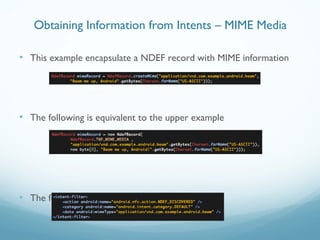
• This example encapsulate a NDEF record with MIME information
• The following is equivalent to the upper example
• The following is the corresponding intent filter
Obtaining Information from Intents – MIME Media
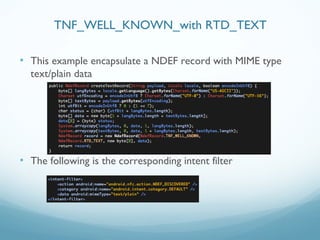
• This example encapsulate a NDEF record with MIME type
text/plain data
• The following is the corresponding intent filter
TNF_WELL_KNOWN_with RTD_TEXT
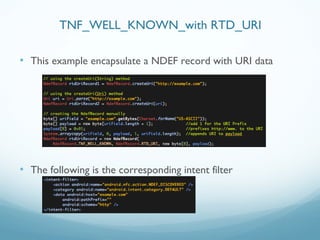
• This example encapsulate a NDEF record with URI data
• The following is the corresponding intent filter
TNF_WELL_KNOWN_with RTD_URI
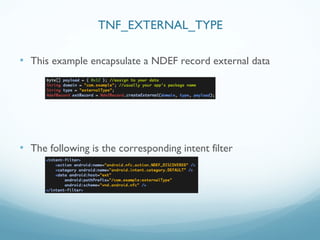
• This example encapsulate a NDEF record external data
• The following is the corresponding intent filter
TNF_EXTERNAL_TYPE
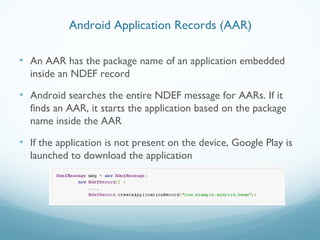
• An AAR has the package name of an application embedded
inside an NDEF record
• Android searches the entire NDEF message for AARs. If it
finds an AAR, it starts the application based on the package
name inside the AAR
• If the application is not present on the device, Google Play is
launched to download the application
Android Application Records (AAR)
• Introduction to NFC
• Understanding NFC Data Exchange Format (NDEF) messages
• Android NFC Basics
References
Thank you

Introduction to nfc

  • 1.
  • 2.
    Outline • Introduction toNFC • Use Cases • Technical Overview • NFC on Android
  • 3.
    Introduction to NFC •Near Field Communication • A short-range radio technology that enables communication between devices that either touch or are momentarily held close together – NFC is an open-platform technology that is being standardized in the NFC Forum – NFC is based on and extends on RFID. It operates on 13.56 MHz frequency – The NFC communication range is up to 10 cm – The NFC standard supports different data transmission rates such as 106 kBps, 212 kBps, and 424 kBps
  • 4.
  • 5.
    • NFC tagis a simple, thin device containing an antenna and a small amount of memory • It is a passive device, powered by a magnetic field • Depending on the tag type, the memory can be – Read only – Rewritable – Writable once IC Antenna RFID – TAG
  • 6.
    • The readeris an active device that generates radio signals to communicate with the tags • The reader powers the passive device when the two are engaged in the passive mode of communication. RFID – Reader/ Writer
  • 7.
    • NFC devicescan operate in three different modes – Read / Write – Peer to Peer – Card emulation • Based on the ISO/IEC 18092, NFC IP-1, and ISO/IEC 14443 contactless smart card standards Operation Modes
  • 8.
    • The NFC-enabledphone can read or write data to any of the supported tag types in a standard NFC data format. Operation Modes – Read/Write
  • 9.
    • In P2Pmode, two NFC-enabled devices can exchange data • Share Bluetooth or Wi-Fi link setup parameters to initiate a Bluetooth or Wi-Fi link • Exchange data such as virtual business cards or digital photos • Based on the ISO/IEC 18092 standard. Operation Modes – Peer to Peer
  • 10.
    • In Cardemulation mode, the phone can act as a tag or contactless card for existing readers. Operation Modes – Card Emulation
  • 11.
    • Introduction toNFC • Use Cases • Technical Overview • NFC on Android Outline
  • 12.
  • 13.
  • 14.
  • 15.
  • 16.
  • 17.
    • Introduction toNFC • Use Cases • Technical Overview • NFC on Android Outline
  • 18.
    • NFC TagTypes • Transition Specs • NFC Data Exchange Format (NDEF) Technological Overview
  • 19.
    • NFC Forumtag types – Type 1 tag – Type 2 tag – Type 3 tag – Type 4 tag • NXP-specific tag type – Type MIFARE Classic Tag Tag Types
  • 20.
    • Type 1Tags are cost effective and ideal for many NFC applications – Based on ISO-14443A standard – Read and rewrite capable; also users can configure the tag to be read- only – 96 bytes of memory, expandable up to 2 kB – Communication speed 106 kbits/s – No data collision protection Type 1 Tag
  • 21.
    • Type 2Tags are similar to Type 1 Tags and are derived from the NXP/Philips MIFARE Ultralight tag – Based on ISO-14443A standard – Read and rewrite capable; also users can configure the tag to be read- only – 96 bytes of memory, expandable up to 2 kB – Communication speed 106 kbits/s – Anti-collision support Type 2 Tag
  • 22.
    • Type 3Tags are derived from the nonsecure parts of Sony FeliCa tags. These tags are more expensive than Types 1 and 2 – Based on the Japanese Industrial Standard (JIS) X 6319-4 – Preconfigured at manufacture to be either read and rewritable, or read-only – Variable memory, up to 1 MB per service – Supports two communication speeds: 212 or 424 kbits/s – Anti-collision support Type 3 Tag
  • 23.
    • Type 4Tags are similar to Type 1 Tags and are derived from the NXP DESFire tag – Based on ISO-14443A standard – Preconfigured at manufacture to be either read and rewritable, or read-only – Variable memory, up to 32 kB per service – Supports three different communication speeds: 106, 212, or 424 kbits/s – Anti-collision support Type 4 Tag
  • 24.
    • This isa proprietary tag type defined by NXP Semiconductors – Based on ISO-14443A standard – Read and rewrite capable; also users can configure the tag to be read- only – Variable memory 192/768/3584 bytes – Communication speed 106 kbits/s – Anti-collision support Type MIFARE Classic Tag
  • 25.
    • ISO-14443 • NFCIP-1 •MIFARE • FeliCa NFC Relative Specifications
  • 26.
    • ISO 14443is a well-known international standard originally developed for contactless chip card communication over a 13.56 MHz radio. • ISO 14443 defines a protocol stack from the radio layer up to a command protocol. ISO 14443
  • 27.
    • Peer-to-peer communicationbetween two NFC devices is made possible by mechanisms defined in the Near Field Communication - Interface and Protocol Specification, NFCIP- 1, also known as ISO 18092 and ECMA-340 • NFCIP-1 includes two communication modes that allow an NFC device to communicate with other NFC devices in a peer-to-peer manner, as well as with NFCIP-1 based NFC tags NFCIP-1
  • 28.
    • MIFARE refersto an NFC tag type developed by NXP Semiconductors • MIFARE tags are widely used as memory cards in transportation applications MIFARE
  • 29.
    • FeliCa isa proprietary NFC tag technology developed by Sony, and it is widely used in proprietary payment and transportation applications in the Asian markets • FeliCa tags are standardized as a Japanese industry standard. The tags are based on the passive mode of ISO 18092, with added authentication and encryption capabilities. FeliCa
  • 30.
    • The NFCData Exchange Format (NDEF) specification defines a message encapsulation format to exchange information NDEF
  • 31.
  • 32.
  • 33.
  • 34.
  • 35.
  • 36.
    • Introduction toNFC • Use Cases • Technical Overview • NFC on Android Outline
  • 37.
    • When aAndroid Device being engaged with another NFC device, the tag dispatch system start to work • Tag dispatch system retrieve data from another NFC device and decide what to do according to the data • Work closely with Android Intent and Intent Filter NFC on Android
  • 38.
    Tag Dispatch System Intent NDEFNDEF Activity 1 <Intent Filter> Activity2 <Intent Filter> Activity N <Intent Filter> … generate NFC – Read/Write
  • 39.
    • ACTION_NDEF_DISCOVERED: Thisintent is used to start an Activity when a tag that contains an NDEF payload is scanned and is of a recognized type. This is the highest priority intent, and the tag dispatch system tries to start an Activity with this intent before any other intent, whenever possible. • ACTION_TECH_DISCOVERED: If no activities register to handle the ACTION_NDEF_DISCOVERED intent, the tag dispatch system tries to start an application with this intent. This intent is also directly started (without starting ACTION_NDEF_DISCOVERED first) if the tag that is scanned contains NDEF data that cannot be mapped to a MIME type or URI, or if the tag does not contain NDEF data but is of a known tag technology. • ACTION_TAG_DISCOVERED: This intent is started if no activities handle the ACTION_NDEF_DISCOVERED or ACTION_TECH_DISCOVERED intents Tag Dispatch System
  • 40.
  • 41.
  • 42.
  • 43.
    • The followingexample filters for ACTION_NDEF_DISCOVERED intents with a MIME type of text/plain: • The following example filters for a URI in the form of http://developer.android.com/index.html ACTION_NDEF_DISCOVERED
  • 44.
    • This exampleillustrates how to retrieve NDEF message from an Intent Obtaining Information from Intents
  • 45.
    • This exampleencapsulate a NDEF record with URI information • The following is the corresponding intent filter Obtaining Information from Intents – Absolute URI
  • 46.
    • This exampleencapsulate a NDEF record with MIME information • The following is equivalent to the upper example • The following is the corresponding intent filter Obtaining Information from Intents – MIME Media
  • 47.
    • This exampleencapsulate a NDEF record with MIME type text/plain data • The following is the corresponding intent filter TNF_WELL_KNOWN_with RTD_TEXT
  • 48.
    • This exampleencapsulate a NDEF record with URI data • The following is the corresponding intent filter TNF_WELL_KNOWN_with RTD_URI
  • 49.
    • This exampleencapsulate a NDEF record external data • The following is the corresponding intent filter TNF_EXTERNAL_TYPE
  • 50.
    • An AARhas the package name of an application embedded inside an NDEF record • Android searches the entire NDEF message for AARs. If it finds an AAR, it starts the application based on the package name inside the AAR • If the application is not present on the device, Google Play is launched to download the application Android Application Records (AAR)
  • 51.
    • Introduction toNFC • Understanding NFC Data Exchange Format (NDEF) messages • Android NFC Basics References
  • 52.

Editor's Notes