Microsoft Flow : introduction and advanced scenarios
Serge Luca – Isabelle Van Campenhoudt
Serge Luca
10 x SharePoint MVP
SharePoint since 2002
Architect (Admin, Dev, gouvernance)
Managing partner of www.shareql.com
Worked for the MS workflow team
Blog: http://sergeluca.wordpress.com/
sergeluca@shareql.com
@sergeluca
SQL Server MVP, Brussels
Consultant, speaker, trainer, GUSS Board Member, PASS V-Chapter Leader
Managing partner de www.ShareQL.com
SQL Server since 1999
Blog: http://thesqlgrrrl.wordpress.com/
ivc@ShareQL.com
@thesqlgrrrl
Isabelle Van Campenhoudt
Agenda
Flows and on premises
Environment + Data Loss prevention
Extensibility : communication with the outside world
Logic Apps
Prices & Roadmap
Creating Flows
Introduction : the context
Conclusions
Agenda
Introduction : the context
Empower power users
Connect data across apps
More efficient developers
App Services
Service Fabric
Azure Functions
…
Logic Apps
API Management
BizTalk
…
SQL Server BI
Data analytics
Internet of Things (IoT)
…
The context : business Apps
Build modern business app fast
Agenda
Creating Flows
Introduction : the context
Creating and managing Flows
Microsoft Account (free) or Office 365 or Dynamics 365 or Flow (paid)
Flow.microsoft.com
Powerapps.microsoft.com
A modern SharePoint Online list
Mobile app (iOS and Android, Windows Mobile is coming)
Designing a Flow
template or
from scratch
Choose a
trigger
Add
« actions »
Save the flow
demoEXPENSE REPORT
demoCOMMON DATA MODEL
Agenda
Flows and on data premises
Creating Flows
Introduction : the context
Flow and data on Premises
• Install the « on Premises data gateway »
(shared between PowerBI, PowerApps and Azure Logic
Apps)
demoFLOW AND DATA ON PREMISES
Agenda
Flows and data on premises
Environments + Data Loss prevention
Creating Flows
Introduction : the context
Why« environments » ?
• Isolated spaces where Flows/Data are
running/stored
– Ex HR, Marketing, Production, Legal, DEV, TEST,
UAT, PROD…
• Different rules (DLP)
– Ex marketing can use twitter, Legal and Production
cannot
• Different regions if needed
• Max 2 !
Flow Administration Center
demoENVIRONMENTS & DLP
Limitations
• Gateways are created in the default
environnement
• Resources like Custom API must be in
the same flow environment
• The Microsoft Common Data Service is
linked to only 1 environnement
Agenda
Flows and on premises
Environnement + Data Loss prevention
Extensibility : communication with the outside world
Creating Flows
Introduction : the context
Extensibility : communication with the outside world
 Action Request
 Custom API (REST API described in a Swagger )
 Action Http
PowerApps calls Flow
A custom app calls Flow
PowerBI calls Flow (Data Alerts)
Flow calls the outside world
demoPOWERAPPS CALLS FLOW
demoA CUSTOM APPLICATION CALLS
FLOW
demoFLOW CALLS THE OUTSIDE WORLD
FLOW & POWER BI
FLOW
DATA ALERTS
DATA SOURCES
POWER BI
SCHEDULED REFRESH
STREAMING DATA
LIVE
demoFLOW & POWERBI
demoPOWERBI CALLS FLOW (data alerts)
)
Agenda
Flows and on premises
Environnement + Data Loss prevention
Extensibility : communication with the outside world
Logic Apps
Creating Flows
Introduction : the context
Logic Apps
More dev oriented(Json, Rest api, Visual Studio …)
Logic Apps connectors can be used in Flow
Exceptions : B2B connectors B2B (Very good integration with Biztalk
Server)
The workflow engine behind Flow is Logic Apps
demoLogic Apps
)
Flows and on premises
Environnement + Data Loss prevention
Extensibility : communication with the outside world
Logic Apps
Prices & Roadmap
Creating Flows
Introduction : the context
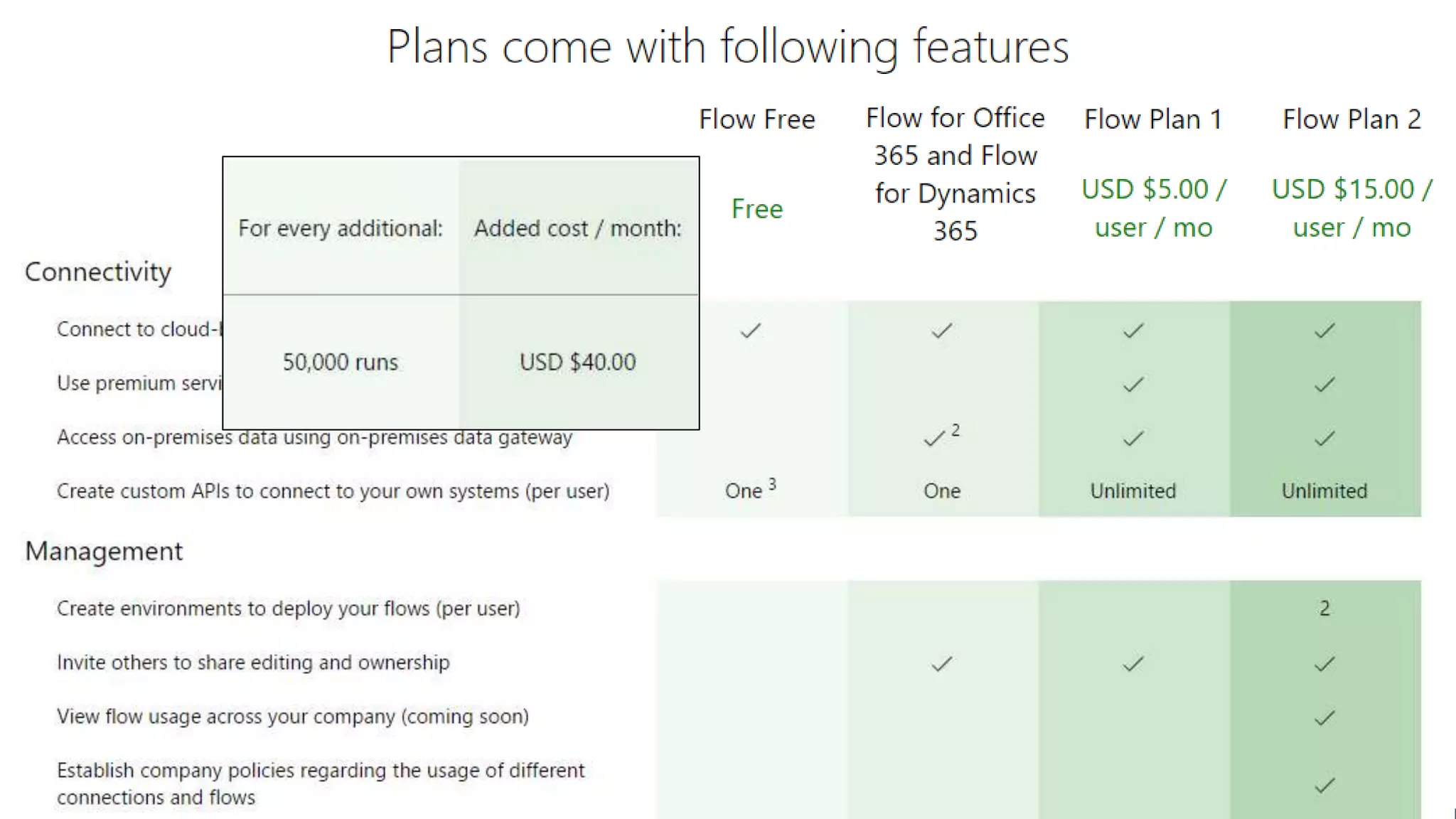
Tarifs: Comparison
Tarifs: Comparaison
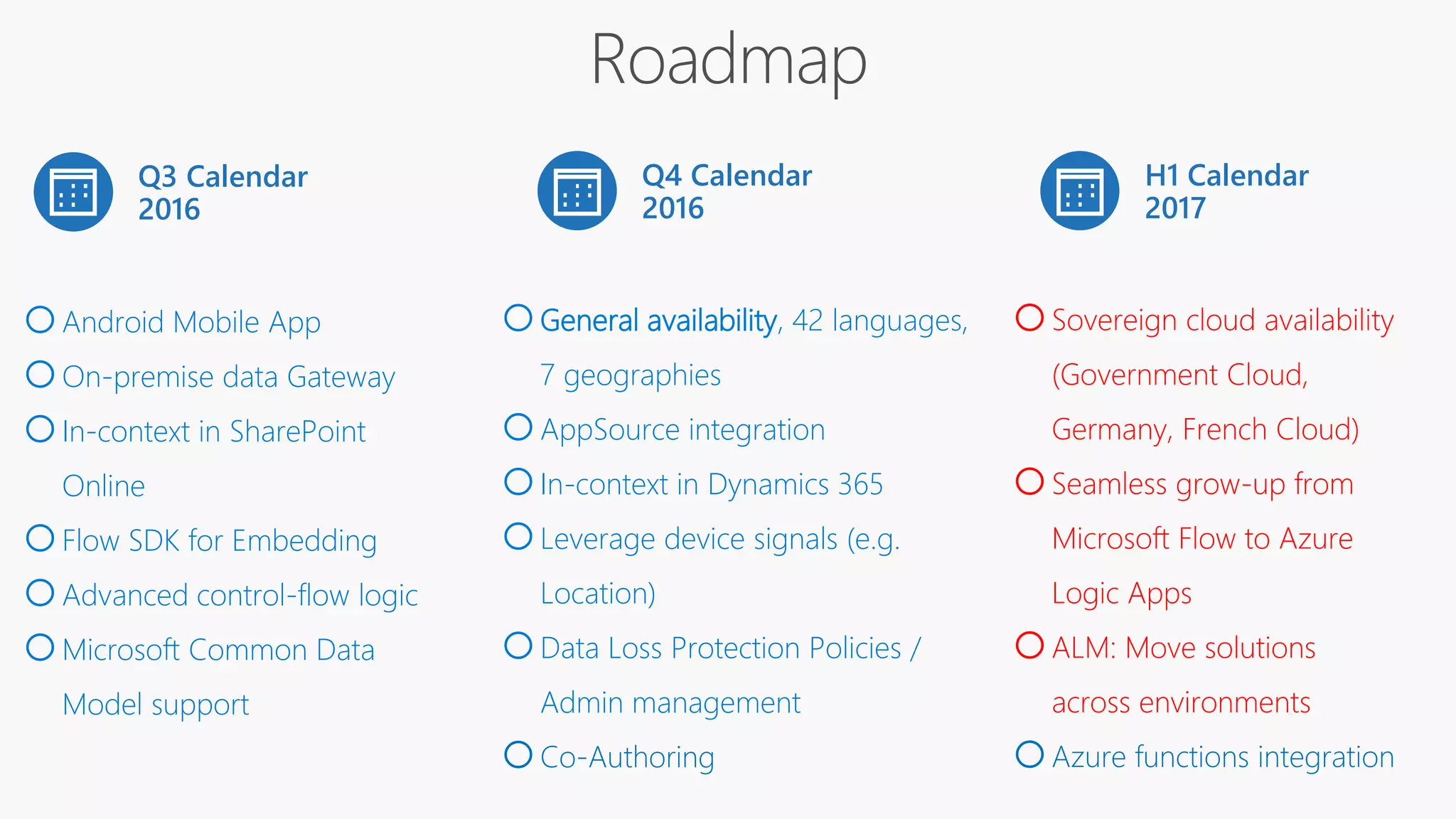
Q3 Calendar
2016
Q4 Calendar
2016
oAndroid Mobile App
oOn-premise data Gateway
oIn-context in SharePoint
Online
oFlow SDK for Embedding
oAdvanced control-flow logic
oMicrosoft Common Data
Model support
oGeneral availability, 42 languages,
7 geographies
oAppSource integration
oIn-context in Dynamics 365
oLeverage device signals (e.g.
Location)
oData Loss Protection Policies /
Admin management
oCo-Authoring
H1 Calendar
2017
oSovereign cloud availability
(Government Cloud,
Germany, French Cloud)
oSeamless grow-up from
Microsoft Flow to Azure
Logic Apps
oALM: Move solutions
across environments
oAzure functions integration
Flows and Data on premises
Environment + Data Loss prevention
Extensibility : communication with the outside world
Logic Apps
Prices & Roadmap
Creating Flows
Introduction : the context
Conclusions
Positive
• Simple
• Not just SharePoint
• Connection to hundreds of services
• Including on prem!
• SharePoint Integration
• PowerApps, PowerBI integration
• Flow team very dynamic
Negative
• Young, unknown reliability
• Designer needs to be improved
• Cannot copy flow across environments
• No state machines
• No custom variables
• Approval logic weak
• Collect feedback weak
• SharePoint integration weak (no lookup,…)
Merci Beaucoup! Thank you!
Join the conversation
#MSCloudSummit
@MSCloudSummit
Questions ? @sergeluca @chouksabrine
#MSCloudsummit
Questions ?
@sergeluca @thesqlgrrrl
#spswarsaw
Thanks to our Sponsors!

Introduction to Microsoft Flow - Introduction & advanced scenarios

  • 1.
    Microsoft Flow :introduction and advanced scenarios Serge Luca – Isabelle Van Campenhoudt
  • 2.
    Serge Luca 10 xSharePoint MVP SharePoint since 2002 Architect (Admin, Dev, gouvernance) Managing partner of www.shareql.com Worked for the MS workflow team Blog: http://sergeluca.wordpress.com/ sergeluca@shareql.com @sergeluca
  • 3.
    SQL Server MVP,Brussels Consultant, speaker, trainer, GUSS Board Member, PASS V-Chapter Leader Managing partner de www.ShareQL.com SQL Server since 1999 Blog: http://thesqlgrrrl.wordpress.com/ ivc@ShareQL.com @thesqlgrrrl Isabelle Van Campenhoudt
  • 4.
    Agenda Flows and onpremises Environment + Data Loss prevention Extensibility : communication with the outside world Logic Apps Prices & Roadmap Creating Flows Introduction : the context Conclusions
  • 5.
  • 6.
    Empower power users Connectdata across apps More efficient developers App Services Service Fabric Azure Functions … Logic Apps API Management BizTalk … SQL Server BI Data analytics Internet of Things (IoT) … The context : business Apps Build modern business app fast
  • 7.
  • 8.
    Creating and managingFlows Microsoft Account (free) or Office 365 or Dynamics 365 or Flow (paid) Flow.microsoft.com Powerapps.microsoft.com A modern SharePoint Online list Mobile app (iOS and Android, Windows Mobile is coming)
  • 9.
    Designing a Flow templateor from scratch Choose a trigger Add « actions » Save the flow
  • 10.
  • 11.
  • 12.
    Agenda Flows and ondata premises Creating Flows Introduction : the context
  • 13.
    Flow and dataon Premises • Install the « on Premises data gateway » (shared between PowerBI, PowerApps and Azure Logic Apps)
  • 14.
    demoFLOW AND DATAON PREMISES
  • 15.
    Agenda Flows and dataon premises Environments + Data Loss prevention Creating Flows Introduction : the context
  • 16.
    Why« environments »? • Isolated spaces where Flows/Data are running/stored – Ex HR, Marketing, Production, Legal, DEV, TEST, UAT, PROD… • Different rules (DLP) – Ex marketing can use twitter, Legal and Production cannot • Different regions if needed • Max 2 !
  • 17.
  • 19.
  • 20.
    Limitations • Gateways arecreated in the default environnement • Resources like Custom API must be in the same flow environment • The Microsoft Common Data Service is linked to only 1 environnement
  • 21.
    Agenda Flows and onpremises Environnement + Data Loss prevention Extensibility : communication with the outside world Creating Flows Introduction : the context
  • 22.
    Extensibility : communicationwith the outside world  Action Request  Custom API (REST API described in a Swagger )  Action Http PowerApps calls Flow A custom app calls Flow PowerBI calls Flow (Data Alerts) Flow calls the outside world
  • 23.
  • 24.
  • 25.
    demoFLOW CALLS THEOUTSIDE WORLD
  • 26.
    FLOW & POWERBI FLOW DATA ALERTS DATA SOURCES POWER BI SCHEDULED REFRESH STREAMING DATA LIVE
  • 27.
  • 28.
    demoPOWERBI CALLS FLOW(data alerts) )
  • 29.
    Agenda Flows and onpremises Environnement + Data Loss prevention Extensibility : communication with the outside world Logic Apps Creating Flows Introduction : the context
  • 30.
    Logic Apps More devoriented(Json, Rest api, Visual Studio …) Logic Apps connectors can be used in Flow Exceptions : B2B connectors B2B (Very good integration with Biztalk Server) The workflow engine behind Flow is Logic Apps
  • 31.
  • 32.
    Flows and onpremises Environnement + Data Loss prevention Extensibility : communication with the outside world Logic Apps Prices & Roadmap Creating Flows Introduction : the context
  • 33.
  • 34.
  • 35.
    Q3 Calendar 2016 Q4 Calendar 2016 oAndroidMobile App oOn-premise data Gateway oIn-context in SharePoint Online oFlow SDK for Embedding oAdvanced control-flow logic oMicrosoft Common Data Model support oGeneral availability, 42 languages, 7 geographies oAppSource integration oIn-context in Dynamics 365 oLeverage device signals (e.g. Location) oData Loss Protection Policies / Admin management oCo-Authoring H1 Calendar 2017 oSovereign cloud availability (Government Cloud, Germany, French Cloud) oSeamless grow-up from Microsoft Flow to Azure Logic Apps oALM: Move solutions across environments oAzure functions integration
  • 36.
    Flows and Dataon premises Environment + Data Loss prevention Extensibility : communication with the outside world Logic Apps Prices & Roadmap Creating Flows Introduction : the context Conclusions
  • 37.
    Positive • Simple • Notjust SharePoint • Connection to hundreds of services • Including on prem! • SharePoint Integration • PowerApps, PowerBI integration • Flow team very dynamic
  • 38.
    Negative • Young, unknownreliability • Designer needs to be improved • Cannot copy flow across environments • No state machines • No custom variables • Approval logic weak • Collect feedback weak • SharePoint integration weak (no lookup,…)
  • 39.
    Merci Beaucoup! Thankyou! Join the conversation #MSCloudSummit @MSCloudSummit Questions ? @sergeluca @chouksabrine #MSCloudsummit Questions ? @sergeluca @thesqlgrrrl #spswarsaw
  • 40.
    Thanks to ourSponsors!

Editor's Notes

  • #5 Speaker:slu
  • #6 Speaker:slu
  • #7 Speaker: Sabr Microsoft est en train de reconcevoir la façon dont on crée les app business sans écrire du code. le but étant d'outiller d'avantage les power users ( parce qu'on parle d'application sans code° et les developpeur parce qu'il possible d'étendre ses applications Microsoft se base 3 Piliers:   Pilier Mesure:  qui permet de mesurer des données et afficher des Dashboard: concrètement incarné Power Bi  Act qui permet agir sur les données c'est à dire afficher et modifier les données, ce pilier est porté par power Apps Un pilier d'automatisation, Microsoft flow dont on va vous parler pendant une heure.  Ces 3 outils sont conçus pour fonctionner dans le cloud et sur toutes les plateforme y compris le mobile. (Pour qu'on puisse interagir avec elle à partir du mobile)  Les applications développés par ces 3 aplli ( sans ) peuvent être étendu si nécessaires par des développeurs. Même si ces application fonctionnent dans le cloud, elles peuvent aussi se connecter à des données on prem ( via les gateways)
  • #8 Speaker:slu
  • #9 Speaker: sabr
  • #10 Speaker: sabr
  • #11 Jusqu’ici: 7 min Duréee 8-10 min Demo scan Ondrive If doesn’t work set filepath is the content parameter (send mail) https://shareql.sharepoint.com/demosharepoint/nintext/ Show how to login App launcher ? SharePoint list online Show services https://flow.microsoft.com/en-us/services/ ( > 60 services) Show templates Type « SharePoint » to see sharepoint actions and « Office 365 » Triggers ( show triggers) Triggers in SharePoint Show flow « ShareQL expense » When a new item is created in expenses, ask my manager approve it if it is > 500 euros
  • #12 Go to powerapps.microsoft.com Check the ReviewDropped files
  • #13 Speaker:slu
  • #15 3 min Go to powerapps.microsoft.com Check the ReviewDropped files
  • #16 Speaker:slu
  • #20 Speaker: serge et sabr Après la fin de la demo : 24 ‘
  • #21 Speaker: SLU
  • #22 Speaker:slu
  • #23 Speaker: SLU
  • #24 2 min Go to powerapps.microsoft.com Check the ReviewDropped files
  • #25 3 min Postman demo
  • #26 Duréee: 2 min 56 Flow call weather or flow call Azure function Or Flow call webapi service Or read this https://flow.microsoft.com/en-us/blog/custom-web-api-as-custom-api/
  • #28 Durée 2’51 https://app.powerbi.com/view?r=eyJrIjoiNTQyOGZhZmEtYmE4NS00YzYyLTg1NWItYWYxZjQ1Njg4N2ZmIiwidCI6IjdlNGNjMjBjLTdiOTgtNDU2MC04NzhkLTkwNjllN2M1NTdjYiIsImMiOjN9 Expense PowerBi https://app.powerbi.com/view?r=eyJrIjoiNjI2ODRlN2ItMTk4Yy00NzY5LTg4MDktNTRlZDcwNjI0YTBiIiwidCI6Ijg5MmIzNDQ2LWQ1ZjAtNDg5ZS1hNjhkLTYwNWMxNjEzYWVhZCIsImMiOjh9
  • #29 https://app.powerbi.com/view?r=eyJrIjoiNTQyOGZhZmEtYmE4NS00YzYyLTg1NWItYWYxZjQ1Njg4N2ZmIiwidCI6IjdlNGNjMjBjLTdiOTgtNDU2MC04NzhkLTkwNjllN2M1NTdjYiIsImMiOjN9
  • #30 41 minutes jusqu’ici
  • #31 Speaker:slu
  • #32 Installer Azure sdk 2.9.1 ou plus récent Installer le logic apps tools pour vstudio
  • #33 https://app.powerbi.com/view?r=eyJrIjoiNTQyOGZhZmEtYmE4NS00YzYyLTg1NWItYWYxZjQ1Njg4N2ZmIiwidCI6IjdlNGNjMjBjLTdiOTgtNDU2MC04NzhkLTkwNjllN2M1NTdjYiIsImMiOjN9
  • #34 Speaker: sabr
  • #35 Speaker: sabr https://flow.microsoft.com/en-us/pricing/
  • #36 Speaker: sabr https://flow.microsoft.com/en-us/pricing/
  • #37 Speaker: SLU
  • #38 Speaker: sabr
  • #39 Speaker: sabr
  • #40 Flow est une brique très jeune (date de release) Il n'est pas possible pour le moment de packager un Flow et de le déplacer d'un environnement à un autre ( même au sein du même tenant)  Il n'est pas possible de créer des workflow de type machine à état L'interface de création de workflow pourrait être améliorée:  Réordonner les tâches est pénible. Changer une variable sans supprimer toutes les étapes suivantes est impossible.