Nakkeeran Natarajan &
Vijai Anand Ramalingam
Hands-on Microsoft Flow
1
Nakkeeran & Vijai Anand
2
Agenda
 Introduction to Microsoft Flow
 Understanding Basics
 Approvals
 Advanced Concepts with real time scenarios/examples
 Serverless with Flow and Azure Functions
 Mobile app
 Flow vs Azure Logic Apps
 Benefits & Limitations
 Roadmap
 Administer flows using Admin Center and PowerShell
 Q&A
Nakkeeran & Vijai Anand
3
Introduction to Microsoft Flow
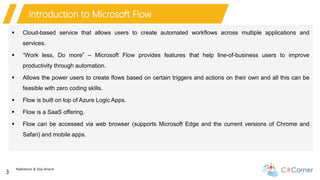
 Cloud-based service that allows users to create automated workflows across multiple applications and
services.
 “Work less, Do more” – Microsoft Flow provides features that help line-of-business users to improve
productivity through automation.
 Allows the power users to create flows based on certain triggers and actions on their own and all this can be
feasible with zero coding skills.
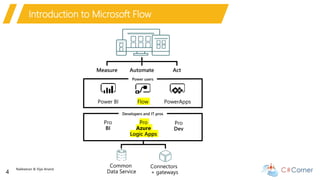
 Flow is built on top of Azure Logic Apps.
 Flow is a SaaS offering.
 Flow can be accessed via web browser (supports Microsoft Edge and the current versions of Chrome and
Safari) and mobile apps.
Nakkeeran & Vijai Anand
4
Introduction to Microsoft Flow
Nakkeeran & Vijai Anand
5
Understanding basics
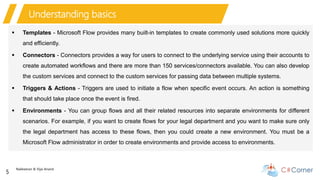
 Templates - Microsoft Flow provides many built-in templates to create commonly used solutions more quickly
and efficiently.
 Connectors - Connectors provides a way for users to connect to the underlying service using their accounts to
create automated workflows and there are more than 150 services/connectors available. You can also develop
the custom services and connect to the custom services for passing data between multiple systems.
 Triggers & Actions - Triggers are used to initiate a flow when specific event occurs. An action is something
that should take place once the event is fired.
 Environments - You can group flows and all their related resources into separate environments for different
scenarios. For example, if you want to create flows for your legal department and you want to make sure only
the legal department has access to these flows, then you could create a new environment. You must be a
Microsoft Flow administrator in order to create environments and provide access to environments.
Nakkeeran & Vijai Anand
6
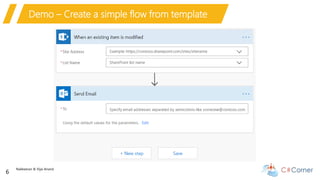
Demo – Create a simple flow from template
Nakkeeran & Vijai Anand
7
Approvals
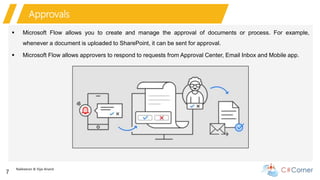
 Microsoft Flow allows you to create and manage the approval of documents or process. For example,
whenever a document is uploaded to SharePoint, it can be sent for approval.
 Microsoft Flow allows approvers to respond to requests from Approval Center, Email Inbox and Mobile app.
Nakkeeran & Vijai Anand
8
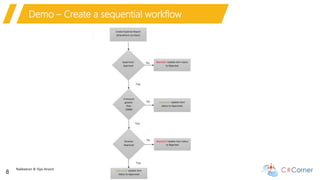
Demo – Create a sequential workflow
Nakkeeran & Vijai Anand
9
Advanced Concepts
 Manage Connectors and Gateways
 Custom connectors
 Deep dive into expressions and conditions
 Working with lists/Arrays
 Handling Errors
 Using Common Data Services
Nakkeeran & Vijai Anand
10
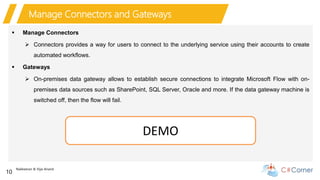
Manage Connectors and Gateways
 Manage Connectors
 Connectors provides a way for users to connect to the underlying service using their accounts to create
automated workflows.
 Gateways
 On-premises data gateway allows to establish secure connections to integrate Microsoft Flow with on-
premises data sources such as SharePoint, SQL Server, Oracle and more. If the data gateway machine is
switched off, then the flow will fail.
DEMO
Nakkeeran & Vijai Anand
11
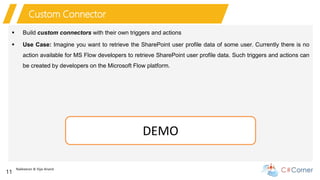
Custom Connector
 Build custom connectors with their own triggers and actions
 Use Case: Imagine you want to retrieve the SharePoint user profile data of some user. Currently there is no
action available for MS Flow developers to retrieve SharePoint user profile data. Such triggers and actions can
be created by developers on the Microsoft Flow platform.
DEMO
Nakkeeran & Vijai Anand
12
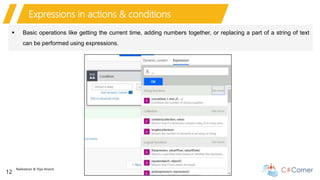
Expressions in actions & conditions
 Basic operations like getting the current time, adding numbers together, or replacing a part of a string of text
can be performed using expressions.
Nakkeeran & Vijai Anand
13
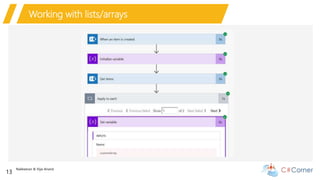
Working with lists/arrays
Nakkeeran & Vijai Anand
14
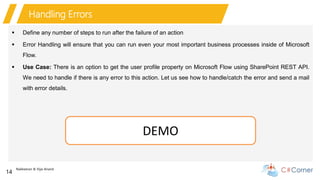
Handling Errors
 Define any number of steps to run after the failure of an action
 Error Handling will ensure that you can run even your most important business processes inside of Microsoft
Flow.
 Use Case: There is an option to get the user profile property on Microsoft Flow using SharePoint REST API.
We need to handle if there is any error to this action. Let us see how to handle/catch the error and send a mail
with error details.
DEMO
Nakkeeran & Vijai Anand
15
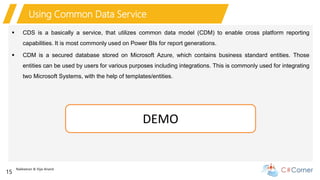
Using Common Data Service
 CDS is a basically a service, that utilizes common data model (CDM) to enable cross platform reporting
capabilities. It is most commonly used on Power BIs for report generations.
 CDM is a secured database stored on Microsoft Azure, which contains business standard entities. Those
entities can be used by users for various purposes including integrations. This is commonly used for integrating
two Microsoft Systems, with the help of templates/entities.
DEMO
16
Nakkeeran & Vijai Anand
17
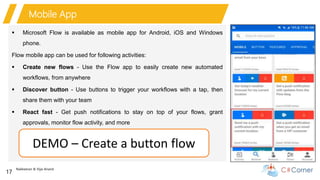
Mobile App
 Microsoft Flow is available as mobile app for Android, iOS and Windows
phone.
Flow mobile app can be used for following activities:
 Create new flows - Use the Flow app to easily create new automated
workflows, from anywhere
 Discover button - Use buttons to trigger your workflows with a tap, then
share them with your team
 React fast - Get push notifications to stay on top of your flows, grant
approvals, monitor flow activity, and more
DEMO – Create a button flow
Nakkeeran & Vijai Anand
18
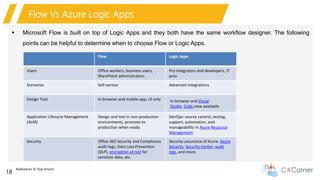
Flow Vs Azure Logic Apps
 Microsoft Flow is built on top of Logic Apps and they both have the same workflow designer. The following
points can be helpful to determine when to choose Flow or Logic Apps.
Flow Logic Apps
Users Office workers, business users,
SharePoint administrators
Pro integrators and developers, IT
pros
Scenarios Self-service Advanced integrations
Design Tool In-browser and mobile app, UI only In-browser and Visual
Studio, Code view available
Application Lifecycle Management
(ALM)
Design and test in non-production
environments, promote to
production when ready.
DevOps: source control, testing,
support, automation, and
manageability in Azure Resource
Management
Security Office 365 Security and Compliance
audit logs, Data Loss Prevention
(DLP), encryption at rest for
sensitive data, etc.
Security assurance of Azure: Azure
Security, Security Center, audit
logs, and more.
Nakkeeran & Vijai Anand
19
Administer flows
 Manage Flows – Edit, Turn on/off, Delete, Export, Import etc.
 Admin Center Overview - Admin center allows the tenant and environment administrators to manage the
environments and data policies.
 Manage Environments
 PowerShell cmdlets for app creators and administrators - automate many of the monitoring and management
tasks that are only possible manually today.
DEMO
Nakkeeran & Vijai Anand
20
Data loss prevention (DLP) policies
 Data Policies – help to protect your organizational data from being shared with a list of connectors that you
define.
Benefits of a DLP Policy:
 Ensures that data is managed in a uniform manner across the organization.
 Prevents important business data from being accidentally published to connectors such as social media sites.
DEMO
Nakkeeran & Vijai Anand
21
Benefits & Limitations
 No code solution
 Business can build simpler workflows
themselves
 Less dependency on IT
 Zero deployment time
 Reuse common use cases and workflows
 Custom connectors created can be reused
across the organization
 Limits with in Microsoft Flow -
 Request limits - Message size, Retry policy
 Run duration and retention
 Looping and debatching limits
 Definition limits
 There are known issues with SharePoint
 https://docs.microsoft.com/en-us/flow/limits-
and-config
Nakkeeran & Vijai Anand
22
Roadmap
 Currently there is no documentation available sharing the information regarding the Microsoft Flow roadmap.
 For the most up-to-date information about Microsoft Flow, check the Microsoft Flow blog and release notes
are available.
 Blog - https://flow.microsoft.com/en-us/blog/
 Release Notes - https://flow.microsoft.com/en-us/documentation/release-notes/
Nakkeeran & Vijai Anand
23
References
 https://us.flow.microsoft.com/
 http://www.techwithnakkeeran.com/2018/06/making-office-365-sharepoint-rest-api.html
 http://www.techwithnakkeeran.com/2018/05/creating-office-365-sharepoint-custom.html
 http://www.techwithnakkeeran.com/2018/09/connecting-sharepoint-with-cds-using.html
 http://www.techwithnakkeeran.com/2018/09/error-handling-for-office-365.html
 http://www.techwithnakkeeran.com/2018/07/protecting-sharepoint-data-on-microsoft.html
 http://www.techwithnakkeeran.com/2018/10/using-azure-functions-cognitive_6.html
 http://www.techwithnakkeeran.com/2018/07/analyze-and-classify-images-on-office.html
 https://www.c-sharpcorner.com/blogs/how-to-connect-to-microsoft-flow-using-powershell
Nakkeeran & Vijai Anand
24
Q & A
Thank You!!!

Hands-on Microsoft Flow

  • 1.
    Nakkeeran Natarajan & VijaiAnand Ramalingam Hands-on Microsoft Flow 1
  • 2.
    Nakkeeran & VijaiAnand 2 Agenda  Introduction to Microsoft Flow  Understanding Basics  Approvals  Advanced Concepts with real time scenarios/examples  Serverless with Flow and Azure Functions  Mobile app  Flow vs Azure Logic Apps  Benefits & Limitations  Roadmap  Administer flows using Admin Center and PowerShell  Q&A
  • 3.
    Nakkeeran & VijaiAnand 3 Introduction to Microsoft Flow  Cloud-based service that allows users to create automated workflows across multiple applications and services.  “Work less, Do more” – Microsoft Flow provides features that help line-of-business users to improve productivity through automation.  Allows the power users to create flows based on certain triggers and actions on their own and all this can be feasible with zero coding skills.  Flow is built on top of Azure Logic Apps.  Flow is a SaaS offering.  Flow can be accessed via web browser (supports Microsoft Edge and the current versions of Chrome and Safari) and mobile apps.
  • 4.
    Nakkeeran & VijaiAnand 4 Introduction to Microsoft Flow
  • 5.
    Nakkeeran & VijaiAnand 5 Understanding basics  Templates - Microsoft Flow provides many built-in templates to create commonly used solutions more quickly and efficiently.  Connectors - Connectors provides a way for users to connect to the underlying service using their accounts to create automated workflows and there are more than 150 services/connectors available. You can also develop the custom services and connect to the custom services for passing data between multiple systems.  Triggers & Actions - Triggers are used to initiate a flow when specific event occurs. An action is something that should take place once the event is fired.  Environments - You can group flows and all their related resources into separate environments for different scenarios. For example, if you want to create flows for your legal department and you want to make sure only the legal department has access to these flows, then you could create a new environment. You must be a Microsoft Flow administrator in order to create environments and provide access to environments.
  • 6.
    Nakkeeran & VijaiAnand 6 Demo – Create a simple flow from template
  • 7.
    Nakkeeran & VijaiAnand 7 Approvals  Microsoft Flow allows you to create and manage the approval of documents or process. For example, whenever a document is uploaded to SharePoint, it can be sent for approval.  Microsoft Flow allows approvers to respond to requests from Approval Center, Email Inbox and Mobile app.
  • 8.
    Nakkeeran & VijaiAnand 8 Demo – Create a sequential workflow
  • 9.
    Nakkeeran & VijaiAnand 9 Advanced Concepts  Manage Connectors and Gateways  Custom connectors  Deep dive into expressions and conditions  Working with lists/Arrays  Handling Errors  Using Common Data Services
  • 10.
    Nakkeeran & VijaiAnand 10 Manage Connectors and Gateways  Manage Connectors  Connectors provides a way for users to connect to the underlying service using their accounts to create automated workflows.  Gateways  On-premises data gateway allows to establish secure connections to integrate Microsoft Flow with on- premises data sources such as SharePoint, SQL Server, Oracle and more. If the data gateway machine is switched off, then the flow will fail. DEMO
  • 11.
    Nakkeeran & VijaiAnand 11 Custom Connector  Build custom connectors with their own triggers and actions  Use Case: Imagine you want to retrieve the SharePoint user profile data of some user. Currently there is no action available for MS Flow developers to retrieve SharePoint user profile data. Such triggers and actions can be created by developers on the Microsoft Flow platform. DEMO
  • 12.
    Nakkeeran & VijaiAnand 12 Expressions in actions & conditions  Basic operations like getting the current time, adding numbers together, or replacing a part of a string of text can be performed using expressions.
  • 13.
    Nakkeeran & VijaiAnand 13 Working with lists/arrays
  • 14.
    Nakkeeran & VijaiAnand 14 Handling Errors  Define any number of steps to run after the failure of an action  Error Handling will ensure that you can run even your most important business processes inside of Microsoft Flow.  Use Case: There is an option to get the user profile property on Microsoft Flow using SharePoint REST API. We need to handle if there is any error to this action. Let us see how to handle/catch the error and send a mail with error details. DEMO
  • 15.
    Nakkeeran & VijaiAnand 15 Using Common Data Service  CDS is a basically a service, that utilizes common data model (CDM) to enable cross platform reporting capabilities. It is most commonly used on Power BIs for report generations.  CDM is a secured database stored on Microsoft Azure, which contains business standard entities. Those entities can be used by users for various purposes including integrations. This is commonly used for integrating two Microsoft Systems, with the help of templates/entities. DEMO
  • 16.
  • 17.
    Nakkeeran & VijaiAnand 17 Mobile App  Microsoft Flow is available as mobile app for Android, iOS and Windows phone. Flow mobile app can be used for following activities:  Create new flows - Use the Flow app to easily create new automated workflows, from anywhere  Discover button - Use buttons to trigger your workflows with a tap, then share them with your team  React fast - Get push notifications to stay on top of your flows, grant approvals, monitor flow activity, and more DEMO – Create a button flow
  • 18.
    Nakkeeran & VijaiAnand 18 Flow Vs Azure Logic Apps  Microsoft Flow is built on top of Logic Apps and they both have the same workflow designer. The following points can be helpful to determine when to choose Flow or Logic Apps. Flow Logic Apps Users Office workers, business users, SharePoint administrators Pro integrators and developers, IT pros Scenarios Self-service Advanced integrations Design Tool In-browser and mobile app, UI only In-browser and Visual Studio, Code view available Application Lifecycle Management (ALM) Design and test in non-production environments, promote to production when ready. DevOps: source control, testing, support, automation, and manageability in Azure Resource Management Security Office 365 Security and Compliance audit logs, Data Loss Prevention (DLP), encryption at rest for sensitive data, etc. Security assurance of Azure: Azure Security, Security Center, audit logs, and more.
  • 19.
    Nakkeeran & VijaiAnand 19 Administer flows  Manage Flows – Edit, Turn on/off, Delete, Export, Import etc.  Admin Center Overview - Admin center allows the tenant and environment administrators to manage the environments and data policies.  Manage Environments  PowerShell cmdlets for app creators and administrators - automate many of the monitoring and management tasks that are only possible manually today. DEMO
  • 20.
    Nakkeeran & VijaiAnand 20 Data loss prevention (DLP) policies  Data Policies – help to protect your organizational data from being shared with a list of connectors that you define. Benefits of a DLP Policy:  Ensures that data is managed in a uniform manner across the organization.  Prevents important business data from being accidentally published to connectors such as social media sites. DEMO
  • 21.
    Nakkeeran & VijaiAnand 21 Benefits & Limitations  No code solution  Business can build simpler workflows themselves  Less dependency on IT  Zero deployment time  Reuse common use cases and workflows  Custom connectors created can be reused across the organization  Limits with in Microsoft Flow -  Request limits - Message size, Retry policy  Run duration and retention  Looping and debatching limits  Definition limits  There are known issues with SharePoint  https://docs.microsoft.com/en-us/flow/limits- and-config
  • 22.
    Nakkeeran & VijaiAnand 22 Roadmap  Currently there is no documentation available sharing the information regarding the Microsoft Flow roadmap.  For the most up-to-date information about Microsoft Flow, check the Microsoft Flow blog and release notes are available.  Blog - https://flow.microsoft.com/en-us/blog/  Release Notes - https://flow.microsoft.com/en-us/documentation/release-notes/
  • 23.
    Nakkeeran & VijaiAnand 23 References  https://us.flow.microsoft.com/  http://www.techwithnakkeeran.com/2018/06/making-office-365-sharepoint-rest-api.html  http://www.techwithnakkeeran.com/2018/05/creating-office-365-sharepoint-custom.html  http://www.techwithnakkeeran.com/2018/09/connecting-sharepoint-with-cds-using.html  http://www.techwithnakkeeran.com/2018/09/error-handling-for-office-365.html  http://www.techwithnakkeeran.com/2018/07/protecting-sharepoint-data-on-microsoft.html  http://www.techwithnakkeeran.com/2018/10/using-azure-functions-cognitive_6.html  http://www.techwithnakkeeran.com/2018/07/analyze-and-classify-images-on-office.html  https://www.c-sharpcorner.com/blogs/how-to-connect-to-microsoft-flow-using-powershell
  • 24.
    Nakkeeran & VijaiAnand 24 Q & A Thank You!!!