Introduction to Knockout JsIntroduction to Knockout Js
Teena Vashist
Software Consultant
Knoldus Software LLP
Teena Vashist
Software Consultant
Knoldus Software LLP
AGENDAAGENDA
What is knockout js
MVVM
Features
Why knockout js
Observable
Controlling dependency tracking
Bindings
Demo
What is knockout js
MVVM
Features
Why knockout js
Observable
Controlling dependency tracking
Bindings
Demo
What is Knockout Js
● Knockout is a JavaScript library that helps you to create
responsive display(UI)
● It is based on Model–view–viewmodel (MVVM) pattern
● It provides a simple two-way data binding mechanism
between your data model and UI
● It was developed and is maintained as an open source project
by Steve Sanderson, a Microsoft employee on July 5, 2010
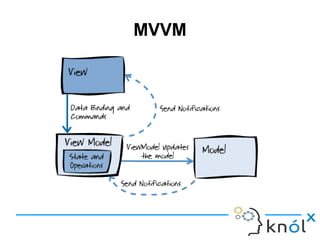
MVVM Design Pattern
MVVM pattern has 3 key parts:
● Model – It stores application data and is independent of any
UI
● View – It provides User Interface
● View-Model – It connect model and view and a pure-code
representation of the data and operations on a UI
MVVM
Features
● Declarative Bindings
It allows you to connect your UI element to your data model
● Automatic UI Refresh
When your data model's state changes, your UI updates automatically
● Dependency Tracking
Implicitly set up chains of relationships between model data, to transform and combine it
● Extensible
This implements custom behaviors as new declarative bindings for easy reuse in just a few lines
of code. Knockout is also flexible to integrate with other libraries and technologies
Why Knockout Js ?
● Small & lightweight - 54kb minified
● Compatible with other technologies
● Open source and free
● Smart feature - self updating UI
● Fully documented
● It supports all mainstream browsers:
IE 6+, Firefox 2+, Chrome, Safari, others
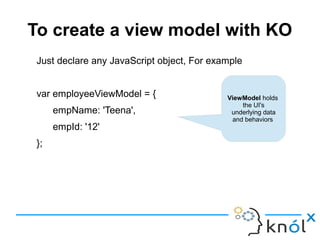
To create a view model with KO
Just declare any JavaScript object, For example
var employeeViewModel = {
empName: 'Teena',
empId: '12'
};
ViewModel holds
the UI's
underlying data
and behaviors
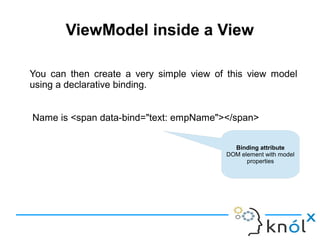
ViewModel inside a View
You can then create a very simple view of this view model
using a declarative binding.
Name is <span data-bind="text: empName"></span>
Binding attribute
DOM element with model
properties
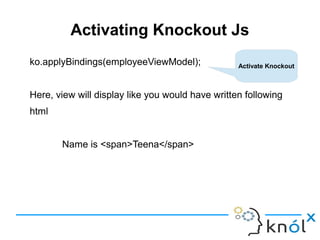
Activating Knockout Js
ko.applyBindings(employeeViewModel);
Here, view will display like you would have written following
html
Name is <span>Teena</span>
Activate Knockout
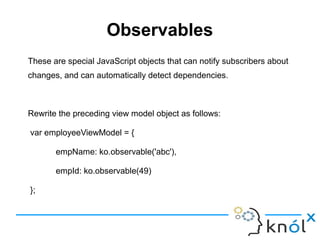
Observables
These are special JavaScript objects that can notify subscribers about
changes, and can automatically detect dependencies.
Rewrite the preceding view model object as follows:
var employeeViewModel = {
empName: ko.observable('abc'),
empId: ko.observable(49)
};
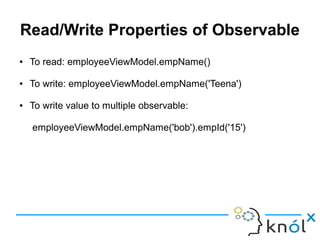
Read/Write Properties of Observable
● To read: employeeViewModel.empName()
● To write: employeeViewModel.empName('Teena')
● To write value to multiple observable:
employeeViewModel.empName('bob').empId('15')
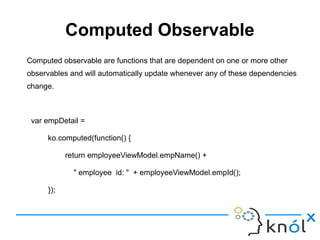
Computed Observable
Computed observable are functions that are dependent on one or more other
observables and will automatically update whenever any of these dependencies
change.
var empDetail =
ko.computed(function() {
return employeeViewModel.empName() +
" employee id: " + employeeViewModel.empId();
});
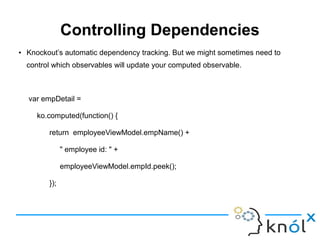
Controlling Dependencies
● Knockout’s automatic dependency tracking. But we might sometimes need to
control which observables will update your computed observable.
var empDetail =
ko.computed(function() {
return employeeViewModel.empName() +
" employee id: " +
employeeViewModel.empId.peek();
});
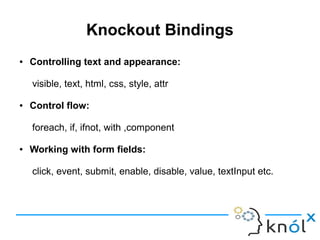
Knockout Bindings
● Controlling text and appearance:
visible, text, html, css, style, attr
● Control flow:
foreach, if, ifnot, with ,component
● Working with form fields:
click, event, submit, enable, disable, value, textInput etc.
Demo
https://github.com/knoldus/play-knockout-demo
Questions ?
References
● http://knockoutjs.com/
● http://www.knockmeout.net/
● https://msdn.microsoft.com/
Introduction to Knockout Js

Introduction to Knockout Js

  • 1.
    Introduction to KnockoutJsIntroduction to Knockout Js Teena Vashist Software Consultant Knoldus Software LLP Teena Vashist Software Consultant Knoldus Software LLP
  • 2.
    AGENDAAGENDA What is knockoutjs MVVM Features Why knockout js Observable Controlling dependency tracking Bindings Demo What is knockout js MVVM Features Why knockout js Observable Controlling dependency tracking Bindings Demo
  • 3.
    What is KnockoutJs ● Knockout is a JavaScript library that helps you to create responsive display(UI) ● It is based on Model–view–viewmodel (MVVM) pattern ● It provides a simple two-way data binding mechanism between your data model and UI ● It was developed and is maintained as an open source project by Steve Sanderson, a Microsoft employee on July 5, 2010
  • 4.
    MVVM Design Pattern MVVMpattern has 3 key parts: ● Model – It stores application data and is independent of any UI ● View – It provides User Interface ● View-Model – It connect model and view and a pure-code representation of the data and operations on a UI
  • 5.
  • 6.
    Features ● Declarative Bindings Itallows you to connect your UI element to your data model ● Automatic UI Refresh When your data model's state changes, your UI updates automatically ● Dependency Tracking Implicitly set up chains of relationships between model data, to transform and combine it ● Extensible This implements custom behaviors as new declarative bindings for easy reuse in just a few lines of code. Knockout is also flexible to integrate with other libraries and technologies
  • 7.
    Why Knockout Js? ● Small & lightweight - 54kb minified ● Compatible with other technologies ● Open source and free ● Smart feature - self updating UI ● Fully documented ● It supports all mainstream browsers: IE 6+, Firefox 2+, Chrome, Safari, others
  • 8.
    To create aview model with KO Just declare any JavaScript object, For example var employeeViewModel = { empName: 'Teena', empId: '12' }; ViewModel holds the UI's underlying data and behaviors
  • 9.
    ViewModel inside aView You can then create a very simple view of this view model using a declarative binding. Name is <span data-bind="text: empName"></span> Binding attribute DOM element with model properties
  • 10.
    Activating Knockout Js ko.applyBindings(employeeViewModel); Here,view will display like you would have written following html Name is <span>Teena</span> Activate Knockout
  • 11.
    Observables These are specialJavaScript objects that can notify subscribers about changes, and can automatically detect dependencies. Rewrite the preceding view model object as follows: var employeeViewModel = { empName: ko.observable('abc'), empId: ko.observable(49) };
  • 12.
    Read/Write Properties ofObservable ● To read: employeeViewModel.empName() ● To write: employeeViewModel.empName('Teena') ● To write value to multiple observable: employeeViewModel.empName('bob').empId('15')
  • 13.
    Computed Observable Computed observableare functions that are dependent on one or more other observables and will automatically update whenever any of these dependencies change. var empDetail = ko.computed(function() { return employeeViewModel.empName() + " employee id: " + employeeViewModel.empId(); });
  • 14.
    Controlling Dependencies ● Knockout’sautomatic dependency tracking. But we might sometimes need to control which observables will update your computed observable. var empDetail = ko.computed(function() { return employeeViewModel.empName() + " employee id: " + employeeViewModel.empId.peek(); });
  • 15.
    Knockout Bindings ● Controllingtext and appearance: visible, text, html, css, style, attr ● Control flow: foreach, if, ifnot, with ,component ● Working with form fields: click, event, submit, enable, disable, value, textInput etc.
  • 16.
  • 17.
  • 18.