1 | P a g e 
A 
Practical Report 
on 
INTRODUCTION TO FILTERS 
Under LabVIEW Environment 
Submitted To: Submitted By: 
Mr. Raj Kumar Garg Paramjeet Singh Jamwal 
Assistant Professor PG/ICE/136321 
LabVIEW 
M.Tech (ICE) 
Third Semester 
Department of Electrical and Instrumentation Engineering 
Sant Longowal Institute of Engineering and Technology 
Longowal – 148106 (INDIA) 
Nov 2014
2 | P a g e 
CONTENT 
S. No. Example Page No. 
1. Design a Finite Impulse Response Low Pass Filter using rectangular 
window with a cut off frequency of 1 KHz and sampling rate of 4 
KHz with 11 samples. 
LabVIEW 
3. 
2. Design a Finite Impulse Response Band Pass Filter using Triangular 
(Bartlett) window with a lower cut off frequency of 3 KHz, higher 
cut off frequency of 5.5 KHz and sampling rate of 20 KHz with 15 
samples (Order-14). 
5. 
3. Type of filter and commonly used Windows. 7. 
4. List of filter icon available in the LabVIEW. 8.
1. Design a Finite Impulse Response Low Pass Filter using rectangular window with a cut off 
3 | P a g e 
frequency of 1 KHz and sampling rate of 4 KHz with 11 samples. 
1 −휔푐 ≤ 휔 ≤ 휔푐 
0 − 
휔푐 
LabVIEW 
Given: 
Fs : 4 KHz 
fc : 1 KHz 
N : 11 
Step: 1 - Finding Hd(ωt): 
퐻푑 (휔푇) = 
[ 
휔푠 
2 
≤ 휔 ≤ −휔푐 
0 휔푐 ≤ 휔 ≤ 
휔푠 
2 ] 
휔푠 = 2휋푓푠 = 25132.74 푟푎푑/푠푒푐 
푇 = 
1 
푓푠 
= 0.25 ∗ 10−3푠푒푐 
Step: 2 – Finding hd(n): 
ℎ푑 (푛) = 
1 
휔푠 
∫ 푒푗휔푛푇 . 푑휔 
−휔푐 
ℎ푑 (푛) = 
2 
휔푠 푛푇 
∗ 푆푖푛(휔푐 푛푇) 
ℎ푑 (푛) = 
푆푖푛(휔푐 푛푇) 
휋푛 
; 푤ℎ푒푛 푛 ≠ 0 
ℎ푑 (푛) = 
2휔푐 
휔푠 
; 푤ℎ푒푛 푛 = 0 
Step: 3 – Window Function: 
휔푟 (푛) = [ 
1 푓표푟 푛 = 0 푡표 푀 − 1 
0 표푡ℎ푒푟푤푖푠푒 
] 
Step: 4 – Coefficients: 
hd(n) 0.5 0.3183 0 -0.1061 0 0.0637 -0.0455 0 0.0354 0 
ωr(n) 1 1 1 1 1 1 1 1 1 1 
h(n) 0.5 0.3183 0 -0.1061 0 0.0637 -0.0455 0 0.0354 0
4 | P a g e 
LabVIEW 
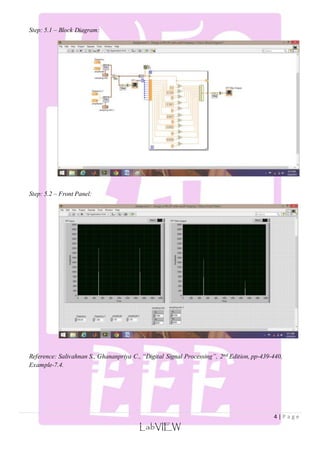
Step: 5.1 – Block Diagram: 
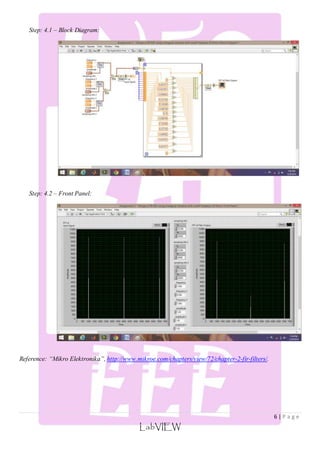
Step: 5.2 – Front Panel: 
Reference: Salivahnan S., Ghananpriya C., “Digital Signal Processing”, 2nd Edition, pp-439-440, 
Example-7.4.
2. Design a Finite Impulse Response Band Pass Filter using Triangular (Bartlett) window with a 
lower cut off frequency of 3 KHz, higher cut off frequency of 5.5 KHz and sampling rate of 20 
KHz with 15 samples (Order-14). 
5 | P a g e 
푆푖푛(휔푐1(푛 − 푀)) 
LabVIEW 
Given: 
Fs : 20 KHz 
fcl : 3 KHz 
fch : 5.5 KHz 
N : 15 
Step: 1 – Finding hd(n): 
ℎ푑 (푛) = [ 
휋 (푛 − 푀) 
− 
푆푖푛(휔푐2(푛 − 푀)) 
휋(푛 − 푀) 
푛 ≠ 푀 
1 − 
휔푐2−휔푐1 
휋 
푛 = 푀 
] 
Where: M index of middle coefficient. 
휔푐1 = 
2휋푓푐1 
푓푠 
= 0.3휋 
휔푐2 = 
2휋푓푐2 
푓푠 
= 0.55휋 
Step: 2 – Window Function: 
휔[푛] = [ 
2푛 
푁 − 1 
; 푓표푟 0 ≤ 푛 ≤ 푡표 
푁 − 1 
2 
2 − 
2푛 
푁 − 1 
; 
푁 + 1 
2 
≤ 푛 ≤ 푁 − 1 
] 
Step: 3 – Coefficients: 
Coefficient 0 1 2 3 4 5 6 7 
hd(n) 0.034696 0.011737 -0.10868 -0.09355 0.127326 0.200547 -0.05687 0.75 
ωr(n) 0 0.142857 0.285714 0.428571 0.571429 0.714286 0.857143 1 
h(n) 0 0.001677 -0.03105 -0.04009 0.072758 0.143248 -0.048747 0.75 
Coefficient 8 9 10 11 12 13 14 
hd(n) 0.056872 -0.20055 -0.12733 0.093549 0.108678 -0.01174 -0.034696 
ωr(n) 0.857143 0.714286 0.571429 0.428571 0.285714 0.142857 0 
h(n) -0.048747 0.143248 0.072758 -0.040092 -0.031051 0.001667 0
6 | P a g e 
LabVIEW 
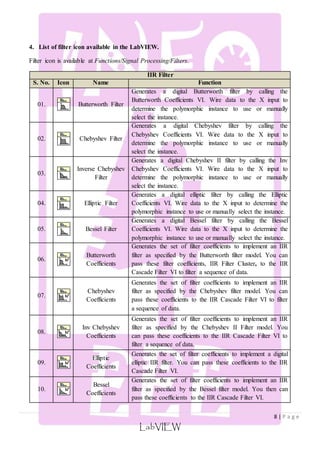
Step: 4.1 – Block Diagram: 
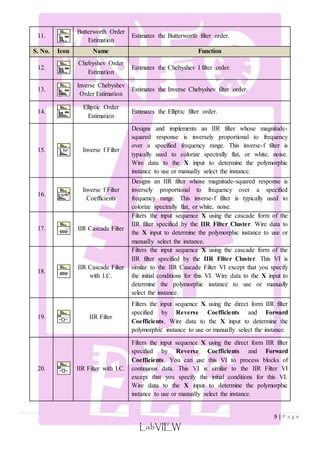
Step: 4.2 – Front Panel: 
Reference: “Mikro Elektronika”, http://www.mikroe.com/chapters/view/72/chapter-2-fir-filters/.
7 | P a g e 
3. Type of filter and commonly used Windows. 
S.No. Type of Filter Frequency Response hd[n] 
푆푖푛(휔푐 (푛 − 푀)) 
1. Low Pass Filter ℎ푑 (푛) = [ 
0.54 + 0.46 ∗ 퐶표푠 
LabVIEW 
휋(푛 − 푀) 
푛 ≠ 푀 
휔푐 
휋 
푛 = 푀 
] 
2. High Pass Filter ℎ푑 (푛) = [ 
1 − 
휔푐 
휋 
푛 ≠ 푀 
− 
푆푖푛(휔푐 (푛 − 푀)) 
휋(푛 − 푀) 
푛 = 푀 
] 
3. Band Pass Filter ℎ푑 (푛) = [ 
푆푖푛(휔푐2(푛 − 푀)) 
휋(푛 − 푀) 
− 
푆푖푛(휔푐1(푛 − 푀)) 
휋(푛 − 푀) 
푛 ≠ 푀 
휔푐2− 휔푐1 
휋 
푛 = 푀 
] 
4. Band Stop Filter ℎ푑 (푛) = [ 
푆푖푛(휔푐1(푛 − 푀)) 
휋(푛 − 푀) 
− 
푆푖푛(휔푐2(푛 − 푀)) 
휋(푛 − 푀) 
푛 ≠ 푀 
1 − 
휔푐2− 휔푐1 
휋 
푛 = 푀 
] 
S. No. Window Function 
1. Triangular (Bartlett) 푊푇 [푛] = 
2|푛| 
푀 − 1 
; 푓표푟 |푛| ≤ 푀 − 1 
2. Hanning 푊ℎ푛 = 
1 
2 
[1 − 
퐶표푠2휋푛 
푀 − 1 
] ; 
3. Hamming 푊퐻푚 = [ 
2휋푛 
푀 − 1 
; |푛| ≤ 푄 
0; 푒푙푒푠푤ℎ푒푟푒 
] 
4. Blackman 푊퐵 [푛] = 0.42 + 0.5 ∗ 퐶표푠 
2휋푛 
푀 − 1 
+ 0.08 ∗ 퐶표푠 
4휋푛 
푀 − 1 
5. Kaiser 푊푘 [푛] = [ 
퐼표(훽) 
퐼표(훼) 
|푛| ≤ 푄 
0; 푒푙푒푠푤ℎ푒푟푒 
]
8 | P a g e 
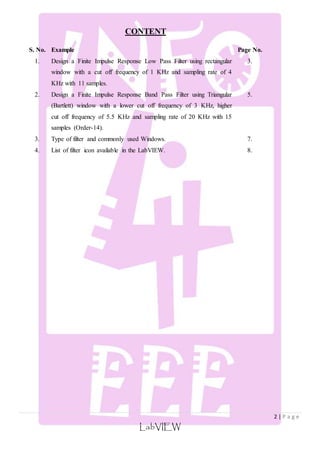
4. List of filter icon available in the LabVIEW. 
Filter icon is available at Functions/Signal Processing/Filters. 
IIR Filter 
S. No. Icon Name Function 
LabVIEW 
01. 
Butterworth Filter 
Generates a digital Butterworth filter by calling the 
Butterworth Coefficients VI. Wire data to the X input to 
determine the polymorphic instance to use or manually 
select the instance. 
02. 
Chebyshev Filter 
Generates a digital Chebyshev filter by calling the 
Chebyshev Coefficients VI. Wire data to the X input to 
determine the polymorphic instance to use or manually 
select the instance. 
03. 
Inverse Chebyshev 
Filter 
Generates a digital Chebyshev II filter by calling the Inv 
Chebyshev Coefficients VI. Wire data to the X input to 
determine the polymorphic instance to use or manually 
select the instance. 
04. 
Elliptic Filter 
Generates a digital elliptic filter by calling the Elliptic 
Coefficients VI. Wire data to the X input to determine the 
polymorphic instance to use or manually select the instance. 
05. 
Bessel Filter 
Generates a digital Bessel filter by calling the Bessel 
Coefficients VI. Wire data to the X input to determine the 
polymorphic instance to use or manually select the instance. 
06. 
Butterworth 
Coefficients 
Generates the set of filter coefficients to implement an IIR 
filter as specified by the Butterworth filter model. You can 
pass these filter coefficients, IIR Filter Cluster, to the IIR 
Cascade Filter VI to filter a sequence of data. 
07. 
Chebyshev 
Coefficients 
Generates the set of filter coefficients to implement an IIR 
filter as specified by the Chebyshev filter model. You can 
pass these coefficients to the IIR Cascade Filter VI to filter 
a sequence of data. 
08. 
Inv Chebyshev 
Coefficients 
Generates the set of filter coefficients to implement an IIR 
filter as specified by the Chebyshev II Filter model. You 
can pass these coefficients to the IIR Cascade Filter VI to 
filter a sequence of data. 
09. 
Elliptic 
Coefficients 
Generates the set of filter coefficients to implement a digital 
elliptic IIR filter. You can pass these coefficients to the IIR 
Cascade Filter VI. 
10. 
Bessel 
Coefficients 
Generates the set of filter coefficients to implement an IIR 
filter as specified by the Bessel filter model. You then can 
pass these coefficients to the IIR Cascade Filter VI.
9 | P a g e 
LabVIEW 
11. 
Butterworth Order 
Estimation 
Estimates the Butterworth filter order. 
S. No. Icon Name Function 
12. 
Chebyshev Order 
Estimation 
Estimates the Chebyshev I filter order. 
13. 
Inverse Chebyshev 
Order Estimation 
Estimates the Inverse Chebyshev filter order. 
14. 
Elliptic Order 
Estimation 
Estimates the Elliptic filter order. 
15. 
Inverse f Filter 
Designs and implements an IIR filter whose magnitude-squared 
response is inversely proportional to frequency 
over a specified frequency range. This inverse-f filter is 
typically used to colorize spectrally flat, or white, noise. 
Wire data to the X input to determine the polymorphic 
instance to use or manually select the instance. 
16. 
Inverse f Filter 
Coefficients 
Designs an IIR filter whose magnitude-squared response is 
inversely proportional to frequency over a specified 
frequency range. This inverse-f filter is typically used to 
colorize spectrally flat, or white, noise. 
17. 
IIR Cascade Filter 
Filters the input sequence X using the cascade form of the 
IIR filter specified by the IIR Filter Cluster. Wire data to 
the X input to determine the polymorphic instance to use or 
manually select the instance. 
18. 
IIR Cascade Filter 
with I.C. 
Filters the input sequence X using the cascade form of the 
IIR filter specified by the IIR Filter Cluster. This VI is 
similar to the IIR Cascade Filter VI except that you specify 
the initial conditions for this VI. Wire data to the X input to 
determine the polymorphic instance to use or manually 
select the instance. 
19. 
IIR Filter 
Filters the input sequence X using the direct form IIR filter 
specified by Reverse Coefficients and Forward 
Coefficients. Wire data to the X input to determine the 
polymorphic instance to use or manually select the instance. 
20. 
IIR Filter with I.C. 
Filters the input sequence X using the direct form IIR filter 
specified by Reverse Coefficients and Forward 
Coefficients. You can use this VI to process blocks of 
continuous data. This VI is similar to the IIR Filter VI 
except that you specify the initial conditions for this VI. 
Wire data to the X input to determine the polymorphic 
instance to use or manually select the instance.
10 | P a g e 
LabVIEW 
21. 
Cascade To Direct 
Coefficients 
Converts IIR filter coefficients from the cascade form to the 
direct form. 
FIR Filter 
S. No. Icon Name Function 
22. 
Equi-Ripple 
LowPass 
Generates a lowpass FIR filter with equi-ripple 
characteristics using the Parks-McClellan algorithm and the 
# of taps, pass freq, stop freq, and sampling freq: fs. The 
Equi-Ripple LowPass VI then applies a linear-phase, 
lowpass filter to the input sequence X using the 
Convolution VI to obtain Filtered X. Wire data to the X 
input to determine the polymorphic instance to use or 
manually select the instance. 
23. 
Equi-Ripple 
HighPass 
Generates a highpass FIR filter with equi-ripple 
characteristics using the Parks-McClellan algorithm and the 
# of taps, stop freq, high freq, and sampling freq: fs. The 
Equi-Ripple HighPass VI then applies a linear-phase, 
highpass filter to the input sequence X using the 
Convolution VI to obtain Filtered X. Wire data to the X 
input to determine the polymorphic instance to use or 
manually select the instance. 
24. 
Equi-Ripple 
BandPass 
Generates a bandpass FIR filter with equi-ripple 
characteristics using the Parks-McClellan algorithm and the 
higher pass freq, lower pass freq, # of taps, lower stop 
freq, higher stop freq, and sampling freq: fs. The Equi- 
Ripple BandPass VI then applies a linear-phase, bandpass 
filter to the input sequence X using the Convolution VI to 
obtain Filtered X. Wire data to the X input to determine the 
polymorphic instance to use or manually select the instance. 
25. 
Equi-Ripple 
BandStop 
Generates a bandstop FIR digital filter with equi-ripple 
characteristics using the Parks-McClellan algorithm and 
higher pass freq, lower pass freq, # of taps, lower stop freq, 
higher stop freq, and sampling freq: fs. The Equi-Ripple 
BandStop VI then applies a linear-phase, bandstop filter to 
the input sequence X using the Convolution VI to obtain 
Filtered X. Wire data to the X input to determine the 
polymorphic instance to use or manually select the instance. 
26. 
FIR Windowed 
Filter 
Filters the input data sequence, X, using the set of 
windowed FIR filter coefficients specified by the sampling 
freq: fs, low cutoff freq: fl, high cutoff freq: fh, and 
number of taps. Wire data to the X input to determine the 
polymorphic instance to use or manually select the instance. 
27. 
Savitzky-Golay 
Filter 
Filters the input data sequence X using a Savitzky-Golay 
FIR smoothing filter. Wire data to the X input to determine 
the polymorphic instance to use or manually select the 
instance. 
28. 
FIR Windowed 
Coefficients 
Generates the set of filter coefficients you need to 
implement an FIR windowed filter.
11 | P a g e 
LabVIEW 
29. 
Parks-McClellan 
Generates a set of linear-phase FIR multiband digital filter 
coefficients using the # of taps, sampling frequency: fs, 
Band Parameters, and filter type. 
S. No. Icon Name Function 
30. 
Savitzky-Golay 
Filter Coefficients 
Designs a Savitzky-Golay FIR smoothing filter. This VI 
returns the designed Savitzky-Golay filter coefficients and 
the differentiation filter coefficients. 
31. 
FIR Narrowband 
Coefficients 
Generates a set of filter coefficients to implement a digital 
interpolated FIR (IFIR) filter. 
32. 
FIR Filter 
Filters the input sequence X using the direct-form FIR filter 
specified by FIR Coefficients. Wire data to the X input to 
determine the polymorphic instance to use or manually 
select the instance. 
33. 
FIR Filter with 
I.C. 
Filters the input sequence X using the direct-form FIR filter 
specified by FIR Coefficients. You can use this VI to 
process blocks of continuous data. Wire data to the X input 
to determine the polymorphic instance to use or manually 
select the instance. 
34. 
FIR Narrowband 
Filter 
Filters the input sequence X using the interpolated FIR 
(IFIR) filter specified by IFIR Coefficients. 
Other Filter 
35. 
Smoothing Filter 
Coefficients 
Designs filter coefficients for a smoothing filter. You can 
use this VI to design a moving-average FIR filter or an 
exponentially-averaging IIR filter. The VI returns reverse 
coefficients and forward coefficients for direct connection 
to the IIR Filter VI, which is used to implement both FIR 
and IIR filters. 
36. 
Zero Phase Filter 
Applies a zero phase filter to an input sequence X. Wire 
data to the X input to determine the polymorphic instance to 
use or manually select the instance. 
37. 
Median Filter 
Applies a median filter of rank to the input sequence X, 
where rank is right rank if right rank is greater than zero, 
or left rank if right rank is less than zero. 
38. 
Mathematical 
Morphological 
Filter 
Filters the input data sequence X with Structure Element 
using a mathematical morphological filter. 
39. 
Convolution 
Computes the convolution of the input sequences X and Y. 
Wire data to the X and Y inputs to determine the 
polymorphic instance to use or manually select the instance. 
--- 
An info4eee presentation, which provides Information for Electrical and Electronics Engineering students. It 
is the initiative to share the material among the EEE students in a well mannered way. 
Now available on: 
info4eee.wordpress.com 
facebook.com/info4eee

Introduction to Filters under labVIEW Environment

  • 1.
    1 | Pa g e A Practical Report on INTRODUCTION TO FILTERS Under LabVIEW Environment Submitted To: Submitted By: Mr. Raj Kumar Garg Paramjeet Singh Jamwal Assistant Professor PG/ICE/136321 LabVIEW M.Tech (ICE) Third Semester Department of Electrical and Instrumentation Engineering Sant Longowal Institute of Engineering and Technology Longowal – 148106 (INDIA) Nov 2014
  • 2.
    2 | Pa g e CONTENT S. No. Example Page No. 1. Design a Finite Impulse Response Low Pass Filter using rectangular window with a cut off frequency of 1 KHz and sampling rate of 4 KHz with 11 samples. LabVIEW 3. 2. Design a Finite Impulse Response Band Pass Filter using Triangular (Bartlett) window with a lower cut off frequency of 3 KHz, higher cut off frequency of 5.5 KHz and sampling rate of 20 KHz with 15 samples (Order-14). 5. 3. Type of filter and commonly used Windows. 7. 4. List of filter icon available in the LabVIEW. 8.
  • 3.
    1. Design aFinite Impulse Response Low Pass Filter using rectangular window with a cut off 3 | P a g e frequency of 1 KHz and sampling rate of 4 KHz with 11 samples. 1 −휔푐 ≤ 휔 ≤ 휔푐 0 − 휔푐 LabVIEW Given: Fs : 4 KHz fc : 1 KHz N : 11 Step: 1 - Finding Hd(ωt): 퐻푑 (휔푇) = [ 휔푠 2 ≤ 휔 ≤ −휔푐 0 휔푐 ≤ 휔 ≤ 휔푠 2 ] 휔푠 = 2휋푓푠 = 25132.74 푟푎푑/푠푒푐 푇 = 1 푓푠 = 0.25 ∗ 10−3푠푒푐 Step: 2 – Finding hd(n): ℎ푑 (푛) = 1 휔푠 ∫ 푒푗휔푛푇 . 푑휔 −휔푐 ℎ푑 (푛) = 2 휔푠 푛푇 ∗ 푆푖푛(휔푐 푛푇) ℎ푑 (푛) = 푆푖푛(휔푐 푛푇) 휋푛 ; 푤ℎ푒푛 푛 ≠ 0 ℎ푑 (푛) = 2휔푐 휔푠 ; 푤ℎ푒푛 푛 = 0 Step: 3 – Window Function: 휔푟 (푛) = [ 1 푓표푟 푛 = 0 푡표 푀 − 1 0 표푡ℎ푒푟푤푖푠푒 ] Step: 4 – Coefficients: hd(n) 0.5 0.3183 0 -0.1061 0 0.0637 -0.0455 0 0.0354 0 ωr(n) 1 1 1 1 1 1 1 1 1 1 h(n) 0.5 0.3183 0 -0.1061 0 0.0637 -0.0455 0 0.0354 0
  • 4.
    4 | Pa g e LabVIEW Step: 5.1 – Block Diagram: Step: 5.2 – Front Panel: Reference: Salivahnan S., Ghananpriya C., “Digital Signal Processing”, 2nd Edition, pp-439-440, Example-7.4.
  • 5.
    2. Design aFinite Impulse Response Band Pass Filter using Triangular (Bartlett) window with a lower cut off frequency of 3 KHz, higher cut off frequency of 5.5 KHz and sampling rate of 20 KHz with 15 samples (Order-14). 5 | P a g e 푆푖푛(휔푐1(푛 − 푀)) LabVIEW Given: Fs : 20 KHz fcl : 3 KHz fch : 5.5 KHz N : 15 Step: 1 – Finding hd(n): ℎ푑 (푛) = [ 휋 (푛 − 푀) − 푆푖푛(휔푐2(푛 − 푀)) 휋(푛 − 푀) 푛 ≠ 푀 1 − 휔푐2−휔푐1 휋 푛 = 푀 ] Where: M index of middle coefficient. 휔푐1 = 2휋푓푐1 푓푠 = 0.3휋 휔푐2 = 2휋푓푐2 푓푠 = 0.55휋 Step: 2 – Window Function: 휔[푛] = [ 2푛 푁 − 1 ; 푓표푟 0 ≤ 푛 ≤ 푡표 푁 − 1 2 2 − 2푛 푁 − 1 ; 푁 + 1 2 ≤ 푛 ≤ 푁 − 1 ] Step: 3 – Coefficients: Coefficient 0 1 2 3 4 5 6 7 hd(n) 0.034696 0.011737 -0.10868 -0.09355 0.127326 0.200547 -0.05687 0.75 ωr(n) 0 0.142857 0.285714 0.428571 0.571429 0.714286 0.857143 1 h(n) 0 0.001677 -0.03105 -0.04009 0.072758 0.143248 -0.048747 0.75 Coefficient 8 9 10 11 12 13 14 hd(n) 0.056872 -0.20055 -0.12733 0.093549 0.108678 -0.01174 -0.034696 ωr(n) 0.857143 0.714286 0.571429 0.428571 0.285714 0.142857 0 h(n) -0.048747 0.143248 0.072758 -0.040092 -0.031051 0.001667 0
  • 6.
    6 | Pa g e LabVIEW Step: 4.1 – Block Diagram: Step: 4.2 – Front Panel: Reference: “Mikro Elektronika”, http://www.mikroe.com/chapters/view/72/chapter-2-fir-filters/.
  • 7.
    7 | Pa g e 3. Type of filter and commonly used Windows. S.No. Type of Filter Frequency Response hd[n] 푆푖푛(휔푐 (푛 − 푀)) 1. Low Pass Filter ℎ푑 (푛) = [ 0.54 + 0.46 ∗ 퐶표푠 LabVIEW 휋(푛 − 푀) 푛 ≠ 푀 휔푐 휋 푛 = 푀 ] 2. High Pass Filter ℎ푑 (푛) = [ 1 − 휔푐 휋 푛 ≠ 푀 − 푆푖푛(휔푐 (푛 − 푀)) 휋(푛 − 푀) 푛 = 푀 ] 3. Band Pass Filter ℎ푑 (푛) = [ 푆푖푛(휔푐2(푛 − 푀)) 휋(푛 − 푀) − 푆푖푛(휔푐1(푛 − 푀)) 휋(푛 − 푀) 푛 ≠ 푀 휔푐2− 휔푐1 휋 푛 = 푀 ] 4. Band Stop Filter ℎ푑 (푛) = [ 푆푖푛(휔푐1(푛 − 푀)) 휋(푛 − 푀) − 푆푖푛(휔푐2(푛 − 푀)) 휋(푛 − 푀) 푛 ≠ 푀 1 − 휔푐2− 휔푐1 휋 푛 = 푀 ] S. No. Window Function 1. Triangular (Bartlett) 푊푇 [푛] = 2|푛| 푀 − 1 ; 푓표푟 |푛| ≤ 푀 − 1 2. Hanning 푊ℎ푛 = 1 2 [1 − 퐶표푠2휋푛 푀 − 1 ] ; 3. Hamming 푊퐻푚 = [ 2휋푛 푀 − 1 ; |푛| ≤ 푄 0; 푒푙푒푠푤ℎ푒푟푒 ] 4. Blackman 푊퐵 [푛] = 0.42 + 0.5 ∗ 퐶표푠 2휋푛 푀 − 1 + 0.08 ∗ 퐶표푠 4휋푛 푀 − 1 5. Kaiser 푊푘 [푛] = [ 퐼표(훽) 퐼표(훼) |푛| ≤ 푄 0; 푒푙푒푠푤ℎ푒푟푒 ]
  • 8.
    8 | Pa g e 4. List of filter icon available in the LabVIEW. Filter icon is available at Functions/Signal Processing/Filters. IIR Filter S. No. Icon Name Function LabVIEW 01. Butterworth Filter Generates a digital Butterworth filter by calling the Butterworth Coefficients VI. Wire data to the X input to determine the polymorphic instance to use or manually select the instance. 02. Chebyshev Filter Generates a digital Chebyshev filter by calling the Chebyshev Coefficients VI. Wire data to the X input to determine the polymorphic instance to use or manually select the instance. 03. Inverse Chebyshev Filter Generates a digital Chebyshev II filter by calling the Inv Chebyshev Coefficients VI. Wire data to the X input to determine the polymorphic instance to use or manually select the instance. 04. Elliptic Filter Generates a digital elliptic filter by calling the Elliptic Coefficients VI. Wire data to the X input to determine the polymorphic instance to use or manually select the instance. 05. Bessel Filter Generates a digital Bessel filter by calling the Bessel Coefficients VI. Wire data to the X input to determine the polymorphic instance to use or manually select the instance. 06. Butterworth Coefficients Generates the set of filter coefficients to implement an IIR filter as specified by the Butterworth filter model. You can pass these filter coefficients, IIR Filter Cluster, to the IIR Cascade Filter VI to filter a sequence of data. 07. Chebyshev Coefficients Generates the set of filter coefficients to implement an IIR filter as specified by the Chebyshev filter model. You can pass these coefficients to the IIR Cascade Filter VI to filter a sequence of data. 08. Inv Chebyshev Coefficients Generates the set of filter coefficients to implement an IIR filter as specified by the Chebyshev II Filter model. You can pass these coefficients to the IIR Cascade Filter VI to filter a sequence of data. 09. Elliptic Coefficients Generates the set of filter coefficients to implement a digital elliptic IIR filter. You can pass these coefficients to the IIR Cascade Filter VI. 10. Bessel Coefficients Generates the set of filter coefficients to implement an IIR filter as specified by the Bessel filter model. You then can pass these coefficients to the IIR Cascade Filter VI.
  • 9.
    9 | Pa g e LabVIEW 11. Butterworth Order Estimation Estimates the Butterworth filter order. S. No. Icon Name Function 12. Chebyshev Order Estimation Estimates the Chebyshev I filter order. 13. Inverse Chebyshev Order Estimation Estimates the Inverse Chebyshev filter order. 14. Elliptic Order Estimation Estimates the Elliptic filter order. 15. Inverse f Filter Designs and implements an IIR filter whose magnitude-squared response is inversely proportional to frequency over a specified frequency range. This inverse-f filter is typically used to colorize spectrally flat, or white, noise. Wire data to the X input to determine the polymorphic instance to use or manually select the instance. 16. Inverse f Filter Coefficients Designs an IIR filter whose magnitude-squared response is inversely proportional to frequency over a specified frequency range. This inverse-f filter is typically used to colorize spectrally flat, or white, noise. 17. IIR Cascade Filter Filters the input sequence X using the cascade form of the IIR filter specified by the IIR Filter Cluster. Wire data to the X input to determine the polymorphic instance to use or manually select the instance. 18. IIR Cascade Filter with I.C. Filters the input sequence X using the cascade form of the IIR filter specified by the IIR Filter Cluster. This VI is similar to the IIR Cascade Filter VI except that you specify the initial conditions for this VI. Wire data to the X input to determine the polymorphic instance to use or manually select the instance. 19. IIR Filter Filters the input sequence X using the direct form IIR filter specified by Reverse Coefficients and Forward Coefficients. Wire data to the X input to determine the polymorphic instance to use or manually select the instance. 20. IIR Filter with I.C. Filters the input sequence X using the direct form IIR filter specified by Reverse Coefficients and Forward Coefficients. You can use this VI to process blocks of continuous data. This VI is similar to the IIR Filter VI except that you specify the initial conditions for this VI. Wire data to the X input to determine the polymorphic instance to use or manually select the instance.
  • 10.
    10 | Pa g e LabVIEW 21. Cascade To Direct Coefficients Converts IIR filter coefficients from the cascade form to the direct form. FIR Filter S. No. Icon Name Function 22. Equi-Ripple LowPass Generates a lowpass FIR filter with equi-ripple characteristics using the Parks-McClellan algorithm and the # of taps, pass freq, stop freq, and sampling freq: fs. The Equi-Ripple LowPass VI then applies a linear-phase, lowpass filter to the input sequence X using the Convolution VI to obtain Filtered X. Wire data to the X input to determine the polymorphic instance to use or manually select the instance. 23. Equi-Ripple HighPass Generates a highpass FIR filter with equi-ripple characteristics using the Parks-McClellan algorithm and the # of taps, stop freq, high freq, and sampling freq: fs. The Equi-Ripple HighPass VI then applies a linear-phase, highpass filter to the input sequence X using the Convolution VI to obtain Filtered X. Wire data to the X input to determine the polymorphic instance to use or manually select the instance. 24. Equi-Ripple BandPass Generates a bandpass FIR filter with equi-ripple characteristics using the Parks-McClellan algorithm and the higher pass freq, lower pass freq, # of taps, lower stop freq, higher stop freq, and sampling freq: fs. The Equi- Ripple BandPass VI then applies a linear-phase, bandpass filter to the input sequence X using the Convolution VI to obtain Filtered X. Wire data to the X input to determine the polymorphic instance to use or manually select the instance. 25. Equi-Ripple BandStop Generates a bandstop FIR digital filter with equi-ripple characteristics using the Parks-McClellan algorithm and higher pass freq, lower pass freq, # of taps, lower stop freq, higher stop freq, and sampling freq: fs. The Equi-Ripple BandStop VI then applies a linear-phase, bandstop filter to the input sequence X using the Convolution VI to obtain Filtered X. Wire data to the X input to determine the polymorphic instance to use or manually select the instance. 26. FIR Windowed Filter Filters the input data sequence, X, using the set of windowed FIR filter coefficients specified by the sampling freq: fs, low cutoff freq: fl, high cutoff freq: fh, and number of taps. Wire data to the X input to determine the polymorphic instance to use or manually select the instance. 27. Savitzky-Golay Filter Filters the input data sequence X using a Savitzky-Golay FIR smoothing filter. Wire data to the X input to determine the polymorphic instance to use or manually select the instance. 28. FIR Windowed Coefficients Generates the set of filter coefficients you need to implement an FIR windowed filter.
  • 11.
    11 | Pa g e LabVIEW 29. Parks-McClellan Generates a set of linear-phase FIR multiband digital filter coefficients using the # of taps, sampling frequency: fs, Band Parameters, and filter type. S. No. Icon Name Function 30. Savitzky-Golay Filter Coefficients Designs a Savitzky-Golay FIR smoothing filter. This VI returns the designed Savitzky-Golay filter coefficients and the differentiation filter coefficients. 31. FIR Narrowband Coefficients Generates a set of filter coefficients to implement a digital interpolated FIR (IFIR) filter. 32. FIR Filter Filters the input sequence X using the direct-form FIR filter specified by FIR Coefficients. Wire data to the X input to determine the polymorphic instance to use or manually select the instance. 33. FIR Filter with I.C. Filters the input sequence X using the direct-form FIR filter specified by FIR Coefficients. You can use this VI to process blocks of continuous data. Wire data to the X input to determine the polymorphic instance to use or manually select the instance. 34. FIR Narrowband Filter Filters the input sequence X using the interpolated FIR (IFIR) filter specified by IFIR Coefficients. Other Filter 35. Smoothing Filter Coefficients Designs filter coefficients for a smoothing filter. You can use this VI to design a moving-average FIR filter or an exponentially-averaging IIR filter. The VI returns reverse coefficients and forward coefficients for direct connection to the IIR Filter VI, which is used to implement both FIR and IIR filters. 36. Zero Phase Filter Applies a zero phase filter to an input sequence X. Wire data to the X input to determine the polymorphic instance to use or manually select the instance. 37. Median Filter Applies a median filter of rank to the input sequence X, where rank is right rank if right rank is greater than zero, or left rank if right rank is less than zero. 38. Mathematical Morphological Filter Filters the input data sequence X with Structure Element using a mathematical morphological filter. 39. Convolution Computes the convolution of the input sequences X and Y. Wire data to the X and Y inputs to determine the polymorphic instance to use or manually select the instance. --- An info4eee presentation, which provides Information for Electrical and Electronics Engineering students. It is the initiative to share the material among the EEE students in a well mannered way. Now available on: info4eee.wordpress.com facebook.com/info4eee