Introduction
to Cloud
Computing
Partho Kumar Saha
Google Cloud Ready
Facilitator 2021
Introduction
Cloud computing provide us a
means by which we can access
the applications as utilities, over
the Internet. It allows us to
create, configure, and
customize applications online.
With cloud computing users can
access database resources via
the internet from anywhere for
as long as they need without
worrying about any
maintainance or management of
actual resources.
What is Cloud?
The definition for the cloud can seem murky, but
essentially, it’s a term used to describe a global
network of ser vers, each with a unique function.
The cloud is not a physical entity, but instead is a
vast network of remote ser vers around the globe
which are hooked together and meant to operate as
a single ecosystem. These ser vers are designed to
either store and manage data, run applications, or
deliver content or a ser vice such as streaming
videos, web mail, office productivity software, or
social media. Instead of accessing files and data
from a local or personal computer, you are
accessing them online from any Internet -capable
device—the information will be available anywhere
you go and anytime you need it.
What is Cloud Computing?
Cloud Computing is defined as storing and
accessing of data and computing services over the
internet. It doesn’t store any data on your personal
computer. It is the on-demand availability of
computer services like servers, data storage,
networking, databases, etc. The main purpose of
cloud computing is to give access to data centers
to many users. Users can also access data from a
remote server.
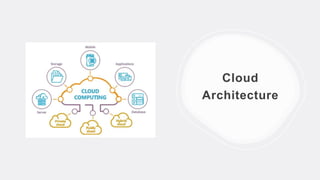
Cloud
Architecture
Evolution of Cloud Computing
 The idea of cloud computing first came in the 1950s.
 In making cloud computing what it is today, five technologies
played vital role, These are:
>Distributed system and its peripheral
>Web 2.O
>Service Oriented
>Utility Computing
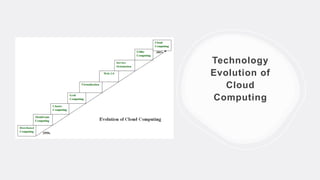
Technology
Evolution of
Cloud
Computing
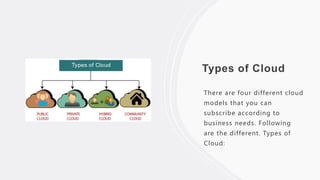
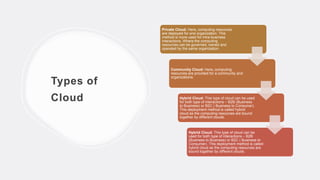
Types of Cloud
There are four different cloud
models that you can
subscribe according to
business needs. Following
are the different. Types of
Cloud:
Types of
Cloud
Private Cloud: Here, computing resources
are deployed for one organization. This
method is more used for intra-business
interactions. Where the computing
resources can be governed, owned and
operated by the same organization.
Community Cloud: Here, computing
resources are provided for a community and
organizations.
Hybrid Cloud: This type of cloud can be used
for both type of interactions – B2B (Business
to Business) or B2C ( Business to Consumer).
This deployment method is called hybrid
cloud as the computing resources are bound
together by different clouds.
Hybrid Cloud: This type of cloud can be
used for both type of interactions – B2B
(Business to Business) or B2C ( Business to
Consumer). This deployment method is called
hybrid cloud as the computing resources are
bound together by different clouds.
Benefit of
Cloud
Computing
The potential for cost saving is the
major reason of cloud services
adoption by many organizations.
Cloud computing gives the freedom
to use services as per the
requirement and pay only for what
you use. Due to cloud computing it
has become possible to run IT
operations as a outsourced unit
without much in-house resources.
Benefits of
Cloud
Computing
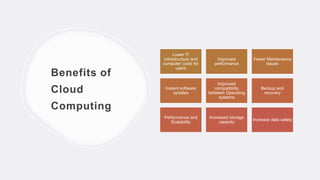
Lower IT
infrastructure and
computer costs for
users
Improved
performance
Fewer Maintenance
issues
Instant software
updates
Improved
compatibility
between Operating
systems
Backup and
recovery
Performance and
Scalability
Increased storage
capacity
Increase data safety
Examples of
Cloud
Computing
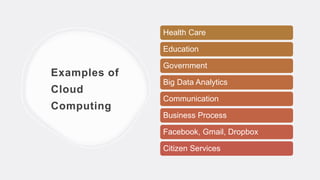
Health Care
Education
Government
Big Data Analytics
Communication
Business Process
Facebook, Gmail, Dropbox
Citizen Services
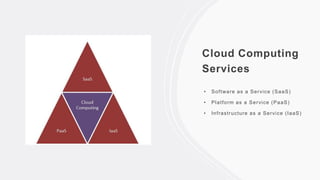
Cloud Computing
Services
• Software as a Service (SaaS)
• Platform as a Service (PaaS)
• Infrastructure as a Service (IaaS)
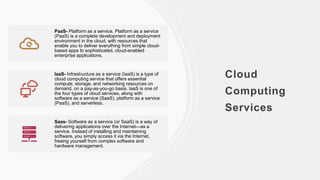
Cloud
Computing
Services
PaaS- Platform as a service. Platform as a service
(PaaS) is a complete development and deployment
environment in the cloud, with resources that
enable you to deliver everything from simple cloud-
based apps to sophisticated, cloud-enabled
enterprise applications.
IaaS- Infrastructure as a service (IaaS) is a type of
cloud computing service that offers essential
compute, storage, and networking resources on
demand, on a pay-as-you-go basis. IaaS is one of
the four types of cloud services, along with
software as a service (SaaS), platform as a service
(PaaS), and serverless.
Saas- Software as a service (or SaaS) is a way of
delivering applications over the Internet—as a
service. Instead of installing and maintaining
software, you simply access it via the Internet,
freeing yourself from complex software and
hardware management.
Distributed
Systems
Distributed cloud computing splits one
task across multiple computers at
different locations—all of which are
networked. Each computer will complete
an aspect of the task, allowing for the
task to be completed faster. Cloud
computing can help by allowing remote
network access to hardware and
software.
Mainframe Computing
Mainframe is a client/server-based
computer system. It has high processing
power, memory, and storage to support
massive data processing
operations. Cloud computing is a
distributed architecture of systems
spread across Internet / web and used
to store , manage, process and access
data online.
Cluster Computing
Cluster computing is a collection of tightly or loosely
connected computers that work together so that
they act as a single entity. The connected computers
execute operations all together thus creating the idea
of a single system. The clusters are generally
connected through fast local area networks (LANs)
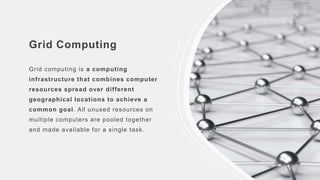
Grid Computing
Grid computing is a computing
infrastructure that combines computer
resources spread over different
geographical locations to achieve a
common goal. All unused resources on
multiple computers are pooled together
and made available for a single task.
Virtualization
Virtualization is technology that you can use to create
virtual representations of servers, storage, networks,
and other physical machines. Virtual software mimics the
functions of physical hardware to run multiple virtual
machines simultaneously on a single physical machine.
Web 2.0
Web 2.0, term devised to differentiate the post-dotcom
bubble World Wide Web with its emphasis on social
networking, content generated by users, and cloud
computing from that which came before. The 2.0
appellation is used in analogy with common computer
software naming conventions to indicate a new,
improved version.
Service Orientation
Service orientation is the core reference model for cloud computing
systems. This approach adopts the concept of services as the main
building blocks of application and system development.
Utility Computing
Utility computing is a model in which computing resources are provided
to the customer based on specific demand. The service provider charges
exactly for the services provided, instead of a flat rate.
Characteristics of Cloud Computing
 On-Demand Self Services
The Cloud computing services
does not require any human
administrators, user themselves
are able to provision, monitor
and manage computing
resources as needed.
 Broad Network Access
The Computing services are
generally provided over standard
networks and heterogeneous
devices.
Characteristics of Cloud
Computing
 Rapid Elasticity
The Computing services should have IT resources that are able to scale out and in
quickly and on as needed basis. W henever the user require services, it is
provided to him, and it is scale out as soon as its requirement gets over.
 Resource Polling
The IT resource (e.g., networks, servers, storage, applications, and services)
present are shared across multiple applications and occupant in an uncommitted
manner. Multiple clients are provided service f rom a same physical resource.
 Measured Service
The resource utilization is tracked f or each application and occupant, it will
provide both the user and the resource provider with an account of what has been
used. This is done f or various reasons lik e monitoring billing and effective use of
resource.
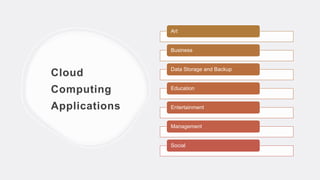
Cloud
Computing
Applications
Art
Business
Data Storage and Backup
Education
Entertainment
Management
Social
Challenges of Cloud
Computing
 Security Issues
Security risks of cloud computing have become the top
concern in 2018 as 77% of respondents stated in the
referred survey.
 Cost Management and Containment
The next part of our cloud computing risks list involves
costs. For the most part cloud computing can save
businesses money. The on-demand and scalable
nature of cloud computing services make it sometimes
difficult to define and predict quantities and costs.
Challenges
in Cloud
Computing
 Lack of Resources/Expertise
One of the cloud challenges companies and
enterprises are facing today is lack of
resources and/or expertise.
 Governance/Control
Proper IT governance should ensure IT assets
are implemented and used according to agreed-
upon policies and procedures; ensure that
these assets are properly controlled and
maintained and ensure that these assets are
supporting your organization’s strategy and
business goals.
Thank You
Connect With Me:
Facebook:
facebook.com/parthokumar.saha.39
Instagram: instagram.com/i.m.partho/
LinkedIn: linkedin.com/in/partho-kumar-
saha-bb2176184/
Blog: impartho.hashnode.dev

Introduction to Cloud Computing.pptx

  • 1.
    Introduction to Cloud Computing Partho KumarSaha Google Cloud Ready Facilitator 2021
  • 2.
    Introduction Cloud computing provideus a means by which we can access the applications as utilities, over the Internet. It allows us to create, configure, and customize applications online. With cloud computing users can access database resources via the internet from anywhere for as long as they need without worrying about any maintainance or management of actual resources.
  • 3.
    What is Cloud? Thedefinition for the cloud can seem murky, but essentially, it’s a term used to describe a global network of ser vers, each with a unique function. The cloud is not a physical entity, but instead is a vast network of remote ser vers around the globe which are hooked together and meant to operate as a single ecosystem. These ser vers are designed to either store and manage data, run applications, or deliver content or a ser vice such as streaming videos, web mail, office productivity software, or social media. Instead of accessing files and data from a local or personal computer, you are accessing them online from any Internet -capable device—the information will be available anywhere you go and anytime you need it.
  • 4.
    What is CloudComputing? Cloud Computing is defined as storing and accessing of data and computing services over the internet. It doesn’t store any data on your personal computer. It is the on-demand availability of computer services like servers, data storage, networking, databases, etc. The main purpose of cloud computing is to give access to data centers to many users. Users can also access data from a remote server.
  • 5.
  • 6.
    Evolution of CloudComputing  The idea of cloud computing first came in the 1950s.  In making cloud computing what it is today, five technologies played vital role, These are: >Distributed system and its peripheral >Web 2.O >Service Oriented >Utility Computing
  • 7.
  • 8.
    Types of Cloud Thereare four different cloud models that you can subscribe according to business needs. Following are the different. Types of Cloud:
  • 9.
    Types of Cloud Private Cloud:Here, computing resources are deployed for one organization. This method is more used for intra-business interactions. Where the computing resources can be governed, owned and operated by the same organization. Community Cloud: Here, computing resources are provided for a community and organizations. Hybrid Cloud: This type of cloud can be used for both type of interactions – B2B (Business to Business) or B2C ( Business to Consumer). This deployment method is called hybrid cloud as the computing resources are bound together by different clouds. Hybrid Cloud: This type of cloud can be used for both type of interactions – B2B (Business to Business) or B2C ( Business to Consumer). This deployment method is called hybrid cloud as the computing resources are bound together by different clouds.
  • 10.
    Benefit of Cloud Computing The potentialfor cost saving is the major reason of cloud services adoption by many organizations. Cloud computing gives the freedom to use services as per the requirement and pay only for what you use. Due to cloud computing it has become possible to run IT operations as a outsourced unit without much in-house resources.
  • 11.
    Benefits of Cloud Computing Lower IT infrastructureand computer costs for users Improved performance Fewer Maintenance issues Instant software updates Improved compatibility between Operating systems Backup and recovery Performance and Scalability Increased storage capacity Increase data safety
  • 12.
    Examples of Cloud Computing Health Care Education Government BigData Analytics Communication Business Process Facebook, Gmail, Dropbox Citizen Services
  • 13.
    Cloud Computing Services • Softwareas a Service (SaaS) • Platform as a Service (PaaS) • Infrastructure as a Service (IaaS)
  • 14.
    Cloud Computing Services PaaS- Platform asa service. Platform as a service (PaaS) is a complete development and deployment environment in the cloud, with resources that enable you to deliver everything from simple cloud- based apps to sophisticated, cloud-enabled enterprise applications. IaaS- Infrastructure as a service (IaaS) is a type of cloud computing service that offers essential compute, storage, and networking resources on demand, on a pay-as-you-go basis. IaaS is one of the four types of cloud services, along with software as a service (SaaS), platform as a service (PaaS), and serverless. Saas- Software as a service (or SaaS) is a way of delivering applications over the Internet—as a service. Instead of installing and maintaining software, you simply access it via the Internet, freeing yourself from complex software and hardware management.
  • 15.
    Distributed Systems Distributed cloud computingsplits one task across multiple computers at different locations—all of which are networked. Each computer will complete an aspect of the task, allowing for the task to be completed faster. Cloud computing can help by allowing remote network access to hardware and software.
  • 16.
    Mainframe Computing Mainframe isa client/server-based computer system. It has high processing power, memory, and storage to support massive data processing operations. Cloud computing is a distributed architecture of systems spread across Internet / web and used to store , manage, process and access data online.
  • 17.
    Cluster Computing Cluster computingis a collection of tightly or loosely connected computers that work together so that they act as a single entity. The connected computers execute operations all together thus creating the idea of a single system. The clusters are generally connected through fast local area networks (LANs)
  • 18.
    Grid Computing Grid computingis a computing infrastructure that combines computer resources spread over different geographical locations to achieve a common goal. All unused resources on multiple computers are pooled together and made available for a single task.
  • 19.
    Virtualization Virtualization is technologythat you can use to create virtual representations of servers, storage, networks, and other physical machines. Virtual software mimics the functions of physical hardware to run multiple virtual machines simultaneously on a single physical machine.
  • 20.
    Web 2.0 Web 2.0,term devised to differentiate the post-dotcom bubble World Wide Web with its emphasis on social networking, content generated by users, and cloud computing from that which came before. The 2.0 appellation is used in analogy with common computer software naming conventions to indicate a new, improved version.
  • 21.
    Service Orientation Service orientationis the core reference model for cloud computing systems. This approach adopts the concept of services as the main building blocks of application and system development.
  • 22.
    Utility Computing Utility computingis a model in which computing resources are provided to the customer based on specific demand. The service provider charges exactly for the services provided, instead of a flat rate.
  • 23.
    Characteristics of CloudComputing  On-Demand Self Services The Cloud computing services does not require any human administrators, user themselves are able to provision, monitor and manage computing resources as needed.  Broad Network Access The Computing services are generally provided over standard networks and heterogeneous devices.
  • 24.
    Characteristics of Cloud Computing Rapid Elasticity The Computing services should have IT resources that are able to scale out and in quickly and on as needed basis. W henever the user require services, it is provided to him, and it is scale out as soon as its requirement gets over.  Resource Polling The IT resource (e.g., networks, servers, storage, applications, and services) present are shared across multiple applications and occupant in an uncommitted manner. Multiple clients are provided service f rom a same physical resource.  Measured Service The resource utilization is tracked f or each application and occupant, it will provide both the user and the resource provider with an account of what has been used. This is done f or various reasons lik e monitoring billing and effective use of resource.
  • 25.
    Cloud Computing Applications Art Business Data Storage andBackup Education Entertainment Management Social
  • 26.
    Challenges of Cloud Computing Security Issues Security risks of cloud computing have become the top concern in 2018 as 77% of respondents stated in the referred survey.  Cost Management and Containment The next part of our cloud computing risks list involves costs. For the most part cloud computing can save businesses money. The on-demand and scalable nature of cloud computing services make it sometimes difficult to define and predict quantities and costs.
  • 27.
    Challenges in Cloud Computing  Lackof Resources/Expertise One of the cloud challenges companies and enterprises are facing today is lack of resources and/or expertise.  Governance/Control Proper IT governance should ensure IT assets are implemented and used according to agreed- upon policies and procedures; ensure that these assets are properly controlled and maintained and ensure that these assets are supporting your organization’s strategy and business goals.
  • 28.
    Thank You Connect WithMe: Facebook: facebook.com/parthokumar.saha.39 Instagram: instagram.com/i.m.partho/ LinkedIn: linkedin.com/in/partho-kumar- saha-bb2176184/ Blog: impartho.hashnode.dev