
ADVANCE COMPUTER NETWORK AND SECURITY
Session By:
Dr.(h.c) Pravin Madalia Parmar
BCA, MCA, MCP, MCTS, PDM, Ph.D (Honorary Causa)
INTRODUCTION TO COMPUTER NETWORKS
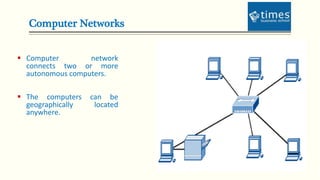
Computer Networks
 Computer network
connects two or more
autonomous computers.
 The computers can be
geographically located
anywhere.
LAN, MAN & WAN
 Network in small geographical Area (Room, Building or a Campus) is called
LAN (Local Area Network)
 Network in a City is call MAN (Metropolitan Area Network)
 Network spread geographically (Country or across Globe) is called WAN
(Wide Area Network)
Applications of Networks
 Resource Sharing
 Hardware (computing resources, disks, printers)
 Software (application software)
 Information Sharing
 Easy accessibility from anywhere (files, databases)
 Search Capability (WWW)
 Communication
 Email
 Message broadcast
 Remote computing
 Distributed processing
Network Topology
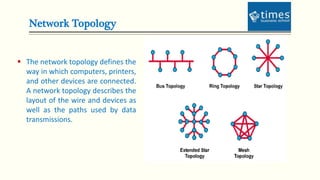
 The network topology defines the
way in which computers, printers,
and other devices are connected.
A network topology describes the
layout of the wire and devices as
well as the paths used by data
transmissions.
Bus Topology
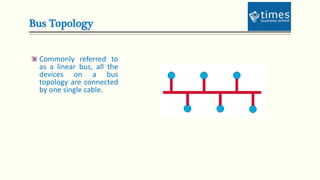
Commonly referred to
as a linear bus, all the
devices on a bus
topology are connected
by one single cable.
Star & Tree Topology
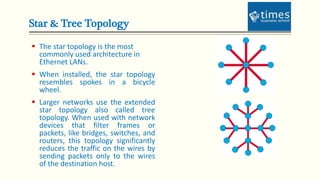
 The star topology is the most
commonly used architecture in
Ethernet LANs.
 When installed, the star topology
resembles spokes in a bicycle
wheel.
 Larger networks use the extended
star topology also called tree
topology. When used with network
devices that filter frames or
packets, like bridges, switches, and
routers, this topology significantly
reduces the traffic on the wires by
sending packets only to the wires
of the destination host.
Ring Topology
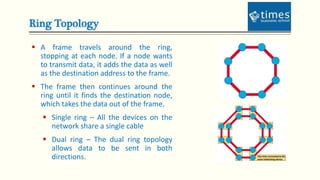
 A frame travels around the ring,
stopping at each node. If a node wants
to transmit data, it adds the data as well
as the destination address to the frame.
 The frame then continues around the
ring until it finds the destination node,
which takes the data out of the frame.
 Single ring – All the devices on the
network share a single cable
 Dual ring – The dual ring topology
allows data to be sent in both
directions.
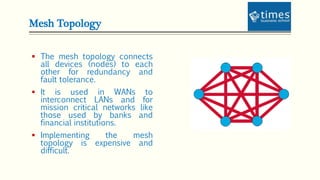
Mesh Topology
 The mesh topology connects
all devices (nodes) to each
other for redundancy and
fault tolerance.
 It is used in WANs to
interconnect LANs and for
mission critical networks like
those used by banks and
financial institutions.
 Implementing the mesh
topology is expensive and
difficult.
Network Components
 Physical Media
 Interconnecting Devices
 Computers
 Networking Software
 Applications
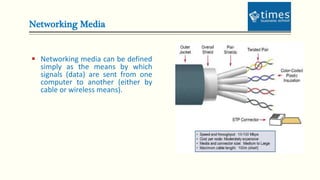
Networking Media
 Networking media can be defined
simply as the means by which
signals (data) are sent from one
computer to another (either by
cable or wireless means).
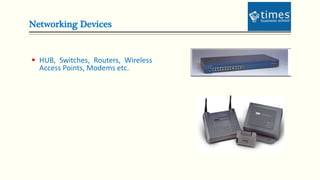
Networking Devices
 HUB, Switches, Routers, Wireless
Access Points, Modems etc.
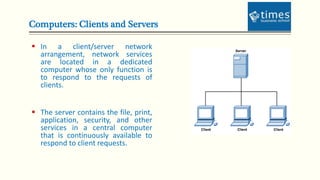
Computers: Clients and Servers
 In a client/server network
arrangement, network services
are located in a dedicated
computer whose only function is
to respond to the requests of
clients.
 The server contains the file, print,
application, security, and other
services in a central computer
that is continuously available to
respond to client requests.
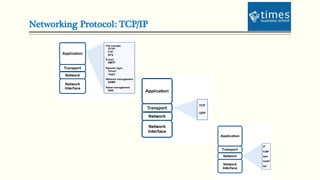
Networking Protocol: TCP/IP
Applications
 E-mail
 Searchable Data (Web Sites)
 E-Commerce
 News Groups
 Internet Telephony (VoIP)
 Video Conferencing
 Chat Groups
 Instant Messengers
 Internet Radio
THANK YOU
Contact:
Mobile: +91 98799 33475, Email: pravin@aequitas-infotech.com

Introduction to computer networks

  • 1.
    ADVANCE COMPUTER NETWORKAND SECURITY Session By: Dr.(h.c) Pravin Madalia Parmar BCA, MCA, MCP, MCTS, PDM, Ph.D (Honorary Causa) INTRODUCTION TO COMPUTER NETWORKS
  • 2.
    Computer Networks  Computernetwork connects two or more autonomous computers.  The computers can be geographically located anywhere.
  • 3.
    LAN, MAN &WAN  Network in small geographical Area (Room, Building or a Campus) is called LAN (Local Area Network)  Network in a City is call MAN (Metropolitan Area Network)  Network spread geographically (Country or across Globe) is called WAN (Wide Area Network)
  • 4.
    Applications of Networks Resource Sharing  Hardware (computing resources, disks, printers)  Software (application software)  Information Sharing  Easy accessibility from anywhere (files, databases)  Search Capability (WWW)  Communication  Email  Message broadcast  Remote computing  Distributed processing
  • 5.
    Network Topology  Thenetwork topology defines the way in which computers, printers, and other devices are connected. A network topology describes the layout of the wire and devices as well as the paths used by data transmissions.
  • 6.
    Bus Topology Commonly referredto as a linear bus, all the devices on a bus topology are connected by one single cable.
  • 7.
    Star & TreeTopology  The star topology is the most commonly used architecture in Ethernet LANs.  When installed, the star topology resembles spokes in a bicycle wheel.  Larger networks use the extended star topology also called tree topology. When used with network devices that filter frames or packets, like bridges, switches, and routers, this topology significantly reduces the traffic on the wires by sending packets only to the wires of the destination host.
  • 8.
    Ring Topology  Aframe travels around the ring, stopping at each node. If a node wants to transmit data, it adds the data as well as the destination address to the frame.  The frame then continues around the ring until it finds the destination node, which takes the data out of the frame.  Single ring – All the devices on the network share a single cable  Dual ring – The dual ring topology allows data to be sent in both directions.
  • 9.
    Mesh Topology  Themesh topology connects all devices (nodes) to each other for redundancy and fault tolerance.  It is used in WANs to interconnect LANs and for mission critical networks like those used by banks and financial institutions.  Implementing the mesh topology is expensive and difficult.
  • 10.
    Network Components  PhysicalMedia  Interconnecting Devices  Computers  Networking Software  Applications
  • 11.
    Networking Media  Networkingmedia can be defined simply as the means by which signals (data) are sent from one computer to another (either by cable or wireless means).
  • 12.
    Networking Devices  HUB,Switches, Routers, Wireless Access Points, Modems etc.
  • 13.
    Computers: Clients andServers  In a client/server network arrangement, network services are located in a dedicated computer whose only function is to respond to the requests of clients.  The server contains the file, print, application, security, and other services in a central computer that is continuously available to respond to client requests.
  • 14.
  • 15.
    Applications  E-mail  SearchableData (Web Sites)  E-Commerce  News Groups  Internet Telephony (VoIP)  Video Conferencing  Chat Groups  Instant Messengers  Internet Radio
  • 16.
    THANK YOU Contact: Mobile: +9198799 33475, Email: pravin@aequitas-infotech.com

Editor's Notes

  • #2 NOTE: To change the image on this slide, select the picture and delete it. Then click the Pictures icon in the placeholder to insert your own image.