MOTHERBOARD
Presented by Rauf Asadov
Faculty Engineering
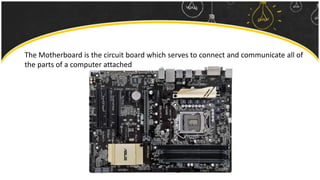
The Motherboard is the circuit board which serves to connect and communicate all of
the parts of a computer attached
Types of Motherboards
ATX form factor
ATX (Advanced Technology Extended) – is a specification used to outline Motherboard
configuration and dimensions
ATX defines the following:
1) Dimensions of Motherboard
2) Dimensions and position of Power Supply
3) Requirements for İ/O shield
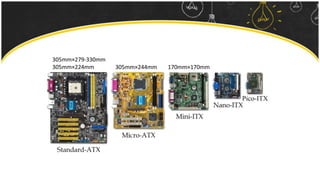
305mm×279-330mm
305mm×224mm 305mm×244mm 170mm×170mm
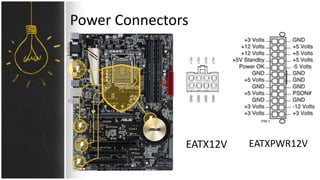
Power Connectors
EATX12V EATXPWR12V
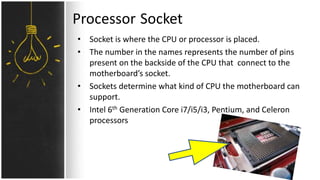
Processor Socket
• Socket is where the CPU or processor is placed.
• The number in the names represents the number of pins
present on the backside of the CPU that connect to the
motherboard’s socket.
• Sockets determine what kind of CPU the motherboard can
support.
• Intel 6th Generation Core i7/i5/i3, Pentium, and Celeron
processors
Land Grid Array Pin Grid Array
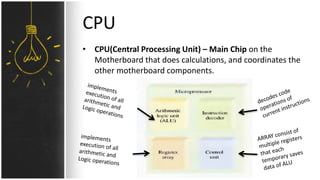
CPU
• CPU(Central Processing Unit) – Main Chip on the
Motherboard that does calculations, and coordinates the
other motherboard components.
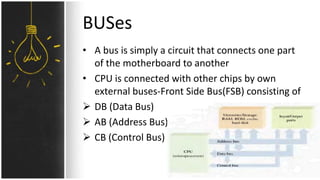
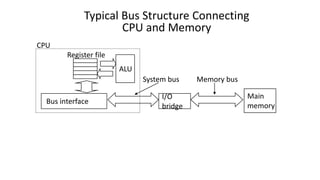
BUSes
• A bus is simply a circuit that connects one part
of the motherboard to another
• CPU is connected with other chips by own
external buses-Front Side Bus(FSB) consisting of
 DB (Data Bus)
 AB (Address Bus)
 CB (Control Bus)
Main
memory
I/O
bridge
Bus interface
ALU
Register file
CPU
System bus Memory bus
Typical Bus Structure Connecting
CPU and Memory
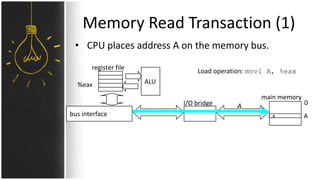
Memory Read Transaction (1)
• CPU places address A on the memory bus.
ALU
register file
bus interface
A 0
Ax
main memory
I/O bridge
%eax
Load operation: movl A, %eax
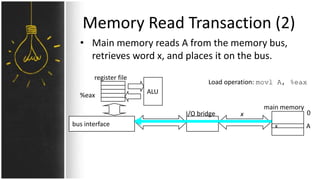
Memory Read Transaction (2)
• Main memory reads A from the memory bus,
retrieves word x, and places it on the bus.
ALU
register file
bus interface
x 0
Ax
main memory
%eax
I/O bridge
Load operation: movl A, %eax
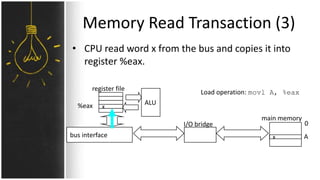
Memory Read Transaction (3)
• CPU read word x from the bus and copies it into
register %eax.
x
ALU
register file
bus interface x
main memory
0
A
%eax
I/O bridge
Load operation: movl A, %eax
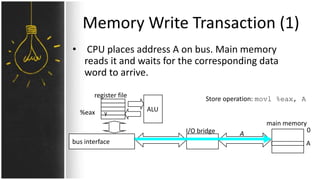
Memory Write Transaction (1)
• CPU places address A on bus. Main memory
reads it and waits for the corresponding data
word to arrive.
y
ALU
register file
bus interface
A
main memory
0
A
%eax
I/O bridge
Store operation: movl %eax, A
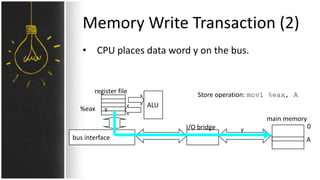
Memory Write Transaction (2)
• CPU places data word y on the bus.
y
ALU
register file
bus interface
y
main memory
0
A
%eax
I/O bridge
Store operation: movl %eax, A
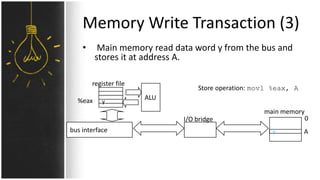
Memory Write Transaction (3)
• Main memory read data word y from the bus and
stores it at address A.
y
ALU
register file
bus interface y
main memory
0
A
%eax
I/O bridge
Store operation: movl %eax, A
RAM slots
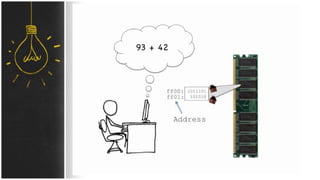
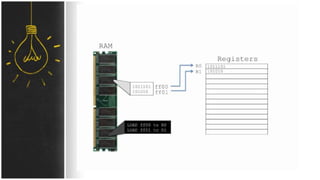
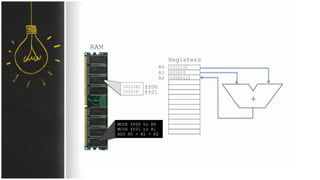
• Ram(Random Access Memory) is used to hold programs
while they are being executed, and data while it is being
processed. Ram is temporary memory meaning that
information written to ram will disappear when the
computer is turned off.
• 4 × DDR4(Double Data Rate) DIMM(Dual In-line
Memory Module) 3466(O.C) MHz support, maximum 64
GB
Expansion Slots
• 2 × PCI(Peripheral Component Interconnect) Express
3.0/2.0 x16 slots
• 2 × PCI Express 3.0/2.0 x1 slots
• 2 × PCI slots
SATA
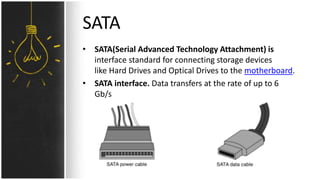
• SATA(Serial Advanced Technology Attachment) is
interface standard for connecting storage devices
like Hard Drives and Optical Drives to the motherboard.
• SATA interface. Data transfers at the rate of up to 6
Gb/s
ROM
• Rom(Read Only Memory) – permanent memory. It
remember its contents even when the power is turned
off
• The BIOS chip contains the basic code needed to avoid
resetting of BIOS settings and system time
• 128Mb BIOS
• Since the BIOS code is stored on a memory chip that
needs constant power to function, a battery is also
present to keep the chip powered when the computer is
unplugged
Chip Set
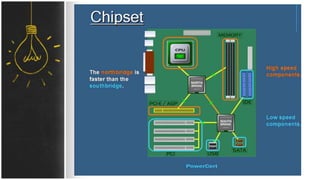
• The chipset is the "glue" that connects the
microprocessor to the rest of the motherboard and
therefore to the rest of the computer. On a PC, it
consists of two basic parts -- the Northbridge and
the Southbridge. All of the various components of the
computer communicate with the CPU through the
chipset.
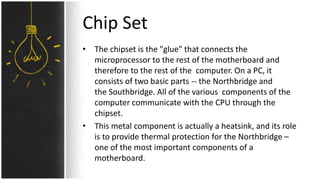
• This metal component is actually a heatsink, and its role
is to provide thermal protection for the Northbridge –
one of the most important components of a
motherboard.
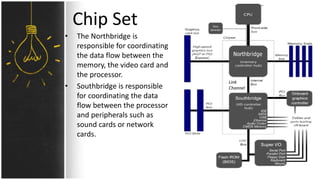
Chip Set
Link
Channel
• The Northbridge is
responsible for coordinating
the data flow between the
memory, the video card and
the processor.
• Southbridge is responsible
for coordinating the data
flow between the processor
and peripherals such as
sound cards or network
cards.
Chip Set determines
• Type of the CPU
• Maximum RAM needed
• Frequency of FSB (Front Side Bus) MHz

Introduction to Computer Engineering. Motherboard.

  • 1.
    MOTHERBOARD Presented by RaufAsadov Faculty Engineering
  • 2.
    The Motherboard isthe circuit board which serves to connect and communicate all of the parts of a computer attached
  • 3.
    Types of Motherboards ATXform factor ATX (Advanced Technology Extended) – is a specification used to outline Motherboard configuration and dimensions ATX defines the following: 1) Dimensions of Motherboard 2) Dimensions and position of Power Supply 3) Requirements for İ/O shield
  • 4.
  • 5.
  • 6.
    Processor Socket • Socketis where the CPU or processor is placed. • The number in the names represents the number of pins present on the backside of the CPU that connect to the motherboard’s socket. • Sockets determine what kind of CPU the motherboard can support. • Intel 6th Generation Core i7/i5/i3, Pentium, and Celeron processors
  • 7.
    Land Grid ArrayPin Grid Array
  • 8.
    CPU • CPU(Central ProcessingUnit) – Main Chip on the Motherboard that does calculations, and coordinates the other motherboard components.
  • 9.
    BUSes • A busis simply a circuit that connects one part of the motherboard to another • CPU is connected with other chips by own external buses-Front Side Bus(FSB) consisting of  DB (Data Bus)  AB (Address Bus)  CB (Control Bus)
  • 10.
    Main memory I/O bridge Bus interface ALU Register file CPU Systembus Memory bus Typical Bus Structure Connecting CPU and Memory
  • 11.
    Memory Read Transaction(1) • CPU places address A on the memory bus. ALU register file bus interface A 0 Ax main memory I/O bridge %eax Load operation: movl A, %eax
  • 12.
    Memory Read Transaction(2) • Main memory reads A from the memory bus, retrieves word x, and places it on the bus. ALU register file bus interface x 0 Ax main memory %eax I/O bridge Load operation: movl A, %eax
  • 14.
    Memory Read Transaction(3) • CPU read word x from the bus and copies it into register %eax. x ALU register file bus interface x main memory 0 A %eax I/O bridge Load operation: movl A, %eax
  • 17.
    Memory Write Transaction(1) • CPU places address A on bus. Main memory reads it and waits for the corresponding data word to arrive. y ALU register file bus interface A main memory 0 A %eax I/O bridge Store operation: movl %eax, A
  • 18.
    Memory Write Transaction(2) • CPU places data word y on the bus. y ALU register file bus interface y main memory 0 A %eax I/O bridge Store operation: movl %eax, A
  • 19.
    Memory Write Transaction(3) • Main memory read data word y from the bus and stores it at address A. y ALU register file bus interface y main memory 0 A %eax I/O bridge Store operation: movl %eax, A
  • 20.
    RAM slots • Ram(RandomAccess Memory) is used to hold programs while they are being executed, and data while it is being processed. Ram is temporary memory meaning that information written to ram will disappear when the computer is turned off. • 4 × DDR4(Double Data Rate) DIMM(Dual In-line Memory Module) 3466(O.C) MHz support, maximum 64 GB
  • 21.
    Expansion Slots • 2× PCI(Peripheral Component Interconnect) Express 3.0/2.0 x16 slots • 2 × PCI Express 3.0/2.0 x1 slots • 2 × PCI slots
  • 22.
    SATA • SATA(Serial AdvancedTechnology Attachment) is interface standard for connecting storage devices like Hard Drives and Optical Drives to the motherboard. • SATA interface. Data transfers at the rate of up to 6 Gb/s
  • 23.
    ROM • Rom(Read OnlyMemory) – permanent memory. It remember its contents even when the power is turned off • The BIOS chip contains the basic code needed to avoid resetting of BIOS settings and system time • 128Mb BIOS • Since the BIOS code is stored on a memory chip that needs constant power to function, a battery is also present to keep the chip powered when the computer is unplugged
  • 24.
    Chip Set • Thechipset is the "glue" that connects the microprocessor to the rest of the motherboard and therefore to the rest of the computer. On a PC, it consists of two basic parts -- the Northbridge and the Southbridge. All of the various components of the computer communicate with the CPU through the chipset. • This metal component is actually a heatsink, and its role is to provide thermal protection for the Northbridge – one of the most important components of a motherboard.
  • 25.
    Chip Set Link Channel • TheNorthbridge is responsible for coordinating the data flow between the memory, the video card and the processor. • Southbridge is responsible for coordinating the data flow between the processor and peripherals such as sound cards or network cards.
  • 27.
    Chip Set determines •Type of the CPU • Maximum RAM needed • Frequency of FSB (Front Side Bus) MHz