Introduction to CMake
Dimitris Platis
dimitris@platis.solutions
[grcpp]
👍facebook.com/grcpp
👍meetup.com/grcpp-athens
● Knowledge spreading
● Discussions
● Development culture
● Networking
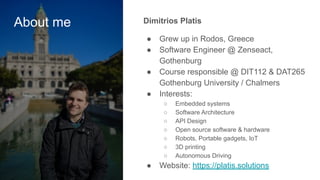
About me Dimitrios Platis
● Grew up in Rodos, Greece
● Software Engineer @ Zenseact,
Gothenburg
● Course responsible @ DIT112 & DAT265
Gothenburg University / Chalmers
● Interests:
○ Embedded systems
○ Software Architecture
○ API Design
○ Open source software & hardware
○ Robots, Portable gadgets, IoT
○ 3D printing
○ Autonomous Driving
● Website: https://platis.solutions
How about you?
What is CMake?
CMake is a software that manages the
way C/C++ projects are built. It has the
ability to simplify the build process of
projects with large or complex code
layouts and is compiler-agnostic.
It is considered the de facto standard for
building C/C++ projects.
When is a build
system
necessary?
● Avoid hard-coding paths
● Build a package on more than one
computer
● Support multiple operating systems and
compilers
● Describe how your program is
structured logically, not flags and
commands
Source: An Introduction to Modern CMake
Why do you
need to learn
CMake?
● 55 to 80% of C++ developers use it
● The vast majority professional C++
projects use it
● Cross-platform
● Well-supported by IDEs
● Relatively easy to get started with
● Makefiles and building with the command
line simply do not scale
Create binaries
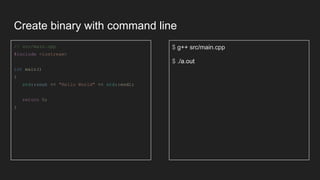
Create binary with command line
// src/main.cpp
#include <iostream>
int main()
{
std::cout << "Hello World" << std::endl;
return 0;
}
$ g++ src/main.cpp
$ ./a.out
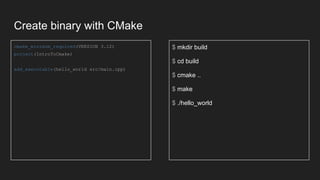
Create binary with CMake
cmake_minimum_required(VERSION 3.12)
project(IntroToCmake)
add_executable(hello_world src/main.cpp)
$ mkdir build
$ cd build
$ cmake ..
$ make
$ ./hello_world
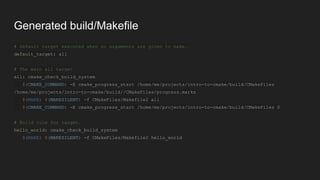
Generated build/Makefile
# Default target executed when no arguments are given to make.
default_target: all
# The main all target
all: cmake_check_build_system
$(CMAKE_COMMAND) -E cmake_progress_start /home/me/projects/intro-to-cmake/build/CMakeFiles
/home/me/projects/intro-to-cmake/build//CMakeFiles/progress.marks
$(MAKE) $(MAKESILENT) -f CMakeFiles/Makefile2 all
$(CMAKE_COMMAND) -E cmake_progress_start /home/me/projects/intro-to-cmake/build/CMakeFiles 0
# Build rule for target.
hello_world: cmake_check_build_system
$(MAKE) $(MAKESILENT) -f CMakeFiles/Makefile2 hello_world
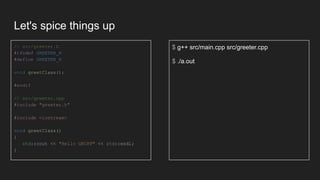
Let's spice things up
// src/greeter.h
#ifndef GREETER_H
#define GREETER_H
void greetClass();
#endif
// src/greeter.cpp
#include "greeter.h"
#include <iostream>
void greetClass()
{
std::cout << "Hello GRCPP" << std::endl;
}
$ g++ src/main.cpp src/greeter.cpp
$ ./a.out
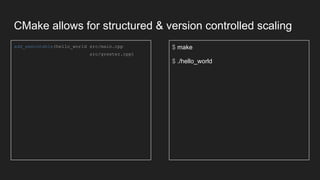
CMake allows for structured & version controlled scaling
add_executable(hello_world src/main.cpp
src/greeter.cpp)
$ make
$ ./hello_world
Set include path
#include <foo/Foo.h>
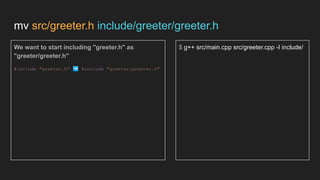
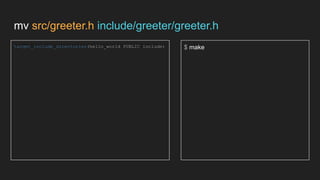
mv src/greeter.h include/greeter/greeter.h
We want to start including "greeter.h" as
"greeter/greeter.h"
#include "greeter.h" ➡ #include "greeter/greeter.h"
$ g++ src/main.cpp src/greeter.cpp -I include/
mv src/greeter.h include/greeter/greeter.h
target_include_directories(hello_world PUBLIC include) $ make
Create libraries
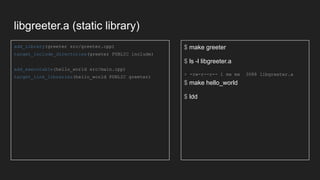
libgreeter.a (static library)
add_library(greeter src/greeter.cpp)
target_include_directories(greeter PUBLIC include)
add_executable(hello_world src/main.cpp)
target_link_libraries(hello_world PUBLIC greeter)
$ make greeter
$ ls -l libgreeter.a
> -rw-r--r-- 1 me me 3088 libgreeter.a
$ make hello_world
$ ldd
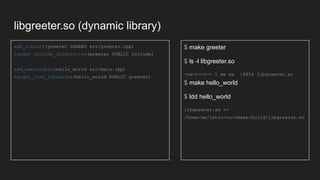
libgreeter.so (dynamic library)
add_library(greeter SHARED src/greeter.cpp)
target_include_directories(greeter PUBLIC include)
add_executable(hello_world src/main.cpp)
target_link_libraries(hello_world PUBLIC greeter)
$ make greeter
$ ls -l libgreeter.so
-rw-r--r-- 1 me me 16856 libgreeter.so
$ make hello_world
$ ldd hello_world
libgreeter.so =>
/home/me/intro-to-cmake/build/libgreeter.so
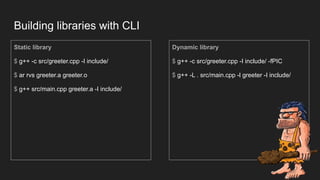
Building libraries with CLI
Static library
$ g++ -c src/greeter.cpp -I include/
$ ar rvs greeter.a greeter.o
$ g++ src/main.cpp greeter.a -I include/
Dynamic library
$ g++ -c src/greeter.cpp -I include/ -fPIC
$ g++ -L . src/main.cpp -l greeter -I include/
Set compilation flags
🚩🚩🚩
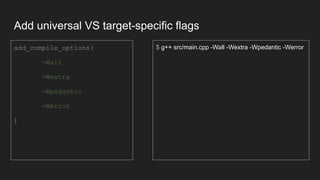
Add universal VS target-specific flags
add_compile_options(
-Wall
-Wextra
-Wpedantic
-Werror
)
$ g++ src/main.cpp -Wall -Wextra -Wpedantic -Werror
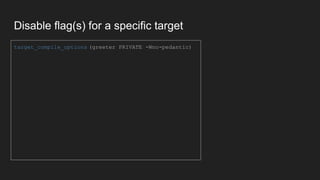
Disable flag(s) for a specific target
target_compile_options (greeter PRIVATE -Wno-pedantic)
Configure the build with options
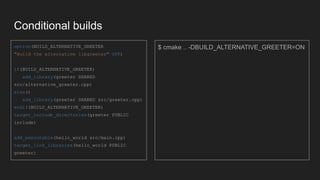
Conditional builds
option(BUILD_ALTERNATIVE_GREETER
"Build the alternative libgreeter" OFF)
if(BUILD_ALTERNATIVE_GREETER)
add_library(greeter SHARED
src/alternative_greeter.cpp)
else()
add_library(greeter SHARED src/greeter.cpp)
endif(BUILD_ALTERNATIVE_GREETER)
target_include_directories(greeter PUBLIC
include)
add_executable(hello_world src/main.cpp)
target_link_libraries(hello_world PUBLIC
greeter)
$ cmake .. -DBUILD_ALTERNATIVE_GREETER=ON
CMake functions
⚙
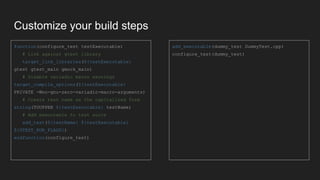
Customize your build steps
function(configure_test testExecutable)
# Link against gtest library
target_link_libraries(${testExecutable}
gtest gtest_main gmock_main)
# Disable variadic macro warnings
target_compile_options(${testExecutable}
PRIVATE -Wno-gnu-zero-variadic-macro-arguments)
# Create test name as the capitalized form
string(TOUPPER ${testExecutable} testName)
# Add executable to test suite
add_test(${testName} ${testExecutable}
${GTEST_RUN_FLAGS})
endfunction(configure_test)
add_executable(dummy_test DummyTest.cpp)
configure_test(dummy_test)
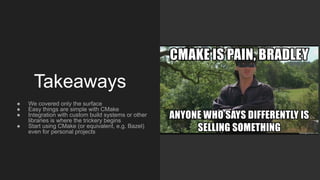
Takeaways
● We covered only the surface
● Easy things are simple with CMake
● Integration with custom build systems or other
libraries is where the trickery begins
● Start using CMake (or equivalent, e.g. Bazel)
even for personal projects
Let's keep in touch!
https://www.linkedin.com/in/platisd/
dimitris@platis.solutions
@PlatisSolutions
JetBrains lottery
1 year license for any Jetbrains IDE!
1. Go to: http://plat.is/jetbrains
2. If you won, please stick around until I
contact you
3. If you did not win, better luck next time!
Did you know that as a university student you
can get a free JetBrains license anyway?

Introduction to CMake

  • 1.
    Introduction to CMake DimitrisPlatis dimitris@platis.solutions
  • 2.
  • 3.
    About me DimitriosPlatis ● Grew up in Rodos, Greece ● Software Engineer @ Zenseact, Gothenburg ● Course responsible @ DIT112 & DAT265 Gothenburg University / Chalmers ● Interests: ○ Embedded systems ○ Software Architecture ○ API Design ○ Open source software & hardware ○ Robots, Portable gadgets, IoT ○ 3D printing ○ Autonomous Driving ● Website: https://platis.solutions
  • 4.
  • 5.
    What is CMake? CMakeis a software that manages the way C/C++ projects are built. It has the ability to simplify the build process of projects with large or complex code layouts and is compiler-agnostic. It is considered the de facto standard for building C/C++ projects.
  • 6.
    When is abuild system necessary? ● Avoid hard-coding paths ● Build a package on more than one computer ● Support multiple operating systems and compilers ● Describe how your program is structured logically, not flags and commands Source: An Introduction to Modern CMake
  • 7.
    Why do you needto learn CMake? ● 55 to 80% of C++ developers use it ● The vast majority professional C++ projects use it ● Cross-platform ● Well-supported by IDEs ● Relatively easy to get started with ● Makefiles and building with the command line simply do not scale
  • 8.
  • 9.
    Create binary withcommand line // src/main.cpp #include <iostream> int main() { std::cout << "Hello World" << std::endl; return 0; } $ g++ src/main.cpp $ ./a.out
  • 10.
    Create binary withCMake cmake_minimum_required(VERSION 3.12) project(IntroToCmake) add_executable(hello_world src/main.cpp) $ mkdir build $ cd build $ cmake .. $ make $ ./hello_world
  • 11.
    Generated build/Makefile # Defaulttarget executed when no arguments are given to make. default_target: all # The main all target all: cmake_check_build_system $(CMAKE_COMMAND) -E cmake_progress_start /home/me/projects/intro-to-cmake/build/CMakeFiles /home/me/projects/intro-to-cmake/build//CMakeFiles/progress.marks $(MAKE) $(MAKESILENT) -f CMakeFiles/Makefile2 all $(CMAKE_COMMAND) -E cmake_progress_start /home/me/projects/intro-to-cmake/build/CMakeFiles 0 # Build rule for target. hello_world: cmake_check_build_system $(MAKE) $(MAKESILENT) -f CMakeFiles/Makefile2 hello_world
  • 12.
    Let's spice thingsup // src/greeter.h #ifndef GREETER_H #define GREETER_H void greetClass(); #endif // src/greeter.cpp #include "greeter.h" #include <iostream> void greetClass() { std::cout << "Hello GRCPP" << std::endl; } $ g++ src/main.cpp src/greeter.cpp $ ./a.out
  • 13.
    CMake allows forstructured & version controlled scaling add_executable(hello_world src/main.cpp src/greeter.cpp) $ make $ ./hello_world
  • 14.
  • 15.
    mv src/greeter.h include/greeter/greeter.h Wewant to start including "greeter.h" as "greeter/greeter.h" #include "greeter.h" ➡ #include "greeter/greeter.h" $ g++ src/main.cpp src/greeter.cpp -I include/
  • 16.
  • 17.
  • 18.
    libgreeter.a (static library) add_library(greetersrc/greeter.cpp) target_include_directories(greeter PUBLIC include) add_executable(hello_world src/main.cpp) target_link_libraries(hello_world PUBLIC greeter) $ make greeter $ ls -l libgreeter.a > -rw-r--r-- 1 me me 3088 libgreeter.a $ make hello_world $ ldd
  • 19.
    libgreeter.so (dynamic library) add_library(greeterSHARED src/greeter.cpp) target_include_directories(greeter PUBLIC include) add_executable(hello_world src/main.cpp) target_link_libraries(hello_world PUBLIC greeter) $ make greeter $ ls -l libgreeter.so -rw-r--r-- 1 me me 16856 libgreeter.so $ make hello_world $ ldd hello_world libgreeter.so => /home/me/intro-to-cmake/build/libgreeter.so
  • 20.
    Building libraries withCLI Static library $ g++ -c src/greeter.cpp -I include/ $ ar rvs greeter.a greeter.o $ g++ src/main.cpp greeter.a -I include/ Dynamic library $ g++ -c src/greeter.cpp -I include/ -fPIC $ g++ -L . src/main.cpp -l greeter -I include/
  • 21.
  • 22.
    Add universal VStarget-specific flags add_compile_options( -Wall -Wextra -Wpedantic -Werror ) $ g++ src/main.cpp -Wall -Wextra -Wpedantic -Werror
  • 23.
    Disable flag(s) fora specific target target_compile_options (greeter PRIVATE -Wno-pedantic)
  • 24.
    Configure the buildwith options
  • 25.
    Conditional builds option(BUILD_ALTERNATIVE_GREETER "Build thealternative libgreeter" OFF) if(BUILD_ALTERNATIVE_GREETER) add_library(greeter SHARED src/alternative_greeter.cpp) else() add_library(greeter SHARED src/greeter.cpp) endif(BUILD_ALTERNATIVE_GREETER) target_include_directories(greeter PUBLIC include) add_executable(hello_world src/main.cpp) target_link_libraries(hello_world PUBLIC greeter) $ cmake .. -DBUILD_ALTERNATIVE_GREETER=ON
  • 26.
  • 27.
    Customize your buildsteps function(configure_test testExecutable) # Link against gtest library target_link_libraries(${testExecutable} gtest gtest_main gmock_main) # Disable variadic macro warnings target_compile_options(${testExecutable} PRIVATE -Wno-gnu-zero-variadic-macro-arguments) # Create test name as the capitalized form string(TOUPPER ${testExecutable} testName) # Add executable to test suite add_test(${testName} ${testExecutable} ${GTEST_RUN_FLAGS}) endfunction(configure_test) add_executable(dummy_test DummyTest.cpp) configure_test(dummy_test)
  • 28.
    Takeaways ● We coveredonly the surface ● Easy things are simple with CMake ● Integration with custom build systems or other libraries is where the trickery begins ● Start using CMake (or equivalent, e.g. Bazel) even for personal projects
  • 30.
    Let's keep intouch! https://www.linkedin.com/in/platisd/ dimitris@platis.solutions @PlatisSolutions
  • 31.
    JetBrains lottery 1 yearlicense for any Jetbrains IDE! 1. Go to: http://plat.is/jetbrains 2. If you won, please stick around until I contact you 3. If you did not win, better luck next time! Did you know that as a university student you can get a free JetBrains license anyway?