Lightweight Developer Provisioning with Gradle
Mario-Leander Reimer
Chief Technologist, QAware GmbH
Gradle Summit 2016
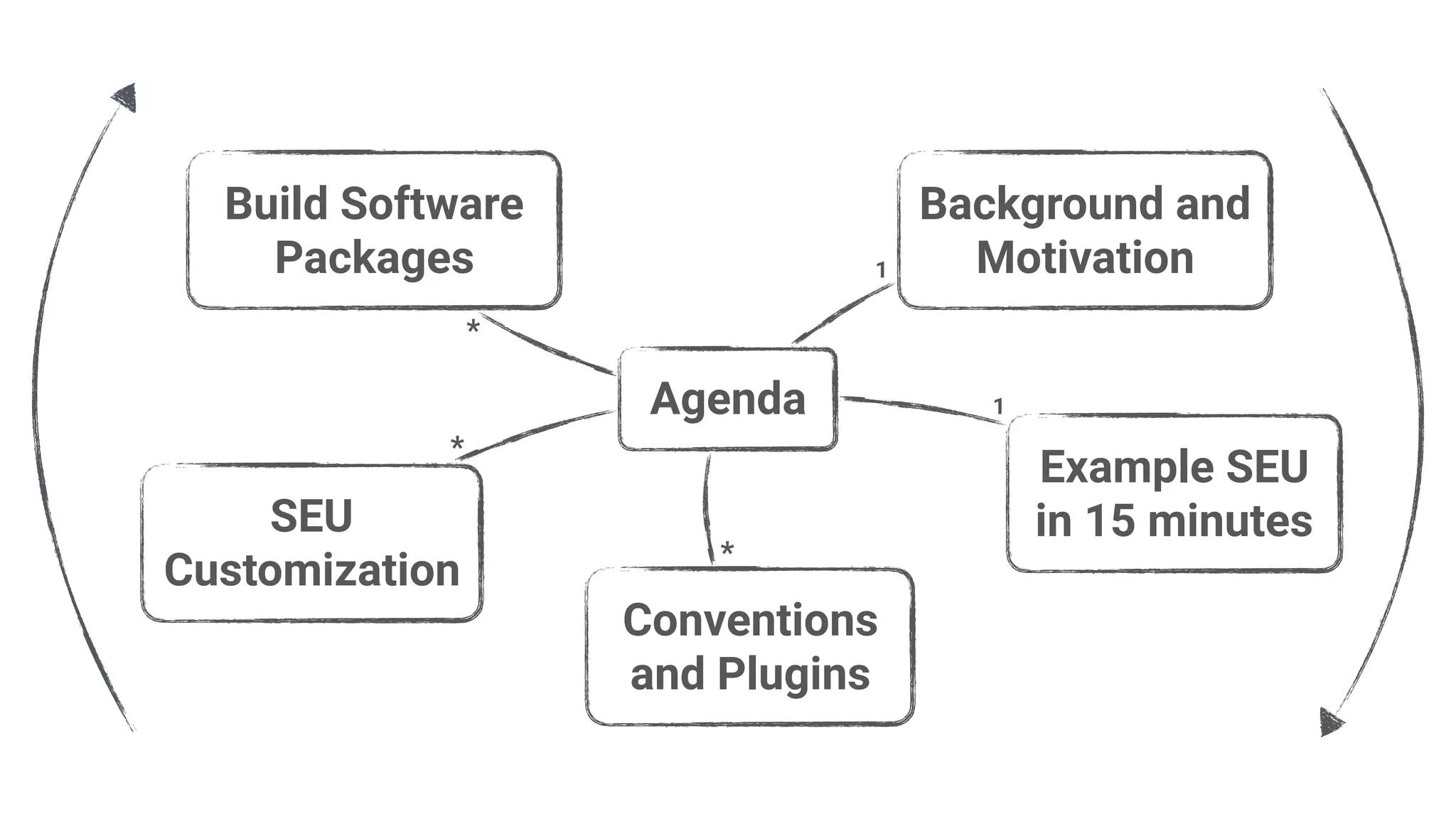
Agenda
Example SEU
in 15 minutes
Background and
Motivation
Build Software
Packages
Conventions
and Plugins
SEU
Customization
1
*
*
*
1
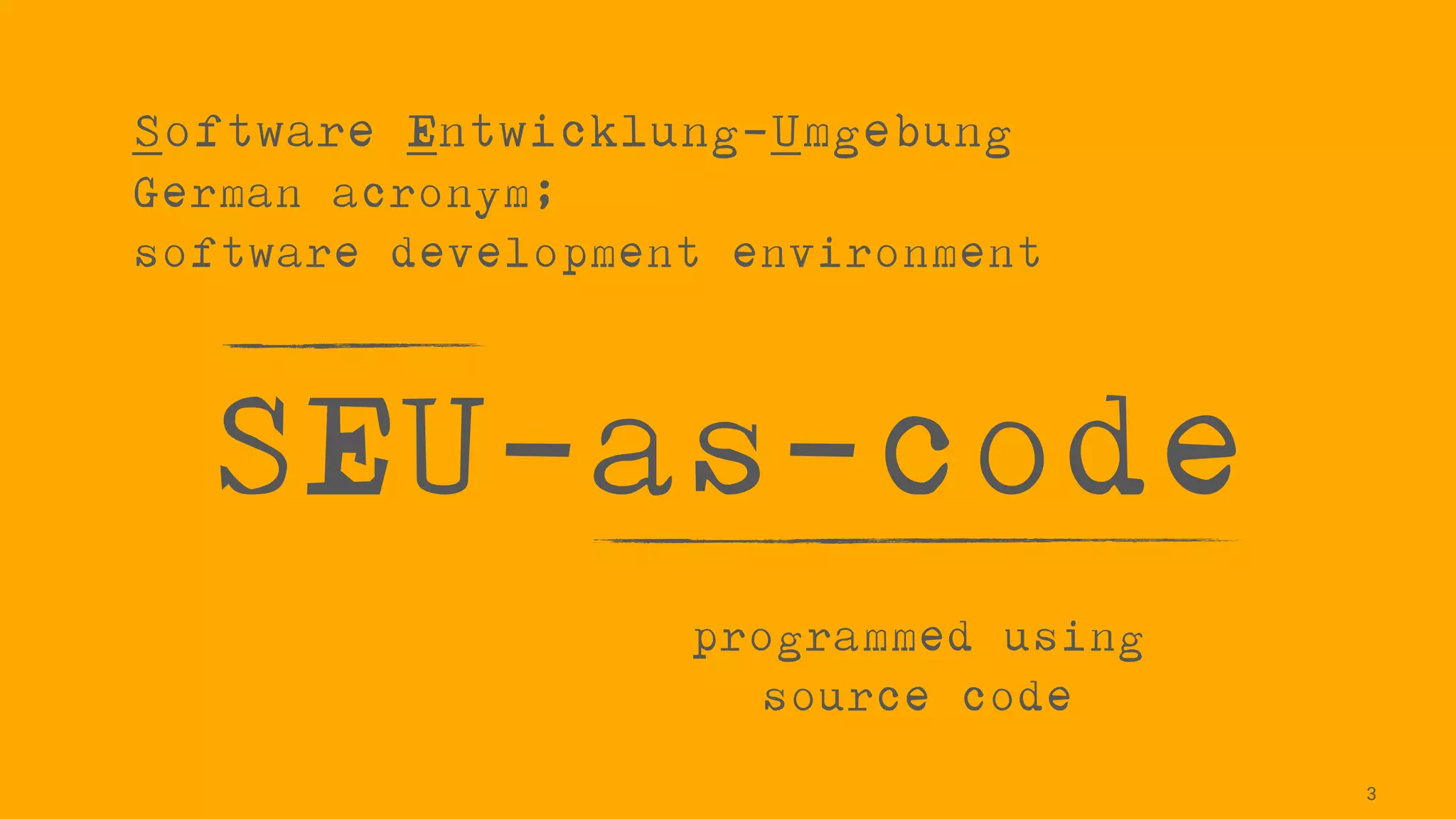
SEU-as-code
3
Software Entwicklung-Umgebung

German acronym;

software development environment
programmed using
source code
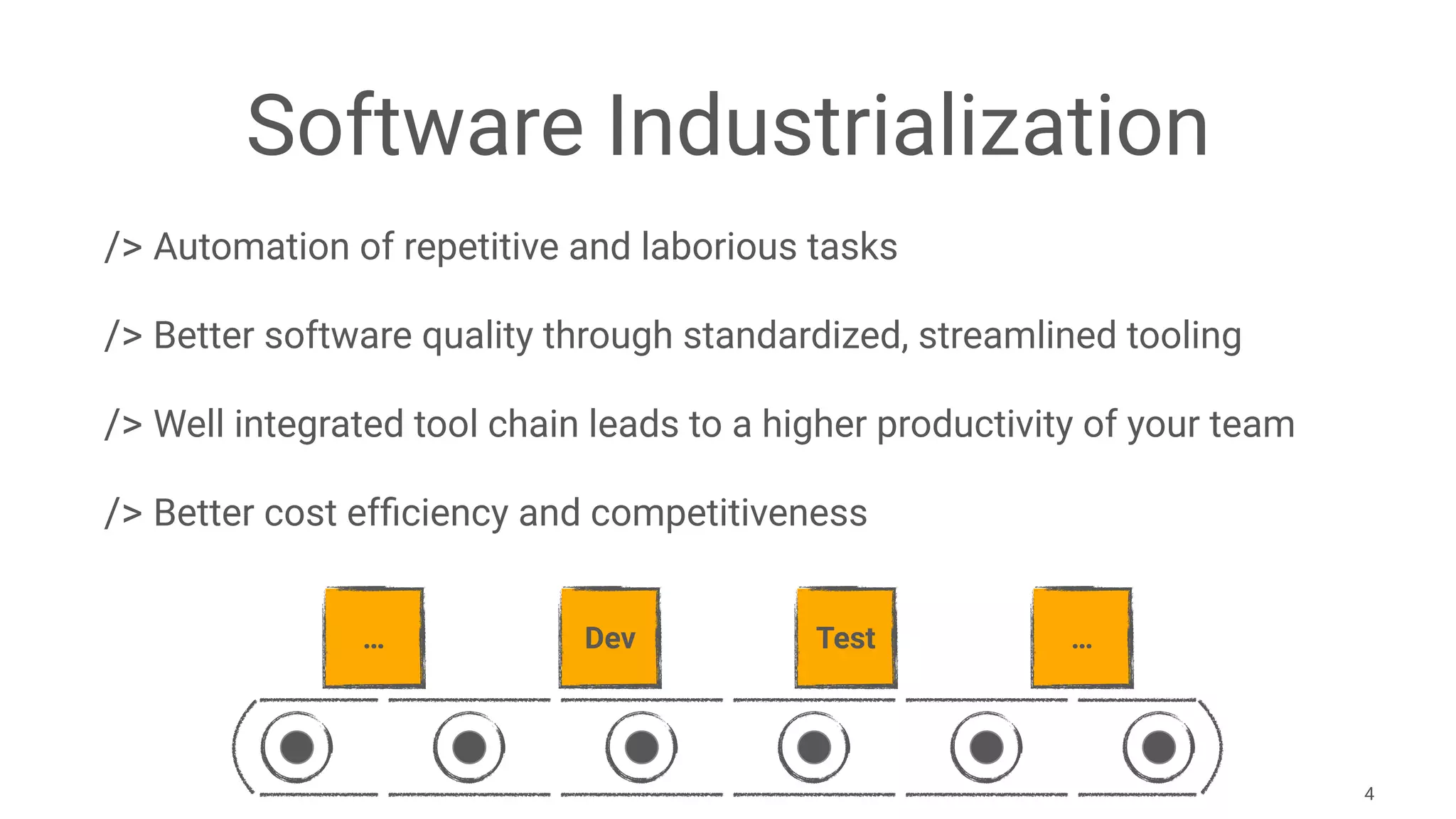
Software Industrialization
/> Automation of repetitive and laborious tasks
/> Better software quality through standardized, streamlined tooling
/> Well integrated tool chain leads to a higher productivity of your team
/> Better cost efficiency and competitiveness
4
… Dev Test …
The Ideal.
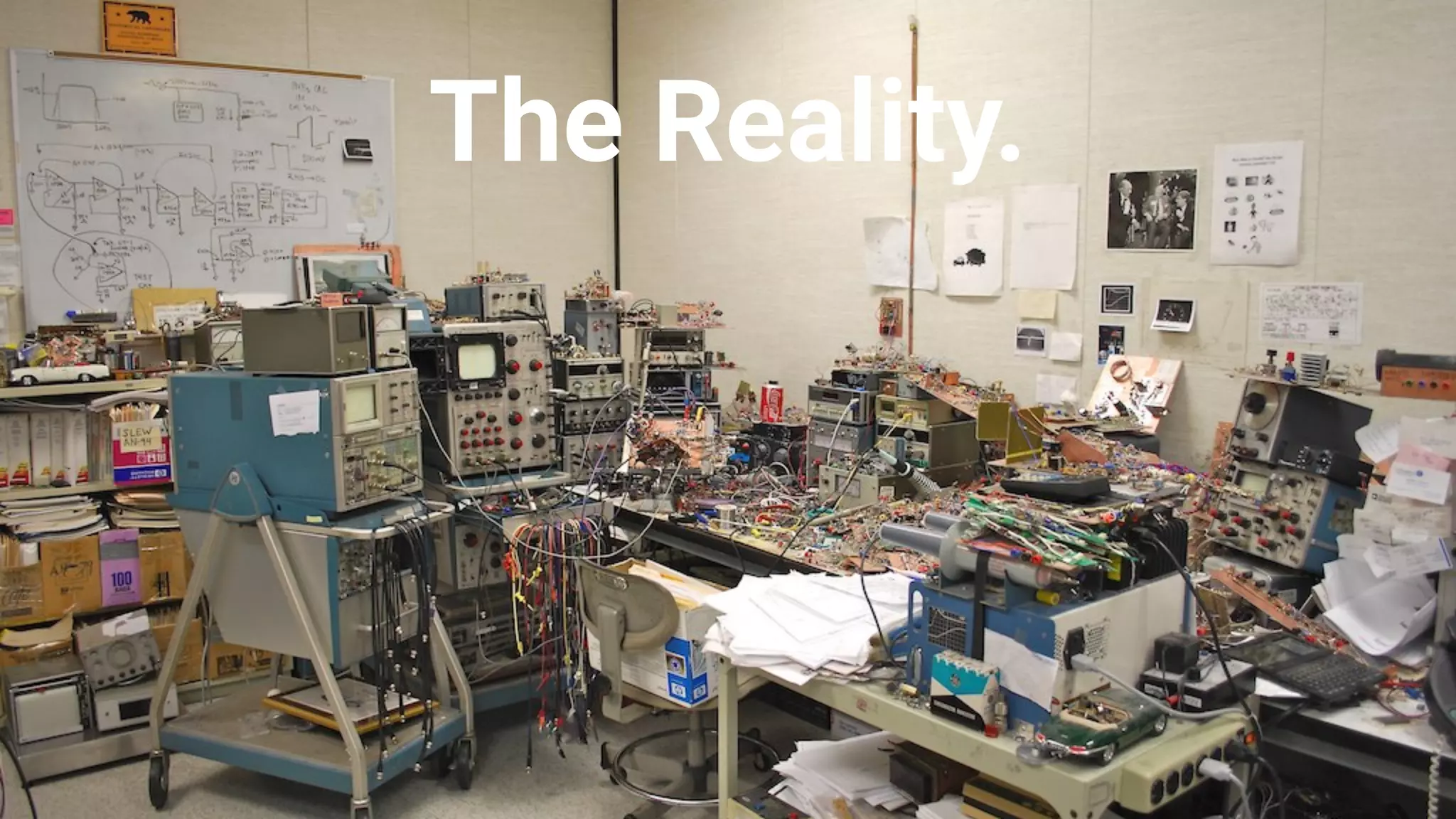
The Reality.
So what are the problems?
/> Individual SEUs produce different results and strange bugs
/> The SEU of a new project is often a copy of a previous project
/> Older versions of a SEU can not easily be restored
/> Manual and error prone update procedure of individual SEUs
/> Batch files. No good IDE support for shell scripting
7
The solution ...
/> Use a build tool for the automated creation and update of a SEU
/> Gradle tasks and Groovy are used for all required shell scripting
/> Everything is version controlled just like „normal" source code
/> Required software packages are expressed as dependencies
/> Software packages are stored in an artifact repository like Nexus
8
D E M O
10
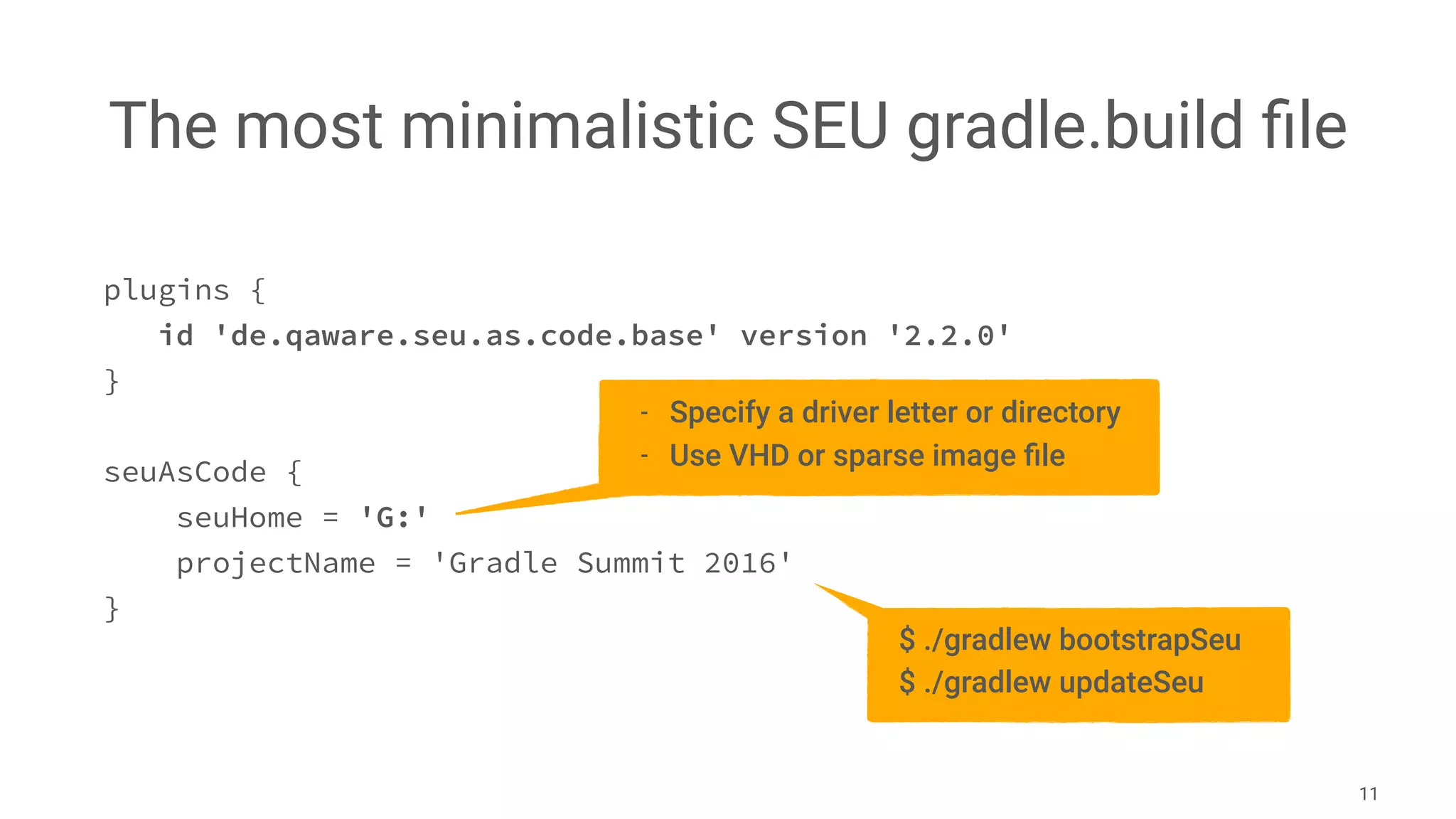
The most minimalistic SEU gradle.build file
11
plugins {
id 'de.qaware.seu.as.code.base' version '2.2.0'
}
seuAsCode {
seuHome = 'G:'
projectName = 'Gradle Summit 2016'
}
- Specify a driver letter or directory
- Use VHD or sparse image file
$ ./gradlew bootstrapSeu
$ ./gradlew updateSeu
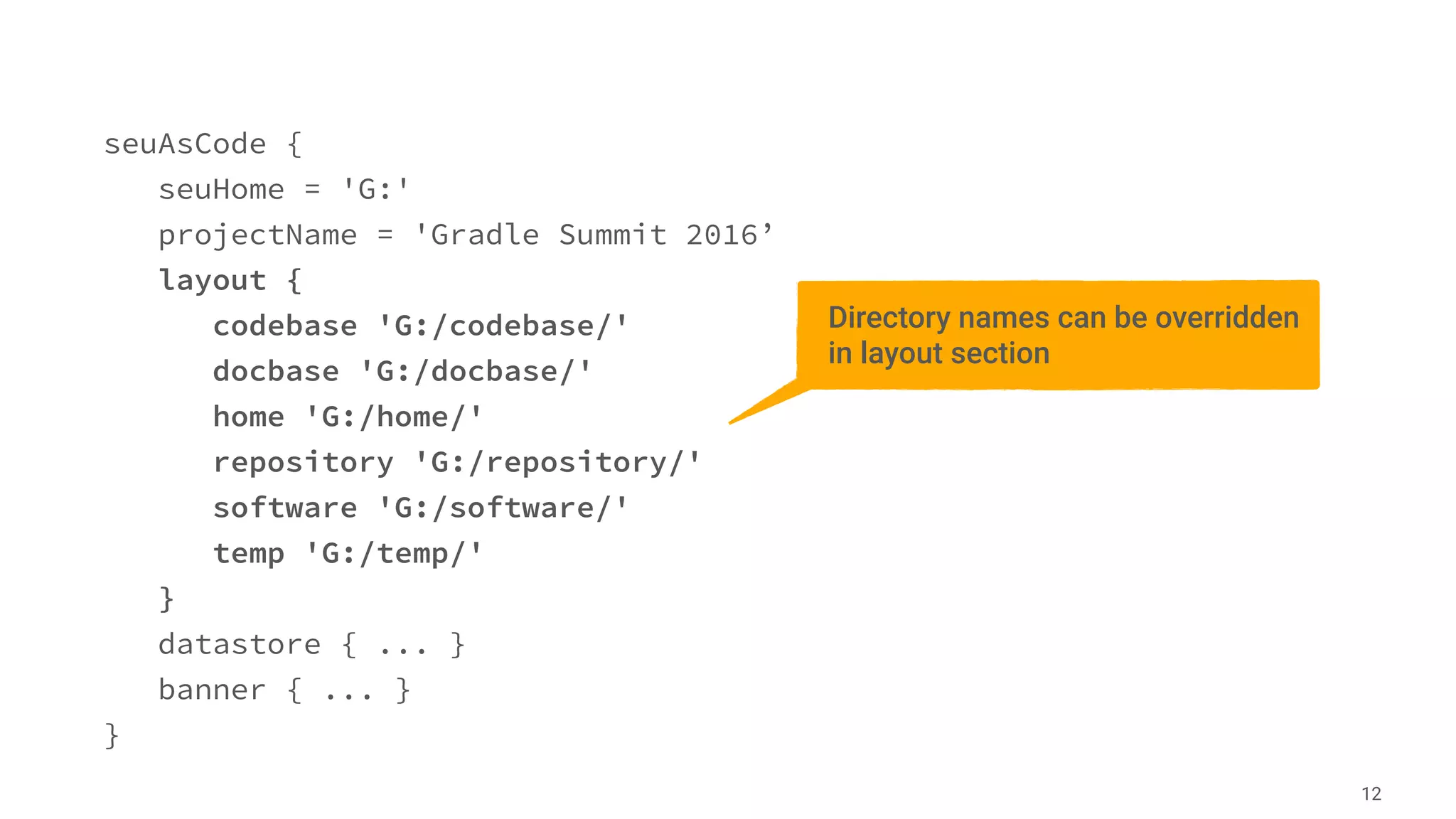
seuAsCode {
seuHome = 'G:'
projectName = 'Gradle Summit 2016’
layout {
codebase 'G:/codebase/'
docbase 'G:/docbase/'
home 'G:/home/'
repository 'G:/repository/'
software 'G:/software/'
temp 'G:/temp/'
}
datastore { ... }
banner { ... }
}
12
Directory names can be overridden
in layout section
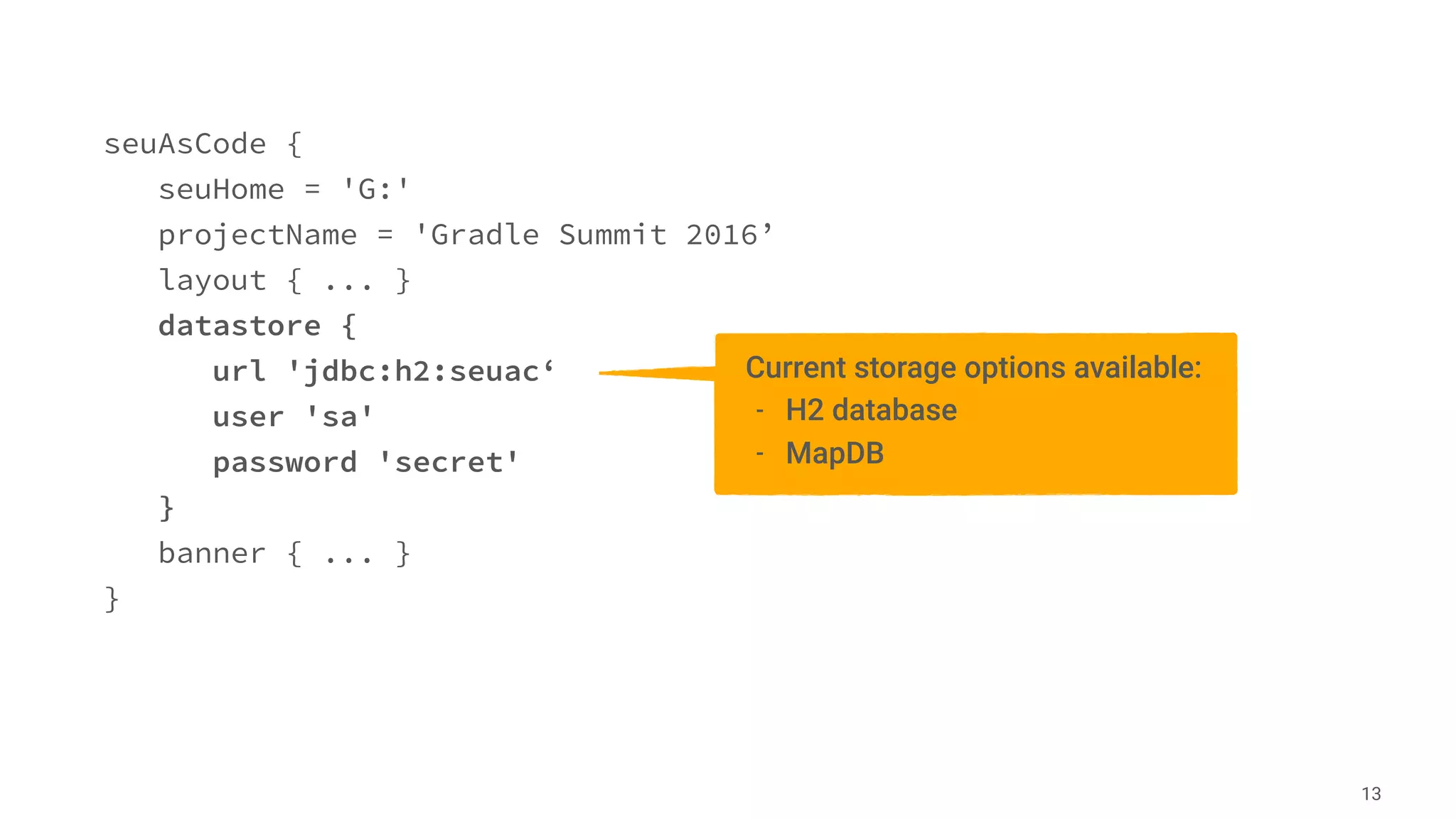
seuAsCode {
seuHome = 'G:'
projectName = 'Gradle Summit 2016’
layout { ... }
datastore {
url 'jdbc:h2:seuac‘
user 'sa'
password 'secret'
}
banner { ... }
}
13
Current storage options available:
- H2 database
- MapDB
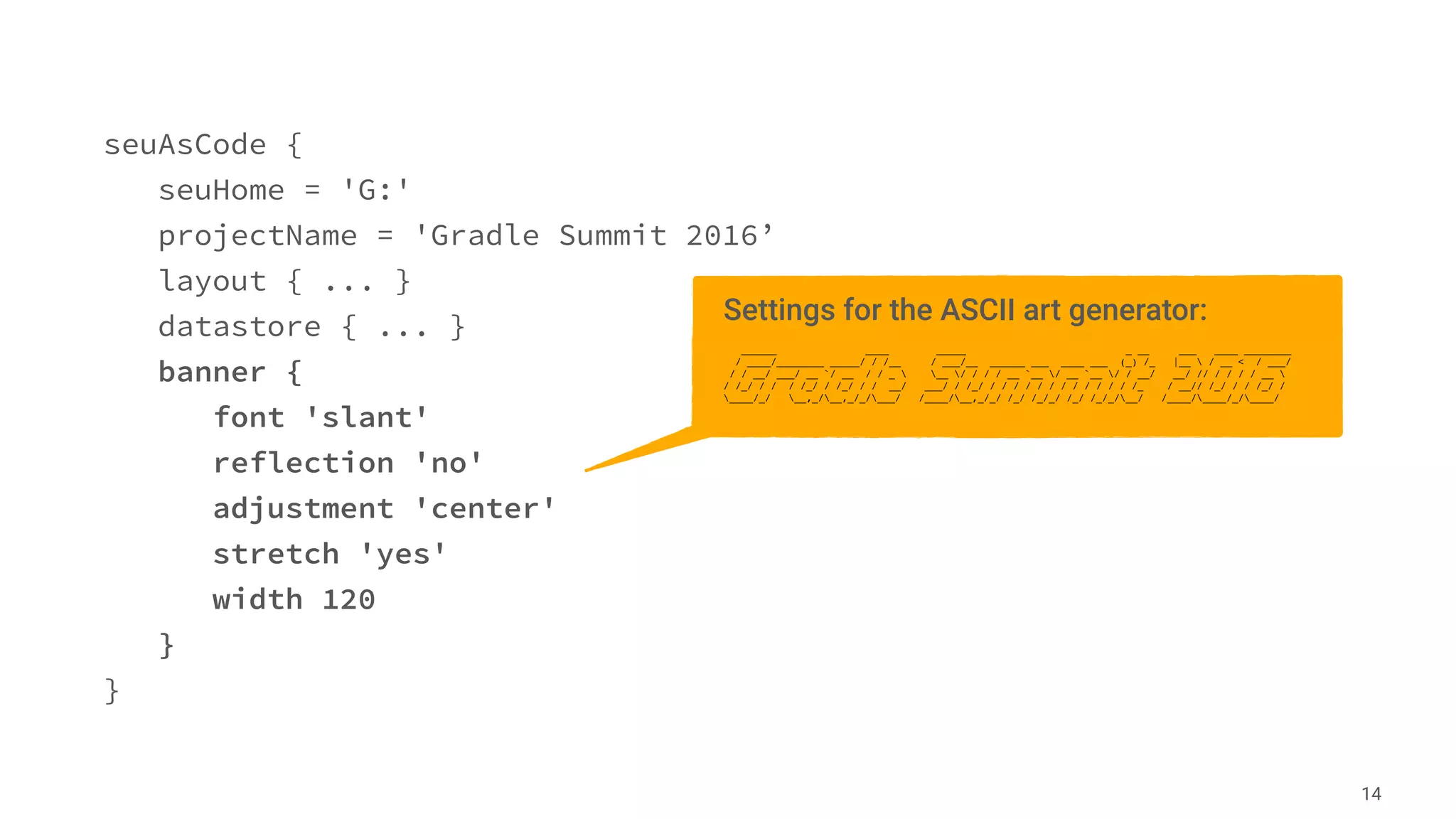
seuAsCode {
seuHome = 'G:'
projectName = 'Gradle Summit 2016’
layout { ... }
datastore { ... }
banner {
font 'slant'
reflection 'no'
adjustment 'center'
stretch 'yes'
width 120
}
}
14
Settings for the ASCII art generator:
______ ____ _____ _ __ ___ ____ ________
/ ____/________ _____/ / /__ / ___/__ ______ ___ ____ ___ (_) /_ |__  / __ < / ___/
/ / __/ ___/ __ `/ __ / / _  __ / / / / __ `__ / __ `__ / / __/ __/ // / / / / __ 
/ /_/ / / / /_/ / /_/ / / __/ ___/ / /_/ / / / / / / / / / / / / /_ / __// /_/ / / /_/ /
____/_/ __,_/__,_/_/___/ /____/__,_/_/ /_/ /_/_/ /_/ /_/_/__/ /____/____/_/____/
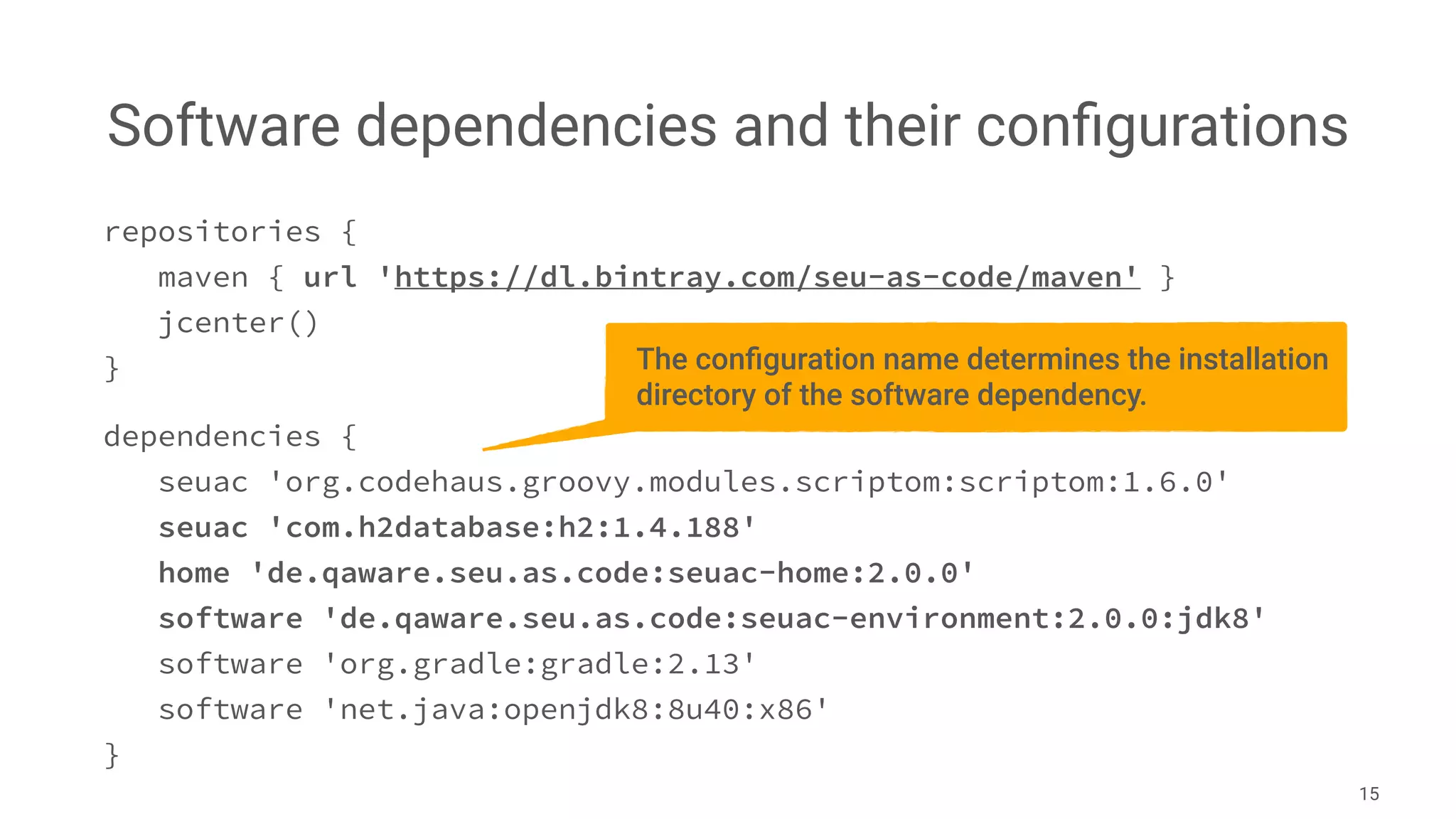
Software dependencies and their configurations
15
repositories {
maven { url 'https://dl.bintray.com/seu-as-code/maven' }
jcenter()
}
dependencies {
seuac 'org.codehaus.groovy.modules.scriptom:scriptom:1.6.0'
seuac 'com.h2database:h2:1.4.188'
home 'de.qaware.seu.as.code:seuac-home:2.0.0'
software 'de.qaware.seu.as.code:seuac-environment:2.0.0:jdk8'
software 'org.gradle:gradle:2.13'
software 'net.java:openjdk8:8u40:x86'
}
The configuration name determines the installation
directory of the software dependency.
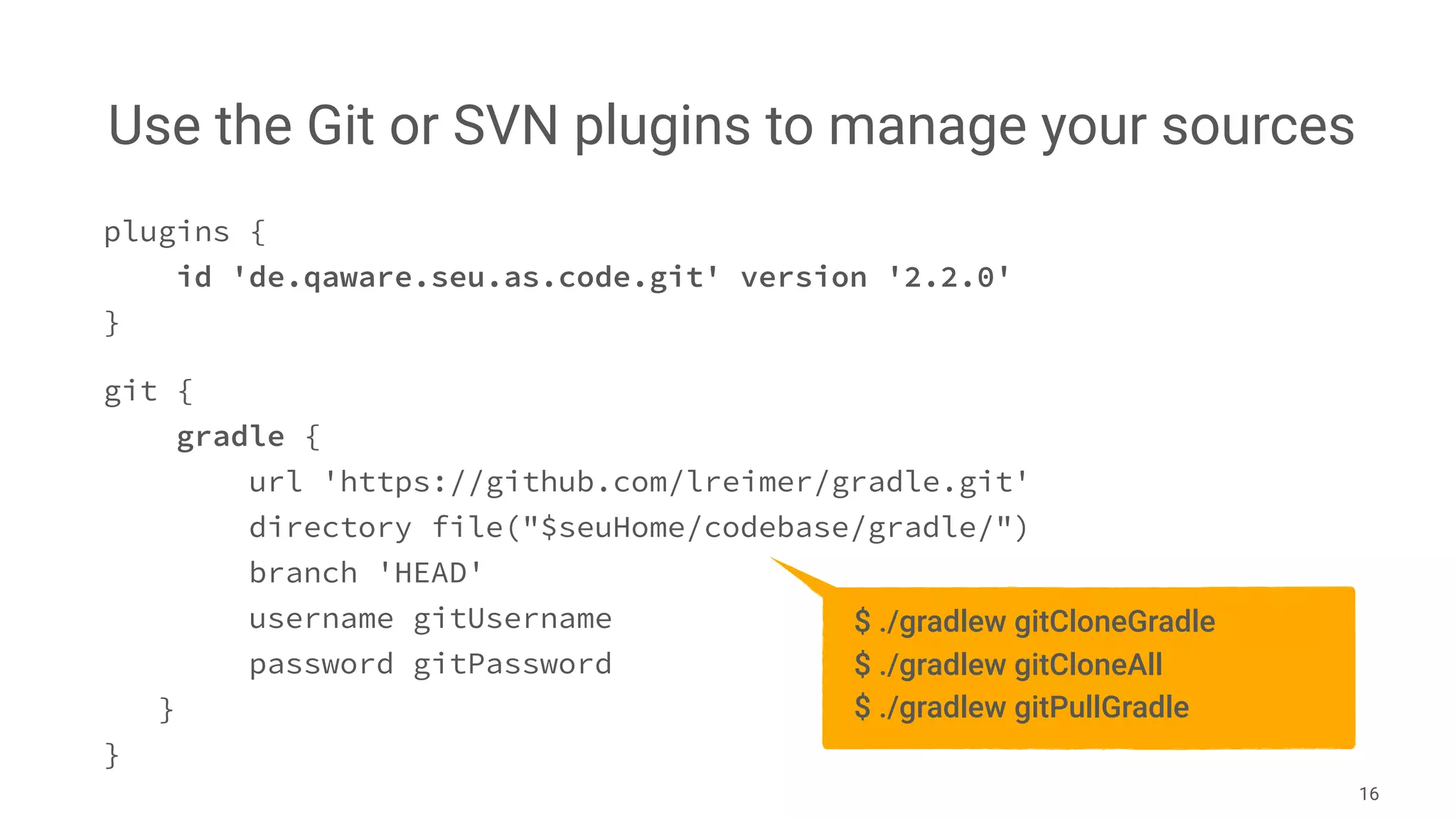
Use the Git or SVN plugins to manage your sources
16
plugins {
id 'de.qaware.seu.as.code.git' version '2.2.0'
}
git {
gradle {
url 'https://github.com/lreimer/gradle.git'
directory file("$seuHome/codebase/gradle/")
branch 'HEAD'
username gitUsername
password gitPassword
}
}
$ ./gradlew gitCloneGradle
$ ./gradlew gitCloneAll
$ ./gradlew gitPullGradle
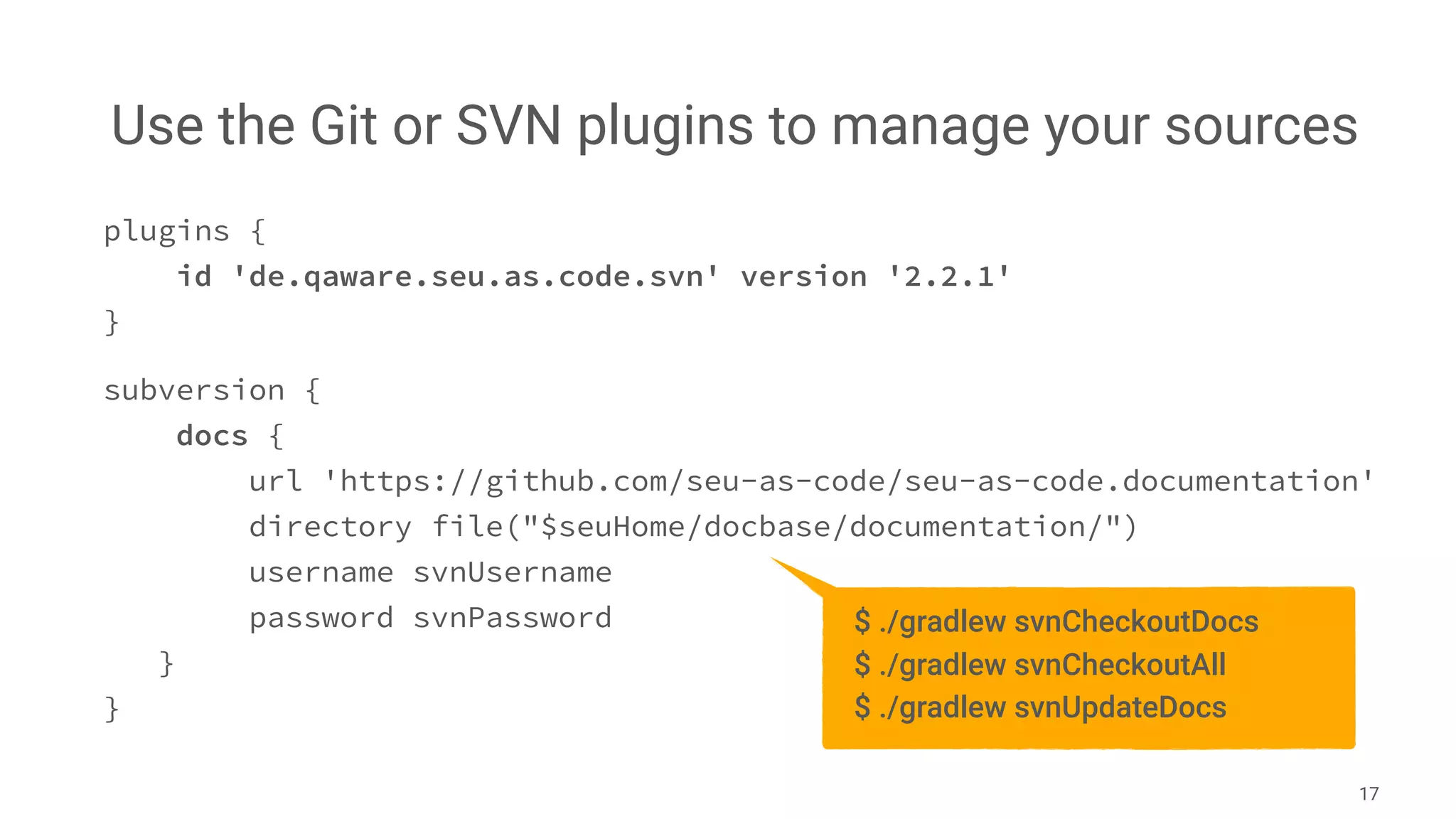
Use the Git or SVN plugins to manage your sources
17
plugins {
id 'de.qaware.seu.as.code.svn' version '2.2.1'
}
subversion {
docs {
url 'https://github.com/seu-as-code/seu-as-code.documentation'
directory file("$seuHome/docbase/documentation/")
username svnUsername
password svnPassword
}
}
$ ./gradlew svnCheckoutDocs
$ ./gradlew svnCheckoutAll
$ ./gradlew svnUpdateDocs
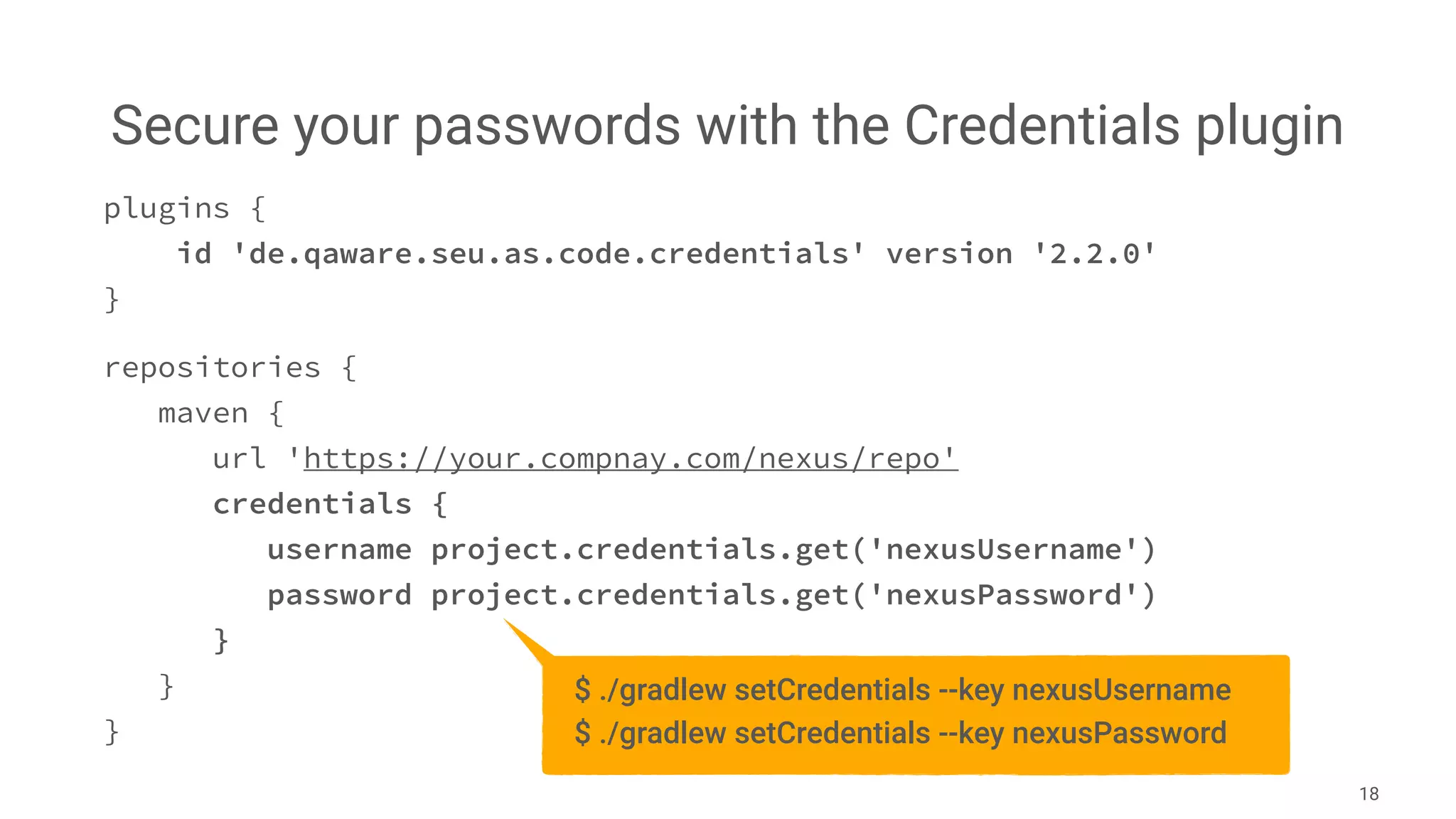
Secure your passwords with the Credentials plugin
18
plugins {
id 'de.qaware.seu.as.code.credentials' version '2.2.0'
}
repositories {
maven {
url 'https://your.compnay.com/nexus/repo'
credentials {
username project.credentials.get('nexusUsername')
password project.credentials.get('nexusPassword')
}
}
}
$ ./gradlew setCredentials --key nexusUsername
$ ./gradlew setCredentials --key nexusPassword
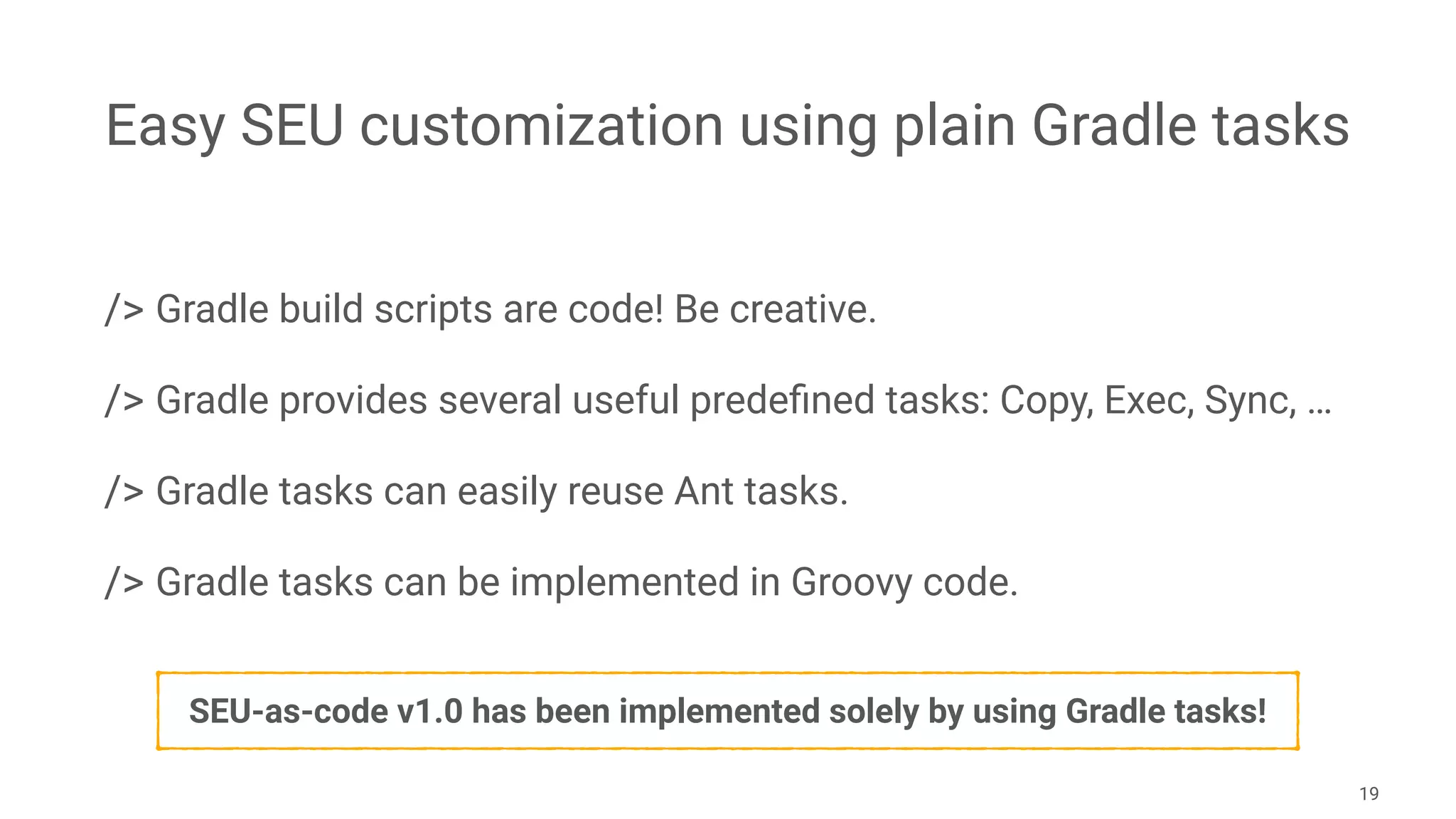
Easy SEU customization using plain Gradle tasks
/> Gradle build scripts are code! Be creative.
/> Gradle provides several useful predefined tasks: Copy, Exec, Sync, …
/> Gradle tasks can easily reuse Ant tasks.
/> Gradle tasks can be implemented in Groovy code.

19
SEU-as-code v1.0 has been implemented solely by using Gradle tasks!
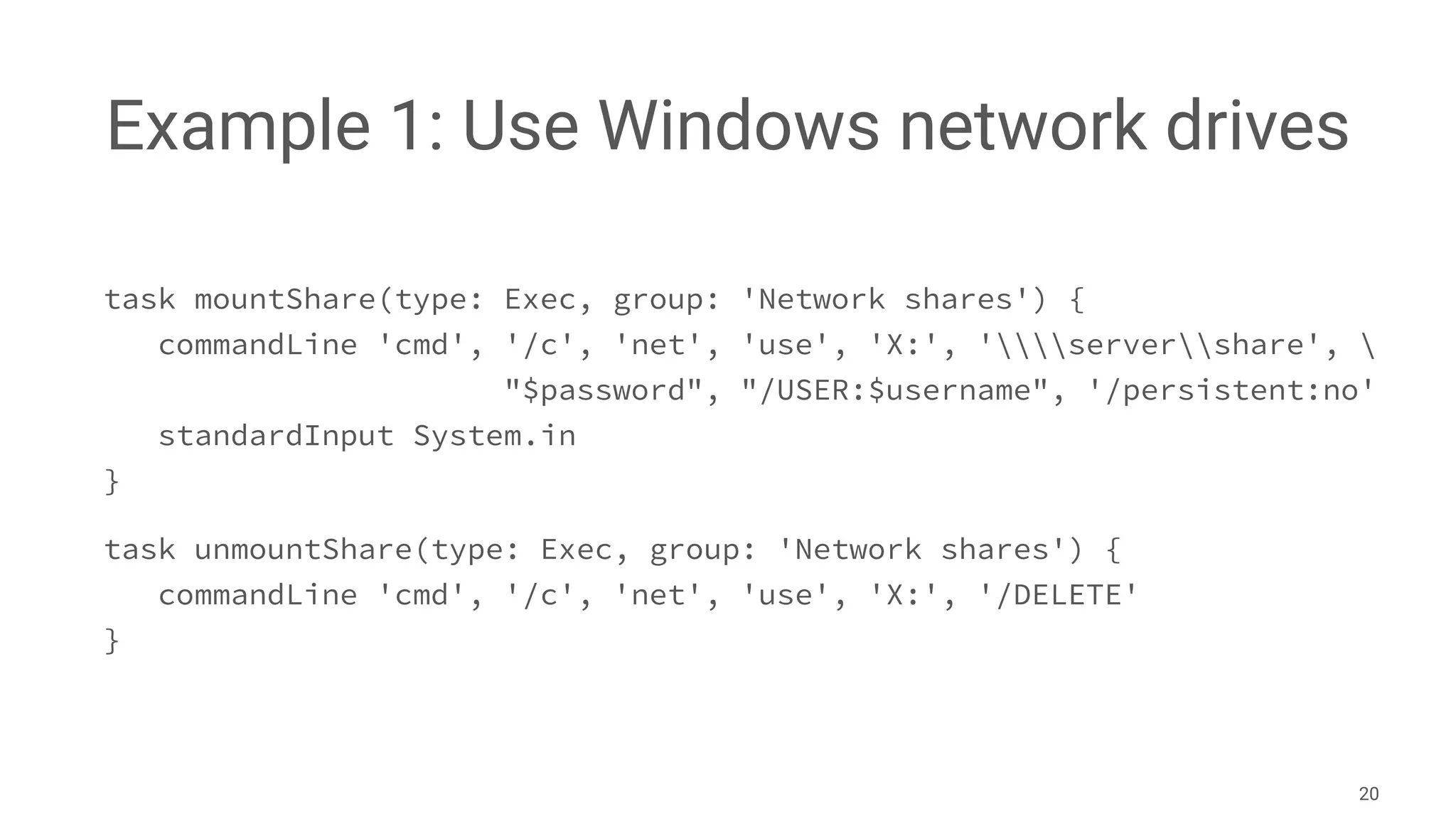
Example 1: Use Windows network drives
task mountShare(type: Exec, group: 'Network shares') {
commandLine 'cmd', '/c', 'net', 'use', 'X:', 'servershare', 
"$password", "/USER:$username", '/persistent:no'
standardInput System.in
}
task unmountShare(type: Exec, group: 'Network shares') {
commandLine 'cmd', '/c', 'net', 'use', 'X:', '/DELETE'
}
20
Example 2: Init and delete Derby DB
ext.derbyHome = System.env['DERBY_HOME']
task deleteDemoDb(type: Delete, group: 'Database') {
delete "$derbyHome/demo"
}
task initDemoDb(type: Exec, group: 'Database') {
workingDir "$derbyHome/bin"
commandLine 'cmd', '/B', '/C', 'ij.bat', "$rootDir/scripts/init.sql"
}
21
Example 3: Restore Solr index data
ext.cores = ['de_DE', 'en_GB', 'zh_CN']
task solrRestoreAll(group: 'Solr') { }
cores.each { coreName ->
def name = coreName.replaceAll("_", "").capitalize()
task "solrRestore${name}"(type: Sync, group: 'Solr') {
from zipTree("$rootDir/scripts/solr/${coreName}.zip")
into "$seuHome/software/solr-4.7.2/example/solr/${coreName}"
}
solrRestoreAll.dependsOn "solrRestore${name}"
}
22
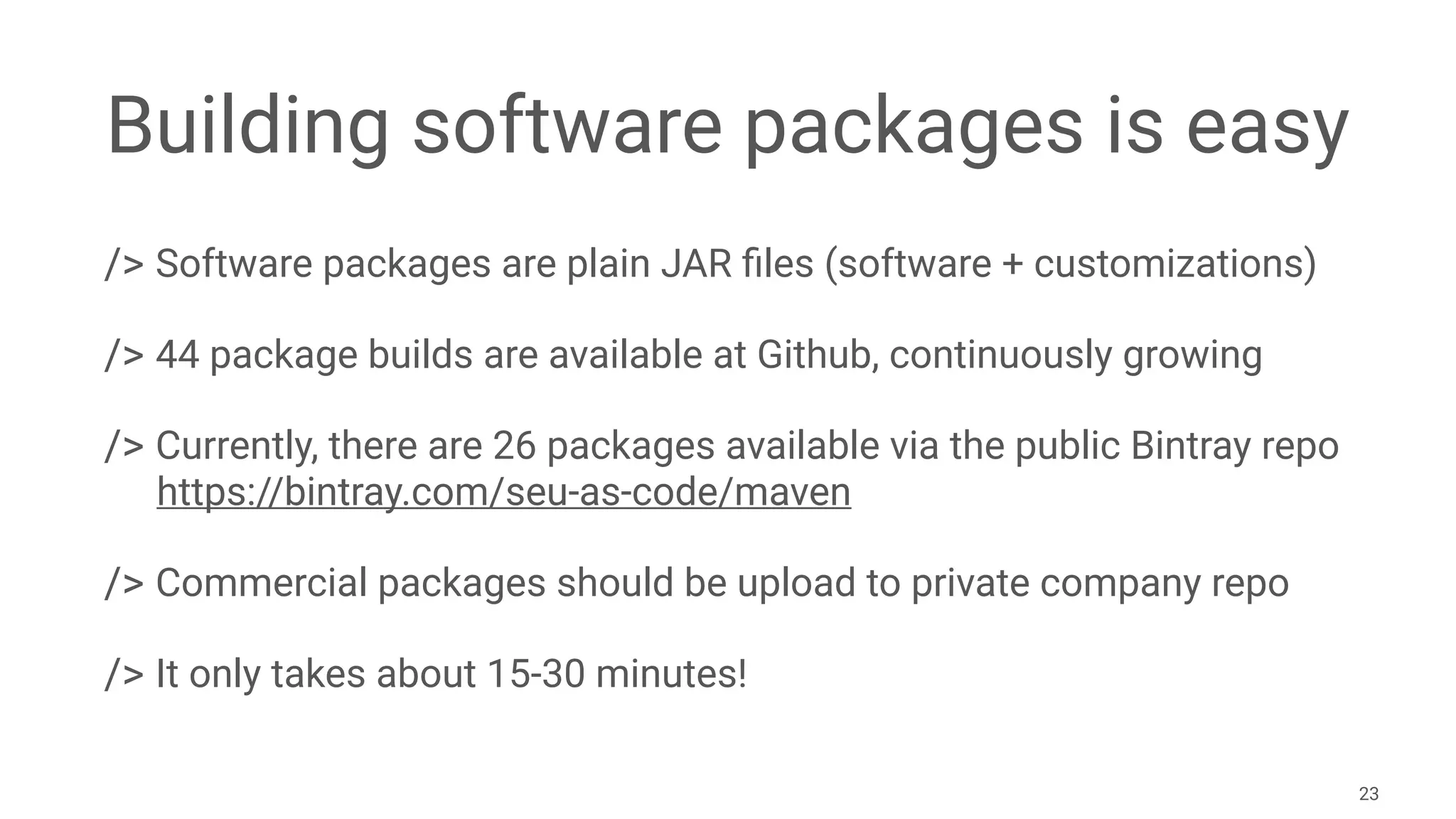
Building software packages is easy
/> Software packages are plain JAR files (software + customizations)
/> 44 package builds are available at Github, continuously growing
/> Currently, there are 26 packages available via the public Bintray repo

https://bintray.com/seu-as-code/maven
/> Commercial packages should be upload to private company repo
/> It only takes about 15-30 minutes!
23
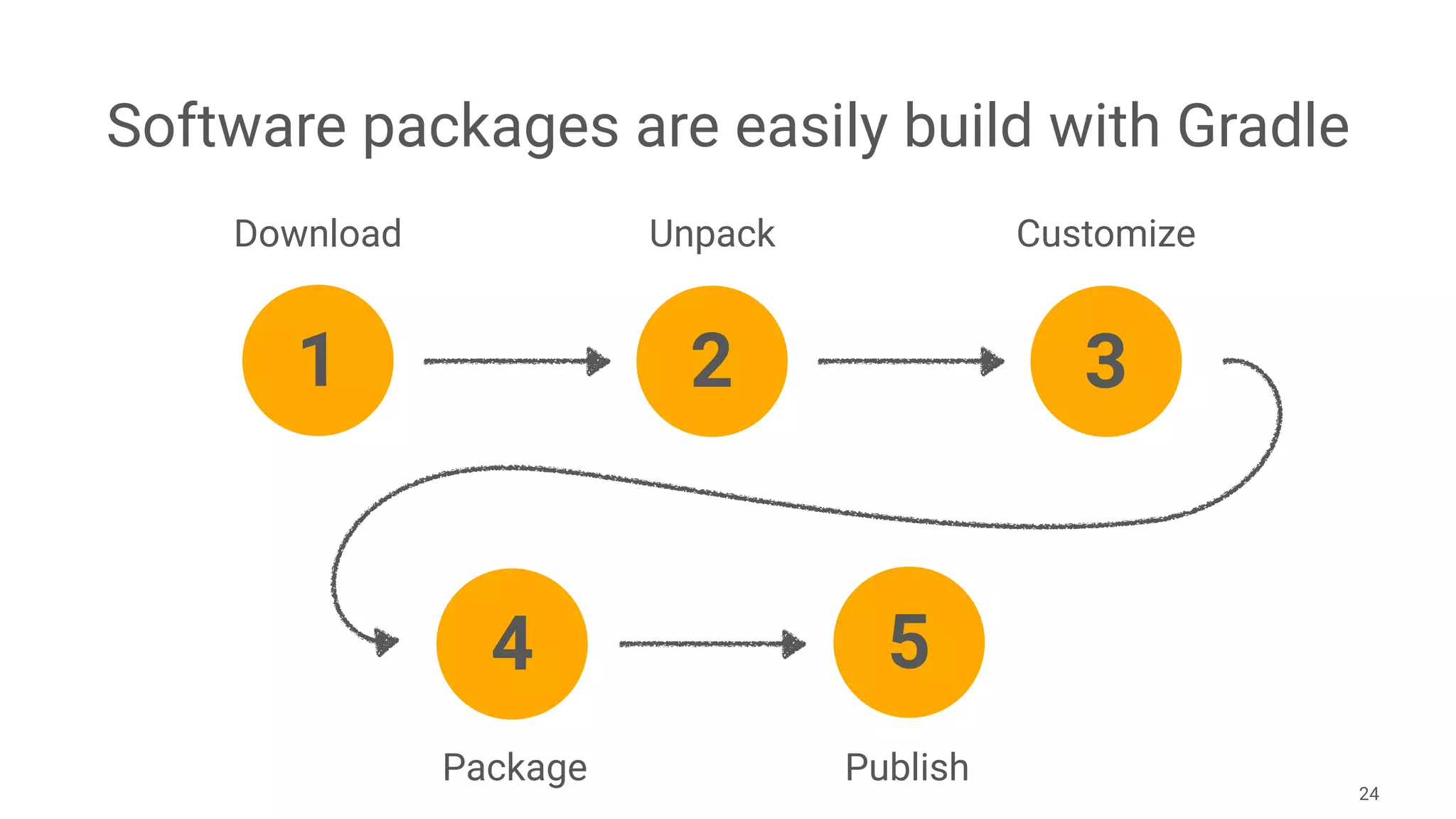
Software packages are easily build with Gradle
24
1
Download Unpack Customize
Package Publish
2 3
4 5
L E T ’ S B U I L D A
G R A D L E P A C K A G E
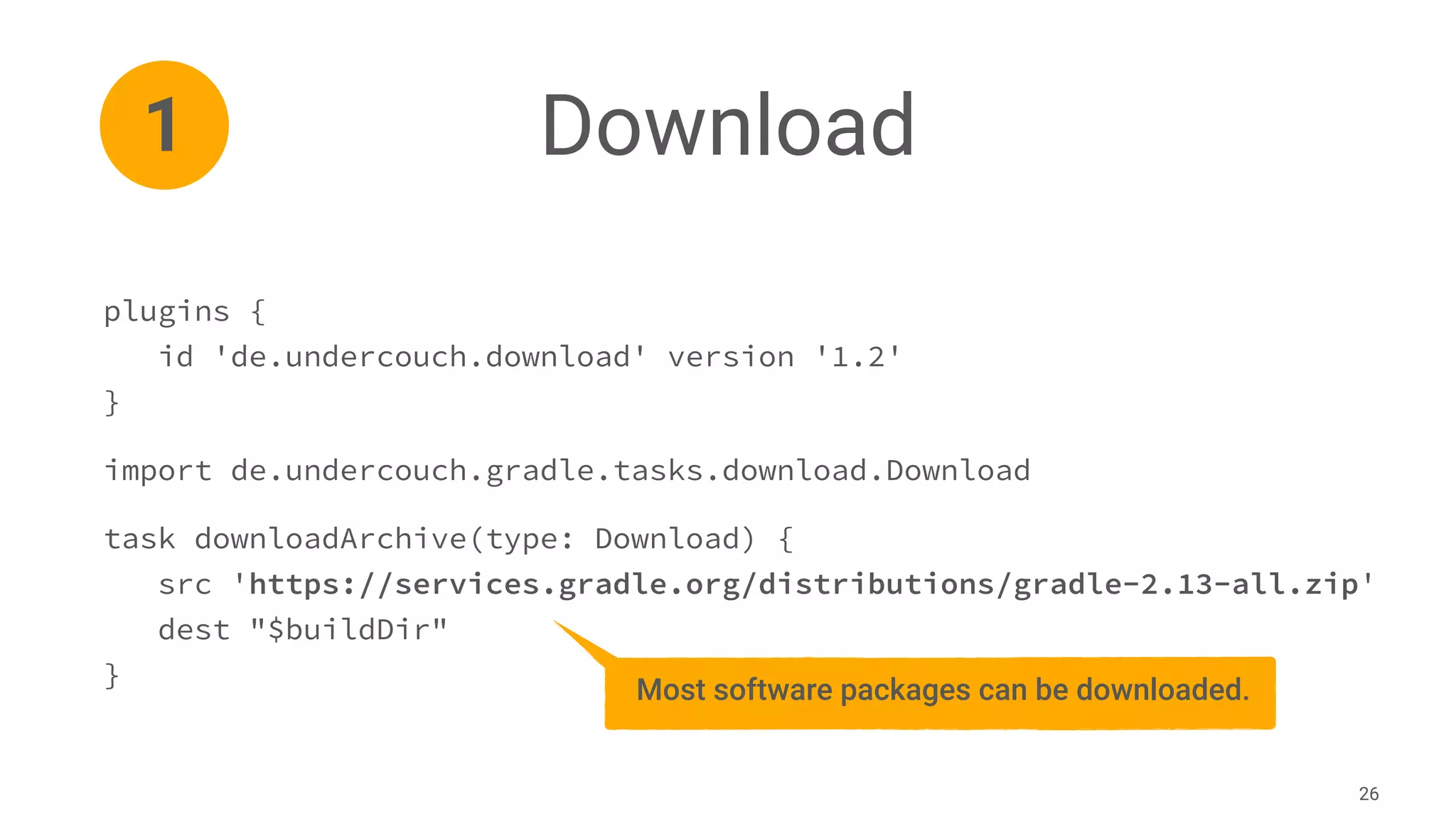
Download
26
plugins {
id 'de.undercouch.download' version '1.2'
}
import de.undercouch.gradle.tasks.download.Download
task downloadArchive(type: Download) {
src 'https://services.gradle.org/distributions/gradle-2.13-all.zip'
dest "$buildDir"
}
1
Most software packages can be downloaded.
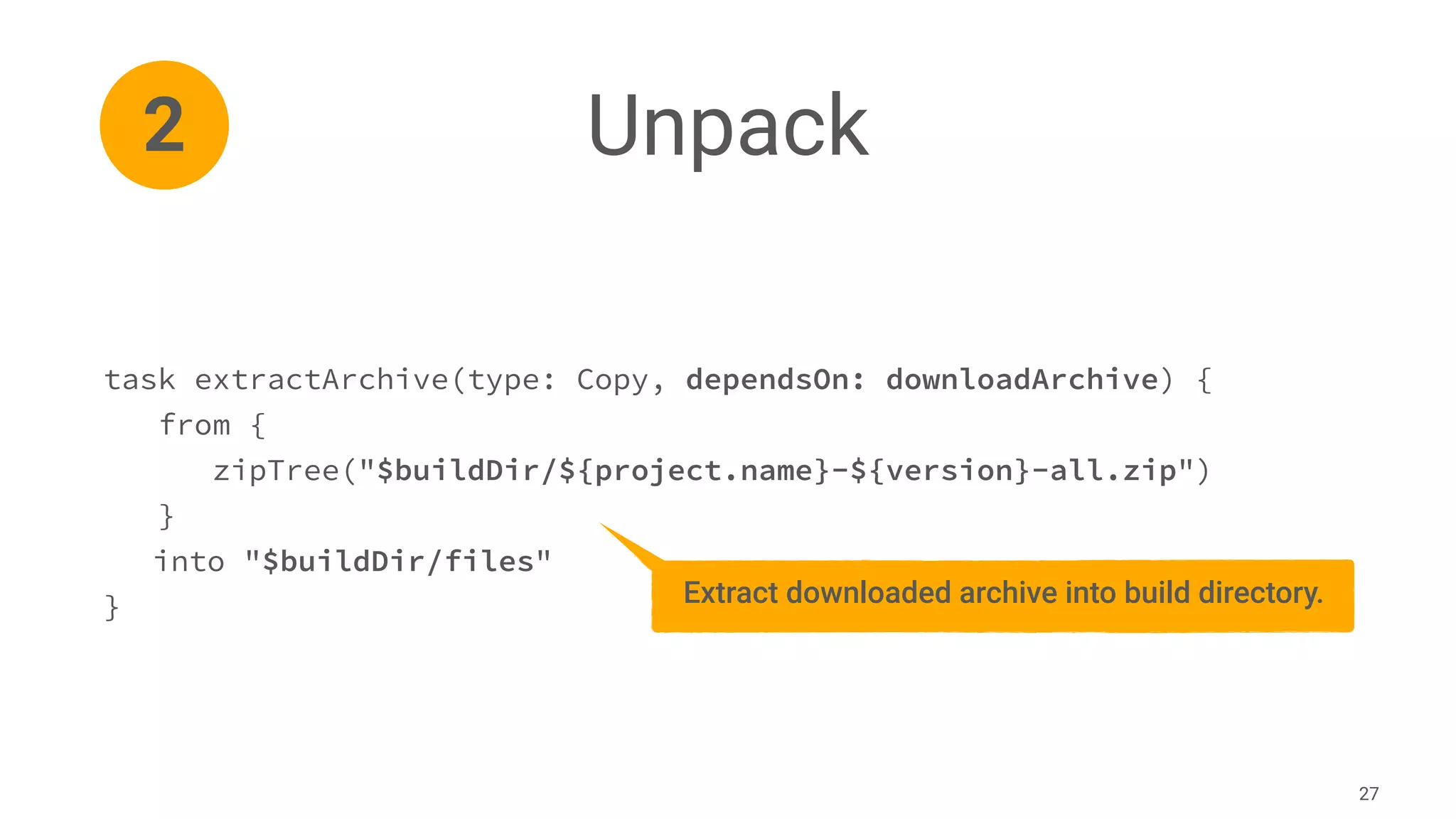
Unpack
27
task extractArchive(type: Copy, dependsOn: downloadArchive) {
from {
zipTree("$buildDir/${project.name}-${version}-all.zip")
}
into "$buildDir/files"
}
2
Extract downloaded archive into build directory.
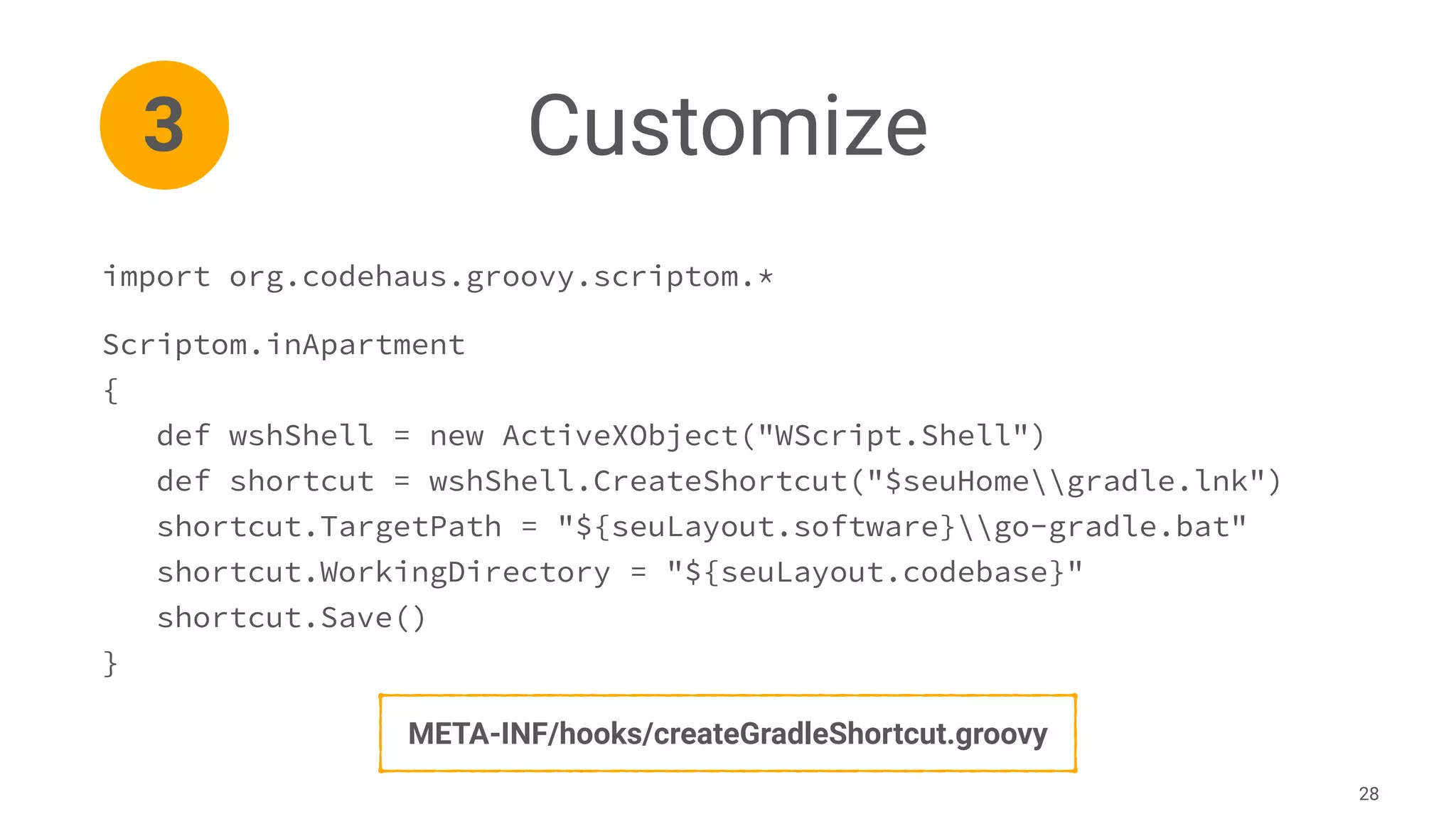
Customize
28
import org.codehaus.groovy.scriptom.*
Scriptom.inApartment
{
def wshShell = new ActiveXObject("WScript.Shell")
def shortcut = wshShell.CreateShortcut("$seuHomegradle.lnk")
shortcut.TargetPath = "${seuLayout.software}go-gradle.bat"
shortcut.WorkingDirectory = "${seuLayout.codebase}"
shortcut.Save()
}
3
META-INF/hooks/createGradleShortcut.groovy
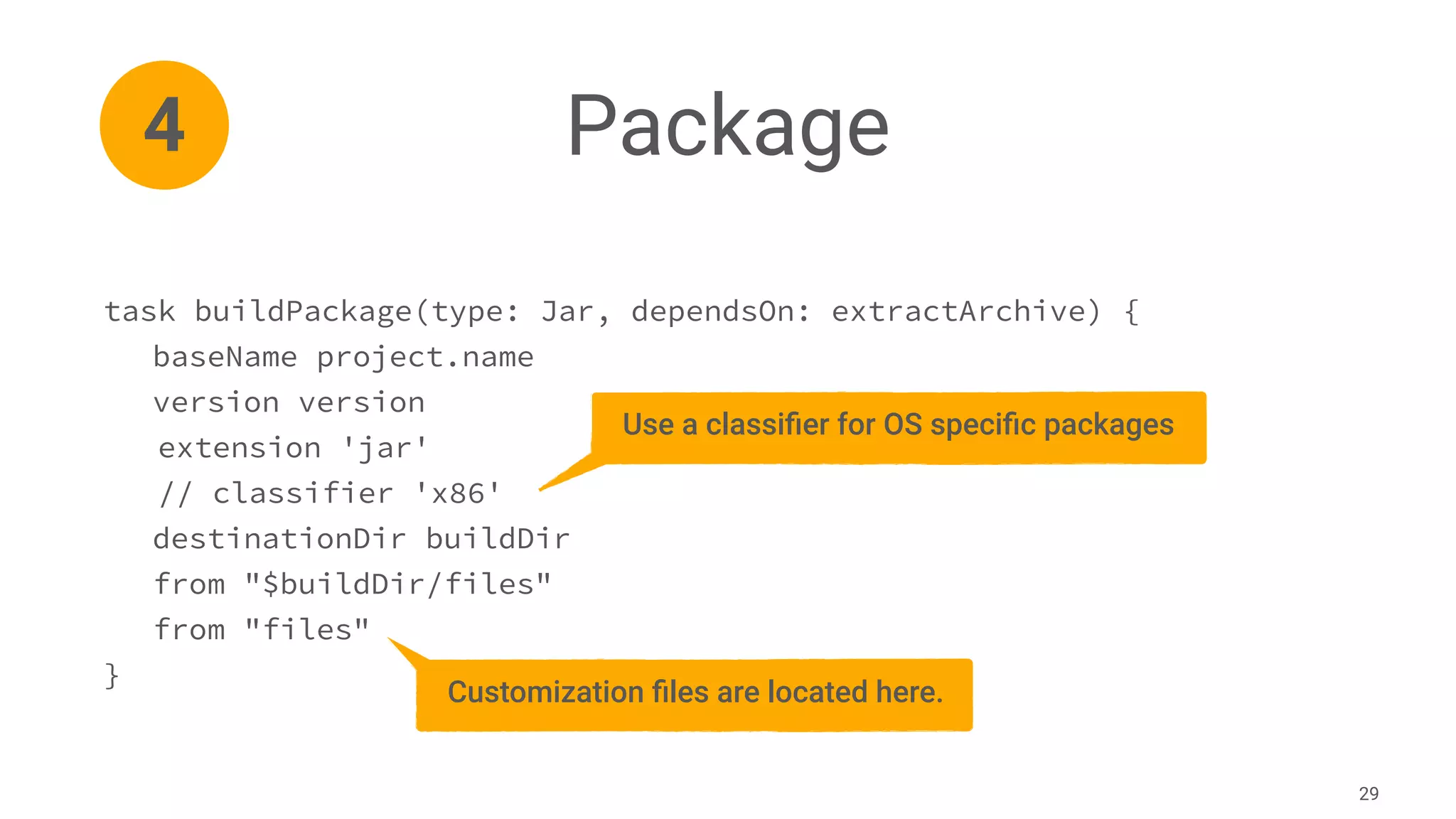
Package
29
4
task buildPackage(type: Jar, dependsOn: extractArchive) {
baseName project.name
version version
extension 'jar'
// classifier 'x86'
destinationDir buildDir
from "$buildDir/files"
from "files"
}
Use a classifier for OS specific packages
Customization files are located here.
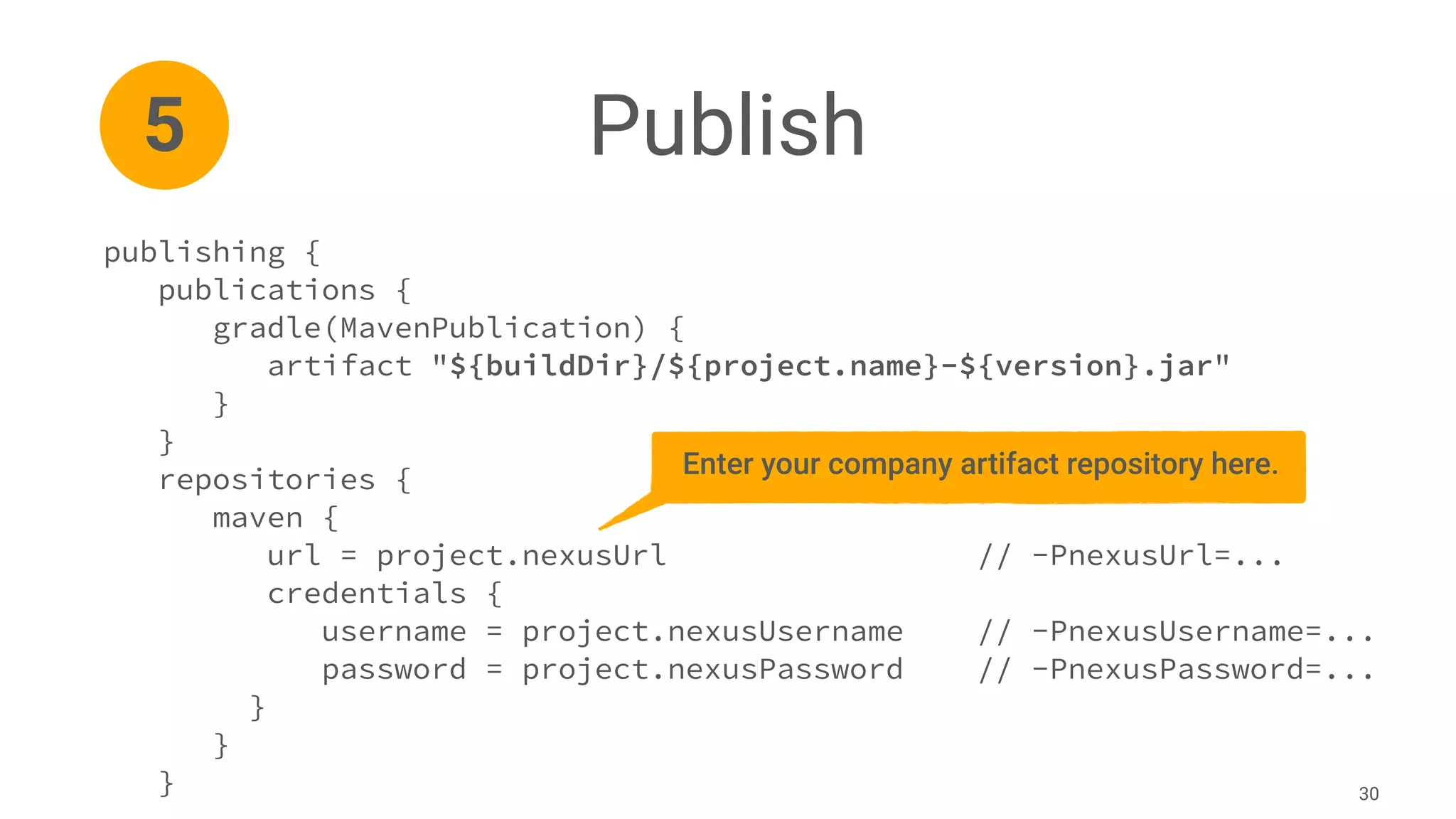
Publish
30
publishing {
publications {
gradle(MavenPublication) {
artifact "${buildDir}/${project.name}-${version}.jar"
}
}
repositories {
maven {
url = project.nexusUrl // -PnexusUrl=...
credentials {
username = project.nexusUsername // -PnexusUsername=...
password = project.nexusPassword // -PnexusPassword=...
}
}
}
5
Enter your company artifact repository here.
W H A T ’ S N E X T ?
The SEU-as-code Roadmap
/> Add support for Mac OS X SEU and mixed platform SEUs
/> Continuously add more and more software packages
/> Create plugin to securely store credentials in OS X key store
/> Create plugin to build software packages even quicker
/> Write and improve documentation and user’s guide
32
Contributions are welcome
/> git clone https://github.com/seu-as-code/seu-as-code.archetype.git
/> git clone https://github.com/seu-as-code/seu-as-code.plugins.git
/> git clone https://github.com/seu-as-code/seu-as-code.packages.git
/> git clone https://github.com/seu-as-code/seu-as-code.examples.git
/> git clone https://github.com/seu-as-code/seu-as-code.users-guide.git
33
Mario-Leander Reimer
Chief Technologist, QAware GmbH
mario-leander.reimer@qaware.de
https://seu-as-code.io
https://slideshare.net/MarioLeanderReimer/
https://speakerdeck.com/lreimer/
https://twitter.com/leanderreimer/
&
Learn more at www.gradle.org

Lightweight Developer Provisioning with Gradle

  • 1.
    Lightweight Developer Provisioningwith Gradle Mario-Leander Reimer Chief Technologist, QAware GmbH Gradle Summit 2016
  • 2.
    Agenda Example SEU in 15minutes Background and Motivation Build Software Packages Conventions and Plugins SEU Customization 1 * * * 1
  • 3.
    SEU-as-code 3 Software Entwicklung-Umgebung German acronym; softwaredevelopment environment programmed using source code
  • 4.
    Software Industrialization /> Automationof repetitive and laborious tasks /> Better software quality through standardized, streamlined tooling /> Well integrated tool chain leads to a higher productivity of your team /> Better cost efficiency and competitiveness 4 … Dev Test …
  • 5.
  • 6.
  • 7.
    So what arethe problems? /> Individual SEUs produce different results and strange bugs /> The SEU of a new project is often a copy of a previous project /> Older versions of a SEU can not easily be restored /> Manual and error prone update procedure of individual SEUs /> Batch files. No good IDE support for shell scripting 7
  • 8.
    The solution ... />Use a build tool for the automated creation and update of a SEU /> Gradle tasks and Groovy are used for all required shell scripting /> Everything is version controlled just like „normal" source code /> Required software packages are expressed as dependencies /> Software packages are stored in an artifact repository like Nexus 8
  • 9.
  • 10.
  • 11.
    The most minimalisticSEU gradle.build file 11 plugins { id 'de.qaware.seu.as.code.base' version '2.2.0' } seuAsCode { seuHome = 'G:' projectName = 'Gradle Summit 2016' } - Specify a driver letter or directory - Use VHD or sparse image file $ ./gradlew bootstrapSeu $ ./gradlew updateSeu
  • 12.
    seuAsCode { seuHome ='G:' projectName = 'Gradle Summit 2016’ layout { codebase 'G:/codebase/' docbase 'G:/docbase/' home 'G:/home/' repository 'G:/repository/' software 'G:/software/' temp 'G:/temp/' } datastore { ... } banner { ... } } 12 Directory names can be overridden in layout section
  • 13.
    seuAsCode { seuHome ='G:' projectName = 'Gradle Summit 2016’ layout { ... } datastore { url 'jdbc:h2:seuac‘ user 'sa' password 'secret' } banner { ... } } 13 Current storage options available: - H2 database - MapDB
  • 14.
    seuAsCode { seuHome ='G:' projectName = 'Gradle Summit 2016’ layout { ... } datastore { ... } banner { font 'slant' reflection 'no' adjustment 'center' stretch 'yes' width 120 } } 14 Settings for the ASCII art generator: ______ ____ _____ _ __ ___ ____ ________ / ____/________ _____/ / /__ / ___/__ ______ ___ ____ ___ (_) /_ |__ / __ < / ___/ / / __/ ___/ __ `/ __ / / _ __ / / / / __ `__ / __ `__ / / __/ __/ // / / / / __ / /_/ / / / /_/ / /_/ / / __/ ___/ / /_/ / / / / / / / / / / / / /_ / __// /_/ / / /_/ / ____/_/ __,_/__,_/_/___/ /____/__,_/_/ /_/ /_/_/ /_/ /_/_/__/ /____/____/_/____/
  • 15.
    Software dependencies andtheir configurations 15 repositories { maven { url 'https://dl.bintray.com/seu-as-code/maven' } jcenter() } dependencies { seuac 'org.codehaus.groovy.modules.scriptom:scriptom:1.6.0' seuac 'com.h2database:h2:1.4.188' home 'de.qaware.seu.as.code:seuac-home:2.0.0' software 'de.qaware.seu.as.code:seuac-environment:2.0.0:jdk8' software 'org.gradle:gradle:2.13' software 'net.java:openjdk8:8u40:x86' } The configuration name determines the installation directory of the software dependency.
  • 16.
    Use the Gitor SVN plugins to manage your sources 16 plugins { id 'de.qaware.seu.as.code.git' version '2.2.0' } git { gradle { url 'https://github.com/lreimer/gradle.git' directory file("$seuHome/codebase/gradle/") branch 'HEAD' username gitUsername password gitPassword } } $ ./gradlew gitCloneGradle $ ./gradlew gitCloneAll $ ./gradlew gitPullGradle
  • 17.
    Use the Gitor SVN plugins to manage your sources 17 plugins { id 'de.qaware.seu.as.code.svn' version '2.2.1' } subversion { docs { url 'https://github.com/seu-as-code/seu-as-code.documentation' directory file("$seuHome/docbase/documentation/") username svnUsername password svnPassword } } $ ./gradlew svnCheckoutDocs $ ./gradlew svnCheckoutAll $ ./gradlew svnUpdateDocs
  • 18.
    Secure your passwordswith the Credentials plugin 18 plugins { id 'de.qaware.seu.as.code.credentials' version '2.2.0' } repositories { maven { url 'https://your.compnay.com/nexus/repo' credentials { username project.credentials.get('nexusUsername') password project.credentials.get('nexusPassword') } } } $ ./gradlew setCredentials --key nexusUsername $ ./gradlew setCredentials --key nexusPassword
  • 19.
    Easy SEU customizationusing plain Gradle tasks /> Gradle build scripts are code! Be creative. /> Gradle provides several useful predefined tasks: Copy, Exec, Sync, … /> Gradle tasks can easily reuse Ant tasks. /> Gradle tasks can be implemented in Groovy code.
 19 SEU-as-code v1.0 has been implemented solely by using Gradle tasks!
  • 20.
    Example 1: UseWindows network drives task mountShare(type: Exec, group: 'Network shares') { commandLine 'cmd', '/c', 'net', 'use', 'X:', 'servershare', "$password", "/USER:$username", '/persistent:no' standardInput System.in } task unmountShare(type: Exec, group: 'Network shares') { commandLine 'cmd', '/c', 'net', 'use', 'X:', '/DELETE' } 20
  • 21.
    Example 2: Initand delete Derby DB ext.derbyHome = System.env['DERBY_HOME'] task deleteDemoDb(type: Delete, group: 'Database') { delete "$derbyHome/demo" } task initDemoDb(type: Exec, group: 'Database') { workingDir "$derbyHome/bin" commandLine 'cmd', '/B', '/C', 'ij.bat', "$rootDir/scripts/init.sql" } 21
  • 22.
    Example 3: RestoreSolr index data ext.cores = ['de_DE', 'en_GB', 'zh_CN'] task solrRestoreAll(group: 'Solr') { } cores.each { coreName -> def name = coreName.replaceAll("_", "").capitalize() task "solrRestore${name}"(type: Sync, group: 'Solr') { from zipTree("$rootDir/scripts/solr/${coreName}.zip") into "$seuHome/software/solr-4.7.2/example/solr/${coreName}" } solrRestoreAll.dependsOn "solrRestore${name}" } 22
  • 23.
    Building software packagesis easy /> Software packages are plain JAR files (software + customizations) /> 44 package builds are available at Github, continuously growing /> Currently, there are 26 packages available via the public Bintray repo
 https://bintray.com/seu-as-code/maven /> Commercial packages should be upload to private company repo /> It only takes about 15-30 minutes! 23
  • 24.
    Software packages areeasily build with Gradle 24 1 Download Unpack Customize Package Publish 2 3 4 5
  • 25.
    L E T’ S B U I L D A G R A D L E P A C K A G E
  • 26.
    Download 26 plugins { id 'de.undercouch.download'version '1.2' } import de.undercouch.gradle.tasks.download.Download task downloadArchive(type: Download) { src 'https://services.gradle.org/distributions/gradle-2.13-all.zip' dest "$buildDir" } 1 Most software packages can be downloaded.
  • 27.
    Unpack 27 task extractArchive(type: Copy,dependsOn: downloadArchive) { from { zipTree("$buildDir/${project.name}-${version}-all.zip") } into "$buildDir/files" } 2 Extract downloaded archive into build directory.
  • 28.
    Customize 28 import org.codehaus.groovy.scriptom.* Scriptom.inApartment { def wshShell= new ActiveXObject("WScript.Shell") def shortcut = wshShell.CreateShortcut("$seuHomegradle.lnk") shortcut.TargetPath = "${seuLayout.software}go-gradle.bat" shortcut.WorkingDirectory = "${seuLayout.codebase}" shortcut.Save() } 3 META-INF/hooks/createGradleShortcut.groovy
  • 29.
    Package 29 4 task buildPackage(type: Jar,dependsOn: extractArchive) { baseName project.name version version extension 'jar' // classifier 'x86' destinationDir buildDir from "$buildDir/files" from "files" } Use a classifier for OS specific packages Customization files are located here.
  • 30.
    Publish 30 publishing { publications { gradle(MavenPublication){ artifact "${buildDir}/${project.name}-${version}.jar" } } repositories { maven { url = project.nexusUrl // -PnexusUrl=... credentials { username = project.nexusUsername // -PnexusUsername=... password = project.nexusPassword // -PnexusPassword=... } } } 5 Enter your company artifact repository here.
  • 31.
    W H AT ’ S N E X T ?
  • 32.
    The SEU-as-code Roadmap />Add support for Mac OS X SEU and mixed platform SEUs /> Continuously add more and more software packages /> Create plugin to securely store credentials in OS X key store /> Create plugin to build software packages even quicker /> Write and improve documentation and user’s guide 32
  • 33.
    Contributions are welcome />git clone https://github.com/seu-as-code/seu-as-code.archetype.git /> git clone https://github.com/seu-as-code/seu-as-code.plugins.git /> git clone https://github.com/seu-as-code/seu-as-code.packages.git /> git clone https://github.com/seu-as-code/seu-as-code.examples.git /> git clone https://github.com/seu-as-code/seu-as-code.users-guide.git 33
  • 34.
    Mario-Leander Reimer Chief Technologist,QAware GmbH mario-leander.reimer@qaware.de https://seu-as-code.io https://slideshare.net/MarioLeanderReimer/ https://speakerdeck.com/lreimer/ https://twitter.com/leanderreimer/ &
  • 35.
    Learn more atwww.gradle.org