CMake / CTest / CPack


Open Source Tools to build, test, and install software

                 Bill Hoffman
                 bill.hoffman@kitware.com

                 BoostCon 2009
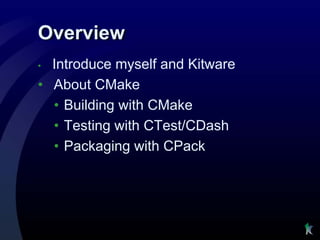
Overview
• Introduce myself and Kitware
• About CMake
  • Building with CMake
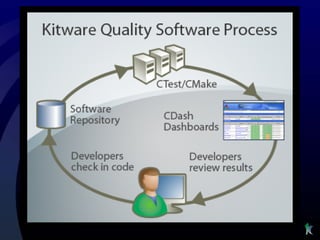
  • Testing with CTest/CDash
  • Packaging with CPack
Introductions
•   Bill Hoffman
     • 1990 – 1999 GE Global Research Center Computer Vision
         Group
          • Large C++ research environments
     • 1999 – Present Vice President Kitware Inc
•   Kitware Inc
     • Founded in 1998
     • Privately held
     • 55 employees and 2 locations (and hiring)
          • Clifton Park NY, USA
          • Chapel Hill, NC, USA
     • Supporting many open source projects
     • Medical Imaging, Super computing, Computer Vision
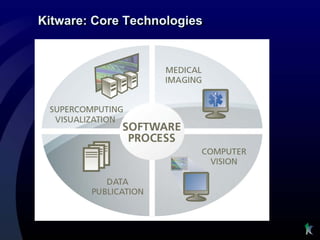
Kitware: Core Technologies


   Supercomputing                                    Medical
    Visualization                                    Imaging
    •   Large data                                    •   Registration
    •   Parallel computing                            •   Segmentation
    •   Client / Server                               •   Image Processing
    •   Web / grid architectures
                                                      •   Measurement
    •   Human/Computer
                                                      •   Responsive GUI
        Interaction
                                      Software
                                      Process
   Open-Source                                            Computer
     Toolkits                                              Vision
    •   Insight ToolKit (ITK)                    Expertise in:
    •   VisualizationToolkit (VTK)               • Behavior/event recognition
    •   CMake                                    • Detection and tracking
    •   ParaView                                 • Segmentation
    •   Publications and consulting              • Change Detection
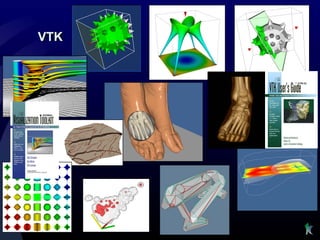
VTK
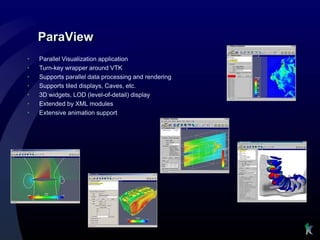
ParaView
•   Parallel Visualization application
•   Turn-key wrapper around VTK
•   Supports parallel data processing and rendering
•   Supports tiled displays, Caves, etc.
•   3D widgets, LOD (level-of-detail) display
•   Extended by XML modules
•   Extensive animation support
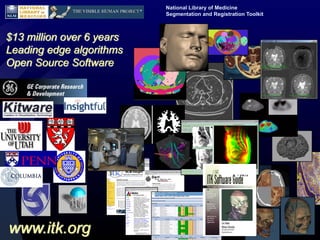
National Library of Medicine
                           Segmentation and Registration Toolkit


$13 million over 6 years
Leading edge algorithms
Open Source Software


www.itk.org
CMake
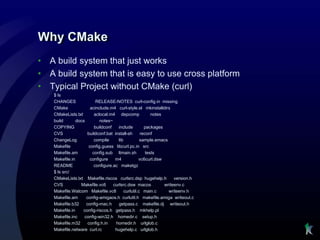
Why CMake
•   A build system that just works
•   A build system that is easy to use cross platform
•   Typical Project without CMake (curl)
     $ ls
     CHANGES                RELEASE-NOTES curl-config.in missing
     CMake               acinclude.m4 curl-style.el mkinstalldirs
     CMakeLists.txt        aclocal.m4 depcomp               notes
     build       docs         notes~
     COPYING               buildconf    include         packages
     CVS               buildconf.bat install-sh       reconf
     ChangeLog             compile      lib           sample.emacs
     Makefile           config.guess libcurl.pc.in src
     Makefile.am          config.sub ltmain.sh           tests
     Makefile.in        configure     m4             vc6curl.dsw
     README                configure.ac maketgz
     $ ls src/
     CMakeLists.txt Makefile.riscos curlsrc.dsp hugehelp.h             version.h
     CVS           Makefile.vc6      curlsrc.dsw macos            writeenv.c
     Makefile.Watcom Makefile.vc8           curlutil.c main.c       writeenv.h
     Makefile.am      config-amigaos.h curlutil.h makefile.amiga writeout.c
     Makefile.b32     config-mac.h      getpass.c makefile.dj writeout.h
     Makefile.in    config-riscos.h getpass.h mkhelp.pl
     Makefile.inc    config-win32.h homedir.c setup.h
     Makefile.m32      config.h.in    homedir.h urlglob.c
     Makefile.netware curl.rc         hugehelp.c urlglob.h
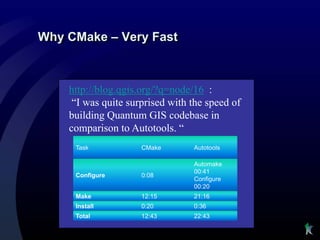
Why CMake – Very Fast


    http://blog.qgis.org/?q=node/16 :
     “I was quite surprised with the speed of
    building Quantum GIS codebase in
    comparison to Autotools. “
     Task            CMake       Autotools

                                 Automake
                                 00:41
     Configure       0:08
                                 Configure
                                 00:20
     Make            12:15       21:16
     Install         0:20        0:36
     Total           12:43       22:43
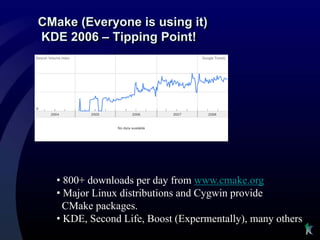
CMake (Everyone is using it)
KDE 2006 – Tipping Point!


   • 800+ downloads per day from www.cmake.org
   • Major Linux distributions and Cygwin provide
     CMake packages.
   • KDE, Second Life, Boost (Expermentally), many others
What is CMake?
• Family of Software Development Tools
   • Build – CMake
   • Test – CTest/CDash
   • Package – CPack

• Open-Source License

• History
   • Insight Segmentation & Registration Toolkit (~2000)
   • Changed the way we build
Who is involved?
• Users            • Supporters
   • KDE              • Kitware
   • Second Life      • National Library of Medicine
   • ITK              • Sandia National Labs
                      • Los Alamos National Labs
   • VTK
                      • NAMIC
   • ParaView
                      • ARL
   • Scribus
   • many more
CMake Documentation
• Mastering CMake Book
• Web Page: www.cmake.org
• http://www.cmake.org/Wiki/CMake
• mailing list: cmake@cmake.org
• Full reference documentation
   • http://www.cmake.org/cmake/help/documentation.html
   • Ships HTML, man, and command line help
• Tutorial included and tested in source tree
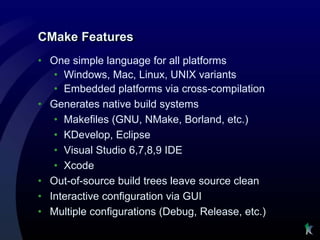
CMake Features
• One simple language for all platforms
   • Windows, Mac, Linux, UNIX variants
   • Embedded platforms via cross-compilation
• Generates native build systems
   • Makefiles (GNU, NMake, Borland, etc.)
   • KDevelop, Eclipse
   • Visual Studio 6,7,8,9 IDE
   • Xcode
• Out-of-source build trees leave source clean
• Interactive configuration via GUI
• Multiple configurations (Debug, Release, etc.)
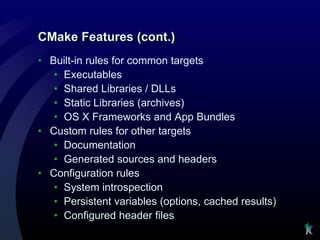
CMake Features (cont.)
• Built-in rules for common targets
   • Executables
   • Shared Libraries / DLLs
   • Static Libraries (archives)
   • OS X Frameworks and App Bundles
• Custom rules for other targets
   • Documentation
   • Generated sources and headers
• Configuration rules
   • System introspection
   • Persistent variables (options, cached results)
   • Configured header files
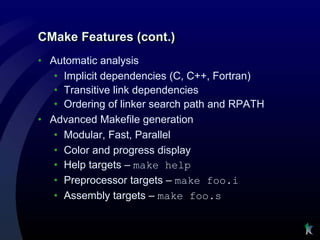
CMake Features (cont.)
• Automatic analysis
   • Implicit dependencies (C, C++, Fortran)
   • Transitive link dependencies
   • Ordering of linker search path and RPATH
• Advanced Makefile generation
   • Modular, Fast, Parallel
   • Color and progress display
   • Help targets – make help
   • Preprocessor targets – make foo.i
   • Assembly targets – make foo.s
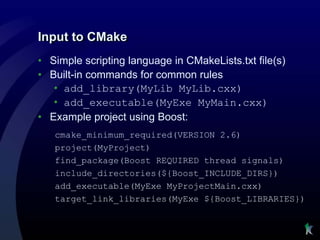
Input to CMake
• Simple scripting language in CMakeLists.txt file(s)
• Built-in commands for common rules
   • add_library(MyLib MyLib.cxx)
   • add_executable(MyExe MyMain.cxx)
• Example project using Boost:
   cmake_minimum_required(VERSION 2.6)
   project(MyProject)
   find_package(Boost REQUIRED thread signals)
   include_directories(${Boost_INCLUDE_DIRS})
   add_executable(MyExe MyProjectMain.cxx)
   target_link_libraries(MyExe ${Boost_LIBRARIES})
Installing CMake
•   Easy to Get CMake
     • http://www.cmake.org/cmake/resources/software.html
     • Many Linux distributions and Cygwin include CMake
        packages
         • apt-get install cmake
•   Installing CMake from www.cmake.org
     • Windows Binary installers
     • Linux Binaries – can be installed anywhere, (don’t need root)
     • Mac
     • Other UNIX on download page
     • Source can bootstrap on any Unix platform
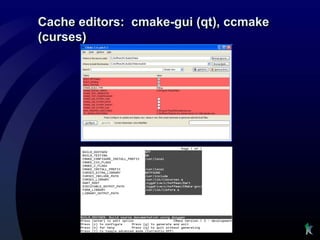
Cache editors: cmake-gui (qt), ccmake
(curses)
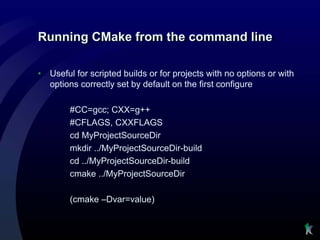
Running CMake from the command line

•   Useful for scripted builds or for projects with no options or with
    options correctly set by default on the first configure

         #CC=gcc; CXX=g++
         #CFLAGS, CXXFLAGS
         cd MyProjectSourceDir
         mkdir ../MyProjectSourceDir-build
         cd ../MyProjectSourceDir-build
         cmake ../MyProjectSourceDir

         (cmake –Dvar=value)
cmake scripts
•   cmake –E command
     • Cross platform command line utility
     • Ex. Copy file, Remove file, Compare and conditionally copy,
       time etc
•   cmake –P script.cmake
     • Cross platform scripting utility
     • Does not generate cmake_cache
     • Ignores commands specific to generating build environment
CTest/CDash
Testing with CMake, CTest and CDash
•   Testing command in CMake
     • add_test ( testname exename arg1 arg2 arg3 …)
     • Executable is expected to return 0 for passed
     • Can set other test passing conditions based on output
        matching.
•   ctest – an executable that is distributed with cmake that can run
    tests in a project.
     • Used for continuous integration testing
     • Client for CDash
     • Can be use for both CMake based projects and other build
        systems
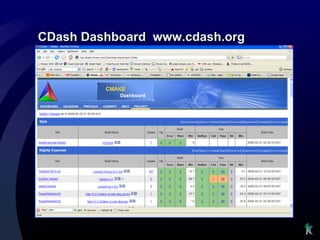
CDash Dashboard www.cdash.org
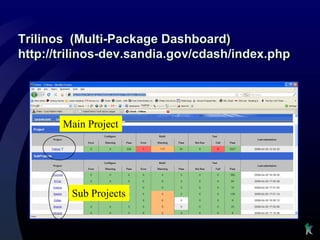
Trilinos (Multi-Package Dashboard)
http://trilinos-dev.sandia.gov/cdash/index.php


       Main Project


         Sub Projects
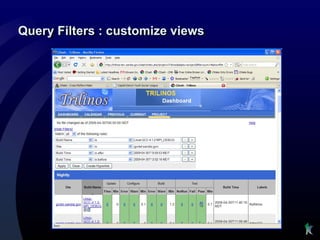
Query Filters : customize views
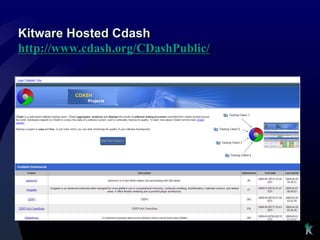
Kitware Hosted Cdash
http://www.cdash.org/CDashPublic/
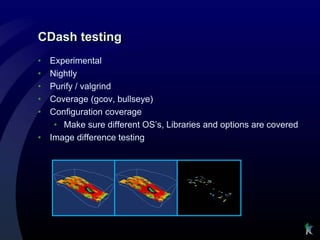
CDash testing
•   Experimental
•   Nightly
•   Purify / valgrind
•   Coverage (gcov, bullseye)
•   Configuration coverage
     • Make sure different OS’s, Libraries and options are covered
•   Image difference testing
CMake Tutorial — Step7
Adding dashboard support


• Demo
   • add dashboard support to tutorial with CDash
Configuration Coverage
•   CMake
     • Spaces in paths
     • Network paths
     • Different drive letters and directories
•   VTK
     • Mesa
     • OpenGL
     • CMake release
     • Current CMake
CPack
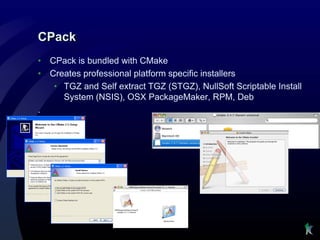
•   CPack is bundled with CMake
•   Creates professional platform specific installers
     • TGZ and Self extract TGZ (STGZ), NullSoft Scriptable Install
       System (NSIS), OSX PackageMaker, RPM, Deb
.
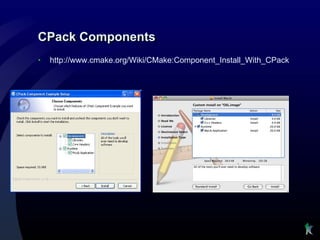
CPack Components
•   http://www.cmake.org/Wiki/CMake:Component_Install_With_CPack
Using CPack
•   On Windows install command line ZIP program, and NSIS
•   setup your project to work with cpack
     • set cpack option variables if needed
     • include(CPack)
     • Reuses existing project install rules
•   Running cpack
     • make package (create all packages)
     • make package_source (create source package)
     • cpack -C CPackConfig.cmake -G NSIS
     • cpack -C CPackConfig.cmake -G ZIP
     • cpack -C CPackSourceConfig.cmake -G ZIP
CPack more information
•   Mastering CMake
•   http://www.cmake.org/Wiki/CMake:Packaging_With_CPack
Summary
•   Build - CMake
•   Test - CTest /CDash/KWStyle
•   Deploy – CPack

•   Links
     • www.kitware.com
     • www.cmake.org
     • www.cdash.org
     • https://svn.boost.org/trac/boost/wiki/CMake
     • bill.hoffman@kitware.com
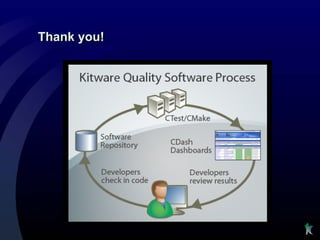
Thank you!

Cmake kitware

  • 1.
    CMake / CTest/ CPack Open Source Tools to build, test, and install software Bill Hoffman bill.hoffman@kitware.com BoostCon 2009
  • 3.
    Overview • Introduce myselfand Kitware • About CMake • Building with CMake • Testing with CTest/CDash • Packaging with CPack
  • 4.
    Introductions • Bill Hoffman • 1990 – 1999 GE Global Research Center Computer Vision Group • Large C++ research environments • 1999 – Present Vice President Kitware Inc • Kitware Inc • Founded in 1998 • Privately held • 55 employees and 2 locations (and hiring) • Clifton Park NY, USA • Chapel Hill, NC, USA • Supporting many open source projects • Medical Imaging, Super computing, Computer Vision
  • 5.
    Kitware: Core Technologies Supercomputing Medical Visualization Imaging • Large data • Registration • Parallel computing • Segmentation • Client / Server • Image Processing • Web / grid architectures • Measurement • Human/Computer • Responsive GUI Interaction Software Process Open-Source Computer Toolkits Vision • Insight ToolKit (ITK) Expertise in: • VisualizationToolkit (VTK) • Behavior/event recognition • CMake • Detection and tracking • ParaView • Segmentation • Publications and consulting • Change Detection
  • 6.
  • 7.
    ParaView • Parallel Visualization application • Turn-key wrapper around VTK • Supports parallel data processing and rendering • Supports tiled displays, Caves, etc. • 3D widgets, LOD (level-of-detail) display • Extended by XML modules • Extensive animation support
  • 8.
    National Library ofMedicine Segmentation and Registration Toolkit $13 million over 6 years Leading edge algorithms Open Source Software www.itk.org
  • 9.
  • 10.
    Why CMake • A build system that just works • A build system that is easy to use cross platform • Typical Project without CMake (curl) $ ls CHANGES RELEASE-NOTES curl-config.in missing CMake acinclude.m4 curl-style.el mkinstalldirs CMakeLists.txt aclocal.m4 depcomp notes build docs notes~ COPYING buildconf include packages CVS buildconf.bat install-sh reconf ChangeLog compile lib sample.emacs Makefile config.guess libcurl.pc.in src Makefile.am config.sub ltmain.sh tests Makefile.in configure m4 vc6curl.dsw README configure.ac maketgz $ ls src/ CMakeLists.txt Makefile.riscos curlsrc.dsp hugehelp.h version.h CVS Makefile.vc6 curlsrc.dsw macos writeenv.c Makefile.Watcom Makefile.vc8 curlutil.c main.c writeenv.h Makefile.am config-amigaos.h curlutil.h makefile.amiga writeout.c Makefile.b32 config-mac.h getpass.c makefile.dj writeout.h Makefile.in config-riscos.h getpass.h mkhelp.pl Makefile.inc config-win32.h homedir.c setup.h Makefile.m32 config.h.in homedir.h urlglob.c Makefile.netware curl.rc hugehelp.c urlglob.h
  • 11.
    Why CMake –Very Fast http://blog.qgis.org/?q=node/16 : “I was quite surprised with the speed of building Quantum GIS codebase in comparison to Autotools. “ Task CMake Autotools Automake 00:41 Configure 0:08 Configure 00:20 Make 12:15 21:16 Install 0:20 0:36 Total 12:43 22:43
  • 12.
    CMake (Everyone isusing it) KDE 2006 – Tipping Point! • 800+ downloads per day from www.cmake.org • Major Linux distributions and Cygwin provide CMake packages. • KDE, Second Life, Boost (Expermentally), many others
  • 13.
    What is CMake? •Family of Software Development Tools • Build – CMake • Test – CTest/CDash • Package – CPack • Open-Source License • History • Insight Segmentation & Registration Toolkit (~2000) • Changed the way we build
  • 14.
    Who is involved? •Users • Supporters • KDE • Kitware • Second Life • National Library of Medicine • ITK • Sandia National Labs • Los Alamos National Labs • VTK • NAMIC • ParaView • ARL • Scribus • many more
  • 15.
    CMake Documentation • MasteringCMake Book • Web Page: www.cmake.org • http://www.cmake.org/Wiki/CMake • mailing list: cmake@cmake.org • Full reference documentation • http://www.cmake.org/cmake/help/documentation.html • Ships HTML, man, and command line help • Tutorial included and tested in source tree
  • 16.
    CMake Features • Onesimple language for all platforms • Windows, Mac, Linux, UNIX variants • Embedded platforms via cross-compilation • Generates native build systems • Makefiles (GNU, NMake, Borland, etc.) • KDevelop, Eclipse • Visual Studio 6,7,8,9 IDE • Xcode • Out-of-source build trees leave source clean • Interactive configuration via GUI • Multiple configurations (Debug, Release, etc.)
  • 17.
    CMake Features (cont.) •Built-in rules for common targets • Executables • Shared Libraries / DLLs • Static Libraries (archives) • OS X Frameworks and App Bundles • Custom rules for other targets • Documentation • Generated sources and headers • Configuration rules • System introspection • Persistent variables (options, cached results) • Configured header files
  • 18.
    CMake Features (cont.) •Automatic analysis • Implicit dependencies (C, C++, Fortran) • Transitive link dependencies • Ordering of linker search path and RPATH • Advanced Makefile generation • Modular, Fast, Parallel • Color and progress display • Help targets – make help • Preprocessor targets – make foo.i • Assembly targets – make foo.s
  • 19.
    Input to CMake •Simple scripting language in CMakeLists.txt file(s) • Built-in commands for common rules • add_library(MyLib MyLib.cxx) • add_executable(MyExe MyMain.cxx) • Example project using Boost: cmake_minimum_required(VERSION 2.6) project(MyProject) find_package(Boost REQUIRED thread signals) include_directories(${Boost_INCLUDE_DIRS}) add_executable(MyExe MyProjectMain.cxx) target_link_libraries(MyExe ${Boost_LIBRARIES})
  • 20.
    Installing CMake • Easy to Get CMake • http://www.cmake.org/cmake/resources/software.html • Many Linux distributions and Cygwin include CMake packages • apt-get install cmake • Installing CMake from www.cmake.org • Windows Binary installers • Linux Binaries – can be installed anywhere, (don’t need root) • Mac • Other UNIX on download page • Source can bootstrap on any Unix platform
  • 21.
    Cache editors: cmake-gui(qt), ccmake (curses)
  • 22.
    Running CMake fromthe command line • Useful for scripted builds or for projects with no options or with options correctly set by default on the first configure #CC=gcc; CXX=g++ #CFLAGS, CXXFLAGS cd MyProjectSourceDir mkdir ../MyProjectSourceDir-build cd ../MyProjectSourceDir-build cmake ../MyProjectSourceDir (cmake –Dvar=value)
  • 23.
    cmake scripts • cmake –E command • Cross platform command line utility • Ex. Copy file, Remove file, Compare and conditionally copy, time etc • cmake –P script.cmake • Cross platform scripting utility • Does not generate cmake_cache • Ignores commands specific to generating build environment
  • 24.
  • 25.
    Testing with CMake,CTest and CDash • Testing command in CMake • add_test ( testname exename arg1 arg2 arg3 …) • Executable is expected to return 0 for passed • Can set other test passing conditions based on output matching. • ctest – an executable that is distributed with cmake that can run tests in a project. • Used for continuous integration testing • Client for CDash • Can be use for both CMake based projects and other build systems
  • 26.
  • 27.
  • 28.
    Query Filters :customize views
  • 29.
  • 30.
    CDash testing • Experimental • Nightly • Purify / valgrind • Coverage (gcov, bullseye) • Configuration coverage • Make sure different OS’s, Libraries and options are covered • Image difference testing
  • 31.
    CMake Tutorial —Step7 Adding dashboard support • Demo • add dashboard support to tutorial with CDash
  • 32.
    Configuration Coverage • CMake • Spaces in paths • Network paths • Different drive letters and directories • VTK • Mesa • OpenGL • CMake release • Current CMake
  • 33.
    CPack • CPack is bundled with CMake • Creates professional platform specific installers • TGZ and Self extract TGZ (STGZ), NullSoft Scriptable Install System (NSIS), OSX PackageMaker, RPM, Deb .
  • 34.
    CPack Components • http://www.cmake.org/Wiki/CMake:Component_Install_With_CPack
  • 35.
    Using CPack • On Windows install command line ZIP program, and NSIS • setup your project to work with cpack • set cpack option variables if needed • include(CPack) • Reuses existing project install rules • Running cpack • make package (create all packages) • make package_source (create source package) • cpack -C CPackConfig.cmake -G NSIS • cpack -C CPackConfig.cmake -G ZIP • cpack -C CPackSourceConfig.cmake -G ZIP
  • 36.
    CPack more information • Mastering CMake • http://www.cmake.org/Wiki/CMake:Packaging_With_CPack
  • 37.
    Summary • Build - CMake • Test - CTest /CDash/KWStyle • Deploy – CPack • Links • www.kitware.com • www.cmake.org • www.cdash.org • https://svn.boost.org/trac/boost/wiki/CMake • bill.hoffman@kitware.com
  • 38.