Introduction to CloudStack
Networking
Geoff Higginbottom
CTO ShapeBlue
geoff.higginbottom@shapeblue.com
Twitter: @ShapeBlue, @CloudStackGuru
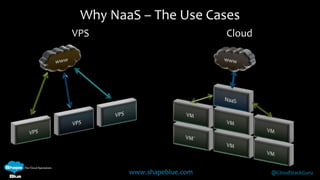
Why NaaS – The Use Cases
VPS

Cloud

www.shapeblue.com

@CloudStackGuru
Why NaaS – The Use Cases

www.shapeblue.com

@CloudStackGuru
Management Network

www.shapeblue.com

@CloudStackGuru
Public Network – Advanced Zone

www.shapeblue.com

@CloudStackGuru
Public Network - Basic Zone EIP / ELB

www.shapeblue.com

@CloudStackGuru
Public Network – System VMs

www.shapeblue.com

@CloudStackGuru
Guest Network – Advanced Zone

www.shapeblue.com

@CloudStackGuru
Guest Network – Basic Zone

www.shapeblue.com

@CloudStackGuru
Guest Network – Basic Zone

www.shapeblue.com

@CloudStackGuru
Guest Network – Basic Zone EIP / ELB

www.shapeblue.com

@CloudStackGuru
Storage Network

www.shapeblue.com

@CloudStackGuru
Physical Connectivity

www.shapeblue.com

@CloudStackGuru
Network Service Providers

www.shapeblue.com

@CloudStackGuru
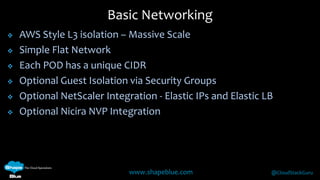
Basic Networking








AWS Style L3 isolation – Massive Scale
Simple Flat Network
Each POD has a unique CIDR
Optional Guest Isolation via Security Groups
Optional NetScaler Integration - Elastic IPs and Elastic LB
Optional Nicira NVP Integration

www.shapeblue.com

@CloudStackGuru
Security Groups







Isolate traffic between VMs
Available for both Basic and Advanced Networking
Only supported on XenServer 6.x and KVM
XenServer 6.0.x requires the Cloud Support Package
XenServer must use Linux Bridge and not Open vSwitch




xe-switch-network-backend bridge
Must be implemented before adding to CloudStack

www.shapeblue.com

@CloudStackGuru
Security Groups






Must be specified when the Zone is created
Uses Ingress and Egress Rules to control traffic flow
Default is all outbound traffic allowed, all inbound denied
Rules can be mapped to CIDR or another Account/Security Group

www.shapeblue.com

@CloudStackGuru
Security Groups






Must be specified when the Zone is created
Uses Ingress and Egress Rules to control traffic flow
Default is all outbound traffic allowed, all inbound denied
Rules can be mapped to CIDR or another Account/Security Group

www.shapeblue.com

@CloudStackGuru
Basic Zone – Example IP Schema

www.shapeblue.com

@CloudStackGuru
Using Multiple NICs

www.shapeblue.com

@CloudStackGuru
Using Multiple NICs

www.shapeblue.com

@CloudStackGuru
Advanced Networking





Guest Networks isolated by VLANs
Private and Shared Guest Networks
Multiple Physical Networks
Virtual Router for each Network providing:







DNS & DHCP
Firewall
Client VPN
Load Balancing
Source / Static NAT
Port Forwarding
www.shapeblue.com

@CloudStackGuru
Adv Zone – Example IP Schema

www.shapeblue.com

@CloudStackGuru
Adv Zone - Egress Rules


Blocks all outbound traffic by default

Example of an ‘Allow All’ Egress Rule

www.shapeblue.com

@CloudStackGuru
Adv Zone - Firewall & Port Forwarding


Firewall




Allow traffic into network

Port Forwarding


Pass traffic to a specified VM

www.shapeblue.com

@CloudStackGuru
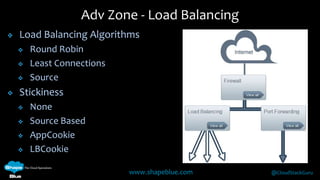
Adv Zone - Load Balancing


Load Balancing Algorithms






Round Robin
Least Connections
Source

Stickiness





None
Source Based
AppCookie
LBCookie
www.shapeblue.com

@CloudStackGuru
Adv Zone - User VPN


User VPN




IPSec VPN
Win/MAC
Connects to Guest
Network

www.shapeblue.com

@CloudStackGuru
Adv Zone - Static NAT


Enable Static NAT

www.shapeblue.com

@CloudStackGuru
Adv Zone - Static NAT


Allocate VM

www.shapeblue.com

@CloudStackGuru
Adv Zone - Static NAT




Only Firewall Rules exist due to
1-2-1 mapping
Public IP is also used for
Outbound Traffic from this VM

www.shapeblue.com

@CloudStackGuru
Virtual Private Clouds (VPC)






Private multi-tiered Virtual Networks
ACLs to control traffic isolation
Inter VLAN Routing
Site-2-Site VPN
Private Gateway

www.shapeblue.com

@CloudStackGuru
Virtual Private Clouds (VPC)


No Conserve Mode so unique Public IP Required for:






Source NAT
Port Forwarding
Load Balancing

Cannot operate in Redundant Mode (VRRP)

www.shapeblue.com

@CloudStackGuru
VPC Components

Virtual Router – Connects
all the VPC Components
Network Tiers – Isolated Networks,
each with unique VLAN and CIDR

www.shapeblue.com

@CloudStackGuru
VPC Components
Public Gateway

Site-2-Site VPN
Linked to Public Gateway

www.shapeblue.com

@CloudStackGuru
VPC Components

Private Gateway
Created by Root Admins
Configured by Users (Static Routes)

www.shapeblue.com

@CloudStackGuru
VPC Components

www.shapeblue.com

@CloudStackGuru
VPC Components

www.shapeblue.com

@CloudStackGuru
VPC Components

www.shapeblue.com

@CloudStackGuru
VPC 4.2 Enhancements










Support for KVM
Load Balancing between Tiers
Citrix NetScaler as External LB
Enhanced Access Control Lists
Deploy VM to both VPC & Shared Network from UI
Multiple VPN Gateways
Multiple Private Gateways
ACLs & Black Lists for Private Gateways
www.shapeblue.com

@CloudStackGuru
System VMs & Their Networks
Virtual Router

www.shapeblue.com

@CloudStackGuru
System VMs & Their Networks
Virtual Router

www.shapeblue.com

@CloudStackGuru
System VMs & Their Networks
Secondary Storage VM

www.shapeblue.com

@CloudStackGuru
System VMs & Their Networks
SSVM – VM Image / ISO Upload Workflow

www.shapeblue.com

@CloudStackGuru
System VMs & Their Networks
Console Proxy VM

www.shapeblue.com

@CloudStackGuru
System VMs & Their Networks
CPVM – Remote Connection

www.shapeblue.com

@CloudStackGuru
Communication Ports

www.shapeblue.com

@CloudStackGuru
Recent Networking Improvements (4.1 & 4.2)













Numerous VPC Improvements
Add & Remove NICs / Networks
Multiple IPs on Single NIC
Persistent Networks
Configurable Default Egress Behaviour
Non Contiguous VLAN Ranges
Enhanced SRX & F5 Support
PVLANs
GLSB
IPv6 – (Technical Demo)
www.shapeblue.com

@CloudStackGuru
Questions?

www.shapeblue.com

@CloudStackGuru
Introduction to CloudStack
Networking
Geoff Higginbottom
CTO ShapeBlue
geoff.higginbottom@shapeblue.com
Twitter: @ShapeBlue, @CloudStackGuru

Introduction to cloudstack 4.2 networking