CloudStack 101
Paul Angus
Cloud Architect ShapeBlue
paul.angus@shapeblue.com
@ShapeBlue
@CloudyAngus

www.shapeblue.com
Setting the Scene
What is ‘The Cloud’
Who uses Clouds
Why use Clouds

www.shapeblue.com
What is The Cloud?
(No, it’s not ‘Just like DropBox’)

IaaS
On-demand self-service
Elasticity
Scalability
API integration
Resource accounting

www.shapeblue.com
Who Uses Clouds?
Public clouds (SPs/MSPs)
General public can create or log into instances themselves

Private Clouds (Enterprises)
Anyone who wants to be able to orchestrate their environment

www.shapeblue.com
Why Use Clouds?
On-demand self-service (simplicity)
Elasticity
Scalability

www.shapeblue.com
What is CloudStack
CloudStack is a hypervisor agnostic open source IaaS
platform.

CloudStack orchestrates hypervisors and network appliances
to give control simple to complex tasks

www.shapeblue.com
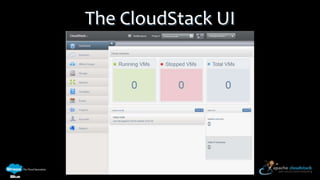
The CloudStack UI

www.shapeblue.com
What can you do with CloudStack?

Lots

www.shapeblue.com
More Specifically…
Create, start & stop virtual machines
Create virtual machines from templates
Create networks (normal or multi-tiered)
Create/manage firewall rules
Create/management network services such as load
balancing, static NAT, VPNs, and auto scaling

www.shapeblue.com
Public Cloud

Demo

www.shapeblue.com
Private – Production

Demo

www.shapeblue.com
Private – Development

Demo

www.shapeblue.com
How does CloudStack do it
Abstraction of Networks, Compute and disks so you don’t
have to worry about it.
It orchestrates the hypervisor layer

www.shapeblue.com
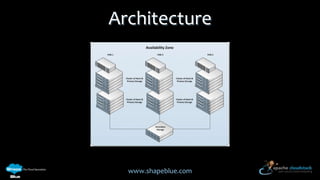
Architecture

www.shapeblue.com
What Can I Use?
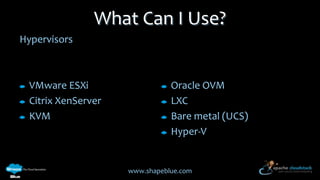
Hypervisors

VMware ESXi
Citrix XenServer
KVM

Oracle OVM
LXC
Bare metal (UCS)
Hyper-V

www.shapeblue.com
What Can I Use?
OS
Anything the hypervisor can run (pretty much)

www.shapeblue.com
What Can I Use?
Hardware
Storage - NFS, iSCSI, FCoE, S3

Compute – commodity
Networking – Layer 2 switches (L3 for basic networks)

www.shapeblue.com

Cloudstack 101 - an introduction to Coudstack

Editor's Notes

  • #4 I get asked a lot what is cloud – is it dropbox?Self service – means not the techies supporting the environmentElasticity – can grow and shrink the number of VMsScalability – 50 thousand nodes in ZyngaAPI - controllableResource account – who’s used what internal or external billing
  • #5 Service providers – public create instances themselves and pay per-instance per-hour depending on the size of offeringAdd services such as vpn extra ip addresses backup etc.MSP add their own value-add
  • #6 Service providers use cloud technology to provide instances in a more dynamical way
  • #8 Create Advanced Zone environment which has multiple accounts and Templates:Windows templatesCentOSCentOS with http
  • #9 It’s down to your imagination(time/budget)
  • #10 Simple stuff but it’s then about what you do with these building blocksYou don’t need to be able to configure cisco routers and switches or be a vmware/xenserver/kvm guru
  • #11 Create VM as a user (windows)EnablerdpCreate userCreate port forward to RDP on windowsLoad balancer ruleFirewall ruleLog in.
  • #13 Two web servers behind a load balancer
  • #15 PodsClustersHostsHypervisor types:Storage
  • #16 Split mainstream vs others