Private  Cloud  Networking  in  
Apache  CloudStack
Chiradeep Vittal
@chiradeep
CloudStack  Days  Austin
April  16  2015
Overview
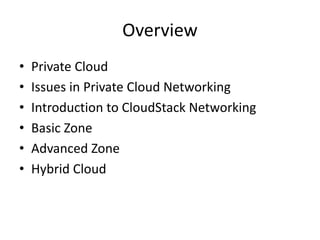
• Private  Cloud
• Issues  in  Private  Cloud  Networking
• Introduction  to  CloudStack  Networking
• Basic  Zone
• Advanced  Zone
• Hybrid  Cloud
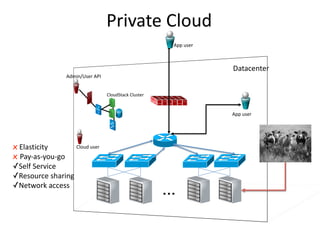
Private  Cloud
…
Datacenter
CloudStack Cluster
Admin/User  API
App  user
App  user
Cloud  userx Elasticity
x Pay-­‐as-­‐you-­‐go
✓Self  Service
✓Resource  sharing
✓Network  access
Private  Cloud  &  your  pets
…
Datacenter
Legacy Cloud
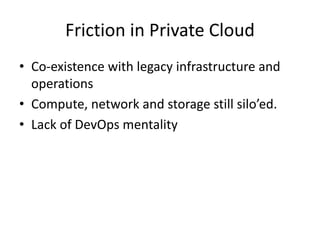
Friction  in  Private  Cloud
• Co-­‐existence  with  legacy  infrastructure  and  
operations  
• Compute,  network  and  storage  still  silo’ed.
• Lack  of  DevOps mentality
Friction  in  networking
• DNS  and  IPAM  automation
• Security  policy  automation
• Switch  /  VLAN  configuration
• Infrastructure  optimized  for  N-­‐S  traffic
• Integration  with  middle  boxes
– Load  Balancers
– NAT
– IDS
Middleboxes,  VLANS,  etc
Backbone/Int
ernet
Core Routers
Access Routers
Aggregation Switches
Load Balancers
Top of Rack Switches
…
…
Servers
Packet Filters
DNS/IPAM
CloudStack  Networking
• “Batteries  included  but  removable”
• Network  services:
– Use  built-­‐in  providers  or
– Integrate  with  external  providers  or
– Mix-­‐and-­‐match
• KISS  principle
– Master  the  simplest  network  configuration  first
Network  Services
Network  
Services
• L2  
connectivity
• IPAM
• DNS
• Routing
• ACL
• Firewall
• NAT
• VPN
• LB
Network  
Isolation
• No  isolation
• VLAN  
isolation
• Overlays
• L3  isolation
Service
Providers
ü Virtual
appliances
ü Hardware
firewalls
ü LB
appliances
ü SDN
controllers
ü VRF
ü Hypervisor
Basic  Zone
• Basic :  reduced  network  setup
• Group  Based  Policy  :  Security  Groups  is  the  
means  of  policy  enforcement  /  isolation
• AWS  EC2-­‐Classic  emulation
• High  level  policy  configuration
• Scalable implementation
• Least friction  
Security  Groups
• All  VMs  (instances)  launched  into  one  or  more  
security  groups
• Default-­‐deny firewalls
• Contain  Rules that  allow selected  traffic
• Example:
– VMs  in  ‘Web’  Security  Group  are  allowed  to  
communicate  on  TCP  port  3306  to  VMs  in  ‘DB’  
Security  Group
– Anybody  can  talk  to  a  ‘Web’  VM  on  port  80
Web  
appserver db
8080 3306
Internet
80
All  ports  are  tcp /24
192.168.1.0/24
22
management
22
Security  Groups
Security  Groups
• Create  security  groups
>  create  securitygroup  name=web
>  create  securitygroup  name=appserver
>  create  securitygroup  name=db
>  create  securitygroup  name=management
• Add  rules
>  authorize  securitygroupingress securitygroupname=management protocol=tcp startport=22  endport=22  usersecuritygrouplist=management
>  authorize  securitygroupingress securitygroupname=management protocol=tcp startport=22  endport=22  cidrlist=192.168.0.1/24
>  authorize  securitygroupingress securitygroupname=web protocol=tcp startport=80  endport=80  cidr=0.0.0.0/0
>  authorize  securitygroupingress securitygroupname=appserver protocol=tcp startport=8080  endport=8080  usersecuritygrouplist=web
>  authorize  securitygroupingress securitygroupname=db protocol=tcp startport=3306  endport=3306  usersecuritygrouplist=appserver
• Deploy  VMs
> deploy  virtualmachine securitygroupnames=management,web displayname=web0001
> deploy  virtualmachine securitygroupnames=management,web displayname=web0002
> deploy  virtualmachine securitygroupnames=management,appserver displayname=app001
> deploy  virtualmachine securitygroupnames=management,db displayname=db0001
Properties  of  Security  Groups
• Subnets  are  shared  between  accounts  /  VMs  
in  a  security  group  may  not  share  a  subnet.
Properties  of  Security  Groups
• Anti-­‐spoofing  protection.
• Multiple  IP  addresses  per  VM  (single  NIC)
• No  multicast  /  broadcast
• Stateful firewall
• More:
https://cloudierthanthou.wordpress.com/2015/04/07/cloudstack-­‐basic-­‐networking-­‐deeper-­‐dive/
Scaled  out  network  for  Basic  Zone
… Servers
Leaf Routers
Spine Routers
Host-based
firewalls and ACL
Server Load Balancing
Backbone/Int
ernet
10.1.0.0/2
4
L3  Core
Rack  1  L2  
Switch
Rack 24  L2  
Switch
10.22.16.0/24
VM  1 10.1.0.2
VM  2 10.1.0.3
VM  3
10.1.0.99
Rack  1  Host  1
VM  4 10.1.0.43
VM  5 10.1.0.87
Rack  1  Host  8
VM  6 10.1.0.43
VM  7 10.1.0.87
Rack  24  Host  5
VM  8 10.1.0.43
10.1.0.87
Rack  24  Host  9
VM  9
VM  Placement  in  Basic  Zone
Adding  Services  to  Basic  Zone
• Static  NAT  (aaS)
• Load  Balancer  (aaS)
• Use  Citrix  Netscaler integration  or
• Run  a  PaaS on  CloudStack
Advanced  Zone
• Virtual  networking  using  either
– VLANs  or
– Overlay
• Rich  array  of  services  and  virtual  networking  providers
• Out-­‐of-­‐the-­‐box  (batteries  included)
– VLAN,  GRE  isolation
– Virtual  Router  provides  scale  out  (per  tenant)  services  including
• VPNaaS
• LBaaS
• FWaaS
• DHCP,  DNS
– Physical  Device  Integration  via  plugins
• F5,  Netscaler
• Juniper  SRX
Keeping  it  simple
• Network  Offerings  
– Catalog  of  potential  virtual  network  designs
– Created  by  operator
• Simplest  network  offering  :“Shared  Network”
– Only  services  offered  are
• DNS,  DHCP
• User  data,  password  change
– VLAN-­‐based  virtual  networks
– Inter-­‐network  routing  using  static  routing  in  TOR
Service  insertion  with  VLANs
10.1.1.5
Tenant
2 VM 2
Tenant
2 VM 3
Tenant
2 VM 1
Tenant 2 Virtual Network 10.1.1.0/24
Gateway
address
10.1.1.1
VPN
NAT
DHCP
10.1.1.2
10.1.1.3
10.1.1.4
Tenant 2
Edge
Services
Appliance
Public IP
address
65.37.141.24
65.37.141.80
Internet
/ rest of
DC
Tenant
1 VM 4
Tenant
1 VM 1
Tenant
1 VM 2
Tenant
1 VM 3
“Public
Network”
Tenant 1 Virtual Network 10.1.1.0/24
Gateway
address 10.1.1.1
NAT
DHCP
FW
Public IP
address
65.37.141.11
65.37.141.36
10.1.1.2
10.1.1.3
10.1.1.4
Tenant 1
Edge
Services
Appliance(s)
Tenant 1
Edge
Services
Appliance(s)
Load
Balancing
Public  IPs  can  be  RFC1918
Virtual
Router
Device  Integration
10.1.1.0/24
VLAN 100
DHCP,
DNS
CS
Virtual
Router
10.1.1.11265.37.141.112
10.1.1.2 VM 1
10.1.1.3
VM 2
10.1.1.4
VM 3
10.1.1.
5
VM 4
Netscaler
Load
Balancer
10.1.1.165.37.141.111
Juniper
SRX
Firewall NAT,
VPN
Multi-­‐tier  virtual  networking
VLAN2724
DB
VM 1
Web
VM 1
Web
VM 3
Web
VM 2
VLAN101
App
VM 1
App
VM 2
VLAN398Virtual Router
Internet /
Rest of DC
Remote DC
IPSec VPN
Integration VLANLoadbalancer  
(HW  or  
Virtual)
Network Services
• IPAM
• DNS
• LB [intra]
• S-2-S VPN
• Static Routes
• ACLs
• NAT, PF
• FW [ingress & egress]
Virtual  networking  with  overlays
GREKEY2724
DB
VM 1
Web
VM 1
Web
VM 3
Web
VM 2
GREKEY101
App
VM 1
App
VM 2
GREKEY398VR + vSwitches
Internet /
Rest of DC
Remote DC
IPSec VPN
Private GatewayLoadbalancer  
(Virtual)
Network Services
• IPAM
• DNS
• LB [intra]
• S-2-S VPN
• Static Routes
• ACLs
• NAT, PF
• FW [ingress & egress]
SDN  /  Other  Overlays/Other  Devices
• Plugins  available  for
– Midokura
– NVP
– Nuage
– BigSwitch
– Palo  Alto
• VxLAN on  KVM
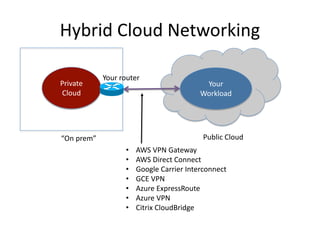
Private  
Cloud
Your  
Workload
“On  prem” Public  Cloud
Hybrid  Cloud  Networking
• AWS  VPN  Gateway
• AWS  Direct  Connect
• Google  Carrier  Interconnect
• GCE  VPN
• Azure  ExpressRoute
• Azure  VPN
• Citrix  CloudBridge
Your  router
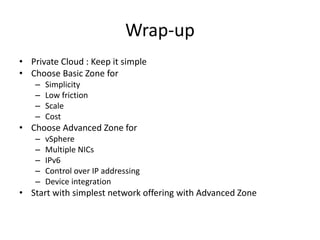
Wrap-­‐up
• Private  Cloud  :  Keep  it  simple
• Choose  Basic  Zone  for
– Simplicity
– Low  friction
– Scale
– Cost
• Choose  Advanced  Zone  for
– vSphere
– Multiple  NICs
– IPv6
– Control  over  IP  addressing
– Device  integration
• Start  with  simplest  network  offering  with  Advanced  Zone

Private cloud networking_cloudstack_days_austin

  • 1.
    Private  Cloud  Networking in   Apache  CloudStack Chiradeep Vittal @chiradeep CloudStack  Days  Austin April  16  2015
  • 2.
    Overview • Private  Cloud •Issues  in  Private  Cloud  Networking • Introduction  to  CloudStack  Networking • Basic  Zone • Advanced  Zone • Hybrid  Cloud
  • 3.
    Private  Cloud … Datacenter CloudStack Cluster Admin/User API App  user App  user Cloud  userx Elasticity x Pay-­‐as-­‐you-­‐go ✓Self  Service ✓Resource  sharing ✓Network  access
  • 4.
    Private  Cloud  & your  pets … Datacenter Legacy Cloud
  • 5.
    Friction  in  Private Cloud • Co-­‐existence  with  legacy  infrastructure  and   operations   • Compute,  network  and  storage  still  silo’ed. • Lack  of  DevOps mentality
  • 6.
    Friction  in  networking •DNS  and  IPAM  automation • Security  policy  automation • Switch  /  VLAN  configuration • Infrastructure  optimized  for  N-­‐S  traffic • Integration  with  middle  boxes – Load  Balancers – NAT – IDS
  • 7.
    Middleboxes,  VLANS,  etc Backbone/Int ernet CoreRouters Access Routers Aggregation Switches Load Balancers Top of Rack Switches … … Servers Packet Filters DNS/IPAM
  • 8.
    CloudStack  Networking • “Batteries included  but  removable” • Network  services: – Use  built-­‐in  providers  or – Integrate  with  external  providers  or – Mix-­‐and-­‐match • KISS  principle – Master  the  simplest  network  configuration  first
  • 9.
    Network  Services Network   Services •L2   connectivity • IPAM • DNS • Routing • ACL • Firewall • NAT • VPN • LB Network   Isolation • No  isolation • VLAN   isolation • Overlays • L3  isolation Service Providers ü Virtual appliances ü Hardware firewalls ü LB appliances ü SDN controllers ü VRF ü Hypervisor
  • 10.
    Basic  Zone • Basic:  reduced  network  setup • Group  Based  Policy  :  Security  Groups  is  the   means  of  policy  enforcement  /  isolation • AWS  EC2-­‐Classic  emulation • High  level  policy  configuration • Scalable implementation • Least friction  
  • 11.
    Security  Groups • All VMs  (instances)  launched  into  one  or  more   security  groups • Default-­‐deny firewalls • Contain  Rules that  allow selected  traffic • Example: – VMs  in  ‘Web’  Security  Group  are  allowed  to   communicate  on  TCP  port  3306  to  VMs  in  ‘DB’   Security  Group – Anybody  can  talk  to  a  ‘Web’  VM  on  port  80
  • 12.
    Web   appserver db 80803306 Internet 80 All  ports  are  tcp /24 192.168.1.0/24 22 management 22 Security  Groups
  • 13.
    Security  Groups • Create security  groups >  create  securitygroup  name=web >  create  securitygroup  name=appserver >  create  securitygroup  name=db >  create  securitygroup  name=management • Add  rules >  authorize  securitygroupingress securitygroupname=management protocol=tcp startport=22  endport=22  usersecuritygrouplist=management >  authorize  securitygroupingress securitygroupname=management protocol=tcp startport=22  endport=22  cidrlist=192.168.0.1/24 >  authorize  securitygroupingress securitygroupname=web protocol=tcp startport=80  endport=80  cidr=0.0.0.0/0 >  authorize  securitygroupingress securitygroupname=appserver protocol=tcp startport=8080  endport=8080  usersecuritygrouplist=web >  authorize  securitygroupingress securitygroupname=db protocol=tcp startport=3306  endport=3306  usersecuritygrouplist=appserver • Deploy  VMs > deploy  virtualmachine securitygroupnames=management,web displayname=web0001 > deploy  virtualmachine securitygroupnames=management,web displayname=web0002 > deploy  virtualmachine securitygroupnames=management,appserver displayname=app001 > deploy  virtualmachine securitygroupnames=management,db displayname=db0001
  • 14.
    Properties  of  Security Groups • Subnets  are  shared  between  accounts  /  VMs   in  a  security  group  may  not  share  a  subnet.
  • 15.
    Properties  of  Security Groups • Anti-­‐spoofing  protection. • Multiple  IP  addresses  per  VM  (single  NIC) • No  multicast  /  broadcast • Stateful firewall • More: https://cloudierthanthou.wordpress.com/2015/04/07/cloudstack-­‐basic-­‐networking-­‐deeper-­‐dive/
  • 16.
    Scaled  out  network for  Basic  Zone … Servers Leaf Routers Spine Routers Host-based firewalls and ACL Server Load Balancing Backbone/Int ernet
  • 17.
    10.1.0.0/2 4 L3  Core Rack  1 L2   Switch Rack 24  L2   Switch 10.22.16.0/24 VM  1 10.1.0.2 VM  2 10.1.0.3 VM  3 10.1.0.99 Rack  1  Host  1 VM  4 10.1.0.43 VM  5 10.1.0.87 Rack  1  Host  8 VM  6 10.1.0.43 VM  7 10.1.0.87 Rack  24  Host  5 VM  8 10.1.0.43 10.1.0.87 Rack  24  Host  9 VM  9 VM  Placement  in  Basic  Zone
  • 18.
    Adding  Services  to Basic  Zone • Static  NAT  (aaS) • Load  Balancer  (aaS) • Use  Citrix  Netscaler integration  or • Run  a  PaaS on  CloudStack
  • 19.
    Advanced  Zone • Virtual networking  using  either – VLANs  or – Overlay • Rich  array  of  services  and  virtual  networking  providers • Out-­‐of-­‐the-­‐box  (batteries  included) – VLAN,  GRE  isolation – Virtual  Router  provides  scale  out  (per  tenant)  services  including • VPNaaS • LBaaS • FWaaS • DHCP,  DNS – Physical  Device  Integration  via  plugins • F5,  Netscaler • Juniper  SRX
  • 20.
    Keeping  it  simple •Network  Offerings   – Catalog  of  potential  virtual  network  designs – Created  by  operator • Simplest  network  offering  :“Shared  Network” – Only  services  offered  are • DNS,  DHCP • User  data,  password  change – VLAN-­‐based  virtual  networks – Inter-­‐network  routing  using  static  routing  in  TOR
  • 21.
    Service  insertion  with VLANs 10.1.1.5 Tenant 2 VM 2 Tenant 2 VM 3 Tenant 2 VM 1 Tenant 2 Virtual Network 10.1.1.0/24 Gateway address 10.1.1.1 VPN NAT DHCP 10.1.1.2 10.1.1.3 10.1.1.4 Tenant 2 Edge Services Appliance Public IP address 65.37.141.24 65.37.141.80 Internet / rest of DC Tenant 1 VM 4 Tenant 1 VM 1 Tenant 1 VM 2 Tenant 1 VM 3 “Public Network” Tenant 1 Virtual Network 10.1.1.0/24 Gateway address 10.1.1.1 NAT DHCP FW Public IP address 65.37.141.11 65.37.141.36 10.1.1.2 10.1.1.3 10.1.1.4 Tenant 1 Edge Services Appliance(s) Tenant 1 Edge Services Appliance(s) Load Balancing Public  IPs  can  be  RFC1918 Virtual Router
  • 22.
    Device  Integration 10.1.1.0/24 VLAN 100 DHCP, DNS CS Virtual Router 10.1.1.11265.37.141.112 10.1.1.2VM 1 10.1.1.3 VM 2 10.1.1.4 VM 3 10.1.1. 5 VM 4 Netscaler Load Balancer 10.1.1.165.37.141.111 Juniper SRX Firewall NAT, VPN
  • 23.
    Multi-­‐tier  virtual  networking VLAN2724 DB VM1 Web VM 1 Web VM 3 Web VM 2 VLAN101 App VM 1 App VM 2 VLAN398Virtual Router Internet / Rest of DC Remote DC IPSec VPN Integration VLANLoadbalancer   (HW  or   Virtual) Network Services • IPAM • DNS • LB [intra] • S-2-S VPN • Static Routes • ACLs • NAT, PF • FW [ingress & egress]
  • 24.
    Virtual  networking  with overlays GREKEY2724 DB VM 1 Web VM 1 Web VM 3 Web VM 2 GREKEY101 App VM 1 App VM 2 GREKEY398VR + vSwitches Internet / Rest of DC Remote DC IPSec VPN Private GatewayLoadbalancer   (Virtual) Network Services • IPAM • DNS • LB [intra] • S-2-S VPN • Static Routes • ACLs • NAT, PF • FW [ingress & egress]
  • 25.
    SDN  /  Other Overlays/Other  Devices • Plugins  available  for – Midokura – NVP – Nuage – BigSwitch – Palo  Alto • VxLAN on  KVM
  • 26.
    Private   Cloud Your   Workload “On prem” Public  Cloud Hybrid  Cloud  Networking • AWS  VPN  Gateway • AWS  Direct  Connect • Google  Carrier  Interconnect • GCE  VPN • Azure  ExpressRoute • Azure  VPN • Citrix  CloudBridge Your  router
  • 27.
    Wrap-­‐up • Private  Cloud :  Keep  it  simple • Choose  Basic  Zone  for – Simplicity – Low  friction – Scale – Cost • Choose  Advanced  Zone  for – vSphere – Multiple  NICs – IPv6 – Control  over  IP  addressing – Device  integration • Start  with  simplest  network  offering  with  Advanced  Zone