Lead/Demand Generation Management
in
salesforce
SalesForce
Salesforce Customer Relationship Management technology
can streamline and automate business processes with the
cutting edge, logistical advantages of cloud computing
technology. Synchronization across all channels, optimized
internal collaboration and better access to proven data
provide a greatly enhanced customer experience.
Overview feature of salesforce• Search Tab
• My Profile & Setting Tab
• Setup Tab
• Department Tab
• Help & Training Tab
• Online Chat Console
• Home
• Getting Started
• Campaigns
• Leads
• Contacts
• Accounts
• Reports
• Dashboards
• Chatter
• Files
• Add new Application sign
Missing feature on salesforce
Analytics Tab not found
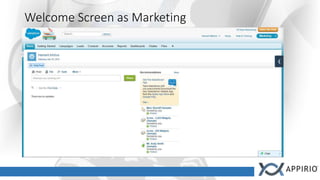
Welcome Screen as Marketing
Campaigns
• Campaign is an outbound marketing process which is to be
managed and tracked within salesforce. The data is being
collected through the organized events, online marketing,
seminars, company or affiliates website & email marketing
process.
• The analytics in salesforce let us know how & from where
data has been generated or created. Which can be hierarchy
organized like from SEO, Email or website.
Features in Campaigns Tab
• Create & Edit campaign.
• Can View all active campaigns or designated campaign.
• Every Campaign can be viewed in detail explaining who has
created campaign, name of the campaign, from where is has
been collected. It also defines expected response in planning
section and what will be the clients budget on this.
• Statistics Column shows no. of leads present in it, no. of
opportunities can be converted into business.
• How many campaign members are their?
• Campaign Hierarchy and new opportunity can be generated.
Leads
• Lead is a Potential Contact Details.
• Lead is generated through many sources whether it might be
through Social Media, Website Application, Seminars,
Webinars, SEO, Email Campaigns.
Features in Leads Tab
• Create new leads.
• Can view, unviewed, current & recently viewed all leads.
• Every Lead Contains a detail by:
• Name
• Title
• Email
• Phone
• Lead Status
• Lead Owner
• Company
• Industry
• No. of Employees
• Lead Source
• Address information
• Custom Link which can integrate Google & Bing maps.
• Activity History(Called, Emailed or left voicemail)
• Notes & Attachment
• Email Status
• Campaign History
Features in Leads Tab
• Reports can be viewed by:
• Lead Lifetime Report(About all the modification made in past or new changes
to be made in future)
• Lead By Source (How lead is generated)
• Lead List Report. (It shows the effectiveness & efficiency of lead)
• Tools (Modifications)
• Import Leads (Importing leads through .csv file or online source)
• Mass Delete Leads(Deleting data category wise but it's recommended to
archive data first)
• Transfer Leads (From One user to other)
• Mass Email Leads (Specified Recipient)
• Mass Add leads to campaign (Adding member from a list of leads)
Contact
• Contact is someone’s communication information whether it
might be personal or business to reach particular individual.
• Contact tab in Salesforce:
• Contact is a detailed business accounts information associated with salesforce
which includes phone number, addresses, title, email, department, fax
number & dealing industry.
Features in Contact tab
• Create New Contacts.
• Recent Contacts
• Reports:
• Email Status Report (Whether email has been checked by receiver or not with
particular date & time)
• Partner Account (Detailed partner account)
• Mailing List (Preview detail of contacts sorted as per date)
• Contact History (When particular contact was approched in past & what was
the value quoted to him & new value quoted with appropriate date)
• Bounced Contacts (No. of emails not reached to customers)
Features in Contact tab
• Tools
• Import My accounts & Contacts
• Sync to Outlook (Download Plugin to import contacts or manually
configuration)
• Import My Organization's Accounts & Contacts (Importing contacts of
multiple users in company through .csv file or online source)
• Mass Delete Contacts
• Mass Email Contacts
• Mass Stay in Touch (The default note & defined signature in personal email)
• Mass Add Contacts to campaign
Accounts
A track record which has detailed information of a
organization, consumer or company with physical address.
Features in Accounts tab
• Create or Edit New Contacts.
• Reports:
• Active Accounts (Preview of active account owner by name, type & Billing
location)
• Accounts with last activity>30 days (Unsaved Reports)
• Account Owners (Owner Report)
• Contact Role Report
• Account History Report
• Partner Accounts
Features in Account tab
• Tools
• Import My accounts & Contacts
• Sync to Outlook (Download Plugin to import contacts or manually
configuration)
• Import My Organization's Accounts & Contacts (Importing contacts of
multiple users in company through .csv file or online source)
• Mass Delete Contacts
• Mass Email Contacts
• Mass Stay in Touch (The default note & defined signature in personal email)
• Mass Add Contacts to campaign
Report
It's a detailed wealthy data ranging from real time snapshots
of business to yearly summaries.
Features in Report tab
• Entire Reporting system of salesforce CRM effectively & efficiently.
• Sales Reports
• Opportunity Reports
• Account & Contact Reports
• Lead Reports
• Support Reports
• Campaign Reports
• Administrative Reports
• Personal Reports
• Dashboard Reports
Dashboard
It's a snapshot of a graphical representation of the data
generated by a report at certain point in time.
Features of Dashboard tab
• Graphical Representation of:
• Sales(Earnings)
• Top 5 Open Deals
• Sales Leaderboard
• Month to Date Sales Trending
• Historical Snapshot
• Marketing
• Leads by Lead Source
• Lead by Lead Status
• Support (Open Cases By Priority)
• Cases by Rep (No. Of Cases)
• Solution Knowledgebase (No. of solutions added)
Chatter
Chatter is used in salesforce to collaborate with the people in particular
organization & partners privately & securely.
Features of Chatter tab
• Connect with People
• Join Groups like Sales, Marketing, Product, Finance, Expense Q&A,
Competitive strategies.
• Share Files
• Resolved Issue efficiently.
• One can upload a file and store it privately until it's ready to share it.

Appirio Lead Generation presentation on Salesforce

  • 1.
  • 2.
    SalesForce Salesforce Customer RelationshipManagement technology can streamline and automate business processes with the cutting edge, logistical advantages of cloud computing technology. Synchronization across all channels, optimized internal collaboration and better access to proven data provide a greatly enhanced customer experience.
  • 3.
    Overview feature ofsalesforce• Search Tab • My Profile & Setting Tab • Setup Tab • Department Tab • Help & Training Tab • Online Chat Console • Home • Getting Started • Campaigns • Leads • Contacts • Accounts • Reports • Dashboards • Chatter • Files • Add new Application sign
  • 4.
    Missing feature onsalesforce Analytics Tab not found
  • 5.
  • 6.
    Campaigns • Campaign isan outbound marketing process which is to be managed and tracked within salesforce. The data is being collected through the organized events, online marketing, seminars, company or affiliates website & email marketing process. • The analytics in salesforce let us know how & from where data has been generated or created. Which can be hierarchy organized like from SEO, Email or website.
  • 7.
    Features in CampaignsTab • Create & Edit campaign. • Can View all active campaigns or designated campaign. • Every Campaign can be viewed in detail explaining who has created campaign, name of the campaign, from where is has been collected. It also defines expected response in planning section and what will be the clients budget on this. • Statistics Column shows no. of leads present in it, no. of opportunities can be converted into business. • How many campaign members are their? • Campaign Hierarchy and new opportunity can be generated.
  • 8.
    Leads • Lead isa Potential Contact Details. • Lead is generated through many sources whether it might be through Social Media, Website Application, Seminars, Webinars, SEO, Email Campaigns.
  • 9.
    Features in LeadsTab • Create new leads. • Can view, unviewed, current & recently viewed all leads. • Every Lead Contains a detail by: • Name • Title • Email • Phone • Lead Status • Lead Owner • Company • Industry • No. of Employees • Lead Source • Address information • Custom Link which can integrate Google & Bing maps. • Activity History(Called, Emailed or left voicemail) • Notes & Attachment • Email Status • Campaign History
  • 10.
    Features in LeadsTab • Reports can be viewed by: • Lead Lifetime Report(About all the modification made in past or new changes to be made in future) • Lead By Source (How lead is generated) • Lead List Report. (It shows the effectiveness & efficiency of lead) • Tools (Modifications) • Import Leads (Importing leads through .csv file or online source) • Mass Delete Leads(Deleting data category wise but it's recommended to archive data first) • Transfer Leads (From One user to other) • Mass Email Leads (Specified Recipient) • Mass Add leads to campaign (Adding member from a list of leads)
  • 11.
    Contact • Contact issomeone’s communication information whether it might be personal or business to reach particular individual. • Contact tab in Salesforce: • Contact is a detailed business accounts information associated with salesforce which includes phone number, addresses, title, email, department, fax number & dealing industry.
  • 12.
    Features in Contacttab • Create New Contacts. • Recent Contacts • Reports: • Email Status Report (Whether email has been checked by receiver or not with particular date & time) • Partner Account (Detailed partner account) • Mailing List (Preview detail of contacts sorted as per date) • Contact History (When particular contact was approched in past & what was the value quoted to him & new value quoted with appropriate date) • Bounced Contacts (No. of emails not reached to customers)
  • 13.
    Features in Contacttab • Tools • Import My accounts & Contacts • Sync to Outlook (Download Plugin to import contacts or manually configuration) • Import My Organization's Accounts & Contacts (Importing contacts of multiple users in company through .csv file or online source) • Mass Delete Contacts • Mass Email Contacts • Mass Stay in Touch (The default note & defined signature in personal email) • Mass Add Contacts to campaign
  • 14.
    Accounts A track recordwhich has detailed information of a organization, consumer or company with physical address.
  • 15.
    Features in Accountstab • Create or Edit New Contacts. • Reports: • Active Accounts (Preview of active account owner by name, type & Billing location) • Accounts with last activity>30 days (Unsaved Reports) • Account Owners (Owner Report) • Contact Role Report • Account History Report • Partner Accounts
  • 16.
    Features in Accounttab • Tools • Import My accounts & Contacts • Sync to Outlook (Download Plugin to import contacts or manually configuration) • Import My Organization's Accounts & Contacts (Importing contacts of multiple users in company through .csv file or online source) • Mass Delete Contacts • Mass Email Contacts • Mass Stay in Touch (The default note & defined signature in personal email) • Mass Add Contacts to campaign
  • 17.
    Report It's a detailedwealthy data ranging from real time snapshots of business to yearly summaries.
  • 18.
    Features in Reporttab • Entire Reporting system of salesforce CRM effectively & efficiently. • Sales Reports • Opportunity Reports • Account & Contact Reports • Lead Reports • Support Reports • Campaign Reports • Administrative Reports • Personal Reports • Dashboard Reports
  • 19.
    Dashboard It's a snapshotof a graphical representation of the data generated by a report at certain point in time.
  • 20.
    Features of Dashboardtab • Graphical Representation of: • Sales(Earnings) • Top 5 Open Deals • Sales Leaderboard • Month to Date Sales Trending • Historical Snapshot • Marketing • Leads by Lead Source • Lead by Lead Status • Support (Open Cases By Priority) • Cases by Rep (No. Of Cases) • Solution Knowledgebase (No. of solutions added)
  • 21.
    Chatter Chatter is usedin salesforce to collaborate with the people in particular organization & partners privately & securely.
  • 22.
    Features of Chattertab • Connect with People • Join Groups like Sales, Marketing, Product, Finance, Expense Q&A, Competitive strategies. • Share Files • Resolved Issue efficiently. • One can upload a file and store it privately until it's ready to share it.