1
Azure Virtual Networks - Overview
Azure Virtual Network
Part 01: Azure Virtual Networks –
An Overview
Agenda
AZ-100: Configure and manage virtual networks
2
Virtual Networks
Azure Virtual Networks - Overview
A virtual network in Azure is similar to the network that we have in our on-premises environment, helping
us connect different resources.
Virtual networks -
• Have their own private address space as defined during their creation
• Can have one or more subnets with their own address space allocated, which is one part of the main
address space of the vNet
With the provision of the virtual network, Azure provide its own name resolution using the Azure DNS.
There is additionally an option to configure our own DNS server
3
Subnets
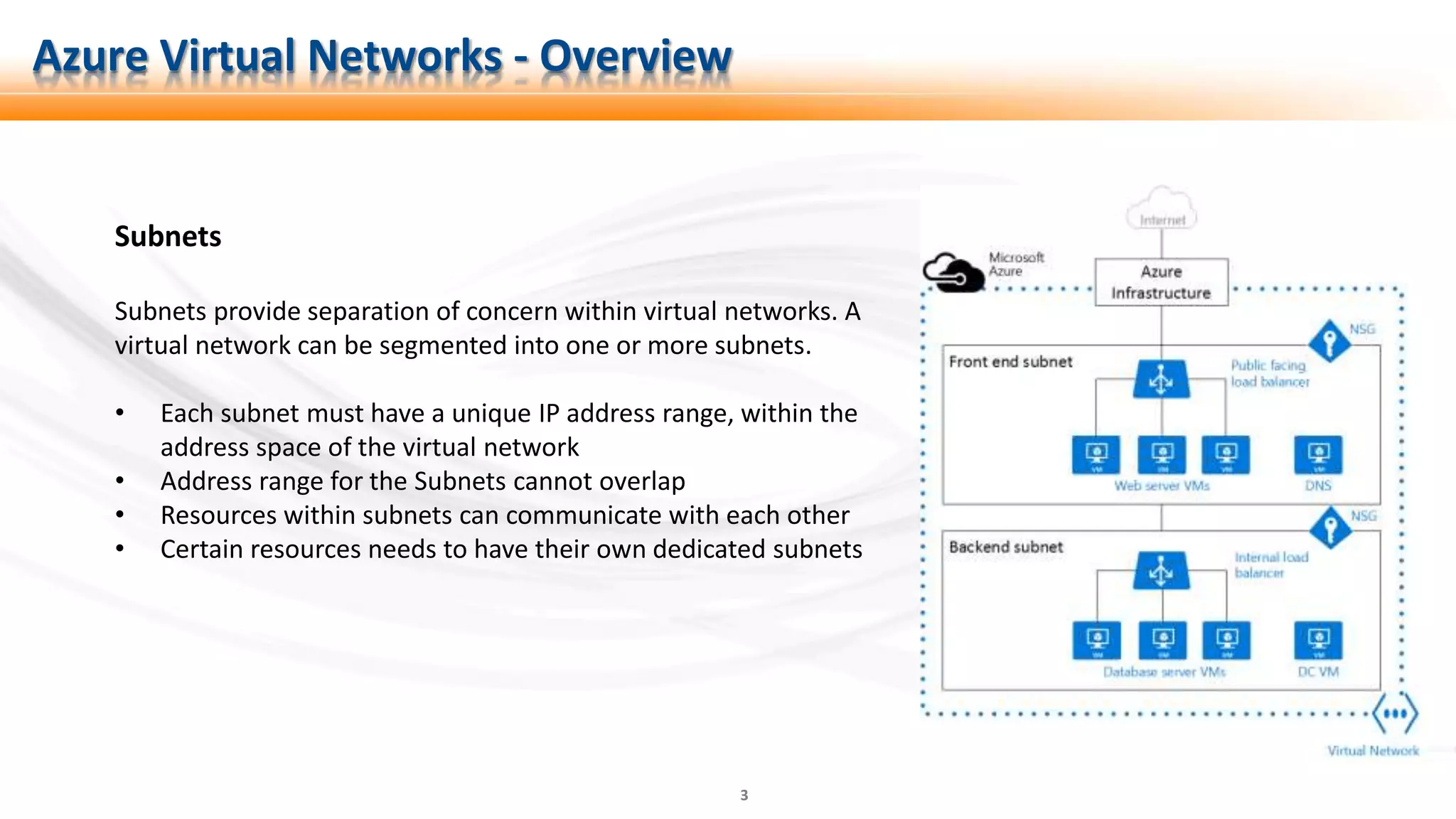
Subnets provide separation of concern within virtual networks. A
virtual network can be segmented into one or more subnets.
• Each subnet must have a unique IP address range, within the
address space of the virtual network
• Address range for the Subnets cannot overlap
• Resources within subnets can communicate with each other
• Certain resources needs to have their own dedicated subnets
Azure Virtual Networks - Overview
4
Network Security Group
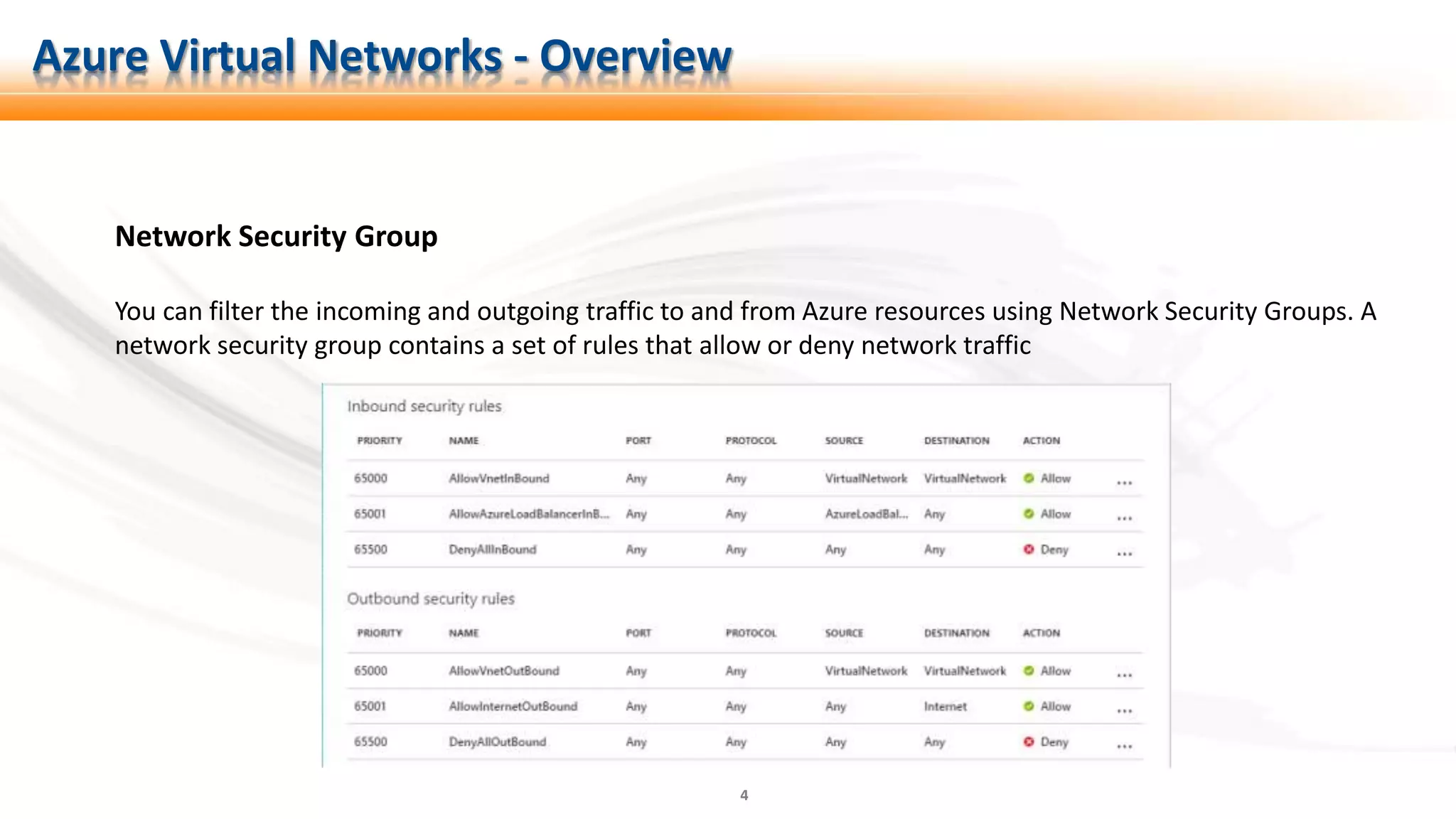
You can filter the incoming and outgoing traffic to and from Azure resources using Network Security Groups. A
network security group contains a set of rules that allow or deny network traffic
Azure Virtual Networks - Overview
5
Network Interfaces (NICs)
It allows the connectivity between Azure Virtual Machine and the vNet, enabling the VM to
communicate with internal and external resources over the network.
One virtual machine can have more than one network interface depending upon the size of the VM
opted for.
Azure Virtual Networks - Overview
6
IP Addresses (IPs)
IP addresses are assigned to resources to communicate with each other within and outside Azure.
There are two types of IP addresses in Azure:
1. Public IP addresses: These IP addresses can be assigned to-
• Virtual Machines
• External/Internet facing Load Balancers (Layer 4 Load Balancing)
• VPN Gateways (P2S and S2S Connectivity)
• Application Gateways (Layer 7 Load Balancing)
2. Private IP addresses: These IP addresses can be assigned to -
• Virtual Machines
• Internal Load Balancers (Layer 4 LBs)
• Application Gateways (Layer 7 LBs)
Azure Virtual Networks - Overview
7
VPN Gateways
The VPN Gateway helps connecting networks within Azure, such as –
1. Azure vNet to vNet.
It also helps in connecting Azure vNet to on-premises network, such as –
1. Point to Site Connectivity (P2S)
2. Site to Site Connectivity (S2S)
Azure Virtual Networks - Overview
8
Azure Load Balancers
Azure LBs are layer 4 load balancers operating at TCP and UDP levels and deliver high availability. They –
1. Load-balance incoming internet traffic to your VMs
2. Load-balance traffic across VMs inside a virtual network
3. Help in forwarding traffic to a specific port on a particular VM with the defined inbound network address
translation (NAT) rules.
4. Provide outbound connectivity for VMs in the VNet using a public Load Balancer
Azure Virtual Networks - Overview
9
Azure Load Balancers Contd.
Azure LBs uses a 5-tuple hash composed of –
1. Source IP address
2. Source port
3. Destination IP address
4. Destination port
5. Protocol
Azure Virtual Networks - Overview
https://docs.microsoft.com/en-us/azure/load-balancer/load-balancer-overview
10
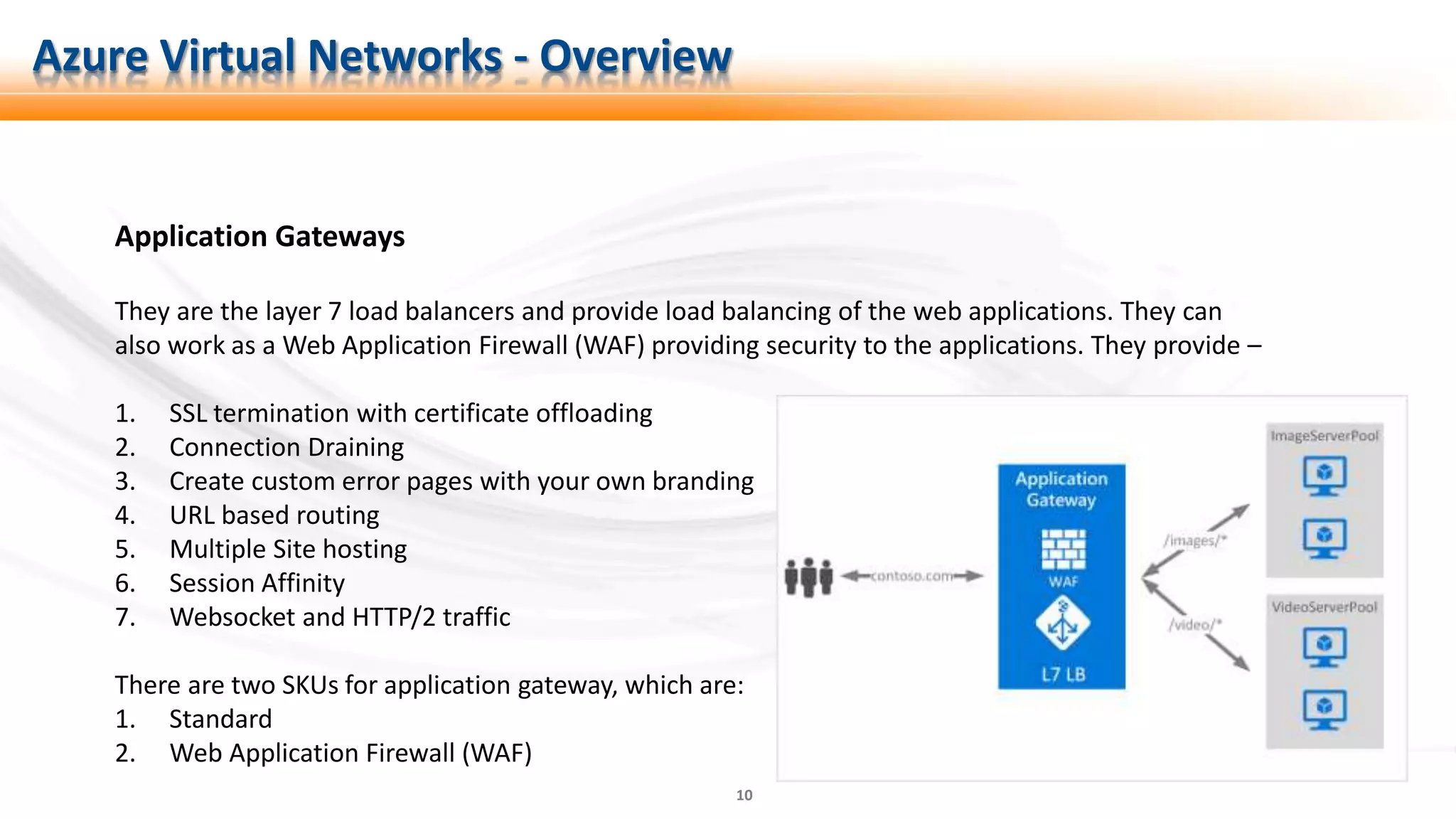
Application Gateways
They are the layer 7 load balancers and provide load balancing of the web applications. They can
also work as a Web Application Firewall (WAF) providing security to the applications. They provide –
1. SSL termination with certificate offloading
2. Connection Draining
3. Create custom error pages with your own branding
4. URL based routing
5. Multiple Site hosting
6. Session Affinity
7. Websocket and HTTP/2 traffic
There are two SKUs for application gateway, which are:
1. Standard
2. Web Application Firewall (WAF)
Azure Virtual Networks - Overview
11
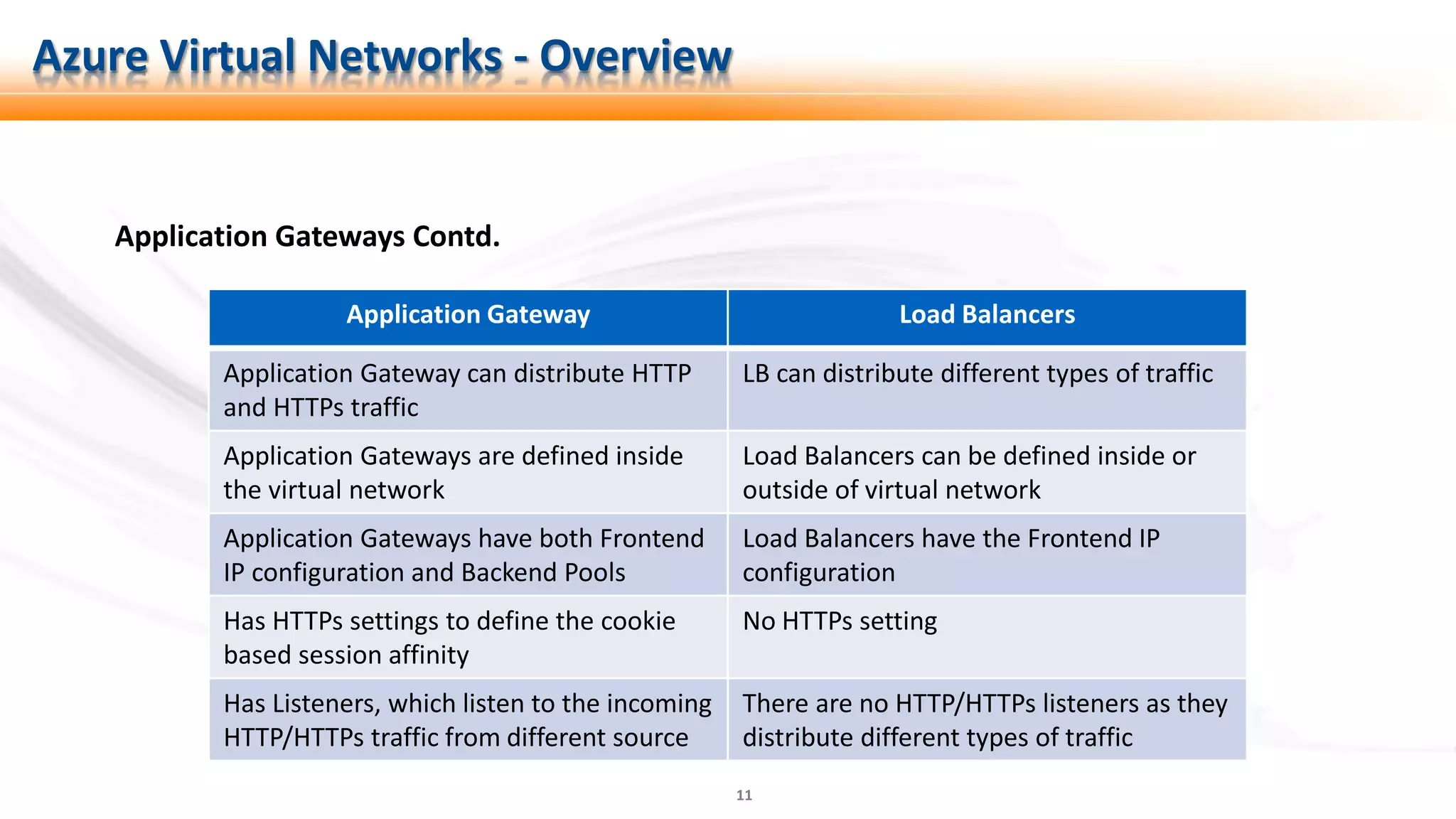
Application Gateways Contd.
Azure Virtual Networks - Overview
Application Gateway Load Balancers
Application Gateway can distribute HTTP
and HTTPs traffic
LB can distribute different types of traffic
Application Gateways are defined inside
the virtual network
Load Balancers can be defined inside or
outside of virtual network
Application Gateways have both Frontend
IP configuration and Backend Pools
Load Balancers have the Frontend IP
configuration
Has HTTPs settings to define the cookie
based session affinity
No HTTPs setting
Has Listeners, which listen to the incoming
HTTP/HTTPs traffic from different source
There are no HTTP/HTTPs listeners as they
distribute different types of traffic
12
Traffic Manager
Traffic Managers are the DNS-based load balancer. They help in –
1. The distribution of traffic optimally to services across different Azure regions
2. Providing high availability and performance.
3. Providing service maintenance without downtime
4. Proving hybrid application experience
5. Distributing traffic for complex deployments
Azure Virtual Networks - Overview
13
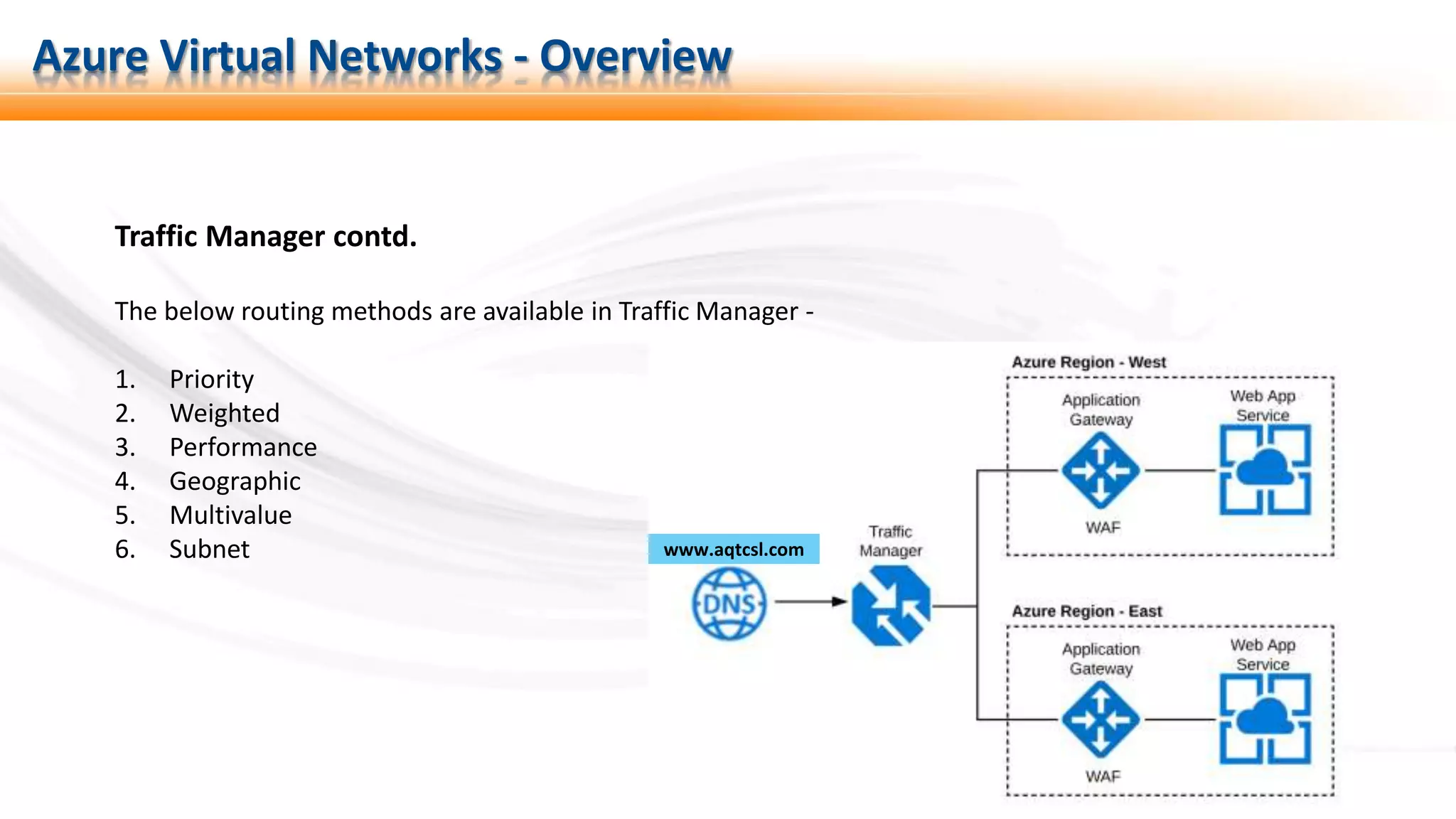
Traffic Manager contd.
The below routing methods are available in Traffic Manager -
1. Priority
2. Weighted
3. Performance
4. Geographic
5. Multivalue
6. Subnet
Azure Virtual Networks - Overview
www.aqtcsl.com
14
Summary
 Azure Virtual Network
 Subnets
 Network Security Groups
 NICs
Download the training material from – https://azure-training.com
 IP addresses
 VPN gateways
 Load Balancers
 Application Gateways
 Traffic Managers
Azure Virtual Networks - Overview

Part 01: Azure Virtual Networks – An Overview

  • 1.
    1 Azure Virtual Networks- Overview Azure Virtual Network Part 01: Azure Virtual Networks – An Overview Agenda AZ-100: Configure and manage virtual networks
  • 2.
    2 Virtual Networks Azure VirtualNetworks - Overview A virtual network in Azure is similar to the network that we have in our on-premises environment, helping us connect different resources. Virtual networks - • Have their own private address space as defined during their creation • Can have one or more subnets with their own address space allocated, which is one part of the main address space of the vNet With the provision of the virtual network, Azure provide its own name resolution using the Azure DNS. There is additionally an option to configure our own DNS server
  • 3.
    3 Subnets Subnets provide separationof concern within virtual networks. A virtual network can be segmented into one or more subnets. • Each subnet must have a unique IP address range, within the address space of the virtual network • Address range for the Subnets cannot overlap • Resources within subnets can communicate with each other • Certain resources needs to have their own dedicated subnets Azure Virtual Networks - Overview
  • 4.
    4 Network Security Group Youcan filter the incoming and outgoing traffic to and from Azure resources using Network Security Groups. A network security group contains a set of rules that allow or deny network traffic Azure Virtual Networks - Overview
  • 5.
    5 Network Interfaces (NICs) Itallows the connectivity between Azure Virtual Machine and the vNet, enabling the VM to communicate with internal and external resources over the network. One virtual machine can have more than one network interface depending upon the size of the VM opted for. Azure Virtual Networks - Overview
  • 6.
    6 IP Addresses (IPs) IPaddresses are assigned to resources to communicate with each other within and outside Azure. There are two types of IP addresses in Azure: 1. Public IP addresses: These IP addresses can be assigned to- • Virtual Machines • External/Internet facing Load Balancers (Layer 4 Load Balancing) • VPN Gateways (P2S and S2S Connectivity) • Application Gateways (Layer 7 Load Balancing) 2. Private IP addresses: These IP addresses can be assigned to - • Virtual Machines • Internal Load Balancers (Layer 4 LBs) • Application Gateways (Layer 7 LBs) Azure Virtual Networks - Overview
  • 7.
    7 VPN Gateways The VPNGateway helps connecting networks within Azure, such as – 1. Azure vNet to vNet. It also helps in connecting Azure vNet to on-premises network, such as – 1. Point to Site Connectivity (P2S) 2. Site to Site Connectivity (S2S) Azure Virtual Networks - Overview
  • 8.
    8 Azure Load Balancers AzureLBs are layer 4 load balancers operating at TCP and UDP levels and deliver high availability. They – 1. Load-balance incoming internet traffic to your VMs 2. Load-balance traffic across VMs inside a virtual network 3. Help in forwarding traffic to a specific port on a particular VM with the defined inbound network address translation (NAT) rules. 4. Provide outbound connectivity for VMs in the VNet using a public Load Balancer Azure Virtual Networks - Overview
  • 9.
    9 Azure Load BalancersContd. Azure LBs uses a 5-tuple hash composed of – 1. Source IP address 2. Source port 3. Destination IP address 4. Destination port 5. Protocol Azure Virtual Networks - Overview https://docs.microsoft.com/en-us/azure/load-balancer/load-balancer-overview
  • 10.
    10 Application Gateways They arethe layer 7 load balancers and provide load balancing of the web applications. They can also work as a Web Application Firewall (WAF) providing security to the applications. They provide – 1. SSL termination with certificate offloading 2. Connection Draining 3. Create custom error pages with your own branding 4. URL based routing 5. Multiple Site hosting 6. Session Affinity 7. Websocket and HTTP/2 traffic There are two SKUs for application gateway, which are: 1. Standard 2. Web Application Firewall (WAF) Azure Virtual Networks - Overview
  • 11.
    11 Application Gateways Contd. AzureVirtual Networks - Overview Application Gateway Load Balancers Application Gateway can distribute HTTP and HTTPs traffic LB can distribute different types of traffic Application Gateways are defined inside the virtual network Load Balancers can be defined inside or outside of virtual network Application Gateways have both Frontend IP configuration and Backend Pools Load Balancers have the Frontend IP configuration Has HTTPs settings to define the cookie based session affinity No HTTPs setting Has Listeners, which listen to the incoming HTTP/HTTPs traffic from different source There are no HTTP/HTTPs listeners as they distribute different types of traffic
  • 12.
    12 Traffic Manager Traffic Managersare the DNS-based load balancer. They help in – 1. The distribution of traffic optimally to services across different Azure regions 2. Providing high availability and performance. 3. Providing service maintenance without downtime 4. Proving hybrid application experience 5. Distributing traffic for complex deployments Azure Virtual Networks - Overview
  • 13.
    13 Traffic Manager contd. Thebelow routing methods are available in Traffic Manager - 1. Priority 2. Weighted 3. Performance 4. Geographic 5. Multivalue 6. Subnet Azure Virtual Networks - Overview www.aqtcsl.com
  • 14.
    14 Summary  Azure VirtualNetwork  Subnets  Network Security Groups  NICs Download the training material from – https://azure-training.com  IP addresses  VPN gateways  Load Balancers  Application Gateways  Traffic Managers Azure Virtual Networks - Overview

Editor's Notes

  • #2 I know many of you must already be aware of there terms, and that case you are more than welcome to skip to my next video which dives deep into more details and has hands on session.
  • #3 A virtual network in Azure is similar to the network that we have in our on-premises environment, helping us connect different resources. Azure network helps us connect virtual machines (VMs), create a connected systems as a part of a FARMs so that they can communicate with each other, and talk to the on-premises systems as well in special connected scenarios.   Each Azure subscription can have multiple Azure regions, and each Azure region can have one or more virtual networks. Virtual networks, therefore, are isolated from other virtual networks even when they are in the same region.   Virtual networks - 1. Have their own private address space as defined during their creation 2. Can have one or more subnets with their own address space allocated, which is one part of the main address space of the vNet.   With the provision of the virtual network, Azure provide its own name resolution using the Azure DNS. There is additionally an option to configure our own DNS server, if we have our own domain name. The resources thus created, can use the configured domain name.
  • #4 Subnets provide separation of concern within virtual networks, and the resources within virtual networks can be grouped together into different subnets depending on requirements. Some of the resources require their own dedicated subnets like an application gateway. 1. Each subnet must have a unique address range, specified in CIDR format, within the address space of the virtual network, which cannot overlap with other subnets in the virtual network. 2. Azure routes network traffic between all subnets in a virtual network, by default. 3. There is a possibility for you to associate network security group to each subnet in a virtual network. You can associate the same, or a different, network security group to each subnet.
  • #5 An NSG is a part of the virtual network inside the resource group, which has a set of rules defined for managing the inbound and the outbound traffic to and from the Virtual Machines. The NSGs can be assigned to either the NICs or to the Subnets. If the NSG is assigned to an NIC, only a single VM to which the NIC is allocated gets affected. On the other hand, if the NSG is assigned to a Subnet, all the VMs within the subnet will follow the same rule. Every rule defined in the NSG has a priority assigned. There are some default/predefined rules set, which cannot be deleted, but there rules have the highest priority value set, i.e., they have the lowest priority, and can be overridden.
  • #6 It allows the connectivity between Azure Virtual Machine and the vNet, enabling the VM to communicate with internal and external resources over the network. One virtual machine can have more than one network interface depending upon the size of the VM opted for.
  • #7 IP addresses are assigned to resources to communicate with each other within and outside Azure. We can also connect to our on-premises network as well as the internet. There are two types of IP addresses in Azure:   Public IP addresses: These IP addresses are used for communications over the internet, and also with the public facing azure services The Public IP addresses can be assigned to- Virtual Machines External/Internet facing Load Balancers (Layer 3 Load Balancing) VPN Gateways (P2S and S2S Connectivity) Application Gateways (Layer 7 Load Balancing)    The Azure Public IP address is created with either – Basic SKU They can be assigned with either the static or the dynamic allocation method. Network security groups are recommended but optional for restricting inbound or outbound traffic. IP addresses under Basic SKU are not zone redundant   Standard SKU They can be assigned only with the static allocation method. When using the standard SKU, we must explicitly whitelist the inbound traffic, which needs to be allowed by configuring the IP addresses, ports, protocols, etc. This SKU is zone redundant.   Private IP addresses: The private IP addresses on the other hand are used for communication within an Azure vNet. These IP addresses also allow communication with your on-premises network, when a VPN gateway or ExpressRoute is established with on-premises network. The Private IP addresses can be assigned to - Virtual Machines Internal Load Balancers (Layer 3 LBs) Application Gateways (Layer 7 LBs)
  • #8 The VPN Gateway will help connecting networks, such as – Azure vNet to another Azure vNet. It also helps in connecting Azure vNet to on-premises network. They are created in a separate dedicated subnet. As per the Microsoft docs, only dynamic basic SKU IP address can be assigned to the VPN Gateway. We will see a demo on creating the P2S and the S2S connectivity in the hands on module of this training series. For this particular training, this is all theoretical
  • #9 Azure Load Balancer are layer 4 load balancers operating at TCP and UDP levels and deliver high availability and performance for the applications.   The load balancer maps the traffic between the incoming IP address and port to the private IP address and port of the Virtual Machine.
  • #10 With the Load Balancer, you can create a LB rules to distribute incoming traffic at frontend to the backend pool instances. Load Balancer uses a 5-tuple hash-based algorithm for it. The 5-tuple hash is composed of source IP address, source port, destination IP address, destination port, and IP protocol number to map flows to available servers A server is available to receive new flows when a health probe indicates a healthy backend endpoint.
  • #11 Application gateways are layer 7 load balancers. For application gateways as well, only dynamic basic IP is required. The traditional load balancer operate at the transport layer (Layer 4, which is TCP and USP), whereas, the application gateway is more specific and routes traffic based on the URL. They are always within the virtual network SSL Termination Connection draining helps you achieve graceful removal of backend pool members if need be. Once enabled, Application Gateway ensures that all deregistering instances of a backend pool do not receive any new request while allowing existing requests to complete within a configured time limit. We can create custom error pages instead of displaying default error pages. You can use your own branding and layout using a custom error page. URL Path Based Routing allows you to route traffic to back-end server pools based on URL Paths of the request Multiple-site hosting enables you to configure more than one web site using the same application gateway instance. This feature allows you to configure a more efficient topology for your deployments The cookie-based session affinity feature is useful when you want to keep a user session on the same server. By using gateway-managed cookies, the Application Gateway can direct subsequent traffic from a user session to the same server for processing The WebSocket and HTTP/2 protocols enable full duplex communication between a server and a client over a long running TCP connection. This allows for a more interactive communication between the web server and the client, which can be bidirectional without the need for polling as required in HTTP-based implementations There are two SKUs for application gateway, which are: 1. Standard Provides all the features of layer 7 load balancer 2. Web Application Firewall (WAF) Provides a centralized protection for the web applications to save from common attacks and vulnerabilities in addition to everything under Standard SKU
  • #12 In addition to these differences, Application Gateway now has a public preview of a new SKU [Standard_V2], which offers- Autoscaling - Application Gateway or WAF deployments under the autoscaling SKU can scale up or down based on changing traffic load patterns. Autoscaling also removes the requirement to choose a deployment size or instance count during provisioning. Zone redundancy - An Application Gateway or WAF deployment can span multiple Availability Zones, removing the need to provision and spin separate Application Gateway instances in each zone with a Traffic Manager. Static VIP - The application gateway VIP now supports the static VIP type exclusively. This ensures that the VIP associated with application gateway does not change even after a restart. Faster deployment and update time as compared to the generally available SKU. 5X better SSL offload performance as compared to the generally available SKU.
  • #13 Traffic Manager is another point of interest. They are the DNS-based load balancer, which enables the distribution of traffic optimally to services across different Azure regions, and also providing high availability and performance. Traffic Manager helps in directing the traffic to the nearest service endpoint using the DNS based on a traffic-routing method and health of the endpoints, which is continuously probes. Increase application availability Traffic Manager delivers high availability for your critical applications by monitoring your endpoints and providing automatic failover when an endpoint goes down. Improve application performance Azure allows you to run cloud services or websites in datacenters located around the world. Traffic Manager improves application responsiveness by directing traffic to the endpoint with the lowest network latency for the client. Perform service maintenance without downtime You can perform planned maintenance operations on your applications without downtime. Traffic Manager directs traffic to alternative endpoints while the maintenance is in progress. Combine hybrid applications Traffic Manager supports external, non-Azure endpoints enabling it to be used with hybrid cloud and on-premises deployments, including the "burst-to-cloud," "migrate-to-cloud," and "failover-to-cloud" scenarios. Distribute traffic for complex deployments Using nested Traffic Manager profiles, traffic-routing methods can be combined to create sophisticated and flexible rules to scale to the needs of larger, more complex deployments.
  • #14 The following traffic routing methods are available in Traffic Manager: Priority: Select Priority when you want to use a primary service endpoint for all traffic, and provide backups in case the primary or the backup endpoints are unavailable. Weighted: Select Weighted when you want to distribute traffic across a set of endpoints, either evenly or according to weights, which you define. Performance: Select Performance when you have endpoints in different geographic locations and you want end users to use the "closest" endpoint in terms of the lowest network latency. Geographic: Select Geographic so that users are directed to specific endpoints (Azure, External, or Nested) based on which geographic location their DNS query originates from. This empowers Traffic Manager customers to enable scenarios where knowing a user’s geographic region and routing them based on that is important. Examples include complying with data sovereignty mandates, localization of content & user experience and measuring traffic from different regions. Multivalue: Select MultiValue for Traffic Manager profiles that can only have IPv4/IPv6 addresses as endpoints. When a query is received for this profile, all healthy endpoints are returned. Subnet: Select Subnet traffic-routing method to map sets of end-user IP address ranges to a specific endpoint within a Traffic Manager profile. When a request is received, the endpoint returned will be the one mapped for that request’s source IP address.