Intro to Salesforce1 Mobile Development
January 22, 2014
Safe Harbor
Safe harbor statement under the Private Securities Litigation Reform Act of 1995:
This presentation may contain forward-looking statements that involve risks, uncertainties, and assumptions. If any such uncertainties materialize or if any of
the assumptions proves incorrect, the results of salesforce.com, inc. could differ materially from the results expressed or implied by the forward-looking
statements we make. All statements other than statements of historical fact could be deemed forward-looking, including any projections of product or service
availability, subscriber growth, earnings, revenues, or other financial items and any statements regarding strategies or plans of management for future
operations, statements of belief, any statements concerning new, planned, or upgraded services or technology developments and customer contracts or use
of our services.
The risks and uncertainties referred to above include – but are not limited to – risks associated with developing and delivering new functionality for our
service, new products and services, our new business model, our past operating losses, possible fluctuations in our operating results and rate of growth,
interruptions or delays in our Web hosting, breach of our security measures, the outcome of intellectual property and other litigation, risks associated with
possible mergers and acquisitions, the immature market in which we operate, our relatively limited operating history, our ability to expand, retain, and
motivate our employees and manage our growth, new releases of our service and successful customer deployment, our limited history reselling nonsalesforce.com products, and utilization and selling to larger enterprise customers. Further information on potential factors that could affect the financial
results of salesforce.com, inc. is included in our annual report on Form 10-Q for the most recent fiscal quarter ended July 31, 2012. This documents and
others containing important disclosures are available on the SEC Filings section of the Investor Information section of our Web site.
Any unreleased services or features referenced in this or other presentations, press releases or public statements are not currently available and may not be
delivered on time or at all. Customers who purchase our services should make the purchase decisions based upon features that are currently available.
Salesforce.com, inc. assumes no obligation and does not intend to update these forward-looking statements.

#forcewebinar
Speakers
Ryan Upton
Developer Evangelist
@ryanjupton

#forcewebinar

Samantha Ready
Developer Evangelist
@samantha_ready
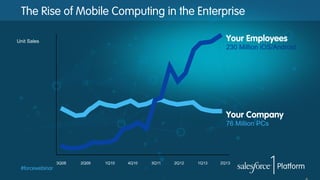
The Rise of Mobile Computing in the Enterprise
Your Employees

Unit Sales

230 Million iOS/Android

Your Company
76 Million PCs

3Q08

#forcewebinar

2Q09

1Q10

4Q10

3Q11

2Q12

1Q13

2Q13
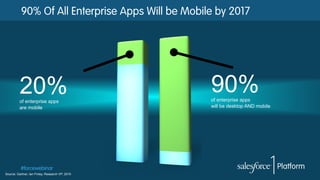
90% Of All Enterprise Apps Will be Mobile by 2017

20%
of enterprise apps
are mobile

#forcewebinar
Source: Gartner, Ian Finley, Research VP; 2010

90%

of enterprise apps
will be desktop AND mobile
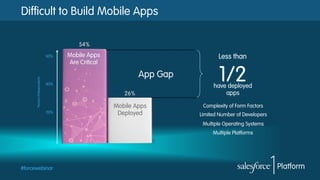
Difficult to Build Mobile Apps

Percent of Respondents

60%

Mobile Apps
Are Critical

Less than

App Gap
40%

20%

1/2

have deployed
apps
Mobile Apps
Deployed

Complexity of Form Factors
Limited Number of Developers
Multiple Operating Systems
Multiple Platforms

#forcewebinar
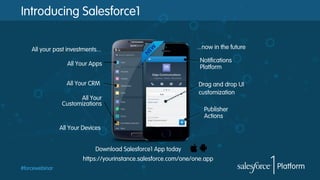
Introducing Salesforce1
All your past investments...
All Your Apps
All Your CRM
All Your
Customizations

...now in the future
Notifications
Platform
Drag and drop UI
customization
Publisher
Actions

All Your Devices
Download Salesforce1 App today
https://yourinstance.salesforce.com/one/one.app
#forcewebinar
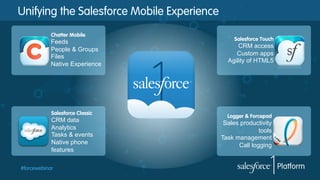
Unifying the Salesforce Mobile Experience
Chatter Mobile

Feeds
People & Groups
Files
Native Experience

Salesforce Classic

CRM data
Analytics
Tasks & events
Native phone
features
#forcewebinar

Salesforce Touch

CRM access
Custom apps
Agility of HTML5

Logger & Forcepad

Sales productivity
tools
Task management
Call logging
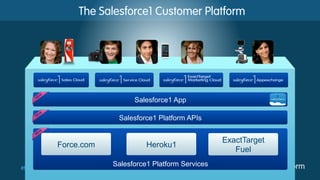
The Salesforce1 Customer Platform

Salesforce1 App
Salesforce1 Platform APIs

Force.com
#forcewebinar

Heroku1
Salesforce1 Platform Services

ExactTarget
Fuel
Let’s dive into the example…

#forcewebinar
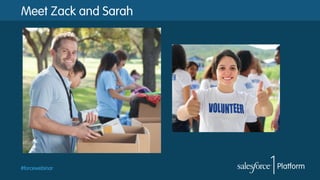
Meet Zack and Sarah

#forcewebinar
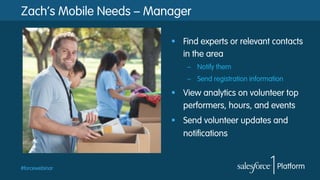
Zach’s Mobile Needs – Manager
§  Find experts or relevant contacts
in the area
–  Notify them
–  Send registration information

§  View analytics on volunteer top
performers, hours, and events
§  Send volunteer updates and
notifications

#forcewebinar
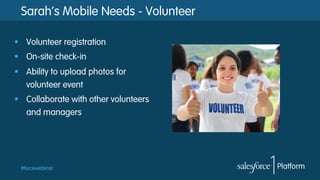
Sarah’s Mobile Needs - Volunteer
§  Volunteer registration
§  On-site check-in
§  Ability to upload photos for
volunteer event
§  Collaborate with other volunteers
and managers

#forcewebinar
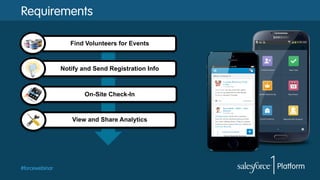
Requirements
Find Volunteers for Events

Notify and Send Registration Info

On-Site Check-In

View and Share Analytics

#forcewebinar
Demo

#forcewebinar
Demo
§  Overview [Sam/Ryan]
§  Find Experts [Ryan]
§  Registration [Ryan]
§  Check in [Sam]
§  Analytics [Sam]
–  view in mobile simulator of top performer graph
–  post “Thank you” to volunteer community and thank top performer (@Sarah)

§  Wrap Up [Sam]
#forcewebinar
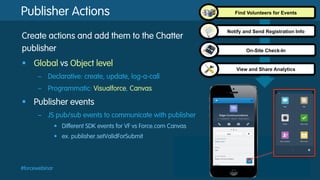
Publisher Actions
Create actions and add them to the Chatter
publisher
§  Global vs Object level
–  Declarative: create, update, log-a-call
–  Programmatic: Visualforce, Canvas

§  Publisher events
–  JS pub/sub events to communicate with publisher
•  Different SDK events for VF vs Force.com Canvas
•  ex. publisher.setValidForSubmit

#forcewebinar

Find Volunteers for Events

Notify and Send Registration Info

On-Site Check-In

View and Share Analytics
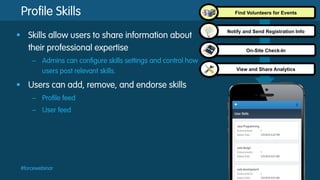
Profile Skills
§  Skills allow users to share information about
their professional expertise
–  Admins can configure skills settings and control how
users post relevant skills.

§  Users can add, remove, and endorse skills
–  Profile feed
–  User feed

#forcewebinar

Find Volunteers for Events

Notify and Send Registration Info

On-Site Check-In

View and Share Analytics
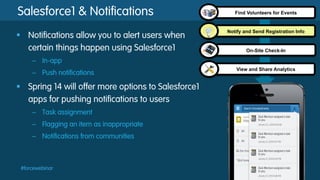
Salesforce1 & Notifications
§  Notifications allow you to alert users when
certain things happen using Salesforce1

Find Volunteers for Events

Notify and Send Registration Info

On-Site Check-In

–  In-app
–  Push notifications

§  Spring 14 will offer more options to Salesforce1
apps for pushing notifications to users
–  Task assignment
–  Flagging an item as inappropriate
–  Notifications from communities

#forcewebinar

View and Share Analytics
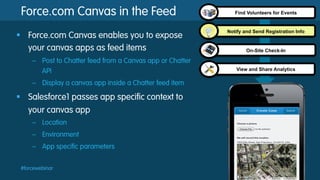
Force.com Canvas in the Feed
§  Force.com Canvas enables you to expose
your canvas apps as feed items
–  Post to Chatter feed from a Canvas app or Chatter
API
–  Display a canvas app inside a Chatter feed item

§  Salesforce1 passes app specific context to
your canvas app
–  Location
–  Environment
–  App specific parameters
#forcewebinar

Find Volunteers for Events

Notify and Send Registration Info

On-Site Check-In

View and Share Analytics
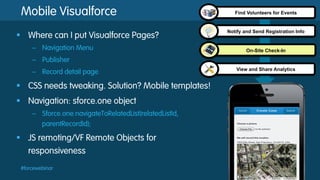
Mobile Visualforce
§  Where can I put Visualforce Pages?
–  Navigation Menu

Find Volunteers for Events

Notify and Send Registration Info

On-Site Check-In

–  Publisher
–  Record detail page

§  CSS needs tweaking. Solution? Mobile templates!
§  Navigation: sforce.one object
–  Sforce.one.navigateToRelatedList(relatedListId,
parentRecordId);

§  JS remoting/VF Remote Objects for
responsiveness
#forcewebinar

View and Share Analytics
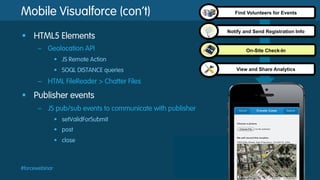
Mobile Visualforce (con’t)
§  HTML5 Elements
–  Geolocation API

Find Volunteers for Events

Notify and Send Registration Info

On-Site Check-In

•  JS Remote Action
•  SOQL DISTANCE queries

–  HTML FileReader > Chatter Files

§  Publisher events
–  JS pub/sub events to communicate with publisher
•  setValidForSubmit
•  post
•  close

#forcewebinar

View and Share Analytics
Analytics
§  Visualforce using the Analytics API
–  Mobile Card

Find Volunteers for Events

Notify and Send Registration Info

On-Site Check-In

–  Tab

§  Declarative
–  Dashboards tab in mobile navigation
–  Embedded charts on record detail page

§  Historical Trending
–  Enable historical trending on object & field
–  Report type = [Enabled object] with historical trending

§  Analytics API in Apex
#forcewebinar

View and Share Analytics
Try it yourself!
§  developer.salesforce.com
§  Sign up to start developing
–  FREE Developer Edition: bit.ly/DE-join

§  Follow the Salesforce1 Dev Guide - bit.ly/s1-dev-guide
§  Test it out in the app
–  Download the Salesforce1 app
–  Open in your mobile browser:
•  https://[--yourinstance--].salesforce.com/one/one.app

#forcewebinar
Salesforce1 Resources
§  Dreamforce Sessions – bit.ly/s1-df-sessions
§  Developer Guide – bit.ly/s1-dev-guide
§  Blogs:
–  6 things you need to know: bit.ly/s1-6-things
–  Mobile cards: bit.ly/s1-mobile-cards
–  App Boogie Fever: bit.ly/s1-boogie

#forcewebinar

Intro to Salesforce1 Mobile App Development Webinar

  • 1.
    Intro to Salesforce1Mobile Development January 22, 2014
  • 2.
    Safe Harbor Safe harborstatement under the Private Securities Litigation Reform Act of 1995: This presentation may contain forward-looking statements that involve risks, uncertainties, and assumptions. If any such uncertainties materialize or if any of the assumptions proves incorrect, the results of salesforce.com, inc. could differ materially from the results expressed or implied by the forward-looking statements we make. All statements other than statements of historical fact could be deemed forward-looking, including any projections of product or service availability, subscriber growth, earnings, revenues, or other financial items and any statements regarding strategies or plans of management for future operations, statements of belief, any statements concerning new, planned, or upgraded services or technology developments and customer contracts or use of our services. The risks and uncertainties referred to above include – but are not limited to – risks associated with developing and delivering new functionality for our service, new products and services, our new business model, our past operating losses, possible fluctuations in our operating results and rate of growth, interruptions or delays in our Web hosting, breach of our security measures, the outcome of intellectual property and other litigation, risks associated with possible mergers and acquisitions, the immature market in which we operate, our relatively limited operating history, our ability to expand, retain, and motivate our employees and manage our growth, new releases of our service and successful customer deployment, our limited history reselling nonsalesforce.com products, and utilization and selling to larger enterprise customers. Further information on potential factors that could affect the financial results of salesforce.com, inc. is included in our annual report on Form 10-Q for the most recent fiscal quarter ended July 31, 2012. This documents and others containing important disclosures are available on the SEC Filings section of the Investor Information section of our Web site. Any unreleased services or features referenced in this or other presentations, press releases or public statements are not currently available and may not be delivered on time or at all. Customers who purchase our services should make the purchase decisions based upon features that are currently available. Salesforce.com, inc. assumes no obligation and does not intend to update these forward-looking statements. #forcewebinar
  • 3.
  • 4.
    The Rise ofMobile Computing in the Enterprise Your Employees Unit Sales 230 Million iOS/Android Your Company 76 Million PCs 3Q08 #forcewebinar 2Q09 1Q10 4Q10 3Q11 2Q12 1Q13 2Q13
  • 5.
    90% Of AllEnterprise Apps Will be Mobile by 2017 20% of enterprise apps are mobile #forcewebinar Source: Gartner, Ian Finley, Research VP; 2010 90% of enterprise apps will be desktop AND mobile
  • 6.
    Difficult to BuildMobile Apps Percent of Respondents 60% Mobile Apps Are Critical Less than App Gap 40% 20% 1/2 have deployed apps Mobile Apps Deployed Complexity of Form Factors Limited Number of Developers Multiple Operating Systems Multiple Platforms #forcewebinar
  • 7.
    Introducing Salesforce1 All yourpast investments... All Your Apps All Your CRM All Your Customizations ...now in the future Notifications Platform Drag and drop UI customization Publisher Actions All Your Devices Download Salesforce1 App today https://yourinstance.salesforce.com/one/one.app #forcewebinar
  • 8.
    Unifying the SalesforceMobile Experience Chatter Mobile Feeds People & Groups Files Native Experience Salesforce Classic CRM data Analytics Tasks & events Native phone features #forcewebinar Salesforce Touch CRM access Custom apps Agility of HTML5 Logger & Forcepad Sales productivity tools Task management Call logging
  • 9.
    The Salesforce1 CustomerPlatform Salesforce1 App Salesforce1 Platform APIs Force.com #forcewebinar Heroku1 Salesforce1 Platform Services ExactTarget Fuel
  • 10.
    Let’s dive intothe example… #forcewebinar
  • 11.
    Meet Zack andSarah #forcewebinar
  • 12.
    Zach’s Mobile Needs– Manager §  Find experts or relevant contacts in the area –  Notify them –  Send registration information §  View analytics on volunteer top performers, hours, and events §  Send volunteer updates and notifications #forcewebinar
  • 13.
    Sarah’s Mobile Needs- Volunteer §  Volunteer registration §  On-site check-in §  Ability to upload photos for volunteer event §  Collaborate with other volunteers and managers #forcewebinar
  • 14.
    Requirements Find Volunteers forEvents Notify and Send Registration Info On-Site Check-In View and Share Analytics #forcewebinar
  • 15.
  • 16.
    Demo §  Overview [Sam/Ryan] § Find Experts [Ryan] §  Registration [Ryan] §  Check in [Sam] §  Analytics [Sam] –  view in mobile simulator of top performer graph –  post “Thank you” to volunteer community and thank top performer (@Sarah) §  Wrap Up [Sam] #forcewebinar
  • 17.
    Publisher Actions Create actionsand add them to the Chatter publisher §  Global vs Object level –  Declarative: create, update, log-a-call –  Programmatic: Visualforce, Canvas §  Publisher events –  JS pub/sub events to communicate with publisher •  Different SDK events for VF vs Force.com Canvas •  ex. publisher.setValidForSubmit #forcewebinar Find Volunteers for Events Notify and Send Registration Info On-Site Check-In View and Share Analytics
  • 18.
    Profile Skills §  Skillsallow users to share information about their professional expertise –  Admins can configure skills settings and control how users post relevant skills. §  Users can add, remove, and endorse skills –  Profile feed –  User feed #forcewebinar Find Volunteers for Events Notify and Send Registration Info On-Site Check-In View and Share Analytics
  • 19.
    Salesforce1 & Notifications § Notifications allow you to alert users when certain things happen using Salesforce1 Find Volunteers for Events Notify and Send Registration Info On-Site Check-In –  In-app –  Push notifications §  Spring 14 will offer more options to Salesforce1 apps for pushing notifications to users –  Task assignment –  Flagging an item as inappropriate –  Notifications from communities #forcewebinar View and Share Analytics
  • 20.
    Force.com Canvas inthe Feed §  Force.com Canvas enables you to expose your canvas apps as feed items –  Post to Chatter feed from a Canvas app or Chatter API –  Display a canvas app inside a Chatter feed item §  Salesforce1 passes app specific context to your canvas app –  Location –  Environment –  App specific parameters #forcewebinar Find Volunteers for Events Notify and Send Registration Info On-Site Check-In View and Share Analytics
  • 21.
    Mobile Visualforce §  Wherecan I put Visualforce Pages? –  Navigation Menu Find Volunteers for Events Notify and Send Registration Info On-Site Check-In –  Publisher –  Record detail page §  CSS needs tweaking. Solution? Mobile templates! §  Navigation: sforce.one object –  Sforce.one.navigateToRelatedList(relatedListId, parentRecordId); §  JS remoting/VF Remote Objects for responsiveness #forcewebinar View and Share Analytics
  • 22.
    Mobile Visualforce (con’t) § HTML5 Elements –  Geolocation API Find Volunteers for Events Notify and Send Registration Info On-Site Check-In •  JS Remote Action •  SOQL DISTANCE queries –  HTML FileReader > Chatter Files §  Publisher events –  JS pub/sub events to communicate with publisher •  setValidForSubmit •  post •  close #forcewebinar View and Share Analytics
  • 23.
    Analytics §  Visualforce usingthe Analytics API –  Mobile Card Find Volunteers for Events Notify and Send Registration Info On-Site Check-In –  Tab §  Declarative –  Dashboards tab in mobile navigation –  Embedded charts on record detail page §  Historical Trending –  Enable historical trending on object & field –  Report type = [Enabled object] with historical trending §  Analytics API in Apex #forcewebinar View and Share Analytics
  • 24.
    Try it yourself! § developer.salesforce.com §  Sign up to start developing –  FREE Developer Edition: bit.ly/DE-join §  Follow the Salesforce1 Dev Guide - bit.ly/s1-dev-guide §  Test it out in the app –  Download the Salesforce1 app –  Open in your mobile browser: •  https://[--yourinstance--].salesforce.com/one/one.app #forcewebinar
  • 25.
    Salesforce1 Resources §  DreamforceSessions – bit.ly/s1-df-sessions §  Developer Guide – bit.ly/s1-dev-guide §  Blogs: –  6 things you need to know: bit.ly/s1-6-things –  Mobile cards: bit.ly/s1-mobile-cards –  App Boogie Fever: bit.ly/s1-boogie #forcewebinar