Salesforce1 for Developers
Speakers
Sandeep Bhanot
Mobile Geek (both kinds)
@cloudysan
Safe Harbor
Safe harbor statement under the Private Securities Litigation Reform Act of 1995:
This presentation may contain forward-looking statements that involve risks, uncertainties, and assumptions. If any such uncertainties materialize or if any of
the assumptions proves incorrect, the results of salesforce.com, inc. could differ materially from the results expressed or implied by the forward-looking
statements we make. All statements other than statements of historical fact could be deemed forward-looking, including any projections of product or service
availability, subscriber growth, earnings, revenues, or other financial items and any statements regarding strategies or plans of management for future
operations, statements of belief, any statements concerning new, planned, or upgraded services or technology developments and customer contracts or use
of our services.
The risks and uncertainties referred to above include – but are not limited to – risks associated with developing and delivering new functionality for our
service, new products and services, our new business model, our past operating losses, possible fluctuations in our operating results and rate of growth,
interruptions or delays in our Web hosting, breach of our security measures, the outcome of intellectual property and other litigation, risks associated with
possible mergers and acquisitions, the immature market in which we operate, our relatively limited operating history, our ability to expand, retain, and
motivate our employees and manage our growth, new releases of our service and successful customer deployment, our limited history reselling nonsalesforce.com products, and utilization and selling to larger enterprise customers. Further information on potential factors that could affect the financial
results of salesforce.com, inc. is included in our annual report on Form 10-Q for the most recent fiscal quarter ended July 31, 2012. This documents and
others containing important disclosures are available on the SEC Filings section of the Investor Information section of our Web site.
Any unreleased services or features referenced in this or other presentations, press releases or public statements are not currently available and may not be
delivered on time or at all. Customers who purchase our services should make the purchase decisions based upon features that are currently available.
Salesforce.com, inc. assumes no obligation and does not intend to update these forward-looking statements.
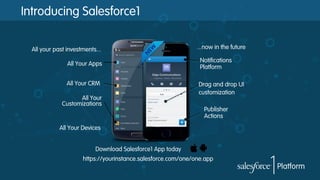
Introducing Salesforce1
All your past investments...
All Your Apps
All Your CRM
All Your
Customizations

...now in the future
Notifications
Platform
Drag and drop UI
customization
Publisher
Actions

All Your Devices
Download Salesforce1 App today
https://yourinstance.salesforce.com/one/one.app
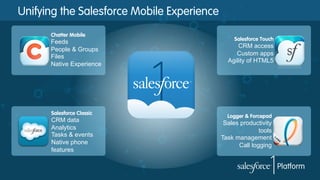
Unifying the Salesforce Mobile Experience
Chatter Mobile

Feeds
People & Groups
Files
Native Experience

Salesforce Classic

CRM data
Analytics
Tasks & events
Native phone
features

Salesforce Touch

CRM access
Custom apps
Agility of HTML5

Logger & Forcepad

Sales productivity
tools
Task management
Call logging
But is Salesforce1 an App or a Platform?
Its both
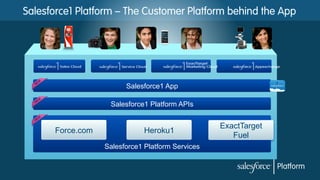
Salesforce1 Platform – The Customer Platform behind the App

Salesforce1 App
Salesforce1 Platform APIs

Force.com

Heroku1
Salesforce1 Platform Services

ExactTarget
Fuel
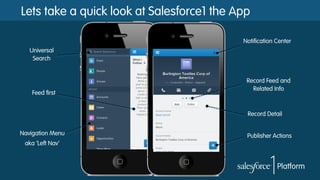
Lets take a quick look at Salesforce1 the App
Notification Center
Universal
Search

Record Home
Feed first

Record Feed and
Related Info

Record Detail
Navigation Menu
aka ‘Left Nav’

Publisher Actions
Platform = endless ways to customize the app

Declarative and Programmatic tools to customize the Salesforce1
experience
Declarative tools for customizing the
Salesforce1 App
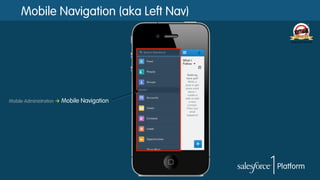
Mobile Navigation (aka Left Nav)

Mobile Administration à

Mobile Navigation
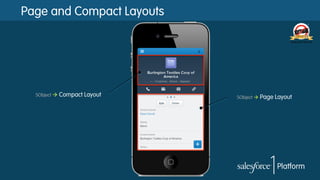
Page and Compact Layouts

SObject à

Compact Layout

SObject à

Page Layout
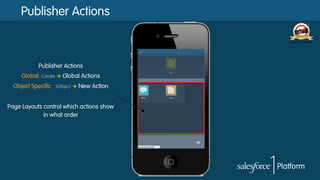
Publisher Actions

Publisher Actions
Global: Create à Global Actions
Object Specific:

SObject à

New Action

Page Layouts control which actions show
in what order
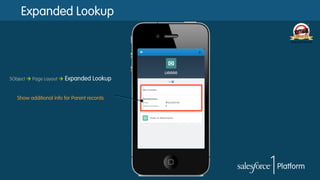
Expanded Lookup

SObject à Page Layout à

Expanded Lookup

Show additional info for Parent records
Programmatic tools for customizing
the Salesforce1 App
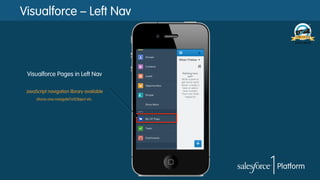
Visualforce – Left Nav

Visualforce Pages in Left Nav
JavaScript navigation library available
sforce.one.navigateToSObject etc.
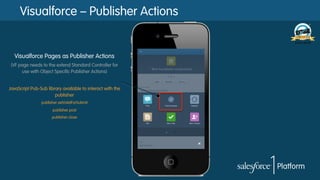
Visualforce – Publisher Actions

Visualforce Pages as Publisher Actions
(VF page needs to the extend Standard Controller for
use with Object Specific Publisher Actions)

JavaScript Pub-Sub library available to interact with the
publisher
publisher.setValidForSubmit
publisher.post
publisher.close
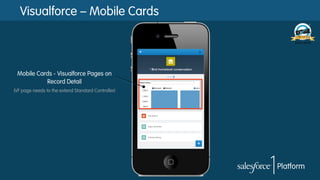
Visualforce – Mobile Cards

Mobile Cards - Visualforce Pages on
Record Detail
(VF page needs to the extend Standard Controller)
Visualforce in Salesforce1
§  <apex:page docType="html-5.0" …>
§  ‘Available for Salesforce Mobile apps’ flag enabled
§  Developers are responsible for making the VF page ‘mobile ready’
–  Use a Responsive Design framework like Bootstrap or Mobile Design templates
–  Leverage touch and swipe events where appropriate

§  Use JavaScript Remoting/VF Remote Objects for better performance
§  Use HTML5 for device features like Geolocation and Camera access
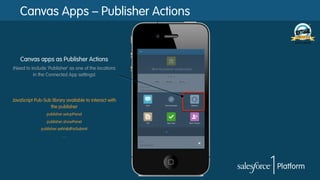
Canvas Apps – Publisher Actions

Canvas apps as Publisher Actions
(Need to include ‘Publisher’ as one of the locations
in the Connected App settings)

JavaScript Pub-Sub library available to interact with
the publisher
publisher.setupPanel
publisher.showPanel
publisher.setValidForSubmit
….
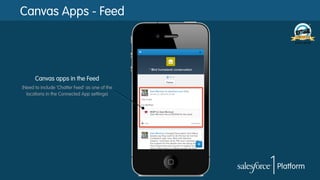
Canvas Apps - Feed

Canvas apps in the Feed
(Need to include ‘Chatter Feed’ as one of the
locations in the Connected App settings)
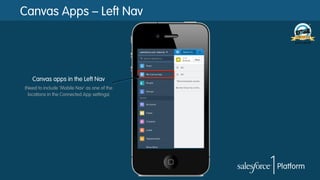
Canvas Apps – Left Nav

Canvas apps in the Left Nav
(Need to include ‘Mobile Nav’ as one of the
locations in the Connected App settings)
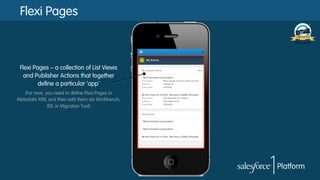
Flexi Pages

Flexi Pages – a collection of List Views
and Publisher Actions that together
define a particular ‘app’
(For now, you need to define Flexi Pages in
Metadata XML and then add them via Workbench,
IDE or Migration Tool)
Salesforce1 - The Bonus Tracks
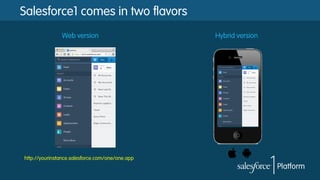
Salesforce1 comes in two flavors
Web version

http://yourinstance.salesforce.com/one/one.app

Hybrid version
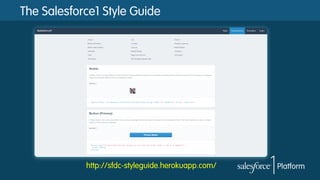
The Salesforce1 Style Guide

http://sfdc-styleguide.herokuapp.com/
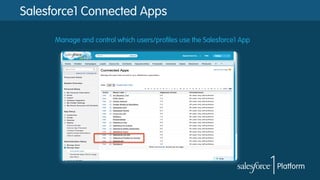
Salesforce1 Connected Apps
Manage and control which users/profiles use the Salesforce1 App
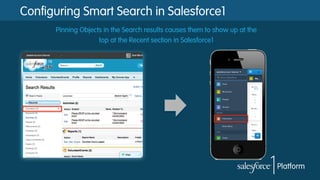
Configuring Smart Search in Salesforce1
Pinning Objects in the Search results causes them to show up at the
top at the Recent section in Salesforce1
Notifications in Salesforce1
§  Notifications allow you to alert users when certain things happen using
Salesforce1
–  In-app
–  Push notifications

§  Things at currently (Spring ’14) trigger push notifications in the Hybrid App
–  Post to Chatter Profile
–  Comment on your post
–  @Mention
–  Approval Request
–  Task assignment
–  Flagging an item as inappropriate
–  Notifications from communities
Device Access in Salesforce1
PhoneGap/Cordova type device access is not available in the Salesforce1 app.
HOWEVER….

–  Geolocation API
–  <input type="file" accept="image/*"/>
(for Camera access)
Salesforce1 Resources
§  Webinar: Intro to Salesforce1 Mobile App Development
§  Dreamforce Sessions – bit.ly/s1-df-sessions
§  Developer Guide – bit.ly/s1-dev-guide
§  Blogs:
–  6 things you need to know: bit.ly/s1-6-things
–  Mobile cards: bit.ly/s1-mobile-cards
–  App Boogie Fever: bit.ly/s1-boogie
Follow Developer Force for the Latest News
@forcedotcom / #forcewebinar
Developer Force – Force.com Community
+Developer Force – Force.com Community
Developer Force
Developer Force Group

Salesforce1 for Developers

  • 1.
  • 2.
    Speakers Sandeep Bhanot Mobile Geek(both kinds) @cloudysan
  • 3.
    Safe Harbor Safe harborstatement under the Private Securities Litigation Reform Act of 1995: This presentation may contain forward-looking statements that involve risks, uncertainties, and assumptions. If any such uncertainties materialize or if any of the assumptions proves incorrect, the results of salesforce.com, inc. could differ materially from the results expressed or implied by the forward-looking statements we make. All statements other than statements of historical fact could be deemed forward-looking, including any projections of product or service availability, subscriber growth, earnings, revenues, or other financial items and any statements regarding strategies or plans of management for future operations, statements of belief, any statements concerning new, planned, or upgraded services or technology developments and customer contracts or use of our services. The risks and uncertainties referred to above include – but are not limited to – risks associated with developing and delivering new functionality for our service, new products and services, our new business model, our past operating losses, possible fluctuations in our operating results and rate of growth, interruptions or delays in our Web hosting, breach of our security measures, the outcome of intellectual property and other litigation, risks associated with possible mergers and acquisitions, the immature market in which we operate, our relatively limited operating history, our ability to expand, retain, and motivate our employees and manage our growth, new releases of our service and successful customer deployment, our limited history reselling nonsalesforce.com products, and utilization and selling to larger enterprise customers. Further information on potential factors that could affect the financial results of salesforce.com, inc. is included in our annual report on Form 10-Q for the most recent fiscal quarter ended July 31, 2012. This documents and others containing important disclosures are available on the SEC Filings section of the Investor Information section of our Web site. Any unreleased services or features referenced in this or other presentations, press releases or public statements are not currently available and may not be delivered on time or at all. Customers who purchase our services should make the purchase decisions based upon features that are currently available. Salesforce.com, inc. assumes no obligation and does not intend to update these forward-looking statements.
  • 4.
    Introducing Salesforce1 All yourpast investments... All Your Apps All Your CRM All Your Customizations ...now in the future Notifications Platform Drag and drop UI customization Publisher Actions All Your Devices Download Salesforce1 App today https://yourinstance.salesforce.com/one/one.app
  • 5.
    Unifying the SalesforceMobile Experience Chatter Mobile Feeds People & Groups Files Native Experience Salesforce Classic CRM data Analytics Tasks & events Native phone features Salesforce Touch CRM access Custom apps Agility of HTML5 Logger & Forcepad Sales productivity tools Task management Call logging
  • 6.
    But is Salesforce1an App or a Platform? Its both
  • 7.
    Salesforce1 Platform –The Customer Platform behind the App Salesforce1 App Salesforce1 Platform APIs Force.com Heroku1 Salesforce1 Platform Services ExactTarget Fuel
  • 8.
    Lets take aquick look at Salesforce1 the App Notification Center Universal Search Record Home Feed first Record Feed and Related Info Record Detail Navigation Menu aka ‘Left Nav’ Publisher Actions
  • 9.
    Platform = endlessways to customize the app Declarative and Programmatic tools to customize the Salesforce1 experience
  • 10.
    Declarative tools forcustomizing the Salesforce1 App
  • 11.
    Mobile Navigation (akaLeft Nav) Mobile Administration à Mobile Navigation
  • 12.
    Page and CompactLayouts SObject à Compact Layout SObject à Page Layout
  • 13.
    Publisher Actions Publisher Actions Global:Create à Global Actions Object Specific: SObject à New Action Page Layouts control which actions show in what order
  • 14.
    Expanded Lookup SObject àPage Layout à Expanded Lookup Show additional info for Parent records
  • 15.
    Programmatic tools forcustomizing the Salesforce1 App
  • 16.
    Visualforce – LeftNav Visualforce Pages in Left Nav JavaScript navigation library available sforce.one.navigateToSObject etc.
  • 17.
    Visualforce – PublisherActions Visualforce Pages as Publisher Actions (VF page needs to the extend Standard Controller for use with Object Specific Publisher Actions) JavaScript Pub-Sub library available to interact with the publisher publisher.setValidForSubmit publisher.post publisher.close
  • 18.
    Visualforce – MobileCards Mobile Cards - Visualforce Pages on Record Detail (VF page needs to the extend Standard Controller)
  • 19.
    Visualforce in Salesforce1 § <apex:page docType="html-5.0" …> §  ‘Available for Salesforce Mobile apps’ flag enabled §  Developers are responsible for making the VF page ‘mobile ready’ –  Use a Responsive Design framework like Bootstrap or Mobile Design templates –  Leverage touch and swipe events where appropriate §  Use JavaScript Remoting/VF Remote Objects for better performance §  Use HTML5 for device features like Geolocation and Camera access
  • 20.
    Canvas Apps –Publisher Actions Canvas apps as Publisher Actions (Need to include ‘Publisher’ as one of the locations in the Connected App settings) JavaScript Pub-Sub library available to interact with the publisher publisher.setupPanel publisher.showPanel publisher.setValidForSubmit ….
  • 21.
    Canvas Apps -Feed Canvas apps in the Feed (Need to include ‘Chatter Feed’ as one of the locations in the Connected App settings)
  • 22.
    Canvas Apps –Left Nav Canvas apps in the Left Nav (Need to include ‘Mobile Nav’ as one of the locations in the Connected App settings)
  • 23.
    Flexi Pages Flexi Pages– a collection of List Views and Publisher Actions that together define a particular ‘app’ (For now, you need to define Flexi Pages in Metadata XML and then add them via Workbench, IDE or Migration Tool)
  • 24.
    Salesforce1 - TheBonus Tracks
  • 25.
    Salesforce1 comes intwo flavors Web version http://yourinstance.salesforce.com/one/one.app Hybrid version
  • 26.
    The Salesforce1 StyleGuide http://sfdc-styleguide.herokuapp.com/
  • 27.
    Salesforce1 Connected Apps Manageand control which users/profiles use the Salesforce1 App
  • 28.
    Configuring Smart Searchin Salesforce1 Pinning Objects in the Search results causes them to show up at the top at the Recent section in Salesforce1
  • 29.
    Notifications in Salesforce1 § Notifications allow you to alert users when certain things happen using Salesforce1 –  In-app –  Push notifications §  Things at currently (Spring ’14) trigger push notifications in the Hybrid App –  Post to Chatter Profile –  Comment on your post –  @Mention –  Approval Request –  Task assignment –  Flagging an item as inappropriate –  Notifications from communities
  • 30.
    Device Access inSalesforce1 PhoneGap/Cordova type device access is not available in the Salesforce1 app. HOWEVER…. –  Geolocation API –  <input type="file" accept="image/*"/> (for Camera access)
  • 31.
    Salesforce1 Resources §  Webinar:Intro to Salesforce1 Mobile App Development §  Dreamforce Sessions – bit.ly/s1-df-sessions §  Developer Guide – bit.ly/s1-dev-guide §  Blogs: –  6 things you need to know: bit.ly/s1-6-things –  Mobile cards: bit.ly/s1-mobile-cards –  App Boogie Fever: bit.ly/s1-boogie
  • 32.
    Follow Developer Forcefor the Latest News @forcedotcom / #forcewebinar Developer Force – Force.com Community +Developer Force – Force.com Community Developer Force Developer Force Group