Intro to Mixpanel
Or, how can I understand what my users are doing?
Gilman Tolle
CTO & Co-Founder of Boon+Gable
500 Startups Batch 9
gil@boonandgable.com
Answer 3 Questions
• How many?
• How good?
• How often?
But first, some
background…
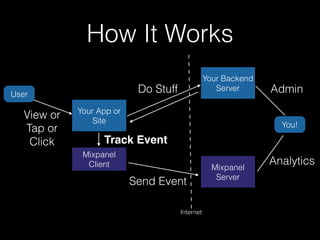
How It Works
User
Your App or
Site
Mixpanel
Client
View or
Tap or
Click
Your Backend
ServerDo Stuff
Mixpanel
Server
Track Event
You!
Send Event
Admin
Analytics
Internet
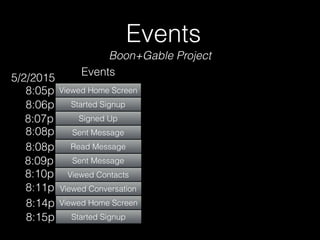
Events
Viewed Home Screen
Started Signup
Signed Up
Sent Message
Events
Read Message
Sent Message
Viewed Contacts
Viewed Conversation
8:05p
8:06p
8:07p
8:08p
8:08p
8:09p
8:10p
8:11p
Viewed Home Screen
Started Signup
8:14p
8:15p
5/2/2015
Boon+Gable Project
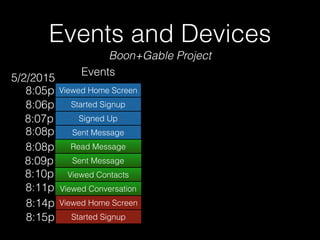
Events and Devices
Viewed Home Screen
Started Signup
Signed Up
Sent Message
Events
Read Message
Sent Message
Viewed Contacts
Viewed Conversation
8:05p
8:06p
8:07p
8:08p
8:08p
8:09p
8:10p
8:11p
Viewed Home Screen
Started Signup
8:14p
8:15p
5/2/2015
Boon+Gable Project
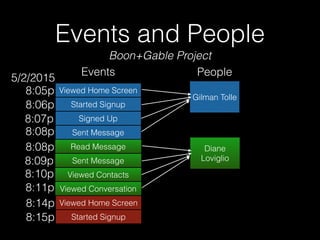
Events and People
Viewed Home Screen
Started Signup
Signed Up
Sent Message
Gilman Tolle
Events People
Read Message
Sent Message
Viewed Contacts
Viewed Conversation
Diane
Loviglio
8:05p
8:06p
8:07p
8:08p
8:08p
8:09p
8:10p
8:11p
Viewed Home Screen
Started Signup
8:14p
8:15p
5/2/2015
Boon+Gable Project
Basic Setup
Define Your Events
• You are responsible for defining and naming
your own events.
• Name them wisely.
• Cause you can’t change them.
• Ever.
Naming Guidelines
• Use human-friendly names! (e.g. “Signed Up”,
not “user_signup_192xq”)
• Think “what action did the user take that
triggered this event?”. Name it that.
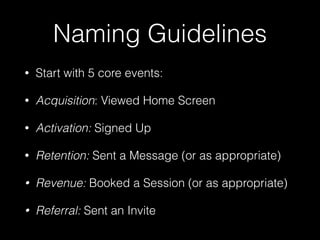
Naming Guidelines
• Start with 5 core events:
• Acquisition: Viewed Home Screen
• Activation: Signed Up
• Retention: Sent a Message (or as appropriate)
• Revenue: Booked a Session (or as appropriate)
• Referral: Sent an Invite
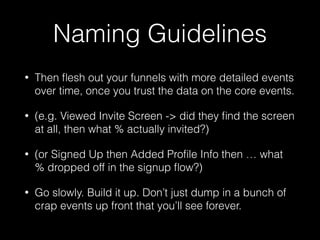
Naming Guidelines
• Then flesh out your funnels with more detailed events
over time, once you trust the data on the core events.
• (e.g. Viewed Invite Screen -> did they find the screen
at all, then what % actually invited?)
• (or Signed Up then Added Profile Info then … what
% dropped off in the signup flow?)
• Go slowly. Build it up. Don’t just dump in a bunch of
crap events up front that you’ll see forever.
Implementation
• Ask your developer to add code to send the
right events at the right time.
• It’s easy:
• mixpanel.track(“Signed Up”)
• [[Mixpanel sharedInstance] track:@“Signed Up”]
• I have more developer details afterwards.
Implementation
• There’s one additional step to link your events to people.
• When a user first signs up, call “alias” to tell Mixpanel about your
internal database ID number for that user.
• Then, send that user’s data (name, email, phone, etc) to Mixpanel.
• Every event sent after that will be linked to the person, and every
event before the “alias” call (e.g. home page view) will be linked
too.
• And, every page view or app launch after that, as long as the user
is signed in, send your user’s data to Mixpanel again to keep it up
to date.
Live View
• The way to test your Mixpanel setup
• Watch the real-time event stream
• Go through a user flow and watch the live view
to make sure your app is sending the events you
expect
Demo
Analytics
Answer 3 Questions
• How many?
• How good?
• How often?
How many?
• Use the Segmentation page
• See how many times each event happened
• Pick your time range
• Daily/Weekly/Monthly totals
• Total count vs unique count per user session
Demo
How good?
• Use the Funnels page
• Create simple 2 or 3-step funnels to understand…
• What % of people who did event X then went on to do
event Y in the future?
• E.g. what % of people who saw the homepage
actually signed up?
• See your conversion rate improve or drop over time
and judge how good your app is becoming
Demo
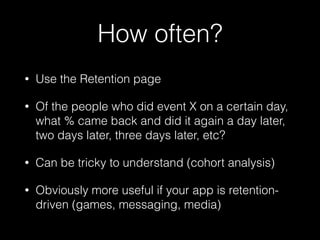
How often?
• Use the Retention page
• Of the people who did event X on a certain day,
what % came back and did it again a day later,
two days later, three days later, etc?
• Can be tricky to understand (cohort analysis)
• Obviously more useful if your app is retention-
driven (games, messaging, media)
Demo
Bonus Question: Who?
• Use the People tab
• See the full history of events done by a person
• Send them emails and pushes and SMS
• Ask them questions in-app with surveys
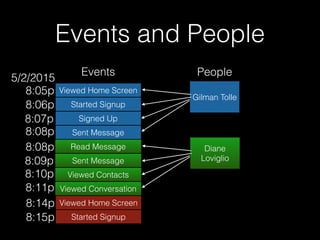
Events and People
Viewed Home Screen
Started Signup
Signed Up
Sent Message
Gilman Tolle
Events People
Read Message
Sent Message
Viewed Contacts
Viewed Conversation
Diane
Loviglio
8:05p
8:06p
8:07p
8:08p
8:08p
8:09p
8:10p
8:11p
Viewed Home Screen
Started Signup
8:14p
8:15p
5/2/2015
Demo
Next-Level Mixpanel:
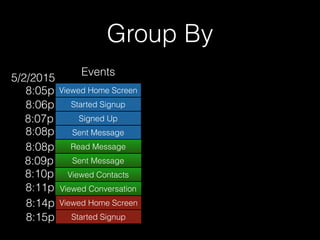
Group By Properties
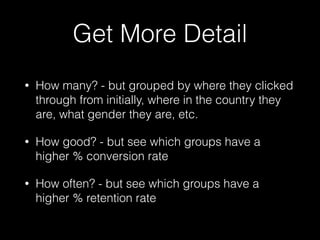
Get More Detail
• How many? - but grouped by where they clicked
through from initially, where in the country they
are, what gender they are, etc.
• How good? - but see which groups have a
higher % conversion rate
• How often? - but see which groups have a
higher % retention rate
Group By
Viewed Home Screen
Started Signup
Signed Up
Sent Message
Events
Read Message
Sent Message
Viewed Contacts
Viewed Conversation
8:05p
8:06p
8:07p
8:08p
8:08p
8:09p
8:10p
8:11p
Viewed Home Screen
Started Signup
8:14p
8:15p
5/2/2015
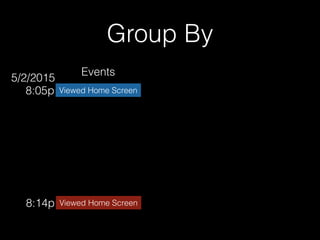
Group By
Viewed Home Screen8:05p
Viewed Home Screen8:14p
Events
5/2/2015
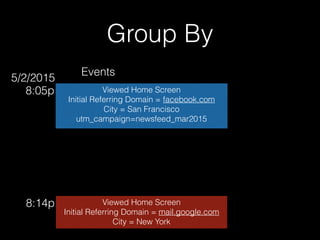
Group By
Viewed Home Screen
Initial Referring Domain = facebook.com
City = San Francisco
utm_campaign=newsfeed_mar2015
8:05p
Viewed Home Screen
Initial Referring Domain = mail.google.com
City = New York
8:14p
Events
5/2/2015
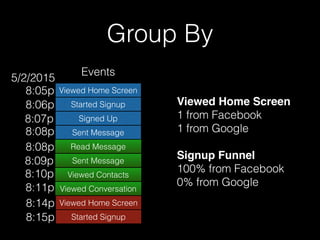
Group By
Viewed Home Screen
Started Signup
Signed Up
Sent Message
Events
Read Message
Sent Message
Viewed Contacts
Viewed Conversation
8:05p
8:06p
8:07p
8:08p
8:08p
8:09p
8:10p
8:11p
Viewed Home Screen
Started Signup
8:14p
8:15p
5/2/2015
Viewed Home Screen
1 from Facebook
1 from Google
Signup Funnel
100% from Facebook
0% from Google
Demo
Group By
• You can add your own custom properties to events as well.
For example, when you track the ‘Sent Invite’ event, define
a property called ‘Invite Channel’ that can be ‘Facebook’,
‘Twitter’, ‘Text’, or ‘Email’. Then you can group by it.
• If you want to automatically add the same property to every
event you send, you can set them as “super properties”
instead.
• This is good for storing user-level data like gender or name
or role, so you can group events by it and see it in the live
view.
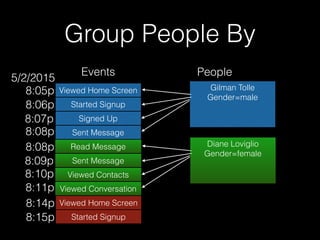
Group People By
• People have their own separate properties too
(e.g. gender, role, how many times the user sent
an invite, etc).
Group People By
Viewed Home Screen
Started Signup
Signed Up
Sent Message
Gilman Tolle
Gender=male
Events People
Read Message
Sent Message
Viewed Contacts
Viewed Conversation
Diane Loviglio
Gender=female
8:05p
8:06p
8:07p
8:08p
8:08p
8:09p
8:10p
8:11p
Viewed Home Screen
Started Signup
8:14p
8:15p
5/2/2015
Group People By
• Can group by those properties as well when
sending out notifications, emails, etc. to subsets
of your user list.
Demo
Group People By
• Event properties and people properties are
different.
• If it’s just a people property, you can’t segment
events by it on Segmentation, Funnels, and
Retention.
• So, consider setting your people properties as
event super properties too, so they’re available
both places.
Answer 3 Questions
• How many?
• How good?
• How often?
Thanks!
Any questions?
Gilman Tolle
CTO & Co-Founder of Boon+Gable
500 Startups Batch 9
gil@boonandgable.com
Developer’s Corner
Identifying Your Users
• Properly linking your Events to People is easy to
mess up.
• It all comes back to the fact that Mixpanel built
Events first, then glued People on later.
• You need to correctly associate their pre-sign-up
activities (Viewed Home Page) to their post-sign-
up activities (Signed Up, Booked a Session) or
else your funnels will be broken.
Why?
• Mixpanel starts by assigning a random “distinct id” to each
session using a browser cookie on the web or a uuid in app
storage. It’s device-specific.
• But once a user signs up, you now have a real unique ID from
your database that is the same no matter what device they use.
• You need to use the database ID going forward so you don’t
get duplicate users just by using 2 devices.
• But first you need to alias the database ID to the original
random “distinct id” so Mixpanel knows the events go together.
iOS
• When the user signs up, alias then identify:
• Mixpanel *mixpanel = [Mixpanel sharedInstance];

User *currentUser = [UserStore sharedStore].currentUser;

[mixpanel createAlias:currentUser.id forDistinctID:mixpanel.distinctId];

[mixpanel identify:currentUser.id];

[mixpanel.people set:@{@"$name": currentUser.name, …}];

[mixpanel registerSuperProperties:@{@"Name": currentUser.name, …}];
• Whenever the app checks credentials with the server and
downloads the user data (after launch, after login, etc), just
identify:
• Mixpanel *mixpanel = [Mixpanel sharedInstance];

User *currentUser = [UserStore sharedStore].currentUser;

[mixpanel identify:currentUser.id];

[mixpanel.people set:@{@"$name": currentUser.name, …}];

[mixpanel registerSuperProperties:@{@"Name": currentUser.name, …}];
Javascript
• When the user signs up, alias then identify.
• On every page view (or at least every login), just
identify.
• <% if flash[:just_created] %>

<%= content_for :ready do %>

mixpanel.alias("<%= current_user.id %>");

<% end %>

<% end %>


<%= content_for :ready do %>

mixpanel.identify("<%= current_user.id %>");

mixpanel.people.set({ $name: '<%= current_user.name %>', ... })

mixpanel.register({ name: '<%= current_user.name %>', ... })

<% end %>

Other Useful Tricks
• Create 2 projects: a production project and a dev
project
• Use the production project token in production,
and the dev token project token in development or
on the iOS simulator.
• #if TARGET_IPHONE_SIMULATOR
• That way you don’t pollute your real analytics with
all your development and testing.
Other Useful Tricks
• On iOS, events flush every 60 seconds by
default. That makes testing and setup slow.
• In the simulator:
• [Mixpanel sharedInstance].flushInterval = 1;
Other Useful Tricks
• On the web, use the Mixpanel Javascript library.
• On iOS or Android, use the native library.
• Think hard before you decide to use the Ruby/
Python/etc backend library.
• The client-side libraries capture a bunch of useful
data for you automatically (location, referrer,
device type, etc). The backend libraries don’t.
Intro to Mixpanel

Intro to Mixpanel

  • 1.
    Intro to Mixpanel Or,how can I understand what my users are doing? Gilman Tolle CTO & Co-Founder of Boon+Gable 500 Startups Batch 9 gil@boonandgable.com
  • 2.
    Answer 3 Questions •How many? • How good? • How often?
  • 3.
  • 4.
    How It Works User YourApp or Site Mixpanel Client View or Tap or Click Your Backend ServerDo Stuff Mixpanel Server Track Event You! Send Event Admin Analytics Internet
  • 5.
    Events Viewed Home Screen StartedSignup Signed Up Sent Message Events Read Message Sent Message Viewed Contacts Viewed Conversation 8:05p 8:06p 8:07p 8:08p 8:08p 8:09p 8:10p 8:11p Viewed Home Screen Started Signup 8:14p 8:15p 5/2/2015 Boon+Gable Project
  • 6.
    Events and Devices ViewedHome Screen Started Signup Signed Up Sent Message Events Read Message Sent Message Viewed Contacts Viewed Conversation 8:05p 8:06p 8:07p 8:08p 8:08p 8:09p 8:10p 8:11p Viewed Home Screen Started Signup 8:14p 8:15p 5/2/2015 Boon+Gable Project
  • 7.
    Events and People ViewedHome Screen Started Signup Signed Up Sent Message Gilman Tolle Events People Read Message Sent Message Viewed Contacts Viewed Conversation Diane Loviglio 8:05p 8:06p 8:07p 8:08p 8:08p 8:09p 8:10p 8:11p Viewed Home Screen Started Signup 8:14p 8:15p 5/2/2015 Boon+Gable Project
  • 8.
  • 9.
    Define Your Events •You are responsible for defining and naming your own events. • Name them wisely. • Cause you can’t change them. • Ever.
  • 10.
    Naming Guidelines • Usehuman-friendly names! (e.g. “Signed Up”, not “user_signup_192xq”) • Think “what action did the user take that triggered this event?”. Name it that.
  • 11.
    Naming Guidelines • Startwith 5 core events: • Acquisition: Viewed Home Screen • Activation: Signed Up • Retention: Sent a Message (or as appropriate) • Revenue: Booked a Session (or as appropriate) • Referral: Sent an Invite
  • 12.
    Naming Guidelines • Thenflesh out your funnels with more detailed events over time, once you trust the data on the core events. • (e.g. Viewed Invite Screen -> did they find the screen at all, then what % actually invited?) • (or Signed Up then Added Profile Info then … what % dropped off in the signup flow?) • Go slowly. Build it up. Don’t just dump in a bunch of crap events up front that you’ll see forever.
  • 13.
    Implementation • Ask yourdeveloper to add code to send the right events at the right time. • It’s easy: • mixpanel.track(“Signed Up”) • [[Mixpanel sharedInstance] track:@“Signed Up”] • I have more developer details afterwards.
  • 14.
    Implementation • There’s oneadditional step to link your events to people. • When a user first signs up, call “alias” to tell Mixpanel about your internal database ID number for that user. • Then, send that user’s data (name, email, phone, etc) to Mixpanel. • Every event sent after that will be linked to the person, and every event before the “alias” call (e.g. home page view) will be linked too. • And, every page view or app launch after that, as long as the user is signed in, send your user’s data to Mixpanel again to keep it up to date.
  • 15.
    Live View • Theway to test your Mixpanel setup • Watch the real-time event stream • Go through a user flow and watch the live view to make sure your app is sending the events you expect
  • 16.
  • 17.
  • 18.
    Answer 3 Questions •How many? • How good? • How often?
  • 19.
    How many? • Usethe Segmentation page • See how many times each event happened • Pick your time range • Daily/Weekly/Monthly totals • Total count vs unique count per user session
  • 20.
  • 21.
    How good? • Usethe Funnels page • Create simple 2 or 3-step funnels to understand… • What % of people who did event X then went on to do event Y in the future? • E.g. what % of people who saw the homepage actually signed up? • See your conversion rate improve or drop over time and judge how good your app is becoming
  • 22.
  • 23.
    How often? • Usethe Retention page • Of the people who did event X on a certain day, what % came back and did it again a day later, two days later, three days later, etc? • Can be tricky to understand (cohort analysis) • Obviously more useful if your app is retention- driven (games, messaging, media)
  • 24.
  • 25.
    Bonus Question: Who? •Use the People tab • See the full history of events done by a person • Send them emails and pushes and SMS • Ask them questions in-app with surveys
  • 26.
    Events and People ViewedHome Screen Started Signup Signed Up Sent Message Gilman Tolle Events People Read Message Sent Message Viewed Contacts Viewed Conversation Diane Loviglio 8:05p 8:06p 8:07p 8:08p 8:08p 8:09p 8:10p 8:11p Viewed Home Screen Started Signup 8:14p 8:15p 5/2/2015
  • 27.
  • 28.
  • 29.
    Get More Detail •How many? - but grouped by where they clicked through from initially, where in the country they are, what gender they are, etc. • How good? - but see which groups have a higher % conversion rate • How often? - but see which groups have a higher % retention rate
  • 30.
    Group By Viewed HomeScreen Started Signup Signed Up Sent Message Events Read Message Sent Message Viewed Contacts Viewed Conversation 8:05p 8:06p 8:07p 8:08p 8:08p 8:09p 8:10p 8:11p Viewed Home Screen Started Signup 8:14p 8:15p 5/2/2015
  • 31.
    Group By Viewed HomeScreen8:05p Viewed Home Screen8:14p Events 5/2/2015
  • 32.
    Group By Viewed HomeScreen Initial Referring Domain = facebook.com City = San Francisco utm_campaign=newsfeed_mar2015 8:05p Viewed Home Screen Initial Referring Domain = mail.google.com City = New York 8:14p Events 5/2/2015
  • 33.
    Group By Viewed HomeScreen Started Signup Signed Up Sent Message Events Read Message Sent Message Viewed Contacts Viewed Conversation 8:05p 8:06p 8:07p 8:08p 8:08p 8:09p 8:10p 8:11p Viewed Home Screen Started Signup 8:14p 8:15p 5/2/2015 Viewed Home Screen 1 from Facebook 1 from Google Signup Funnel 100% from Facebook 0% from Google
  • 34.
  • 35.
    Group By • Youcan add your own custom properties to events as well. For example, when you track the ‘Sent Invite’ event, define a property called ‘Invite Channel’ that can be ‘Facebook’, ‘Twitter’, ‘Text’, or ‘Email’. Then you can group by it. • If you want to automatically add the same property to every event you send, you can set them as “super properties” instead. • This is good for storing user-level data like gender or name or role, so you can group events by it and see it in the live view.
  • 36.
    Group People By •People have their own separate properties too (e.g. gender, role, how many times the user sent an invite, etc).
  • 37.
    Group People By ViewedHome Screen Started Signup Signed Up Sent Message Gilman Tolle Gender=male Events People Read Message Sent Message Viewed Contacts Viewed Conversation Diane Loviglio Gender=female 8:05p 8:06p 8:07p 8:08p 8:08p 8:09p 8:10p 8:11p Viewed Home Screen Started Signup 8:14p 8:15p 5/2/2015
  • 38.
    Group People By •Can group by those properties as well when sending out notifications, emails, etc. to subsets of your user list.
  • 39.
  • 40.
    Group People By •Event properties and people properties are different. • If it’s just a people property, you can’t segment events by it on Segmentation, Funnels, and Retention. • So, consider setting your people properties as event super properties too, so they’re available both places.
  • 41.
    Answer 3 Questions •How many? • How good? • How often?
  • 42.
    Thanks! Any questions? Gilman Tolle CTO& Co-Founder of Boon+Gable 500 Startups Batch 9 gil@boonandgable.com
  • 43.
  • 44.
    Identifying Your Users •Properly linking your Events to People is easy to mess up. • It all comes back to the fact that Mixpanel built Events first, then glued People on later. • You need to correctly associate their pre-sign-up activities (Viewed Home Page) to their post-sign- up activities (Signed Up, Booked a Session) or else your funnels will be broken.
  • 45.
    Why? • Mixpanel startsby assigning a random “distinct id” to each session using a browser cookie on the web or a uuid in app storage. It’s device-specific. • But once a user signs up, you now have a real unique ID from your database that is the same no matter what device they use. • You need to use the database ID going forward so you don’t get duplicate users just by using 2 devices. • But first you need to alias the database ID to the original random “distinct id” so Mixpanel knows the events go together.
  • 46.
    iOS • When theuser signs up, alias then identify: • Mixpanel *mixpanel = [Mixpanel sharedInstance];
 User *currentUser = [UserStore sharedStore].currentUser;
 [mixpanel createAlias:currentUser.id forDistinctID:mixpanel.distinctId];
 [mixpanel identify:currentUser.id];
 [mixpanel.people set:@{@"$name": currentUser.name, …}];
 [mixpanel registerSuperProperties:@{@"Name": currentUser.name, …}]; • Whenever the app checks credentials with the server and downloads the user data (after launch, after login, etc), just identify: • Mixpanel *mixpanel = [Mixpanel sharedInstance];
 User *currentUser = [UserStore sharedStore].currentUser;
 [mixpanel identify:currentUser.id];
 [mixpanel.people set:@{@"$name": currentUser.name, …}];
 [mixpanel registerSuperProperties:@{@"Name": currentUser.name, …}];
  • 47.
    Javascript • When theuser signs up, alias then identify. • On every page view (or at least every login), just identify. • <% if flash[:just_created] %>
 <%= content_for :ready do %>
 mixpanel.alias("<%= current_user.id %>");
 <% end %>
 <% end %>
 
 <%= content_for :ready do %>
 mixpanel.identify("<%= current_user.id %>");
 mixpanel.people.set({ $name: '<%= current_user.name %>', ... })
 mixpanel.register({ name: '<%= current_user.name %>', ... })
 <% end %>

  • 48.
    Other Useful Tricks •Create 2 projects: a production project and a dev project • Use the production project token in production, and the dev token project token in development or on the iOS simulator. • #if TARGET_IPHONE_SIMULATOR • That way you don’t pollute your real analytics with all your development and testing.
  • 49.
    Other Useful Tricks •On iOS, events flush every 60 seconds by default. That makes testing and setup slow. • In the simulator: • [Mixpanel sharedInstance].flushInterval = 1;
  • 50.
    Other Useful Tricks •On the web, use the Mixpanel Javascript library. • On iOS or Android, use the native library. • Think hard before you decide to use the Ruby/ Python/etc backend library. • The client-side libraries capture a bunch of useful data for you automatically (location, referrer, device type, etc). The backend libraries don’t.