Campaign
proposal
Docker.
First steps.
Hackβ€˜n’Tell
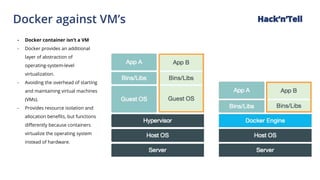
Docker against VM’s
- Docker container isn’t a VM
- Docker provides an additional
layer of abstraction of
operating-system-level
virtualization.
- Avoiding the overhead of starting
and maintaining virtual machines
(VMs).
- Provides resource isolation and
allocation benefits, but functions
differently because containers
virtualize the operating system
instead of hardware.
Hackβ€˜n’Tell
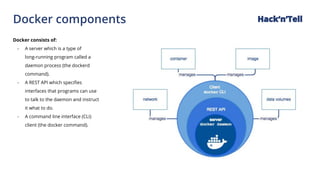
Docker components
Docker consists of:
- A server which is a type of
long-running program called a
daemon process (the dockerd
command).
- A REST API which specifies
interfaces that programs can use
to talk to the daemon and instruct
it what to do.
- A command line interface (CLI)
client (the docker command).
Hackβ€˜n’Tell
Docker installation
Your best choice:
https://www.docker.com/community-edition#/download
If you are on Linux (not prod):
https://get.docker.com/
Windows 10 Pro - your best friend.
Mac OS also supported.
Docker CE, Docker EE, Clouds, etc.
Hackβ€˜n’Tell
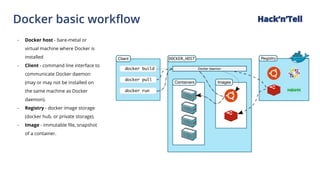
Docker basic workflow Hackβ€˜n’Tell
- Docker host - bare-metal or
virtual machine where Docker is
installed
- Client - command line interface to
communicate Docker daemon
(may or may not be installed on
the same machine as Docker
daemon).
- Registry - docker image storage
(docker hub, or private storage).
- Image - immutable file, snapshot
of a container.
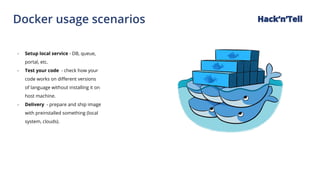
Docker usage scenarios Hackβ€˜n’Tell
- Setup local service - DB, queue,
portal, etc.
- Test your code - check how your
code works on different versions
of language without installing it on
host machine.
- Delivery - prepare and ship image
with preinstalled something (local
system, clouds).
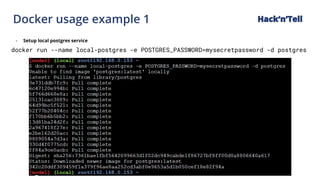
Docker usage example 1 Hackβ€˜n’Tell
- Setup local postgres service
docker run --name local-postgres -e POSTGRES_PASSWORD=mysecretpassword -d postgres
Docker usage example 2 Hackβ€˜n’Tell
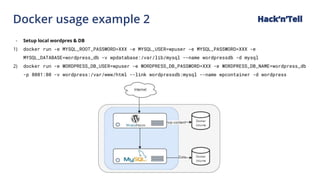
- Setup local wordpres & DB
1) docker run -e MYSQL_ROOT_PASSWORD=XXX -e MYSQL_USER=wpuser -e MYSQL_PASSWORD=XXX -e
MYSQL_DATABASE=wordpress_db -v wpdatabase:/var/lib/mysql --name wordpressdb -d mysql
2) docker run -e WORDPRESS_DB_USER=wpuser -e WORDPRESS_DB_PASSWORD=XXX -e WORDPRESS_DB_NAME=wordpress_db
-p 8081:80 -v wordpress:/var/www/html --link wordpressdb:mysql --name wpcontainer -d wordpress
Docker usage example 2 Hackβ€˜n’Tell
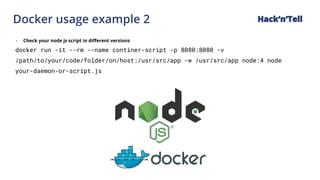
- Check your node js script in different versions
docker run -it --rm --name continer-script -p 8080:8080 -v
/path/to/your/code/folder/on/host:/usr/src/app -w /usr/src/app node:4 node
your-daemon-or-script.js
Docker container not persistent Hackβ€˜n’Tell
- All container images consist of
layers.
- Layers are created via image build
process and they are immutable.
- Container is a new read-write not
persistent layer on top of the
image.
- After container stopped - all
changes inside it will be reset to
the base image state.
- Container state can be saved to
image via command commit
(better not to do this)
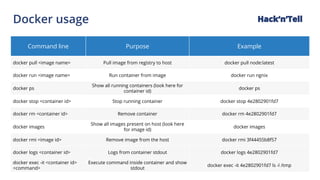
Docker usage
Command line Purpose Example
docker pull <image name> Pull image from registry to host docker pull node:latest
docker run <image name> Run container from image docker run ngnix
docker ps
Show all running containers (look here for
container id)
docker ps
docker stop <container id> Stop running container docker stop 4e2802901fd7
docker rm <container id> Remove container docker rm 4e2802901fd7
docker images
Show all images present on host (look here
for image id)
docker images
docker rmi <image id> Remove image from the host docker rmi 3f44455b8f57
docker logs <container id> Logs from container stdout docker logs 4e2802901fd7
docker exec -it <container id>
<command>
Execute command inside container and show
stdout
docker exec -it 4e2802901fd7 ls -l /tmp
Hackβ€˜n’Tell
Docker useful links Hackβ€˜n’Tell
- https://hub.docker.com/ - image
storage
- https://docs.docker.com/ -
documentation, tutorials, api,
etc.
- https://labs.play-with-docker.co
m/ - playground, tutorials
(docker hub registration
required)
- https://docs.docker.com/develo
p/ - good place to continue from
this point
THANK YOU
avasyliev@intersog.com

Intersog Hack_n_Tell. Docker. First steps.

  • 1.
  • 2.
    Docker against VM’s -Docker container isn’t a VM - Docker provides an additional layer of abstraction of operating-system-level virtualization. - Avoiding the overhead of starting and maintaining virtual machines (VMs). - Provides resource isolation and allocation benefits, but functions differently because containers virtualize the operating system instead of hardware. Hackβ€˜n’Tell
  • 3.
    Docker components Docker consistsof: - A server which is a type of long-running program called a daemon process (the dockerd command). - A REST API which specifies interfaces that programs can use to talk to the daemon and instruct it what to do. - A command line interface (CLI) client (the docker command). Hackβ€˜n’Tell
  • 4.
    Docker installation Your bestchoice: https://www.docker.com/community-edition#/download If you are on Linux (not prod): https://get.docker.com/ Windows 10 Pro - your best friend. Mac OS also supported. Docker CE, Docker EE, Clouds, etc. Hackβ€˜n’Tell
  • 5.
    Docker basic workflowHackβ€˜n’Tell - Docker host - bare-metal or virtual machine where Docker is installed - Client - command line interface to communicate Docker daemon (may or may not be installed on the same machine as Docker daemon). - Registry - docker image storage (docker hub, or private storage). - Image - immutable file, snapshot of a container.
  • 6.
    Docker usage scenariosHackβ€˜n’Tell - Setup local service - DB, queue, portal, etc. - Test your code - check how your code works on different versions of language without installing it on host machine. - Delivery - prepare and ship image with preinstalled something (local system, clouds).
  • 7.
    Docker usage example1 Hackβ€˜n’Tell - Setup local postgres service docker run --name local-postgres -e POSTGRES_PASSWORD=mysecretpassword -d postgres
  • 8.
    Docker usage example2 Hackβ€˜n’Tell - Setup local wordpres & DB 1) docker run -e MYSQL_ROOT_PASSWORD=XXX -e MYSQL_USER=wpuser -e MYSQL_PASSWORD=XXX -e MYSQL_DATABASE=wordpress_db -v wpdatabase:/var/lib/mysql --name wordpressdb -d mysql 2) docker run -e WORDPRESS_DB_USER=wpuser -e WORDPRESS_DB_PASSWORD=XXX -e WORDPRESS_DB_NAME=wordpress_db -p 8081:80 -v wordpress:/var/www/html --link wordpressdb:mysql --name wpcontainer -d wordpress
  • 9.
    Docker usage example2 Hackβ€˜n’Tell - Check your node js script in different versions docker run -it --rm --name continer-script -p 8080:8080 -v /path/to/your/code/folder/on/host:/usr/src/app -w /usr/src/app node:4 node your-daemon-or-script.js
  • 10.
    Docker container notpersistent Hackβ€˜n’Tell - All container images consist of layers. - Layers are created via image build process and they are immutable. - Container is a new read-write not persistent layer on top of the image. - After container stopped - all changes inside it will be reset to the base image state. - Container state can be saved to image via command commit (better not to do this)
  • 11.
    Docker usage Command linePurpose Example docker pull <image name> Pull image from registry to host docker pull node:latest docker run <image name> Run container from image docker run ngnix docker ps Show all running containers (look here for container id) docker ps docker stop <container id> Stop running container docker stop 4e2802901fd7 docker rm <container id> Remove container docker rm 4e2802901fd7 docker images Show all images present on host (look here for image id) docker images docker rmi <image id> Remove image from the host docker rmi 3f44455b8f57 docker logs <container id> Logs from container stdout docker logs 4e2802901fd7 docker exec -it <container id> <command> Execute command inside container and show stdout docker exec -it 4e2802901fd7 ls -l /tmp Hackβ€˜n’Tell
  • 12.
    Docker useful linksHackβ€˜n’Tell - https://hub.docker.com/ - image storage - https://docs.docker.com/ - documentation, tutorials, api, etc. - https://labs.play-with-docker.co m/ - playground, tutorials (docker hub registration required) - https://docs.docker.com/develo p/ - good place to continue from this point
  • 13.