Docker Swarm + Machine
Docker - Container Clustering
Eueung Mulyana
http://eueung.github.io/docker-stuff/swarm
CodeLabs | Attribution-ShareAlike CC BY-SA
1 / 31
Outline
Docker Engine - Revisited
Docker Machine
Docker Swarm
2 / 31
Previously Addressed
Docker Engine
3 / 31
Docker Engine
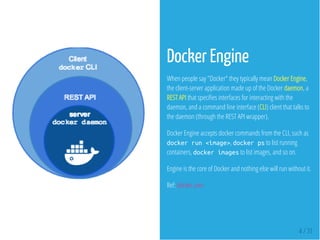
When people say "Docker" they typically mean Docker Engine,
the client-server application made up of the Docker daemon, a
REST API that speci es interfaces for interacting with the
daemon, and a command line interface (CLI) client that talks to
the daemon (through the REST API wrapper).
Docker Engine accepts docker commands from the CLI, such as
dockerrun<image>, dockerpsto list running
containers, dockerimagesto list images, and so on.
Engine is the core of Docker and nothing else will run without it.
Ref: docker.com
4 / 31
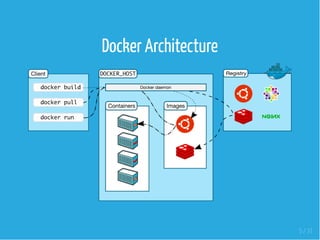
Docker Architecture
5 / 31
Docker daemon
The Docker daemon runs on a host machine. The user does not
directly interact with the daemon, but instead through the
Docker client.
Docker client
The Docker client, in the form of the docker binary, is the
primary user interface to Docker.
It accepts commands from the user and communicates back and
forth with a Docker daemon.
Ref: docker.com
6 / 31
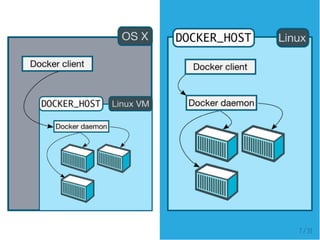
Docker Architecture
Docker uses a client-server architecture. The Docker client talks
to the Docker daemon, which does the heavy lifting of building,
running, and distributing your Docker containers.
Both the Docker client and the daemon can run on the same
system, or you can connect a Docker client to a remote Docker
daemon.
The Docker client and daemon communicate via sockets or
through a RESTful API.
7 / 31
Docker Machine
8 / 31
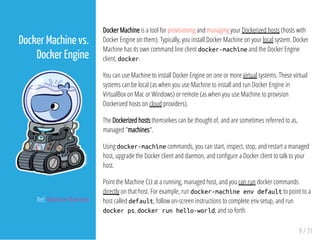
Docker Machine is a tool for provisioning and managing your Dockerized hosts (hosts with
Docker Engine on them). Typically, you install Docker Machine on your local system. Docker
Machine has its own command line client docker-machineand the Docker Engine
client, docker.
You can use Machine to install Docker Engine on one or more virtual systems. These virtual
systems can be local (as when you use Machine to install and run Docker Engine in
VirtualBox on Mac or Windows) or remote (as when you use Machine to provision
Dockerized hosts on cloud providers).
The Dockerized hosts themselves can be thought of, and are sometimes referred to as,
managed "machines".
Using docker-machinecommands, you can start, inspect, stop, and restart a managed
host, upgrade the Docker client and daemon, and con gure a Docker client to talk to your
host.
Point the Machine CLI at a running, managed host, and you can run docker commands
directly on that host. For example, run docker-machineenvdefaultto point to a
host called default, follow on-screen instructions to complete env setup, and run
dockerps, dockerrunhello-world, and so forth.
9 / 31
Docker Machine vs.
Docker Engine
Ref: Machine Overview
Docker Machine
10 / 31
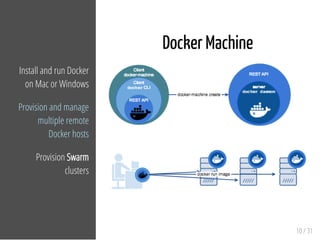
Install and run Docker
on Mac or Windows
Provision and manage
multiple remote
Docker hosts
Provision Swarm
clusters
Let's Try It ...
11 / 31
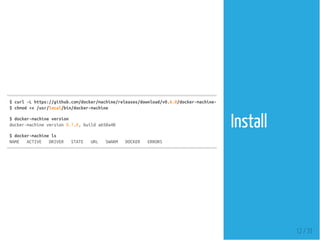
$curl-Lhttps://github.com/docker/machine/releases/download/v0.6.0/docker-machine-`uname
$chmod+x/usr/local/bin/docker-machine
$docker-machineversion
docker-machineversion0.7.0,builda650a40
$docker-machinels
NAME ACTIVE DRIVER STATE URL SWARM DOCKER ERRORS
Install
12 / 31
Create a
Machine
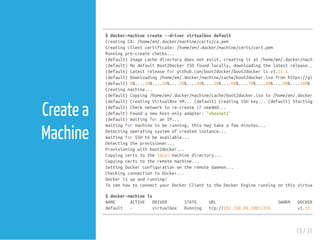
$docker-machinecreate--drivervirtualboxdefault
CreatingCA:/home/em/.docker/machine/certs/ca.pem
Creatingclientcertificate:/home/em/.docker/machine/certs/cert.pem
Runningpre-createchecks...
(default)Imagecachedirectorydoesnotexist,creatingitat/home/em/.docker/machine/
(default)NodefaultBoot2DockerISOfoundlocally,downloadingthelatestrelease...
(default)Latestreleaseforgithub.com/boot2docker/boot2dockerisv1.11.1
(default)Downloading/home/em/.docker/machine/cache/boot2docker.isofromhttps://github
(default)0%....10%....20%....30%....40%....50%....60%....70%....80%....90%....100%
Creatingmachine...
(default)Copying/home/em/.docker/machine/cache/boot2docker.isoto/home/em/.docker/mac
(default)CreatingVirtualBoxVM...(default)CreatingSSHkey...(default)Startingthe
(default)Checknetworktore-createifneeded...
(default)Foundanewhost-onlyadapter:"vboxnet1"
(default)WaitingforanIP...
Waitingformachinetoberunning,thismaytakeafewminutes...
Detectingoperatingsystemofcreatedinstance...
WaitingforSSHtobeavailable...
Detectingtheprovisioner...
Provisioningwithboot2docker...
Copyingcertstothelocalmachinedirectory...
Copyingcertstotheremotemachine...
SettingDockerconfigurationontheremotedaemon...
CheckingconnectiontoDocker...
Dockerisupandrunning!
ToseehowtoconnectyourDockerClienttotheDockerEnginerunningonthisvirtualma
$docker-machinels
NAME ACTIVE DRIVER STATE URL SWARM DOCKER
default - virtualbox Running tcp://192.168.99.100:2376 v1.11.1
13 / 31
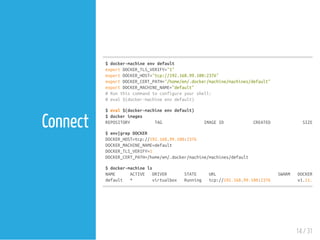
Connect
$docker-machineenvdefault
exportDOCKER_TLS_VERIFY="1"
exportDOCKER_HOST="tcp://192.168.99.100:2376"
exportDOCKER_CERT_PATH="/home/em/.docker/machine/machines/default"
exportDOCKER_MACHINE_NAME="default"
#Runthiscommandtoconfigureyourshell:
#eval$(docker-machineenvdefault)
$eval$(docker-machineenvdefault)
$dockerimages
REPOSITORY TAG IMAGEID CREATED SIZE
$env|grepDOCKER
DOCKER_HOST=tcp://192.168.99.100:2376
DOCKER_MACHINE_NAME=default
DOCKER_TLS_VERIFY=1
DOCKER_CERT_PATH=/home/em/.docker/machine/machines/default
$docker-machinels
NAME ACTIVE DRIVER STATE URL SWARM DOCKER
default * virtualbox Running tcp://192.168.99.100:2376 v1.11.1
14 / 31
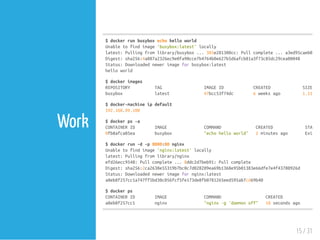
Work
$dockerrunbusyboxechohelloworld
Unabletofindimage'busybox:latest'locally
latest:Pullingfromlibrary/busybox...385e281300cc:Pullcomplete...a3ed95caeb02:P
Digest:sha256:4a887a2326ec9e0fa90cce7b4764b0e627b5d6afcb81a3f73c85dc29cea00048
Status:Downloadednewerimageforbusybox:latest
helloworld
$dockerimages
REPOSITORY TAG IMAGEID CREATED SIZE
busybox latest 47bcc53f74dc 6weeksago 1.113
$docker-machineipdefault
192.168.99.100
$dockerps-a
CONTAINERID IMAGE COMMAND CREATED STATUS
0fb8afca05ea busybox "echohelloworld" 2minutesago Exited
$dockerrun-d-p8000:80nginx
Unabletofindimage'nginx:latest'locally
latest:Pullingfromlibrary/nginx
efd26ecc9548:Pullcomplete...8ddc2d7beb91:Pullcomplete
Digest:sha256:2ca2638e55319b7bc0c7d028209ea69b1368e95b01383e66dfe7e4f43780926d
Status:Downloadednewerimagefornginx:latest
a8eb8f257cc1a747ff5bd30c056fcf5fe173de8fb0781265eed595ab7cd69b40
$dockerps
CONTAINERID IMAGE COMMAND CREATED STA
a8eb8f257cc1 nginx "nginx-g'daemonoff" 10secondsago Up
15 / 31
16 / 31
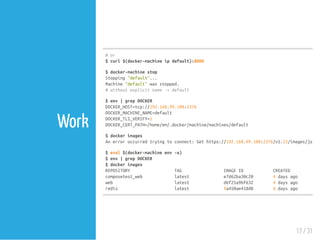
Work
#or
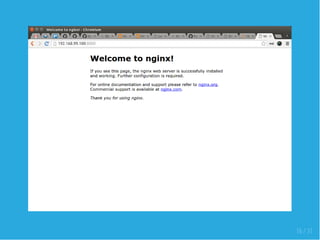
$curl$(docker-machineipdefault):8000
$docker-machinestop
Stopping"default"...
Machine"default"wasstopped.
#withoutexplicitname->default
$env|grepDOCKER
DOCKER_HOST=tcp://192.168.99.100:2376
DOCKER_MACHINE_NAME=default
DOCKER_TLS_VERIFY=1
DOCKER_CERT_PATH=/home/em/.docker/machine/machines/default
$dockerimages
Anerroroccurredtryingtoconnect:Gethttps://192.168.99.100:2376/v1.23/images/json:
$eval$(docker-machineenv-u)
$env|grepDOCKER
$dockerimages
REPOSITORY TAG IMAGEID CREATED
composetest_web latest e7d62ba30c20 4daysago
web latest d6f25a9bf632 4daysago
redis latest 9a450ae418d8 4daysago
17 / 31
Docker Swarm
18 / 31
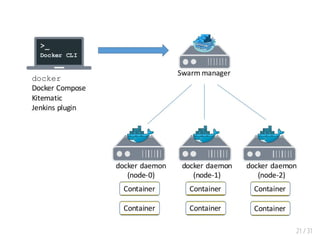
Docker Swarm is native clustering for Docker.
It turns a pool of Docker hosts into a single,
virtual Docker host.
Because Docker Swarm serves the standard
Docker API, any tool that already
communicates with a Docker daemon can use
Swarm to transparently scale to multiple
hosts.
19 / 31
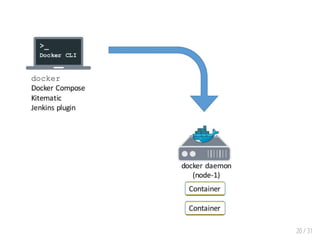
Docker Swarm
Ref: Mike Goelzer, Swarm: Docker Native Clustering, Swarm
Overview
20 / 31
21 / 31
Back to Console ...
22 / 31
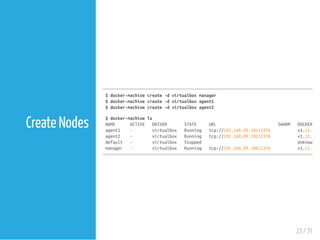
$docker-machinecreate-dvirtualboxmanager
$docker-machinecreate-dvirtualboxagent1
$docker-machinecreate-dvirtualboxagent2
$docker-machinels
NAME ACTIVE DRIVER STATE URL SWARM DOCKER
agent1 - virtualbox Running tcp://192.168.99.101:2376 v1.11.1
agent2 - virtualbox Running tcp://192.168.99.102:2376 v1.11.1
default - virtualbox Stopped Unknown
manager - virtualbox Running tcp://192.168.99.100:2376 v1.11.1
23 / 31
Create Nodes
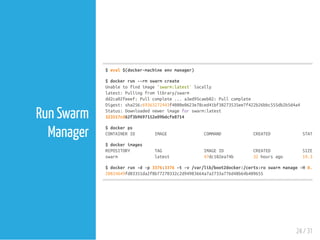
$eval$(docker-machineenvmanager)
$dockerrun--rmswarmcreate
Unabletofindimage'swarm:latest'locally
latest:Pullingfromlibrary/swarm
dd2ca02feeef:Pullcomplete...a3ed95caeb02:Pullcomplete
Digest:sha256:69363272443f4080e0623e78ced41bf38273535ee7f422b26bbc555db2b5d4a4
Status:Downloadednewerimageforswarm:latest
323517cd62f3b9697152e09bdcfe8714
$dockerps
CONTAINERID IMAGE COMMAND CREATED STATUS
$dockerimages
REPOSITORY TAG IMAGEID CREATED SIZE
swarm latest 47dc182ea74b 32hoursago 19.32
$dockerrun-d-p3376:3376-t-v/var/lib/boot2docker:/certs:roswarmmanage-H0.0.
20824649fd03351da2f8b77270332c2d94983664a7a2733a776d48b64b409655
24 / 31
Run Swarm
Manager
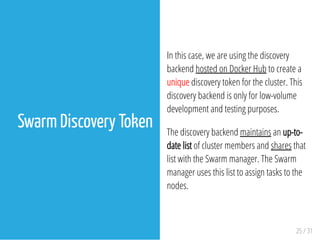
In this case, we are using the discovery
backend hosted on Docker Hub to create a
unique discovery token for the cluster. This
discovery backend is only for low-volume
development and testing purposes.
The discovery backend maintains an up-to-
date list of cluster members and shares that
list with the Swarm manager. The Swarm
manager uses this list to assign tasks to the
nodes.
25 / 31
Swarm Discovery Token
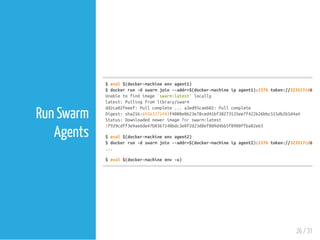
$eval$(docker-machineenvagent1)
$dockerrun-dswarmjoin--addr=$(docker-machineipagent1):2376token://323517cd62f3b
Unabletofindimage'swarm:latest'locally
latest:Pullingfromlibrary/swarm
dd2ca02feeef:Pullcomplete...a3ed95caeb02:Pullcomplete
Digest:sha256:69363272443f4080e0623e78ced41bf38273535ee7f422b26bbc555db2b5d4a4
Status:Downloadednewerimageforswarm:latest
2f929cdff3e9ae6de47b0367140bdc3e0f2d23d8ef809d4bb5f8900ffba82e63
$eval$(docker-machineenvagent2)
$dockerrun-dswarmjoin--addr=$(docker-machineipagent2):2376token://323517cd62f3b
...
$eval$(docker-machineenv-u)
26 / 31
Run Swarm
Agents
$eval$(docker-machineenvmanager)
$exportDOCKER_HOST=$(docker-machineipmanager):3376
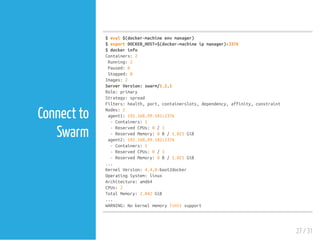
$dockerinfo
Containers:2
Running:2
Paused:0
Stopped:0
Images:2
ServerVersion:swarm/1.2.1
Role:primary
Strategy:spread
Filters:health,port,containerslots,dependency,affinity,constraint
Nodes:2
agent1:192.168.99.101:2376
-Containers:1
-ReservedCPUs:0/1
-ReservedMemory:0B/1.021GiB
agent2:192.168.99.102:2376
-Containers:1
-ReservedCPUs:0/1
-ReservedMemory:0B/1.021GiB
...
KernelVersion:4.4.8-boot2docker
OperatingSystem:linux
Architecture:amd64
CPUs:2
TotalMemory:2.042GiB
...
WARNING:Nokernelmemorylimitsupport
27 / 31
Connect to
Swarm
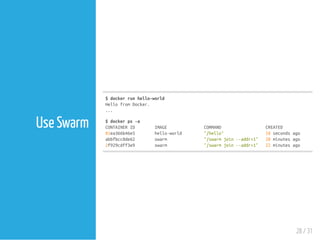
$dockerrunhello-world
HellofromDocker.
...
$dockerps-a
CONTAINERID IMAGE COMMAND CREATED STA
81ea366b46e5 hello-world "/hello" 18secondsago Exi
abbfbcc8de62 swarm "/swarmjoin--addr=1" 20minutesago Up
2f929cdff3e9 swarm "/swarmjoin--addr=1" 22minutesago Up
28 / 31
Use Swarm
Refs
29 / 31
Refs
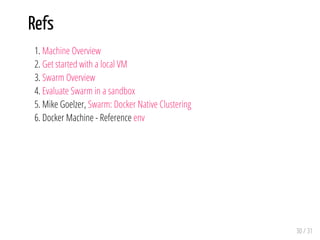
1. Machine Overview
2. Get started with a local VM
3. Swarm Overview
4. Evaluate Swarm in a sandbox
5. Mike Goelzer, Swarm: Docker Native Clustering
6. Docker Machine - Reference env
30 / 31
END
Eueung Mulyana
http://eueung.github.io/docker-stuff/swarm
CodeLabs | Attribution-ShareAlike CC BY-SA
31 / 31

Docker Swarm & Machine