Develop with Docker
Local development powered by Docker – August 2014
Slides prepared by Vincent De Smet – Art ripped from docker.com & tutum.co
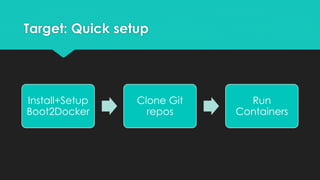
Target: Quick setup
Install+Setup
Boot2Docker
Clone Git
repos
Run
Containers
Docker Intro
A quick intro to Linux Containers & Docker
based on IDF2014 presentation by Nicholas Weaver
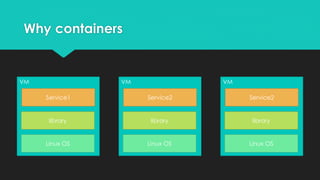
Why containers
VM
Linux OS
library
Service1
VM
Linux OS
library
Service2
VM
Linux OS
library
Service2
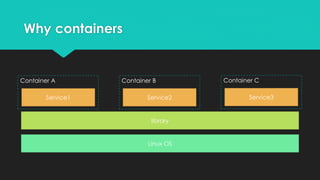
Why containers
Linux OS
library
Service1 Service2 Service3
Container A Container B Container C
Why containers
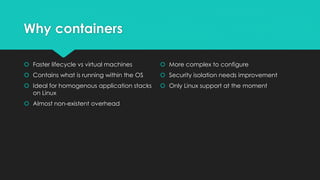
 Faster lifecycle vs virtual machines
 Contains what is running within the OS
 Ideal for homogenous application stacks
on Linux
 Almost non-existent overhead
 More complex to configure
 Security isolation needs improvement
 Only Linux support at the moment
Docker core concept - Images
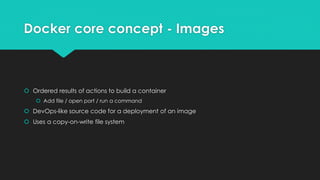
 Ordered results of actions to build a container
 Add file / open port / run a command
 DevOps-like source code for a deployment of an image
 Uses a copy-on-write file system
Docker core concepts
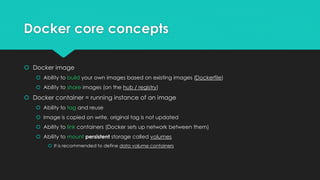
 Docker image
 Ability to build your own images based on existing images (Dockerfile)
 Ability to share images (on the hub / registry)
 Docker container = running instance of an image
 Ability to tag and reuse
 Image is copied on write, original tag is not updated
 Ability to link containers (Docker sets up network between them)
 Ability to mount persistent storage called volumes
 It is recommended to define data volume containers
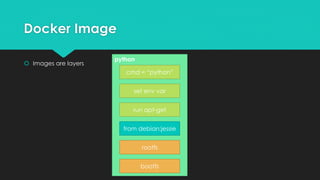
Docker Image
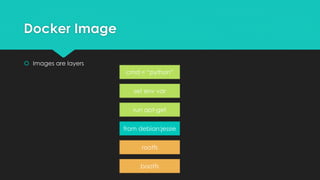
 Images are layers
bootfs
rootfs
from debian:jessie
run apt-get
set env var
cmd = “python”
python
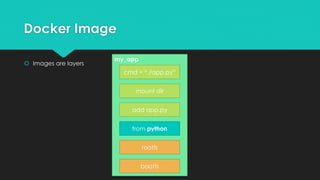
Docker Image
 Images are layers
bootfs
rootfs
from debian:jessie
run apt-get
set env var
cmd = “python”
my_app
Docker Image
 Images are layers
bootfs
rootfs
from python
add app.py
mount dir
cmd = “./app.py”
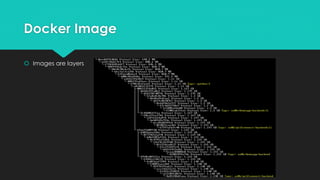
Docker Image
 Images are layers
Image Registry
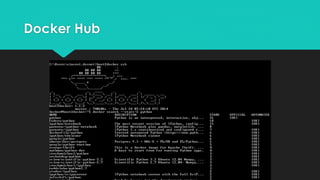
 Public Docker registry: Docker Hub
 In-house registry (open source / self host)
Docker Hub
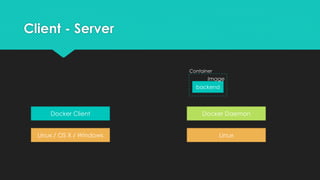
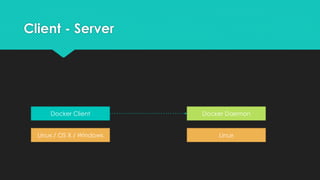
Client - Server
Linux / OS X / Windows
Docker Client
Linux
Docker Daemon
Client - Server
Linux / OS X / Windows
Docker Client
Linux
Docker Daemon
[docker run backend]
backend
Image
Container
Client - Server
Linux / OS X / Windows
Docker Client
Linux
Docker Daemon
[docker run frontend]
backend
Image
Container
frontend
Image
Container
Client - Server
Linux / OS X / Windows
Docker Client
Linux
Docker Daemon
[docker stop frontend]
backend
Image
Container
frontend
Image
Container
Client - Server
Linux / OS X / Windows
Docker Client
Linux
Docker Daemon
backend
Image
Container
Developing in containers
making containers your home
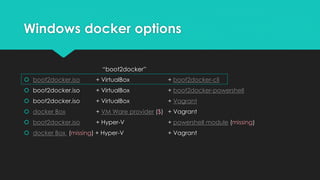
Windows docker options
 boot2docker.iso + VirtualBox + boot2docker-cli
 boot2docker.iso + VirtualBox + boot2docker-powershell
 boot2docker.iso + VirtualBox + Vagrant
 docker Box + VM Ware provider ($) + Vagrant
 boot2docker.iso + Hyper-V + powershell module (missing)
 docker Box (missing) + Hyper-V + Vagrant
“boot2docker”
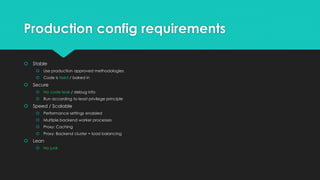
Production config requirements
 Stable
 Use production approved methodologies
 Code is fixed / baked in
 Secure
 No code leak / debug info
 Run according to least privilege principle
 Speed / Scalable
 Performance settings enabled
 Multiple backend worker processes
 Proxy: Caching
 Proxy: Backend cluster + load balancing
 Lean
 No junk
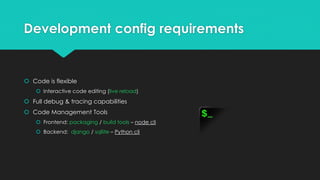
Development config requirements
 Code is flexible
 Interactive code editing (live reload)
 Full debug & tracing capabilities
 Code Management Tools
 Frontend: packaging / build tools – node cli
 Backend: django / sqllite – Python cli
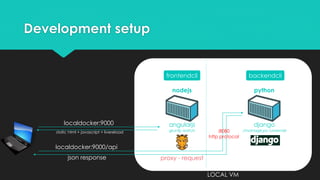
Development setup
nodejs python
angularjs
gruntjs watch
django
./manage.py runserver
localdocker:9000
static html + javascript + livereload
localdocker:9000/api
proxy - requestjson response
LOCAL VM
frontendcli backendcli
:8080
http protocol
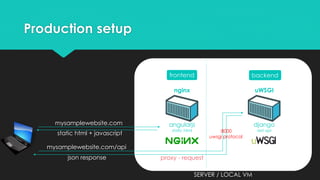
Production setup
nginx uWSGI
angularjs
static html
django
rest api
mysamplewebsite.com
static html + javascript
mysamplewebsite.com/api
proxy - requestjson response
SERVER / LOCAL VM
frontend backend
:8000
uwsgi protocol
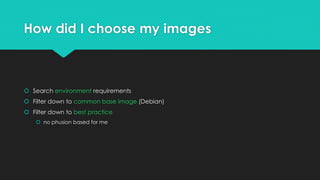
How did I choose my images
 Search environment requirements
 Filter down to common base image (Debian)
 Filter down to best practice
 no phusion based for me
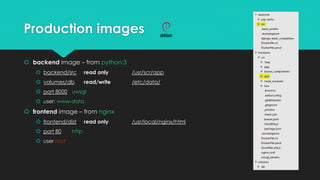
Production images
 backend image – from python:3
 backend/src read only /usr/scr/app
 volumes/db read/write /etc/data/
 port 8000 uwsgi
 user: www-data
 frontend image – from nginx
 frontend/dist read only /usr/local/nginx/html
 port 80 http
 user root
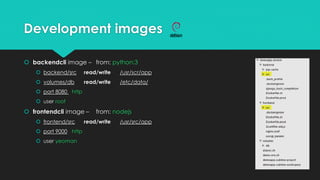
Development images
 backendcli image – from: python:3
 backend/src read/write /usr/scr/app
 volumes/db read/write /etc/data/
 port 8080 http
 user root
 frontendcli image – from: nodejs
 frontend/src read/write /usr/src/app
 port 9000 http
 user yeoman
Setup boot2docker VM
 docs.docker.com for installation instructions
 Set up samba shares & utilities
https://gist.github.com/so0k/d4f5e485a81ca5768643
 Bash management script I wrote
https://gist.github.com/so0k/b73248e7e42a0e4fd564
Management script
 setup / teardown
 backendcli [name] / frontendcli
 build <cli|prod>
 start / stop
 enter <name>
 cleanup
setup / teardown
 setup / teardown initial data containers (+chmod)
build demo
 Build cli to start development
backendcli demo
 Use python environment for DRF backend:
 Start a new django application REST API for task app
 Sync db
 Generate model graph
frontendcli demo
 Use generator-angular to start demo project
 Use yo to generate angular project directory
 Use bower to install application dependencies
 Use npm to install grunt-proxy
 Modify gruntfile to run grunt-proxy to backend
 Use grunt for editing with live reload
 Use grunt to package the app for production
enter demo
 Enter backend to
 See open connections
 Run dbshell to review tables created
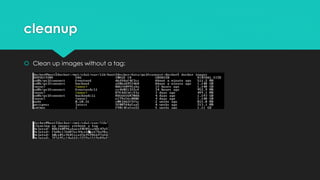
cleanup
 Clean up images without a tag:
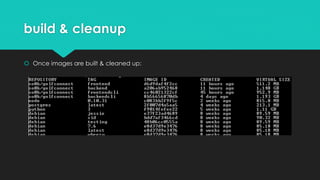
build & cleanup
 Once images are built & cleaned up:
Run production
 Build prod containers
 Start / stop production containers
20 September 2014 – ToDo (long term):
 Add environment variables for production containers
 i.e.: to control settings.py (debug / ..)
 Log management & performance monitoring (+orchestration)
 Set up squid proxies to overcome slow internet builds
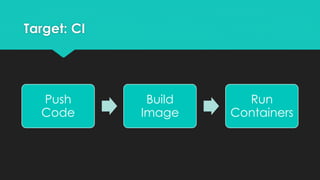
Target: CI
Push
Code
Build
Image
Run
Containers
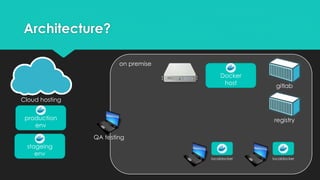
Architecture?
localdocker localdocker
Docker
host
gitlab
registry
Cloud hosting
on premise
QA testing
production
env
stageing
env
About me
Author: Vincent De Smet
this presentation source code:
https://gist.github.com/so0k/b73248e7e42a0e4fd564
 Presentation prepared for Docker Saigon Meetup Group
You can find us at:
 http://www.meetup.com/Docker-Saigon
 www.docker.com

Develop with docker 2014 aug

  • 1.
    Develop with Docker Localdevelopment powered by Docker – August 2014 Slides prepared by Vincent De Smet – Art ripped from docker.com & tutum.co
  • 2.
  • 3.
    Docker Intro A quickintro to Linux Containers & Docker based on IDF2014 presentation by Nicholas Weaver
  • 4.
    Why containers VM Linux OS library Service1 VM LinuxOS library Service2 VM Linux OS library Service2
  • 5.
    Why containers Linux OS library Service1Service2 Service3 Container A Container B Container C
  • 6.
    Why containers  Fasterlifecycle vs virtual machines  Contains what is running within the OS  Ideal for homogenous application stacks on Linux  Almost non-existent overhead  More complex to configure  Security isolation needs improvement  Only Linux support at the moment
  • 7.
    Docker core concept- Images  Ordered results of actions to build a container  Add file / open port / run a command  DevOps-like source code for a deployment of an image  Uses a copy-on-write file system
  • 8.
    Docker core concepts Docker image  Ability to build your own images based on existing images (Dockerfile)  Ability to share images (on the hub / registry)  Docker container = running instance of an image  Ability to tag and reuse  Image is copied on write, original tag is not updated  Ability to link containers (Docker sets up network between them)  Ability to mount persistent storage called volumes  It is recommended to define data volume containers
  • 9.
    Docker Image  Imagesare layers bootfs rootfs from debian:jessie run apt-get set env var cmd = “python”
  • 10.
    python Docker Image  Imagesare layers bootfs rootfs from debian:jessie run apt-get set env var cmd = “python”
  • 11.
    my_app Docker Image  Imagesare layers bootfs rootfs from python add app.py mount dir cmd = “./app.py”
  • 12.
  • 13.
    Image Registry  PublicDocker registry: Docker Hub  In-house registry (open source / self host)
  • 14.
  • 15.
    Client - Server Linux/ OS X / Windows Docker Client Linux Docker Daemon
  • 16.
    Client - Server Linux/ OS X / Windows Docker Client Linux Docker Daemon [docker run backend] backend Image Container
  • 17.
    Client - Server Linux/ OS X / Windows Docker Client Linux Docker Daemon [docker run frontend] backend Image Container frontend Image Container
  • 18.
    Client - Server Linux/ OS X / Windows Docker Client Linux Docker Daemon [docker stop frontend] backend Image Container frontend Image Container
  • 19.
    Client - Server Linux/ OS X / Windows Docker Client Linux Docker Daemon backend Image Container
  • 20.
    Developing in containers makingcontainers your home
  • 21.
    Windows docker options boot2docker.iso + VirtualBox + boot2docker-cli  boot2docker.iso + VirtualBox + boot2docker-powershell  boot2docker.iso + VirtualBox + Vagrant  docker Box + VM Ware provider ($) + Vagrant  boot2docker.iso + Hyper-V + powershell module (missing)  docker Box (missing) + Hyper-V + Vagrant “boot2docker”
  • 22.
    Production config requirements Stable  Use production approved methodologies  Code is fixed / baked in  Secure  No code leak / debug info  Run according to least privilege principle  Speed / Scalable  Performance settings enabled  Multiple backend worker processes  Proxy: Caching  Proxy: Backend cluster + load balancing  Lean  No junk
  • 23.
    Development config requirements Code is flexible  Interactive code editing (live reload)  Full debug & tracing capabilities  Code Management Tools  Frontend: packaging / build tools – node cli  Backend: django / sqllite – Python cli
  • 24.
    Development setup nodejs python angularjs gruntjswatch django ./manage.py runserver localdocker:9000 static html + javascript + livereload localdocker:9000/api proxy - requestjson response LOCAL VM frontendcli backendcli :8080 http protocol
  • 25.
    Production setup nginx uWSGI angularjs statichtml django rest api mysamplewebsite.com static html + javascript mysamplewebsite.com/api proxy - requestjson response SERVER / LOCAL VM frontend backend :8000 uwsgi protocol
  • 26.
    How did Ichoose my images  Search environment requirements  Filter down to common base image (Debian)  Filter down to best practice  no phusion based for me
  • 27.
    Production images  backendimage – from python:3  backend/src read only /usr/scr/app  volumes/db read/write /etc/data/  port 8000 uwsgi  user: www-data  frontend image – from nginx  frontend/dist read only /usr/local/nginx/html  port 80 http  user root
  • 28.
    Development images  backendcliimage – from: python:3  backend/src read/write /usr/scr/app  volumes/db read/write /etc/data/  port 8080 http  user root  frontendcli image – from: nodejs  frontend/src read/write /usr/src/app  port 9000 http  user yeoman
  • 29.
    Setup boot2docker VM docs.docker.com for installation instructions  Set up samba shares & utilities https://gist.github.com/so0k/d4f5e485a81ca5768643  Bash management script I wrote https://gist.github.com/so0k/b73248e7e42a0e4fd564
  • 30.
    Management script  setup/ teardown  backendcli [name] / frontendcli  build <cli|prod>  start / stop  enter <name>  cleanup
  • 31.
    setup / teardown setup / teardown initial data containers (+chmod)
  • 32.
    build demo  Buildcli to start development
  • 33.
    backendcli demo  Usepython environment for DRF backend:  Start a new django application REST API for task app  Sync db  Generate model graph
  • 34.
    frontendcli demo  Usegenerator-angular to start demo project  Use yo to generate angular project directory  Use bower to install application dependencies  Use npm to install grunt-proxy  Modify gruntfile to run grunt-proxy to backend  Use grunt for editing with live reload  Use grunt to package the app for production
  • 35.
    enter demo  Enterbackend to  See open connections  Run dbshell to review tables created
  • 36.
    cleanup  Clean upimages without a tag:
  • 37.
    build & cleanup Once images are built & cleaned up:
  • 38.
    Run production  Buildprod containers  Start / stop production containers
  • 39.
    20 September 2014– ToDo (long term):  Add environment variables for production containers  i.e.: to control settings.py (debug / ..)  Log management & performance monitoring (+orchestration)  Set up squid proxies to overcome slow internet builds
  • 40.
  • 41.
  • 42.
    About me Author: VincentDe Smet this presentation source code: https://gist.github.com/so0k/b73248e7e42a0e4fd564  Presentation prepared for Docker Saigon Meetup Group You can find us at:  http://www.meetup.com/Docker-Saigon  www.docker.com

Editor's Notes

  • #2 Issues faced and solved (in some way or another): How to work on code locally and sync to shared folder? (using powershell & robocopy currently, not ideal) How to have multiple docker images from 1 repo? How to manage volume permissions within docker? How many of attendees are new to Docker? on windows? Use Python backend? Use Javascript frontend?
  • #3 http://matthew-brett.github.io/pydagogue/develop_windows.html I depend heavily on knowing which branch I am on when using git. This is the what the git-completion bash routines do; posh-git does the equivalent for powershell. Why not Vagrant? Not looked into vagrant yet + boot2docker is built to run the latest boot2docker image, let’s use this to get started… http://12factor.net/codebase There is always a one-to-one correlation between the codebase and the app You should have 1 repo for frontend & 1 repo for backend. Docker is used here as the dependency isolation tool during execution to ensure that no implicit dependencies “leak in” from the surrounding system. The new developer can check out the app’s codebase onto their development machine, requiring only the language runtime and dependency manager installed as prerequisites. They will be able to set up everything needed to run the app’s code with a deterministicbuild command. Issues faced: While setting up new developer laptop with only 4GB & limited space on C partition, boot2docker did not allow to specify where to init the VM disk. We achieved this easily with powershell docker management scripts: https://github.com/henjuv/boot2docker-powershell Also considering using winscp to keep folder synchronized: http://winscp.net/eng/docs/task_synchronize_full https://docs.docker.com/articles/host_integration/ https://gist.github.com/nathanleclaire/9927571 http://stackoverflow.com/questions/638975/how-do-i-tell-if-a-file-does-not-exist-in-bash
  • #7 Can isolate using VMs
  • #8 http://blog.scottlowe.org/2014/09/09/idf2014-bare-metal-docker-containers-and-virtualization/
  • #10 http://blog.scottlowe.org/2014/09/09/idf2014-bare-metal-docker-containers-and-virtualization/
  • #11 http://blog.scottlowe.org/2014/09/09/idf2014-bare-metal-docker-containers-and-virtualization/
  • #12 http://blog.scottlowe.org/2014/09/09/idf2014-bare-metal-docker-containers-and-virtualization/ Images can be tagged
  • #13 http://blog.scottlowe.org/2014/09/09/idf2014-bare-metal-docker-containers-and-virtualization/ Tagged images can be used as a starting point for new images to build new layers upon
  • #14 http://blog.scottlowe.org/2014/09/09/idf2014-bare-metal-docker-containers-and-virtualization/ Tagged images can be used as a starting point for new images to build new layers upon
  • #15 http://blog.scottlowe.org/2014/09/09/idf2014-bare-metal-docker-containers-and-virtualization/
  • #16 Share images through the registry Or use docker save –o <file.tar> <image_name> And docker load –i <file.tar>
  • #27 Windows has no native docker client either… HyperV cmdlets in Windows http://technet.microsoft.com/en-us/library/hh848559.aspx
  • #28 http://confreaks.com/videos/3434-gophercon2014-best-practices-for-production-environments An app’s config is everything that is likely to vary between deploys (staging, production, developer environments, etc). This includes: Resource handles to the database, Memcached, and other backing services Credentials to external services such as Amazon S3 or Twitter Per-deploy values such as the canonical hostname for the deploy twelve-factor, which requires strict separation of config from code. Config varies substantially across deploys, code does not. A litmus test for whether an app has all config correctly factored out of the code is whether the codebase could be made open source at any moment, without compromising any credentials. Code is fixed The twelve-factor app uses strict separation between the build, release, and run stages. For example, it is impossible to make changes to the code at runtime, since there is no way to propagate those changes back to the build stage.
  • #31 This is interesting: https://github.com/unbit/uwsgi-docker uwsgi-docker An uWSGI plugin for integration with Docker. This plugin allows you to configure and run vassals in Docker containers. Also notice docker-gitlab container, this container takes docker binary and starts additional containers + links them https://github.com/sameersbn/docker-gitlab/blob/master/assets/init
  • #32 Based on: http://www.centurylinklabs.com/how-to-migrate-legacy-applications-into-docker-containers/ After the fact, how did I choose my images and how to justify? does the image provide a tag other than latest, using an image with a tag provides version control for the application Having a common base image will improve the development cycle because they will leverage an image cache. What are the logging strategies? Nginx image compiled to log to stdout / stderr Same for uwsgi setup Intend to use docker logging solution in future..
  • #35 Should create a simple git repository to clone.. Edit script to fit project..
  • #36 This script was based on gm-env.sh from glowmachine (github). Why a management script? Fig not supported on windows, can’t run it in tcl either. Maybe vagrant could help, use a different linux image to run docker? Also, fugu might make it easier to make a better management script https://github.com/mattes/fugu
  • #38 Build should have a target..
  • #39 Build should have a target.. Should we use make instead? Or use powershell functions to send SSH commands to the host..
  • #40 Reformat your pc and do a trial run. Have code snippets ready for demo scripts! gc frontenv bower list … grunt watch *edit file* *see live reload* grunt dist exit gc build Review newly built image Ideally django rest framework tutorial, do something with api… prepare demo project (generator angular?)
  • #43 Yeoman codelab with restangular – drf backend?
  • #45 Yeoman codelab with restangular – drf backend?
  • #49 Build should have a target.. Should we use make instead? Or use powershell functions to send SSH commands to the host.. Make sure you have the images pre-built (in cache)
  • #53 Aliases are not persisted, try https://github.com/Russell91/sshrc https://github.com/msysgit/msysgit/wiki
  • #54 http://www.reddit.com/r/docker/comments/2gok31/suggestion_workflow_github_ci_docker_hub/ Set up internal gitlab / fulcrum / docker registry Set up continuous integration servers
  • #55 Gitlab webhook for CI Run integration tests On success Push Development branch to Staging in cloud + update redmine On success Push Production branch to Production on cloud
  • #56 Google? Amazon? Digital Ocean? AWS? …