Interpretation of SPSS Results
Dependent Variable
1. Gross Domestic Product
Independent Variable
1. Imports
2. Exports
3. Exchange Rate
From the following variables following statement have been made;
Statement No. 1
Ho: Export has insignificant relationship with GDP
H1: Export has significant relationship with GDP
Statement No. 2
Ho: Import has insignificant relationship with GDP
H1: Import has significant relationship with GDP
Statement No. 3
Ho: Exchange rate has insignificant relationship with GDP
H1: Exchange rate has significant relationship with GDP
Interpretation of SPSS Results
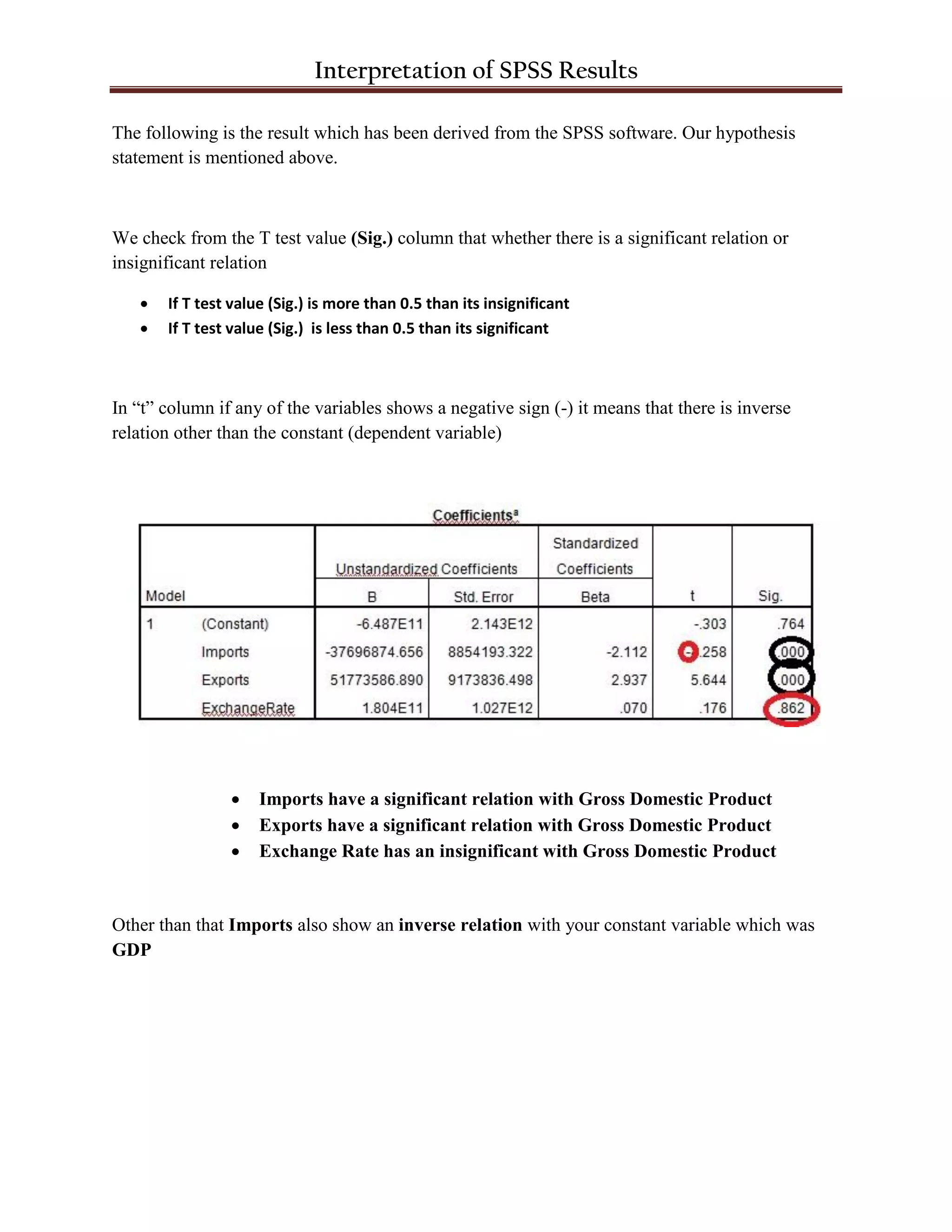
The following is the result which has been derived from the SPSS software. Our hypothesis
statement is mentioned above.
We check from the T test value (Sig.) column that whether there is a significant relation or
insignificant relation
 If T test value (Sig.) is more than 0.5 than its insignificant
 If T test value (Sig.) is less than 0.5 than its significant
In “t” column if any of the variables shows a negative sign (-) it means that there is inverse
relation other than the constant (dependent variable)
 Imports have a significant relation with Gross Domestic Product
 Exports have a significant relation with Gross Domestic Product
 Exchange Rate has an insignificant with Gross Domestic Product
Other than that Imports also show an inverse relation with your constant variable which was
GDP
Interpretation of SPSS Results
Durbin Watson and Sig. F Change
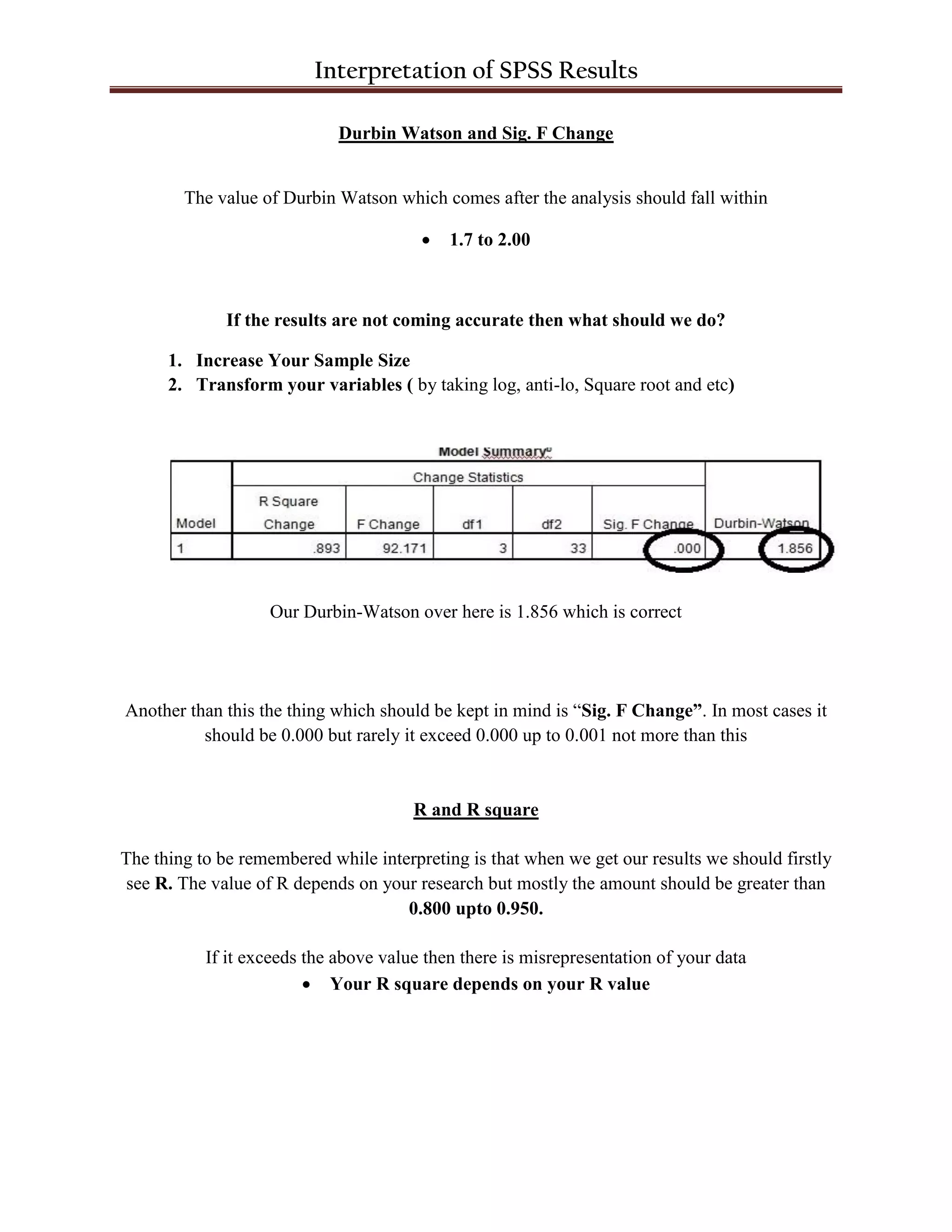
The value of Durbin Watson which comes after the analysis should fall within
 1.7 to 2.00
If the results are not coming accurate then what should we do?
1. Increase Your Sample Size
2. Transform your variables ( by taking log, anti-lo, Square root and etc)
Our Durbin-Watson over here is 1.856 which is correct
Another than this the thing which should be kept in mind is “Sig. F Change”. In most cases it
should be 0.000 but rarely it exceed 0.000 up to 0.001 not more than this
R and R square
The thing to be remembered while interpreting is that when we get our results we should firstly
see R. The value of R depends on your research but mostly the amount should be greater than
0.800 upto 0.950.
If it exceeds the above value then there is misrepresentation of your data
 Your R square depends on your R value
Interpretation of SPSS Results
Correlations
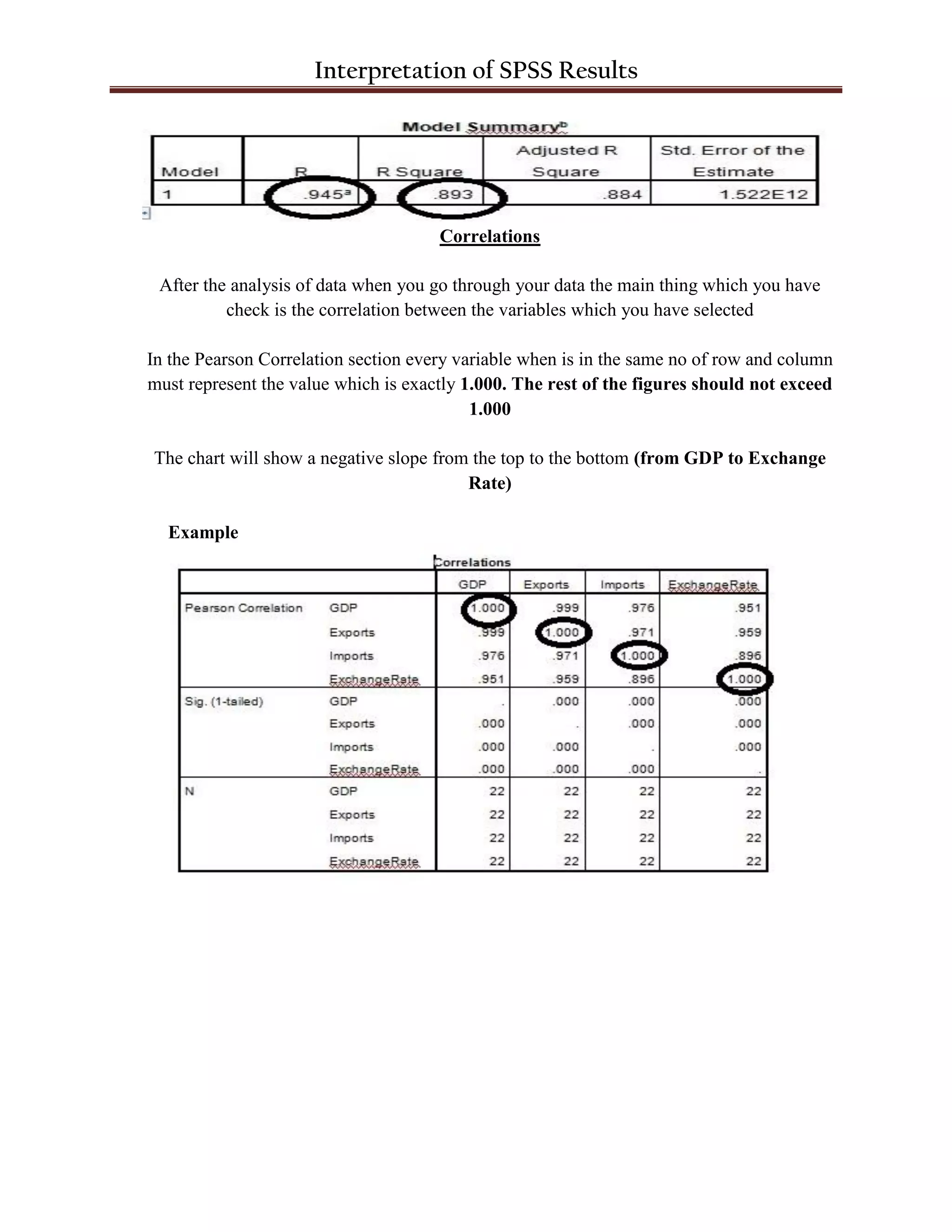
After the analysis of data when you go through your data the main thing which you have
check is the correlation between the variables which you have selected
In the Pearson Correlation section every variable when is in the same no of row and column
must represent the value which is exactly 1.000. The rest of the figures should not exceed
1.000
The chart will show a negative slope from the top to the bottom (from GDP to Exchange
Rate)
Example

Interpretation of SPSS Results

  • 1.
    Interpretation of SPSSResults Dependent Variable 1. Gross Domestic Product Independent Variable 1. Imports 2. Exports 3. Exchange Rate From the following variables following statement have been made; Statement No. 1 Ho: Export has insignificant relationship with GDP H1: Export has significant relationship with GDP Statement No. 2 Ho: Import has insignificant relationship with GDP H1: Import has significant relationship with GDP Statement No. 3 Ho: Exchange rate has insignificant relationship with GDP H1: Exchange rate has significant relationship with GDP
  • 2.
    Interpretation of SPSSResults The following is the result which has been derived from the SPSS software. Our hypothesis statement is mentioned above. We check from the T test value (Sig.) column that whether there is a significant relation or insignificant relation  If T test value (Sig.) is more than 0.5 than its insignificant  If T test value (Sig.) is less than 0.5 than its significant In “t” column if any of the variables shows a negative sign (-) it means that there is inverse relation other than the constant (dependent variable)  Imports have a significant relation with Gross Domestic Product  Exports have a significant relation with Gross Domestic Product  Exchange Rate has an insignificant with Gross Domestic Product Other than that Imports also show an inverse relation with your constant variable which was GDP
  • 3.
    Interpretation of SPSSResults Durbin Watson and Sig. F Change The value of Durbin Watson which comes after the analysis should fall within  1.7 to 2.00 If the results are not coming accurate then what should we do? 1. Increase Your Sample Size 2. Transform your variables ( by taking log, anti-lo, Square root and etc) Our Durbin-Watson over here is 1.856 which is correct Another than this the thing which should be kept in mind is “Sig. F Change”. In most cases it should be 0.000 but rarely it exceed 0.000 up to 0.001 not more than this R and R square The thing to be remembered while interpreting is that when we get our results we should firstly see R. The value of R depends on your research but mostly the amount should be greater than 0.800 upto 0.950. If it exceeds the above value then there is misrepresentation of your data  Your R square depends on your R value
  • 4.
    Interpretation of SPSSResults Correlations After the analysis of data when you go through your data the main thing which you have check is the correlation between the variables which you have selected In the Pearson Correlation section every variable when is in the same no of row and column must represent the value which is exactly 1.000. The rest of the figures should not exceed 1.000 The chart will show a negative slope from the top to the bottom (from GDP to Exchange Rate) Example