Internet of Things
(20CS002)
Department of Computer Science and Engineering
Vignan's Foundation for Science, Technology & Research
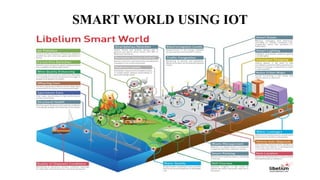
SMART WORLD USING IOT
• The Internet of things (IoT) is a system of interrelated computing
devices, mechanical and digital machines, objects, animals or people that
are provided with unique identifiers (UIDs) and the ability to transfer data over
a network without requiring human-to-human or human-to-computer interaction
- IoTAgenda
• IoT is a concept of connecting any device with an on and off switch to the Internet
(and/or to each other). This includes everything from cellphones, coffee makers,
washing machines, headphones, lamps, wearable devices and almost anything
else you can think of. This also applies to components of machines, for example
a jet engine of an airplane or the drill of an oil rig – Forbes.
• IoT is a sensor network of billions of smart devices that connect people, systems
and other applications to collect and share data.
Internet of Things
Characteristics of IoT
• IoT system has the ability to dynamically adapt with the changing context. Ex
Surveillance cameras adjust to modes depending on day or night. Camera could switch from
lower resolution to higher modes when any motion is detected and alert the nearby camera to
do the same.
• Self-Configuring: IoT devices can configure themselves, setup the networking and fetch
latest software upgrades with minimal manual or user interventions.
• IoT systems may support Interoperable communication protocols and can communicate with
any other device and infrastructure.
• Each IoT device has a unique identity and a Identifier (IP or URI). IoT device interfaces
allow users to query the devices, monitor their status and control them remotely, in association
with the control, configuration and management infrastructure.
• IoT devices are usually Integrated into the information network that allows them
to communicate and exchange data with other devices and systems. Integration into
information network helps in making IoT system” Smarter: due to the collective intelligence of
the individual devices in collaboration with the infrastructure.
Physical Design of IoT
• Physical design of IoT consists of IoT devices and IoT protocols.
• An IoT device is simply an electronic device that is connected to the Internet.
• There are several basic properties that qualify a device as an “IoT” device:
1. A physical device/object
2. Contains controller(s), sensor(s), and or actuator(s)
3. Connects to the Internet
• Examples: Amazon Alexa, Samsung Smart TV, Google Home, NEST
Security Camera
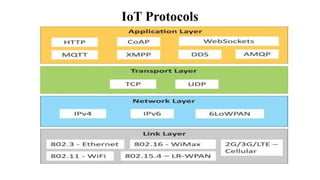
IoT Protocols
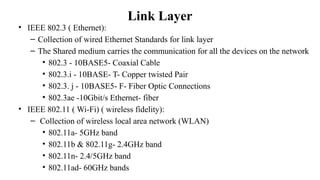
Link Layer
• IEEE 802.3 ( Ethernet):
– Collection of wired Ethernet Standards for link layer
– The Shared medium carries the communication for all the devices on the network
• 802.3 - 10BASE5- Coaxial Cable
• 802.3.i - 10BASE- T- Copper twisted Pair
• 802.3. j - 10BASE5- F- Fiber Optic Connections
• 802.3ae -10Gbit/s Ethernet- fiber
• IEEE 802.11 ( Wi-Fi) ( wireless fidelity):
– Collection of wireless local area network (WLAN)
• 802.11a- 5GHz band
• 802.11b & 802.11g- 2.4GHz band
• 802.11n- 2.4/5GHz band
• 802.11ad- 60GHz bands
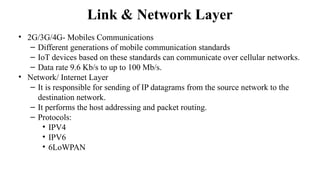
Link & Network Layer
• 2G/3G/4G- Mobiles Communications
– Different generations of mobile communication standards
– IoT devices based on these standards can communicate over cellular networks.
– Data rate 9.6 Kb/s to up to 100 Mb/s.
• Network/ Internet Layer
– It is responsible for sending of IP datagrams from the source network to the
destination network.
– It performs the host addressing and packet routing.
– Protocols:
• IPV4
• IPV6
• 6LoWPAN
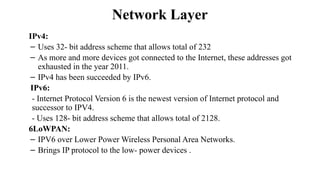
Network Layer
IPv4:
– Uses 32- bit address scheme that allows total of 232
– As more and more devices got connected to the Internet, these addresses got
exhausted in the year 2011.
– IPv4 has been succeeded by IPv6.
IPv6:
- Internet Protocol Version 6 is the newest version of Internet protocol and
successor to IPV4.
- Uses 128- bit address scheme that allows total of 2128.
6LoWPAN:
– IPV6 over Lower Power Wireless Personal Area Networks.
– Brings IP protocol to the low- power devices .
Transport Layer
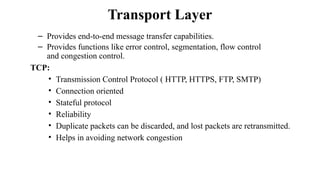
– Provides end-to-end message transfer capabilities.
– Provides functions like error control, segmentation, flow control
and congestion control.
TCP:
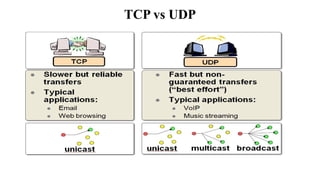
• Transmission Control Protocol ( HTTP, HTTPS, FTP, SMTP)
• Connection oriented
• Stateful protocol
• Reliability
• Duplicate packets can be discarded, and lost packets are retransmitted.
• Helps in avoiding network congestion
Transport Layer
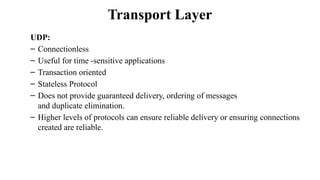
UDP:
– Connectionless
– Useful for time -sensitive applications
– Transaction oriented
– Stateless Protocol
– Does not provide guaranteed delivery, ordering of messages
and duplicate elimination.
– Higher levels of protocols can ensure reliable delivery or ensuring connections
created are reliable.
TCP vs UDP
Application Layer
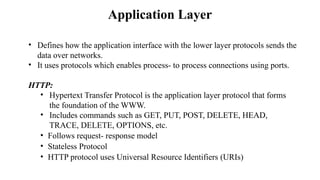
• Defines how the application interface with the lower layer protocols sends the
data over networks.​
• It uses protocols which enables process- to process connections using ports.​
HTTP:​
• Hypertext Transfer Protocol is the application layer protocol that forms
the foundation of the WWW.
• Includes commands such as GET, PUT, POST, DELETE, HEAD,
TRACE, DELETE, OPTIONS, etc.​
• Follows request- response model
• Stateless Protocol
• HTTP protocol uses Universal Resource Identifiers (URIs)
Application Layer
CoAP:
• Constrained Application Protocol
• M2M Applications
• Meant for constrained environments with constrained devices and constrained
networks
• Request-response model
• Runs on UDP instead of TCP
• Client- server architecture
• Methods- GET,PUT, post and DELETE
WebSocket:
• Full-duplex communication
• Based on TCP
• Allows streams of messages to be sent back and forth between the client
and server while keeping the TCP connection open
Application Layer
MQTT:
• Message Queue Telemetry Transport ( MQTT)
• Light- weight protocol
• Publish- Subscribe model
• Well suited for constrained environments- devices have limited processing,
memory resources and network bandwidth
XMPP ( Extensible Messaging and Presence Protocol):
• Real-time Communication and streaming XML
data between network entities.
• Applications:- Messaging, data syndication, gaming, multiparty chat
and voice/video calls.
• Sends small chunks of XML data from one n/w entity to another
• Decentralized protocol , client- server architecture.
• Supports both client– server and server- server communication paths.
Application Layer
DDS- Data Distribution Service:
• Data-centric middleware standard
• Publish- subscribe model
• Provides QoS, configurable reliability
AMQP- Advanced Message Queuing Protocol:
• Open application layer protocol for business messaging.
• Point- point and publisher/ subscriber models, routing and queuing.
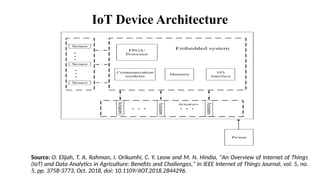
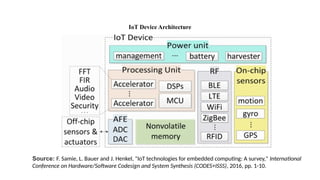
IoT Device Architecture
Source: O. Elijah, T. A. Rahman, I. Orikumhi, C. Y. Leow and M. N. Hindia, "An Overview of Internet of Things
(IoT) and Data Analytics in Agriculture: Benefits and Challenges," in IEEE Internet of Things Journal, vol. 5, no.
5, pp. 3758-3773, Oct. 2018, doi: 10.1109/JIOT.2018.2844296.
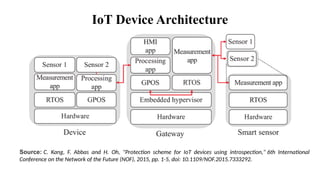
IoT Device Architecture
Source: F. Samie, L. Bauer and J. Henkel, "IoT technologies for embedded computing: A survey," International
Conference on Hardware/Software Codesign and System Synthesis (CODES+ISSS), 2016, pp. 1-10.
IoT Device Architecture
Source: C. Kang, F. Abbas and H. Oh, "Protection scheme for IoT devices using introspection," 6th International
Conference on the Network of the Future (NOF), 2015, pp. 1-5, doi: 10.1109/NOF.2015.7333292.
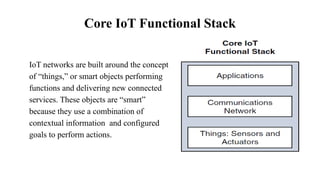
Core IoT Functional Stack
IoT networks are built around the concept
of “things,” or smart objects performing
functions and delivering new connected
services. These objects are “smart”
because they use a combination of
contextual information and configured
goals to perform actions.
Things: Sensors
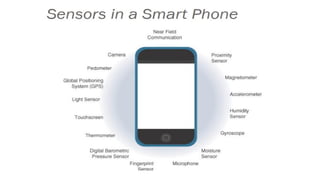
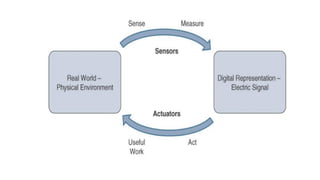
• More specifically, a sensor measures physical quantity and converts
that measurement reading into a digital representation.
• Digital representation is typically passed to another device for
transformation into useful data that can be consumed by intelligent devices
or humans
• Able to provide an extremely wide spectrum of rich and diverse measurement
data with far greater precision than human senses.
• There are number of ways to group and cluster Sensors into different categories,
1. Active or Passive
2. Invasive or non-invasive
3. Contact or no-contact
4. Absolute or relative
Things: Sensors
Active or passive:
• Sensors can be categorized based on whether they produce an energy output
and typically require an external power supply (active)
or
• Whether they simply receive energy and typically require no external power
supply (passive).
Invasive or non-invasive:
• Sensors can be categorized based on whether a sensor is part of the environment
it is measuring (invasive)
or
• External to it (non-invasive).
Things: Sensors
Contact or no-contact:
• Sensors can be categorized based on whether they require physical contact
with what they are measuring (contact) or not (no-contact).
Absolute or relative:
• Sensors can be categorized based on whether they measure on an absolute
scale (absolute) or based on a difference with a fixed or variable reference value
(relative).
Things: Actuators
• Actuators are natural complements to sensors Sensors are designed to sense
and measure practically any measurable variable in the physical world.​
• They convert their measurements (typically analog) into electric signals or
digital representations that can be consumed by an intelligent agent (a device or
a human).​
• Actuators, on the others hand, receive some type of control signal (commonly
an electric signal or digital command) that triggers a physical effect, usually
some type of motion, force, and so on.​
• Sensors provide the information, actuators provide the action​
Communications network
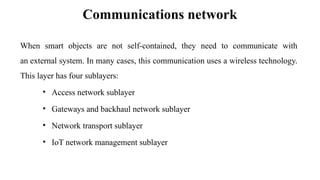
When smart objects are not self-contained, they need to communicate with
an external system. In many cases, this communication uses a wireless technology.
This layer has four sublayers:
• Access network sublayer
• Gateways and backhaul network sublayer
• Network transport sublayer
• IoT network management sublayer
Communications network
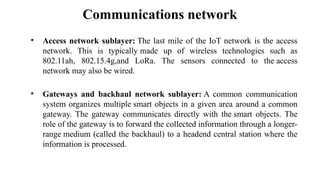
• Access network sublayer: The last mile of the IoT network is the access
network. This is typically made up of wireless technologies such as
802.11ah, 802.15.4g,and LoRa. The sensors connected to the access
network may also be wired.
• Gateways and backhaul network sublayer: A common communication
system organizes multiple smart objects in a given area around a common
gateway. The gateway communicates directly with the smart objects. The
role of the gateway is to forward the collected information through a longer-
range medium (called the backhaul) to a headend central station where the
information is processed.
Communications network
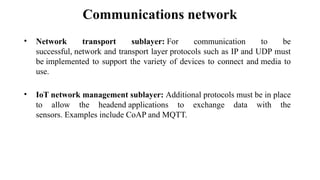
• Network transport sublayer: For communication to be
successful, network and transport layer protocols such as IP and UDP must
be implemented to support the variety of devices to connect and media to
use.
• IoT network management sublayer: Additional protocols must be in place
to allow the headend applications to exchange data with the
sensors. Examples include CoAP and MQTT.
Applications
Applications
Applications
Applications
Applications
Applications
Applications
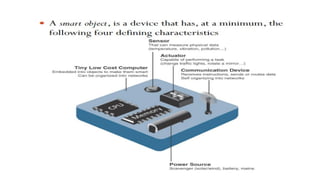
Smart Objects
• Smart objects are, quite simply, the building blocks of IoT.
• Transform everyday objects into a network of intelligent objects that are able to
learn from and interact with their environment in a meaningful way
• The real power of smart objects in IoT comes from being networked together
rather than being isolated as standalone objects
Connecting Smart Objects
• IoT devices and sensors must be connected to the network for their data to
be utilized.
• In addition to the wide range of sensors, actuators, and smart objects that make
IoT, there are also a number of different protocols used to connect them.
• The characteristics are consider when selecting and dealing with connecting
smart objects.
1. Range
2. Frequency Bands
3. Power Consumption
4. Topology
5. Constrained Devices
6. Constrained-Node Networks
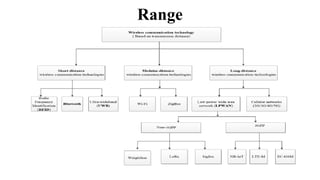
Range
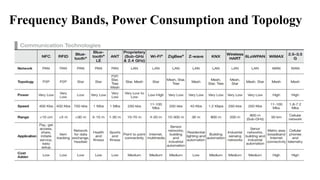
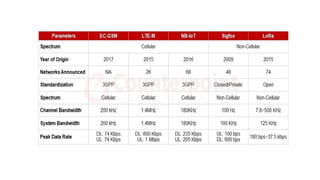
Frequency Bands, Power Consumption and Topology
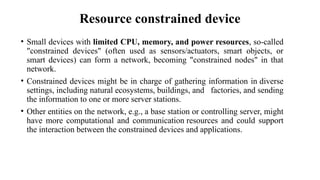
Resource constrained device
• Small devices with limited CPU, memory, and power resources, so-called
"constrained devices" (often used as sensors/actuators, smart objects, or
smart devices) can form a network, becoming "constrained nodes" in that
network.
• Constrained devices might be in charge of gathering information in diverse
settings, including natural ecosystems, buildings, and factories, and sending
the information to one or more server stations.
• Other entities on the network, e.g., a base station or controlling server, might
have more computational and communication resources and could support
the interaction between the constrained devices and applications.
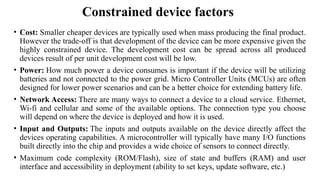
Constrained device factors
• Cost: Smaller cheaper devices are typically used when mass producing the final product.
However the trade-off is that development of the device can be more expensive given the
highly constrained device. The development cost can be spread across all produced
devices result of per unit development cost will be low.
• Power: How much power a device consumes is important if the device will be utilizing
batteries and not connected to the power grid. Micro Controller Units (MCUs) are often
designed for lower power scenarios and can be a better choice for extending battery life.
• Network Access: There are many ways to connect a device to a cloud service. Ethernet,
Wi-fi and cellular and some of the available options. The connection type you choose
will depend on where the device is deployed and how it is used.
• Input and Outputs: The inputs and outputs available on the device directly affect the
devices operating capabilities. A microcontroller will typically have many I/O functions
built directly into the chip and provides a wide choice of sensors to connect directly.
• Maximum code complexity (ROM/Flash), size of state and buffers (RAM) and user
interface and accessibility in deployment (ability to set keys, update software, etc.)
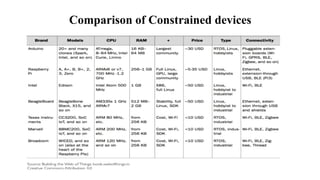
Comparison of Constrained devices
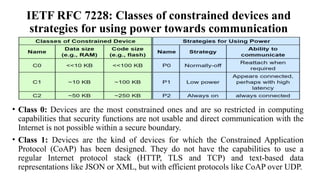
IETF RFC 7228: Classes of constrained devices and
strategies for using power towards communication
• Class 0: Devices are the most constrained ones and are so restricted in computing
capabilities that security functions are not usable and direct communication with the
Internet is not possible within a secure boundary.
• Class 1: Devices are the kind of devices for which the Constrained Application
Protocol (CoAP) has been designed. They do not have the capabilities to use a
regular Internet protocol stack (HTTP, TLS and TCP) and text-based data
representations like JSON or XML, but with efficient protocols like CoAP over UDP.
• Class 2: Devices have enough resources to make use of regular protocols, but
still benefit from optimized protocols like CoAP, leaving more room in terms of
bandwidth or computing power for applications.
• P0: Device sleeps such long periods at a time that once it wakes up, it makes
sense for it to not pretend that it has been connected to the network during sleep:
the device reattaches to the network as it is woken up.
• P1: Devices need to operate on a very small amount of power but still need to be
able to communicate on a relatively frequent basis. Typically, small amount of
time between transmissions, despite their sleep state, these devices retain some
form of attachment to the network.
• P9: Device can "stay on" in the usual manner all the time. It limit the number of
wireless transmissions, CPU speeds, and other aspects for general power-saving
and cooling needs, but the device can be connected to the network all the time.
IETF RFC 7228: Classes of constrained devices and
strategies for using power towards communication
Constrained node networks
• A group of constrained nodes are communicated in networks is called as
"constrained node networks" and following characteristics
Low achievable bitrate/throughput (including limits on duty cycle)
High packet loss (delivery rate)
Severe penalties for using larger packets (e.g., high packet loss due to link-
layer fragmentation)
Limits on reachability over time (a substantial number of devices may power
off at any point in time but periodically "wake up" and can communicate for
brief periods of time)
Lack of (or severe constraints on) advanced services such as IP multicast.
• Two types of Constrained node networks:
1. Low-Power and Lossy Network (LLN)
2. Low-Power Wireless Personal Area Network (LoWPAN)
Types of Constrained node networks
• LLN: Typically composed of many embedded devices with limited power,
memory, and processing resources interconnected by a variety of links, such
as IEEE 802.15.4 or low-power Wi-Fi. Application areas for LLNs, including
 Industrial monitoring
 Building automation (heating, ventilation, and air conditioning lighting,
fire)
 Health care
 Environmental monitoring
 Assets tracking
• LoWPAN: It inspired from the name of an IEEE 802.15.4 working group.
Application areas including
 Urban monitoring
 Control of large buildings
 Industrial control applications
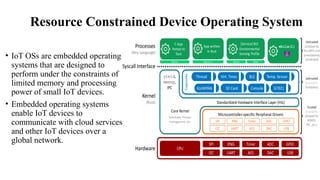
Resource Constrained Device Operating System
• IoT OSs are embedded operating
systems that are designed to
perform under the constraints of
limited memory and processing
power of small IoT devices.
• Embedded operating systems
enable IoT devices to
communicate with cloud services
and other IoT devices over a
global network.
Characteristics of IoT OS
• Small memory footprint: Sensor are typically small and have limited memory
available. This restricts the memory footprint of the OS.
• Energy efficient operation: Sensors are characterized by low power draws
and are often battery powered. Furthermore, it is commonly prohibitively
expensive to replace batteries etc as of OS be highly energy efficient.
• Hardware agnostic operation: Owing to the diversity of hardware platforms
available for various IoT applications, it is important that the OS support a
variety of platforms to simplify interconnectivity and drive standardization and
to lower costs of ownership.
Characteristics of IoT OS
• Network Connectivity & Protocol Support: Crucial to IoT device
operation is continuous connectivity to the network and to devices in
immediate proximity. This requirement is achievable by providing support for a
variety of connectivity protocols like Wi-Fi, Cellular, Bluetooth, etc. Operating
system should simplify the connectivity process.
• Security: It is imperative that the OS for IoT adhere to strict
security expectations and meet stringent requirements imposed by deployments
in sensitive and critical settings.
Parameters for selecting the IoT OS
• Scalability: The operating system must be scalable for any type of device.
That means both integrators and developers need to be familiar with the
operating system when it comes to gateways and nodes.
• Footprint: Since the devices will always come with a bag of constraints, it is
essential to choose an operating system with low power, processing, and
memory requirements. The overheads should be minimal at the end of the day.
• Reliability: This is a critical factor for mission-critical systems. For instance,
industrial iot devices are at remote locations and have to work for years
without hampering business continuity. OS should be able to fulfill specific
certifications for IoT apps.
Parameters for selecting the IoT OS
• Portability: OS is ported to different interface and hardware platforms to
the board support package (BSP) in a standardized format, such as POSIX
calls.
• Security: The operating system should be safe and secure to use, allowing to
add on some aspects in the form of SSL support, secure boot, components, and
encryption drivers.
• Modularity: Every operating system must mandatorily have a kernel core.
All other functionalities can be included as add-ons for IoT apps building.
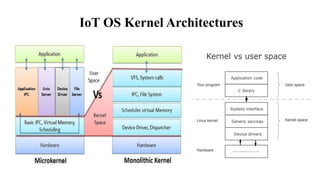
IoT OS Kernel Architectures
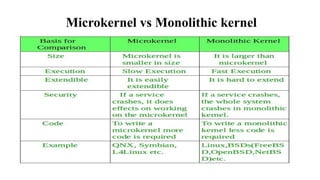
Microkernel vs Monolithic kernel
Modular kernel
Some parts of system core will get allocated in independent files called modules. This
can be added to system at run time. It usually requires small amount of time of load
modules. If one needs a new module, then unable to recompile.
• Allows administrator to add functionality only when it is required.
• Provides less security and reliability as compared to micro kernel.
• Decreases boot time, does not have to load everything at boot time, faster development
time, etc.
• Different kernel services are separated into different files so that one can link
monolithic kernel with functionality or facilities that are required.
• To keep what is loaded in boot-time minimal while still enabling kernel to execute
more functions that are complex.
Scheduler
Preemptive Kernel
• It is a kernel that allows interrupting a program in the middle of the executing. That
means kernel is capable of stopping the execution of the currently running process and
allowing some other process to execute.
• As preemptive kernel does not allow the processor to run a process for a long time
continuously, this type of kernel is more secure.
Nonpreemptive Kernel
• It does not allow interrupting the currently running process.
• It does not allow stopping the execution of the running process.
• The process will be executed until it exits the kernel mode or is blocked.
• Moreover, in the nonpreemptive kernel, there is only a single process active in the
kernel at a time. Therefore, this type of kernel does not cause race condition.
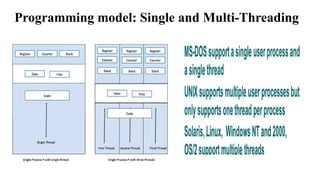
Programming model
Event-driven programming
• It is a programming paradigm in which the flow of the program is determined
by events such as user actions (mouse clicks, key presses), sensor outputs, or message
passing from other programs or threads.
• Event-driven programming is the dominant paradigm used in graphical user interfaces and
other applications (e.g., JavaScript web applications) that are centered on performing
certain actions in response to user input.
Protothreads
• Protothreads are extremely lightweight stackless threads designed for severely memory
constrained systems, such as small embedded systems or wireless sensor network nodes.
• The advantage here is that they do not waste memory on multiple stacks that are only
partially used.
• Protothreads allow block operations within the event-handler. As a result, there is less
application code, more blocking operations, and event infinite loops.
Programming model: Single and Multi-Threading
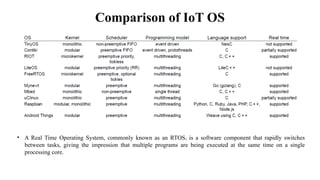
Comparison of IoT OS
• A Real Time Operating System, commonly known as an RTOS, is a software component that rapidly switches
between tasks, giving the impression that multiple programs are being executed at the same time on a single
processing core.
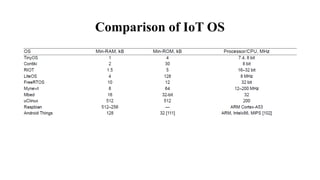
Comparison of IoT OS
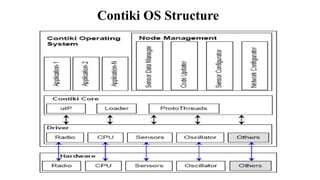
Contiki OS Structure
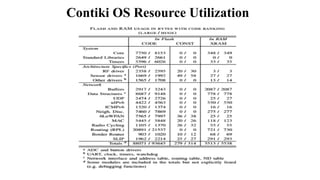
Contiki OS Resource Utilization
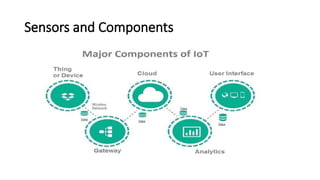
Sensors and Components
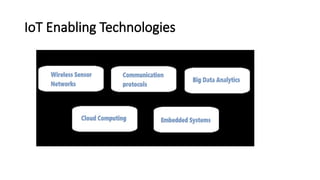
IoT Enabling Technologies
Wireless Sensor Networks
• A wireless sensor network comprises of distributed device with sensor which are used to monitor the environmental
and physical conditions.
• A WSN consists of a number of end-nodes and routers and a coordinator. End Nodes have several sensors attached to
them in node can also act as routers. Routers are responsible for routing the data packets from end-nodes to the
coordinator. The coordinator collects the data from all the nodes. Coordinator also act as a gateway that connects the
WSN to the internet.
Some examples of WSNs used in IoT systems are described as follows:
• Weather monitoring system use WSNs in which the nodes collect temperature humidity and other data which is
aggregated and analyzed.
• Indoor air quality monitoring systems use WSNs to collect data on the indoor air quality and concentration of various
gases
• Soil moisture monitoring system use WSNs to monitor soil moisture at various locations.
• Surveillance system use WSNs for collecting Surveillance data (such as motion detection data)
• Smart grid use WSNs for monitoring the grid at various points.
• Structural health monitoring system use WSNs to monitor the health of structures ( buildings, bridges) by collecting
vibration data from sensor nodes de deployed at various points in the structure.
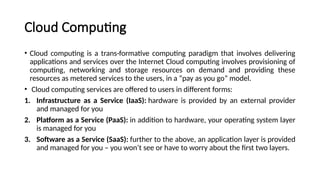
Cloud Computing
• Cloud computing is a trans-formative computing paradigm that involves delivering
applications and services over the Internet Cloud computing involves provisioning of
computing, networking and storage resources on demand and providing these
resources as metered services to the users, in a “pay as you go” model.
• Cloud computing services are offered to users in different forms:
1. Infrastructure as a Service (IaaS): hardware is provided by an external provider
and managed for you
2. Platform as a Service (PaaS): in addition to hardware, your operating system layer
is managed for you
3. Software as a Service (SaaS): further to the above, an application layer is provided
and managed for you – you won’t see or have to worry about the first two layers.
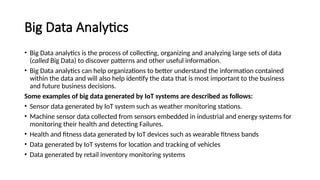
Big Data Analytics
• Big Data analytics is the process of collecting, organizing and analyzing large sets of data
(called Big Data) to discover patterns and other useful information.
• Big Data analytics can help organizations to better understand the information contained
within the data and will also help identify the data that is most important to the business
and future business decisions.
Some examples of big data generated by IoT systems are described as follows:
• Sensor data generated by IoT system such as weather monitoring stations.
• Machine sensor data collected from sensors embedded in industrial and energy systems for
monitoring their health and detecting Failures.
• Health and fitness data generated by IoT devices such as wearable fitness bands
• Data generated by IoT systems for location and tracking of vehicles
• Data generated by retail inventory monitoring systems
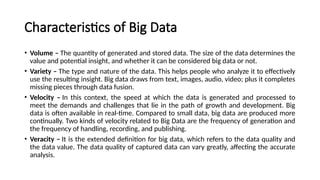
Characteristics of Big Data
• Volume – The quantity of generated and stored data. The size of the data determines the
value and potential insight, and whether it can be considered big data or not.
• Variety – The type and nature of the data. This helps people who analyze it to effectively
use the resulting insight. Big data draws from text, images, audio, video; plus it completes
missing pieces through data fusion.
• Velocity – In this context, the speed at which the data is generated and processed to
meet the demands and challenges that lie in the path of growth and development. Big
data is often available in real-time. Compared to small data, big data are produced more
continually. Two kinds of velocity related to Big Data are the frequency of generation and
the frequency of handling, recording, and publishing.
• Veracity – It is the extended definition for big data, which refers to the data quality and
the data value. The data quality of captured data can vary greatly, affecting the accurate
analysis.
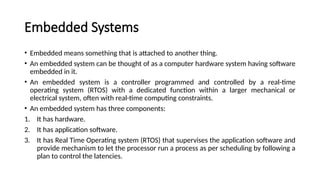
Embedded Systems
• Embedded means something that is attached to another thing.
• An embedded system can be thought of as a computer hardware system having software
embedded in it.
• An embedded system is a controller programmed and controlled by a real-time
operating system (RTOS) with a dedicated function within a larger mechanical or
electrical system, often with real-time computing constraints.
• An embedded system has three components:
1. It has hardware.
2. It has application software.
3. It has Real Time Operating system (RTOS) that supervises the application software and
provide mechanism to let the processor run a process as per scheduling by following a
plan to control the latencies.
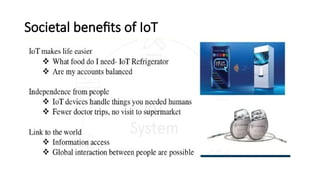
Societal benefits of IoT
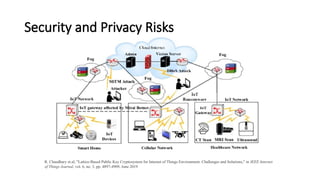
Security and Privacy Risks
R. Chaudhary et.al, "Lattice-Based Public Key Cryptosystem for Internet of Things Environment: Challenges and Solutions," in IEEE Internet
of Things Journal, vol. 6, no. 3, pp. 4897-4909, June 2019
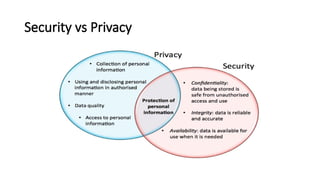
Security vs Privacy
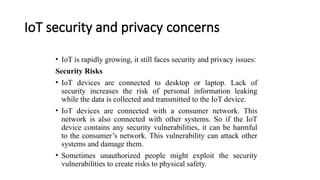
IoT security and privacy concerns
• IoT is rapidly growing, it still faces security and privacy issues:
Security Risks
• IoT devices are connected to desktop or laptop. Lack of
security increases the risk of personal information leaking
while the data is collected and transmitted to the IoT device.
• IoT devices are connected with a consumer network. This
network is also connected with other systems. So if the IoT
device contains any security vulnerabilities, it can be harmful
to the consumer’s network. This vulnerability can attack other
systems and damage them.
• Sometimes unauthorized people might exploit the security
vulnerabilities to create risks to physical safety.
IoT security and privacy concerns
Privacy Risks
• In IoT, devices are interconnected with various hardware and software,
so there are obvious chances of sensitive information leaking through
unauthorized manipulation.
• All the devices are transmitting the user’s personal information such as
name, address, date of birth, health card information, credit card detail
and much more without encryption.
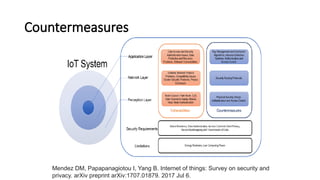
Countermeasures
Mendez DM, Papapanagiotou I, Yang B. Internet of things: Survey on security and
privacy. arXiv preprint arXiv:1707.01879. 2017 Jul 6.

Internet of Things Basics and its protocols

  • 1.
    Internet of Things (20CS002) Departmentof Computer Science and Engineering Vignan's Foundation for Science, Technology & Research
  • 2.
  • 3.
    • The Internetof things (IoT) is a system of interrelated computing devices, mechanical and digital machines, objects, animals or people that are provided with unique identifiers (UIDs) and the ability to transfer data over a network without requiring human-to-human or human-to-computer interaction - IoTAgenda • IoT is a concept of connecting any device with an on and off switch to the Internet (and/or to each other). This includes everything from cellphones, coffee makers, washing machines, headphones, lamps, wearable devices and almost anything else you can think of. This also applies to components of machines, for example a jet engine of an airplane or the drill of an oil rig – Forbes. • IoT is a sensor network of billions of smart devices that connect people, systems and other applications to collect and share data. Internet of Things
  • 4.
    Characteristics of IoT •IoT system has the ability to dynamically adapt with the changing context. Ex Surveillance cameras adjust to modes depending on day or night. Camera could switch from lower resolution to higher modes when any motion is detected and alert the nearby camera to do the same. • Self-Configuring: IoT devices can configure themselves, setup the networking and fetch latest software upgrades with minimal manual or user interventions. • IoT systems may support Interoperable communication protocols and can communicate with any other device and infrastructure. • Each IoT device has a unique identity and a Identifier (IP or URI). IoT device interfaces allow users to query the devices, monitor their status and control them remotely, in association with the control, configuration and management infrastructure. • IoT devices are usually Integrated into the information network that allows them to communicate and exchange data with other devices and systems. Integration into information network helps in making IoT system” Smarter: due to the collective intelligence of the individual devices in collaboration with the infrastructure.
  • 5.
    Physical Design ofIoT • Physical design of IoT consists of IoT devices and IoT protocols. • An IoT device is simply an electronic device that is connected to the Internet. • There are several basic properties that qualify a device as an “IoT” device: 1. A physical device/object 2. Contains controller(s), sensor(s), and or actuator(s) 3. Connects to the Internet • Examples: Amazon Alexa, Samsung Smart TV, Google Home, NEST Security Camera
  • 6.
  • 7.
    Link Layer • IEEE802.3 ( Ethernet): – Collection of wired Ethernet Standards for link layer – The Shared medium carries the communication for all the devices on the network • 802.3 - 10BASE5- Coaxial Cable • 802.3.i - 10BASE- T- Copper twisted Pair • 802.3. j - 10BASE5- F- Fiber Optic Connections • 802.3ae -10Gbit/s Ethernet- fiber • IEEE 802.11 ( Wi-Fi) ( wireless fidelity): – Collection of wireless local area network (WLAN) • 802.11a- 5GHz band • 802.11b & 802.11g- 2.4GHz band • 802.11n- 2.4/5GHz band • 802.11ad- 60GHz bands
  • 8.
    Link & NetworkLayer • 2G/3G/4G- Mobiles Communications – Different generations of mobile communication standards – IoT devices based on these standards can communicate over cellular networks. – Data rate 9.6 Kb/s to up to 100 Mb/s. • Network/ Internet Layer – It is responsible for sending of IP datagrams from the source network to the destination network. – It performs the host addressing and packet routing. – Protocols: • IPV4 • IPV6 • 6LoWPAN
  • 9.
    Network Layer IPv4: – Uses32- bit address scheme that allows total of 232 – As more and more devices got connected to the Internet, these addresses got exhausted in the year 2011. – IPv4 has been succeeded by IPv6. IPv6: - Internet Protocol Version 6 is the newest version of Internet protocol and successor to IPV4. - Uses 128- bit address scheme that allows total of 2128. 6LoWPAN: – IPV6 over Lower Power Wireless Personal Area Networks. – Brings IP protocol to the low- power devices .
  • 10.
    Transport Layer – Providesend-to-end message transfer capabilities. – Provides functions like error control, segmentation, flow control and congestion control. TCP: • Transmission Control Protocol ( HTTP, HTTPS, FTP, SMTP) • Connection oriented • Stateful protocol • Reliability • Duplicate packets can be discarded, and lost packets are retransmitted. • Helps in avoiding network congestion
  • 11.
    Transport Layer UDP: – Connectionless –Useful for time -sensitive applications – Transaction oriented – Stateless Protocol – Does not provide guaranteed delivery, ordering of messages and duplicate elimination. – Higher levels of protocols can ensure reliable delivery or ensuring connections created are reliable.
  • 12.
  • 13.
    Application Layer • Defineshow the application interface with the lower layer protocols sends the data over networks.​ • It uses protocols which enables process- to process connections using ports.​ HTTP:​ • Hypertext Transfer Protocol is the application layer protocol that forms the foundation of the WWW. • Includes commands such as GET, PUT, POST, DELETE, HEAD, TRACE, DELETE, OPTIONS, etc.​ • Follows request- response model • Stateless Protocol • HTTP protocol uses Universal Resource Identifiers (URIs)
  • 14.
    Application Layer CoAP: • ConstrainedApplication Protocol • M2M Applications • Meant for constrained environments with constrained devices and constrained networks • Request-response model • Runs on UDP instead of TCP • Client- server architecture • Methods- GET,PUT, post and DELETE WebSocket: • Full-duplex communication • Based on TCP • Allows streams of messages to be sent back and forth between the client and server while keeping the TCP connection open
  • 15.
    Application Layer MQTT: • MessageQueue Telemetry Transport ( MQTT) • Light- weight protocol • Publish- Subscribe model • Well suited for constrained environments- devices have limited processing, memory resources and network bandwidth XMPP ( Extensible Messaging and Presence Protocol): • Real-time Communication and streaming XML data between network entities. • Applications:- Messaging, data syndication, gaming, multiparty chat and voice/video calls. • Sends small chunks of XML data from one n/w entity to another • Decentralized protocol , client- server architecture. • Supports both client– server and server- server communication paths.
  • 16.
    Application Layer DDS- DataDistribution Service: • Data-centric middleware standard • Publish- subscribe model • Provides QoS, configurable reliability AMQP- Advanced Message Queuing Protocol: • Open application layer protocol for business messaging. • Point- point and publisher/ subscriber models, routing and queuing.
  • 17.
    IoT Device Architecture Source:O. Elijah, T. A. Rahman, I. Orikumhi, C. Y. Leow and M. N. Hindia, "An Overview of Internet of Things (IoT) and Data Analytics in Agriculture: Benefits and Challenges," in IEEE Internet of Things Journal, vol. 5, no. 5, pp. 3758-3773, Oct. 2018, doi: 10.1109/JIOT.2018.2844296.
  • 18.
    IoT Device Architecture Source:F. Samie, L. Bauer and J. Henkel, "IoT technologies for embedded computing: A survey," International Conference on Hardware/Software Codesign and System Synthesis (CODES+ISSS), 2016, pp. 1-10.
  • 19.
    IoT Device Architecture Source:C. Kang, F. Abbas and H. Oh, "Protection scheme for IoT devices using introspection," 6th International Conference on the Network of the Future (NOF), 2015, pp. 1-5, doi: 10.1109/NOF.2015.7333292.
  • 20.
    Core IoT FunctionalStack IoT networks are built around the concept of “things,” or smart objects performing functions and delivering new connected services. These objects are “smart” because they use a combination of contextual information and configured goals to perform actions.
  • 21.
    Things: Sensors • Morespecifically, a sensor measures physical quantity and converts that measurement reading into a digital representation. • Digital representation is typically passed to another device for transformation into useful data that can be consumed by intelligent devices or humans • Able to provide an extremely wide spectrum of rich and diverse measurement data with far greater precision than human senses. • There are number of ways to group and cluster Sensors into different categories, 1. Active or Passive 2. Invasive or non-invasive 3. Contact or no-contact 4. Absolute or relative
  • 22.
    Things: Sensors Active orpassive: • Sensors can be categorized based on whether they produce an energy output and typically require an external power supply (active) or • Whether they simply receive energy and typically require no external power supply (passive). Invasive or non-invasive: • Sensors can be categorized based on whether a sensor is part of the environment it is measuring (invasive) or • External to it (non-invasive).
  • 23.
    Things: Sensors Contact orno-contact: • Sensors can be categorized based on whether they require physical contact with what they are measuring (contact) or not (no-contact). Absolute or relative: • Sensors can be categorized based on whether they measure on an absolute scale (absolute) or based on a difference with a fixed or variable reference value (relative).
  • 25.
    Things: Actuators • Actuatorsare natural complements to sensors Sensors are designed to sense and measure practically any measurable variable in the physical world.​ • They convert their measurements (typically analog) into electric signals or digital representations that can be consumed by an intelligent agent (a device or a human).​ • Actuators, on the others hand, receive some type of control signal (commonly an electric signal or digital command) that triggers a physical effect, usually some type of motion, force, and so on.​ • Sensors provide the information, actuators provide the action​
  • 27.
    Communications network When smartobjects are not self-contained, they need to communicate with an external system. In many cases, this communication uses a wireless technology. This layer has four sublayers: • Access network sublayer • Gateways and backhaul network sublayer • Network transport sublayer • IoT network management sublayer
  • 28.
    Communications network • Accessnetwork sublayer: The last mile of the IoT network is the access network. This is typically made up of wireless technologies such as 802.11ah, 802.15.4g,and LoRa. The sensors connected to the access network may also be wired. • Gateways and backhaul network sublayer: A common communication system organizes multiple smart objects in a given area around a common gateway. The gateway communicates directly with the smart objects. The role of the gateway is to forward the collected information through a longer- range medium (called the backhaul) to a headend central station where the information is processed.
  • 29.
    Communications network • Networktransport sublayer: For communication to be successful, network and transport layer protocols such as IP and UDP must be implemented to support the variety of devices to connect and media to use. • IoT network management sublayer: Additional protocols must be in place to allow the headend applications to exchange data with the sensors. Examples include CoAP and MQTT.
  • 30.
  • 31.
  • 32.
  • 33.
  • 34.
  • 35.
  • 36.
  • 37.
    Smart Objects • Smartobjects are, quite simply, the building blocks of IoT. • Transform everyday objects into a network of intelligent objects that are able to learn from and interact with their environment in a meaningful way • The real power of smart objects in IoT comes from being networked together rather than being isolated as standalone objects
  • 39.
    Connecting Smart Objects •IoT devices and sensors must be connected to the network for their data to be utilized. • In addition to the wide range of sensors, actuators, and smart objects that make IoT, there are also a number of different protocols used to connect them. • The characteristics are consider when selecting and dealing with connecting smart objects. 1. Range 2. Frequency Bands 3. Power Consumption 4. Topology 5. Constrained Devices 6. Constrained-Node Networks
  • 40.
  • 41.
    Frequency Bands, PowerConsumption and Topology
  • 43.
    Resource constrained device •Small devices with limited CPU, memory, and power resources, so-called "constrained devices" (often used as sensors/actuators, smart objects, or smart devices) can form a network, becoming "constrained nodes" in that network. • Constrained devices might be in charge of gathering information in diverse settings, including natural ecosystems, buildings, and factories, and sending the information to one or more server stations. • Other entities on the network, e.g., a base station or controlling server, might have more computational and communication resources and could support the interaction between the constrained devices and applications.
  • 44.
    Constrained device factors •Cost: Smaller cheaper devices are typically used when mass producing the final product. However the trade-off is that development of the device can be more expensive given the highly constrained device. The development cost can be spread across all produced devices result of per unit development cost will be low. • Power: How much power a device consumes is important if the device will be utilizing batteries and not connected to the power grid. Micro Controller Units (MCUs) are often designed for lower power scenarios and can be a better choice for extending battery life. • Network Access: There are many ways to connect a device to a cloud service. Ethernet, Wi-fi and cellular and some of the available options. The connection type you choose will depend on where the device is deployed and how it is used. • Input and Outputs: The inputs and outputs available on the device directly affect the devices operating capabilities. A microcontroller will typically have many I/O functions built directly into the chip and provides a wide choice of sensors to connect directly. • Maximum code complexity (ROM/Flash), size of state and buffers (RAM) and user interface and accessibility in deployment (ability to set keys, update software, etc.)
  • 45.
  • 46.
    IETF RFC 7228:Classes of constrained devices and strategies for using power towards communication • Class 0: Devices are the most constrained ones and are so restricted in computing capabilities that security functions are not usable and direct communication with the Internet is not possible within a secure boundary. • Class 1: Devices are the kind of devices for which the Constrained Application Protocol (CoAP) has been designed. They do not have the capabilities to use a regular Internet protocol stack (HTTP, TLS and TCP) and text-based data representations like JSON or XML, but with efficient protocols like CoAP over UDP.
  • 47.
    • Class 2:Devices have enough resources to make use of regular protocols, but still benefit from optimized protocols like CoAP, leaving more room in terms of bandwidth or computing power for applications. • P0: Device sleeps such long periods at a time that once it wakes up, it makes sense for it to not pretend that it has been connected to the network during sleep: the device reattaches to the network as it is woken up. • P1: Devices need to operate on a very small amount of power but still need to be able to communicate on a relatively frequent basis. Typically, small amount of time between transmissions, despite their sleep state, these devices retain some form of attachment to the network. • P9: Device can "stay on" in the usual manner all the time. It limit the number of wireless transmissions, CPU speeds, and other aspects for general power-saving and cooling needs, but the device can be connected to the network all the time. IETF RFC 7228: Classes of constrained devices and strategies for using power towards communication
  • 48.
    Constrained node networks •A group of constrained nodes are communicated in networks is called as "constrained node networks" and following characteristics Low achievable bitrate/throughput (including limits on duty cycle) High packet loss (delivery rate) Severe penalties for using larger packets (e.g., high packet loss due to link- layer fragmentation) Limits on reachability over time (a substantial number of devices may power off at any point in time but periodically "wake up" and can communicate for brief periods of time) Lack of (or severe constraints on) advanced services such as IP multicast. • Two types of Constrained node networks: 1. Low-Power and Lossy Network (LLN) 2. Low-Power Wireless Personal Area Network (LoWPAN)
  • 49.
    Types of Constrainednode networks • LLN: Typically composed of many embedded devices with limited power, memory, and processing resources interconnected by a variety of links, such as IEEE 802.15.4 or low-power Wi-Fi. Application areas for LLNs, including  Industrial monitoring  Building automation (heating, ventilation, and air conditioning lighting, fire)  Health care  Environmental monitoring  Assets tracking • LoWPAN: It inspired from the name of an IEEE 802.15.4 working group. Application areas including  Urban monitoring  Control of large buildings  Industrial control applications
  • 50.
    Resource Constrained DeviceOperating System • IoT OSs are embedded operating systems that are designed to perform under the constraints of limited memory and processing power of small IoT devices. • Embedded operating systems enable IoT devices to communicate with cloud services and other IoT devices over a global network.
  • 51.
    Characteristics of IoTOS • Small memory footprint: Sensor are typically small and have limited memory available. This restricts the memory footprint of the OS. • Energy efficient operation: Sensors are characterized by low power draws and are often battery powered. Furthermore, it is commonly prohibitively expensive to replace batteries etc as of OS be highly energy efficient. • Hardware agnostic operation: Owing to the diversity of hardware platforms available for various IoT applications, it is important that the OS support a variety of platforms to simplify interconnectivity and drive standardization and to lower costs of ownership.
  • 52.
    Characteristics of IoTOS • Network Connectivity & Protocol Support: Crucial to IoT device operation is continuous connectivity to the network and to devices in immediate proximity. This requirement is achievable by providing support for a variety of connectivity protocols like Wi-Fi, Cellular, Bluetooth, etc. Operating system should simplify the connectivity process. • Security: It is imperative that the OS for IoT adhere to strict security expectations and meet stringent requirements imposed by deployments in sensitive and critical settings.
  • 53.
    Parameters for selectingthe IoT OS • Scalability: The operating system must be scalable for any type of device. That means both integrators and developers need to be familiar with the operating system when it comes to gateways and nodes. • Footprint: Since the devices will always come with a bag of constraints, it is essential to choose an operating system with low power, processing, and memory requirements. The overheads should be minimal at the end of the day. • Reliability: This is a critical factor for mission-critical systems. For instance, industrial iot devices are at remote locations and have to work for years without hampering business continuity. OS should be able to fulfill specific certifications for IoT apps.
  • 54.
    Parameters for selectingthe IoT OS • Portability: OS is ported to different interface and hardware platforms to the board support package (BSP) in a standardized format, such as POSIX calls. • Security: The operating system should be safe and secure to use, allowing to add on some aspects in the form of SSL support, secure boot, components, and encryption drivers. • Modularity: Every operating system must mandatorily have a kernel core. All other functionalities can be included as add-ons for IoT apps building.
  • 55.
    IoT OS KernelArchitectures
  • 56.
  • 57.
    Modular kernel Some partsof system core will get allocated in independent files called modules. This can be added to system at run time. It usually requires small amount of time of load modules. If one needs a new module, then unable to recompile. • Allows administrator to add functionality only when it is required. • Provides less security and reliability as compared to micro kernel. • Decreases boot time, does not have to load everything at boot time, faster development time, etc. • Different kernel services are separated into different files so that one can link monolithic kernel with functionality or facilities that are required. • To keep what is loaded in boot-time minimal while still enabling kernel to execute more functions that are complex.
  • 58.
    Scheduler Preemptive Kernel • Itis a kernel that allows interrupting a program in the middle of the executing. That means kernel is capable of stopping the execution of the currently running process and allowing some other process to execute. • As preemptive kernel does not allow the processor to run a process for a long time continuously, this type of kernel is more secure. Nonpreemptive Kernel • It does not allow interrupting the currently running process. • It does not allow stopping the execution of the running process. • The process will be executed until it exits the kernel mode or is blocked. • Moreover, in the nonpreemptive kernel, there is only a single process active in the kernel at a time. Therefore, this type of kernel does not cause race condition.
  • 59.
    Programming model Event-driven programming •It is a programming paradigm in which the flow of the program is determined by events such as user actions (mouse clicks, key presses), sensor outputs, or message passing from other programs or threads. • Event-driven programming is the dominant paradigm used in graphical user interfaces and other applications (e.g., JavaScript web applications) that are centered on performing certain actions in response to user input. Protothreads • Protothreads are extremely lightweight stackless threads designed for severely memory constrained systems, such as small embedded systems or wireless sensor network nodes. • The advantage here is that they do not waste memory on multiple stacks that are only partially used. • Protothreads allow block operations within the event-handler. As a result, there is less application code, more blocking operations, and event infinite loops.
  • 60.
    Programming model: Singleand Multi-Threading
  • 61.
    Comparison of IoTOS • A Real Time Operating System, commonly known as an RTOS, is a software component that rapidly switches between tasks, giving the impression that multiple programs are being executed at the same time on a single processing core.
  • 62.
  • 63.
  • 64.
  • 65.
  • 66.
  • 67.
    Wireless Sensor Networks •A wireless sensor network comprises of distributed device with sensor which are used to monitor the environmental and physical conditions. • A WSN consists of a number of end-nodes and routers and a coordinator. End Nodes have several sensors attached to them in node can also act as routers. Routers are responsible for routing the data packets from end-nodes to the coordinator. The coordinator collects the data from all the nodes. Coordinator also act as a gateway that connects the WSN to the internet. Some examples of WSNs used in IoT systems are described as follows: • Weather monitoring system use WSNs in which the nodes collect temperature humidity and other data which is aggregated and analyzed. • Indoor air quality monitoring systems use WSNs to collect data on the indoor air quality and concentration of various gases • Soil moisture monitoring system use WSNs to monitor soil moisture at various locations. • Surveillance system use WSNs for collecting Surveillance data (such as motion detection data) • Smart grid use WSNs for monitoring the grid at various points. • Structural health monitoring system use WSNs to monitor the health of structures ( buildings, bridges) by collecting vibration data from sensor nodes de deployed at various points in the structure.
  • 68.
    Cloud Computing • Cloudcomputing is a trans-formative computing paradigm that involves delivering applications and services over the Internet Cloud computing involves provisioning of computing, networking and storage resources on demand and providing these resources as metered services to the users, in a “pay as you go” model. • Cloud computing services are offered to users in different forms: 1. Infrastructure as a Service (IaaS): hardware is provided by an external provider and managed for you 2. Platform as a Service (PaaS): in addition to hardware, your operating system layer is managed for you 3. Software as a Service (SaaS): further to the above, an application layer is provided and managed for you – you won’t see or have to worry about the first two layers.
  • 69.
    Big Data Analytics •Big Data analytics is the process of collecting, organizing and analyzing large sets of data (called Big Data) to discover patterns and other useful information. • Big Data analytics can help organizations to better understand the information contained within the data and will also help identify the data that is most important to the business and future business decisions. Some examples of big data generated by IoT systems are described as follows: • Sensor data generated by IoT system such as weather monitoring stations. • Machine sensor data collected from sensors embedded in industrial and energy systems for monitoring their health and detecting Failures. • Health and fitness data generated by IoT devices such as wearable fitness bands • Data generated by IoT systems for location and tracking of vehicles • Data generated by retail inventory monitoring systems
  • 70.
    Characteristics of BigData • Volume – The quantity of generated and stored data. The size of the data determines the value and potential insight, and whether it can be considered big data or not. • Variety – The type and nature of the data. This helps people who analyze it to effectively use the resulting insight. Big data draws from text, images, audio, video; plus it completes missing pieces through data fusion. • Velocity – In this context, the speed at which the data is generated and processed to meet the demands and challenges that lie in the path of growth and development. Big data is often available in real-time. Compared to small data, big data are produced more continually. Two kinds of velocity related to Big Data are the frequency of generation and the frequency of handling, recording, and publishing. • Veracity – It is the extended definition for big data, which refers to the data quality and the data value. The data quality of captured data can vary greatly, affecting the accurate analysis.
  • 71.
    Embedded Systems • Embeddedmeans something that is attached to another thing. • An embedded system can be thought of as a computer hardware system having software embedded in it. • An embedded system is a controller programmed and controlled by a real-time operating system (RTOS) with a dedicated function within a larger mechanical or electrical system, often with real-time computing constraints. • An embedded system has three components: 1. It has hardware. 2. It has application software. 3. It has Real Time Operating system (RTOS) that supervises the application software and provide mechanism to let the processor run a process as per scheduling by following a plan to control the latencies.
  • 72.
  • 73.
    Security and PrivacyRisks R. Chaudhary et.al, "Lattice-Based Public Key Cryptosystem for Internet of Things Environment: Challenges and Solutions," in IEEE Internet of Things Journal, vol. 6, no. 3, pp. 4897-4909, June 2019
  • 74.
  • 75.
    IoT security andprivacy concerns • IoT is rapidly growing, it still faces security and privacy issues: Security Risks • IoT devices are connected to desktop or laptop. Lack of security increases the risk of personal information leaking while the data is collected and transmitted to the IoT device. • IoT devices are connected with a consumer network. This network is also connected with other systems. So if the IoT device contains any security vulnerabilities, it can be harmful to the consumer’s network. This vulnerability can attack other systems and damage them. • Sometimes unauthorized people might exploit the security vulnerabilities to create risks to physical safety.
  • 76.
    IoT security andprivacy concerns Privacy Risks • In IoT, devices are interconnected with various hardware and software, so there are obvious chances of sensitive information leaking through unauthorized manipulation. • All the devices are transmitting the user’s personal information such as name, address, date of birth, health card information, credit card detail and much more without encryption.
  • 77.
    Countermeasures Mendez DM, PapapanagiotouI, Yang B. Internet of things: Survey on security and privacy. arXiv preprint arXiv:1707.01879. 2017 Jul 6.