Internationalisation and Globalisation Visual Basic 6
Alan Dean alan .dean@ retailexperience .co. uk or adean @hotmail.com ©2003
Credit to Kaplan “ Internationalisation with Visual Basic” Michael S. Kaplan ISBN 0672319772
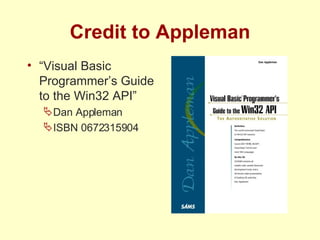
Credit to Appleman “ Visual Basic Programmer’s Guide to the Win32 API” Dan Appleman ISBN 0672315904
Outline “ In a connected world, it is increasingly important to be able to implement solutions for users across the world.  Unfortunately, the ability to do this with VB6 is not well documented, requires a lot of effort to understand and is not available 'out of the box'.” http://www.unitoolbox.com
Contents The following subjects are covered: Characters Keyboards Fonts (very briefly…) Languages Strings Techniques to code an internationalised application
Terminology
Terminology – Contents Globalisation Internationalisation (i18N) Multinationalisation (M18N) Translation Localisation (L10N)
Internationalisation (i18N) The process of converting an application to be  capable  of multinationalisation and localisation Culture-specific issues are addressed e.g. conventions, preferences, data formatting Depends upon default system or user preferences Does not require the translation of the text of an application
Globalisation The process of designing and developing an application that supports localized user interfaces and regional data for users in multiple cultures .NET Framework Developers Guide
Multinationalisation (M18N) The process of converting an application to support multiple cultures A significant enhancement of i18N Multiple language availability, including crossing the code page barrier E.g. Office2000 multilanguage packs (langpacks) and Win2000 multilanguage user interface (MUI)
Translation The process of representing the text of an application in another language e.g. dialogs, menus, alerts, documentation etc. For example, the ‘File|Open’ menu item is translated to ‘Fichier|Ouvrir’ in French Microsoft International Word List Converts the meaning and sense of the text, not just the words
Beware Babelfish! “ Insert the boot disk into Drive A” Translate from English to German using Babelfish “ Legen Sie die Boot Diskette in Laufwerk A ein”  which means “ Insert the charge disk in Propulsion A” “ Setzen Sie die Aufladung Scheibe in Antrieb A ein”  is the correct translation
Localisation (L10N) The process of converting an application to adhere to the local culture of a user
Terminology - Summary Explained some of the general terms used around internationalisation Discussed the scope of the terms used
About Characters
About Character - Contents Character Repertoires Character Codes & Encoding Character Sets ASCII, ANSI, DBCS, Unicode Windows Character Set Usage
Character (definition) character   noun … 7.  letter or symbol : any written or printed letter, number, or other symbol … Source: Encarta World English Dictionary
Character (alternate definition) A character is the atomic unit of textual communication
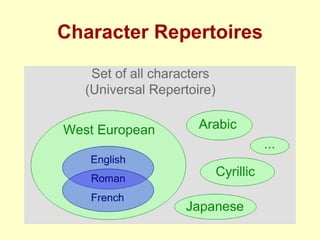
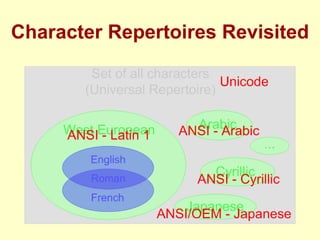
Character Repertoire An abstract set of distinct characters Usually defined by specifying a name and sample presentation of each character The ordering of characters for sorting purposes is not defined Either: Fixed (e.g. English), or Open (e.g. Unicode, Chinese)
Character Repertoire (English) The character repertoire of English contains Alphabet Upper case A ‘A’ … Lower case Z ‘z’ Punctuation Period . Ellipses … Comma , Semicolon ; Colon :  Question Mark ? Exclamation Point ! Quotation Marks “” Parentheses () Apostrophe ‘ Hyphen -
Character Repertoires
Character Code A mapping between an unsigned integer and a character e.g. 65=‘A’ The VB Functions Chr$(…) and Asc(…) address this mapping e.g. Chr$(65) returns “A” e.g. Asc(“A”) returns 65
Character Encoding The process of collating code points by assigning an unsigned integer to each character in a repertoire The output of encoding is a character set The values assigned imply ordering of the character set, but the ordering may not be meaningful
Character Set An encoded character repertoire There are a large number of character sets Character sets are not language specific e.g. Latin Alphabet No.1 (ISO 8859-1)
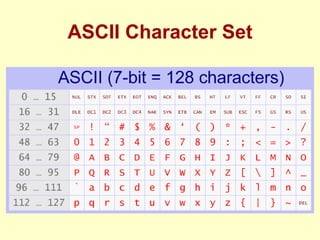
ASCII Character Set
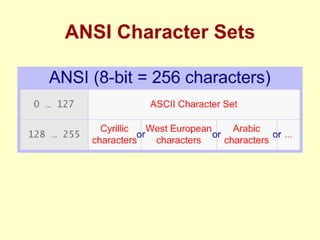
ANSI Character Sets
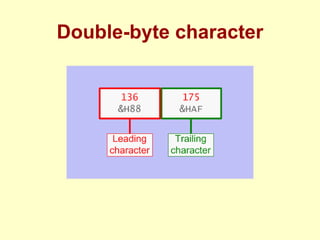
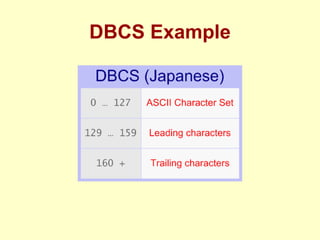
Double-byte Character Sets (DBCS) aka MBCS (Multi-byte character set) Because first 128 characters single-byte encoded as ANSI Additional characters double-byte encoded Double-byte encoding the first (or ‘lead’) byte signals that both itself and the next byte are to be interpreted as a single character
Double-byte character
DBCS Example
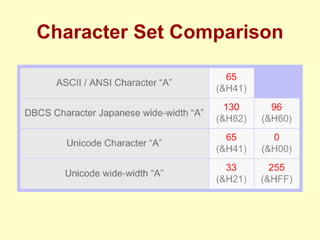
Unicode Character Set All characters as double-byte encoded (as far as Windows is concerned anyway: UCS-2/UTF-16) Although DBCS and Unicode both use  double-byte encoding, the mapping differs All characters in the Unicode character set are given a unique value
Character Set Comparison
Character Repertoires Revisited
Windows Character Set Usage 16-bit Windows use ANSI character sets Known as Code Pages 32-bit Windows use Unicode
Windows Code Page A table of 256(+) code points for a language First 128 code points are the same (the ASCII table of non-printing and English characters) Next 128(+) are used for non-English characters needed by the language Based on ANSI character sets
Windows Code Page 1252, etc. http://www. microsoft .com/ globaldev /reference/ sbcs /1252. htm
About Characters - Summary Explained how characters are gathered into repertoires, and are then encoded into character sets Described the main character sets supported by Windows
About Keyboards
About Keyboards - Contents Scan Codes Keyboard Layouts Virtual Keys
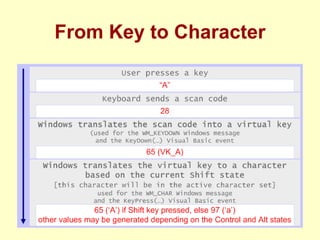
Scan Code A hardware-dependent code sent by a keyboard to indicate a keyboard operation Scan codes can vary between different keyboards
Keyboard Layout A definition of the scan codes supported by a keyboard Win3.x have a system-wide layout Win9x and WinNT support multiple layouts on a system-wide and per-thread basis
Virtual Key An abstraction of scan codes, so that interpretation of input need not be hardware-specific API Constants exist with VK_ prefix e.g. VK_A
From Key to Character
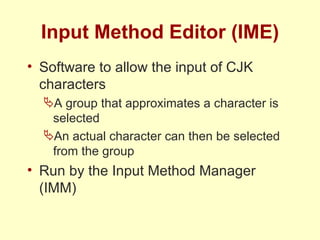
Keyboard limitations Keyboards are an effective data entry method for most languages  However there are no keyboards for character-based languages because there are no keyboards with thousands of keys… i.e. Far East languages (also known as Chinese/Japanese/Korean, or CJK languages)
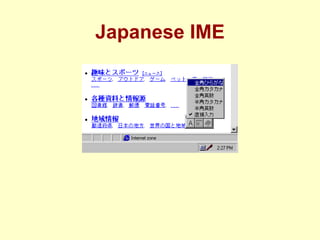
Input Method Editor (IME) Software to allow the input of CJK characters A group that approximates a character is selected An actual character can then be selected from the group Run by the Input Method Manager (IMM)
Japanese IME
About Keyboards - Summary Explained how keystrokes become characters Briefly discussed non-keyboard input
About Fonts
About Fonts - Contents Character-based systems Graphic-based systems Glyphs & Fonts
Character-based Systems Such systems display characters only
Graphic-based Systems Such systems display glyphs, not characters
Glyph A glyph is a graphical representation of a character
Font A collection of glyphs
About Fonts - Summary Discussed the difference between character-based and graphic-based systems Briefly discussed the representation of characters by glyphs and fonts
About Languages
About Languages - Contents Languages Locales
Language (definition) language  noun 1.  speech of group : the speech of a country, region, or group of people, including its diction, syntax, and grammar … Source: Encarta World English Dictionary
Locale A specific international market where a target user is working Encompasses localisation issues: e.g. conventions, culture, language, preferences including formatting of numbers, currencies, etc. phraseology can vary also
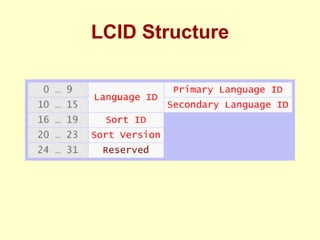
Locale Identifier (LCID) A 32-bit unsigned integer that identifies the locale for the system or thread Commonly pronounced  el-sid
LCID Structure
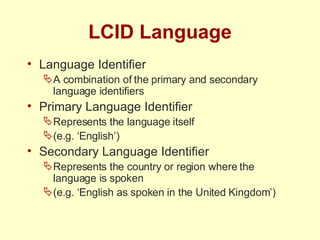
LCID Language Language Identifier A combination of the primary and secondary language identifiers Primary Language Identifier Represents the language itself (e.g. ‘English’) Secondary Language Identifier Represents the country or region where the language is spoken (e.g. ‘English as spoken in the United Kingdom’)
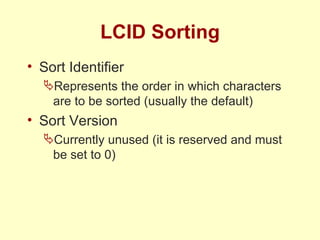
LCID Sorting Sort Identifier Represents the order in which characters are to be sorted (usually the default) Sort Version Currently unused (it is reserved and must be set to 0)
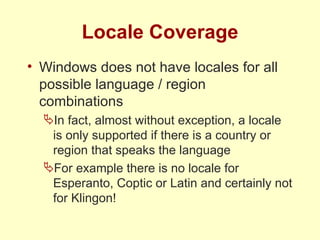
Locale Coverage Windows does not have locales for all possible language / region combinations In fact, almost without exception, a locale is only supported if there is a country or region that speaks the language For example there is no locale for Esperanto, Coptic or Latin and certainly not for Klingon!
Locale Usage Settings associated with Locales are heavily used by Windows, COM and VB So, the current Locale fundamentally affects the processing of information on a system Settings are accessed by the Regional Options control panel
About Languages - Summary Discussed the relationship between languages and locales Explained the structure of the locale identifier
About Strings
About Strings - Contents C Strings VB Strings VB String calls to COM and Win32 API functions
String An array of characters Not a primitive datatype A number of string datatypes exist e.g. LPSTR, BSTR, etc.
Pointer to String (LPSTR) C datatype Null-terminated Used extensively throughout the Windows API
Basic String (BSTR) COM datatype, used by VB internally Unicode pointer to a block of memory prefixed by a length encoding representing the size of the string A contract for creation (allocation) A contract for destruction (deallocation) An API
VB COM Calls Both VB and COM use Unicode, so strings are not transposed into alternate character sets
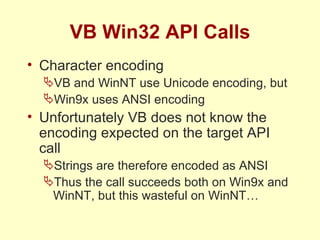
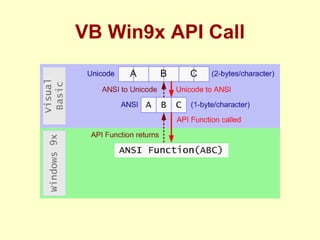
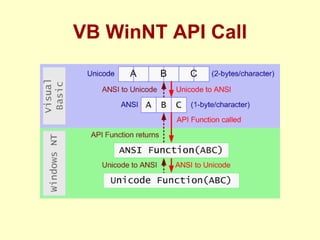
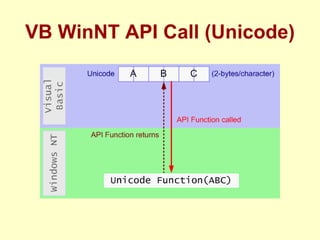
VB Win32 API Calls Character encoding VB and WinNT use Unicode encoding, but Win9x uses ANSI encoding Unfortunately VB does not know the encoding expected on the target API call Strings are therefore encoded as ANSI Thus the call succeeds both on Win9x and WinNT, but this wasteful on WinNT…
VB Win9x API Call
VB WinNT API Call
VB WinNT API Call (Unicode)
About Strings - Summary Discussed C and VB strings Explained how COM and Win32 API string function calls are transacted
An Internationalised App
1.0.1 ‘ Plain vanilla’ VB Standard EXE
2.0.2 1 st  attempt to internationalise Addition of resource file
2.1.2 2 nd  attempt to internationalise Isolate persistent strings
2.2.2 3 rd  attempt to internationalise Parameterise resource strings
2.2.3 4 th  attempt to internationalise Loading with current LCID By setting thread locale
3.0.4 5 th  attempt to internationalise Loading with current LCID (again…) By loading resources directly
3.1.5 6 th  attempt to internationalise Loading with current LCID (yet again!) By employing satellite resource
3.1.6 5 th  attempt to internationalise Loading all strings from satellite resources
Conclusion Covered Characters, Keyboards, Fonts, and Languages Explained Strings and the usage of Strings Coded a simple internationalised application
Thank You alan .dean@ retailexperience .co. uk or adean @hotmail.com ©2003

Internationalisation And Globalisation

  • 1.
  • 2.
    Alan Dean alan.dean@ retailexperience .co. uk or adean @hotmail.com ©2003
  • 3.
    Credit to Kaplan“ Internationalisation with Visual Basic” Michael S. Kaplan ISBN 0672319772
  • 4.
    Credit to Appleman“ Visual Basic Programmer’s Guide to the Win32 API” Dan Appleman ISBN 0672315904
  • 5.
    Outline “ Ina connected world, it is increasingly important to be able to implement solutions for users across the world. Unfortunately, the ability to do this with VB6 is not well documented, requires a lot of effort to understand and is not available 'out of the box'.” http://www.unitoolbox.com
  • 6.
    Contents The followingsubjects are covered: Characters Keyboards Fonts (very briefly…) Languages Strings Techniques to code an internationalised application
  • 7.
  • 8.
    Terminology – ContentsGlobalisation Internationalisation (i18N) Multinationalisation (M18N) Translation Localisation (L10N)
  • 9.
    Internationalisation (i18N) Theprocess of converting an application to be capable of multinationalisation and localisation Culture-specific issues are addressed e.g. conventions, preferences, data formatting Depends upon default system or user preferences Does not require the translation of the text of an application
  • 10.
    Globalisation The processof designing and developing an application that supports localized user interfaces and regional data for users in multiple cultures .NET Framework Developers Guide
  • 11.
    Multinationalisation (M18N) Theprocess of converting an application to support multiple cultures A significant enhancement of i18N Multiple language availability, including crossing the code page barrier E.g. Office2000 multilanguage packs (langpacks) and Win2000 multilanguage user interface (MUI)
  • 12.
    Translation The processof representing the text of an application in another language e.g. dialogs, menus, alerts, documentation etc. For example, the ‘File|Open’ menu item is translated to ‘Fichier|Ouvrir’ in French Microsoft International Word List Converts the meaning and sense of the text, not just the words
  • 13.
    Beware Babelfish! “Insert the boot disk into Drive A” Translate from English to German using Babelfish “ Legen Sie die Boot Diskette in Laufwerk A ein” which means “ Insert the charge disk in Propulsion A” “ Setzen Sie die Aufladung Scheibe in Antrieb A ein” is the correct translation
  • 14.
    Localisation (L10N) Theprocess of converting an application to adhere to the local culture of a user
  • 15.
    Terminology - SummaryExplained some of the general terms used around internationalisation Discussed the scope of the terms used
  • 16.
  • 17.
    About Character -Contents Character Repertoires Character Codes & Encoding Character Sets ASCII, ANSI, DBCS, Unicode Windows Character Set Usage
  • 18.
    Character (definition) character noun … 7. letter or symbol : any written or printed letter, number, or other symbol … Source: Encarta World English Dictionary
  • 19.
    Character (alternate definition)A character is the atomic unit of textual communication
  • 20.
    Character Repertoire Anabstract set of distinct characters Usually defined by specifying a name and sample presentation of each character The ordering of characters for sorting purposes is not defined Either: Fixed (e.g. English), or Open (e.g. Unicode, Chinese)
  • 21.
    Character Repertoire (English)The character repertoire of English contains Alphabet Upper case A ‘A’ … Lower case Z ‘z’ Punctuation Period . Ellipses … Comma , Semicolon ; Colon : Question Mark ? Exclamation Point ! Quotation Marks “” Parentheses () Apostrophe ‘ Hyphen -
  • 22.
  • 23.
    Character Code Amapping between an unsigned integer and a character e.g. 65=‘A’ The VB Functions Chr$(…) and Asc(…) address this mapping e.g. Chr$(65) returns “A” e.g. Asc(“A”) returns 65
  • 24.
    Character Encoding Theprocess of collating code points by assigning an unsigned integer to each character in a repertoire The output of encoding is a character set The values assigned imply ordering of the character set, but the ordering may not be meaningful
  • 25.
    Character Set Anencoded character repertoire There are a large number of character sets Character sets are not language specific e.g. Latin Alphabet No.1 (ISO 8859-1)
  • 26.
  • 27.
  • 28.
    Double-byte Character Sets(DBCS) aka MBCS (Multi-byte character set) Because first 128 characters single-byte encoded as ANSI Additional characters double-byte encoded Double-byte encoding the first (or ‘lead’) byte signals that both itself and the next byte are to be interpreted as a single character
  • 29.
  • 30.
  • 31.
    Unicode Character SetAll characters as double-byte encoded (as far as Windows is concerned anyway: UCS-2/UTF-16) Although DBCS and Unicode both use double-byte encoding, the mapping differs All characters in the Unicode character set are given a unique value
  • 32.
  • 33.
  • 34.
    Windows Character SetUsage 16-bit Windows use ANSI character sets Known as Code Pages 32-bit Windows use Unicode
  • 35.
    Windows Code PageA table of 256(+) code points for a language First 128 code points are the same (the ASCII table of non-printing and English characters) Next 128(+) are used for non-English characters needed by the language Based on ANSI character sets
  • 36.
    Windows Code Page1252, etc. http://www. microsoft .com/ globaldev /reference/ sbcs /1252. htm
  • 37.
    About Characters -Summary Explained how characters are gathered into repertoires, and are then encoded into character sets Described the main character sets supported by Windows
  • 38.
  • 39.
    About Keyboards -Contents Scan Codes Keyboard Layouts Virtual Keys
  • 40.
    Scan Code Ahardware-dependent code sent by a keyboard to indicate a keyboard operation Scan codes can vary between different keyboards
  • 41.
    Keyboard Layout Adefinition of the scan codes supported by a keyboard Win3.x have a system-wide layout Win9x and WinNT support multiple layouts on a system-wide and per-thread basis
  • 42.
    Virtual Key Anabstraction of scan codes, so that interpretation of input need not be hardware-specific API Constants exist with VK_ prefix e.g. VK_A
  • 43.
    From Key toCharacter
  • 44.
    Keyboard limitations Keyboardsare an effective data entry method for most languages However there are no keyboards for character-based languages because there are no keyboards with thousands of keys… i.e. Far East languages (also known as Chinese/Japanese/Korean, or CJK languages)
  • 45.
    Input Method Editor(IME) Software to allow the input of CJK characters A group that approximates a character is selected An actual character can then be selected from the group Run by the Input Method Manager (IMM)
  • 46.
  • 47.
    About Keyboards -Summary Explained how keystrokes become characters Briefly discussed non-keyboard input
  • 48.
  • 49.
    About Fonts -Contents Character-based systems Graphic-based systems Glyphs & Fonts
  • 50.
    Character-based Systems Suchsystems display characters only
  • 51.
    Graphic-based Systems Suchsystems display glyphs, not characters
  • 52.
    Glyph A glyphis a graphical representation of a character
  • 53.
  • 54.
    About Fonts -Summary Discussed the difference between character-based and graphic-based systems Briefly discussed the representation of characters by glyphs and fonts
  • 55.
  • 56.
    About Languages -Contents Languages Locales
  • 57.
    Language (definition) language noun 1. speech of group : the speech of a country, region, or group of people, including its diction, syntax, and grammar … Source: Encarta World English Dictionary
  • 58.
    Locale A specificinternational market where a target user is working Encompasses localisation issues: e.g. conventions, culture, language, preferences including formatting of numbers, currencies, etc. phraseology can vary also
  • 59.
    Locale Identifier (LCID)A 32-bit unsigned integer that identifies the locale for the system or thread Commonly pronounced el-sid
  • 60.
  • 61.
    LCID Language LanguageIdentifier A combination of the primary and secondary language identifiers Primary Language Identifier Represents the language itself (e.g. ‘English’) Secondary Language Identifier Represents the country or region where the language is spoken (e.g. ‘English as spoken in the United Kingdom’)
  • 62.
    LCID Sorting SortIdentifier Represents the order in which characters are to be sorted (usually the default) Sort Version Currently unused (it is reserved and must be set to 0)
  • 63.
    Locale Coverage Windowsdoes not have locales for all possible language / region combinations In fact, almost without exception, a locale is only supported if there is a country or region that speaks the language For example there is no locale for Esperanto, Coptic or Latin and certainly not for Klingon!
  • 64.
    Locale Usage Settingsassociated with Locales are heavily used by Windows, COM and VB So, the current Locale fundamentally affects the processing of information on a system Settings are accessed by the Regional Options control panel
  • 65.
    About Languages -Summary Discussed the relationship between languages and locales Explained the structure of the locale identifier
  • 66.
  • 67.
    About Strings -Contents C Strings VB Strings VB String calls to COM and Win32 API functions
  • 68.
    String An arrayof characters Not a primitive datatype A number of string datatypes exist e.g. LPSTR, BSTR, etc.
  • 69.
    Pointer to String(LPSTR) C datatype Null-terminated Used extensively throughout the Windows API
  • 70.
    Basic String (BSTR)COM datatype, used by VB internally Unicode pointer to a block of memory prefixed by a length encoding representing the size of the string A contract for creation (allocation) A contract for destruction (deallocation) An API
  • 71.
    VB COM CallsBoth VB and COM use Unicode, so strings are not transposed into alternate character sets
  • 72.
    VB Win32 APICalls Character encoding VB and WinNT use Unicode encoding, but Win9x uses ANSI encoding Unfortunately VB does not know the encoding expected on the target API call Strings are therefore encoded as ANSI Thus the call succeeds both on Win9x and WinNT, but this wasteful on WinNT…
  • 73.
  • 74.
  • 75.
    VB WinNT APICall (Unicode)
  • 76.
    About Strings -Summary Discussed C and VB strings Explained how COM and Win32 API string function calls are transacted
  • 77.
  • 78.
    1.0.1 ‘ Plainvanilla’ VB Standard EXE
  • 79.
    2.0.2 1 st attempt to internationalise Addition of resource file
  • 80.
    2.1.2 2 nd attempt to internationalise Isolate persistent strings
  • 81.
    2.2.2 3 rd attempt to internationalise Parameterise resource strings
  • 82.
    2.2.3 4 th attempt to internationalise Loading with current LCID By setting thread locale
  • 83.
    3.0.4 5 th attempt to internationalise Loading with current LCID (again…) By loading resources directly
  • 84.
    3.1.5 6 th attempt to internationalise Loading with current LCID (yet again!) By employing satellite resource
  • 85.
    3.1.6 5 th attempt to internationalise Loading all strings from satellite resources
  • 86.
    Conclusion Covered Characters,Keyboards, Fonts, and Languages Explained Strings and the usage of Strings Coded a simple internationalised application
  • 87.
    Thank You alan.dean@ retailexperience .co. uk or adean @hotmail.com ©2003