C Programming for
Engineers
Shumama Ansa
UNIT I
UNIT I
Introduction to computer algorithms
and programming
 Components of a computer system: Memory, processor, I/O
devices, storage, operating system, the concept of assembler,
compiler, interpreter, loader, and linker
 From algorithm to program: Representation of an algorithm,
flowchart, Pseudocode with examples, converting algorithms to
programs.
 Programming Basics: Structure of C program, writing and
executing the first C program, Syntax and logical errors in
compilation, object, and executable code. Components of C
language, standard I/O in C, data types, variables and constants,
memory storage, and storage classes.
Introduction to components of a
computer system:
A Computer is an electronic device that stores,
manipulates and retrieves the data.
Every computer system has the following three basic
components:
• Input unit
• Central processing unit
• Output unit
Input devices:
• Instructions and data need to be supplied by
external devices, therefore an input device is
needed.
•Input devices are electronic or electro-mechanical
equipment that provides a means of
communicating with the computer system for
feeding data as well as instructions.
•The examples of input devices are Keyboard,
Mouse, Joystick, Trackball, Digital Camera, and
Scanner.
Output devices:
• Output devices display or print input data, or
show output results of the operations on
input data.
• The examples of output devices are Monitor,
Printer, Speakers, Multimedia Projectors, and
GPS.
Central Processing Unit
• The main unit inside the computer is the CPU.
• This unit is responsible for all events inside the
computer.
• It controls all internal and external devices,
performs “Arithmetic and Logical operations”.
• The control Unit and the Arithmetic and Logic unit
of a computer system are jointly known as the
Central Processing Unit (CPU).
• The CPU is the brain of any computer system.
Arithmetic and Logic Unit (ALU)
• The arithmetic and logic unit (ALU) of a computer
system is the place where the actual execution of
the instructions take place during the processing
operations.
• All calculations are performed and all comparisons
(decisions) are made in the ALU.
• The data and instructions, stored in the primary
storage prior to processing are transferred as and
when needed to the ALU where processing takes
place.
• No processing is done in the primary storage unit.
Control Unit
• The control unit directs and controls the
activities of the internal and external devices.
• It interprets the instructions fetched into the
computer, determines what data, if any, are
needed, where it is stored, where to store the
results of the operation, and sends the control
signals to the devices involved in the execution
of the instructions.
Memory:
• A memory is just like a human brain. It is used to store
data and instructions.
• Computer memory is the storage space in the
computer, where data is to be processed and
instructions required for processing are stored.
• The memory is divided into large number of small parts
called cells.
• Each location or cell has a unique address, which varies
from zero to memory size minus one.
• For example, if the computer has 64k words, then this
memory unit has 64 * 1024 = 65536 memory locations.
The address of these locations varies from 0 to 65535.
Memory
Main memory is divided
into many memory
locations (or cells)
9278
9279
9280
9281
9282
9283
9284
9285
9286
Each memory cell has a
numeric address, which
uniquely identifies it
Storing Information
9278
9279
9280
9281
9282
9283
9284
9285
9286
Large values are
stored in consecutive
memory locations
10011010
Each memory cell stores a
set number of bits (usually
8 bits, or one byte)
Storage Capacity
• Every memory device has a storage capacity,
indicating the number of bytes it can hold
• Capacities are expressed in various units:
KB 2
10
= 1024
MB 2
20
(over 1 million)
GB 2
30
(over 1 billion)
TB 2
40
(over 1 trillion)
Unit Symbol Number of Bytes
kilobyte
megabyte
gigabyte
terabyte
Memory is primarily of three types −
• Cache Memory
• Primary Memory/Main Memory
• Secondary Memory
Cache Memory
• Cache memory is a very high speed semiconductor
memory which can speed up the CPU.
• It acts as a buffer between the CPU and the main
memory.
• It is used to hold those parts of data and program
which are most frequently used by the CPU.
• The parts of data and programs are transferred
from the disk to cache memory by the operating
system, from where the CPU can access them.
Primary Memory (Main Memory)
• Primary memory holds only those data and
instructions on which the computer is currently
working.
• It has a limited capacity and data is lost when
power is switched off.
• The data and instruction required to be
processed resides in the main memory.
• Volatile memory: data is lost in case power is
switched off.
Secondary Memory
• This type of memory is also known as external memory or
non-volatile.
• It is slower than the main memory.
• It is a non-volatile memory.
• Data is permanently stored even if power is switched off.
• These are used for storing data/information permanently.
• CPU directly does not access these memories, instead they
are accessed via input-output routines.
• The contents of secondary memories are first transferred
to the main memory, and then the CPU can access it.
• For example: disk, CD-ROM, DVD, etc.
Hard Disk Drive
• A hard disk drive (HDD), hard disk, hard drive, or fixed
disk, is an electromechanical data storage device that uses
magnetic storage to store and retrieve digital information
using one or more rigid rapidly rotating disks (platters)
coated with magnetic material.
• The platters are paired with magnetic heads, usually
arranged on a moving actuator arm, which read and write
data to the platter surfaces.
• Data is accessed in a random-access manner, meaning that
individual blocks of data can be stored or retrieved in any
order and not only sequentially.
• HDDs are a type of non-volatile storage, retaining stored
data even when powered off.
Memory Hierarchy Design and its
Characteristics
• In the Computer System Design, Memory
Hierarchy is an enhancement to organize the
memory such that it can minimize the access
time.
• The Memory Hierarchy was developed based on
a program behavior known as locality of
reference.
• The figure below clearly demonstrates the
different levels of memory hierarchy :
Software:
• Software is a set of instructions, data or programs used
to operate computers and execute specific tasks.
• Opposite of hardware, which describes the physical
aspects of a computer
• software is a generic term used to refer to applications,
scripts and programs that run on a device.
• Software is often divided into application software, or
user downloaded programs that fulfill a want or need,
and system software, which includes operating systems
and any program that supports application software.
Operating System
• An operating system (OS) is system software
that manages computer hardware and software
resources and provides common services for
computer programs.
• It acts as an interface between user and
hardware.
Compiler:
• A compiler is a special program that processes
statements written in a particular programming
language and turns them into machine language or
"code" that a computer's processor uses.
• Typically, a programmer writes language statements in
a language such as Pascal or C one line at a time using
an editor.
• The file that is created contains what are called the
source statements.
• The programmer then runs the appropriate language
compiler, specifying the name of the file that contains
the source statements.
Assembler:
• Assembler is a program for converting
instructions written in low-level assembly
code into relocatable machine code and
generating along information for the loader.
Interpreter:
• An interpreter is a computer program that is used
to directly execute program instructions written
using one of the many high-level programming
languages.
• The interpreter transforms the high-level
program into an intermediate language that it
then executes, or it could parse the high-level
source code and then performs the commands
directly, which is done line by line or statement
by statement.
Linker
• A linker is special program that combines the
object files, generated by compiler/assembler
and other pieces of code to originate an
executable file has .exe extension.
• In the object file, linker searches and append all
libraries needed for execution of file.
• It regulates the memory space that will hold the
code from each module. It also merges two or
more separate object programs and establishes
link among them.
Loader:
• It is special program that takes input of
executable files from linker, loads it to main
memory, and prepares this code for execution
by computer.
• Loader allocates memory space to program.
• Even it settles down symbolic reference
between objects. It is in charge of loading
programs and libraries in operating system.
Number Systems:
• When we type some letters or words, the computer
translates them in numbers as computers can understand
only numbers.
• A computer can understand the positional number system
where there are only a few symbols called digits and these
symbols represent different values depending on the
position they occupy in the number.
• The value of each digit in a number can be determined using
– The digit
– The position of the digit in the number
– The base of the number system (where the base is
defined as the total number of digits available in the
number system)
Decimal Number System
• The number system that we use in our day-to-day life is the decimal
number system.
• Decimal number system has base 10 as it uses 10 digits from 0 to 9.
• Each position represents a specific power of the base (10). For
example, the decimal number 1234 consists of the digit 4 in the
units position, 3 in the tens position, 2 in the hundreds position,
and 1 in the thousands position. Its value can be written as
 (1 x 1000)+ (2 x 100)+ (3 x 10)+ (4 x l)
 (1 x 10³)+ (2 x 10²)+ (3 x 101)+ (4 x l00)
 1000 + 200 + 30 + 4
 1234
S.No. Number System and Description
1
Binary Number System
Base 2. Digits used : 0, 1
2
Octal Number System
Base 8. Digits used : 0 to 7
3
Hexa Decimal Number System
Base 16. Digits used: 0 to 9, Letters used : A- F
Binary Number System
Characteristics of the binary number system are as
follows −
• Uses two digits, 0 and 1
• Also called as base 2 number system
Example
• Binary Number: 101012
• Calculating Decimal Equivalent −
Step Binary Number Decimal Number
Step 1 101012
((1 x 24) + (0 x 23) + (1 x 22) + (0 x 21) + (1 x
20))10
Step 2 101012 (16 + 0 + 4 + 0 + 1)10
Step 3 101012 2110
Octal Number System
Characteristics of the octal number system are as
follows −
• Uses eight digits, 0,1,2,3,4,5,6,7
• Also called as base 8 number system
Example
• Octal Number: 125708
• Calculating Decimal Equivalent −
Step Octal Number Decimal Number
Step 1 125708 ((1 x 84) + (2 x 83) + (5 x 82) + (7 x 81) + (0 x 80))10
Step 2 125708 (4096 + 1024 + 320 + 56 + 0)10
Step 3 125708 549610
Hexadecimal Number System
Characteristics of hexadecimal number system are
as follows −
• Uses 10 digits and 6 letters, 0, 1, 2, 3, 4, 5, 6, 7, 8,
9, A, B, C, D, E, F
• Letters represent the numbers starting from 10. A
= 10. B = 11, C = 12, D = 13, E = 14, F = 15
• Also called as base 16 number system
Example
• Hexadecimal Number: 19FDE16
• Calculating Decimal Equivalent −
Step
Hexadecimal
Number
Decimal Number
Step 1 19FDE16
((1 x 164) + (9 x 163) + (F x 162) + (D x 161) + (E x
160))10
Step 2 19FDE16
((1 x 164) + (9 x 163) + (15 x 162) + (13 x 161) + (14 x
160))10
Step 3 19FDE16 (65536+ 36864 + 3840 + 208 + 14)10
Step 4 19FDE16 10646210
Bit Combinations
1 bit
0
1
2 bits
00
01
10
11
3 bits
000
001
010
011
100
101
110
111
4 bits
0000
0001
0010
0011
0100
0101
0110
0111
1000
1001
1010
1011
1100
1101
1110
1111
Each additional bit doubles the number of possible combinations
• There are many methods or techniques which
can be used to convert numbers from one base to
another.
– Decimal to Other Base System
– Other Base System to Decimal
– Other Base System to Non-Decimal
– Binary to Octal
– Octal to Binary
– Binary to Hexadecimal
– Hexadecimal to Binary
Decimal to Other Base System
• Step 1 − Divide the decimal number to be converted by the value of
the new base.
• Step 2 − Get the remainder from Step 1 as the rightmost digit (least
significant digit) of the new base number.
• Step 3 − Divide the quotient of the previous divide by the new base.
• Step 4 − Record the remainder from Step 3 as the next digit (to the
left) of the new base number.
• Repeat Steps 3 and 4, getting remainders from right to left, until the
quotient becomes zero in Step 3.
• The last remainder thus obtained will be the Most Significant Digit
(MSD) of the new base number.
Example
• Decimal Number: 2910
• Calculating Binary Equivalent −Decimal Number : 2910 = Binary
Number : 111012.
Step Operation Result Remainder
Step 1 29 / 2 14 1
Step 2 14 / 2 7 0
Step 3 7 / 2 3 1
Step 4 3 / 2 1 1
Step 5 1 / 2 0 1
Other Base System to Decimal System
• Step 1 − Determine the column (positional) value of
each digit (this depends on the position of the digit and
the base of the number system).
• Step 2 − Multiply the obtained column values (in Step
1) by the digits in the corresponding columns.
• Step 3 − Sum the products calculated in Step 2. The
total is the equivalent value in decimal.
Example
• Binary Number: 111012
• Calculating Decimal Equivalent −
Step Binary Number Decimal Number
Step 1 111012 ((1 x 24) + (1 x 23) + (1 x 22) + (0 x 21) + (1 x 20))10
Step 2 111012 (16 + 8 + 4 + 0 + 1)10
Step 3 111012 2910
Other Base System to Non-Decimal
System
• Step 1 − Convert the original number to a
decimal number (base 10).
• Step 2 − Convert the decimal number so
obtained to the new base number.
Example
• Octal Number : 258
• Calculating Binary Equivalent −
Step 1 - Convert to Decimal
Step
Octal
Number
Decimal Number
Step 1 258 ((2 x 81) + (5 x 80))10
Step 2 258 (16 + 5)10
Step 3 258 2110
Step 2 - Convert Decimal to Binary
Step Operation Result Remainder
Step 1 21 / 2 10 1
Step 2 10 / 2 5 0
Step 3 5 / 2 2 1
Step 4 2 / 2 1 0
Step 5 1 / 2 0 1
Shortcut Method ─ Binary to Octal
• Step 1 − Divide the binary digits into groups of
three (starting from the right).
• Step 2 − Convert each group of three binary
digits to one octal digit.
Example
• Binary Number : 101012
• Calculating Octal Equivalent −
Step
Binary
Number
Octal Number
Step 1 101012 010 101
Step 2 101012 28 58
Step 3 101012 258
Shortcut Method ─ Octal to Binary
• Step 1 − Convert each octal digit to a 3-digit
binary number (the octal digits may be treated
as decimal for this conversion).
• Step 2 − Combine all the resulting binary
groups (of 3 digits each) into a single binary
number.
Example
• Octal Number : 258
• Calculating Binary Equivalent −
Step Octal Number Binary Number
Step 1 258 210 510
Step 2 258 0102 1012
Step 3 258 0101012
Shortcut Method ─ Binary to
Hexadecimal
• Step 1 − Divide the binary digits into groups of
four (starting from the right).
• Step 2 − Convert each group of four binary
digits to one hexadecimal symbol.
Example
• Binary Number : 101012
• Calculating hexadecimal Equivalent −
Step Binary Number
Hexadecimal
Number
Step 1 101012 0001 0101
Step 2 101012 110 510
Step 3 101012 1516
Shortcut Method - Hexadecimal to
Binary
• Step 1 − Convert each hexadecimal digit to a 4-
digit binary number (the hexadecimal digits may
be treated as decimal for this conversion).
• Step 2 − Combine all the resulting binary groups
(of 4 digits each) into a single binary number.
• Example
• Hexadecimal Number : 1516
• Calculating Binary Equivalent −
Step Hexadecimal Number Binary Number
Step 1 1516 110 510
Step 2 1516 00012 01012
Step 3 1516 000101012
Algorithm :
• An algorithm is a set of well defined instructions in sequence to solve
the problem.
• An algorithm is an effective procedure for solving a problem in a
finite number of steps.
Qualities of a good algorithm
 Input and output should be defined precisely.
 Each steps in algorithm should be clear and unambiguous.
 Algorithm should be most effective among many different ways to
solve a problem.
 An algorithm shouldn't have computer code. Instead, the algorithm
should be written in such a way that, it can be used in similar
programming languages.
• Algorithm can be stated using sequence,
decision and repetition
Sequence: means that each step or process in
the algorithm is executed in the specified order.
Decision constructs: if…. Then, if….then….else
In algorithms, the outcome of a decision is either
true/false.
Decision can also be stated as :
If proposition
then process 1
else
process 2
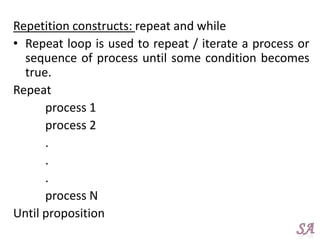
Repetition constructs: repeat and while
• Repeat loop is used to repeat / iterate a process or
sequence of process until some condition becomes
true.
Repeat
process 1
process 2
.
.
.
process N
Until proposition
• While loop
While proposition
begin
process 1
process 2
.
.
.
process N
end
• Different ways of stating an algorithm:
– Step- form
– Pseudo code
– flowchart
Step-form
Developing algorithms using step form:
• Statements start and stop
• To accept data, INPUT or READ statements are used
• To display any user message PRINT statement is used
• Arithmetic operators, that will be used in expression
are =,+ - * /
• Commonly used relational operators are
<,<=,>,>=,=,!=
• Logical operators used are AND, OR, NOT.
Pseudo code
• Pseudo code is part English, part program logic.
• Purpose: is to describe, in precise algorithmic
detail, what the program being designed is to do.
• This requires defining the steps to accomplish
the task in sufficient detail, so that it can be
converted into a computer program
• English – like statements that follow a loosely
defined syntax and are used to convey the design
of an algorithm
Flowchart
• Flowchart is a diagrammatic representation of an
algorithm. Flowchart are very helpful in writing
program and explaining program to others.
• Flowchart is a program design tool in which
standard graphic symbols are used to represent
logical flow of data.
Symbols Used In Flowchart
Different symbols are used for different states in
flowchart.
Symbol Purpose Description
Flow line
Used to indicate the flow of logic by connecting
symbols.
Terminal(Stop/
Start)
Used to represent start and end of flowchart.
Input/output Used for input and output operation.
Processing Used for arithmetic operations and data-manipulations.
Decision
Used to represent the operation in which there are two
alternatives, true and false.
On-page
Connector
Used to join different flow line
Off-page
Connector
Used to connect flowchart portion on different page.
Predefined
Process/Functi
on
Used to represent a group of statements performing
one processing task.
Advantages of flowchart:
– Effective analysis
– Proper documentation
– Efficient coding
– Proper debugging
– Efficient program maintenance
Limitations:
– Complex logic
– Alterations and modification
Algorithm to add two numbers
entered by user.
• Step 1: Start
• Step 2: Declare variables
num1, num2 and sum.
• Step 3: Read values num1 and
num2.
• Step 4: Add num1 and num2
and assign the result to sum.
• sum←num1+num2
• Step 5: Display sum
• Step 6: Stop
Algorithm-
step 1 : start
step 2 : input a,b
step 3 : sum=a+b
step 4 : print sum
step 5 : end
Draw a flowchart to add two numbers
entered by user.
Write an algorithm to find the largest among three
different numbers entered by user.
Step 1: Start
Step 2: Declare variables a,b and c.
Step 3: Read variables a,b and c.
Step 4:If a>b
if a>c
Display a is the largest number.
else
Display c is the largest number.
else
if b>c
Display b is the largest number.
else
Display c is the greatest number.
Step 5: Stop
Step 1: Start
Step 2: INPUT a,b,c
Step 3: If a>b
if a>c
PRINT a is the largest number.
else
PRINT c is the largest number.
else
if b>c
PRINT b is the largest number.
else
PRINT c is the greatest number.
Step 5: Stop
Draw flowchart to find the largest among
three different numbers entered by user.
Structured programming
Structured programming can be defined as
• Top – down analysis for problem solving
• Modularization for program structure and
organization
• Structured code for individual modules
Top – down analysis
• Program is a collection of instructions in a
programming language to solve a specific
problem
• Top – down analysis is a method of problem
solving and problem analysis
• Idea is to subdivide a large problem into several
smaller tasks for ease of analysis
• Therefore top – down analysis reduces
complexity of the process of problem solving
Modular programming
• Modular programming is a program that is divided into
logically independent smaller sections, which can be
written separately
• These sections are called modules
• A module consists of a series of program instructions
• A module is terminated by some special markers required
by syntax of language
• A module as a whole has a unique name
• A module has one entry and one exit point
Advantages:
• Complex programs may be divided into simpler
• Debugging and maintenance may be simpler
Structured code
• Structured programming is a method of
coding, i.e, writing a program that produces a
well organized module
• A high level language supports several control
statements
C Background
Creating, compiling and running programs
Creating:
• To create a c program the code is written in to text editor and
save it with .c extension.
Preprocessing:
• The first stage of compilation is called preprocessing.
• Preprocessor reads the source code and prepares it for
translation.
• While preparing the code it scans for special instructions known
as preprocessor commands.
• Lines starting with a # character are interpreted by the
preprocessor as preprocessor commands.
• These commands tell the preprocessor to look for special code
libraries, make substitutions in the code.
Compilation:
• The preprocessed code is translated into object module, that
can then be combined with other precompiled units to form
final program.
• Output of compiler is not yet ready to run, that is, it is not yet
executable because it does not have required C and other
functions included.
Linking:
• The object code generated is composed of machine
instructions that the processor understands but some pieces of
the program are out of order or missing.
• To produce an executable program, the existing pieces have
to be rearranged and the missing ones filled in.
• This process is called linking.
• The linker will arrange the pieces of object code so that
functions in some pieces can successfully call functions in
other ones.
• It will also add pieces containing the instructions for library
functions used by the program.
• The result of this stage is the final executable program.
• When run without options, cc will name this file a.out.
Executing:
• The program loads in to primary memory and can get
executed by a command, such as run.
• Getting the program into memory is the function of an
operating system program known as loader, it locates the
executable program and reads it into memory.
• The program then takes control and gets executed.
Structure of C program:
A C program can be divided into several sections
Sections of C Program:
• Documentation Section
• Link Section
• Definition Section
• Global Declaration
• main() Function Section
Documentation Section:
• The documentation section contains a set of comment including
the name of the program other necessary details.
• Comments are ignored by compiler and are used to provide
documentation to people who reads that code.
• Comments are be giving in C programming in two different ways:
– Single Line Comment
– Multi Line Comment
// This is single line comment
/*
This is
multi line
comment
*/
Link Section
• The link section consists of header files which
contains function prototype of Standard Library
functions which can be used in program.
• Header file also consists of macro declaration.
Example:
#include <stdio.h>
In the above code, stdio.h is a header file
which is included using the preprocessing
directive #include.
Definition Section
• The definition section defines all symbolic
constants.
• A symbolic constant is a constant value given
to a name which can't be changed in program.
Example:
#define PI 3.14
In above code, the PI is a constant whose
value is 3.14
Global Declaration
• Global declaration section comes at the beginning of
the program.
• In global declaration section, global variables and
user defined functions are declared.
• Basic idea here is that they are visible to all parts of
the program
main() Function Section
• The main () function section is the most important section of any
C program.
• The compiler start executing C program from main() function.
• The main() function is mandatory in C programming.
• It has two parts:
Declaration Part - All the variables that are later used in the
executable part are declared in this part.
Executable Part - This part contains the statements that are
to be executed by the compiler.
main()
{
... .. ...
... .. ...
}
C Character Set
• As every language contains a set of characters used to construct
words, statements etc., C language also has a set of characters
which include alphabets, digits and special symbols.
• Every C program contains statements.
• These statements are constructed using words and these words
are constructed using characters from C character set.
• C language character set contains the following set of
characters...
– Alphabets
– Digits
– Special Symbols
– Escape sequences
Alphabets
• C language supports all the alphabets from
English language.
• Lower and upper case letters together
supports 52 alphabets.
• lower case letters - a to z
• UPPER CASE LETTERS - A to Z
Digits
•C language supports 10 digits which are used to
construct numerical values in C language.
Digits - 0, 1, 2, 3, 4, 5, 6, 7, 8, 9
Special Symbols
• C language supports rich set of special symbols
that include symbols to perform mathematical
operations, to check conditions, white spaces,
back spaces and other special symbols.
• Special Symbols - ~ @ # $ % ^ & * ( ) _ - + = { } [
] ; : ' " / ? . > ,<  | tab newline space NULL bell
backspace vertical tab etc.,
• Every character in C language has its equivalent
ASCII (American Standard Code for Information
Interchange) value.
Escape Sequence in C
• An escape sequence in C language is a
sequence of characters that doesn't represent
itself when used inside string literal or
character.
• It is composed of two or more characters
starting with backslash .
• For example: n represents new line.
Escape Sequence Meaning
a Alarm or Beep
b Backspace
f Form Feed
n New Line
r Carriage Return
t Tab (Horizontal)
v Vertical Tab
 Backslash
' Single Quote
" Double Quote
? Question Mark
nnn octal number
xhh hexadecimal number
0 Null
Identifiers
In C language identifiers are the names given to variables,
constants, functions and user-define data. These identifier are
defined against a set of rules.
Rules for an Identifier
• An Identifier can only have alphanumeric characters(a-z , A-Z ,
0-9) and underscore(_).
• The first character of an identifier can only contain alphabet(a-
z , A-Z) or underscore (_).
• Identifiers are also case sensitive in C.
– For example name and Name are two different identifiers in C.
• Keywords are not allowed to be used as Identifiers.
• No special characters, such as semicolon, period, whitespaces,
slash or comma are permitted to be used in or as Identifier.
Keywords
• Keywords are predefined; reserved words
used in programming that have special
meanings to the compiler.
• Keywords are part of the syntax and they
cannot be used as an identifier.
Keywords in C Programming
auto break case char
const continue default do
double else enum extern
float for goto if
int long register return
short signed sizeof static
struct switch typedef union
unsigned void volatile while
Variable
• When we want to store any information (data) on our
computer/laptop, we store it in the computer's memory space.
• Instead of remembering the complex address of that memory
space where we have stored our data, our operating system
provides us with an option to create folders, name them, so
that it becomes easier for us to find it and access it.
• Similarly, in C language, when we want to use some data value
in our program, we can store it in a memory space and name
the memory space so that it becomes easier to access it.
• The naming of an address is known as variable.
• Variable is the name of memory location.
• Unlike constant, variables are changeable; we can change value
of a variable during execution of a program.
• A programmer can choose a meaningful variable name.
Example : average, height, age, total etc.
Datatype of Variable
• A variable in C language must be given a type,
which defines what type of data the variable
will hold.
• Data types simply refer to the type and size of
data associated with variables and functions.
• Data type can be either fundamental
(provided in C compiler), or derived (derived
from fundamental data types).
Fundamental data types
This section focuses on commonly used fundamental
data types.
int
• Integers are whole numbers that can have both zero,
positive and negative values but no decimal values.
• Example: 0, -5, 10
• We can use int for declaring an integer variable.
int id;
Here, id is a variable of type integer.
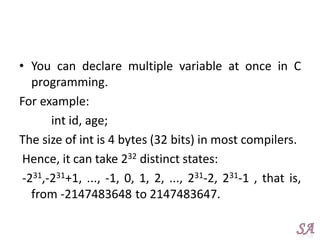
• You can declare multiple variable at once in C
programming.
For example:
int id, age;
The size of int is 4 bytes (32 bits) in most compilers.
Hence, it can take 232 distinct states:
-231,-231+1, ..., -1, 0, 1, 2, ..., 231-2, 231-1 , that is,
from -2147483648 to 2147483647.
float and double
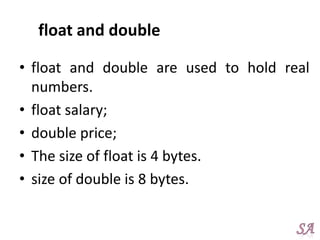
• float and double are used to hold real
numbers.
• float salary;
• double price;
• The size of float is 4 bytes.
• size of double is 8 bytes.
char
• Keyword char is used for declaring character
type variables. For example:
• char test = 'h'; The size of character variable is
1 byte.
void
• void is an incomplete type. It means "nothing"
or "no type".
• You can think of void as absent.
• For example, if a function is not returning
anything, its return type should be void.
• Note that, you cannot create variables of void
type.
bool
• Traditionally, there was no boolean type in C. However, C99
defines a standard boolean type under <stdbool.h> header
file.
• A boolean type can take one of two values, either true or
false.
• For example:
#include<stdio.h>
#include<stdbool.h>
int main()
{
bool a =true;
return0;
}
short and long
• If you need to use large number, you can use
type specifier long. Here's how:
long a;
• If you are sure, only a small integer ([−32,767,
+32,767] range) will be used, you can use
short.
short d;
signed and unsigned
• In C, signed and unsigned are type modifiers.
• You can alter the data storage of a data type by
using them.
• For example:
Unsigned int x;
int y;
• Here, the variable x can hold only zero and positive
values because we have used unsigned modifier.
• Considering the size of int is 4 bytes, variable y can
hold values from -231 to 231-1, whereas variable x
can hold values from 0 to 232-1.
Derived types
• Here's a list of derived types in C. These topics
will be discussed in their respective chapter.
Array type
Pointer type
Structure type
Union type
Types of constants
• Integer constant
• Real constant
• Single character constant
• String constants
Declaring, Defining and Initializing a
variable
• Declaration of variables must be done before they are used in
the program.
• Declaration does the following things.
– It tells the compiler what the variable name is.
– It specifies what type of data the variable will hold.
– Until the variable is defined the compiler doesn't have to worry
about allocating memory space to the variable.
– Declaration is more like informing the compiler that there exist a
variable with following data type which is used in the program.
– A variable is declared using the extern keyword, outside the main()
function.
extern int a;
extern float b;
extern double c, d;
• Defining a variable means the compiler has to now assign
storage to the variable because it will be used in the
program.
• It is not necessary to declare a variable using extern
keyword, if you want to use it in your program.
• You can directly define a variable inside the main() function
and use it.
• To define a function we must provide the data type and the
variable name.
• We can even define multiple variables of same data type in
a single line by using comma to separate them.
int a;
float b, c;
• Syntax:
Datatype variablename;
Example:
int age;
age
• Initializing a variable means to provide it with a value. A variable
can be initialized and defined in a single statement, like:
int a =10;
or
int a;
a=10;
Standard Input and Output
• In c, data is input to and output from a
stream.
• Stream is source or destination for data
• It is associated with a physical device
Standard File File Pointer Device
Standard input stdin Keyboard
Standard output stdout Screen
Standard error stderr Your screen
• i/o functions
–Non formatted input output
–Formatted input output
Non formatted input output
• Can be carried out by standard input output
functions in c
• These can handle one character at a time
• getchar and putchar
• getchar: input function that reads single character
from keyboard
Syntax:
charvariable= getchar();
Ex:
ch=getchar();
• putchar: output function that writes single character
to screen
Syntax:
putchar(char_variable);
Ex:
putchar(ch);
Formatted i/o functions
Library functions scanf and printf are used when input
and output is required in a specified format.
• Printf(): It can display any type of data and any
number of values in a single statement
printf(“control string”, arguments list);
Control string can consist of ordinary text, escape
sequences and conversion character.
• Conversion code specifies the type of each
variable in argument list.
• An argument may be a variable or expression
• printf(“Hello world”); // Hello world
• printf(“sum =%d”,c); //sum=6
//the value of c is printed on screen
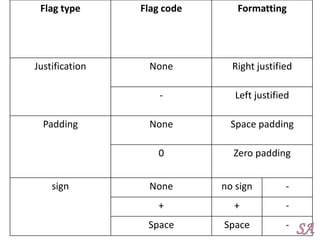
Formatting output in printf()
• Format specifier is coded as
%<flag><width><precision><size><conversion
code>
Where flag, width, precision and size are optional.
Flag is used for print modifications
Justification: justifying placement of value left/right
Padding: fills unused space when value is smaller
than print width
Sign flag: defines the use or absence of sign in
numeric value
Flag type Flag code Formatting
Justification None Right justified
- Left justified
Padding None Space padding
0 Zero padding
sign None no sign -
+ + -
Space Space -
• Width modifier: specifies number of positions
used in total to display the value
• Precision modifier: specifies number of
decimal places to be printed
• Sign modifier
l long int => ld
h short integer => hd
L long double => Lf
Scanf()
• Scanf() reads different types of data and any
number of values in single statement.
scanf(“control string”, address list);
• Control string contains conversion characters
and address list contains address of the
arguments.
• Format specifier is coded as
%<flag><width><size><conversion code>
• Only one flag (*) assignment suppression flag: it lets
scanf() that next input field is to be read but not
stored i.e. it is discarded.
• Width specifier : max width
• Address: indicated by prefixing & to variable name
&a => address of variable a
Syntax errors:
• A syntax error is an error in the source code of a
program.
• Syntax errors are mistakes such as misspelled
keywords, a missing punctuation character, a
missing bracket or a missing closing parenthesis.
• Syntax errors are small grammatical mistakes,
sometimes limited to a single character.
• For example, a missing semicolon at the end of a
line or an extra bracket at the end of a function
may produce a syntax error.
Logical errors
• A logic error (or logical error) is a ‘bug’ or mistake in a
program’s source code that results in incorrect or
unexpected behavior.
• It is a type of runtime error that may simply produce
the wrong output or may cause a program to crash while
running.
• Many different types of programming mistakes can
cause logic errors.
• For example, assigning a value to the wrong variable
may cause a series of unexpected program errors.
• Multiplying two numbers instead of adding them
together may also produce unwanted results
Object and Executable code
• Compiler converts source code into machine
code which is non runnable and it is called as
object code
• This object code is linked with other object
modules and is converted to runnable
machine code called as executable code.
• Executable file is a complete program that can
be run directly by an OS.

CPE UNIT I.pdf c Programming for engineers

  • 1.
  • 2.
    UNIT I Introduction tocomputer algorithms and programming  Components of a computer system: Memory, processor, I/O devices, storage, operating system, the concept of assembler, compiler, interpreter, loader, and linker  From algorithm to program: Representation of an algorithm, flowchart, Pseudocode with examples, converting algorithms to programs.  Programming Basics: Structure of C program, writing and executing the first C program, Syntax and logical errors in compilation, object, and executable code. Components of C language, standard I/O in C, data types, variables and constants, memory storage, and storage classes.
  • 3.
    Introduction to componentsof a computer system: A Computer is an electronic device that stores, manipulates and retrieves the data. Every computer system has the following three basic components: • Input unit • Central processing unit • Output unit
  • 5.
    Input devices: • Instructionsand data need to be supplied by external devices, therefore an input device is needed. •Input devices are electronic or electro-mechanical equipment that provides a means of communicating with the computer system for feeding data as well as instructions. •The examples of input devices are Keyboard, Mouse, Joystick, Trackball, Digital Camera, and Scanner.
  • 8.
    Output devices: • Outputdevices display or print input data, or show output results of the operations on input data. • The examples of output devices are Monitor, Printer, Speakers, Multimedia Projectors, and GPS.
  • 10.
    Central Processing Unit •The main unit inside the computer is the CPU. • This unit is responsible for all events inside the computer. • It controls all internal and external devices, performs “Arithmetic and Logical operations”. • The control Unit and the Arithmetic and Logic unit of a computer system are jointly known as the Central Processing Unit (CPU). • The CPU is the brain of any computer system.
  • 11.
    Arithmetic and LogicUnit (ALU) • The arithmetic and logic unit (ALU) of a computer system is the place where the actual execution of the instructions take place during the processing operations. • All calculations are performed and all comparisons (decisions) are made in the ALU. • The data and instructions, stored in the primary storage prior to processing are transferred as and when needed to the ALU where processing takes place. • No processing is done in the primary storage unit.
  • 12.
    Control Unit • Thecontrol unit directs and controls the activities of the internal and external devices. • It interprets the instructions fetched into the computer, determines what data, if any, are needed, where it is stored, where to store the results of the operation, and sends the control signals to the devices involved in the execution of the instructions.
  • 13.
    Memory: • A memoryis just like a human brain. It is used to store data and instructions. • Computer memory is the storage space in the computer, where data is to be processed and instructions required for processing are stored. • The memory is divided into large number of small parts called cells. • Each location or cell has a unique address, which varies from zero to memory size minus one. • For example, if the computer has 64k words, then this memory unit has 64 * 1024 = 65536 memory locations. The address of these locations varies from 0 to 65535.
  • 14.
    Memory Main memory isdivided into many memory locations (or cells) 9278 9279 9280 9281 9282 9283 9284 9285 9286 Each memory cell has a numeric address, which uniquely identifies it
  • 15.
    Storing Information 9278 9279 9280 9281 9282 9283 9284 9285 9286 Large valuesare stored in consecutive memory locations 10011010 Each memory cell stores a set number of bits (usually 8 bits, or one byte)
  • 16.
    Storage Capacity • Everymemory device has a storage capacity, indicating the number of bytes it can hold • Capacities are expressed in various units: KB 2 10 = 1024 MB 2 20 (over 1 million) GB 2 30 (over 1 billion) TB 2 40 (over 1 trillion) Unit Symbol Number of Bytes kilobyte megabyte gigabyte terabyte
  • 17.
    Memory is primarilyof three types − • Cache Memory • Primary Memory/Main Memory • Secondary Memory
  • 18.
    Cache Memory • Cachememory is a very high speed semiconductor memory which can speed up the CPU. • It acts as a buffer between the CPU and the main memory. • It is used to hold those parts of data and program which are most frequently used by the CPU. • The parts of data and programs are transferred from the disk to cache memory by the operating system, from where the CPU can access them.
  • 19.
    Primary Memory (MainMemory) • Primary memory holds only those data and instructions on which the computer is currently working. • It has a limited capacity and data is lost when power is switched off. • The data and instruction required to be processed resides in the main memory. • Volatile memory: data is lost in case power is switched off.
  • 20.
    Secondary Memory • Thistype of memory is also known as external memory or non-volatile. • It is slower than the main memory. • It is a non-volatile memory. • Data is permanently stored even if power is switched off. • These are used for storing data/information permanently. • CPU directly does not access these memories, instead they are accessed via input-output routines. • The contents of secondary memories are first transferred to the main memory, and then the CPU can access it. • For example: disk, CD-ROM, DVD, etc.
  • 21.
    Hard Disk Drive •A hard disk drive (HDD), hard disk, hard drive, or fixed disk, is an electromechanical data storage device that uses magnetic storage to store and retrieve digital information using one or more rigid rapidly rotating disks (platters) coated with magnetic material. • The platters are paired with magnetic heads, usually arranged on a moving actuator arm, which read and write data to the platter surfaces. • Data is accessed in a random-access manner, meaning that individual blocks of data can be stored or retrieved in any order and not only sequentially. • HDDs are a type of non-volatile storage, retaining stored data even when powered off.
  • 22.
    Memory Hierarchy Designand its Characteristics • In the Computer System Design, Memory Hierarchy is an enhancement to organize the memory such that it can minimize the access time. • The Memory Hierarchy was developed based on a program behavior known as locality of reference. • The figure below clearly demonstrates the different levels of memory hierarchy :
  • 24.
    Software: • Software isa set of instructions, data or programs used to operate computers and execute specific tasks. • Opposite of hardware, which describes the physical aspects of a computer • software is a generic term used to refer to applications, scripts and programs that run on a device. • Software is often divided into application software, or user downloaded programs that fulfill a want or need, and system software, which includes operating systems and any program that supports application software.
  • 25.
    Operating System • Anoperating system (OS) is system software that manages computer hardware and software resources and provides common services for computer programs. • It acts as an interface between user and hardware.
  • 26.
    Compiler: • A compileris a special program that processes statements written in a particular programming language and turns them into machine language or "code" that a computer's processor uses. • Typically, a programmer writes language statements in a language such as Pascal or C one line at a time using an editor. • The file that is created contains what are called the source statements. • The programmer then runs the appropriate language compiler, specifying the name of the file that contains the source statements.
  • 27.
    Assembler: • Assembler isa program for converting instructions written in low-level assembly code into relocatable machine code and generating along information for the loader.
  • 28.
    Interpreter: • An interpreteris a computer program that is used to directly execute program instructions written using one of the many high-level programming languages. • The interpreter transforms the high-level program into an intermediate language that it then executes, or it could parse the high-level source code and then performs the commands directly, which is done line by line or statement by statement.
  • 29.
    Linker • A linkeris special program that combines the object files, generated by compiler/assembler and other pieces of code to originate an executable file has .exe extension. • In the object file, linker searches and append all libraries needed for execution of file. • It regulates the memory space that will hold the code from each module. It also merges two or more separate object programs and establishes link among them.
  • 30.
    Loader: • It isspecial program that takes input of executable files from linker, loads it to main memory, and prepares this code for execution by computer. • Loader allocates memory space to program. • Even it settles down symbolic reference between objects. It is in charge of loading programs and libraries in operating system.
  • 31.
    Number Systems: • Whenwe type some letters or words, the computer translates them in numbers as computers can understand only numbers. • A computer can understand the positional number system where there are only a few symbols called digits and these symbols represent different values depending on the position they occupy in the number. • The value of each digit in a number can be determined using – The digit – The position of the digit in the number – The base of the number system (where the base is defined as the total number of digits available in the number system)
  • 32.
    Decimal Number System •The number system that we use in our day-to-day life is the decimal number system. • Decimal number system has base 10 as it uses 10 digits from 0 to 9. • Each position represents a specific power of the base (10). For example, the decimal number 1234 consists of the digit 4 in the units position, 3 in the tens position, 2 in the hundreds position, and 1 in the thousands position. Its value can be written as  (1 x 1000)+ (2 x 100)+ (3 x 10)+ (4 x l)  (1 x 10³)+ (2 x 10²)+ (3 x 101)+ (4 x l00)  1000 + 200 + 30 + 4  1234
  • 33.
    S.No. Number Systemand Description 1 Binary Number System Base 2. Digits used : 0, 1 2 Octal Number System Base 8. Digits used : 0 to 7 3 Hexa Decimal Number System Base 16. Digits used: 0 to 9, Letters used : A- F
  • 34.
    Binary Number System Characteristicsof the binary number system are as follows − • Uses two digits, 0 and 1 • Also called as base 2 number system Example • Binary Number: 101012 • Calculating Decimal Equivalent −
  • 35.
    Step Binary NumberDecimal Number Step 1 101012 ((1 x 24) + (0 x 23) + (1 x 22) + (0 x 21) + (1 x 20))10 Step 2 101012 (16 + 0 + 4 + 0 + 1)10 Step 3 101012 2110
  • 36.
    Octal Number System Characteristicsof the octal number system are as follows − • Uses eight digits, 0,1,2,3,4,5,6,7 • Also called as base 8 number system Example • Octal Number: 125708 • Calculating Decimal Equivalent −
  • 37.
    Step Octal NumberDecimal Number Step 1 125708 ((1 x 84) + (2 x 83) + (5 x 82) + (7 x 81) + (0 x 80))10 Step 2 125708 (4096 + 1024 + 320 + 56 + 0)10 Step 3 125708 549610
  • 38.
    Hexadecimal Number System Characteristicsof hexadecimal number system are as follows − • Uses 10 digits and 6 letters, 0, 1, 2, 3, 4, 5, 6, 7, 8, 9, A, B, C, D, E, F • Letters represent the numbers starting from 10. A = 10. B = 11, C = 12, D = 13, E = 14, F = 15 • Also called as base 16 number system Example • Hexadecimal Number: 19FDE16 • Calculating Decimal Equivalent −
  • 40.
    Step Hexadecimal Number Decimal Number Step 119FDE16 ((1 x 164) + (9 x 163) + (F x 162) + (D x 161) + (E x 160))10 Step 2 19FDE16 ((1 x 164) + (9 x 163) + (15 x 162) + (13 x 161) + (14 x 160))10 Step 3 19FDE16 (65536+ 36864 + 3840 + 208 + 14)10 Step 4 19FDE16 10646210
  • 41.
    Bit Combinations 1 bit 0 1 2bits 00 01 10 11 3 bits 000 001 010 011 100 101 110 111 4 bits 0000 0001 0010 0011 0100 0101 0110 0111 1000 1001 1010 1011 1100 1101 1110 1111 Each additional bit doubles the number of possible combinations
  • 42.
    • There aremany methods or techniques which can be used to convert numbers from one base to another. – Decimal to Other Base System – Other Base System to Decimal – Other Base System to Non-Decimal – Binary to Octal – Octal to Binary – Binary to Hexadecimal – Hexadecimal to Binary
  • 43.
    Decimal to OtherBase System • Step 1 − Divide the decimal number to be converted by the value of the new base. • Step 2 − Get the remainder from Step 1 as the rightmost digit (least significant digit) of the new base number. • Step 3 − Divide the quotient of the previous divide by the new base. • Step 4 − Record the remainder from Step 3 as the next digit (to the left) of the new base number. • Repeat Steps 3 and 4, getting remainders from right to left, until the quotient becomes zero in Step 3. • The last remainder thus obtained will be the Most Significant Digit (MSD) of the new base number. Example • Decimal Number: 2910 • Calculating Binary Equivalent −Decimal Number : 2910 = Binary Number : 111012.
  • 44.
    Step Operation ResultRemainder Step 1 29 / 2 14 1 Step 2 14 / 2 7 0 Step 3 7 / 2 3 1 Step 4 3 / 2 1 1 Step 5 1 / 2 0 1
  • 45.
    Other Base Systemto Decimal System • Step 1 − Determine the column (positional) value of each digit (this depends on the position of the digit and the base of the number system). • Step 2 − Multiply the obtained column values (in Step 1) by the digits in the corresponding columns. • Step 3 − Sum the products calculated in Step 2. The total is the equivalent value in decimal. Example • Binary Number: 111012 • Calculating Decimal Equivalent −
  • 46.
    Step Binary NumberDecimal Number Step 1 111012 ((1 x 24) + (1 x 23) + (1 x 22) + (0 x 21) + (1 x 20))10 Step 2 111012 (16 + 8 + 4 + 0 + 1)10 Step 3 111012 2910
  • 47.
    Other Base Systemto Non-Decimal System • Step 1 − Convert the original number to a decimal number (base 10). • Step 2 − Convert the decimal number so obtained to the new base number. Example • Octal Number : 258 • Calculating Binary Equivalent −
  • 48.
    Step 1 -Convert to Decimal Step Octal Number Decimal Number Step 1 258 ((2 x 81) + (5 x 80))10 Step 2 258 (16 + 5)10 Step 3 258 2110
  • 49.
    Step 2 -Convert Decimal to Binary Step Operation Result Remainder Step 1 21 / 2 10 1 Step 2 10 / 2 5 0 Step 3 5 / 2 2 1 Step 4 2 / 2 1 0 Step 5 1 / 2 0 1
  • 50.
    Shortcut Method ─Binary to Octal • Step 1 − Divide the binary digits into groups of three (starting from the right). • Step 2 − Convert each group of three binary digits to one octal digit. Example • Binary Number : 101012 • Calculating Octal Equivalent −
  • 51.
    Step Binary Number Octal Number Step 1101012 010 101 Step 2 101012 28 58 Step 3 101012 258
  • 52.
    Shortcut Method ─Octal to Binary • Step 1 − Convert each octal digit to a 3-digit binary number (the octal digits may be treated as decimal for this conversion). • Step 2 − Combine all the resulting binary groups (of 3 digits each) into a single binary number. Example • Octal Number : 258 • Calculating Binary Equivalent −
  • 53.
    Step Octal NumberBinary Number Step 1 258 210 510 Step 2 258 0102 1012 Step 3 258 0101012
  • 54.
    Shortcut Method ─Binary to Hexadecimal • Step 1 − Divide the binary digits into groups of four (starting from the right). • Step 2 − Convert each group of four binary digits to one hexadecimal symbol. Example • Binary Number : 101012 • Calculating hexadecimal Equivalent −
  • 55.
    Step Binary Number Hexadecimal Number Step1 101012 0001 0101 Step 2 101012 110 510 Step 3 101012 1516
  • 56.
    Shortcut Method -Hexadecimal to Binary • Step 1 − Convert each hexadecimal digit to a 4- digit binary number (the hexadecimal digits may be treated as decimal for this conversion). • Step 2 − Combine all the resulting binary groups (of 4 digits each) into a single binary number. • Example • Hexadecimal Number : 1516 • Calculating Binary Equivalent −
  • 57.
    Step Hexadecimal NumberBinary Number Step 1 1516 110 510 Step 2 1516 00012 01012 Step 3 1516 000101012
  • 59.
    Algorithm : • Analgorithm is a set of well defined instructions in sequence to solve the problem. • An algorithm is an effective procedure for solving a problem in a finite number of steps. Qualities of a good algorithm  Input and output should be defined precisely.  Each steps in algorithm should be clear and unambiguous.  Algorithm should be most effective among many different ways to solve a problem.  An algorithm shouldn't have computer code. Instead, the algorithm should be written in such a way that, it can be used in similar programming languages.
  • 60.
    • Algorithm canbe stated using sequence, decision and repetition Sequence: means that each step or process in the algorithm is executed in the specified order. Decision constructs: if…. Then, if….then….else In algorithms, the outcome of a decision is either true/false. Decision can also be stated as : If proposition then process 1 else process 2
  • 61.
    Repetition constructs: repeatand while • Repeat loop is used to repeat / iterate a process or sequence of process until some condition becomes true. Repeat process 1 process 2 . . . process N Until proposition
  • 62.
    • While loop Whileproposition begin process 1 process 2 . . . process N end
  • 63.
    • Different waysof stating an algorithm: – Step- form – Pseudo code – flowchart
  • 64.
    Step-form Developing algorithms usingstep form: • Statements start and stop • To accept data, INPUT or READ statements are used • To display any user message PRINT statement is used • Arithmetic operators, that will be used in expression are =,+ - * / • Commonly used relational operators are <,<=,>,>=,=,!= • Logical operators used are AND, OR, NOT.
  • 65.
    Pseudo code • Pseudocode is part English, part program logic. • Purpose: is to describe, in precise algorithmic detail, what the program being designed is to do. • This requires defining the steps to accomplish the task in sufficient detail, so that it can be converted into a computer program • English – like statements that follow a loosely defined syntax and are used to convey the design of an algorithm
  • 66.
    Flowchart • Flowchart isa diagrammatic representation of an algorithm. Flowchart are very helpful in writing program and explaining program to others. • Flowchart is a program design tool in which standard graphic symbols are used to represent logical flow of data. Symbols Used In Flowchart Different symbols are used for different states in flowchart.
  • 67.
    Symbol Purpose Description Flowline Used to indicate the flow of logic by connecting symbols. Terminal(Stop/ Start) Used to represent start and end of flowchart. Input/output Used for input and output operation. Processing Used for arithmetic operations and data-manipulations. Decision Used to represent the operation in which there are two alternatives, true and false. On-page Connector Used to join different flow line Off-page Connector Used to connect flowchart portion on different page. Predefined Process/Functi on Used to represent a group of statements performing one processing task.
  • 68.
    Advantages of flowchart: –Effective analysis – Proper documentation – Efficient coding – Proper debugging – Efficient program maintenance Limitations: – Complex logic – Alterations and modification
  • 69.
    Algorithm to addtwo numbers entered by user. • Step 1: Start • Step 2: Declare variables num1, num2 and sum. • Step 3: Read values num1 and num2. • Step 4: Add num1 and num2 and assign the result to sum. • sum←num1+num2 • Step 5: Display sum • Step 6: Stop Algorithm- step 1 : start step 2 : input a,b step 3 : sum=a+b step 4 : print sum step 5 : end
  • 70.
    Draw a flowchartto add two numbers entered by user.
  • 71.
    Write an algorithmto find the largest among three different numbers entered by user. Step 1: Start Step 2: Declare variables a,b and c. Step 3: Read variables a,b and c. Step 4:If a>b if a>c Display a is the largest number. else Display c is the largest number. else if b>c Display b is the largest number. else Display c is the greatest number. Step 5: Stop Step 1: Start Step 2: INPUT a,b,c Step 3: If a>b if a>c PRINT a is the largest number. else PRINT c is the largest number. else if b>c PRINT b is the largest number. else PRINT c is the greatest number. Step 5: Stop
  • 72.
    Draw flowchart tofind the largest among three different numbers entered by user.
  • 73.
    Structured programming Structured programmingcan be defined as • Top – down analysis for problem solving • Modularization for program structure and organization • Structured code for individual modules
  • 74.
    Top – downanalysis • Program is a collection of instructions in a programming language to solve a specific problem • Top – down analysis is a method of problem solving and problem analysis • Idea is to subdivide a large problem into several smaller tasks for ease of analysis • Therefore top – down analysis reduces complexity of the process of problem solving
  • 75.
    Modular programming • Modularprogramming is a program that is divided into logically independent smaller sections, which can be written separately • These sections are called modules • A module consists of a series of program instructions • A module is terminated by some special markers required by syntax of language • A module as a whole has a unique name • A module has one entry and one exit point Advantages: • Complex programs may be divided into simpler • Debugging and maintenance may be simpler
  • 76.
    Structured code • Structuredprogramming is a method of coding, i.e, writing a program that produces a well organized module • A high level language supports several control statements
  • 77.
  • 78.
    Creating, compiling andrunning programs Creating: • To create a c program the code is written in to text editor and save it with .c extension. Preprocessing: • The first stage of compilation is called preprocessing. • Preprocessor reads the source code and prepares it for translation. • While preparing the code it scans for special instructions known as preprocessor commands. • Lines starting with a # character are interpreted by the preprocessor as preprocessor commands. • These commands tell the preprocessor to look for special code libraries, make substitutions in the code.
  • 79.
    Compilation: • The preprocessedcode is translated into object module, that can then be combined with other precompiled units to form final program. • Output of compiler is not yet ready to run, that is, it is not yet executable because it does not have required C and other functions included. Linking: • The object code generated is composed of machine instructions that the processor understands but some pieces of the program are out of order or missing. • To produce an executable program, the existing pieces have to be rearranged and the missing ones filled in. • This process is called linking.
  • 80.
    • The linkerwill arrange the pieces of object code so that functions in some pieces can successfully call functions in other ones. • It will also add pieces containing the instructions for library functions used by the program. • The result of this stage is the final executable program. • When run without options, cc will name this file a.out. Executing: • The program loads in to primary memory and can get executed by a command, such as run. • Getting the program into memory is the function of an operating system program known as loader, it locates the executable program and reads it into memory. • The program then takes control and gets executed.
  • 81.
    Structure of Cprogram: A C program can be divided into several sections Sections of C Program: • Documentation Section • Link Section • Definition Section • Global Declaration • main() Function Section
  • 82.
    Documentation Section: • Thedocumentation section contains a set of comment including the name of the program other necessary details. • Comments are ignored by compiler and are used to provide documentation to people who reads that code. • Comments are be giving in C programming in two different ways: – Single Line Comment – Multi Line Comment // This is single line comment /* This is multi line comment */
  • 83.
    Link Section • Thelink section consists of header files which contains function prototype of Standard Library functions which can be used in program. • Header file also consists of macro declaration. Example: #include <stdio.h> In the above code, stdio.h is a header file which is included using the preprocessing directive #include.
  • 84.
    Definition Section • Thedefinition section defines all symbolic constants. • A symbolic constant is a constant value given to a name which can't be changed in program. Example: #define PI 3.14 In above code, the PI is a constant whose value is 3.14
  • 85.
    Global Declaration • Globaldeclaration section comes at the beginning of the program. • In global declaration section, global variables and user defined functions are declared. • Basic idea here is that they are visible to all parts of the program
  • 86.
    main() Function Section •The main () function section is the most important section of any C program. • The compiler start executing C program from main() function. • The main() function is mandatory in C programming. • It has two parts: Declaration Part - All the variables that are later used in the executable part are declared in this part. Executable Part - This part contains the statements that are to be executed by the compiler. main() { ... .. ... ... .. ... }
  • 87.
    C Character Set •As every language contains a set of characters used to construct words, statements etc., C language also has a set of characters which include alphabets, digits and special symbols. • Every C program contains statements. • These statements are constructed using words and these words are constructed using characters from C character set. • C language character set contains the following set of characters... – Alphabets – Digits – Special Symbols – Escape sequences
  • 88.
    Alphabets • C languagesupports all the alphabets from English language. • Lower and upper case letters together supports 52 alphabets. • lower case letters - a to z • UPPER CASE LETTERS - A to Z Digits •C language supports 10 digits which are used to construct numerical values in C language. Digits - 0, 1, 2, 3, 4, 5, 6, 7, 8, 9
  • 89.
    Special Symbols • Clanguage supports rich set of special symbols that include symbols to perform mathematical operations, to check conditions, white spaces, back spaces and other special symbols. • Special Symbols - ~ @ # $ % ^ & * ( ) _ - + = { } [ ] ; : ' " / ? . > ,< | tab newline space NULL bell backspace vertical tab etc., • Every character in C language has its equivalent ASCII (American Standard Code for Information Interchange) value.
  • 91.
    Escape Sequence inC • An escape sequence in C language is a sequence of characters that doesn't represent itself when used inside string literal or character. • It is composed of two or more characters starting with backslash . • For example: n represents new line.
  • 92.
    Escape Sequence Meaning aAlarm or Beep b Backspace f Form Feed n New Line r Carriage Return t Tab (Horizontal) v Vertical Tab Backslash ' Single Quote " Double Quote ? Question Mark nnn octal number xhh hexadecimal number 0 Null
  • 93.
    Identifiers In C languageidentifiers are the names given to variables, constants, functions and user-define data. These identifier are defined against a set of rules. Rules for an Identifier • An Identifier can only have alphanumeric characters(a-z , A-Z , 0-9) and underscore(_). • The first character of an identifier can only contain alphabet(a- z , A-Z) or underscore (_). • Identifiers are also case sensitive in C. – For example name and Name are two different identifiers in C. • Keywords are not allowed to be used as Identifiers. • No special characters, such as semicolon, period, whitespaces, slash or comma are permitted to be used in or as Identifier.
  • 94.
    Keywords • Keywords arepredefined; reserved words used in programming that have special meanings to the compiler. • Keywords are part of the syntax and they cannot be used as an identifier.
  • 95.
    Keywords in CProgramming auto break case char const continue default do double else enum extern float for goto if int long register return short signed sizeof static struct switch typedef union unsigned void volatile while
  • 96.
    Variable • When wewant to store any information (data) on our computer/laptop, we store it in the computer's memory space. • Instead of remembering the complex address of that memory space where we have stored our data, our operating system provides us with an option to create folders, name them, so that it becomes easier for us to find it and access it. • Similarly, in C language, when we want to use some data value in our program, we can store it in a memory space and name the memory space so that it becomes easier to access it. • The naming of an address is known as variable. • Variable is the name of memory location. • Unlike constant, variables are changeable; we can change value of a variable during execution of a program. • A programmer can choose a meaningful variable name. Example : average, height, age, total etc.
  • 97.
    Datatype of Variable •A variable in C language must be given a type, which defines what type of data the variable will hold. • Data types simply refer to the type and size of data associated with variables and functions. • Data type can be either fundamental (provided in C compiler), or derived (derived from fundamental data types).
  • 98.
    Fundamental data types Thissection focuses on commonly used fundamental data types. int • Integers are whole numbers that can have both zero, positive and negative values but no decimal values. • Example: 0, -5, 10 • We can use int for declaring an integer variable. int id; Here, id is a variable of type integer.
  • 99.
    • You candeclare multiple variable at once in C programming. For example: int id, age; The size of int is 4 bytes (32 bits) in most compilers. Hence, it can take 232 distinct states: -231,-231+1, ..., -1, 0, 1, 2, ..., 231-2, 231-1 , that is, from -2147483648 to 2147483647.
  • 100.
    float and double •float and double are used to hold real numbers. • float salary; • double price; • The size of float is 4 bytes. • size of double is 8 bytes.
  • 101.
    char • Keyword charis used for declaring character type variables. For example: • char test = 'h'; The size of character variable is 1 byte.
  • 102.
    void • void isan incomplete type. It means "nothing" or "no type". • You can think of void as absent. • For example, if a function is not returning anything, its return type should be void. • Note that, you cannot create variables of void type.
  • 103.
    bool • Traditionally, therewas no boolean type in C. However, C99 defines a standard boolean type under <stdbool.h> header file. • A boolean type can take one of two values, either true or false. • For example: #include<stdio.h> #include<stdbool.h> int main() { bool a =true; return0; }
  • 104.
    short and long •If you need to use large number, you can use type specifier long. Here's how: long a; • If you are sure, only a small integer ([−32,767, +32,767] range) will be used, you can use short. short d;
  • 105.
    signed and unsigned •In C, signed and unsigned are type modifiers. • You can alter the data storage of a data type by using them. • For example: Unsigned int x; int y; • Here, the variable x can hold only zero and positive values because we have used unsigned modifier. • Considering the size of int is 4 bytes, variable y can hold values from -231 to 231-1, whereas variable x can hold values from 0 to 232-1.
  • 106.
    Derived types • Here'sa list of derived types in C. These topics will be discussed in their respective chapter. Array type Pointer type Structure type Union type
  • 107.
    Types of constants •Integer constant • Real constant • Single character constant • String constants
  • 108.
    Declaring, Defining andInitializing a variable • Declaration of variables must be done before they are used in the program. • Declaration does the following things. – It tells the compiler what the variable name is. – It specifies what type of data the variable will hold. – Until the variable is defined the compiler doesn't have to worry about allocating memory space to the variable. – Declaration is more like informing the compiler that there exist a variable with following data type which is used in the program. – A variable is declared using the extern keyword, outside the main() function. extern int a; extern float b; extern double c, d;
  • 109.
    • Defining avariable means the compiler has to now assign storage to the variable because it will be used in the program. • It is not necessary to declare a variable using extern keyword, if you want to use it in your program. • You can directly define a variable inside the main() function and use it. • To define a function we must provide the data type and the variable name. • We can even define multiple variables of same data type in a single line by using comma to separate them. int a; float b, c;
  • 110.
    • Syntax: Datatype variablename; Example: intage; age • Initializing a variable means to provide it with a value. A variable can be initialized and defined in a single statement, like: int a =10; or int a; a=10;
  • 111.
    Standard Input andOutput • In c, data is input to and output from a stream. • Stream is source or destination for data • It is associated with a physical device Standard File File Pointer Device Standard input stdin Keyboard Standard output stdout Screen Standard error stderr Your screen
  • 112.
    • i/o functions –Nonformatted input output –Formatted input output
  • 113.
    Non formatted inputoutput • Can be carried out by standard input output functions in c • These can handle one character at a time • getchar and putchar
  • 114.
    • getchar: inputfunction that reads single character from keyboard Syntax: charvariable= getchar(); Ex: ch=getchar(); • putchar: output function that writes single character to screen Syntax: putchar(char_variable); Ex: putchar(ch);
  • 115.
    Formatted i/o functions Libraryfunctions scanf and printf are used when input and output is required in a specified format. • Printf(): It can display any type of data and any number of values in a single statement printf(“control string”, arguments list); Control string can consist of ordinary text, escape sequences and conversion character.
  • 116.
    • Conversion codespecifies the type of each variable in argument list. • An argument may be a variable or expression • printf(“Hello world”); // Hello world • printf(“sum =%d”,c); //sum=6 //the value of c is printed on screen
  • 117.
    Formatting output inprintf() • Format specifier is coded as %<flag><width><precision><size><conversion code> Where flag, width, precision and size are optional. Flag is used for print modifications Justification: justifying placement of value left/right Padding: fills unused space when value is smaller than print width Sign flag: defines the use or absence of sign in numeric value
  • 118.
    Flag type Flagcode Formatting Justification None Right justified - Left justified Padding None Space padding 0 Zero padding sign None no sign - + + - Space Space -
  • 119.
    • Width modifier:specifies number of positions used in total to display the value • Precision modifier: specifies number of decimal places to be printed • Sign modifier l long int => ld h short integer => hd L long double => Lf
  • 120.
    Scanf() • Scanf() readsdifferent types of data and any number of values in single statement. scanf(“control string”, address list); • Control string contains conversion characters and address list contains address of the arguments.
  • 121.
    • Format specifieris coded as %<flag><width><size><conversion code> • Only one flag (*) assignment suppression flag: it lets scanf() that next input field is to be read but not stored i.e. it is discarded. • Width specifier : max width • Address: indicated by prefixing & to variable name &a => address of variable a
  • 122.
    Syntax errors: • Asyntax error is an error in the source code of a program. • Syntax errors are mistakes such as misspelled keywords, a missing punctuation character, a missing bracket or a missing closing parenthesis. • Syntax errors are small grammatical mistakes, sometimes limited to a single character. • For example, a missing semicolon at the end of a line or an extra bracket at the end of a function may produce a syntax error.
  • 123.
    Logical errors • Alogic error (or logical error) is a ‘bug’ or mistake in a program’s source code that results in incorrect or unexpected behavior. • It is a type of runtime error that may simply produce the wrong output or may cause a program to crash while running. • Many different types of programming mistakes can cause logic errors. • For example, assigning a value to the wrong variable may cause a series of unexpected program errors. • Multiplying two numbers instead of adding them together may also produce unwanted results
  • 124.
    Object and Executablecode • Compiler converts source code into machine code which is non runnable and it is called as object code • This object code is linked with other object modules and is converted to runnable machine code called as executable code. • Executable file is a complete program that can be run directly by an OS.