Time Savings in Document
Production with DOORS 9 and
RPE (Rational Publishing
Engine)
Eric Deitrick Geoff Rosenthal
IBM Technical RepresentativeCubic Simulation Systems Inc
System Engineer
DOORS Administrator
Introduction
• Eric Deitrick
– System Engineer
– DOORS Administrator
– RPE Document Template Designer
• Geoff Rosenthal
– Technical Sales Specialist
Who is Cubic and What Do We
Do?
• Systems and services
company in the
Transportation and Defense
Industries
– Established in 1951
– Revenue collection systems
for transportation
– Mission support and training
systems to strengthen the
readiness of national military
and security forces
– Cyber and communication
products to safeguard critical
communications and data
4
Take control of your documents
through automation with RPE• Documentation is key to many business activities such as creating compliance
documents, requirements specification documents, test plan documents, etc.
• Reduce the cost of producing and consuming documents that meet internal or
contractual or regulatory requirements
– Make document generation a side-effect of normal engineering effort – avoid lowering the
productivity of your developers and engineers
– Standardize on format and styles – make consumption of information within documents as
simple as possible
• Creating your necessary documentation
should be a by-product of good engineering
practices and tool usage
– You should not have to work around DOORS limitations or DOORS best practices and guidance
just to meet your documentation needs
• Relatively few RPE licenses can satisfy a
large organization
• RPE can be used with most Rational tools
and potentially with 3rd party tools as well

4
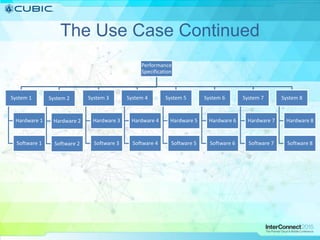
The Use Case
• 12 separate CLINs
• Multiple CDRL resubmissions through the
program lifecycle
• Ability to add additional fields as required by
customer prior to submission
• CLINs all following separate project paths
• Customer desire to sort and filter certain
deliverable reports to aid in review
The Use Case Continued
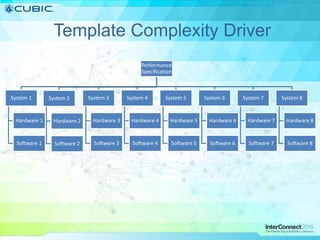
Performance
Specification
System 1
Hardware 1
Software 1
System 2
Hardware 2
Software 2
System 3
Hardware 3
Software 3
System 4
Hardware 4
Software 4
System 5
Hardware 5
Software 5
System 6
Hardware 6
Software 6
System 7
Hardware 7
Software 7
System 8
Hardware 8
Software 8
7
The Problem
• Internal QA Demands
– Needs to be satisfied by delivering documentation according to internal
standards
• Contractual obligations
– Documents are deliverables according to contact with client/prime.
– No deliverable, no milestone approval, no money
• High manual labor costs
– Repeatedly need to author- review- change –release documentatoin ...
• Reliability of documentation
– Need to assure that documentation is consistent and complete wrt the data
in the tools
• Time pressure
– Which is getting higher as the deadline approaches (and so are the number
of revisions to the document)
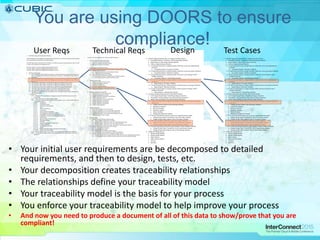
You are using DOORS to ensure
compliance!
1. 820.30(b) Design and Development Planning
Each manufacturer shall establish and maintain plans that describe or reference the design and development
activities and define responsibility for implementation.
The plans shall identify and describe the interfaces with different groups or activities that provide, or result
in, input to the design and development process.
The plans shall be reviewed as design and development evolves.
The plans shall be updated as design and development evolves.
The plans shall be approved as design and development evolves.
2. 820.30(c) Design Input
2.1. Each manufacturer shall establish procedures to ensure that the design requirements relating to a
device are appropriate and address the intended use of the device, including the needs of the user
and patient.
2.2. Each manufacturer shall maintain procedures to ensure that the design requirements relating to a
device are appropriate and address the intended use of the device, including the needs of the user
and patient.
2.3. The procedures shall include a mechanism for addressing incomplete requirements.
2.4. The procedures shall include a mechanism for addressing ambiguous requirements.
2.5. The procedures shall include a mechanism for addressing conflicting requirements.
2.6. The design input requirements shall be documented by a designated individual(s).
2.7. The design input requirements shall be reviewed by a designated individual(s).
2.8. The design input requirements shall be approved by a designated individual(s).
2.9. The approval, including the date and signature of the individual(s) approving the requirements,
shall be documented.
2.10.Questions.
2.10.1. Summarize the manufacturer's written procedure(s) for identification and control of
design input.
2.10.2. From what sources are design inputs sought?
2.10.3. Do design input procedures cover the relevant aspects, such as: (Mark all that apply and
list additional aspects.)
2.10.3.1. intended use
2.10.3.2. user/patient/clinical
2.10.3.3. performance characteristics
2.10.3.4. safety
2.10.3.5. limits and tolerances
2.10.3.6. risk analysis
2.10.3.7. toxicity and biocompatibility
2.10.3.8. electromagnetic compatibility (EMC)
2.10.3.9. compatibility with accessories/auxiliary devices
2.10.3.10. compatibility with the environment of intended use
2.10.3.11. human factors
2.10.3.12. physical/chemical characteristics
2.10.3.13. labeling/packaging
2.10.3.14. reliability
2.10.3.15. statutory and regulatory requirements
2.10.3.16. voluntary standards
2.10.3.17. manufacturing processes
2.10.3.18. sterility
2.10.3.19. MDRs/complaints/failures and other historical data
2.10.3.20. design history files (DHFs)
2.10.4. For the specific design covered, how were the design input requirements identified?
2.10.5. For the specific design covered, how were the design input requirements reviewed for
adequacy?
Comply with FDA Design Control Guidance GMP Regulation
1. Capture design and related information
1.1. Input electronically formatted data
1.2. Reference external information sources
1.3. Reference external documentation
2. Store design and related information
2.1. Identify and tag design information as unique “design elements”
2.2. Organize design elements
2.2.1. Organize by Design Control Guidance Element
2.2.2. Organize by inter-relationships
2.3. Ensure all design elements are available
2.3.1. Store design elements by Design Control Guidance Element
2.3.2. Store design elements and their historical values
3. Manage all user needs
3.1. Identify the source of the user need
3.2. Identify all user types (groups)
3.3. Identify the customer (s)
3.4. Profile the expected patients
3.5. State the intended use of the product (family)
3.6. Capture the acceptance criteria for each user need
4. Manage design input requirements
4.1. Identify the source of the requirement
4.2. Identify the associated user need
4.3. Capture requirement description and attributes
4.4. Capture acceptance criteria
4.5. Assign responsibility for each requirement
4.6. Manage incomplete requirements
4.7. Manage ambiguous requirements
4.8. Manage conflicting requirements
4.9. Approve all requirements
5. Manage acceptance
5.1. Ensure the acceptance of every user need
5.2. Ensure the acceptance of every design input requirement
5.3. Document the results of every user need acceptance test
5.4. Document the results of every design input requirements test
5.5. Make acceptance results available
6. Manage change
6.1. Maintain history of design element changes
6.1.1. Make complete change history available
6.1.2. Maintain history within and across any organizational procedure
6.1.3. Maintain history within and across any project milestone
6.1.4. Maintain history within and across any Design Control Guidance Elements
6.2. Capture frequency and nature of element changes
6.2.1. Provide rationale for change
6.2.2. Describe decisions made
6.2.3. Identify approval authority for the change
6.2.4. Capture date, time, and signature of approving authority
6.3. Identify impacted elements due to a change in another element
6.3.1. Create backward traces to design elements within and across any organizational procedure
6.3.2. Create backward traces to design elements within and across any project milestone
1.1. Identify impacted elements due to a change in another element
 Traceability Reports: consistency with driving design elements
 Impact Reports: other design elements affected
 Links to impacted design elements
1.1.1.Create backward traces to design elements within and across any organizational
procedure
 Traceability Reports: Procedure Attribute
1.1.2.Create backward traces to design elements within and across any project milestone
 Traceability Reports: Milestone Attribute
1.1.3.Create backward traces to design elements within and across Design Control
Guidance Elements
 Traceability Reports: Linked design elements
1.1.4.Create forward impacts to design elements within and across any organizational
procedure
 Impact Reports: Procedure Attribute
1.1.5.Create forward impacts to design elements within and across any project milestone
 Impact Reports: Milestone Attribute
1.1.6.Create forward impacts to design elements within and across Design Control
Guidance Elements
 Impact Reports: Linked design elements
1.2. Associate changed design elements with related elements
 Link Change Design Object with affected design element(s)
 Traceability Links and Reports from affected design element(s)
 Impact Links and Reports from affected design element(s)
1.2.1.Associate design element changes with decisions, rationale, and approval authority
information
 Change Decision Objects with following Attributes:
 Disposition Attribute
 Decision Attribute
 Rationale Attribute
 Owner Attribute
 Management Approval Attribute
1.2.2.Provide associations within and across any organizational procedure
 Change Design Object Traceability Link on Procedure Attribute
 Change Design Object Impacts Link on Procedure Attribute
1.2.3.Provide associations within and across any project milestone
 Change Design Object Traceability Link on Milestone Attribute
 Change Design Object Impacts Link on Milestone Attribute
1.2.4.Provide associations within and across Design Control Guidance Elements
 Change Design Object Traceability Link to traced design elements
 Change Design Object Impacts Link to linked design elements
1.3. Mange the change process
 Design Change Module
 Design Change Reports
 Object History
 Object History Reports
 Versions
 Baselines
1. 820.30(b) Design and Development Planning
Each manufacturer shall establish and maintain plans that describe or reference the design and development
activities and define responsibility for implementation.
The plans shall identify and describe the interfaces with different groups or activities that provide, or result
in, input to the design and development process.
The plans shall be reviewed as design and development evolves.
The plans shall be updated as design and development evolves.
The plans shall be approved as design and development evolves.
2. 820.30(c) Design Input
2.1. Each manufacturer shall establish procedures to ensure that the design requirements relating to a
device are appropriate and address the intended use of the device, including the needs of the user
and patient.
2.2. Each manufacturer shall maintain procedures to ensure that the design requirements relating to a
device are appropriate and address the intended use of the device, including the needs of the user
and patient.
2.3. The procedures shall include a mechanism for addressing incomplete requirements.
2.4. The procedures shall include a mechanism for addressing ambiguous requirements.
2.5. The procedures shall include a mechanism for addressing conflicting requirements.
2.6. The design input requirements shall be documented by a designated individual(s).
2.7. The design input requirements shall be reviewed by a designated individual(s).
2.8. The design input requirements shall be approved by a designated individual(s).
2.9. The approval, including the date and signature of the individual(s) approving the requirements,
shall be documented.
2.10.Questions.
2.10.1. Summarize the manufacturer's written procedure(s) for identification and control of
design input.
2.10.2. From what sources are design inputs sought?
2.10.3. Do design input procedures cover the relevant aspects, such as: (Mark all that apply and
list additional aspects.)
2.10.3.1. intended use
2.10.3.2. user/patient/clinical
2.10.3.3. performance characteristics
2.10.3.4. safety
2.10.3.5. limits and tolerances
2.10.3.6. risk analysis
2.10.3.7. toxicity and biocompatibility
2.10.3.8. electromagnetic compatibility (EMC)
2.10.3.9. compatibility with accessories/auxiliary devices
2.10.3.10. compatibility with the environment of intended use
2.10.3.11. human factors
2.10.3.12. physical/chemical characteristics
2.10.3.13. labeling/packaging
2.10.3.14. reliability
2.10.3.15. statutory and regulatory requirements
2.10.3.16. voluntary standards
2.10.3.17. manufacturing processes
2.10.3.18. sterility
2.10.3.19. MDRs/complaints/failures and other historical data
2.10.3.20. design history files (DHFs)
2.10.4. For the specific design covered, how were the design input requirements identified?
2.10.5. For the specific design covered, how were the design input requirements reviewed for
adequacy?
Comply with FDA Design Control Guidance GMP Regulation
1. Capture design and related information
1.1. Input electronically formatted data
1.2. Reference external information sources
1.3. Reference external documentation
2. Store design and related information
2.1. Identify and tag design information as unique “design elements”
2.2. Organize design elements
2.2.1. Organize by Design Control Guidance Element
2.2.2. Organize by inter-relationships
2.3. Ensure all design elements are available
2.3.1. Store design elements by Design Control Guidance Element
2.3.2. Store design elements and their historical values
3. Manage all user needs
3.1. Identify the source of the user need
3.2. Identify all user types (groups)
3.3. Identify the customer (s)
3.4. Profile the expected patients
3.5. State the intended use of the product (family)
3.6. Capture the acceptance criteria for each user need
4. Manage design input requirements
4.1. Identify the source of the requirement
4.2. Identify the associated user need
4.3. Capture requirement description and attributes
4.4. Capture acceptance criteria
4.5. Assign responsibility for each requirement
4.6. Manage incomplete requirements
4.7. Manage ambiguous requirements
4.8. Manage conflicting requirements
4.9. Approve all requirements
5. Manage acceptance
5.1. Ensure the acceptance of every user need
5.2. Ensure the acceptance of every design input requirement
5.3. Document the results of every user need acceptance test
5.4. Document the results of every design input requirements test
5.5. Make acceptance results available
6. Manage change
6.1. Maintain history of design element changes
6.1.1. Make complete change history available
6.1.2. Maintain history within and across any organizational procedure
6.1.3. Maintain history within and across any project milestone
6.1.4. Maintain history within and across any Design Control Guidance Elements
6.2. Capture frequency and nature of element changes
6.2.1. Provide rationale for change
6.2.2. Describe decisions made
6.2.3. Identify approval authority for the change
6.2.4. Capture date, time, and signature of approving authority
6.3. Identify impacted elements due to a change in another element
6.3.1. Create backward traces to design elements within and across any organizational procedure
6.3.2. Create backward traces to design elements within and across any project milestone
1.1. Identify impacted elements due to a change in another element
 Traceability Reports: consistency with driving design elements
 Impact Reports: other design elements affected
 Links to impacted design elements
1.1.1.Create backward traces to design elements within and across any organizational
procedure
 Traceability Reports: Procedure Attribute
1.1.2.Create backward traces to design elements within and across any project milestone
 Traceability Reports: Milestone Attribute
1.1.3.Create backward traces to design elements within and across Design Control
Guidance Elements
 Traceability Reports: Linked design elements
1.1.4.Create forward impacts to design elements within and across any organizational
procedure
 Impact Reports: Procedure Attribute
1.1.5.Create forward impacts to design elements within and across any project milestone
 Impact Reports: Milestone Attribute
1.1.6.Create forward impacts to design elements within and across Design Control
Guidance Elements
 Impact Reports: Linked design elements
1.2. Associate changed design elements with related elements
 Link Change Design Object with affected design element(s)
 Traceability Links and Reports from affected design element(s)
 Impact Links and Reports from affected design element(s)
1.2.1.Associate design element changes with decisions, rationale, and approval authority
information
 Change Decision Objects with following Attributes:
 Disposition Attribute
 Decision Attribute
 Rationale Attribute
 Owner Attribute
 Management Approval Attribute
1.2.2.Provide associations within and across any organizational procedure
 Change Design Object Traceability Link on Procedure Attribute
 Change Design Object Impacts Link on Procedure Attribute
1.2.3.Provide associations within and across any project milestone
 Change Design Object Traceability Link on Milestone Attribute
 Change Design Object Impacts Link on Milestone Attribute
1.2.4.Provide associations within and across Design Control Guidance Elements
 Change Design Object Traceability Link to traced design elements
 Change Design Object Impacts Link to linked design elements
1.3. Mange the change process
 Design Change Module
 Design Change Reports
 Object History
 Object History Reports
 Versions
 Baselines
User Reqs Technical Reqs Test CasesDesign
• Your initial user requirements are be decomposed to detailed
requirements, and then to design, tests, etc.
• Your decomposition creates traceability relationships
• The relationships define your traceability model
• Your traceability model is the basis for your process
• You enforce your traceability model to help improve your process
• And now you need to produce a document of all of this data to show/prove that you are
compliant!
Are the out of the box export features
enough for your needs?
The provided formats are okay, but my organization needs to make some
changes to them
You cannot tailor the standard output formats
My organization has requirements for many more output document
formats than just table or book format
Book or table format are your only options
I have report requirements to pull data from multiple views and/or projects
The report results are limited to only what you see in a single view
I have report requirements to include data from our other development
tools
The data is limited to only what you see in that point tool
9
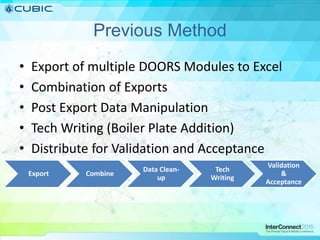
Previous Method
• Export of multiple DOORS Modules to Excel
• Combination of Exports
• Post Export Data Manipulation
• Tech Writing (Boiler Plate Addition)
• Distribute for Validation and Acceptance
Export Combine
Data Clean-
up
Tech
Writing
Validation
&
Acceptance
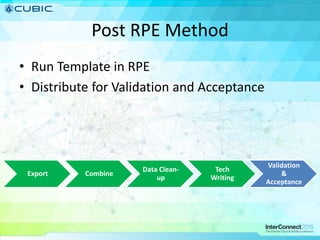
Post RPE Method
• Run Template in RPE
• Distribute for Validation and Acceptance
Export Combine
Data Clean-
up
Tech
Writing
Validation
&
Acceptance
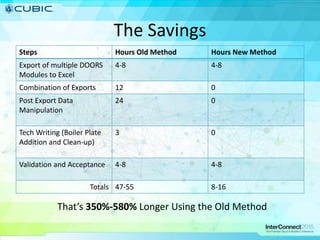
The Savings
Steps Hours Old Method Hours New Method
Export of multiple DOORS
Modules to Excel
4-8 4-8
Combination of Exports 12 0
Post Export Data
Manipulation
24 0
Tech Writing (Boiler Plate
Addition and Clean-up)
3 0
Validation and Acceptance 4-8 4-8
Totals 47-55 8-16
That’s 350%-580% Longer Using the Old Method
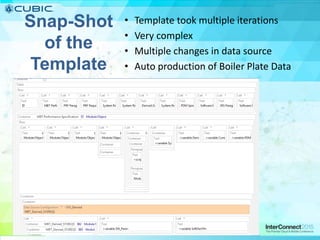
Snap-Shot
of the
Template
• Template took multiple iterations
• Very complex
• Multiple changes in data source
• Auto production of Boiler Plate Data
Template Complexity Driver
Performance
Specification
System 1
Hardware 1
Software 1
System 2
Hardware 2
Software 2
System 3
Hardware 3
Software 3
System 4
Hardware 4
Software 4
System 5
Hardware 5
Software 5
System 6
Hardware 6
Software 6
System 7
Hardware 7
Software 7
System 8
Hardware 8
Software 8
Excel Export Conversion Tool
Global E-Business Solution Group (GEBS)
IBM Partner
• No native Excel handling in RPE
• Add-in for RPE
• Allows for single point solution for Report
Generation
Dynamic Data Configuration
• Game Changer
• Simplified the Template
• Handled the complex Data Schema
– Multiple modules in use per document generation
– Odd relationships for data
The Learning Curve
• Difficult to adjust management to not
touching the materials as much
• Eclipse based interface reduced the curve
• Went from New User to Advanced User in
under 90 days
Additional Information
• Cubic http://www.cubic.com/
• RPE 1.3 Specific
– Introduction to 1.3: http://rpeactual.com/2014/10/31/rpe-1-3/
– Download document: https://www-
01.ibm.com/support/docview.wss?uid=swg24038175
– Information Center: http://www-
01.ibm.com/support/knowledgecenter/SS6RHZ/rpe_welcome.html
• General RPE
– RPE Actual: http://rpeactual.com ***FAVORITE***
– Tips and Tricks:
http://pic.dhe.ibm.com/infocenter/rpehelp/v1r2m1/index.jsp?re=1&topic=/c
om.ibm.rational.pe.reference.doc/topics/r_tips.html&scope=null
– DeveloperWorks:
https://www.ibm.com/developerworks/community/wikis/home?lang=en#!/wi
ki/Rational%20Publishing%20Engine
– Reporting Workshop: https://jazz.net/library/article/1269 ***OLDIE BUT
GOODIE***
– RPE for CLM: https://jazz.net/library/article/1241 ***ADVANCED TOPIC***
18

Interconnect Presentation

  • 1.
    Time Savings inDocument Production with DOORS 9 and RPE (Rational Publishing Engine) Eric Deitrick Geoff Rosenthal IBM Technical RepresentativeCubic Simulation Systems Inc System Engineer DOORS Administrator
  • 2.
    Introduction • Eric Deitrick –System Engineer – DOORS Administrator – RPE Document Template Designer • Geoff Rosenthal – Technical Sales Specialist
  • 3.
    Who is Cubicand What Do We Do? • Systems and services company in the Transportation and Defense Industries – Established in 1951 – Revenue collection systems for transportation – Mission support and training systems to strengthen the readiness of national military and security forces – Cyber and communication products to safeguard critical communications and data
  • 4.
    4 Take control ofyour documents through automation with RPE• Documentation is key to many business activities such as creating compliance documents, requirements specification documents, test plan documents, etc. • Reduce the cost of producing and consuming documents that meet internal or contractual or regulatory requirements – Make document generation a side-effect of normal engineering effort – avoid lowering the productivity of your developers and engineers – Standardize on format and styles – make consumption of information within documents as simple as possible • Creating your necessary documentation should be a by-product of good engineering practices and tool usage – You should not have to work around DOORS limitations or DOORS best practices and guidance just to meet your documentation needs • Relatively few RPE licenses can satisfy a large organization • RPE can be used with most Rational tools and potentially with 3rd party tools as well  4
  • 5.
    The Use Case •12 separate CLINs • Multiple CDRL resubmissions through the program lifecycle • Ability to add additional fields as required by customer prior to submission • CLINs all following separate project paths • Customer desire to sort and filter certain deliverable reports to aid in review
  • 6.
    The Use CaseContinued Performance Specification System 1 Hardware 1 Software 1 System 2 Hardware 2 Software 2 System 3 Hardware 3 Software 3 System 4 Hardware 4 Software 4 System 5 Hardware 5 Software 5 System 6 Hardware 6 Software 6 System 7 Hardware 7 Software 7 System 8 Hardware 8 Software 8
  • 7.
    7 The Problem • InternalQA Demands – Needs to be satisfied by delivering documentation according to internal standards • Contractual obligations – Documents are deliverables according to contact with client/prime. – No deliverable, no milestone approval, no money • High manual labor costs – Repeatedly need to author- review- change –release documentatoin ... • Reliability of documentation – Need to assure that documentation is consistent and complete wrt the data in the tools • Time pressure – Which is getting higher as the deadline approaches (and so are the number of revisions to the document)
  • 8.
    You are usingDOORS to ensure compliance! 1. 820.30(b) Design and Development Planning Each manufacturer shall establish and maintain plans that describe or reference the design and development activities and define responsibility for implementation. The plans shall identify and describe the interfaces with different groups or activities that provide, or result in, input to the design and development process. The plans shall be reviewed as design and development evolves. The plans shall be updated as design and development evolves. The plans shall be approved as design and development evolves. 2. 820.30(c) Design Input 2.1. Each manufacturer shall establish procedures to ensure that the design requirements relating to a device are appropriate and address the intended use of the device, including the needs of the user and patient. 2.2. Each manufacturer shall maintain procedures to ensure that the design requirements relating to a device are appropriate and address the intended use of the device, including the needs of the user and patient. 2.3. The procedures shall include a mechanism for addressing incomplete requirements. 2.4. The procedures shall include a mechanism for addressing ambiguous requirements. 2.5. The procedures shall include a mechanism for addressing conflicting requirements. 2.6. The design input requirements shall be documented by a designated individual(s). 2.7. The design input requirements shall be reviewed by a designated individual(s). 2.8. The design input requirements shall be approved by a designated individual(s). 2.9. The approval, including the date and signature of the individual(s) approving the requirements, shall be documented. 2.10.Questions. 2.10.1. Summarize the manufacturer's written procedure(s) for identification and control of design input. 2.10.2. From what sources are design inputs sought? 2.10.3. Do design input procedures cover the relevant aspects, such as: (Mark all that apply and list additional aspects.) 2.10.3.1. intended use 2.10.3.2. user/patient/clinical 2.10.3.3. performance characteristics 2.10.3.4. safety 2.10.3.5. limits and tolerances 2.10.3.6. risk analysis 2.10.3.7. toxicity and biocompatibility 2.10.3.8. electromagnetic compatibility (EMC) 2.10.3.9. compatibility with accessories/auxiliary devices 2.10.3.10. compatibility with the environment of intended use 2.10.3.11. human factors 2.10.3.12. physical/chemical characteristics 2.10.3.13. labeling/packaging 2.10.3.14. reliability 2.10.3.15. statutory and regulatory requirements 2.10.3.16. voluntary standards 2.10.3.17. manufacturing processes 2.10.3.18. sterility 2.10.3.19. MDRs/complaints/failures and other historical data 2.10.3.20. design history files (DHFs) 2.10.4. For the specific design covered, how were the design input requirements identified? 2.10.5. For the specific design covered, how were the design input requirements reviewed for adequacy? Comply with FDA Design Control Guidance GMP Regulation 1. Capture design and related information 1.1. Input electronically formatted data 1.2. Reference external information sources 1.3. Reference external documentation 2. Store design and related information 2.1. Identify and tag design information as unique “design elements” 2.2. Organize design elements 2.2.1. Organize by Design Control Guidance Element 2.2.2. Organize by inter-relationships 2.3. Ensure all design elements are available 2.3.1. Store design elements by Design Control Guidance Element 2.3.2. Store design elements and their historical values 3. Manage all user needs 3.1. Identify the source of the user need 3.2. Identify all user types (groups) 3.3. Identify the customer (s) 3.4. Profile the expected patients 3.5. State the intended use of the product (family) 3.6. Capture the acceptance criteria for each user need 4. Manage design input requirements 4.1. Identify the source of the requirement 4.2. Identify the associated user need 4.3. Capture requirement description and attributes 4.4. Capture acceptance criteria 4.5. Assign responsibility for each requirement 4.6. Manage incomplete requirements 4.7. Manage ambiguous requirements 4.8. Manage conflicting requirements 4.9. Approve all requirements 5. Manage acceptance 5.1. Ensure the acceptance of every user need 5.2. Ensure the acceptance of every design input requirement 5.3. Document the results of every user need acceptance test 5.4. Document the results of every design input requirements test 5.5. Make acceptance results available 6. Manage change 6.1. Maintain history of design element changes 6.1.1. Make complete change history available 6.1.2. Maintain history within and across any organizational procedure 6.1.3. Maintain history within and across any project milestone 6.1.4. Maintain history within and across any Design Control Guidance Elements 6.2. Capture frequency and nature of element changes 6.2.1. Provide rationale for change 6.2.2. Describe decisions made 6.2.3. Identify approval authority for the change 6.2.4. Capture date, time, and signature of approving authority 6.3. Identify impacted elements due to a change in another element 6.3.1. Create backward traces to design elements within and across any organizational procedure 6.3.2. Create backward traces to design elements within and across any project milestone 1.1. Identify impacted elements due to a change in another element  Traceability Reports: consistency with driving design elements  Impact Reports: other design elements affected  Links to impacted design elements 1.1.1.Create backward traces to design elements within and across any organizational procedure  Traceability Reports: Procedure Attribute 1.1.2.Create backward traces to design elements within and across any project milestone  Traceability Reports: Milestone Attribute 1.1.3.Create backward traces to design elements within and across Design Control Guidance Elements  Traceability Reports: Linked design elements 1.1.4.Create forward impacts to design elements within and across any organizational procedure  Impact Reports: Procedure Attribute 1.1.5.Create forward impacts to design elements within and across any project milestone  Impact Reports: Milestone Attribute 1.1.6.Create forward impacts to design elements within and across Design Control Guidance Elements  Impact Reports: Linked design elements 1.2. Associate changed design elements with related elements  Link Change Design Object with affected design element(s)  Traceability Links and Reports from affected design element(s)  Impact Links and Reports from affected design element(s) 1.2.1.Associate design element changes with decisions, rationale, and approval authority information  Change Decision Objects with following Attributes:  Disposition Attribute  Decision Attribute  Rationale Attribute  Owner Attribute  Management Approval Attribute 1.2.2.Provide associations within and across any organizational procedure  Change Design Object Traceability Link on Procedure Attribute  Change Design Object Impacts Link on Procedure Attribute 1.2.3.Provide associations within and across any project milestone  Change Design Object Traceability Link on Milestone Attribute  Change Design Object Impacts Link on Milestone Attribute 1.2.4.Provide associations within and across Design Control Guidance Elements  Change Design Object Traceability Link to traced design elements  Change Design Object Impacts Link to linked design elements 1.3. Mange the change process  Design Change Module  Design Change Reports  Object History  Object History Reports  Versions  Baselines 1. 820.30(b) Design and Development Planning Each manufacturer shall establish and maintain plans that describe or reference the design and development activities and define responsibility for implementation. The plans shall identify and describe the interfaces with different groups or activities that provide, or result in, input to the design and development process. The plans shall be reviewed as design and development evolves. The plans shall be updated as design and development evolves. The plans shall be approved as design and development evolves. 2. 820.30(c) Design Input 2.1. Each manufacturer shall establish procedures to ensure that the design requirements relating to a device are appropriate and address the intended use of the device, including the needs of the user and patient. 2.2. Each manufacturer shall maintain procedures to ensure that the design requirements relating to a device are appropriate and address the intended use of the device, including the needs of the user and patient. 2.3. The procedures shall include a mechanism for addressing incomplete requirements. 2.4. The procedures shall include a mechanism for addressing ambiguous requirements. 2.5. The procedures shall include a mechanism for addressing conflicting requirements. 2.6. The design input requirements shall be documented by a designated individual(s). 2.7. The design input requirements shall be reviewed by a designated individual(s). 2.8. The design input requirements shall be approved by a designated individual(s). 2.9. The approval, including the date and signature of the individual(s) approving the requirements, shall be documented. 2.10.Questions. 2.10.1. Summarize the manufacturer's written procedure(s) for identification and control of design input. 2.10.2. From what sources are design inputs sought? 2.10.3. Do design input procedures cover the relevant aspects, such as: (Mark all that apply and list additional aspects.) 2.10.3.1. intended use 2.10.3.2. user/patient/clinical 2.10.3.3. performance characteristics 2.10.3.4. safety 2.10.3.5. limits and tolerances 2.10.3.6. risk analysis 2.10.3.7. toxicity and biocompatibility 2.10.3.8. electromagnetic compatibility (EMC) 2.10.3.9. compatibility with accessories/auxiliary devices 2.10.3.10. compatibility with the environment of intended use 2.10.3.11. human factors 2.10.3.12. physical/chemical characteristics 2.10.3.13. labeling/packaging 2.10.3.14. reliability 2.10.3.15. statutory and regulatory requirements 2.10.3.16. voluntary standards 2.10.3.17. manufacturing processes 2.10.3.18. sterility 2.10.3.19. MDRs/complaints/failures and other historical data 2.10.3.20. design history files (DHFs) 2.10.4. For the specific design covered, how were the design input requirements identified? 2.10.5. For the specific design covered, how were the design input requirements reviewed for adequacy? Comply with FDA Design Control Guidance GMP Regulation 1. Capture design and related information 1.1. Input electronically formatted data 1.2. Reference external information sources 1.3. Reference external documentation 2. Store design and related information 2.1. Identify and tag design information as unique “design elements” 2.2. Organize design elements 2.2.1. Organize by Design Control Guidance Element 2.2.2. Organize by inter-relationships 2.3. Ensure all design elements are available 2.3.1. Store design elements by Design Control Guidance Element 2.3.2. Store design elements and their historical values 3. Manage all user needs 3.1. Identify the source of the user need 3.2. Identify all user types (groups) 3.3. Identify the customer (s) 3.4. Profile the expected patients 3.5. State the intended use of the product (family) 3.6. Capture the acceptance criteria for each user need 4. Manage design input requirements 4.1. Identify the source of the requirement 4.2. Identify the associated user need 4.3. Capture requirement description and attributes 4.4. Capture acceptance criteria 4.5. Assign responsibility for each requirement 4.6. Manage incomplete requirements 4.7. Manage ambiguous requirements 4.8. Manage conflicting requirements 4.9. Approve all requirements 5. Manage acceptance 5.1. Ensure the acceptance of every user need 5.2. Ensure the acceptance of every design input requirement 5.3. Document the results of every user need acceptance test 5.4. Document the results of every design input requirements test 5.5. Make acceptance results available 6. Manage change 6.1. Maintain history of design element changes 6.1.1. Make complete change history available 6.1.2. Maintain history within and across any organizational procedure 6.1.3. Maintain history within and across any project milestone 6.1.4. Maintain history within and across any Design Control Guidance Elements 6.2. Capture frequency and nature of element changes 6.2.1. Provide rationale for change 6.2.2. Describe decisions made 6.2.3. Identify approval authority for the change 6.2.4. Capture date, time, and signature of approving authority 6.3. Identify impacted elements due to a change in another element 6.3.1. Create backward traces to design elements within and across any organizational procedure 6.3.2. Create backward traces to design elements within and across any project milestone 1.1. Identify impacted elements due to a change in another element  Traceability Reports: consistency with driving design elements  Impact Reports: other design elements affected  Links to impacted design elements 1.1.1.Create backward traces to design elements within and across any organizational procedure  Traceability Reports: Procedure Attribute 1.1.2.Create backward traces to design elements within and across any project milestone  Traceability Reports: Milestone Attribute 1.1.3.Create backward traces to design elements within and across Design Control Guidance Elements  Traceability Reports: Linked design elements 1.1.4.Create forward impacts to design elements within and across any organizational procedure  Impact Reports: Procedure Attribute 1.1.5.Create forward impacts to design elements within and across any project milestone  Impact Reports: Milestone Attribute 1.1.6.Create forward impacts to design elements within and across Design Control Guidance Elements  Impact Reports: Linked design elements 1.2. Associate changed design elements with related elements  Link Change Design Object with affected design element(s)  Traceability Links and Reports from affected design element(s)  Impact Links and Reports from affected design element(s) 1.2.1.Associate design element changes with decisions, rationale, and approval authority information  Change Decision Objects with following Attributes:  Disposition Attribute  Decision Attribute  Rationale Attribute  Owner Attribute  Management Approval Attribute 1.2.2.Provide associations within and across any organizational procedure  Change Design Object Traceability Link on Procedure Attribute  Change Design Object Impacts Link on Procedure Attribute 1.2.3.Provide associations within and across any project milestone  Change Design Object Traceability Link on Milestone Attribute  Change Design Object Impacts Link on Milestone Attribute 1.2.4.Provide associations within and across Design Control Guidance Elements  Change Design Object Traceability Link to traced design elements  Change Design Object Impacts Link to linked design elements 1.3. Mange the change process  Design Change Module  Design Change Reports  Object History  Object History Reports  Versions  Baselines User Reqs Technical Reqs Test CasesDesign • Your initial user requirements are be decomposed to detailed requirements, and then to design, tests, etc. • Your decomposition creates traceability relationships • The relationships define your traceability model • Your traceability model is the basis for your process • You enforce your traceability model to help improve your process • And now you need to produce a document of all of this data to show/prove that you are compliant!
  • 9.
    Are the outof the box export features enough for your needs? The provided formats are okay, but my organization needs to make some changes to them You cannot tailor the standard output formats My organization has requirements for many more output document formats than just table or book format Book or table format are your only options I have report requirements to pull data from multiple views and/or projects The report results are limited to only what you see in a single view I have report requirements to include data from our other development tools The data is limited to only what you see in that point tool 9
  • 10.
    Previous Method • Exportof multiple DOORS Modules to Excel • Combination of Exports • Post Export Data Manipulation • Tech Writing (Boiler Plate Addition) • Distribute for Validation and Acceptance Export Combine Data Clean- up Tech Writing Validation & Acceptance
  • 11.
    Post RPE Method •Run Template in RPE • Distribute for Validation and Acceptance Export Combine Data Clean- up Tech Writing Validation & Acceptance
  • 12.
    The Savings Steps HoursOld Method Hours New Method Export of multiple DOORS Modules to Excel 4-8 4-8 Combination of Exports 12 0 Post Export Data Manipulation 24 0 Tech Writing (Boiler Plate Addition and Clean-up) 3 0 Validation and Acceptance 4-8 4-8 Totals 47-55 8-16 That’s 350%-580% Longer Using the Old Method
  • 13.
    Snap-Shot of the Template • Templatetook multiple iterations • Very complex • Multiple changes in data source • Auto production of Boiler Plate Data
  • 14.
    Template Complexity Driver Performance Specification System1 Hardware 1 Software 1 System 2 Hardware 2 Software 2 System 3 Hardware 3 Software 3 System 4 Hardware 4 Software 4 System 5 Hardware 5 Software 5 System 6 Hardware 6 Software 6 System 7 Hardware 7 Software 7 System 8 Hardware 8 Software 8
  • 15.
    Excel Export ConversionTool Global E-Business Solution Group (GEBS) IBM Partner • No native Excel handling in RPE • Add-in for RPE • Allows for single point solution for Report Generation
  • 16.
    Dynamic Data Configuration •Game Changer • Simplified the Template • Handled the complex Data Schema – Multiple modules in use per document generation – Odd relationships for data
  • 17.
    The Learning Curve •Difficult to adjust management to not touching the materials as much • Eclipse based interface reduced the curve • Went from New User to Advanced User in under 90 days
  • 18.
    Additional Information • Cubichttp://www.cubic.com/ • RPE 1.3 Specific – Introduction to 1.3: http://rpeactual.com/2014/10/31/rpe-1-3/ – Download document: https://www- 01.ibm.com/support/docview.wss?uid=swg24038175 – Information Center: http://www- 01.ibm.com/support/knowledgecenter/SS6RHZ/rpe_welcome.html • General RPE – RPE Actual: http://rpeactual.com ***FAVORITE*** – Tips and Tricks: http://pic.dhe.ibm.com/infocenter/rpehelp/v1r2m1/index.jsp?re=1&topic=/c om.ibm.rational.pe.reference.doc/topics/r_tips.html&scope=null – DeveloperWorks: https://www.ibm.com/developerworks/community/wikis/home?lang=en#!/wi ki/Rational%20Publishing%20Engine – Reporting Workshop: https://jazz.net/library/article/1269 ***OLDIE BUT GOODIE*** – RPE for CLM: https://jazz.net/library/article/1241 ***ADVANCED TOPIC*** 18