Software Documentation
By:-Gourav Kottawar
Discussion Topics
1. Introduction
2. Documentation Requirements
3. Process and Product
Documentation
4. Document Quality
5. Standards
6. Document Preparation
7. Document Storage
8. ConclusionBy:-Gourav Kottawar
Introduction
 This paper provides an overview of
the
 Reasons for software documentation
 Types of software documentation
 Ways to implement software
documentation
 Processes and “Good Ideas”
By:-Gourav Kottawar
Documentation Requirements
 General requirements of all software
documentation
 Should provide for communication
among team members
 Should act as an information repository
to be used by maintenance engineers
 Should provide enough information to
management to allow them to perform all
program management related activities
 Should describe to users how to operate
and administer the system
By:-Gourav Kottawar
Documentation Requirements
 In all software projects some amount of
documentation should be created prior to
any code being written
 Design docs, etc.
 Documentation should continue after the
code has been completed
 User’s manuals, etc.
 The two main types of documentation
created are Process and Product
documents
By:-Gourav Kottawar
Process Documentation
 Used to record and track the
development process
 Planning documentation
 Cost, Schedule, Funding tracking
 Schedules
 Standards
 Etc.
 This documentation is created to
allow for successful management of a
software productBy:-Gourav Kottawar
Process Documentation
 Has a relatively short lifespan
 Only important to internal
development process
 Except in cases where the customer
requires a view into this data
 Some items, such as papers that
describe design decisions should be
extracted and moved into the product
documentation category when they
become implementedBy:-Gourav Kottawar
Product Documentation
 Describes the delivered product
 Must evolve with the development of
the software product
 Two main categories:
 System Documentation
 User Documentation
By:-Gourav Kottawar
Product Documentation
 System Documentation
 Describes how the system works, but not how
to operate it
 Examples:
 Requirements Spec
 Architectural Design
 Detailed Design
 Commented Source Code
 Including output such as JavaDoc
 Test Plans
 Including test cases
 V&V plan and results
 List of Known BugsBy:-Gourav Kottawar
Product Documentation
 User Documentation has two main
types
 End User
 System Administrator
 In some cases these are the same
people
 The target audience must be well
understood!
By:-Gourav Kottawar
Product Documentation
 There are five important areas that should
be documented for a formal release of a
software application
 These do not necessarily each have to have
their own document, but the topics should be
covered thoroughly
1. Functional Description of the Software
2. Installation Instructions
3. Introductory Manual
4. Reference Manual
5. System Administrator’s GuideBy:-Gourav Kottawar
Document Quality
 Providing thorough and professional
documentation is important for any
size product development team
 The problem is that many software
professionals lack the writing skills to
create professional level documents
By:-Gourav Kottawar
Document Structure
 All documents for a given product should have a
similar structure
 A good reason for product standards
 The IEEE Standard for User Documentation lists
such a structure
 It is a superset of what most documents need
 The authors “best practices” are:
1. Put a cover page on all documents
2. Divide documents into chapters with sections
and subsections
3. Add an index if there is lots of reference
information
4. Add a glossary to define ambiguous terms
By:-Gourav Kottawar
Standards
 Standards play an important role in
the development, maintenance and
usefulness of documentation
 Standards can act as a basis for
quality documentation
 But are not good enough on their own
 Usually define high level content and
organization
 There are three types of
documentation standards ->
By:-Gourav Kottawar
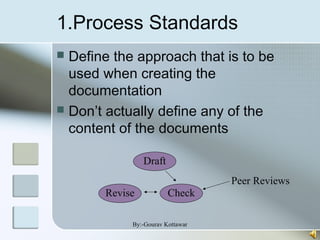
1.Process Standards
 Define the approach that is to be
used when creating the
documentation
 Don’t actually define any of the
content of the documents
Draft
Revise Check
Peer Reviews
By:-Gourav Kottawar
2. Product Standards
 Goal is to have all documents
created for a specific product attain
a consistent structure and
appearance
 Can be based on organizational or
contractually required standards
 Four main types:
1. Documentation Identification Standards
2. Document Structure Standards
3. Document Presentation Standards
4. Document Update StandardsBy:-Gourav Kottawar
2. Product Standards
 One caveat:
 Documentation that will be viewed by
end users should be created in a way
that is best consumed and is most
attractive to them
 Internal development documentation
generally does not meet this need
By:-Gourav Kottawar
3. Interchange Standards
 Deals with the creation of documents in a
format that allows others to effectively use
 PDF may be good for end users who don’t
need to edit
 Word may be good for text editing
 Specialized CASE tools need to be considered
 This is usually not a problem within a single
organization, but when sharing data
between organizations it can occur
 This same problem is faced all the time during
software integration
By:-Gourav Kottawar
Other Standards
 IEEE
 Has a published standard for user
documentation
 Provides a structure and superset of content
areas
 Many organizations probably won’t create
documents that completely match the standard
 Writing Style
 Ten “best practices” when writing are provided
 Author proposes that group edits of important
documents should occur in a similar fashion to
software walkthroughs
By:-Gourav Kottawar
Online Documentation
 Either internal to the application or
Web based
 Requires rethinking the presentation
style since normal “paper”
documentation approaches do not
carry over well
 Should act as a supplement to paper
documentation
 Biggest benefit of Web docs are that
they are always currentBy:-Gourav Kottawar
Document Preparation
 Covers the entire process of creating and
formatting a document for publication
 Author recommends using specialized (and
separate) tools for creating and preparing
documents
 This is only important for user documentation
 It is often important to have a professional
writer or document publisher evaluate
documents before publication to ensure
they look good and will carry over to paper
well
By:-Gourav Kottawar
Document Storage
 Author Recommends (in 2001)
 File System to store the actual
documents
 Database to store references to the files
with metadata to allow searching and
referencing
 Today it is probably better to use a
content management systems
 CVS or Subversion
 Free and Open Source
 Easy to setup and maintain
By:-Gourav Kottawar
Conclusion
 Good overview of documentation
 Though most documentation
“requirements” are based on contract
requirements
 Hard to cover things like that in a paper like
this
 Most of the content seemed to be
referring to user documentation
 Design and other similar docs (often
times more graphical than textual) were
overlookedBy:-Gourav Kottawar

Software documentation

  • 1.
  • 2.
    Discussion Topics 1. Introduction 2.Documentation Requirements 3. Process and Product Documentation 4. Document Quality 5. Standards 6. Document Preparation 7. Document Storage 8. ConclusionBy:-Gourav Kottawar
  • 3.
    Introduction  This paperprovides an overview of the  Reasons for software documentation  Types of software documentation  Ways to implement software documentation  Processes and “Good Ideas” By:-Gourav Kottawar
  • 4.
    Documentation Requirements  Generalrequirements of all software documentation  Should provide for communication among team members  Should act as an information repository to be used by maintenance engineers  Should provide enough information to management to allow them to perform all program management related activities  Should describe to users how to operate and administer the system By:-Gourav Kottawar
  • 5.
    Documentation Requirements  Inall software projects some amount of documentation should be created prior to any code being written  Design docs, etc.  Documentation should continue after the code has been completed  User’s manuals, etc.  The two main types of documentation created are Process and Product documents By:-Gourav Kottawar
  • 6.
    Process Documentation  Usedto record and track the development process  Planning documentation  Cost, Schedule, Funding tracking  Schedules  Standards  Etc.  This documentation is created to allow for successful management of a software productBy:-Gourav Kottawar
  • 7.
    Process Documentation  Hasa relatively short lifespan  Only important to internal development process  Except in cases where the customer requires a view into this data  Some items, such as papers that describe design decisions should be extracted and moved into the product documentation category when they become implementedBy:-Gourav Kottawar
  • 8.
    Product Documentation  Describesthe delivered product  Must evolve with the development of the software product  Two main categories:  System Documentation  User Documentation By:-Gourav Kottawar
  • 9.
    Product Documentation  SystemDocumentation  Describes how the system works, but not how to operate it  Examples:  Requirements Spec  Architectural Design  Detailed Design  Commented Source Code  Including output such as JavaDoc  Test Plans  Including test cases  V&V plan and results  List of Known BugsBy:-Gourav Kottawar
  • 10.
    Product Documentation  UserDocumentation has two main types  End User  System Administrator  In some cases these are the same people  The target audience must be well understood! By:-Gourav Kottawar
  • 11.
    Product Documentation  Thereare five important areas that should be documented for a formal release of a software application  These do not necessarily each have to have their own document, but the topics should be covered thoroughly 1. Functional Description of the Software 2. Installation Instructions 3. Introductory Manual 4. Reference Manual 5. System Administrator’s GuideBy:-Gourav Kottawar
  • 12.
    Document Quality  Providingthorough and professional documentation is important for any size product development team  The problem is that many software professionals lack the writing skills to create professional level documents By:-Gourav Kottawar
  • 13.
    Document Structure  Alldocuments for a given product should have a similar structure  A good reason for product standards  The IEEE Standard for User Documentation lists such a structure  It is a superset of what most documents need  The authors “best practices” are: 1. Put a cover page on all documents 2. Divide documents into chapters with sections and subsections 3. Add an index if there is lots of reference information 4. Add a glossary to define ambiguous terms By:-Gourav Kottawar
  • 14.
    Standards  Standards playan important role in the development, maintenance and usefulness of documentation  Standards can act as a basis for quality documentation  But are not good enough on their own  Usually define high level content and organization  There are three types of documentation standards -> By:-Gourav Kottawar
  • 15.
    1.Process Standards  Definethe approach that is to be used when creating the documentation  Don’t actually define any of the content of the documents Draft Revise Check Peer Reviews By:-Gourav Kottawar
  • 16.
    2. Product Standards Goal is to have all documents created for a specific product attain a consistent structure and appearance  Can be based on organizational or contractually required standards  Four main types: 1. Documentation Identification Standards 2. Document Structure Standards 3. Document Presentation Standards 4. Document Update StandardsBy:-Gourav Kottawar
  • 17.
    2. Product Standards One caveat:  Documentation that will be viewed by end users should be created in a way that is best consumed and is most attractive to them  Internal development documentation generally does not meet this need By:-Gourav Kottawar
  • 18.
    3. Interchange Standards Deals with the creation of documents in a format that allows others to effectively use  PDF may be good for end users who don’t need to edit  Word may be good for text editing  Specialized CASE tools need to be considered  This is usually not a problem within a single organization, but when sharing data between organizations it can occur  This same problem is faced all the time during software integration By:-Gourav Kottawar
  • 19.
    Other Standards  IEEE Has a published standard for user documentation  Provides a structure and superset of content areas  Many organizations probably won’t create documents that completely match the standard  Writing Style  Ten “best practices” when writing are provided  Author proposes that group edits of important documents should occur in a similar fashion to software walkthroughs By:-Gourav Kottawar
  • 20.
    Online Documentation  Eitherinternal to the application or Web based  Requires rethinking the presentation style since normal “paper” documentation approaches do not carry over well  Should act as a supplement to paper documentation  Biggest benefit of Web docs are that they are always currentBy:-Gourav Kottawar
  • 21.
    Document Preparation  Coversthe entire process of creating and formatting a document for publication  Author recommends using specialized (and separate) tools for creating and preparing documents  This is only important for user documentation  It is often important to have a professional writer or document publisher evaluate documents before publication to ensure they look good and will carry over to paper well By:-Gourav Kottawar
  • 22.
    Document Storage  AuthorRecommends (in 2001)  File System to store the actual documents  Database to store references to the files with metadata to allow searching and referencing  Today it is probably better to use a content management systems  CVS or Subversion  Free and Open Source  Easy to setup and maintain By:-Gourav Kottawar
  • 23.
    Conclusion  Good overviewof documentation  Though most documentation “requirements” are based on contract requirements  Hard to cover things like that in a paper like this  Most of the content seemed to be referring to user documentation  Design and other similar docs (often times more graphical than textual) were overlookedBy:-Gourav Kottawar

Editor's Notes