What is Computer?
“Computer” derived from “compute” means to calculate
In past, computer was normally considered to be a calculating de
used to perform arithmetic operations
But today, computers are used in every field of life to solve problem
different kinds
Definition of Computer
– A computer is an electronic machine that is used to solve different kinds of
problems according to a set of instructions given to it
Function of computer
– Accepts data and instructions (as input) and stores them in its own memory
– Processes or manipulates data according to given instructions and prod
information (known as output)
– Stores information permanently on storage devices for later use
6.
What is Computer?
Computer consists of many electric, electronic, and mechanical components
components known as hardware
A computer performs different operations under the control of instructions
– These instructions tell the computer how to perform a particular task
– Some instructions also control the operations of different components of computer
A set of instructions that can be given to a computer to perform a particula
task or to control different operations of computer computer software o
computer program
– A computer cannot perform any task without software
A combination of hardware and software computer system
Small computers are also fitted (embedded) into many other electronic
devices mobile phones, toys, microwave ovens, vehicles, and MP3
7.
Data & Information
Data
Word ‘data’ refers to facts concerning things, people, objects, events, etc.
A collection of raw facts and figures data
Word ‘raw’ means unprepared or unprocessed
Data may consist of text, numbers, images, audio, and video
Data is collected for different purposes
It does not give clear and proper meanings
– It cannot be used directly for decision-making
Example A list of class students, showing students roll numbers, names,
obtained marks, etc.
Information
Processed data
Processed data (information) gives clear and proper meanings
– It can be used for decision-making
8.
Data Processing
Aprocess to convert data into information
Different operations are performed on data to convert it into useful
information
– Operations arithmetic, data sorting, and data formatting
Data can be processed manually or by using a computer
Today, data is processed using a computer
Data and instructions are given to computer, It processes data
according to given instructions and converts into required information
or results
9.
Information Technology
Technologyused for processing, storing, and communicating information
– Technology Easiest way of working using some technique and machine
Combination of telecommunication technology and computer technology
(hardware and software)
It combines computing with high-speed communication links for carrying
data from one place to another, all over the world
Website is a type of information technology
Major components of information technology
– Data or information
– Medium or communication network
– Computer hardware and software
World has become a global village due to IT
– Global village people living in the world know each other as if they are living in a
village
People can exchange information or messages in such a manner as if they
are sitting in a drawing-room, face to face
10.
Characteristics of Computer
Speed
High-speed electronic device
A computer can perform billions or trillions of operations or tasks per second
– Operations arithmetic & sorting operations, displaying images, recording audio/video,
playing music, and showing video or movie
Speed of a computer in microseconds or nanoseconds
Usually, measured in Mega Hertz (MHz) or Giga Hertz (GHz)
Different computers have different speeds
Accuracy
Computer does not make any kind of mistakes in calculations
It processes data and produces a 100% accurate result
Accuracy of result depends upon correct input data and set of instructions given to
computer
– If any mistake in input data computer does not produce an accurate result
Computer can perform billions or trillions of operations in one second without any
error
11.
Characteristics of Computer
Reliability
Electronic components in a modern computer have a very low failure rate
Modern computer can perform complicated calculations without creating any problem
In general, computers are very reliable and do all tasks accurately
Many personal computers have never needed a service call
Communication networks are also very reliable and generally available whenever needed
Nowadays, all large industries and organizations/companies are dependent on compute
and their entire business is running through computers have blindly trust in computers
Consistency
People often have difficulty to repeat the same actions again and again in same way an
to get the same result
– For example, a lecturer feels difficulty to repeat a lecture in a classroom again and again
A computer can repeat same actions consistently (again and again) without losing
concentration
– To run a spell checker (built into a word processor) for checking spelling in a document
– To play multimedia animation for training purposes
– To deliver a lecture through a computer in a classroom etc.
A computer will carry out the activity in an exact manner every time
12.
Characteristics of Computer
Memory/ Storage
A computer has internal memory (storage) primary memory
– Computer stores instructions of the program and data in primary memory during data processing
– Temporary memory
– Data and programs can be stored in it as long as computer is processing data
– When a computer is turned off, everything from primary memory is erased
A computer also has external storage secondary storage
– A large amount of data and programs can be stored permanently
– Stored data or information is available anytime
– Examples hard disk, USB drive, and CD
Automation
Once data and instructions are given to the computer; it can automatically perform
different operations on data
A computer can also control automatically different devices attached to it
It executes automatically program instructions one by one without any human
assistance
13.
Characteristics of Computer
Versatility
Versatility refers to capability of a computer to perform different kinds of
tasks with same accuracy & efficiency
Different types of tasks can be performed through computer
– At one moment we are playing a game on computer, the next moment we are
composing and sending an e-mail, etc.
– In colleges and universities, computers are used to deliver lectures to students
That is why computers are being used in every field of life such as
universities/colleges, hospitals, banks, offices, hotels, at homes, industries
for manufacturing products, etc.
Multitasking
A computer has the capability of multitasking
A user can perform multiple tasks on computer at the same time
Example a user can print a document on printer, while listening to naats.
14.
Characteristics of Computer
Communication
A computer has capability of communicating with other computers in a computer network
Nowadays, computers are mostly used for exchanging messages or information through
computer networks all over the world
– Example information can be received or sent through Internet with the help of computers
Diligence
A computer can continuously work for hours without creating any error
It does not get tired while working
After hours of work, it performs operations with same accuracy and speed as first one
No Feelings
A computer has no feelings or emotions
It detects objects based on the instructions given to it
Based on our feelings, taste, knowledge, and experience we can make certain decisions
and judgments in our daily life
On the other hand, a computer cannot make such judgments on its own
Its judgments are totally based on the instructions given to it
15.
Disadvantages of usingComputers
Health Risks
Data Security Problems
Wastage of Time
Computer Viruses
Unemployment
Privacy Violation
Computer Crimes
Details are given in book on each point
Analog Computers
Word“analog” means continuously varying in quantity
Analog computers accept input data in continuous form and output is
obtained in the form of graphs
These computers accept input and give output in the form of analog signals
Output is measured on a scale
Examples of analog data voltage, current, sound, speed, temperature,
pressure, etc. values
– These values continuously increase and decrease
Analog computers are used to measure continuous values
Analog computers are usually built for special purposes
They have very high-speed computing elements used to process physical
quantities
Analog computers have low memory size and have fewer functions
18.
Analog Computers
Earlyspecial-purpose analog computing devices were Slide Rule,
Curvimeter & Plainmeter, and the Harmonic Analyzer
In World War II, analog computing mechanism was of great importance
for gunfire control on warships
Analog computers are used in industrial units to control various
processes
They are also used in different fields of engineering and medicine
General-purpose analog computer was first manufactured in 1930s
Examples of Analog Devices
– Thermometer used to measure temperature
– Analog Clock measures time by means of distance continuously covered by
needle around a dial
– Voltmeter used to measure voltage
– Speedometer used to measure speed of a car
19.
Digital Computers
Word“digital” means discrete
It refers to a binary system, which consists of only two digits, i.e. 0 and 1
Digital data consists of binary data represented by OFF (low) and ON (high)
electrical pulses
These pulses are increased and decreased in discontinuous form rather
than in continuous form
In digital computers, quantities are counted rather than measured
A digital computer operates by counting numbers or digits and gives output
in digital form
It represents data in digital signals 0 and 1 and then processes it using
arithmetic and logical operations
Today most of the computers used in business, educational institutions,
hospitals, offices, and at homes are digital computers
– Examples IBM PC and Apple Macintosh
– Calculators, digital watches, digital scoreboards, and digital thermometers
20.
Hybrid Computers
Combinedfeatures of both analog and digital computers
These computers contain both digital and analog components
In hybrid computers, users can process both continuous (analog) and
discrete (digital) data
These are special-purpose computers
These are very fast and accurate
These are used in scientific fields
In hospitals, these are used to watch the patient’s health condition in
ICU (Intensive Care Unit)
These are also used in telemetry, spaceships, missiles, etc.
Categories of Computers
Computers are being manufactured in different sizes, data processing speeds, etc.
Computers are classified according to their data processing speed, amount of data
that they can hold, and price
Generally, a computer with high processing speed and large internal storage is
called a big computer
Due to rapidly improving technology, however, distinction among categories of
computers is not always clear-cut
Today many mobile phones (cell phones) are available that also have many
computing features
– For example, they have a media player and web browsing capabilities
Depending upon the computer’s size, speed, memory size, and price, computers
are classified into the following categories:
– Supercomputers
– Mainframe Computers
– Minicomputers
23.
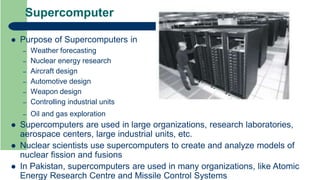
Supercomputer
Most powerfuland fastest computer
It can process huge amounts of data and can solve complicated problems
It can perform more than one trillion calculations per second
A modern supercomputer consists of thousands of processors that work
parallel to complete a specific task
– Task is divided into parts and these parts of the task are performed on different
processors at the same time
– So parallel processing is done in a supercomputer
In a single supercomputer, thousands of users can be connected at same
time
Supercomputer handles work of each user separately
Most expensive cost is up to several billion dollars
Example Deep Blue (developed by IBM)
24.
Supercomputer
Purpose ofSupercomputers in
– Weather forecasting
– Nuclear energy research
– Aircraft design
– Automotive design
– Weapon design
– Controlling industrial units
– Oil and gas exploration
Supercomputers are used in large organizations, research laboratories,
aerospace centers, large industrial units, etc.
Nuclear scientists use supercomputers to create and analyze models of
nuclear fission and fusions
In Pakistan, supercomputers are used in many organizations, like Atomic
Energy Research Centre and Missile Control Systems
25.
Mainframe Computers
Secondpowerful computer
Physically large sized computer that covers about 1000 sq feet
Expensive
Consists of multiple processors
It can process trillions of instructions per second (TIPS)
Largest mainframe computer can handle thousands of connected users
simultaneously
It fulfills requirements of all the users and controls their operations
Users often access the mainframe computer by a device terminal
Types of terminals dumb terminals & intelligent terminals
– Dumb terminal is simply an input/output (I/O) device. It has no processing and storage
capabilities. Usually, it consists of a keyboard and display screen or touch screen.
– Intelligent terminal can perform some processing operations, but it usually does not have
any storage.
– Intelligent terminals are faster than dumb terminals
In some mainframe environments, however, users can use a standard personal
computer to access the mainframe computer
26.
Mainframe Computers
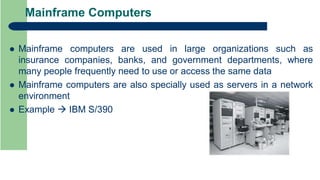
Mainframecomputers are used in large organizations such as
insurance companies, banks, and government departments, where
many people frequently need to use or access the same data
Mainframe computers are also specially used as servers in a network
environment
Example IBM S/390
27.
Minicomputers
This categoryof computer is named as minicomputer because of their small size
as compared to other computers at that time
Capabilities of a minicomputer are less than a mainframe computer but more than
a personal computer
Also known as midrange computer
First minicomputer was introduced in the mid–1960s
Like a mainframe computer and supercomputer, a minicomputer also consists of
multiple processors
Largest minicomputer can handle hundreds of users simultaneously
Users can access minicomputer through terminals or standard personal computers
Minicomputers are used in small businesses, education, scientific research, and
many other government departments
Although some minicomputers are designed for a single user but most are
designed to handle multiple users
A minicomputer can also be used as a server in a network environment
Example IBM AS/400
28.
Personal Computers
Personalcomputers (or simply PCs) also called microcomputers
Personal computers are typically developed for individual users
It can be used by only one person at a time
Today most PCs can communicate with other computers and devices
A personal computer contains a processor (microprocessor), memory, input/output
devices, and storage devices
It also contains communication devices
Personal computers are very small in size and less expensive
They are commonly used in almost every field of life such as at homes, small offices,
education, etc.
They are available in different sizes and shapes
IBM company designed first personal computer in 1981 named IBM-PC
After this, many computer hardware companies copied the design of IBM-PC
Most popular architectures of personal computers PC and Apple
Term “PC-compatible” refers to any personal computer based on the original IBM personal
computer design
– PC and PC-compatible computers use the Windows operating system
29.
Personal Computers
Desktop Computers
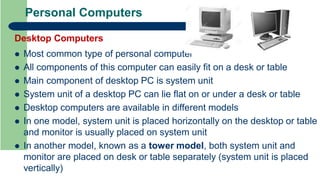
Most common type of personal computer
All components of this computer can easily fit on a desk or table
Main component of desktop PC is system unit
System unit of a desktop PC can lie flat on or under a desk or table
Desktop computers are available in different models
In one model, system unit is placed horizontally on the desktop or table
and monitor is usually placed on system unit
In another model, known as a tower model, both system unit and
monitor are placed on desk or table separately (system unit is placed
vertically)
30.
Personal Computers
Portable Computers
Types of PCs that can easily be carried from place to place portable computers or mob
computers
These computers run on rechargeable batteries, power supply, or both
Laptops
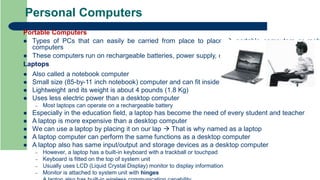
Also called a notebook computer
Small size (85-by-11 inch notebook) computer and can fit inside a briefcase
Lightweight and its weight is about 4 pounds (1.8 Kg)
Uses less electric power than a desktop computer
– Most laptops can operate on a rechargeable battery
Especially in the education field, a laptop has become the need of every student and teacher
A laptop is more expensive than a desktop computer
We can use a laptop by placing it on our lap That is why named as a laptop
A laptop computer can perform the same functions as a desktop computer
A laptop also has same input/output and storage devices as a desktop computer
– However, a laptop has a built-in keyboard with a trackball or touchpad
– Keyboard is fitted on the top of system unit
– Usually uses LCD (Liquid Crystal Display) monitor to display information
– Monitor is attached to system unit with hinges
31.
Personal Computers
Portable Computers
Tablets
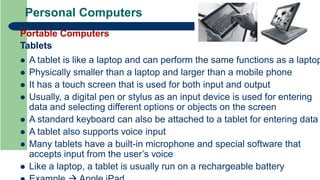
A tablet is like a laptop and can perform the same functions as a laptop
Physically smaller than a laptop and larger than a mobile phone
It has a touch screen that is used for both input and output
Usually, a digital pen or stylus as an input device is used for entering
data and selecting different options or objects on the screen
A standard keyboard can also be attached to a tablet for entering data
A tablet also supports voice input
Many tablets have a built-in microphone and special software that
accepts input from the user’s voice
Like a laptop, a tablet is usually run on a rechargeable battery
32.
Personal Computers
Portable Computers
Tablets
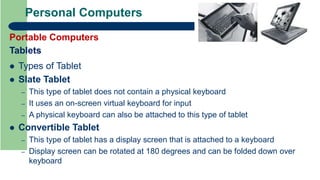
Types of Tablet
Slate Tablet
– This type of tablet does not contain a physical keyboard
– It uses an on-screen virtual keyboard for input
– A physical keyboard can also be attached to this type of tablet
Convertible Tablet
– This type of tablet has a display screen that is attached to a keyboard
– Display screen can be rotated at 180 degrees and can be folded down over
keyboard
33.
Mobile Devices
Smallcomputing devices that can fit in the hand (or in a pocket)
These devices have small screens and some of them have small
physical keyboards
These devices store information and programs permanently on special
storage media memory cards (or smart cards)
A mobile device can be connected to personal computer for
exchanging data
Today, most of the mobile devices are Internet-enabled
– It means that they can be connected to Internet wirelessly for accessing
information on the Internet
Most of the mobile devices are operated by a rechargeable battery
Most popular types of mobile devices smartphones, handheld
computers, PDAs, portable media players, and e-book readers
34.
Mobile Devices
Smartphones
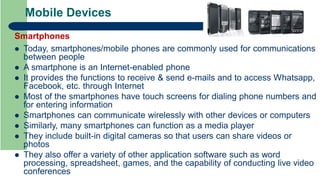
Today,smartphones/mobile phones are commonly used for communications
between people
A smartphone is an Internet-enabled phone
It provides the functions to receive & send e-mails and to access Whatsapp,
Facebook, etc. through Internet
Most of the smartphones have touch screens for dialing phone numbers and
for entering information
Smartphones can communicate wirelessly with other devices or computers
Similarly, many smartphones can function as a media player
They include built-in digital cameras so that users can share videos or
photos
They also offer a variety of other application software such as word
processing, spreadsheet, games, and the capability of conducting live video
conferences
35.
Mobile Devices
Handheld Computers
In the mid-1990s, many new types of small computing devices have
been introduced known as handheld computers
A handheld computer can fit in the hand that is why called handheld
computer
In this computer, a digital pen or stylus is usually used as an input
device
Some handheld computers have a specialized small keyboard
Many handheld computers can communicate wirelessly with other
computing devices or computers
Handheld computers are also used by mobile employees meter
readers & parcel delivery people
36.
Mobile Devices
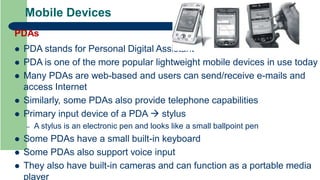
PDAs
PDAstands for Personal Digital Assistant
PDA is one of the more popular lightweight mobile devices in use today
Many PDAs are web-based and users can send/receive e-mails and
access Internet
Similarly, some PDAs also provide telephone capabilities
Primary input device of a PDA stylus
– A stylus is an electronic pen and looks like a small ballpoint pen
Some PDAs have a small built-in keyboard
Some PDAs also support voice input
They also have built-in cameras and can function as a portable media
player
37.
Mobile Devices
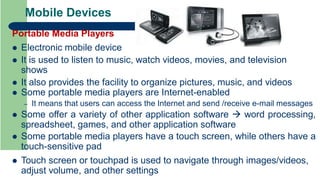
Portable MediaPlayers
Electronic mobile device
It is used to listen to music, watch videos, movies, and television
shows
It also provides the facility to organize pictures, music, and videos
Some portable media players are Internet-enabled
– It means that users can access the Internet and send /receive e-mail messages
Some offer a variety of other application software word processing,
spreadsheet, games, and other application software
Some portable media players have a touch screen, while others have a
touch-sensitive pad
Touch screen or touchpad is used to navigate through images/videos,
adjust volume, and other settings
38.
Mobile Devices
E-Book Readers
An e-book reader (electronic book reader) also called an
e-reader
It is a mobile device that is used for reading e-books (also
called digital books) and other forms of digital media such
as newspapers and magazines
An e-book is an electronic version of a printed book,
readable on computers and other digital devices
An e-reader can hold thousands of e-books
Most e-readers have a touch screen and provide an on-
screen keyboard
Some of them have built-in wireless technology to connect
to Internet
An e-reader is usually smaller than a tablet and larger than
a smartphone
39.
Uses of Computer
Main fields where computers are playing a very important role are:
– Education
– Business
– Banks
– Departmental Stores
– Entertainment
– E-Commerce
– Health Care
– Science
– Publishing
– Travelling
– Government
– Home
– Agriculture
– Energy
– Library
– Defense
– Internet Details are given in book for each point