Understanding Social Networking and Integrating Twitter into Education James Edwards Jr.  Educ 6005 Austin Peay State University
Statement of Intent Develop a plan to incorporate social networking into education Use Twitter as the platform Create materials that display tutorials, best practice techniques, and examples Strategy/ Design Understanding by Design model
Objectives Develop strategies that incorporate social networking into education Educate learners on social networks, online etiquette, cyber bullying and web 2.o tools that facilitate communication and interaction Create assignments that involve the use of Twitter Expand communication beyond the classroom between instructors, learners, and peers
Standards Addressed Computer Technology Standard 2.0  Students will understand the importance of social, ethical, and human issues associated with technology. Computer Technology Standard 3.0  Students will use technology productivity tools. Computer Technology Standard 4.0  Students will use technology communication tools.
Why Twitter? Privacy Ease of Use Promotes interactivity Available on multiple devices Ability to track class participation Networking
Misunderstandings Any Twitter feed is useful because it contains information Twitter is only about celebrity, gossip, sports, or blogging personal thoughts Searching and filtering Twitter feeds of value are simple tasks Information on Twitter is not relevant to learning
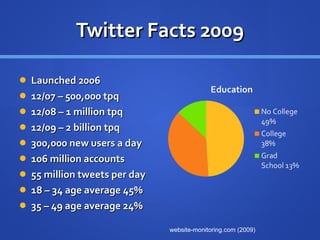
Twitter Facts 2009 Launched 2006 12/07 – 500,000 tpq 12/08 – 1 million tpq 12/09 – 2 billion tpq 300,000 new users a day  106 million accounts 55 million tweets per day 18 – 34 age average 45% 35 – 49 age average 24% website-monitoring.com (2009)
Twitter Facts Today  Twitter reached 1 billion tweets in 3 years, 2 months and 1 day 1 billion this week 140 million tweets per day 460,000 new accounts per day Projected 200 million accounts this year 182% increase in Twitter mobile users  Twitter Blog (2011)
Twitter Terminology Tweet - An individual post. RT (Retweet) - Re-telling someone else’s tweet. @username- Open message to a specific person. Message- Direct message to a follower. (private) #Hashtag - A tag that tracks groups and discussions. Groups – Allows users to place followers in a single feed.
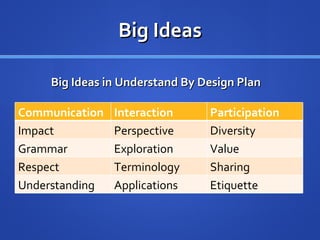
Big Ideas Big Ideas in Understand By Design Plan Communication Interaction Participation Impact Perspective Diversity Grammar Exploration Value Respect Terminology Sharing Understanding Applications Etiquette
Benefits for Students Gives students an alternate way to participate Keeps thoughts focused  Immediate communication Increased personal communication skills Collaboration with others Provides an outlet to ask questions Resource to connect with professionals Build Personal Learning Network (PLN)
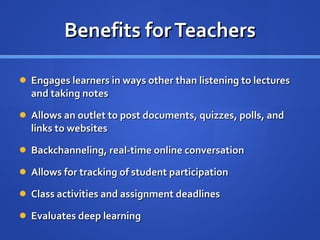
Benefits for Teachers Engages learners in ways other than listening to lectures and taking notes Allows an outlet to post documents, quizzes, polls, and links to websites Backchanneling, real-time online conversation Allows for tracking of student participation Class activities and assignment deadlines Evaluates deep learning
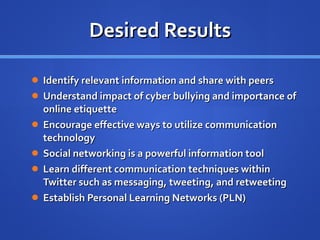
Desired Results Identify relevant information and share with peers Understand impact of cyber bullying and importance of online etiquette Encourage effective ways to utilize communication technology Social networking is a powerful information tool Learn different communication techniques within Twitter such as messaging, tweeting, and retweeting Establish Personal Learning Networks (PLN)
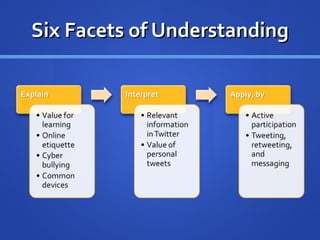
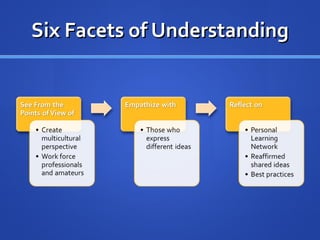
Six Facets of Understanding
Applying WHERETO W  – Ensure students know  WHERE  the unit is heading and  WHY . H  – Hook students in the beginning,  HOLD  their attention. E  –  EQUIP  students with necessary means meet goals. R  – Provide opportunities to  RETHINK ,  REFLECT  and  REVISE . E  –  Create opportunities to  EVALUATE  progress and self-assess. T  – Be  TAILORED  to reflect talents, interests, styles, and needs. O  – Be  ORGANIZED  to optimize deep understanding.
Applying the Design Statement of Intent Objectives Big Ideas Six Facets of Understanding WHERETO
Learning Activities Explanation [Technology: Twitter, PowerPoint, Video, Internet] ( W ) Discuss social networking Full tutorial lesson on Twitter Personal Learning Network (PLN) Twitter classroom uses ( W, H, E ) Introduction of basics of using Twitter Functions and uses of Twitter  Web etiquette Cyber bullying Conduct expectations
Learning Activities Explanation ( W ) Present tutorials on how to use Twitter  Present video and instruction Set up an account  Follow (@classlist) and explore other Twitter users ( W, H ) Discuss value and relevancy Explore news and educational feeds Twitterstreams that promote learning Explore Twitter applications ( W, O ) Practical uses Asynchronous communication Class reminders Public and private forum to ask questions
Learning Activities Interpretation [Technology: Twitter, Internet]  ( W, H ) (Discussion) Define Social Networking Applications towards education.  Allow students to discuss their views of social networking. ( W, E ) Discuss Twitter etiquette to the students. Discuss conduct and content of tweets. Keep direct messages private.  Explore tweeting, retweeting, and replying. Ask questions on Twitter during class.
Learning Activities Perspective [Technology: Twitter, Internet]  ( R ) Conduct a survey Twitter Take a class poll and discuss opinions and feedback on twitter learning experiences  ( E ) Follow a news feed or a world event Gain perspective of other users on Twitter Learn value of information  ( R,E ) Research cyber bullying and its implications on victims and social networking
Learning Activities Empathy [Technology: Twitter, Internet]  ( R, T ) Explore jobs that use Twitter  Learners will list 3 jobs Describe in detail  Present person on Twitter that holds that job title  
Learning Activities Empathy ( H, R, E ) Follow a professional  Interact with a professional using Twitter Submit a biography of professional and interview questions Example Questions for Interview How has Twitter enhanced your communication as a professional?  What do you think is the greatest benefit to come from Twitter? What advice would you give to someone aspiring in your career field?
Learning Activities Self-Knowledge ( E, T ) Students can submit their Twistory (Twitter History) Reflect on participation  Reflect on Twitter experience Learner ideas for improvement Established Personal Learning Network ( H, E ) Class introductions Students could tweet introductions at start of the semester. Classmates could also reply promoting interactivity
Assessments Sign up for a Twitter account and discuss the different ways Twitter can be accessed. Discuss the popularity of social networking and how it has impacted society. Discuss online etiquette and cyber bullying, How it can effect others. In a short paper, through your Twitter exploration present 3 other Twitter feeds that you find contain value and why.  In a short paper, describe your Twitter experience and what changes or suggestions you would make to improve on this communication tool
Assessment Students can be tested on Twitter involving terms, etiquette questions, and cyber bullying. Students will demonstrate participation through coursework. The instructor will assess student Twitter accounts.  Students will be assessed on activity, participation, and value. Students can submit their  Twistory  for an overall participation assessment.
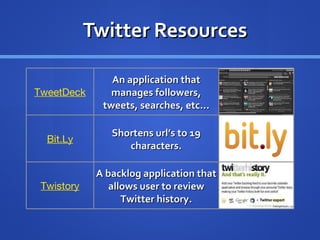
Twitter Resources TweetDeck An application that manages followers, tweets, searches, etc... Bit.Ly Shortens url’s to 19 characters. Twistory A backlog application that allows user to review Twitter history.
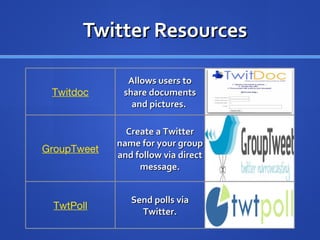
Twitter Resources Twitdoc Allows users to share documents and pictures.  GroupTweet Create a Twitter name for your group and follow via direct message. TwtPoll Send polls via Twitter.
Analysis of the Context What are the needs that will be addressed by this project? Instructors need of  communication technology integration. Growing technology use by learners. How do you know those needs exists? Survey of 2000 higher educational professionals, 56% never used Twitter. (Faculty Focus, 2009) 97% of U.S. college students own a cell phone, and 79% own a mobile computer. (Eduventures, 2008) How will you know when they have been met? Twitter integration into curriculum. Increased communication from participants.
Analysis of the Context Where will the project take place? Traditional, hybrid and online classes Available online What applicable technologies are available? Twitter Twitter applications How will the environment affect the project? Participants must maintain positive interaction and participation  Established infrastructure Wireless Instructional tools
Audience Analysis Target Audience College Undergraduates ages 18-30 Digital Natives Internet access Smartphones and other mobile devices Similarities/ Differences Familiarity with social networking sites Age gap Time Management Personal Learning Network
Audience Analysis Prior Learning Computer Accessibility Knowledge Awareness of Social Networking Sites Positive Attitude for Learning Implications for Design Instructor should explore Twitter and applications Implications for design Positive and successful outcomes are dependent on both student and teacher participation. Learners will be informed of conduct expected of them. Learner suggestions can be adjusted to improve the design.
Analysis of the Learning Task Main Goal Develop a plan for instructors to facilitate learning through Twitter. Evolve teaching styles to gain better communication and interactivity in the classroom. Objectives Research other uses of social networking in education and apply positive finding towards project design. Create materials involving Twitter for training shells.
Materials Twitter account  @social_educ Instructional video Twitter  Terms Twitter Lesson Plan 1 -  Introduction Twitter Lesson Plan 2 –  Etiquette Twitter Lesson Plan 3 –  Collaboration Twitter Lesson Plan 4 –  Follow a Professional Twitter Lesson Plan 5 –  Jobs Twitter Lesson Plan 6 -  World Events
Formative Evaluation Created detailed assignments Rubrics for grading Determine revisions upon feedback from professionals Who will do the formative evaluation? Kathrine Bailey (APSU) has offered assistance and feedback. Barry Jones (APSU) will apply design towards future instruction.
Summative Evaluation What will determine the success or failure of the project? Participation is KEY! Twitter is already a complete social networking too No cost Instructor willingness to use The plan can adapt to multiple teaching curriculums Conducted survey to determine student interest Survey Twitter Poll
Reflection The design is based on prior knowledge of social networking and Twitter. Instructors can implement successful ways to expand learning in the classroom.  Plans can be applied to traditional, hybrid, and online classrooms. Twitter applications will help improve a learning experience. Twitter is free, the only cost is initiative.
Statistic References Website Monitoring (2010)  http://www.website-monitoring.com/blog/2010/05/04/twitter-facts-and-figures-history-statistics/ Eduventures (2008)  http://campustechnology.com/articles/2008/01/snapshot-personal-electronic-devices-owned-by-students.aspx Faculty Focus. (2009)  http://www.facultyfocus.com/free-reports/twitter-in-higher-education-usage-habits-and-trends-of-todays-college-faculty/ Twitter Blog (2011)  http://blog.twitter.com/2011/03/numbers.html

Integrating Twitter into Education

  • 1.
    Understanding Social Networkingand Integrating Twitter into Education James Edwards Jr. Educ 6005 Austin Peay State University
  • 2.
    Statement of IntentDevelop a plan to incorporate social networking into education Use Twitter as the platform Create materials that display tutorials, best practice techniques, and examples Strategy/ Design Understanding by Design model
  • 3.
    Objectives Develop strategiesthat incorporate social networking into education Educate learners on social networks, online etiquette, cyber bullying and web 2.o tools that facilitate communication and interaction Create assignments that involve the use of Twitter Expand communication beyond the classroom between instructors, learners, and peers
  • 4.
    Standards Addressed ComputerTechnology Standard 2.0 Students will understand the importance of social, ethical, and human issues associated with technology. Computer Technology Standard 3.0 Students will use technology productivity tools. Computer Technology Standard 4.0 Students will use technology communication tools.
  • 5.
    Why Twitter? PrivacyEase of Use Promotes interactivity Available on multiple devices Ability to track class participation Networking
  • 6.
    Misunderstandings Any Twitterfeed is useful because it contains information Twitter is only about celebrity, gossip, sports, or blogging personal thoughts Searching and filtering Twitter feeds of value are simple tasks Information on Twitter is not relevant to learning
  • 7.
    Twitter Facts 2009Launched 2006 12/07 – 500,000 tpq 12/08 – 1 million tpq 12/09 – 2 billion tpq 300,000 new users a day 106 million accounts 55 million tweets per day 18 – 34 age average 45% 35 – 49 age average 24% website-monitoring.com (2009)
  • 8.
    Twitter Facts Today Twitter reached 1 billion tweets in 3 years, 2 months and 1 day 1 billion this week 140 million tweets per day 460,000 new accounts per day Projected 200 million accounts this year 182% increase in Twitter mobile users Twitter Blog (2011)
  • 9.
    Twitter Terminology Tweet- An individual post. RT (Retweet) - Re-telling someone else’s tweet. @username- Open message to a specific person. Message- Direct message to a follower. (private) #Hashtag - A tag that tracks groups and discussions. Groups – Allows users to place followers in a single feed.
  • 10.
    Big Ideas BigIdeas in Understand By Design Plan Communication Interaction Participation Impact Perspective Diversity Grammar Exploration Value Respect Terminology Sharing Understanding Applications Etiquette
  • 11.
    Benefits for StudentsGives students an alternate way to participate Keeps thoughts focused Immediate communication Increased personal communication skills Collaboration with others Provides an outlet to ask questions Resource to connect with professionals Build Personal Learning Network (PLN)
  • 12.
    Benefits for TeachersEngages learners in ways other than listening to lectures and taking notes Allows an outlet to post documents, quizzes, polls, and links to websites Backchanneling, real-time online conversation Allows for tracking of student participation Class activities and assignment deadlines Evaluates deep learning
  • 13.
    Desired Results Identifyrelevant information and share with peers Understand impact of cyber bullying and importance of online etiquette Encourage effective ways to utilize communication technology Social networking is a powerful information tool Learn different communication techniques within Twitter such as messaging, tweeting, and retweeting Establish Personal Learning Networks (PLN)
  • 14.
    Six Facets ofUnderstanding
  • 15.
    Six Facets ofUnderstanding
  • 16.
    Applying WHERETO W – Ensure students know WHERE the unit is heading and WHY . H – Hook students in the beginning, HOLD their attention. E – EQUIP students with necessary means meet goals. R – Provide opportunities to RETHINK , REFLECT and REVISE . E – Create opportunities to EVALUATE progress and self-assess. T – Be TAILORED to reflect talents, interests, styles, and needs. O – Be ORGANIZED to optimize deep understanding.
  • 17.
    Applying the DesignStatement of Intent Objectives Big Ideas Six Facets of Understanding WHERETO
  • 18.
    Learning Activities Explanation[Technology: Twitter, PowerPoint, Video, Internet] ( W ) Discuss social networking Full tutorial lesson on Twitter Personal Learning Network (PLN) Twitter classroom uses ( W, H, E ) Introduction of basics of using Twitter Functions and uses of Twitter Web etiquette Cyber bullying Conduct expectations
  • 19.
    Learning Activities Explanation( W ) Present tutorials on how to use Twitter Present video and instruction Set up an account Follow (@classlist) and explore other Twitter users ( W, H ) Discuss value and relevancy Explore news and educational feeds Twitterstreams that promote learning Explore Twitter applications ( W, O ) Practical uses Asynchronous communication Class reminders Public and private forum to ask questions
  • 20.
    Learning Activities Interpretation[Technology: Twitter, Internet]  ( W, H ) (Discussion) Define Social Networking Applications towards education. Allow students to discuss their views of social networking. ( W, E ) Discuss Twitter etiquette to the students. Discuss conduct and content of tweets. Keep direct messages private. Explore tweeting, retweeting, and replying. Ask questions on Twitter during class.
  • 21.
    Learning Activities Perspective[Technology: Twitter, Internet]  ( R ) Conduct a survey Twitter Take a class poll and discuss opinions and feedback on twitter learning experiences  ( E ) Follow a news feed or a world event Gain perspective of other users on Twitter Learn value of information  ( R,E ) Research cyber bullying and its implications on victims and social networking
  • 22.
    Learning Activities Empathy[Technology: Twitter, Internet]  ( R, T ) Explore jobs that use Twitter Learners will list 3 jobs Describe in detail Present person on Twitter that holds that job title  
  • 23.
    Learning Activities Empathy( H, R, E ) Follow a professional Interact with a professional using Twitter Submit a biography of professional and interview questions Example Questions for Interview How has Twitter enhanced your communication as a professional? What do you think is the greatest benefit to come from Twitter? What advice would you give to someone aspiring in your career field?
  • 24.
    Learning Activities Self-Knowledge( E, T ) Students can submit their Twistory (Twitter History) Reflect on participation Reflect on Twitter experience Learner ideas for improvement Established Personal Learning Network ( H, E ) Class introductions Students could tweet introductions at start of the semester. Classmates could also reply promoting interactivity
  • 25.
    Assessments Sign upfor a Twitter account and discuss the different ways Twitter can be accessed. Discuss the popularity of social networking and how it has impacted society. Discuss online etiquette and cyber bullying, How it can effect others. In a short paper, through your Twitter exploration present 3 other Twitter feeds that you find contain value and why. In a short paper, describe your Twitter experience and what changes or suggestions you would make to improve on this communication tool
  • 26.
    Assessment Students canbe tested on Twitter involving terms, etiquette questions, and cyber bullying. Students will demonstrate participation through coursework. The instructor will assess student Twitter accounts. Students will be assessed on activity, participation, and value. Students can submit their Twistory for an overall participation assessment.
  • 27.
    Twitter Resources TweetDeckAn application that manages followers, tweets, searches, etc... Bit.Ly Shortens url’s to 19 characters. Twistory A backlog application that allows user to review Twitter history.
  • 28.
    Twitter Resources TwitdocAllows users to share documents and pictures. GroupTweet Create a Twitter name for your group and follow via direct message. TwtPoll Send polls via Twitter.
  • 29.
    Analysis of theContext What are the needs that will be addressed by this project? Instructors need of communication technology integration. Growing technology use by learners. How do you know those needs exists? Survey of 2000 higher educational professionals, 56% never used Twitter. (Faculty Focus, 2009) 97% of U.S. college students own a cell phone, and 79% own a mobile computer. (Eduventures, 2008) How will you know when they have been met? Twitter integration into curriculum. Increased communication from participants.
  • 30.
    Analysis of theContext Where will the project take place? Traditional, hybrid and online classes Available online What applicable technologies are available? Twitter Twitter applications How will the environment affect the project? Participants must maintain positive interaction and participation Established infrastructure Wireless Instructional tools
  • 31.
    Audience Analysis TargetAudience College Undergraduates ages 18-30 Digital Natives Internet access Smartphones and other mobile devices Similarities/ Differences Familiarity with social networking sites Age gap Time Management Personal Learning Network
  • 32.
    Audience Analysis PriorLearning Computer Accessibility Knowledge Awareness of Social Networking Sites Positive Attitude for Learning Implications for Design Instructor should explore Twitter and applications Implications for design Positive and successful outcomes are dependent on both student and teacher participation. Learners will be informed of conduct expected of them. Learner suggestions can be adjusted to improve the design.
  • 33.
    Analysis of theLearning Task Main Goal Develop a plan for instructors to facilitate learning through Twitter. Evolve teaching styles to gain better communication and interactivity in the classroom. Objectives Research other uses of social networking in education and apply positive finding towards project design. Create materials involving Twitter for training shells.
  • 34.
    Materials Twitter account @social_educ Instructional video Twitter Terms Twitter Lesson Plan 1 - Introduction Twitter Lesson Plan 2 – Etiquette Twitter Lesson Plan 3 – Collaboration Twitter Lesson Plan 4 – Follow a Professional Twitter Lesson Plan 5 – Jobs Twitter Lesson Plan 6 - World Events
  • 35.
    Formative Evaluation Createddetailed assignments Rubrics for grading Determine revisions upon feedback from professionals Who will do the formative evaluation? Kathrine Bailey (APSU) has offered assistance and feedback. Barry Jones (APSU) will apply design towards future instruction.
  • 36.
    Summative Evaluation Whatwill determine the success or failure of the project? Participation is KEY! Twitter is already a complete social networking too No cost Instructor willingness to use The plan can adapt to multiple teaching curriculums Conducted survey to determine student interest Survey Twitter Poll
  • 37.
    Reflection The designis based on prior knowledge of social networking and Twitter. Instructors can implement successful ways to expand learning in the classroom. Plans can be applied to traditional, hybrid, and online classrooms. Twitter applications will help improve a learning experience. Twitter is free, the only cost is initiative.
  • 38.
    Statistic References WebsiteMonitoring (2010) http://www.website-monitoring.com/blog/2010/05/04/twitter-facts-and-figures-history-statistics/ Eduventures (2008) http://campustechnology.com/articles/2008/01/snapshot-personal-electronic-devices-owned-by-students.aspx Faculty Focus. (2009) http://www.facultyfocus.com/free-reports/twitter-in-higher-education-usage-habits-and-trends-of-todays-college-faculty/ Twitter Blog (2011) http://blog.twitter.com/2011/03/numbers.html