Using Twitter to Support
Learning in the Classroom
Overview
● A Few Things to Keep in Mind
● Teaching the Concept of Twitter to
Elementary Students
● Using Twitter for Research
● Twitter as a Communication Tool
● Developing your PLN with Twitter
● Other Twitter Ideas to Look At
A Few Things
to Keep in Mind
If you are new to Twitter...

you should consider completing the "Twitter
101" Institute in a Box Workshop first. This
workshop will go over the application of using
Twitter in the classroom. You should already
have the basic knowledge of how Twitter works.
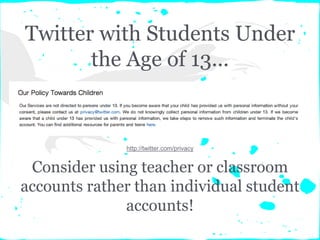
Twitter with Students Under
the Age of 13...
Consider using teacher or classroom
accounts rather than individual student
accounts!
http://twitter.com/privacy
Choose Your
Username Carefully
Your username is attached to all of your tweets.
So... if you are using the Twitter account
professionally or specifically for a class, choose
a username that the people you are working
with will be able recognize.
For Example: @CantoneClass
Teaching the Concept
Of Twitter to Elementary
Students
Hands On Activity One:
Teaching the Concept of Twitter
In elementary classrooms where the age of the
students allows them not to be able to have
their own accounts, the teacher can still
integrate Twitter into the classroom. The
teacher can set up a classroom Twitter account
and model with the students.
Here are two ways...
Set Up a Classroom Account...
● Collaborate with students and tweet about
what happens in the classroom
● Tweet reminders about school events,
homework, special projects, due dates, etc.
● Share photos of student work, class events,
etc.
● Post links to online resources for students
and parents
For Example: @CantoneClass
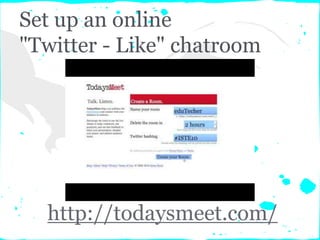
Set up an online
"Twitter - Like" chatroom
http://todaysmeet.com/
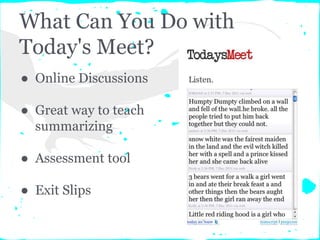
What Can You Do with
Today's Meet?
● Online Discussions
● Great way to teach
summarizing
● Assessment tool
● Exit Slips
Using Twitter
for Research
Image Source: http://askatechteacher.files.wordpress.com/2012/02/ideas-for-using-twitter-in-education.png
Hands On Activity Two:
Using Twitter for Research
You can use Twitter as a research tool. Anyone
is able to search tweets on Twitter without
having an account. Treat it like a Google
search... the results will show you tweets with
hashtags using the keywords, usernames using
the keywords, and content using the keywords.
Let's take a look...
Taking a Look at How
Twitter Search Works
Try it Out...
● Type in a keyword to search
twitter
● Use some of the operators to
refine your search
● Search trends
● Search videos and images
http://search.twitter.com
http://twitter.com/#!/search-advanced
Conducting a Search for
London Olympics...
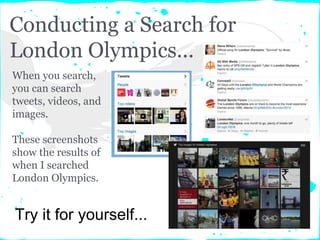
When you search,
you can search
tweets, videos, and
images.
These screenshots
show the results of
when I searched
London Olympics.
Try it for yourself...
Why Use Twitter Search
in the Classroom?
● Use for studying current events
● Use to find information about a certain topic
● Search a hashtag
● View what is trending
Keep this in mind if using
Twitter for
Research...
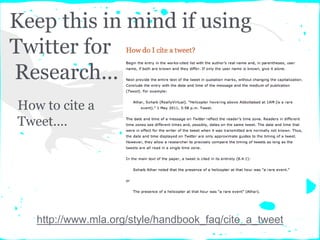
How to cite a
Tweet....
http://www.mla.org/style/handbook_faq/cite_a_tweet
Twitter as a
Communication Tool
Image Source: http://askatechteacher.files.wordpress.com/2012/02/ideas-for-using-twitter-in-education.png
Hands On Activity Three:
Using Twitter to Communicate
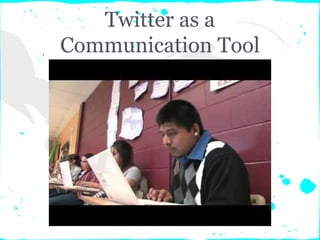
Twitter is a great way to increase
communication in your classroom. There are a
lot of ways you can use Twitter to increase
communication with students,
parents/guardians, the community, and the
world at large.
Let's take a look...
Twitter as a
Communication Tool
Communicating With
Students...
● Update students on assignments and school
events
● Share classroom resources with students
● Share links to postings with course content
● Share photos and videos of classroom events
and work
Communicating With
Parents/Guardians...
● Update parents/guardians on school events
● Share helpful resources for parents
● Share samples of student work
● Share photos and videos of classroom events
● Organize volunteers
Communicating With the
Community...
● Follow local businesses, organizations,
agencies, etc.
● Participate in real world connections with
community members
● Reach out to the community and increase
community involvement
● Ask the community for help and resources to
support learning in the classroom
Communicating With the
World At Large...
● Follow experts in your field of study
● Explore popular trends that are being tweeted
● Connect with businesses, organizations,
agencies, etc.
● Find professionals in your area of study to
connect with and share information
For Example... Directory of Tech Experts
Developing a PLN
With Twitter
Hands On Activity Four:
Develop Your PLN
Twitter opens a huge network of educators who
want to share ideas and connect with others. By
joining Twitter as a professional, you can
connect with other educators in your field and
be exposed to a wealth of information and
resources.
Let's take a look...
How Twitter Can Be Used
Professionally...
● Share lessons plans
● Share online resources
● Ask for advice
● Connect with other educators
● Learn new things
How to get connected...
● tweet with hashtags
● search hashtags
● participate in Twitter Chats
● attend a Tweet Up
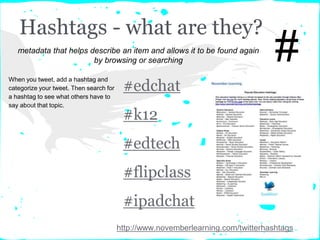
Hashtags - what are they?
#edchat
#k12
#edtech
#flipclass
#ipadchat
#
http://www.novemberlearning.com/twitterhashtags
metadata that helps describe an item and allows it to be found again
by browsing or searching
When you tweet, add a hashtag and
categorize your tweet. Then search for
a hashtag to see what others have to
say about that topic.
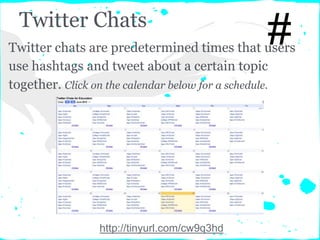
Twitter Chats
#
http://tinyurl.com/cw9q3hd
Twitter chats are predetermined times that users
use hashtags and tweet about a certain topic
together. Click on the calendar below for a schedule.
Tweet Ups
https://twitter.com/#!/NHTweetUp
Tweet ups are when Twitter users get together in
person to connect and collaborate. Check out this
NH based one...
Other Twitter in the
Classroom Ideas to Look At
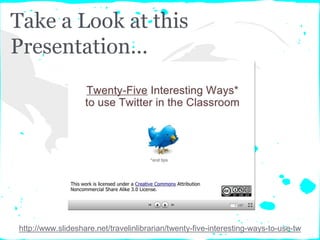
Take a Look at this
Presentation...
http://www.slideshare.net/travelinlibrarian/twenty-five-interesting-ways-to-use-tw
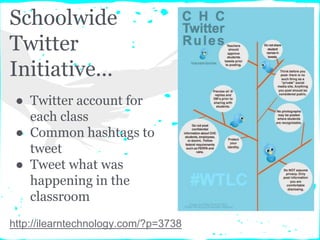
Schoolwide
Twitter
Initiative...
● Twitter account for
each class
● Common hashtags to
tweet
● Tweet what was
happening in the
classroom
http://ilearntechnology.com/?p=3738
Must Reads for More Ideas
● 50 Ways to use Twitter in the Classroom
● Guide to Twitter in the K-8 Classroom
● 100 Ways to Use Twitter in Education, By
Degree of Difficulty
● Twitter Hashtags in the Classroom
● How to Use Twitter in the Classroom
● 4 Great Twitter Applications for Teachers
Using Twitter in the Classroom
Top 10 Activities from Articles
1. Write a collaborative story or poem
2. Tweet Field Trips
3. Track Companies, Organizations, Agencies
4. Live tweet a while watching a movie
5. Live tweet while reading a book
6. Conduct a scavenger hunt
7. Share photos of class events & student work
8. Play word games
9. Conduct a class discussion
10.Communicate with experts
And That Concludes the
Twitter in the Classroom
Using Twitter to Support Learning in the Classroom
Institute in a Box
Quick Links for Workshop
Resources
YouTube Videos Playlist
collection of all videos referenced in this presentation
Diigo Bookmarking List
collection of all links referenced in this presentation

Twitter in the classroom

  • 1.
    Using Twitter toSupport Learning in the Classroom
  • 2.
    Overview ● A FewThings to Keep in Mind ● Teaching the Concept of Twitter to Elementary Students ● Using Twitter for Research ● Twitter as a Communication Tool ● Developing your PLN with Twitter ● Other Twitter Ideas to Look At
  • 3.
    A Few Things toKeep in Mind
  • 4.
    If you arenew to Twitter... you should consider completing the "Twitter 101" Institute in a Box Workshop first. This workshop will go over the application of using Twitter in the classroom. You should already have the basic knowledge of how Twitter works.
  • 5.
    Twitter with StudentsUnder the Age of 13... Consider using teacher or classroom accounts rather than individual student accounts! http://twitter.com/privacy
  • 6.
    Choose Your Username Carefully Yourusername is attached to all of your tweets. So... if you are using the Twitter account professionally or specifically for a class, choose a username that the people you are working with will be able recognize. For Example: @CantoneClass
  • 7.
    Teaching the Concept OfTwitter to Elementary Students
  • 8.
    Hands On ActivityOne: Teaching the Concept of Twitter In elementary classrooms where the age of the students allows them not to be able to have their own accounts, the teacher can still integrate Twitter into the classroom. The teacher can set up a classroom Twitter account and model with the students. Here are two ways...
  • 9.
    Set Up aClassroom Account... ● Collaborate with students and tweet about what happens in the classroom ● Tweet reminders about school events, homework, special projects, due dates, etc. ● Share photos of student work, class events, etc. ● Post links to online resources for students and parents For Example: @CantoneClass
  • 10.
    Set up anonline "Twitter - Like" chatroom http://todaysmeet.com/
  • 11.
    What Can YouDo with Today's Meet? ● Online Discussions ● Great way to teach summarizing ● Assessment tool ● Exit Slips
  • 12.
    Using Twitter for Research ImageSource: http://askatechteacher.files.wordpress.com/2012/02/ideas-for-using-twitter-in-education.png
  • 13.
    Hands On ActivityTwo: Using Twitter for Research You can use Twitter as a research tool. Anyone is able to search tweets on Twitter without having an account. Treat it like a Google search... the results will show you tweets with hashtags using the keywords, usernames using the keywords, and content using the keywords. Let's take a look...
  • 14.
    Taking a Lookat How Twitter Search Works
  • 15.
    Try it Out... ●Type in a keyword to search twitter ● Use some of the operators to refine your search ● Search trends ● Search videos and images http://search.twitter.com http://twitter.com/#!/search-advanced
  • 16.
    Conducting a Searchfor London Olympics... When you search, you can search tweets, videos, and images. These screenshots show the results of when I searched London Olympics. Try it for yourself...
  • 17.
    Why Use TwitterSearch in the Classroom? ● Use for studying current events ● Use to find information about a certain topic ● Search a hashtag ● View what is trending
  • 18.
    Keep this inmind if using Twitter for Research... How to cite a Tweet.... http://www.mla.org/style/handbook_faq/cite_a_tweet
  • 19.
    Twitter as a CommunicationTool Image Source: http://askatechteacher.files.wordpress.com/2012/02/ideas-for-using-twitter-in-education.png
  • 20.
    Hands On ActivityThree: Using Twitter to Communicate Twitter is a great way to increase communication in your classroom. There are a lot of ways you can use Twitter to increase communication with students, parents/guardians, the community, and the world at large. Let's take a look...
  • 21.
  • 22.
    Communicating With Students... ● Updatestudents on assignments and school events ● Share classroom resources with students ● Share links to postings with course content ● Share photos and videos of classroom events and work
  • 23.
    Communicating With Parents/Guardians... ● Updateparents/guardians on school events ● Share helpful resources for parents ● Share samples of student work ● Share photos and videos of classroom events ● Organize volunteers
  • 24.
    Communicating With the Community... ●Follow local businesses, organizations, agencies, etc. ● Participate in real world connections with community members ● Reach out to the community and increase community involvement ● Ask the community for help and resources to support learning in the classroom
  • 25.
    Communicating With the WorldAt Large... ● Follow experts in your field of study ● Explore popular trends that are being tweeted ● Connect with businesses, organizations, agencies, etc. ● Find professionals in your area of study to connect with and share information For Example... Directory of Tech Experts
  • 26.
  • 27.
    Hands On ActivityFour: Develop Your PLN Twitter opens a huge network of educators who want to share ideas and connect with others. By joining Twitter as a professional, you can connect with other educators in your field and be exposed to a wealth of information and resources. Let's take a look...
  • 28.
    How Twitter CanBe Used Professionally... ● Share lessons plans ● Share online resources ● Ask for advice ● Connect with other educators ● Learn new things
  • 29.
    How to getconnected... ● tweet with hashtags ● search hashtags ● participate in Twitter Chats ● attend a Tweet Up
  • 30.
    Hashtags - whatare they? #edchat #k12 #edtech #flipclass #ipadchat # http://www.novemberlearning.com/twitterhashtags metadata that helps describe an item and allows it to be found again by browsing or searching When you tweet, add a hashtag and categorize your tweet. Then search for a hashtag to see what others have to say about that topic.
  • 31.
    Twitter Chats # http://tinyurl.com/cw9q3hd Twitter chatsare predetermined times that users use hashtags and tweet about a certain topic together. Click on the calendar below for a schedule.
  • 32.
    Tweet Ups https://twitter.com/#!/NHTweetUp Tweet upsare when Twitter users get together in person to connect and collaborate. Check out this NH based one...
  • 33.
    Other Twitter inthe Classroom Ideas to Look At
  • 34.
    Take a Lookat this Presentation... http://www.slideshare.net/travelinlibrarian/twenty-five-interesting-ways-to-use-tw
  • 35.
    Schoolwide Twitter Initiative... ● Twitter accountfor each class ● Common hashtags to tweet ● Tweet what was happening in the classroom http://ilearntechnology.com/?p=3738
  • 36.
    Must Reads forMore Ideas ● 50 Ways to use Twitter in the Classroom ● Guide to Twitter in the K-8 Classroom ● 100 Ways to Use Twitter in Education, By Degree of Difficulty ● Twitter Hashtags in the Classroom ● How to Use Twitter in the Classroom ● 4 Great Twitter Applications for Teachers Using Twitter in the Classroom
  • 37.
    Top 10 Activitiesfrom Articles 1. Write a collaborative story or poem 2. Tweet Field Trips 3. Track Companies, Organizations, Agencies 4. Live tweet a while watching a movie 5. Live tweet while reading a book 6. Conduct a scavenger hunt 7. Share photos of class events & student work 8. Play word games 9. Conduct a class discussion 10.Communicate with experts
  • 38.
    And That Concludesthe Twitter in the Classroom Using Twitter to Support Learning in the Classroom Institute in a Box
  • 39.
    Quick Links forWorkshop Resources YouTube Videos Playlist collection of all videos referenced in this presentation Diigo Bookmarking List collection of all links referenced in this presentation