Instructional
Software
Catherine Holthaus
EdTech 541
Spring 2014
What is instructional
software?


“Instructional software is a general term for
computer programs designed specifically to
deliver instruction or assist with the delivery
of instruction on a topic” (Robyler &
Doering, 2013).
Relative Advantage of
Instructional Software


Engages and motivates students



Supplements existing classroom resources



Designed to meet the needs of all learners



Cost effective
How to select instructional
software?


Review teacher evaluations



Contact the informational technology
department



Contact other educational facilities using
the software
Instructional Software
Functions


Drill and Practice



Tutorial



Simulation



Instructional Game



Problem Solving
Drill and Practice


Provides repeated practice on skill or
concept



Students receive immediate, detailed
feedback
Types of Drill and Practice
Functions Include


Flash card activity – Students are provided one
question at a time, select the answer, and receive
immediate feedback.



Chart fill-in activities – Fluency based, students fill in
a chart while being timed, and receiving feedback
upon completion of the chart.



Branching drill – The level of difficulty adjusts
according to student achievement.



Extensive feedback activities – Detailed feedback on
why the answer was incorrect.
Relative Advantage


Provides repeated practice on skill or
concept



Students receive immediate, detailed
feedback



Motivated and engages students
Uses


Serves as a supplement and in some cases
replaces the need for worksheets



Helps students prepare for assessments
Benefits


Helps students establish automaticity of
basic skills



Motivates students by delivering immediate
feedback



Drill and practice offers self-paced learning
activities
Example


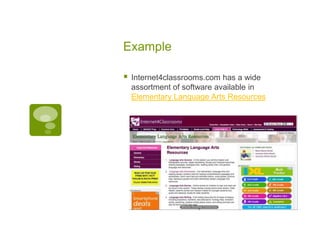
Internet4classrooms.com has a wide
assortment of software available in
Elementary Language Arts Resources


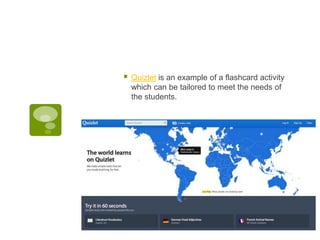
Quizlet is an example of a flashcard activity
which can be tailored to meet the needs of
the students.
Tutorial


Not intended to be a supplement, tutorial
software is comprised of an entire unit or
lesson. Without any additional materials or
support, students progress at their own
pace. “Unlike other types of instructional
software, tutorials are true teaching
materials” (Robyler & Doering, 2013).


Tutorial software is comprised of an entire
unit or lesson and should not intended to be
used as a supplement. According to
Robyler & Doering, “ Students should be
able to learn the topic without any other help
or materials.”
Relative Advantage


Structured



Self-paced software which allows the
student to control the rate of delivery



Contains an entire unit or lesson
Uses


Self-paced instruction



Variable learning strategies



Accessible
Benefits


Students can work at their own pace



Motivates and engages student



Immediate feedback
Example


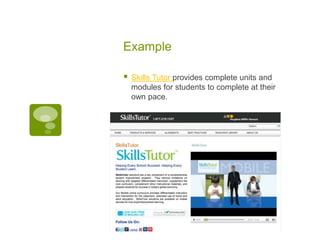
Skills Tutor provides complete units and
modules for students to complete at their
own pace.
Simulation


“A simulation is a computerized model of a
real or imagined system that is designed to
teach how the system works” (Roblyer &
Doering, 2013). Simulation software
includes procedural and situational
simulations.


“Simulations allow learners the opportunity
to model, explore, and try out a variety of
strategies” (NETC, 2005). Procedural
simulations teach the students to follow a set
of steps necessary in order to achieve a
desired outcome.


Situational simulations provide students with
a real-life scenario, which they must solve a
given problem or perform a skill.
Relative Advantage


Provides visual, interactive activities



Teaches students to follow a set of steps



Students experience a real-life scenario
without leaving the classroom
Uses


Supplements lab experiments



Teaches students life skills



Allows students to actively participate in role
playing



Virtual field trips
Benefits


Introduces and/or clarifies a new topic



Explore and process learning



Supports cooperative work
Examples


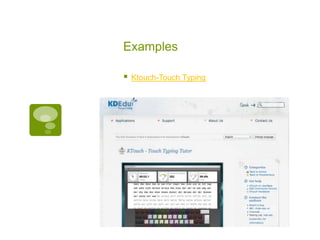
Ktouch-Touch Typing


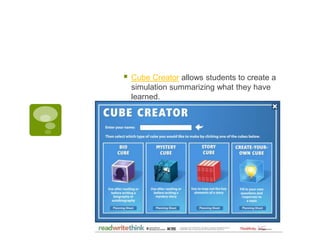
Cube Creator allows students to create a
simulation summarizing what they have
learned.
Instructional Games


Marc Prensky refers to instructional games
as “hidden gems”. “Hidden gems are
kernels of ideas for teaching some of the
things we want student to learn using the
language of games, which the students find
so engaging” (Prensky, 2002).


Gone are the days when students are
passive learners or are shown, interactive
game based learning places the student into
an active role.


According to Robyler & Doering,
“Instructional games add game-like rules
and/or competition to learning activities.”
Relative Advantage


Engages and motivates learning



Level of difficulty increases



Teaches sportsmanship
Uses


Alternative to drill and practice



Authentic practice using a game concept



Teaches cooperative working skills
Benefits


Reinforces content skills



Captures student attention
Examples


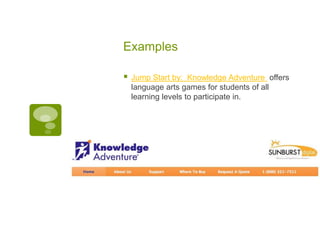
Jump Start by: Knowledge Adventure offers
language arts games for students of all
learning levels to participate in.


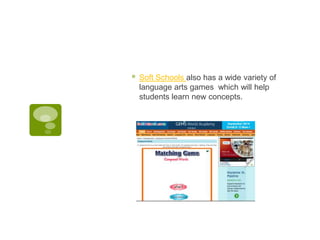
Soft Schools also has a wide variety of
language arts games which will help
students learn new concepts.
Problem-Solving


One of the most popular types of
educational software, problem-solving
software is designed for students to “practice
solving various kinds of content-area
problems” (Robyler & Doering, 2013).
Problem-solving software focuses on
developing and exercising critical thinking
skills.
Relative Advantage


Emphasis is placed on finding solutions



Focuses on specific problems



Real-life applications
Uses


Experience in content-area problem-solving
skills



Experience in content-free problem-solving
skills
Benefits


Challenges students to identify problems
and create solutions



Engages specific problem-solving skills



Graphics assist students in understanding
and solving problems
Examples


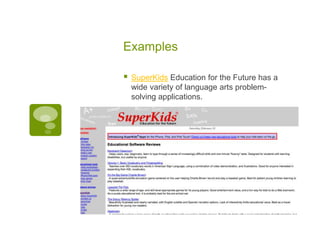
SuperKids Education for the Future has a
wide variety of language arts problemsolving applications.


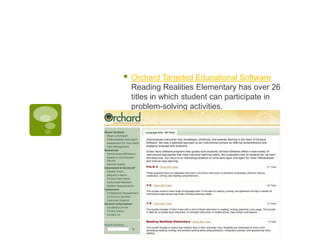
Orchard Targeted Educational Software
Reading Realities Elementary has over 26
titles in which student can participate in
problem-solving activities.
References


Northwest Educational Technology Consortium
(NETC) – Seven steps to responsible software
selection. (2005). Retrieved from
http://www.netc.org/focus/strategies/simu.php



Prensky, Marc. (2002). Open collaboration
finding and polishing “hidden gems”. On The
Horizon, Volume 10 No 3. Retrieved from:
http://www.marcprensky.com/writing/Prensky%
20-%20Open%20Collaboration%20%20OTH%2010.3.pdf



Roblyer, M.D. and Doering, A.H. (2013).
Integrating Educational Technology Into
Teaching, (6th ed.). Upper Saddle River:
Pearson Education, Inc.

Instructional software

  • 1.
  • 2.
    What is instructional software?  “Instructionalsoftware is a general term for computer programs designed specifically to deliver instruction or assist with the delivery of instruction on a topic” (Robyler & Doering, 2013).
  • 3.
    Relative Advantage of InstructionalSoftware  Engages and motivates students  Supplements existing classroom resources  Designed to meet the needs of all learners  Cost effective
  • 4.
    How to selectinstructional software?  Review teacher evaluations  Contact the informational technology department  Contact other educational facilities using the software
  • 5.
    Instructional Software Functions  Drill andPractice  Tutorial  Simulation  Instructional Game  Problem Solving
  • 6.
    Drill and Practice  Providesrepeated practice on skill or concept  Students receive immediate, detailed feedback
  • 7.
    Types of Drilland Practice Functions Include  Flash card activity – Students are provided one question at a time, select the answer, and receive immediate feedback.  Chart fill-in activities – Fluency based, students fill in a chart while being timed, and receiving feedback upon completion of the chart.  Branching drill – The level of difficulty adjusts according to student achievement.  Extensive feedback activities – Detailed feedback on why the answer was incorrect.
  • 8.
    Relative Advantage  Provides repeatedpractice on skill or concept  Students receive immediate, detailed feedback  Motivated and engages students
  • 9.
    Uses  Serves as asupplement and in some cases replaces the need for worksheets  Helps students prepare for assessments
  • 10.
    Benefits  Helps students establishautomaticity of basic skills  Motivates students by delivering immediate feedback  Drill and practice offers self-paced learning activities
  • 11.
    Example  Internet4classrooms.com has awide assortment of software available in Elementary Language Arts Resources
  • 12.
     Quizlet is anexample of a flashcard activity which can be tailored to meet the needs of the students.
  • 13.
    Tutorial  Not intended tobe a supplement, tutorial software is comprised of an entire unit or lesson. Without any additional materials or support, students progress at their own pace. “Unlike other types of instructional software, tutorials are true teaching materials” (Robyler & Doering, 2013).
  • 14.
     Tutorial software iscomprised of an entire unit or lesson and should not intended to be used as a supplement. According to Robyler & Doering, “ Students should be able to learn the topic without any other help or materials.”
  • 15.
    Relative Advantage  Structured  Self-paced softwarewhich allows the student to control the rate of delivery  Contains an entire unit or lesson
  • 16.
  • 17.
    Benefits  Students can workat their own pace  Motivates and engages student  Immediate feedback
  • 18.
    Example  Skills Tutor providescomplete units and modules for students to complete at their own pace.
  • 19.
    Simulation  “A simulation isa computerized model of a real or imagined system that is designed to teach how the system works” (Roblyer & Doering, 2013). Simulation software includes procedural and situational simulations.
  • 20.
     “Simulations allow learnersthe opportunity to model, explore, and try out a variety of strategies” (NETC, 2005). Procedural simulations teach the students to follow a set of steps necessary in order to achieve a desired outcome.
  • 21.
     Situational simulations providestudents with a real-life scenario, which they must solve a given problem or perform a skill.
  • 22.
    Relative Advantage  Provides visual,interactive activities  Teaches students to follow a set of steps  Students experience a real-life scenario without leaving the classroom
  • 23.
    Uses  Supplements lab experiments  Teachesstudents life skills  Allows students to actively participate in role playing  Virtual field trips
  • 24.
    Benefits  Introduces and/or clarifiesa new topic  Explore and process learning  Supports cooperative work
  • 25.
  • 26.
     Cube Creator allowsstudents to create a simulation summarizing what they have learned.
  • 27.
    Instructional Games  Marc Prenskyrefers to instructional games as “hidden gems”. “Hidden gems are kernels of ideas for teaching some of the things we want student to learn using the language of games, which the students find so engaging” (Prensky, 2002).
  • 28.
     Gone are thedays when students are passive learners or are shown, interactive game based learning places the student into an active role.
  • 29.
     According to Robyler& Doering, “Instructional games add game-like rules and/or competition to learning activities.”
  • 30.
    Relative Advantage  Engages andmotivates learning  Level of difficulty increases  Teaches sportsmanship
  • 31.
    Uses  Alternative to drilland practice  Authentic practice using a game concept  Teaches cooperative working skills
  • 32.
  • 33.
    Examples  Jump Start by:Knowledge Adventure offers language arts games for students of all learning levels to participate in.
  • 34.
     Soft Schools alsohas a wide variety of language arts games which will help students learn new concepts.
  • 35.
    Problem-Solving  One of themost popular types of educational software, problem-solving software is designed for students to “practice solving various kinds of content-area problems” (Robyler & Doering, 2013). Problem-solving software focuses on developing and exercising critical thinking skills.
  • 36.
    Relative Advantage  Emphasis isplaced on finding solutions  Focuses on specific problems  Real-life applications
  • 37.
    Uses  Experience in content-areaproblem-solving skills  Experience in content-free problem-solving skills
  • 38.
    Benefits  Challenges students toidentify problems and create solutions  Engages specific problem-solving skills  Graphics assist students in understanding and solving problems
  • 39.
    Examples  SuperKids Education forthe Future has a wide variety of language arts problemsolving applications.
  • 40.
     Orchard Targeted EducationalSoftware Reading Realities Elementary has over 26 titles in which student can participate in problem-solving activities.
  • 41.
    References  Northwest Educational TechnologyConsortium (NETC) – Seven steps to responsible software selection. (2005). Retrieved from http://www.netc.org/focus/strategies/simu.php  Prensky, Marc. (2002). Open collaboration finding and polishing “hidden gems”. On The Horizon, Volume 10 No 3. Retrieved from: http://www.marcprensky.com/writing/Prensky% 20-%20Open%20Collaboration%20%20OTH%2010.3.pdf  Roblyer, M.D. and Doering, A.H. (2013). Integrating Educational Technology Into Teaching, (6th ed.). Upper Saddle River: Pearson Education, Inc.